

Email Blacklist: How to Check, Fix & Prevent It in 2026
You just discovered your domain is on an email blacklist. Your stomach drops, you start Googling frantically, and every result makes it sound like your email infrastructure is on fire. Take a breath. The panic is almost always worse than the actual problem.
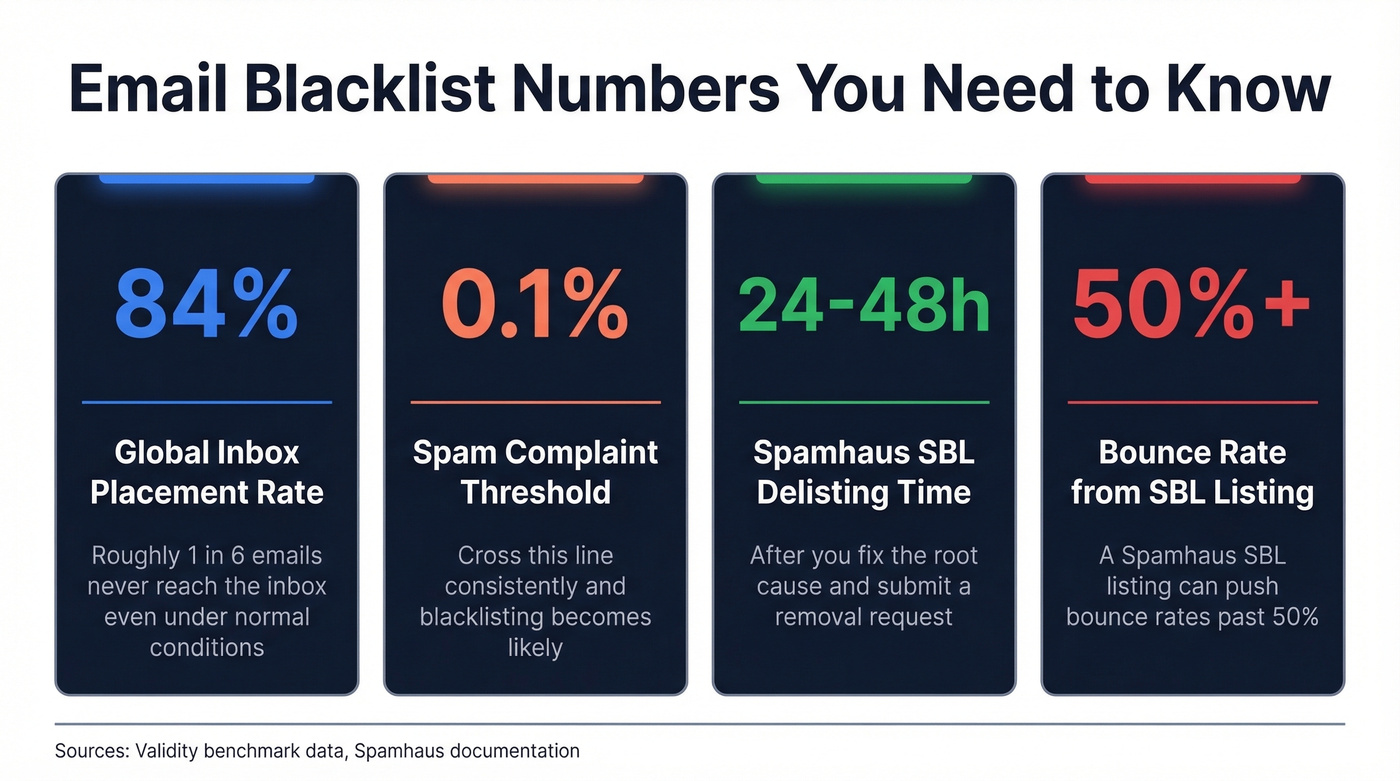
Global inbox placement averages about 84% according to Validity's benchmark data - roughly one in six emails never reach the inbox even under normal conditions. Blacklists are one reason, but most listings sit on obscure lists that major providers don't even check. The handful that do matter - Spamhaus, primarily - are fixable: Spamhaus SBL typically resolves in 24-48 hours after validation, and compromised-host listings (XBL/CBL-driven) often clear within hours once you've remediated the issue.
A quick terminology note: "blacklist," "blocklist," and "denylist" all mean the same thing. The industry is shifting toward "blocklist" as a more neutral term, but we'll use "blacklist" throughout because that's what people actually search for.
What You Need (Quick Version)
- Check: Run your IP and domain through MXToolbox or Spamhaus directly. Focus on the lists that actually move deliverability: Spamhaus first, then Barracuda and SpamCop for B2B.
- Fix: Follow the per-list delisting steps below (many resolve in 24-48 hours). Fix the root cause before requesting removal.
- Prevent: Set up SPF/DKIM/DMARC and stop sending to unverified emails. Bad data is the #1 silent cause of blacklisting.
What Is an Email Blacklist?
Nearly half of all email sent globally is spam. That's why blocklists exist - receiving mail servers need a fast way to separate legitimate senders from junk.
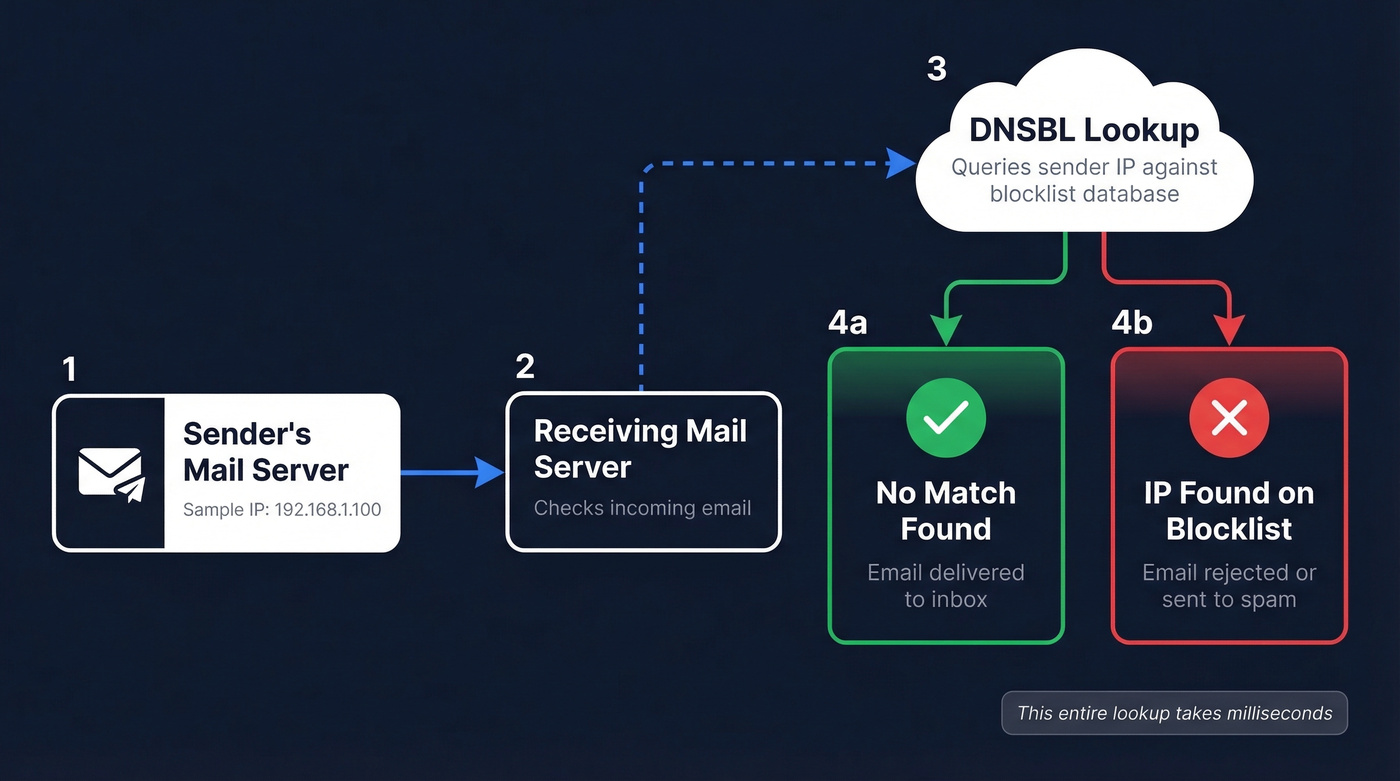
When someone sends you an email, the receiving server doesn't just accept it blindly. It runs a real-time check against one or more DNS-based blackhole lists (DNSBLs). The server queries the DNSBL with the sender's IP address or domain, and if there's a match, the email gets rejected or routed to spam. No match? It passes through. The whole lookup takes milliseconds.
There are two types of blocklists. IP-based lists flag the sending server's IP address - this is the traditional model and still the most common. Domain-based lists flag the domain itself, regardless of which IP sent the message. You can be listed on one, both, or neither.
The shared vs. dedicated IP distinction matters here. If you're on a shared IP - common with budget hosting or entry-level email services - another sender's bad behavior can get your IP flagged even if you've done nothing wrong. Dedicated IPs give you full control over your reputation, but they also mean you own every mistake.
Here's the thing most people miss: Gmail, Outlook, and Yahoo maintain their own internal reputation systems that don't show up on any public blacklist checker. You can be clean on every DNSBL and still land in spam because of poor engagement signals. This is why obsessing over niche blocklist results is a waste of time - the major inbox providers are making their own decisions regardless.
Common Causes of Blacklisting
Most listings trace back to one of these triggers:
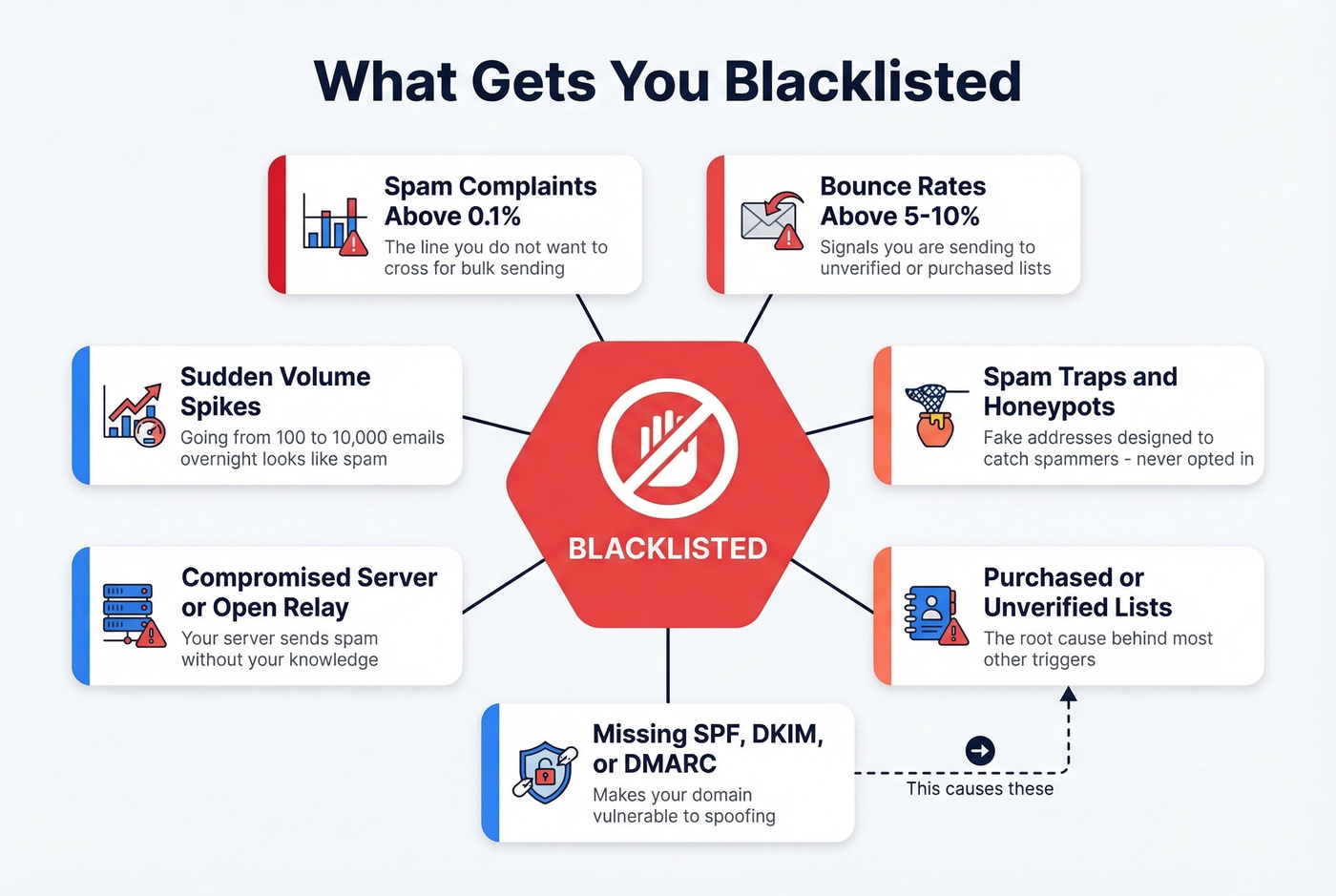
- Spam complaints above 0.1%. That's the threshold widely used as the line you don't want to cross for bulk sending. Hit it consistently and you're asking for trouble.
- Bounce rates above 5-10%. High hard-bounce rates signal to blocklist operators that you're sending to unverified or purchased lists. (If you need a deeper breakdown, see our bounce rates guide.)
- Spam traps and honeypots. These are email addresses specifically designed to catch spammers - they look like real addresses but were never opted in. Hit enough of them and you'll land on Spamhaus fast. (More on cleanup in spam trap removal.)
- Purchased or unverified lists. This is the root cause behind most of the triggers above. Buy a list, send to it, and you're almost guaranteed to hit spam traps and generate bounces. (If you're unsure on compliance, read Is It Illegal to Buy Email Lists?.)
- Missing SPF/DKIM/DMARC. Without proper authentication, your domain is vulnerable to spoofing. If someone spoofs your domain to send spam, you inherit the reputation damage. (Related: DMARC alignment.)
- Compromised server or open relay. If your mail server is misconfigured or hacked, it can send spam without your knowledge. Spamhaus XBL specifically targets compromised hosts. You can test for open relay by running
telnet yourmailserver.com 25and attempting to relay a message to an external address - if it goes through, your server is open and needs to be locked down immediately. - Sudden volume spikes. Going from 100 emails/day to 10,000 overnight looks exactly like a compromised account or a spam operation. (See email velocity for safe ramping.)
- Poor domain reputation signals. A website flagged for malware can contribute to broader reputation issues that make deliverability problems more likely. (For a full framework, use our email deliverability guide.)

High bounce rates and spam traps are the fastest path to a blacklist - and both trace back to bad data. Prospeo's 5-step email verification delivers 98% accuracy, catch-all handling, and spam-trap removal built in. Every record refreshes every 7 days, not 6 weeks.
Stop sending to dead addresses that destroy your sender reputation.
How to Check If You're Blacklisted
Step 1: Read your bounce messages first. This is the fastest diagnostic. When an email bounces because of a blocklist, the rejection message often names the specific list. You'll see something like "blocked using Spamhaus SBL" or "rejected by Barracuda." Don't skip this step - it tells you exactly where to focus.
Step 2: Run a lookup on MXToolbox or Spamhaus. Enter your sending IP address and domain into MXToolbox's blacklist checker. It tests a mail server IP against over 100 DNS-based blocklists. For Spamhaus specifically, use their lookup/removal center on spamhaus.org - it's the authoritative place to confirm a listing and start the correct delisting workflow. (If you want a dedicated walkthrough, see Spamhaus blacklist removal.)

Step 3: Check Google Search Console. If you're worried about broader domain reputation, open Google Search Console's Security Issues report. Google flags your domain there if it detects malware, social engineering, or other security problems that can spill over into email reputation.
Step 4: Use MultiRBL for a wide view, but read it carefully. MultiRBL checks your IP against a massive number of lists. The critical thing most people miss: blue/neutral entries are informational only. They don't mean your mail is being blocked. Only red entries indicate an actual listing. We've seen teams panic over 15 "listings" that were actually just informational entries on lists nobody uses.
One more thing - never send removal requests to aggregators like MultiRBL or MXToolbox. They don't maintain the lists; they just check them. Removal requests go directly to the blocklist operator.
Which Listings Actually Matter
Spamhaus is the only list that should make you sweat. Everything else is either manageable or irrelevant.
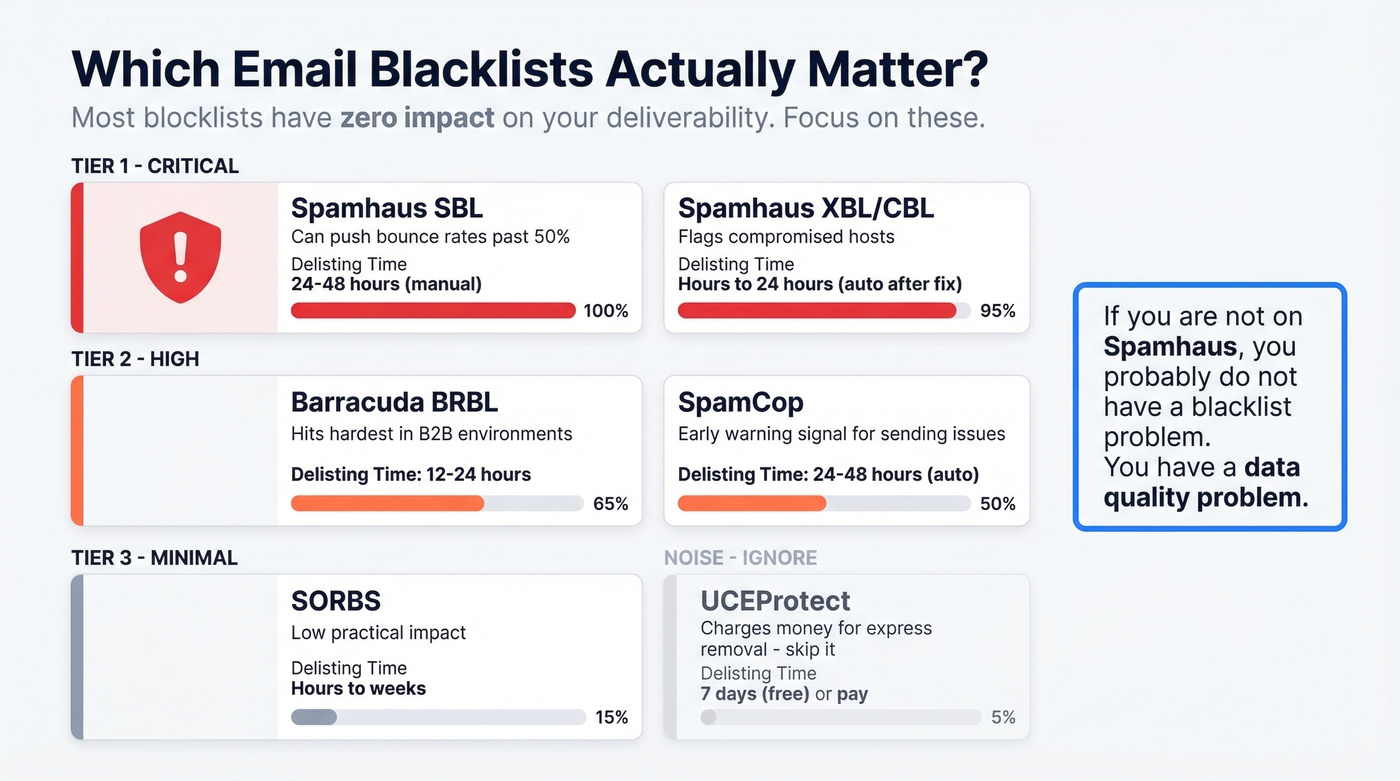
Adobe's Marketo deliverability team published a tiering model that aligns with what we've seen in practice. There are thousands of blocklists out there, and the vast majority won't affect your delivery rates at all.
| Blacklist | Tier | Impact | Delisting Time | Notes |
|---|---|---|---|---|
| Spamhaus SBL | 1 | Critical | 24-48h (manual) | Highest impact |
| Spamhaus XBL/CBL | 1 | Critical | Hours-24h (auto after fix) | Compromised host flag |
| Barracuda BRBL | 2 | High | 12-24h | Common in business email |
| SpamCop | 2 | Moderate-High (B2B) | 24-48h (auto) | Early warning signal |
| SORBS | 3 | Minimal | Hours-weeks | Slow depending on severity |
| UCEProtect | Noise | Minimal | 7 days (L1, free) | Pay-for-express has a poor reputation |
Tier 1 - Spamhaus is by far the highest-impact list. Evidence suggests most top North American ISPs use Spamhaus data to inform blocking decisions. An SBL listing can push bounce rates past 50%. This is the one that actually breaks your email program.
Tier 2 - Barracuda and SpamCop matter in different contexts. Barracuda hits hardest in business email environments where companies run Barracuda appliances. SpamCop isn't widely used by major North American ISPs for blocking decisions, but it can hurt B2B campaigns and often serves as the first indicator that something's wrong with your sending.
Tier 3 and Noise - SORBS, UCEProtect, and other niche lists. This is where most of the unnecessary panic happens. A Reddit user reported being listed on UCEProtect L2, UCEProtect L3, and Fabelsources after sending just 500 emails. None of these listings affected delivery to Gmail or Outlook. Brand new domains regularly show up on niche blocklists that have zero practical impact. The consensus on r/emaildeliverability and r/sysadmin threads is similar: inbox placement testing tools themselves feel unreliable, which reinforces the point - stop chasing green checkmarks on obscure lists and focus on the ones that actually gate your delivery.
Let's be honest: if you're not on Spamhaus, you probably don't have a blacklist problem. You have an engagement problem, a content problem, or a data quality problem. The blocklist panic industry thrives on making senders worry about lists that Gmail has never heard of. (If you want a systematic approach, use our guide on how to improve sender reputation.)
And about UCEProtect specifically - they charge money for "express delisting." Marketo's deliverability team calls out UCEProtect's poor reputation and recommends ignoring these listings because removal requires payment and the list's reach is very limited. Skip it.
How to Get Delisted
Fix the Root Cause First
Submitting a delisting request without addressing the underlying problem just gets you re-listed within days. Understanding what flagged your IP or domain - and why - is the essential first step.
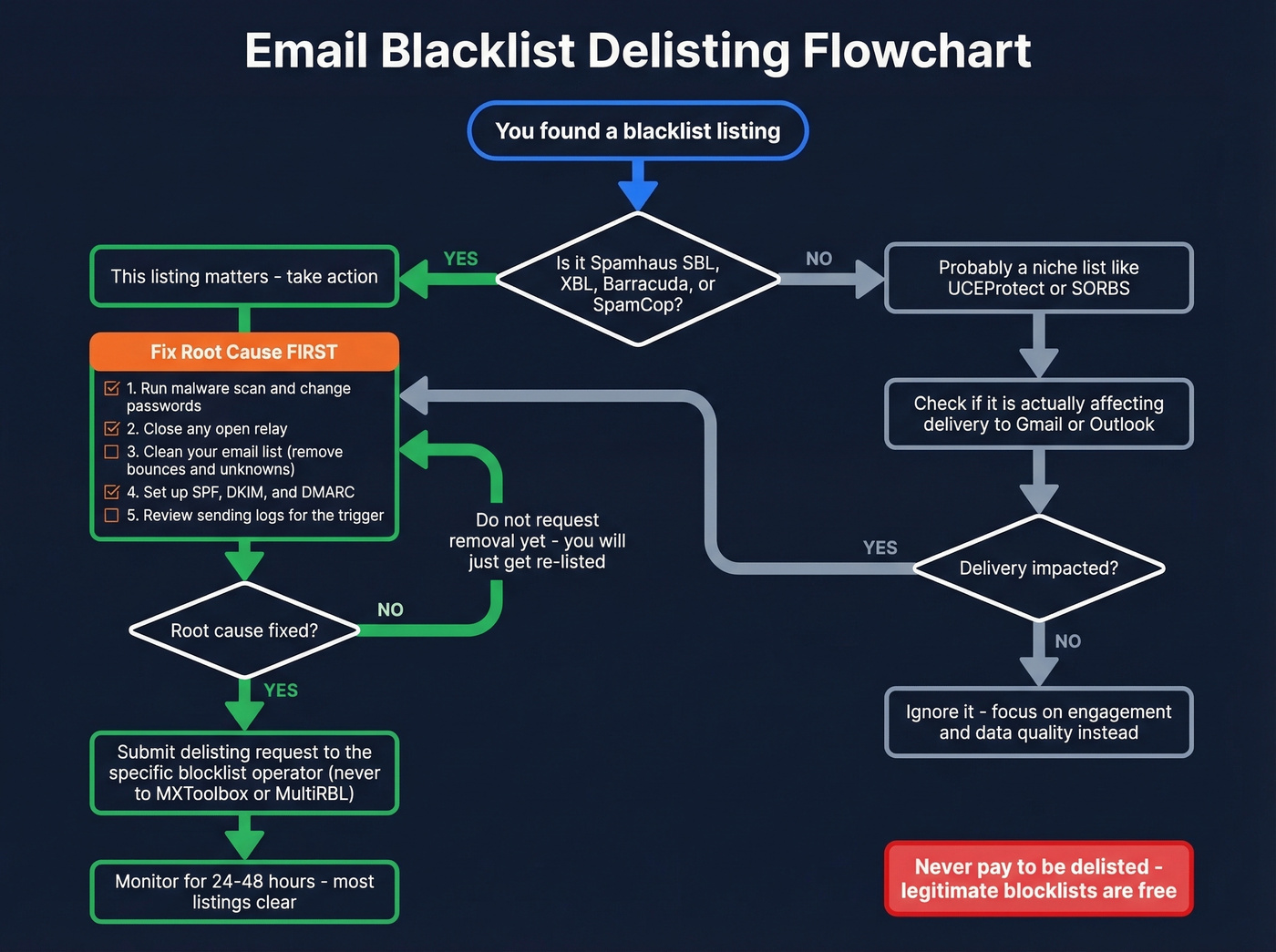
Pre-delisting checklist:
- Run a malware scan and change all mail server passwords
- Close any open relay by enforcing authenticated SMTP only
- Clean your email list - remove all bounces, unsubscribes, and unknowns
- Configure SPF, DKIM, and DMARC (details in the prevention section)
- Review sending logs to identify what triggered the listing
Never pay to be delisted. Legitimate blocklists delist for free. Pay-to-remove schemes have a poor reputation in the deliverability community. If someone asks for money, walk away.
Spamhaus SBL
Go to the Spamhaus SBL removal flow on spamhaus.org. Enter your IP address. You'll need to submit your identity, explain what caused the listing, and describe the corrective measures you've taken. Expect 24-48 hours after Spamhaus validates your submission.
Spamhaus XBL/CBL
XBL listings are based on CBL data, which flags compromised hosts. Follow the CBL delisting process - once you've fixed the compromise by patching the vulnerability, removing malware, and changing credentials, the listing typically auto-resolves within hours to 24 hours.
Spamhaus PBL
The PBL isn't an accusation of spam. It lists IP ranges that shouldn't be sending email directly - typically residential or dynamic IPs. If you're running a legitimate mail server on a listed IP, submit the removal form with justification. For residential connections, route your email through your ISP's relay or a third-party sender. Resolution typically takes 24-48 hours.
Barracuda BRBL
Look up your IP on Barracuda's BRBL page. Click "Request Removal," describe the corrective measures you've taken, and confirm via the verification email they send. Delisting typically happens within 12-24 hours.
SpamCop
SpamCop auto-delists within 24-48 hours as long as no new spam reports come in. Don't waste time submitting a removal request - focus on fixing whatever triggered the reports. SpamCop is often the canary in the coal mine, so treat a listing here as a warning to investigate your sending practices immediately.
SORBS
Look up your IP, identify which SORBS sub-list you're on, and submit a removal request. You may need to create an account. Timelines vary widely - anywhere from hours to several days, and in more severe cases it can take longer. Given SORBS' minimal impact on delivery, don't lose sleep over this one.
UCEProtect
L1 listings delist for free after 7 days with no new reports. L2 and L3 listings require contacting your hosting provider or network operator. Don't pay for express removal. The listing's impact on actual email delivery is minimal.
How to Prevent Getting Blacklisted
Set Up Email Authentication
Since February 2024, Gmail requires bulk senders to have SPF, DKIM, and a DMARC policy. Outlook enforced similar requirements for high-volume senders starting May 2025. If you haven't set these up yet, you're already behind.
SPF: Publish one SPF record per hostname. End with -all when you're confident all legitimate sending sources are included - use ~all during rollout. Watch the 10-DNS-lookup limit; exceeding it causes a PermError and breaks DMARC alignment. (Need syntax help? See SPF record examples.)
DKIM: Publish your public key at selector._domainkey.yourdomain.com. Use 2048-bit keys when your provider supports them. (You can validate setup with how to verify DKIM is working.)
DMARC: Start with p=none and add a rua= reporting address so you can see who's sending as your domain. Once you've confirmed all legitimate sources align, escalate to quarantine and eventually reject.
Clean Your Data Before Sending
We've seen this scenario play out dozens of times. An SDR team's reply rates dropped from 8% to 2% over two weeks. The domain landed on Spamhaus SBL. The root cause? Fifteen percent of the prospect list was invalid, and they'd been hitting spam traps for months without knowing it. The listing was the symptom - their data hygiene had failed them long before it appeared.
The chain is simple: bad data leads to bounces, bounces lead to spam traps, and spam traps get you blocklisted. This isn't a sending problem. It's a data problem.
Prospeo's 5-step verification process catches spam traps and honeypots before they torch your domain. With 98% email accuracy and data refreshed every 7 days, you're not sending to addresses that went stale three months ago. Customers like Stack Optimize maintain 94%+ deliverability and sub-3% bounce rates across all their clients.
Monitor Weekly
Don't wait for bounces to tell you something's wrong. Run MXToolbox checks weekly against your sending IPs and domains, and set up monitoring alerts so you catch new listings quickly. Paid monitoring tools typically run $10-$100/month for continuous checks across multiple IPs, though free tiers cover most small-to-mid-size senders.
Beyond blocklist checks, track three metrics every week: bounce rate (investigate anything above 5-10%), spam complaint rate (keep it below 0.1%), and reply/engagement rates. A sudden drop in engagement often precedes a listing event. If all three metrics are trending the wrong direction at the same time, assume something is wrong with your list quality and pause sending until you've investigated.
Purchased lists are blacklist bait. Prospeo gives you 143M+ verified emails from 300M+ profiles - all GDPR compliant, honeypot-filtered, and triple-verified. At $0.01 per email, clean data costs less than one delisting headache.
Replace risky lists with data you can actually trust to land in inboxes.
FAQ
How long does it take to get off an email blacklist?
Spamhaus SBL resolves in 24-48 hours after you submit proof of corrective action. Barracuda typically delists within 12-24 hours. SpamCop auto-delists in 24-48 hours if no new spam reports arrive. UCEProtect L1 clears after 7 days with no new reports.
Can I be blacklisted on a shared IP that isn't my fault?
Yes - shared IPs are common with budget hosting, and another sender's spam can get the entire IP flagged. Move to a dedicated IP or use a reputable email service provider that actively monitors shared IP reputation to avoid inheriting someone else's problems.
Does being on a blocklist mean all my emails bounce?
No. Spamhaus is the only list consistently associated with widespread delivery failures across major providers. Listings on obscure lists like UCEProtect or Fabelsources rarely affect delivery at all. Impact varies dramatically by which list flagged you.
How do I prevent outbound emails from triggering blacklists?
Three essentials: authenticate your domain with SPF, DKIM, and DMARC. Verify every address before sending - tools like Prospeo remove spam traps and honeypots at the source with 98% accuracy. And keep your spam complaint rate below 0.1%.
Is "blocklist" the same as "blacklist"?
Yes. The industry is shifting to "blocklist" as a more neutral term, but they're functionally identical. Both refer to lists of IPs or domains flagged for spam-related behavior that mail servers check before accepting inbound messages.