

How to Write Email Copy That Actually Converts
A wine merchant changed nothing about their audience, their product, or their ad spend. They rewrote their emails. Sales per send jumped from $455 to $5,400. That's not a typo - it's what happens when email copy does its job.
Email still returns roughly $38 for every $1 spent, but most teams don't capture the full upside because they treat email like an afterthought. Every guide on the internet gives you "tips." Tips don't build a repeatable system. What follows is the system.
You're staring at a blank draft for your next campaign or cold outreach sequence. Twenty minutes in. Cursor blinking. No idea what to say. The problem isn't writer's block - it's that you skipped the research step that makes writing easy. Let's fix that, then build every email from a framework that converts.
The System in Three Steps
If you're short on time, here's the whole thing:
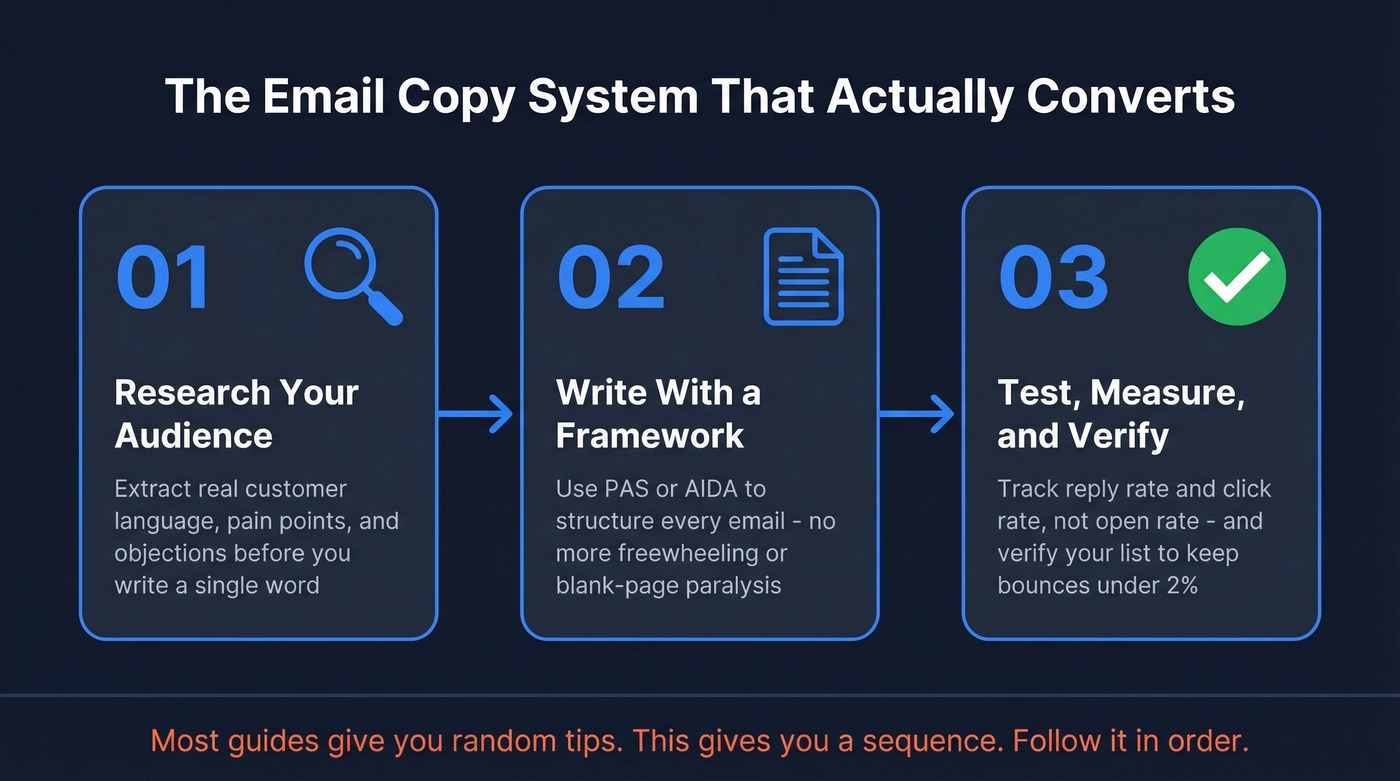
- Research your audience before you write a word. Use the structured questionnaire below to extract the language, pain points, and objections your emails need to address.
- Use PAS or AIDA to structure every email. Stop freewheeling. Frameworks eliminate blank-page paralysis and keep your copy focused.
- Measure reply rate and click rate, not open rate - and verify your list before sending. Open rate is inflated by Apple's Mail Privacy Protection. Brilliant copy bouncing off bad addresses is wasted effort, so run your list through real-time email verification before any campaign to keep bounce rates under 1-4%.
Most email copywriting advice gives you a grab bag of disconnected ideas. This gives you a sequence: research, write with structure, test and verify. Follow it in order.
Before You Write a Word
Every guide says "personalize your emails" and gives zero guidance on how to research your audience. So you end up guessing. Or worse, copying someone else's swipe file and wondering why it doesn't convert.
Stop collecting swipe files. Start collecting customer language.
Before you draft a single subject line, run through this practitioner questionnaire - it's adapted from an agency onboarding workflow, and it's the foundation of every effective email copywriting strategy:
- What keeps your buyer awake at 2 AM? Not the business problem - the emotional one. "I'm going to miss quota" hits harder than "pipeline velocity is suboptimal."
- What are the top 5 reasons someone won't buy? These become your objection-handling emails.
- What proof do you have? Case studies, revenue numbers, before/after metrics. If you can't name three, you're not ready to send.
- What are the 10 most common questions prospects ask? Each one is an email topic.
- Who are the 3 competitors your buyer is also evaluating? Your copy needs to address why you're different without naming them directly.
- What's the guarantee or risk reversal? Free trial, money-back, pilot program - whatever removes friction.
This isn't optional prep work. It's the raw material your emails are built from. We've seen teams cut their drafting time in half just by having this questionnaire filled out before they open their email editor.
Anatomy of High-Converting Emails
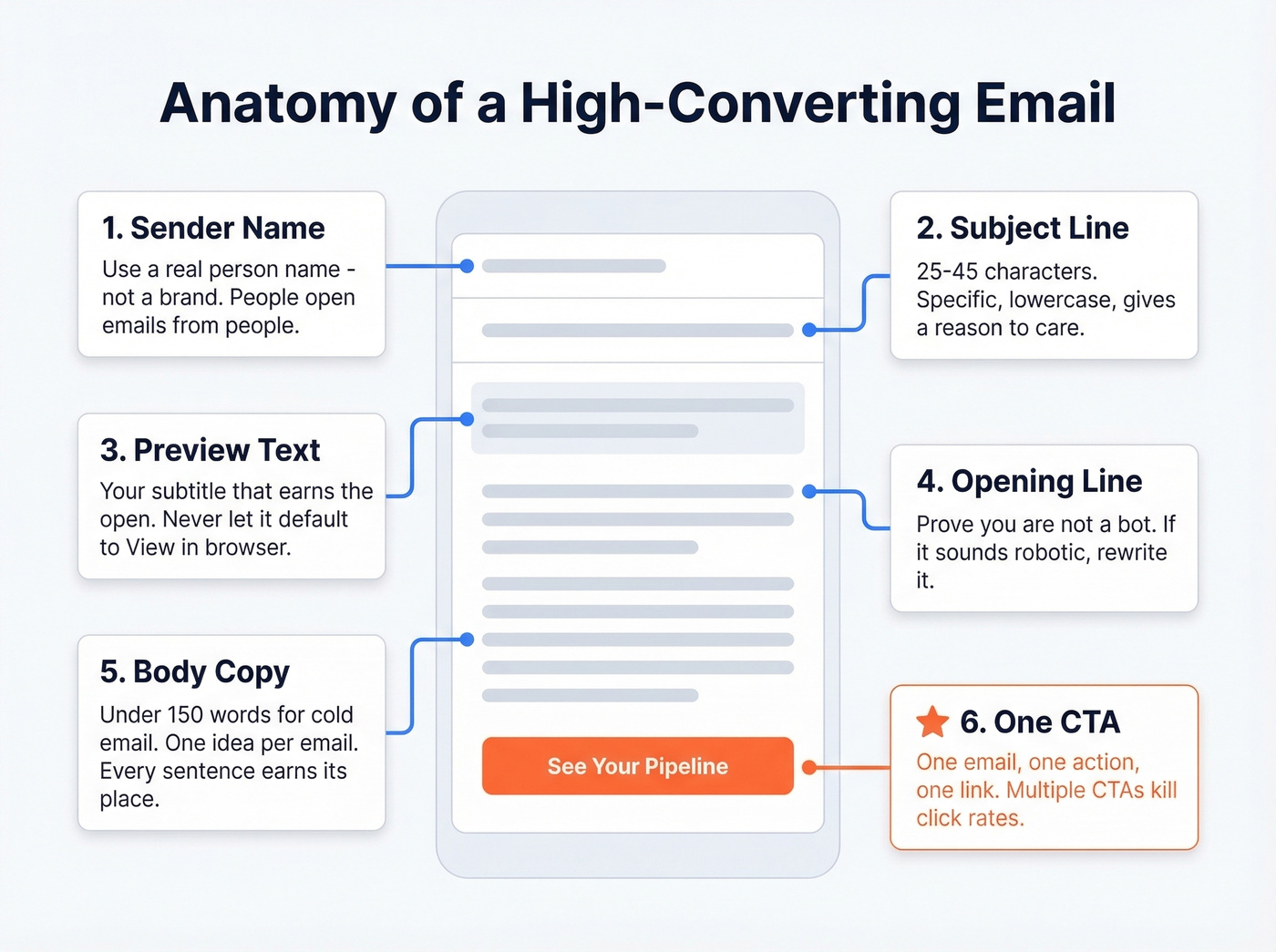
Every email has five core components - plus one that nearly everyone forgets. Most senders get two right and butcher the rest.
Sender Name
Before anyone reads your subject line, they see who the email is from. Twilio SendGrid A/B tested using a first name in the "from name," and the first-name version won. People open emails from people, not brands. If you're running cold outreach, use your real first name and company. For marketing emails, test a person's name against your brand name and keep what wins.
Subject Lines
Keep them between 25 and 45 characters. Mobile screens truncate around 33-43 characters, and over half of all email is opened on phones. A truncated subject line isn't mysterious - it's invisible.
What works: specificity, lowercase, and a reason to care. "Quick question about [company]'s Q3 pipeline" beats "Exciting Opportunity Inside!!!" every time. Avoid all-caps, excessive exclamation points, and the word "FREE" - they can hurt deliverability before your message even gets a chance.
If you want a fast starting point, borrow from proven subject line examples and then tailor them to your audience research.
Preview Text
That grey line after your subject line in the inbox? It's as important as the subject line itself because it's the last thing a reader sees before deciding to open. If you don't customize it, most inboxes pull the beginning of your email body - which usually means something like "View in browser" or a navigation menu. Set it intentionally. It should complement the subject line, not repeat it. Think of it as a subtitle that earns the open.
If you're testing variations, use a simple preview text A/B testing process so you don't change multiple variables at once.
The Opening Line
If your email starts with "I hope this email finds you well," it's already dead. The consensus on r/sales is simple: robotic intros get deleted. Your opening line has one job - prove you're not a bot and give the reader a reason to keep going.
Try this: read your first sentence out loud. If it sounds like something a stranger would say at a networking event while avoiding eye contact, rewrite it.
Body Copy
For cold outreach, stay under 150 words. If your email looks like homework, it's getting archived. For marketing emails and sales pitches, 50-125 words is the sweet spot. Longer copy can work for storytelling sequences, but only if every sentence earns its place.
Format matters too - short paragraphs, plenty of white space, and a single-column layout that renders cleanly on mobile. A quick body copy analysis after drafting, checking word count and readability and whether every sentence moves the reader toward your CTA, catches bloat before you hit send.
The rule: one idea per email. If you're covering two topics, you need two emails.
One CTA, One Action
One email. One call to action. One link. Multiple CTAs split attention and drag down click rates. Every link you add beyond the first is a decision point, and decisions create friction.
Frame your CTA as what the reader gets, not what you want them to do. "See your pipeline in 30 seconds" beats "Book a demo." If you're designing HTML emails, make the button at least 44x44 pixels so it's easy to tap on mobile. Tell the reader exactly what happens next, and make it effortless.
For more patterns and rules, see these email call to action best practices.
Frameworks That Write Themselves
Frameworks aren't training wheels. They're how professionals write fast without sacrificing quality. These two cover most email scenarios.
PAS: The Beginner's Best Friend
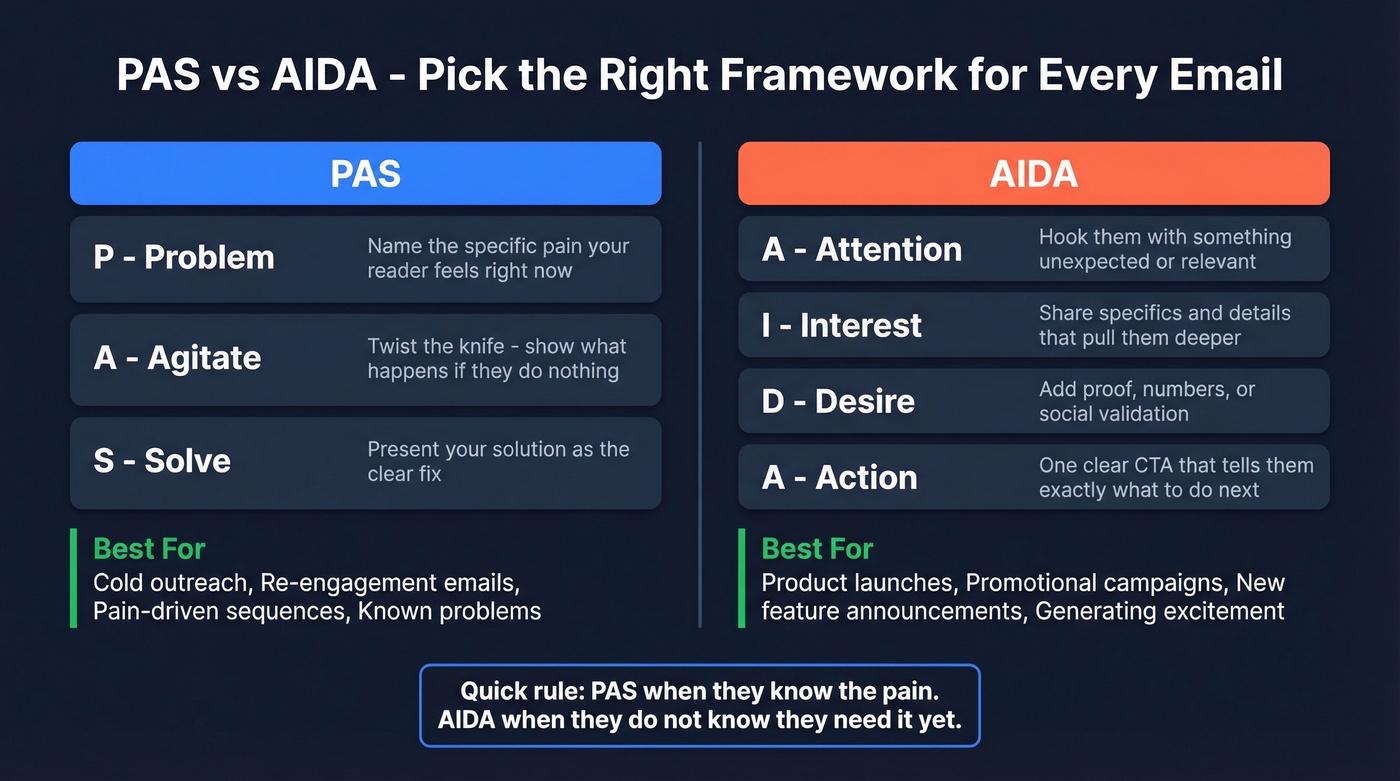
Problem, Agitate, Solve. Name the pain, twist the knife, then offer the fix. PAS works best for pain-driven emails - cold outreach, re-engagement, and any situation where your reader has a problem they're actively trying to solve.
Here's PAS in practice:
Subject: Your list is going stale
Most teams lose deals because their outreach never reaches the right person - it bounces, routes to the wrong inbox, or hits outdated contact info.
Prospeo refreshes its data every 7 days and verifies emails in real time at 98% accuracy. Want to run a quick 100-contact test?
Three sentences. Problem identified, frustration amplified, solution offered. No fluff.
AIDA: For Launches and Promos
Attention, Interest, Desire, Action. AIDA builds momentum toward a purchase decision. It's ideal for product launches, promotional campaigns, and any email where you're introducing something new rather than solving an existing pain.
Subject: We just shipped the feature you asked for
You told us enrichment was too slow. We listened - bulk enrichment now returns 50+ data points per contact.
On cold lists, enrichment match rates average 83%. Try it free this week - no credit card required.
Attention (the hook), interest (the specifics), desire (the proof), action (the CTA). Each sentence does one job.
When to use which: PAS when your audience has a known pain point. AIDA when you're generating excitement about something they don't know they need yet. Both frameworks appear repeatedly in strong email copy examples across industries because they reliably move readers to act.

You just learned how to write email copy that converts. But even the best PAS framework won't save you if 35% of your emails bounce. Prospeo verifies emails in real time with 98% accuracy and refreshes data every 7 days - so your copy actually reaches the inbox it was written for.
Stop wasting brilliant copy on dead email addresses.
Email Copy by Type
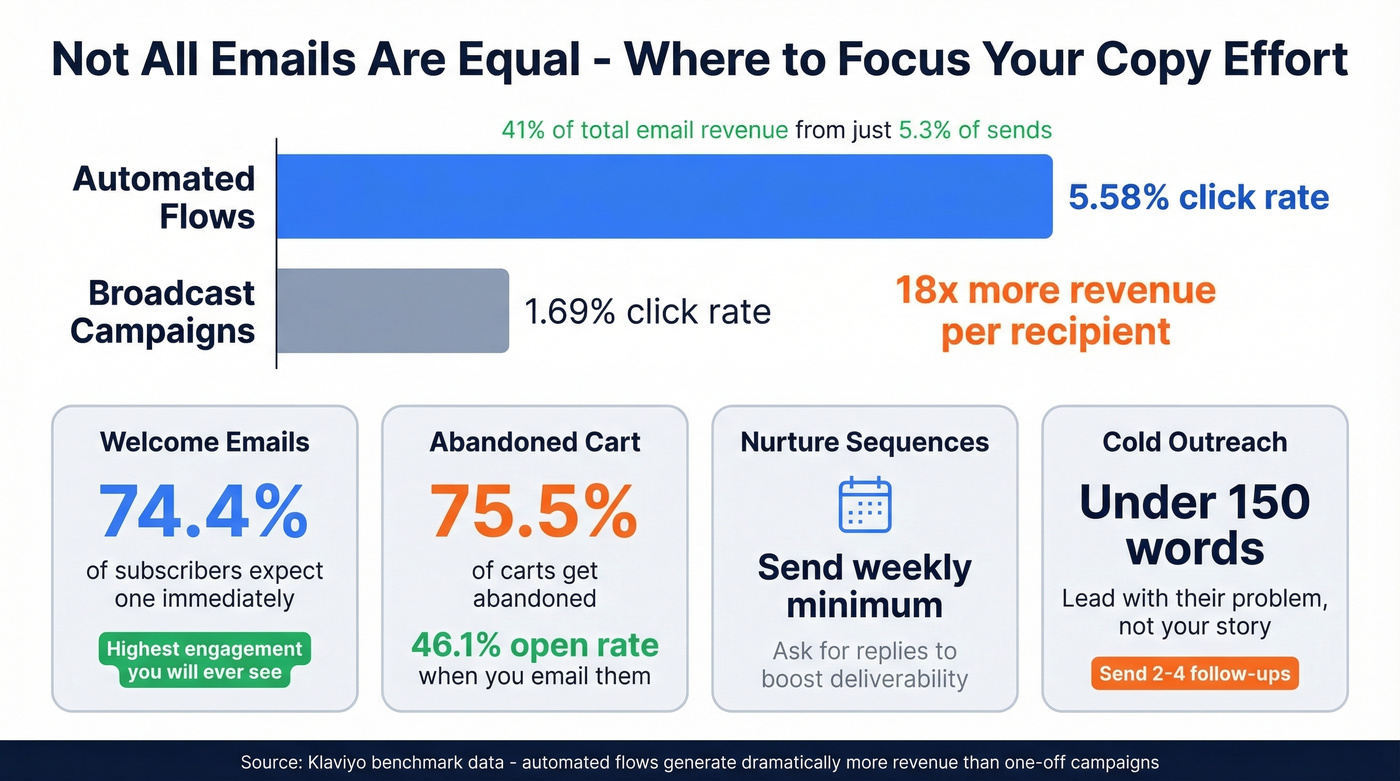
Not all emails are created equal. Klaviyo's benchmark data should change how you allocate your writing time: automated flows generate 41% of total email revenue from just 5.3% of sends, and around 18x more revenue per recipient than campaigns. Flows deliver 5.58% click rates versus 1.69% for campaigns. Your triggered sequences deserve 10x more copy attention than your broadcast newsletters.
Welcome Emails
74.4% of subscribers expect a welcome email immediately after signing up. Miss that window and you've already lost trust.
Your welcome email has three jobs: confirm what they signed up for, set expectations for what's coming, and give them one thing to do right now - reply, download, browse. Don't save your best content for email #5. The welcome email gets the highest engagement you'll ever see from that subscriber. Use it.
Abandoned Cart Emails
The numbers here are staggering. 75.5% of carts get abandoned, but abandoned cart emails pull a 46.1% open rate and 13.3% click rate. More than 35% of those who click through complete a purchase. This is the highest-ROI email you'll ever write, and most brands phone it in with a generic "You forgot something!" subject line.
Show the product. Name the price. Add a reason to act now - scarcity, a time-limited discount, or social proof. Keep it short and visual.
Nurture Sequences
Nurture emails are the long game. They're not welcome emails and they're not sales pitches - they're the ongoing value you deliver to stay top-of-mind until the buyer is ready.
Send at least monthly. Weekly is better for most businesses because it builds the habit of opening your emails. Here's a deliverability trick that gets overlooked: occasionally ask subscribers to reply. ISPs interpret genuine back-and-forth as a signal that your emails are wanted, which helps inbox placement across your entire list.
If you're building a longer sequence, use a simple sequence management approach so your touches stay consistent.
Cold Outreach
Here's the thing: nearly every cold email is too long, too self-centered, and too generic. Keep them under 150 words. Lead with the recipient's problem, not your company's origin story. Send 2-4 follow-ups - persistence via polite follow-ups is one of the biggest drivers of replies.
Skip "I hope this finds you well." Skip attaching PDFs. Skip multiple links. One clear ask, one reason to care, done.
If you need a starting point, use these cold email follow-up templates to structure your touches.
Tracking Performance
You can't improve what you don't measure. But you need to measure the right things. Here are Mailchimp's published benchmarks (last updated December 2023), drawn from billions of emails:
| Industry | Open Rate | Click Rate | Unsub Rate |
|---|---|---|---|
| All Users | 35.63% | 2.62% | 0.22% |
| Ecommerce | 29.81% | 1.74% | 0.19% |
| Business & Finance | 31.35% | 2.78% | 0.15% |
| Non-Profits | 40.04% | 3.27% | 0.18% |
| Education | 35.64% | 3.02% | 0.18% |
Here's our unpopular opinion: open rate is a vanity metric. Apple's Mail Privacy Protection pre-loads tracking pixels, which inflates open rates across the board. You could have a 50% "open rate" and still be landing in spam for half your list. Focus on click rate and reply rate instead - those require actual human action.
Map your metrics to components: open rate reflects your subject line, click rate reflects your CTA, and reply rate reflects your body copy. Diagnose accordingly.
For A/B testing, isolate one variable at a time and use at least 250 contacts per variant. Reply rate is your primary metric for outbound - a 5%+ positive reply rate is the target, and recent benchmarks put the average cold email response rate around 4%.
If your average deal size is under five figures, you probably don't need a $30k/year data platform. But you absolutely need clean data. A bounce rate above 1-2% usually means the problem isn't your writing - it's your list. Running your contacts through verification before any campaign is the single fastest way to improve every metric on this table.
If you want to go deeper on list health, start with email bounce rate benchmarks and fixes.
Mistakes That Kill Conversions
Most emails fail for predictable reasons. We see the same ones over and over.
Robotic intros. "I hope this email finds you well" should become "Noticed [company] just opened a London office - congrats." Personalization isn't adding a first name token. It's proving you did 30 seconds of research.
Too many CTAs. "Book a demo, download our whitepaper, follow us on Twitter, and check out our blog!" Pick one. The email with one CTA outperforms the email with four.
Writing without research. If you skipped the questionnaire above, your emails are guesses. Educated guesses, maybe - but guesses. Go back and fill it out.
No follow-up. The majority of replies come on the second or third touch. Sending one email and giving up is leaving money on the table.
Sending to a dirty list. This one frustrates me the most because it's the easiest to fix. Even perfect messaging bounces off bad data. Invalid addresses hurt your sender reputation and inbox placement across your entire domain. We've seen teams go from a 35% bounce rate to under 4% just by verifying their list with Prospeo before hitting send. Verify before you send. Every time.
If you're seeing deliverability issues, follow a step-by-step email deliverability guide before you change your copy.
Using AI Without Sounding Like a Robot
49% of B2B marketers now use generative AI to create emails. The tools can cut writing time by 50-80%. But here's the opinion that'll save you from bland copy: AI is a rewriting tool, not a writing tool.
The best workflow isn't "generate an email from scratch." It's this: write a rough draft with your audience research and framework, feed it to AI for tightening and tone shifts, then edit the output with your human judgment. The draft-to-AI-to-human pipeline produces emails that sound like you, not like a chatbot.
Klaviyo's data shows AI-powered product recommendations lift click rates to 3.75% on average - and 8.79% for top performers. AI adds the most value when it's optimizing specific elements, not generating entire emails from a one-line prompt.
Best use cases for AI in email copywriting: iterating on subject lines (generate 20, pick 3 to test), shortening body copy, changing tone from formal to conversational, and writing PS lines. Worst use case: writing the entire email from scratch with no context. That's how you get generic slop that sounds like every other AI-generated message in your prospect's inbox.
If you're building this into your workflow, use a dedicated AI email copywriter tool (or a repeatable prompt system) to keep outputs consistent.
Common tools in 2026:
| Tool | Best For | Price/mo |
|---|---|---|
| ChatGPT | General rewriting | $20 |
| Jasper | Marketing copy | $39 |
| Copy.ai | Batch variants | $49 |
| Rytr | Budget option | $9 |
| Lavender | Sales email coaching | $29 |
| Grammarly | Tone + clarity | $12 |
Skip Jasper and Copy.ai if you're a solo founder or small team - ChatGPT at $20/month handles 90% of what those tools do. Lavender is worth it specifically for sales teams because it scores your emails in real time and coaches you on length, tone, and personalization. None of these replace understanding your audience. They accelerate the mechanical parts of writing.
The research step above only works if you have accurate contact data to act on. Prospeo gives you 300M+ verified profiles with 30+ filters - buyer intent, technographics, job changes - so you can match your sharpest copy to the exact buyers who need to read it. At $0.01 per email, bad data is no longer an excuse.
Build the list your email copy deserves in minutes.
FAQ
How long should my emails be?
Cold outreach should stay under 150 words. Marketing and sales emails perform best at 50-125 words. Longer storytelling sequences can work, but every sentence must earn its place - cut anything that doesn't move the reader toward your CTA.
What's the best framework for beginners?
PAS (Problem, Agitate, Solve) is the strongest starting point. It forces you to lead with the reader's pain instead of your product features - the single biggest shift that separates effective email copy from self-centered pitches.
How do I measure email copy performance?
Track positive reply rate for outbound (target 5%+) and click rate for marketing emails. Open rate is unreliable due to Apple's Mail Privacy Protection inflating numbers. Map each metric to a component: subject line drives opens, CTA drives clicks, body drives replies.
Does list quality affect my results?
Absolutely - even perfect copy bounces off bad data. Bounce rates above 1-2% degrade sender reputation and inbox placement across your entire domain. Run your list through verification before every campaign. It's the fastest fix.
Should I use AI to write my emails?
Use AI to rewrite and tighten, not to generate from scratch. Draft with audience research and a framework first, then feed it to AI for tone shifts and subject line variants. The human-AI-human workflow consistently outperforms pure AI generation.