

How to Run an Email Domain Check and Actually Fix What's Broken
Your domain's authentication is probably broken and you don't know it. 85.7% of the top 1 million domains lack effective DMARC protection - they're either missing DMARC entirely or running a policy that does nothing. Meanwhile, 14-17% of legitimate marketing emails never reach the inbox. That's not a fringe problem. That's the default state of most sending domains right now.
The fix isn't complicated, but it requires understanding what's actually being tested, what the results mean, and what domain authentication alone can't solve.
What You Need (Quick Version)
- Free instant check: MxToolbox or EasyDMARC. Both cover SPF, DKIM, DMARC, and blacklist status in one scan.
- Ongoing monitoring: Google Postmaster Tools (free, Gmail-specific) or MxToolbox paid plans (Delivery Center $129/mo; Plus $399/mo) for continuous monitoring and alerting.
- Preventing bounce-rate damage: Prospeo's 98% email accuracy with a 7-day data refresh cycle. Domain authentication means nothing if you're sending to dead addresses (see Email Bounce Rate).
What Gets Tested in a Domain Health Check
Most tools can tell you whether your records exist. The gap is understanding what the results mean. A full scan runs a battery of tests across your DNS records, mail server configuration, and reputation signals (see Email Deliverability Guide).
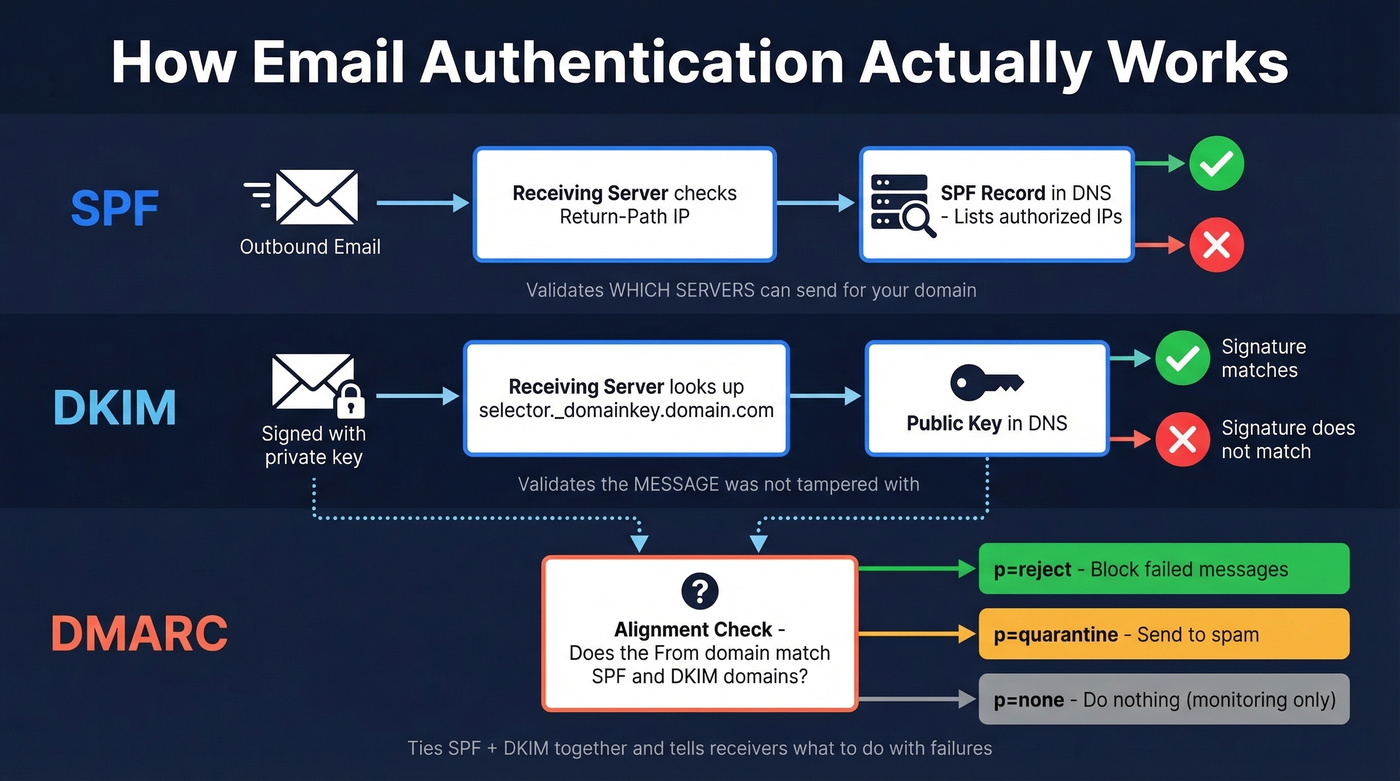
SPF validates the domain in the Return-Path header, not the visible "From" address. It tells receiving servers which IPs are authorized to send on your behalf. If a message comes from an unlisted IP, SPF fails.
DKIM uses cryptographic signing tied to a specific selector in your DNS. The receiving server looks up the public key at selector._domainkey.yourdomain.com and verifies the signature. Missing key or mismatched signature? DKIM fails (see How to Verify DKIM Is Working).
DMARC ties SPF and DKIM together through alignment - checking whether the domain in the From header matches the domains authenticated by SPF and DKIM. Without DMARC, a message can pass SPF and DKIM individually but still be spoofed. DMARC also tells receivers what to do with failures: nothing (p=none), quarantine, or reject (see DMARC Alignment).
Beyond authentication, a thorough domain scan covers MX records to confirm your domain can receive mail, blacklist status across 100+ blocklists, and increasingly, BIMI for displaying your logo in supported inboxes. BIMI requires DMARC enforcement and a Verified Mark Certificate at around $1,500/year. Nice-to-have, not a priority.
Why This Matters More in 2026
The enforcement landscape shifted hard starting in February 2024, when Google and Yahoo began requiring DMARC for anyone sending more than 5,000 daily emails. Microsoft followed in early 2025 with bulk-sender authentication requirements. At bulk-sender volumes, non-compliant messages can be rejected at SMTP - they don't just land in spam, they bounce (see Bulk Email Threshold).
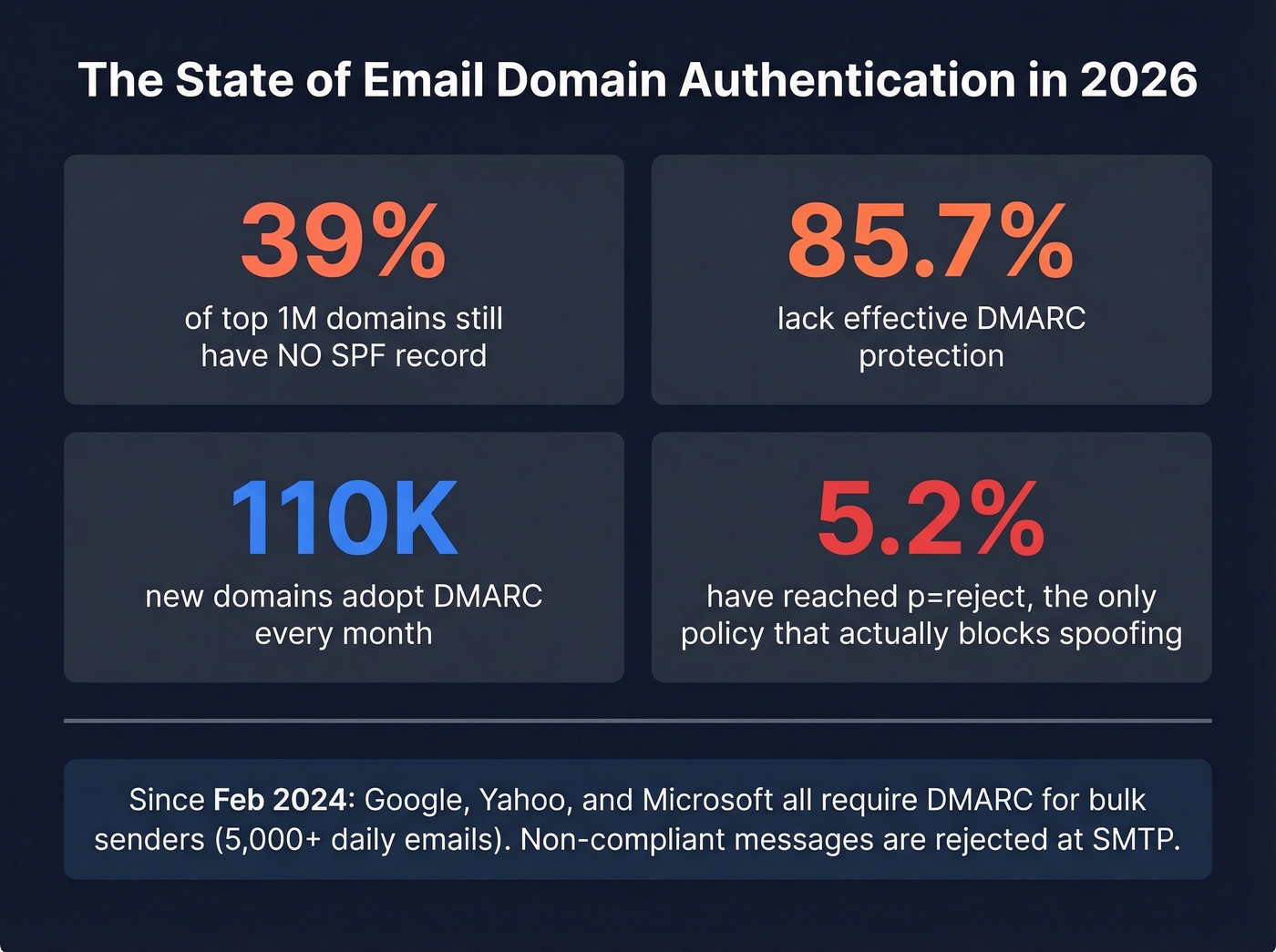
The adoption numbers tell the story. 110,000 new domains adopt DMARC every month, and that pace accelerated through 2024 and 2025. But 39% of the top million domains still lack SPF entirely. Only 33.4% have a valid DMARC record, and just 5.2% have reached p=reject - the only policy that actually blocks spoofed mail.
Here's the thing: if you're sending outbound at any real volume and you haven't validated your domain authentication in the last 90 days, you're gambling. Inbox providers aren't sending warnings anymore. They're just rejecting mail.
How to Check Your Email Domain
Free Online Tools
Go to MxToolbox, enter your domain, and get a full report covering SPF, DKIM, DMARC, MX records, and blacklist status. EasyDMARC and Valimail offer similar one-click scans. Free MxToolbox accounts are limited to one health check per 24 hours, but that's enough for a baseline audit. The output is color-coded - green for pass, red for fail, yellow for warnings. Start with the red items.

Manual DNS Queries
If you want the raw records, use dig on Linux and Mac or nslookup on Windows:
# SPF
dig txt yourdomain.com

# DKIM (you need your selector   -   check your ESP's docs or your outbound headers)
dig txt selector._domainkey.yourdomain.com

# DMARC
dig txt _dmarc.yourdomain.com
Selectors vary by provider. If you don't know the selector, you can't query the DKIM record directly.
Send a Test Email and Read Headers
DNS checks confirm your records exist. Sending a test email confirms they actually work. Fire off a message to a Gmail or Outlook account, open it, and inspect the full message headers. Find the Authentication-Results header - it'll show spf=pass, dkim=pass, and dmarc=pass or fail. This catches real-world issues that DNS-only checks miss: misconfigured third-party senders, alignment mismatches, and key rotation problems that have been silently breaking your deliverability for weeks.
How to Read Your Results
| Result | SPF | DKIM | DMARC |
|---|---|---|---|
| Pass | Sending IP is authorized | Signature verified | Aligned + policy met |
| Fail | IP not in SPF record | Signature invalid | Alignment mismatch |
| None | No SPF record found | No DKIM record | No DMARC record |
For DMARC, the policy tag matters most. But don't overlook rua and ruf - these specify where aggregate and forensic reports are sent. Without them, you're flying blind even with a DMARC record in place.
p=none is monitoring only. Receivers take no action on failures. If you've been on p=none for more than 90 days, you're procrastinating. p=quarantine sends failed messages to spam - the minimum viable protection. p=reject blocks failed messages entirely. That's the goal.
The alignment concept trips people up. SPF checks the Return-Path domain, not the From domain. So SPF can pass while DMARC fails because the Return-Path domain doesn't match the From domain. This is extremely common when using third-party senders that set their own Return-Path (see Return Path Email).

You just fixed SPF, DKIM, and DMARC. Now don't waste that clean domain reputation by sending to invalid addresses. Prospeo's 98% email accuracy and 7-day data refresh cycle keep your bounce rate under control - so your authentication work actually pays off.
Domain authentication protects the door. Clean data decides who walks through it.
Common Failures and Fixes
SPF Failures
We've debugged dozens of SPF failures, and the 10 DNS lookup limit is the most common cause. Every include: mechanism in your SPF record triggers a lookup, and complex setups with multiple ESPs blow through 10 fast. When you exceed it, receivers get a PermError and SPF fails. 2% of the top million domains have this exact problem right now (see SPF Record Examples).
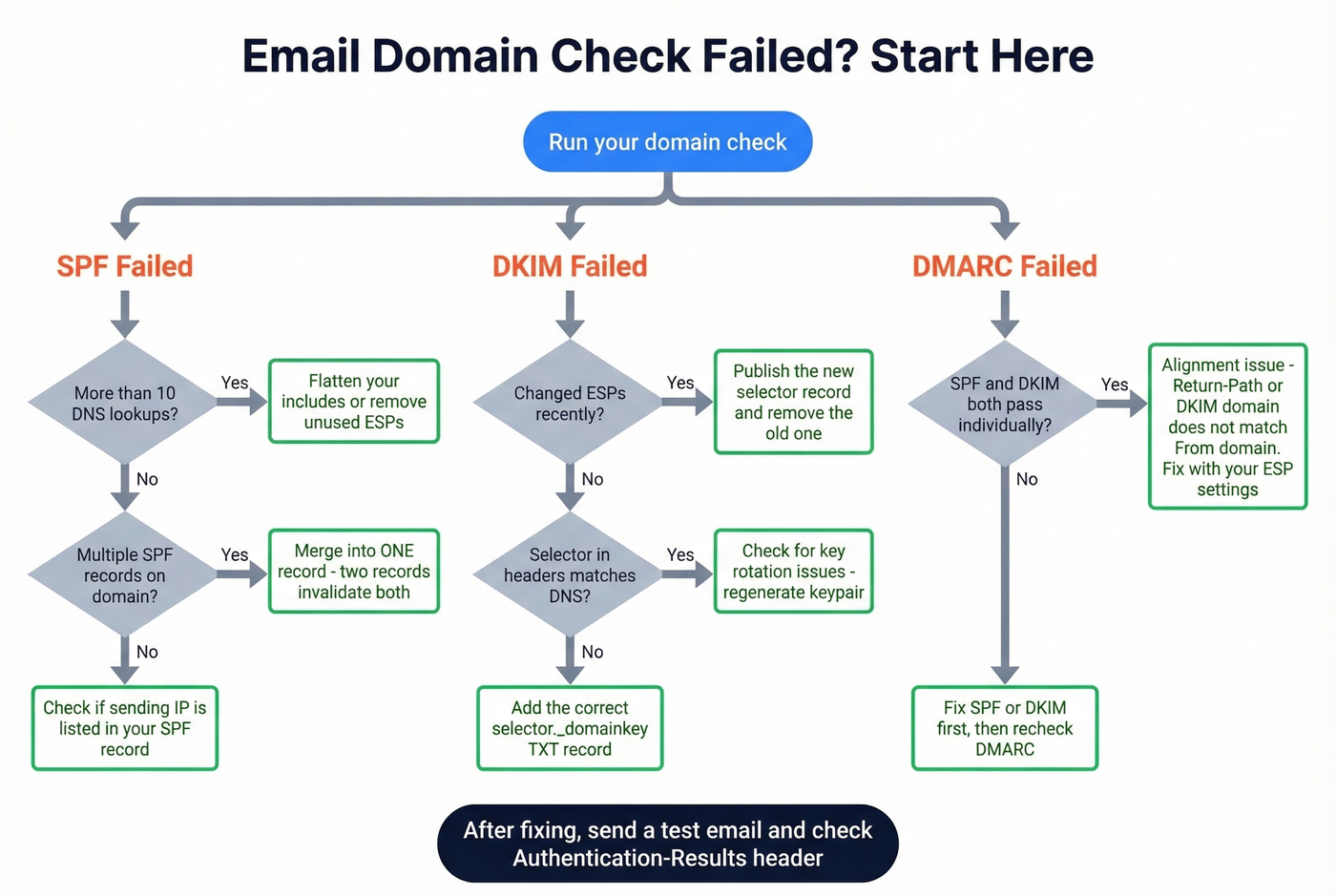
Other common issues: multiple SPF records on the same domain (only one is allowed - having two invalidates both) and using the deprecated ptr mechanism. Consolidate your SPF record, flatten includes where possible, and remove ptr entirely.
DKIM Issues
Usually a missing or misconfigured selector record. If you recently changed ESPs, the old DKIM selector may still be published while the new one isn't. Check that the selector in your outbound headers matches what's published in DNS. This takes five minutes and saves days of troubleshooting.
DMARC Alignment Failures
SPF passes, DKIM passes, but DMARC still fails. The cause is almost always an alignment mismatch. Follow dmarc.org's 5-step deployment sequence: deploy SPF and DKIM, ensure alignment, publish DMARC at p=none, analyze reports, then move to enforcement.
Blacklist Listings
Two triggers to watch: complaint rates above 0.1% and bounce rates above 5%. On a shared IP, your ESP typically handles blacklist issues. On a dedicated IP, it's your problem. Don't just request delisting - fix the root cause first, or you'll be relisted within days (see How to Improve Sender Reputation).
What to Do If Your Domain Is Blacklisted
Let's say you launch a 10,000-email campaign, 600 bounce, your complaint rate spikes, and suddenly you're on Spamhaus.
| Blacklist | Typical Delisting Time | Notes |
|---|---|---|
| SpamCop | 24-48 hours | Auto-delists if no new reports |
| Spamhaus | 24-48 hours | Manual validation for SBL |
| Barracuda | 12-24 hours | Self-service request form |
Prioritize Spamhaus and Barracuda first - they're the most widely referenced by major mailbox providers. Before requesting delisting, secure your mail server against open relay, clean your recipient lists, and confirm SPF/DKIM/DMARC are properly configured. Requesting delisting without fixing the underlying issue wastes everyone's time (see Spamhaus Blacklist Removal).
Best Tools for Email Domain Checks
| Tool | What It Checks | Free Tier | Paid Pricing | Best For |
|---|---|---|---|---|
| MxToolbox | SPF/DKIM/DMARC, blacklists, DNS | 1 check/day | $129-$399/mo | All-in-one checks |
| EasyDMARC | Domain scan + DMARC monitoring | Yes, no card | ~$30-80/mo | DMARC deep dives |
| Google Postmaster | Reputation, spam rate, auth | Fully free | N/A | Gmail monitoring |
| GlockApps | Inbox placement testing | 2 free tests | From $85/mo | Spam vs inbox testing |
| Valimail | Auth status + DMARC/BIMI scan | Free lookup | ~$200+/mo | Quick auth check |
| dmarcian | DMARC checker + reporting | Free tool | ~$100-400/mo | Report analysis |
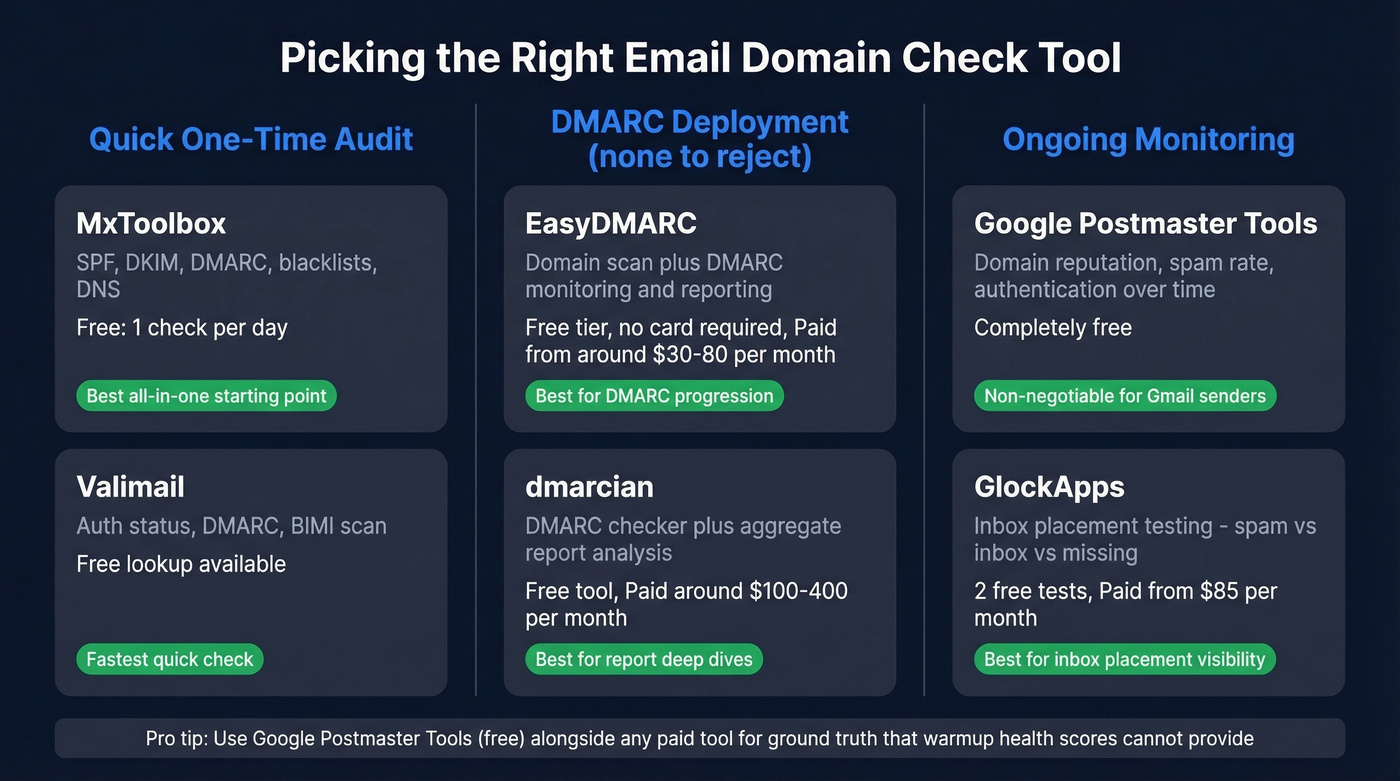
MxToolbox runs one of the broadest batteries of tests - hundreds across blacklists, DNS, mail servers, and web servers. The free tier is limited but sufficient for periodic audits. The Delivery Center plan at $129/mo adds continuous monitoring and alerting, and it's worth it if you're sending at volume.
EasyDMARC goes deeper on DMARC specifically. If your primary concern is getting from p=none to p=reject without breaking legitimate mail flows, this is the tool. Skip it if you just need a quick one-time scan.
Google Postmaster Tools is non-negotiable if you send to Gmail addresses. It's free, takes five minutes to set up, and shows your domain reputation over time. There's no reason not to have this running.
On r/coldemail, users frequently express distrust of warmup platform "health scores" - and they're right to be skeptical. Those scores are proprietary black boxes. Running your own independent validation with the tools above gives you ground truth that no warmup tool can fabricate.
Keeping Your Domain Healthy
Register for Google Postmaster Tools today if you haven't already. Run a full domain check monthly - weekly if you're sending at volume.
For dedicated IP scaling, the practitioner heuristic is roughly 1 IP per 2 million emails per day. Too many IPs with low volume leaves you with unknown reputation, which is almost as bad as bad reputation. Your operational targets: keep complaint rates below 0.1% and bounce rates below 2%. Five percent is a common blacklist trigger.
I've watched this play out dozens of times: an SDR team's reply rates drop 40%, everyone assumes it's a DNS issue, and after two weeks of troubleshooting authentication records, someone finally checks the bounce rate. It's 12%. The problem wasn't DNS. It was data.
Domain authentication is only half the equation. Bounces from bad data destroy sender scores regardless of how clean your DNS is. Prospeo runs every email through a 5-step verification process - including catch-all handling and spam-trap removal (see Spam Trap Removal) - delivering 98% accuracy on a 300M+ contact database that refreshes every 7 days, compared to the 6-week industry average. The results speak for themselves: Meritt dropped their bounce rate from 35% to under 4%, and Stack Optimize maintains 94%+ deliverability with zero domain flags across all clients.
Blacklists don't just flag spoofed domains - they flag domains with high bounce rates. Every email sent to a dead address chips away at the sender reputation you just spent time building. Prospeo verifies every email through a 5-step process at $0.01 per address.
Stop burning your domain reputation on bad data. Verify before you send.
Email Domain Check FAQ
How often should I run an email domain check?
Monthly at minimum, weekly if you're sending more than 5,000 emails per day. Set up Google Postmaster Tools for continuous monitoring between manual scans - it's free and takes five minutes.
Can my domain pass SPF/DKIM/DMARC and still land in spam?
Yes. Bounce rates above 5%, spam complaints above 0.1%, and poor engagement signals all override perfect authentication. Inbox providers weigh sender reputation across multiple dimensions - DNS records are necessary but not sufficient.
What's the difference between a domain check and email verification?
A domain check tests your sending infrastructure - DNS records, blacklist status, and authentication configuration. Email verification checks whether individual recipient addresses are valid and deliverable. You need both: tools like MxToolbox handle domain-side diagnostics, while recipient-side verification at 98% accuracy keeps your bounce rate from tanking your reputation.
Is DMARC p=none actually protecting my domain?
No. It only enables reporting - receivers take zero enforcement action on failures. Move to p=quarantine or p=reject within 90 days of deployment. Anything longer means you're collecting reports you aren't acting on.
How long does it take to get off a blacklist?
Typically 12-48 hours depending on the list. Barracuda offers 12-24 hour self-service delisting. Spamhaus and SpamCop take 24-48 hours. Fix the root cause - high bounces or complaint spikes - before requesting removal, or you'll be relisted within days.