

Email Domain Warmup in 2026: Schedule, Benchmarks, and Tools
A RevOps lead we work with launched three SDRs on fresh domains last quarter. No email domain warmup, no ramp - just loaded sequences and hit send. By day four, most of their emails were landing in spam. The team burned through two domains before anyone checked Google Postmaster Tools.
That's not an edge case. New, unwarmed domains used for cold outreach average below 30% inbox placement in their first month, which means 7 out of 10 messages never reach the target. Unwarmed domains see inbox placement 40-60% lower than properly warmed domains sending identical content. The fix isn't complicated. It just takes patience and a process most teams skip.
What You Need (Quick Version)
- Timeline: 3-6 weeks minimum. Aggressive senders or M365-heavy audiences should plan 6-8 weeks. The old "14-day warmup" advice is dead.
- Engagement over volume: Mailbox providers now weight replies, mark-as-important actions, and conversation depth more than raw send volume. Pacing alone won't save you.
- Verify your list before sending a single warmup email: One batch of bad addresses can undo weeks of reputation building. (If you need a deeper workflow, see our email deliverability guide.)
- Authentication first: SPF, DKIM, and DMARC must be live and passing before you send anything. No exceptions. (Related: DMARC alignment.)
- Warmup is maintenance, not a project: Even after your initial ramp, 30-40% of daily volume should remain warmup emails.
Jump to the 4-week schedule or the tool comparison if you already know the basics.
What Domain Warmup Is (and Why It Changed)
Email domain warmup is the process of gradually increasing send volume from a new or dormant domain to build a positive sender reputation with mailbox providers like Gmail and Outlook.
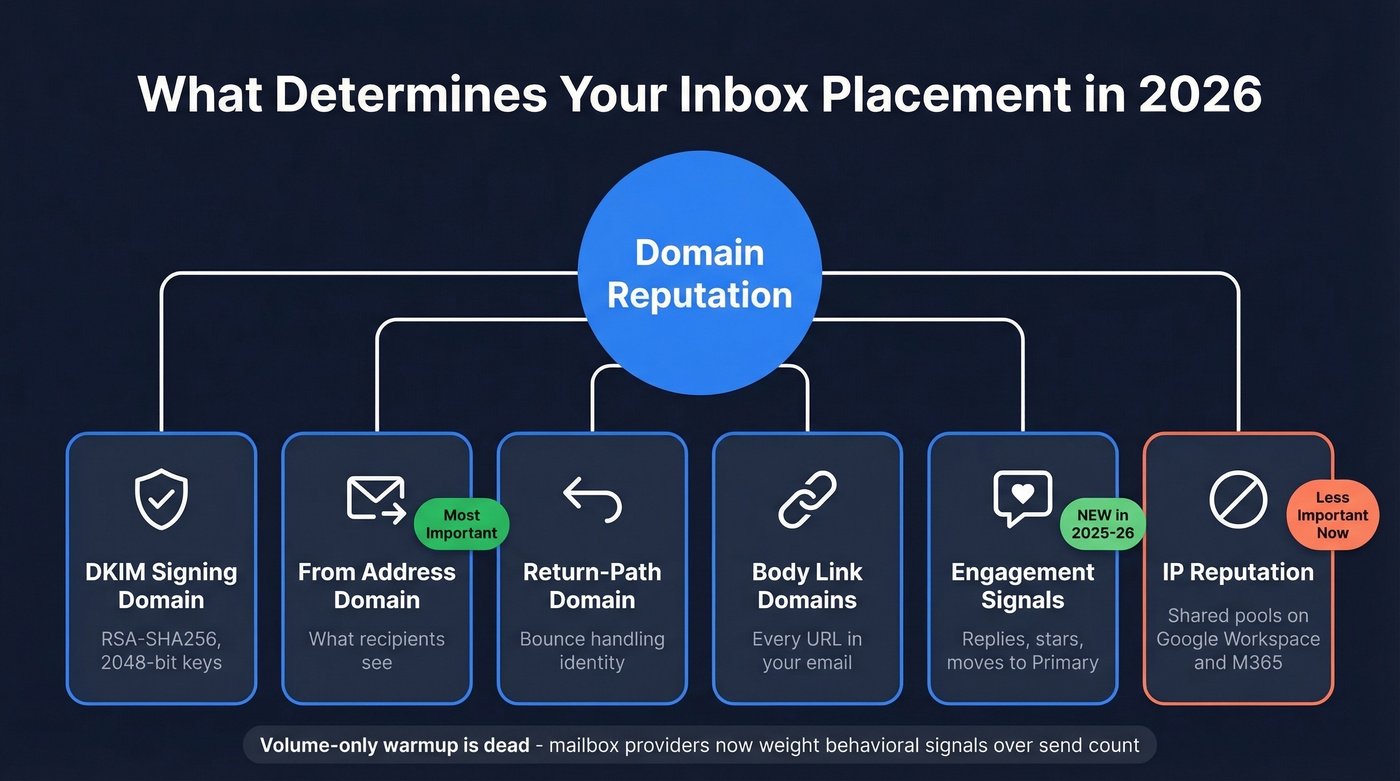
Most B2B teams today use Google Workspace or Microsoft 365, which run on shared IP pools. The IPs are already "warm." What's not warm is your domain. Domain reputation - not IP reputation - is the variable that determines whether your emails land in the inbox or get filtered to spam. Technically, mailbox providers evaluate multiple domain reputations - your DKIM signing domain, Return-Path domain, From address domain, and any domains in your email body links - but for most teams, the From domain is the one that matters most. (More on this in our guide to tracking domain setup.)
Here's the thing: volume-only warmup is dead. Gmail started rejecting more non-compliant mail at the SMTP layer in late 2025, and Outlook has gotten noticeably harsher. Practitioners on r/coldemail consistently describe warmup timelines stretching from roughly three weeks to six to eight weeks before they trust a domain with real outbound volume.
Modern domain warming requires positive engagement signals - replies, stars, moves to Primary - in addition to low bounces and clean authentication. Mailbox providers don't care how old your domain is. They care about behavior. A 10-year-old domain with no outbound history is just as risky as one registered last week. (If you're troubleshooting reputation drops, see how to improve sender reputation.)
Pre-Send Checklist
Before you send a single email, these seven items need to be in place. Skip any of them and you're building on sand.
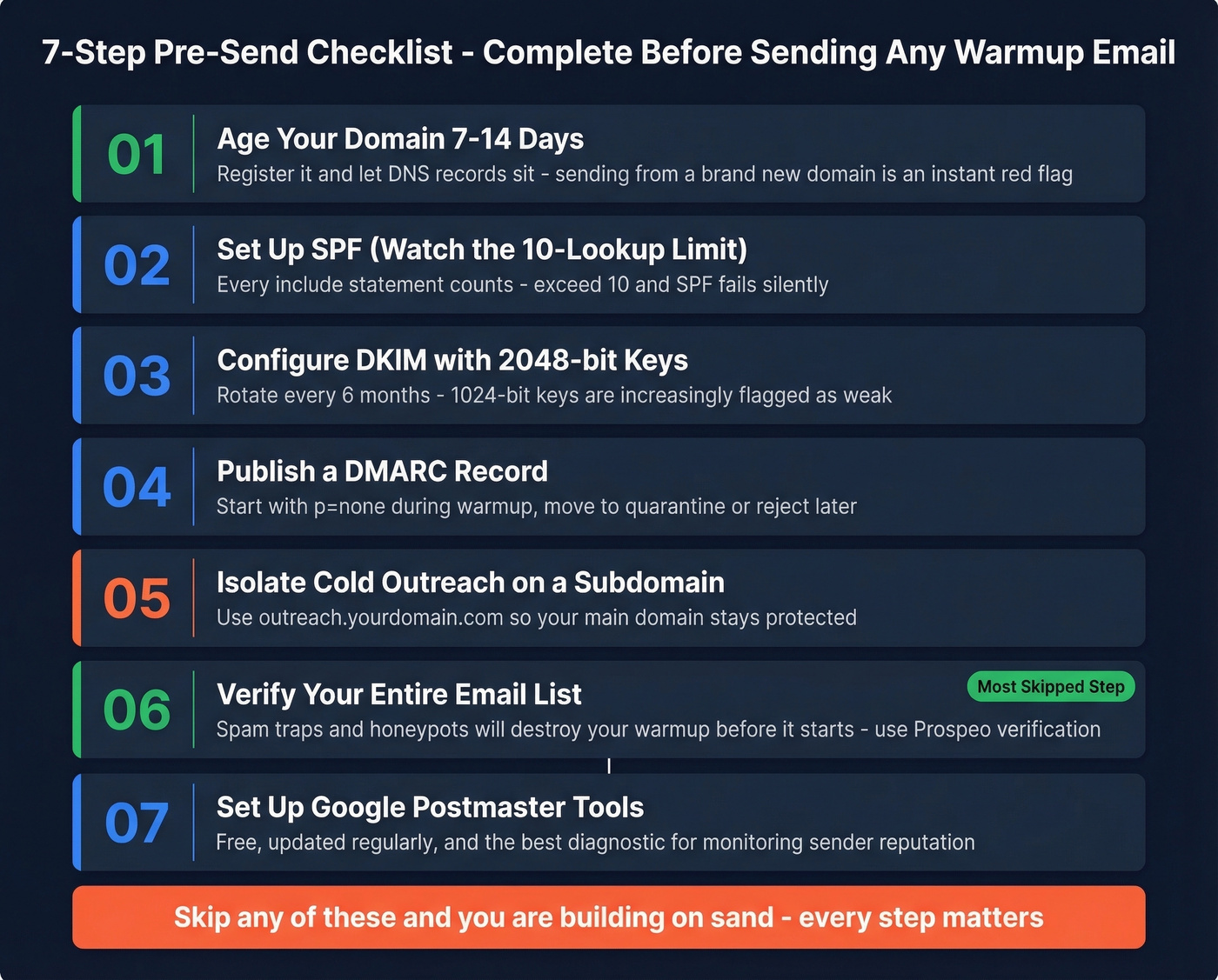
1. Age your domain 7-14 days. Register the domain or subdomain and let it sit with basic DNS records live. Sending from a domain registered yesterday is an instant red flag.
2. Set up SPF - and watch the 10-lookup limit. SPF tells mailbox providers which servers can send on your domain's behalf. The catch: SPF has a hard 10 DNS lookup limit. Every include: statement counts. Exceed 10 and SPF fails silently - your emails look unauthenticated even though you think you're covered. Test with MXToolbox before going live, and allow 24 hours for DNS propagation before testing. (You can also reference our SPF record examples.)
3. Configure DKIM with 2048-bit RSA-SHA256 keys. Rotate keys every 6 months. Major providers can generate DKIM keys for you, but verify the key length - 1024-bit keys are increasingly flagged as weak. (Step-by-step: how to verify DKIM is working.)
4. Publish a DMARC record. Start with p=none during warmup so you can monitor without blocking. Move to p=quarantine or p=reject once you're confident in your authentication setup.
5. Isolate cold outreach on a subdomain. Send cold email from outreach.yourdomain.com, not your primary domain. Subdomains don't automatically inherit your parent domain's reputation, which is exactly why isolation works. Your subdomain starts fresh, and if something goes wrong, your main domain stays clean.
6. Verify your entire list. This is step zero, and it's the one teams skip most often. Spam traps, honeypots, and invalid addresses will destroy your domain warming efforts before they start. Run your list through Prospeo's email verification - its 5-step verification process catches spam traps, honeypots, and catch-all domains that other tools miss. At roughly $0.01 per email with 98% accuracy, the cost is negligible compared to burning a domain. (If you're comparing vendors, see Bouncer alternatives or our guide to spam trap removal.)
7. Set up Google Postmaster Tools. It's free, it updates regularly, and it's the single best diagnostic tool for monitoring sender reputation. If you're sending to Outlook-heavy audiences, monitor Microsoft deliverability signals too. (More options: email reputation tools.)
The 4-Week Warmup Schedule
These numbers are per inbox - if you're running three inboxes, each one follows this schedule independently.
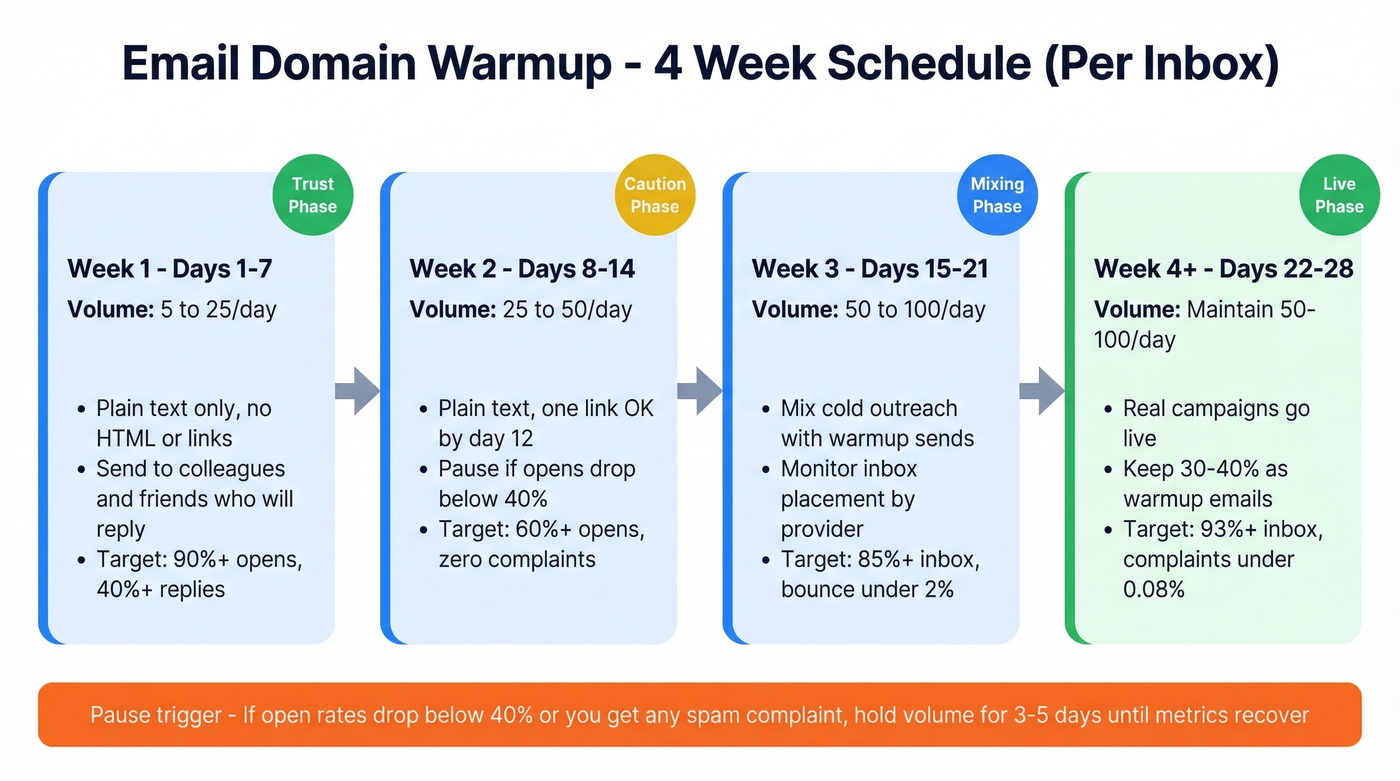
| Period | Daily Volume | Content Rules | Metric Gates |
|---|---|---|---|
| Week 1 (Days 1-7) | 5 → 25 | Plain text only - no HTML/links | Opens 90%+, replies 40%+, zero complaints |
| Week 2 (Days 8-14) | 25 → 50 | Plain text. One link OK by day 12. | Opens 60%+. Pause if opens <40% or any complaint. |
| Week 3 (Days 15-21) | 50 → 100 | Mix cold + warmup sends | Inbox 85%+, bounce <2%, complaints <0.08% |
| Week 4+ (Days 22-28) | Maintain 50-100 | Real campaigns live. 30-40% warmup. | Inbox 93%+, bounce <2%, complaints <0.08% |
Week 1 is about trust, not volume. Send to people who'll actually reply - colleagues, friends, existing contacts. Every reply and "mark as important" action builds positive engagement signals. Don't send HTML templates. Don't include your calendar link. Plain text, conversational emails only. (Need copy help? Use these cold email subject line examples.)
The pause triggers are non-negotiable. If open rates drop below 40% at any point, or you receive even a single spam complaint, stop increasing volume immediately. Hold at your current level for 3-5 days until metrics recover. Pushing through a dip is how domains get blacklisted.
Scaling math matters at higher volumes. Under 100 emails/day, you can safely double day-over-day. Between 100-500/day, slow to 1.5x increases. Above 500/day, cap increases at 1.25x. The higher your volume, the more conservative your ramp needs to be. (Related: email velocity.)
Weekends: reduce, don't stop. Cut volume 50-70% on Saturday and Sunday. Going completely dark for two days creates an unnatural sending pattern that providers notice.
For advanced teams, segment by provider. If 60% of your list is Gmail and 40% is Outlook, track inbox placement separately for each and adjust volume independently. Gmail ramps faster but punishes harder; Outlook is slower to trust but more stable once you're in.
After week 4, the warmup doesn't end. Maintain 30-40% of your daily volume as warmup emails - automated replies, engagement signals, conversation threads. We've seen teams lose 15-20 percentage points of inbox placement within three weeks of cutting warmup cold.

You just spent 4 weeks warming a domain - don't torch it with bad data. Prospeo's 5-step verification catches spam traps, honeypots, and catch-all domains before they tank your sender reputation. 98% email accuracy at $0.01 per email.
Protect your warmup investment - verify every address before it sends.
Warmup Benchmarks to Track
Here's what good looks like, week by week:
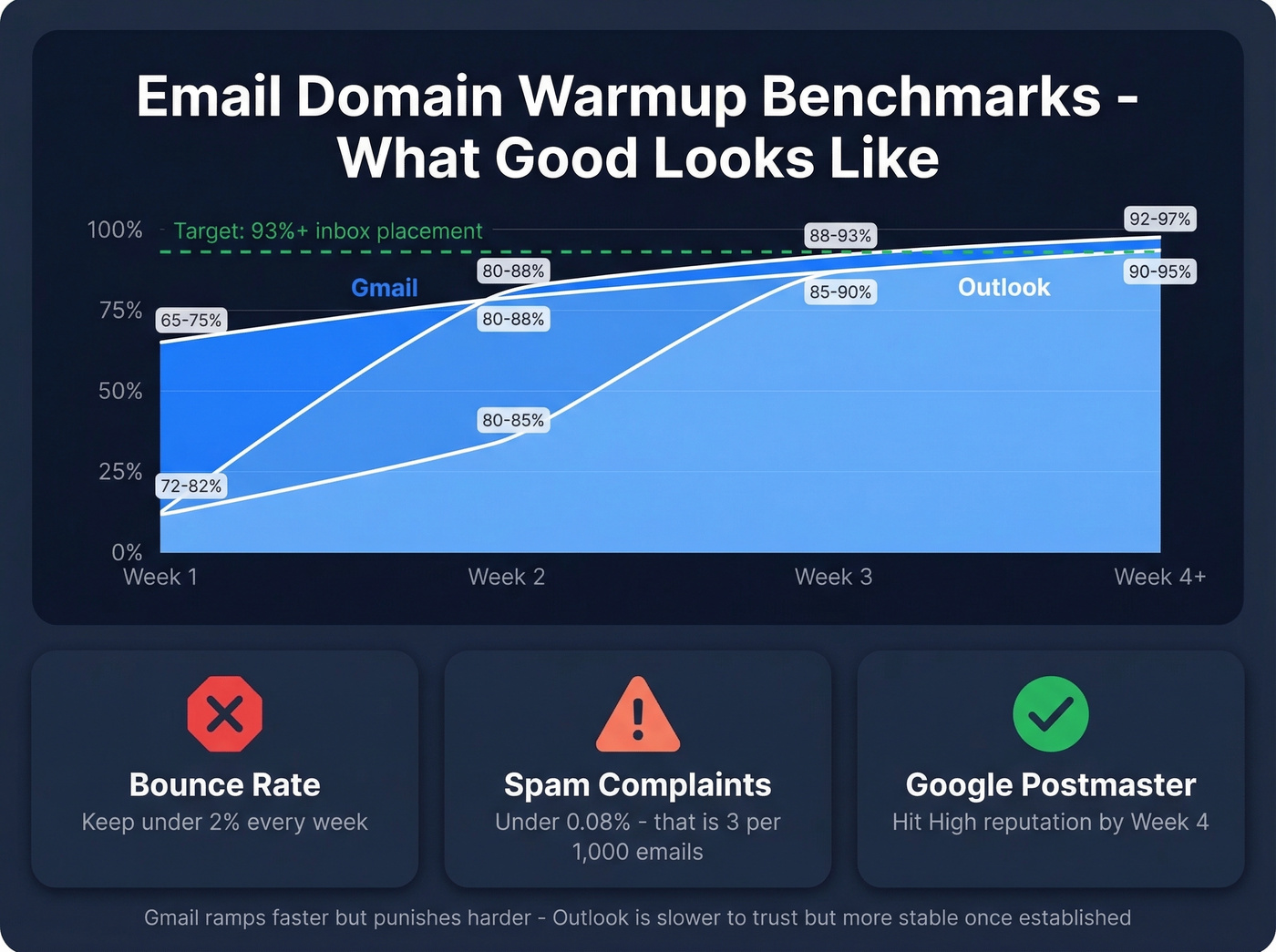
| Metric | Week 1 | Week 2 | Week 3 | Week 4+ |
|---|---|---|---|---|
| Inbox placement | 70-80% | 80-88% | 88-93% | 93-96% |
| Bounce rate | <2% | <2% | <2% | <2% |
| Spam complaints | 0% | <0.05% | <0.08% | <0.08% |
Provider-specific targets differ. Gmail starts lower (65-75% inbox placement in week 1) but ramps faster, reaching 92-97% by week 4. Outlook starts slightly higher (72-82% in week 1) but plateaus around 90-95% - and if you damage your Outlook reputation, recovery takes 3-6 weeks.
The magic number is "High" reputation in Google Postmaster Tools by week 4. Domains that hit this threshold sustain 90%+ inbox placement for 6+ months with proper maintenance. Sales teams exceeding a 0.3% spam complaint rate face immediate throttling - that's roughly 3 complaints per 1,000 emails. Stay well below that line.
Manual vs. Automated Warmup
Manual warmup works if you're warming a single inbox, sending under roughly 20 emails/day, and have a list of colleagues or contacts who'll reliably reply. It's free, it works, and it forces you to understand the process. Mailreach's manual method is a solid reference - start with 5-10 plain-text emails to high-reputation recipients and build from there.
Automate if you're managing multiple inboxes, recovering a damaged domain, or need continuous warmup alongside live campaigns. Automation tools simulate human engagement patterns - opens, replies, "not spam" actions - at scale. For agencies running 10+ inboxes across clients, manual warmup is physically impossible.
Even after your initial ramp, keep automated warmup running. The consensus on r/coldemail is that inbox placement is increasingly tied to ongoing engagement patterns, not just initial reputation building. Think of it like a gym membership - you don't stop going once you're in shape. (If you're building a full outbound motion, see B2B cold email sequence.)
A note on Apollo: Apollo distinguishes between warmup (network-based engagement) and "Inbox Ramp Up" (volume pacing for existing sending). If you're on Apollo, you'll likely still want a separate warmup tool depending on your plan and how many inboxes you manage.
Best Warmup Tools in 2026
Let's be honest: most teams overthink warmup tooling. If you're closing deals under $10k and running fewer than five inboxes, you don't need a $400/month enterprise solution. Pick a tool that fits your inbox count, set it up correctly, and spend your energy on list quality and authentication instead. (If you're evaluating your broader stack, start with our roundup of SDR tools.)
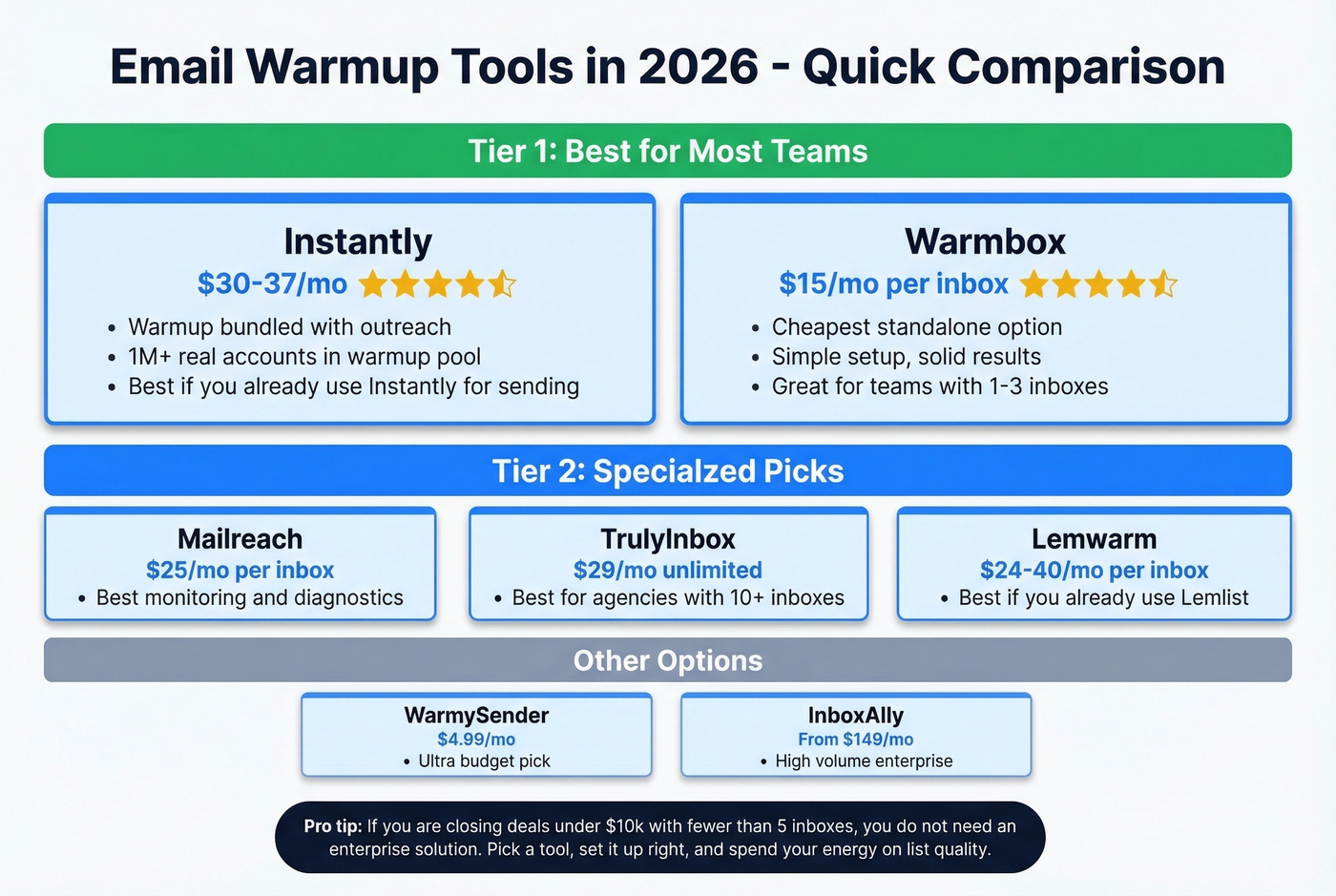
| Tool | Price | Best For | G2 Rating |
|---|---|---|---|
| Instantly | From $30-$37/mo | Teams already doing outreach | ~4.8 |
| Warmbox | $15/mo (1 inbox) | Budget standalone | ~4.7 |
| Mailreach | $25/mo per inbox | Monitoring & diagnostics | 4.6 |
| Lemwarm | $24-40/mo per inbox | Lemlist users | 4.5 |
| TrulyInbox | $29/mo unlimited | Agencies | - |
| WarmySender | $4.99/mo | Budget pick | - |
| Warmy.io | $49-429/mo | Enterprise | - |
| InboxAlly | From $149/mo | High-volume senders | 4.6 |
Instantly
The default pick if you're already running outreach through Instantly's platform. Warmup is bundled with outreach plans starting around $30-$37/mo, and their deliverability pool includes 1,000,000+ real email accounts. The warmup-plus-sending combo eliminates one integration point, which matters when you're managing dozens of inboxes. One thing to watch: some practitioners flag that warmup network quality can degrade if network inboxes themselves get flagged. Monitor your Postmaster data regardless.
Warmbox
Best budget standalone option at $15/mo for a single inbox. Clean UI, straightforward setup, and it does exactly one thing well. If you're warming one or two inboxes and don't need outreach tooling bundled in, Warmbox is the move. Pro plan covers 5 inboxes for $49/mo, Growth handles 25 for $99/mo.
Mailreach
Mailreach makes sense when you care about diagnostics as much as the warmup itself. The spam test tools let you check inbox placement across providers before and during campaigns - that monitoring layer is genuinely useful. Pricing runs $25/mo per inbox, with volume discounts dropping to $18/inbox at 40 mailboxes. Skip this if you just need basic warmup without the analytics overhead.
Lemwarm
Best if you're already on Lemlist. Pricing runs $24/mo (Essential) to $40/mo (Smart) per email on annual plans. The DNS health checks and smart ramping features integrate directly with Lemlist's sending infrastructure, which means fewer configuration headaches. As a standalone tool, it's fine but not differentiated enough to justify switching from cheaper options.
TrulyInbox
Agencies, pay attention. $29/mo for unlimited mailboxes with a 30,000+ inbox network. If you're managing warmup across 15 client domains, the math is dramatically better than per-inbox pricing. Worth a trial for any agency use case.
WarmySender, Warmy.io, and InboxAlly
WarmySender is the cheapest entry point at $4.99/mo - fine for testing, limited network. Warmy.io runs $49-429/mo and is enterprise-grade overkill for most teams. InboxAlly takes a seed-based approach starting at $149/mo for 100 daily seed emails - only makes sense for high-volume senders doing 500+ emails/day.
Common Warmup Mistakes
Skipping authentication. SPF, DKIM, and DMARC must be live and passing before you send a single email. There's no recovering from a bad first impression with mailbox providers.
Ramping too fast. Going from 10 to 200 emails/day in a week is the fastest way to trigger throttling. Follow the scaling math: 2x under 100/day, 1.5x at 100-500, 1.25x above 500. Patience pays.
Volume-only warmup. Sending 50 emails a day that nobody opens or replies to is worse than sending 15 that generate conversations. Engagement signals - replies, stars, moves to Primary - are what build reputation in 2026. Volume without engagement is just noise.
Not verifying your list. Email verification reduces bounce rates by 67%. One bad batch of addresses loaded with spam traps and invalid emails can undo weeks of warmup. Verify before you send, every time. (Benchmarks and fixes: email bounce rate.)
Stopping warmup after the initial ramp. Your domain reputation isn't a one-time achievement - it's a rolling score. Keep 30-40% of daily volume as warmup emails even after you're fully ramped. Teams that stop warmup after week 4 consistently see inbox placement decay within 2-3 weeks.
Recovering a Damaged Domain
If your inbox placement has cratered or Google Postmaster shows "Low" reputation, here's the recovery protocol:
Pause all sending for 48-72 hours. Let the dust settle. Continuing to send from a damaged domain makes things worse.
Audit your authentication. Re-check SPF (watch that 10-lookup limit), DKIM key length, and DMARC alignment. One misconfiguration can silently break everything.
Re-verify your entire list. Strip out anything that bounced, any catch-all domains you're unsure about, and any addresses older than 90 days without engagement.
Restart warmup at Week 1 volumes. Yes, all the way back to 5 emails/day. You need to rebuild sender reputation from scratch - there's no shortcut here.
Monitor Google Postmaster Tools daily. You're looking for reputation to climb from "Low" to "Medium" before increasing volume. Budget extra time for Outlook, where recovery takes 3-6 weeks - longer than Gmail.
If reputation stays "Low" after two weeks of clean warmup, consider a fresh subdomain. Sometimes it's faster to start over than to rehabilitate.
Your warmup schedule means nothing if 10% of your list bounces. Teams using Prospeo keep bounce rates under 2% from day one - because every email is verified through proprietary infrastructure with spam-trap removal and honeypot filtering, refreshed every 7 days.
Stop burning domains. Start with clean data.
FAQ
How long does email domain warmup take?
Plan for 3-6 weeks minimum. Teams targeting M365-heavy audiences or sending aggressive volume should budget 6-8 weeks. Mailbox providers weight engagement signals heavily now, so pushing volume too early burns reputation faster than it builds it.
Can I warm up a domain manually?
Yes, if you're sending under roughly 20 emails/day per inbox. Send plain-text emails to contacts who'll reply, ask them to star or move messages to Primary, and ramp slowly. Above that volume, use an automated tool - manual warming at scale simply isn't practical.
Do I need a warmup tool on Google Workspace?
Google Workspace uses shared IPs that are already warm, but your domain reputation still needs building. A warmup tool generates the engagement signals - opens, replies, "not spam" actions - that Google uses to evaluate your sending domain. Without those signals, you're relying on organic engagement from cold recipients, which is risky during the first few weeks.
What's the difference between domain and IP warmup?
IP warmup applies to dedicated sending IPs - think SendGrid, Mailgun, or Postmark. Domain warmup applies to shared-IP platforms like Google Workspace and Microsoft 365, which is where most B2B teams operate. If you're on Google Workspace, you need to warm your domain, not your IP.
How do I know if my warmup is working?
Check Google Postmaster Tools. By week 4, target 93%+ inbox placement, under 2% bounce rate, and under 0.08% spam complaints. If bounce rates stall, re-verify your list - bad data is the most common culprit. A successful warmup shows steady week-over-week improvement across all three metrics.