

Email Finder by Name: Best Tools & Methods in 2026
You run 500 "verified" emails through your sequencer on Monday. By Wednesday, 23% have bounced, your sending domain's reputation is cratering, and you're staring at a tool that promised 95% accuracy. One practitioner on r/coldemail reported exactly this - a 20%+ bounce rate on a list their email finder had marked as "verified."
The gap between "found" and "deliverable" is where most tools quietly fail, and where your domain reputation pays the price. We've watched teams lose entire sending domains over this exact problem. It's preventable.
Below: how email finders actually work under the hood, which tools hold up in real benchmarks, and the workflow that keeps bounce rates under 2%.
How Email Finders Actually Work
Every tool that finds an email address from a name follows the same basic pipeline, whether they admit it or not.
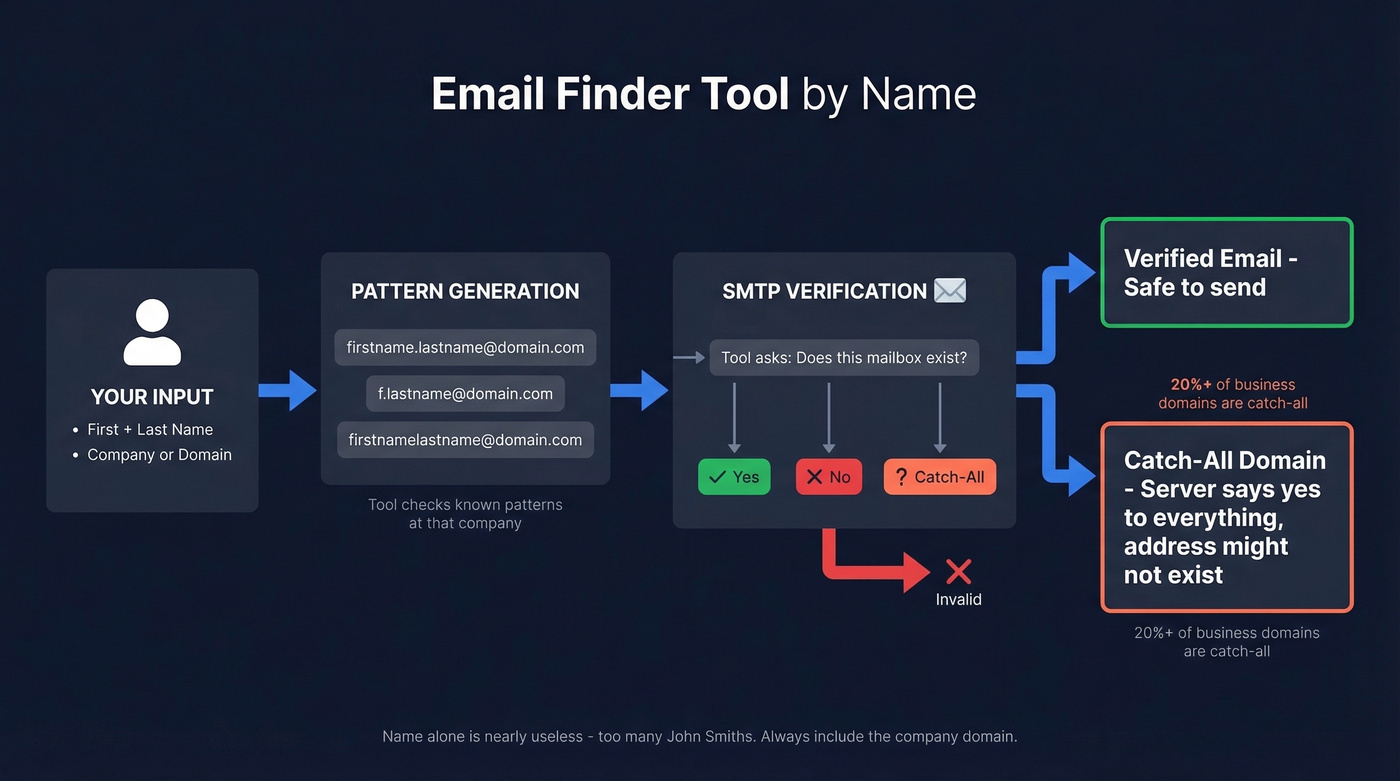
You provide a name and a company or domain. The tool generates pattern permutations - firstname.lastname@domain.com, f.lastname@domain.com, firstnamelastname@domain.com - based on known patterns at that company. If the tool has seen other emails at that domain before, it already knows which format the company uses. If you want a deeper breakdown of common formats, see pattern permutations.
Next, the tool verifies which pattern actually resolves to a real inbox. Most use SMTP simulation - they ping the mail server and ask "does this mailbox exist?" without sending an email. The server responds yes, no, or "catch-all," meaning it accepts everything, so the tool can't confirm whether a specific address is real. For the technical details, read our guide to SMTP verification.
That catch-all problem is massive. Roughly 20%+ of business domains are configured as catch-all, and for those, basic SMTP verification is useless - the server says "yes" to every address, real or fake. Tools that don't handle catch-all domains separately will inflate your "verified" count with addresses that don't exist. The minimum input for reliable results is name + company domain. Name alone is nearly useless. Too many John Smiths.
Free Ways to Find an Email by Name
Before you pay for anything, try these manual methods. They work better than you'd expect for small lists.
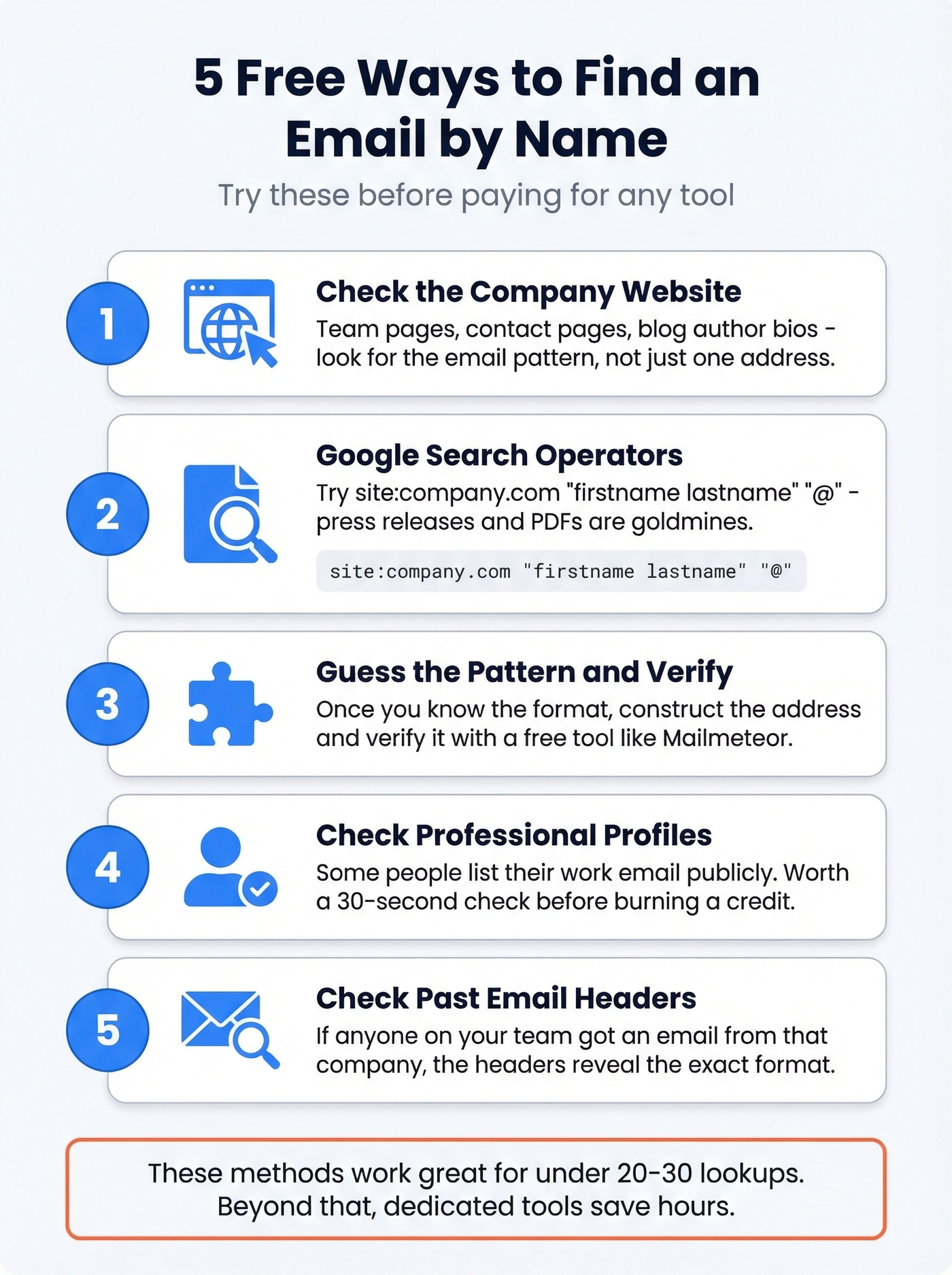
Check the company's website. Contact pages, team bios, and blog author profiles often display email addresses or reveal the company's email pattern. If you find marketing@company.com and jsmith@company.com on the same page, you've cracked the format.
Use Google search operators. Try site:company.com "firstname lastname" "@" or "firstname.lastname" "@company.com". Google indexes more email addresses than you'd think - press releases, conference speaker pages, and PDF documents are goldmines. (More tactics here: search for email addresses on Google.)
Guess the pattern and verify. Once you know a company uses firstname.lastname@domain.com, construct the address and run it through a free verification tool. Free no-account tools like Mailmeteor or EXPERTE's email checker can handle one-off verifications, though their accuracy on catch-all domains is limited compared to paid options. If you’re doing this at scale, use a dedicated email verification process instead of ad-hoc checks.
Check professional profiles. Some people list their work email publicly on their profiles or personal websites. Hit-or-miss, but worth a 30-second check before burning a credit.
Look at email headers from past correspondence. If anyone on your team has ever received an email from that company, the headers reveal the exact format.
For anything beyond 20-30 lookups, manual methods become impractical. That's where dedicated tools earn their keep. If you’re comparing options, start with our roundup of email finding tools.
Best Email Finder by Name Tools in 2026
Here's the thing: most teams don't need the most expensive tool. If you're closing deals under $10K, you probably don't need ZoomInfo-level data. A focused tool with high accuracy will outperform a bloated platform you only use at 15% capacity.
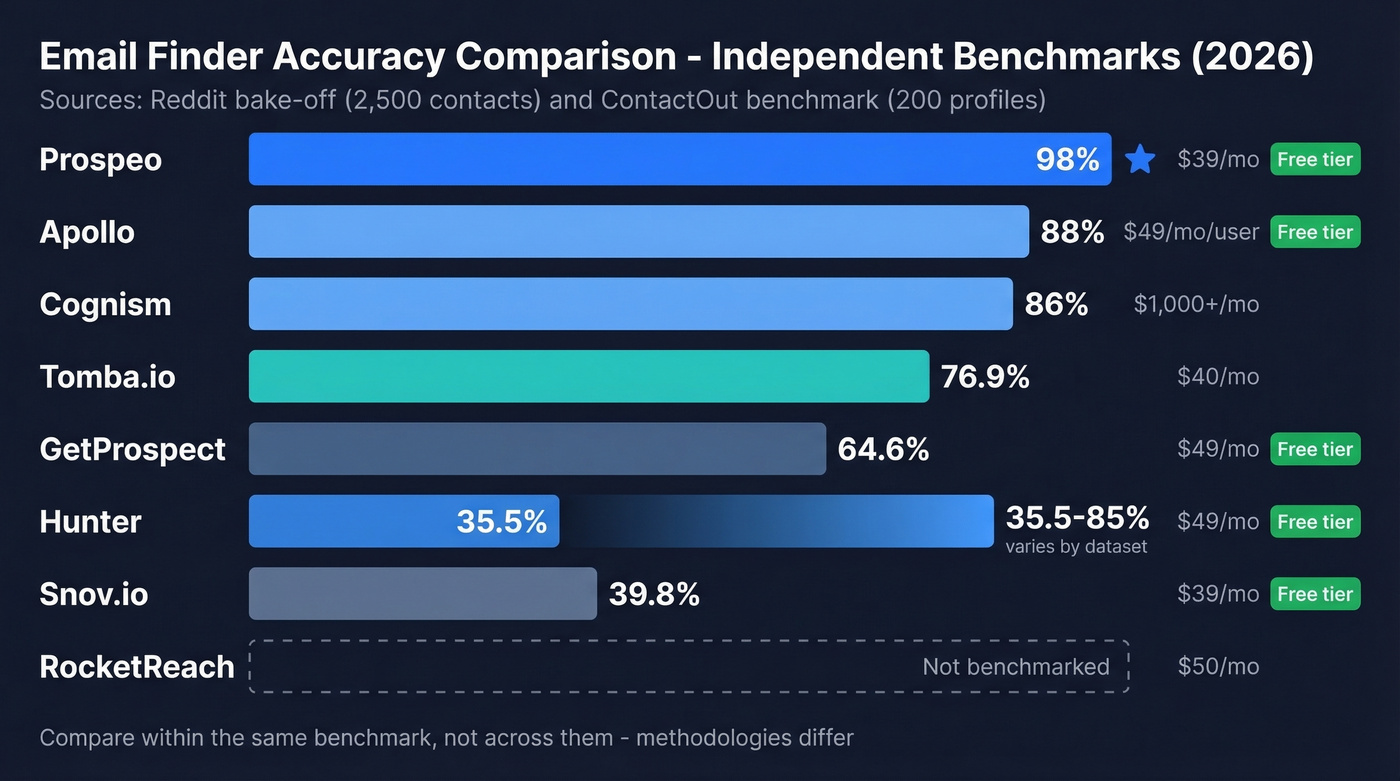
Before choosing, understand the two billing models shaping this market. Pay-per-search tools charge you every time you look someone up, whether they find an email or not. Pay-per-verified tools like GetProspect and Tomba.io only charge when they return a verified result. The right model depends on your hit-rate tolerance and how predictable you need your budget to be. If you want more options in this category, see our list of the best B2B email finder tool picks.
| Tool | Valid Rate | Free Tier | Starting Price | Best For |
|---|---|---|---|---|
| Prospeo | 98% accuracy | 75 emails/mo | ~$39/mo | Accuracy + freshness |
| Hunter | 35.5-85%* | 50 credits/mo | $49/mo | Verification layer |
| Snov.io | 39.8%* | 50 credits/mo | ~$39/mo | International leads |
| RocketReach | Not benchmarked | Limited | ~$50/mo | Limited-info searches |
| GetProspect | 64.6%* | 50 emails/mo | $49/mo | Pay-for-verified model |
| Tomba.io | 76.9%* | Limited | ~$40/mo | Highest bake-off yield |
| Apollo | 88%† | Free tier | ~$49/mo/user | Large database + CRM |
| Cognism | 86%† | None | ~$1,000-3,000/mo | EU/UK data |
\Reddit bake-off (2,500 contacts). †ContactOut benchmark (200 profiles). Methodologies differ - compare within the same benchmark, not across them.*
Prospeo
Use this if: You need the highest email accuracy available and can't afford bounces - agencies running client campaigns, teams that have already burned a domain, or anyone scaling outbound past 200 emails/day.
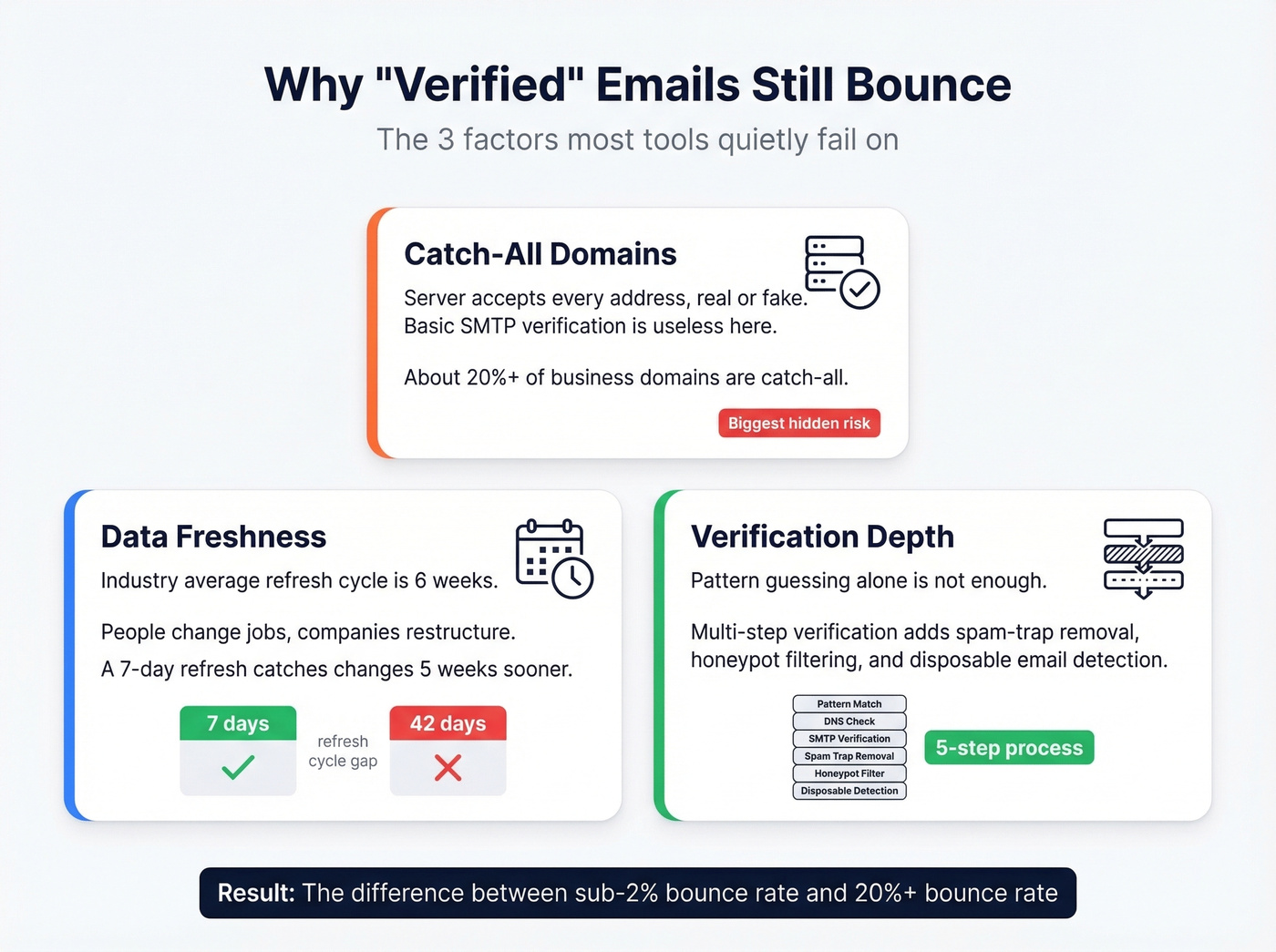
Prospeo's 300M+ profile database runs on a 7-day refresh cycle, which matters more than most people realize. The industry average is six weeks. That five-week gap is where stale data lives, and stale data is the #1 cause of "verified" emails bouncing.

The 5-step verification process includes catch-all handling, spam-trap removal, and honeypot filtering. It uses proprietary email-finding infrastructure rather than relying on third-party providers, which is why it holds 98% accuracy where pattern-guessing tools fall apart. At roughly $0.01 per email, the unit economics are hard to beat. The Chrome extension with 40,000+ users works on company websites and professional profiles for one-click lookups, and native integrations push verified contacts straight into Salesforce, HubSpot, Instantly, Lemlist, and Clay. If you prefer browser-based workflows, compare the top email finder extensions.
One customer, Stack Optimize, built from $0 to $1M ARR using Prospeo's data - maintaining 94%+ deliverability, sub-3% bounce rates, and zero domain flags across all their clients. That's the kind of result you get when the data is actually fresh.
Hunter
Use this if: You already have email addresses and need a verification layer, or you're doing low-volume lookups and want a generous free tier.
Hunter gives you 50 free credits/month, and verification costs just 0.5 credits per email. The Starter plan runs $49/mo for 2,000 credits, with Growth at $149/mo for 10,000. Clean, simple, well-integrated.

The tradeoff: Hunter's database is small. In a Reddit bake-off testing 2,500 contacts, Hunter returned just 35.5% valid emails. A ContactOut benchmark on 200 profiles put it higher at 85%. The gap comes down to dataset composition - Hunter performs better on well-known US companies and worse on international or smaller firms. The consensus on r/coldemail is that it's "better as a verification layer than a finder." For a deeper breakdown, see Hunter.io use cases.
Skip this if: You need high find rates on international leads or niche industries. The database isn't deep enough.
Snov.io
Starting around ~$39/mo with built-in email automation, Snov.io saves you from paying for a separate sequencer. That alone makes it one of the cheapest total-cost options for teams that don't already have an outreach tool.
In the Reddit bake-off, it hit 39.8% valid - not chart-topping. But the international coverage is where it earns its reputation. If you're targeting EMEA or APAC, Snov.io consistently surfaces contacts that US-focused tools miss. For domestic-only prospecting, other tools will outperform it.
RocketReach
"Most accurate so far" - r/coldemail practitioner after testing multiple tools
That same user reported their bounce rate "dropped a lot" after switching. RocketReach's strength is working with incomplete data - just a name, maybe a partial company name - and still finding something useful. Plans start around ~$50/mo. It's not the cheapest option, but when you're targeting mid-size SaaS companies where org charts are sparse, that fuzzy-matching capability is genuinely valuable. (If you’re evaluating it, see RocketReach pros and cons.)
If you already have clean, structured prospect lists with full name + domain, you're paying a premium for a capability you won't use.
GetProspect
| GetProspect | Typical Per-Search Tool | |
|---|---|---|
| Charge for no-result searches | No | Yes |
| Bake-off valid rate | 64.6% | Varies |
| Free tier | 50 valid emails/mo | 25-50 credits/mo |
| Credit rollover | Yes | Rarely |
GetProspect only charges for verified contacts - unverified and not-found results don't cost you. The free plan gives you 50 valid emails/month, Starter is $49/mo for 1,000 valid emails. The pay-only-for-verified model makes budgeting predictable, especially for teams with inconsistent prospecting volume. One limitation: the lower tiers include just 5 phone numbers, so look elsewhere if you need direct dials at scale.
Tomba.io
Tomba.io won the Reddit bake-off outright at 76.9% valid emails from 2,500 contacts, and it uses the same pay-only-for-verified model. Plans start around ~$40/mo. If raw find rate is your top priority and you want independent test results backing the claim, Tomba.io deserves a spot in your stack.
Apollo
Apollo has one of the largest databases in the space and a generous free tier, but practitioners consistently flag stale data and bounces on older contacts. It starts around $49/mo per user and works best as a CRM-plus-database combo rather than a pure email finder.
Cognism
Cognism is the go-to for EU and UK data quality, but enterprise pricing of ~$1,000-3,000+/mo puts it out of reach for SMBs and solo operators. If you're selling into the UK or DACH region with budget to match, it's worth a conversation.
A Note on Instantly Lead Finder
Practitioners on Reddit mention Instantly's Lead Finder frequently - it claims 450M+ contacts and waterfall enrichment. It wasn't included in the Reddit bake-off, so we can't compare it directly. If you're already using Instantly for sequencing, the built-in finder is convenient, but we'd still recommend verifying outputs through a dedicated tool before sending. If you’re building a stack, compare email finder and verifier tools side by side.

Catch-all domains, stale records, and pattern-guessing failures cause 20%+ bounce rates. Prospeo's 5-step verification with catch-all handling and 7-day data refresh keeps you under 2% - across 300M+ profiles at $0.01/email.
Find any email by name and actually land in their inbox.
How Accurate Are These Tools, Really?
No single benchmark tells the whole story. Let's look at three independent-ish tests side by side.
| Benchmark | Who Ran It | Sample Size | Geography | Top Result | Key Insight |
|---|---|---|---|---|---|
| Reddit bake-off | Practitioner | 2,500 contacts | Mixed | Tomba.io (76.9%) | Huge spread: 29.9%-76.9% |
| Dropcontact benchmark | Vendor (Dropcontact) | 20,000 contacts | 9,800 US / 9,700 EU / 500 RoW | Dropcontact (54.9%) | Audited wrong-domain assignments |
| ContactOut benchmark | Vendor (ContactOut) | 200 profiles | US SaaS | ContactOut (90%) | Small sample, narrow vertical |
The Reddit bake-off is the most directionally useful because a practitioner ran it on a real input file with raw results. The Dropcontact study is the most methodologically rigorous - it used live email delivery rather than just SMTP checks, and it's the only benchmark that audited wrong-domain assignments, where a tool returns a valid email that belongs to the wrong person. That geographic split of 9,800 US contacts versus 9,700 European contacts also revealed significant accuracy differences by region that most tests ignore entirely. Disclosure: Dropcontact funded their study and their CEO created one of the tools tested.

The key insight across all three: "found rate" and "deliverable rate" are different numbers. A tool can "find" an email by guessing a pattern and getting an SMTP confirmation, but that email might still bounce when you actually send to it. In our experience, the gap between "found" and "deliverable" is often 10-20 percentage points for tools that rely on basic pattern matching. For a more complete framework, see email address verification.
Treat every vendor benchmark with healthy skepticism. The vendor always wins their own test.
Why "Verified" Doesn't Mean Deliverable
This distinction costs teams more domain reputation damage than any other single factor. A "verified" email passed an SMTP check at the time of verification. That's it. It doesn't mean the email will be deliverable when you send your campaign three weeks later.
Three reasons verified emails still bounce:
Catch-all domains. These servers accept every address - real or fake - so verification tools can't distinguish valid from invalid. Hunter's own verification benchmark found the top verifier scored only 70% accuracy across 3,000 real emails, largely because of catch-all and unknown responses.
List decay. About 2% of a verified list goes invalid within four weeks. People change jobs, companies restructure, domains expire. If you verified a list in January and send in March, you're working with degraded data.
The external verifier paradox. Running emails through a second verification tool can actually reduce your valid list by up to 20%, because many verifiers conservatively reject catch-all addresses that would've delivered fine. You end up with a smaller, "safer" list - but you've thrown away good contacts. This is one of the most underappreciated dynamics in outbound, and almost nobody talks about it.
Your target: keep bounce rates below 2%, ideally 0-1%. Anything above 5% and you're actively damaging your sender reputation. If you’re troubleshooting deliverability, start with DNS reputation.
The Right Workflow: Find, Verify, Send
Here's the workflow we've seen work consistently at scale:
Gather name + company domain. This is the minimum input. Name alone won't cut it. Build your list from CRM data, event attendee lists, or manual research.
Run through an email finder. Use a tool that finds and verifies in one step - catch-all handling should be automatic, not something you triage manually. Whether you're looking up 50 prospects or 5,000, this single change eliminates the most common failure point in outbound workflows.
Handle catch-all and unknown results. If your tool flags addresses as catch-all or risky, route those to a secondary sending domain. Never mix risky emails with your primary domain's reputation.
Verify close to send time. Ideally within one week. The closer to send, the fresher the verification. Tools with a 7-day data refresh cycle reduce this risk significantly.
Monitor bounce rate in your first 50 sends. If bounces spike above 3%, pause and re-verify. Don't push through a bad list hoping it gets better.
Re-verify your entire list every four weeks. For agency-scale operations sending 500-1,000 emails/day, you need sub-5% bounce rates to maintain deliverability - and sub-2% is the real target.
Stack Optimize built a $1M agency on Prospeo data - sub-3% bounce rates, zero domain flags. When you find emails by name through proprietary infrastructure instead of third-party guessing, 98% accuracy is the baseline.
Your sending domain is too valuable for unverified data.
Is It Legal to Find Someone's Email?
Short answer: B2B prospecting using business email addresses is legal in most jurisdictions, but the rules vary and the penalties are real.
Under GDPR, you can process business emails under the "legitimate interest" basis - meaning you have a genuine business reason to contact someone. But you must offer an opt-out, process only business addresses (never personal), and be able to justify the outreach if challenged. Maximum penalties reach EUR20M or 4% of global revenue, and enforcement has included fines exceeding EUR1.2 billion for a single violation.
In the US, CAN-SPAM requires a functioning opt-out mechanism and honest subject lines but doesn't require opt-in for B2B email. CCPA gives California residents the right to know what data you've collected and request deletion. Multiple new state privacy laws took effect in 2025, with additional state-level regulations expected through 2026, adding ongoing complexity for US-based teams.
The line is clear: B2B outreach to business emails with an opt-out mechanism is standard practice. Scraping personal or consumer email addresses is where you cross into risky territory. Make sure your tool has a DPA available and routes data compliantly - the Dropcontact benchmark flagged that many providers route EU personal data through US servers, creating FISA 702 exposure.
FAQ
What's the best email finder by name tool in 2026?
For accuracy and data freshness, Prospeo leads with 98% verified email accuracy and a 7-day refresh cycle at ~$0.01 per email. For the highest independent find rate, Tomba.io scored 76.9% in a Reddit bake-off of 2,500 contacts. For budget international prospecting, Snov.io at ~$39/mo includes built-in sequencing.
How do I find an email with just a name and company?
Enter the person's full name and company domain into an email finder tool. It generates pattern permutations based on known formats at that company, then verifies which address resolves to a real inbox via SMTP checks. For one-off lookups, guess the pattern manually and verify with a free tool like Mailmeteor.
How many valid emails should I expect from 100 names?
Benchmarks show 30-77% valid rates depending on the tool. With a mid-tier finder, budget for 40-60 usable emails per 100 names. Higher-accuracy tools push that number up, but no tool hits 100% - some contacts simply aren't findable.
Can I find an email from a name alone without the company?
It's possible but unreliable. Without a company domain, the tool can't narrow down which email pattern to test or verify against a specific mail server. RocketReach handles incomplete data better than most, but accuracy drops significantly. Always pair a name with at least a company name for usable results.
How often should I re-verify my email list?
Re-verify every four weeks minimum. About 2% of a verified list goes invalid within a month as people change jobs and companies restructure. Tools with weekly data refresh cycles reduce this risk, but re-verification before any major send is still best practice.