

How to Set Up Email Follow-Up Automation Without Burning Your Domain
You built a 5-email sequence, launched it to 2,000 contacts, and watched your bounce rate climb past 7%. Two weeks later, your primary domain's sender reputation is wrecked and half your emails land in spam. Email follow-up automation should prevent this - but only if your data is clean and your infrastructure is right. The fix isn't better copy or more follow-ups. It's smarter tooling and verified contacts.
What You Need (Quick Version)
- Cold outreach follow-ups at scale - Smartlead or Mailshake. Both handle inbox rotation, auto-stop on reply, and multi-step sequences.
- CRM-based follow-ups - HubSpot sequences (Professional tier) or Pipedrive paired with Zapier for no-reply triggers.
- Before you automate anything - Verify your list. Bad data will tank your automated follow-ups regardless of which tool you pick. We've watched teams go from 8% bounce rates to under 2% just by running verification before launch.
What Automated Follow-Up Emails Actually Do
Follow-up automation sends pre-written emails based on triggers you define - time elapsed, recipient behavior, or lack of response. The "no reply after X days" trigger is the workhorse for outbound teams. Behavior-based triggers like opened-but-didn't-click or pricing-page visits add intelligence for marketing sequences.
The baseline requirement in 2026 is auto-stop on reply. If your tool can't detect that a prospect responded and pause the sequence automatically, you'll send follow-ups to people who already said yes - or worse, who already said no.
AI-powered personalization is gaining ground too, with tools like Outreach pulling context from company 10-Ks and other web signals to customize messages at scale, collapsing 15-20 minutes of manual prospect research into seconds. But the fundamentals haven't changed: define a trigger, write a sequence, set stop conditions, and make sure your data is clean. For teams at scale, add consent logging and preference management to that list - governance isn't glamorous, but it keeps you compliant.
Benchmarks Worth Knowing
Let's ground this in real numbers. A study of 16.5 million cold emails across 93 business domains found that a single email generates an 8.4% reply rate. That's your baseline. Sending 4+ emails in a sequence triples unsubscribe rates and more than triples spam complaint risk. More isn't better - it's riskier.
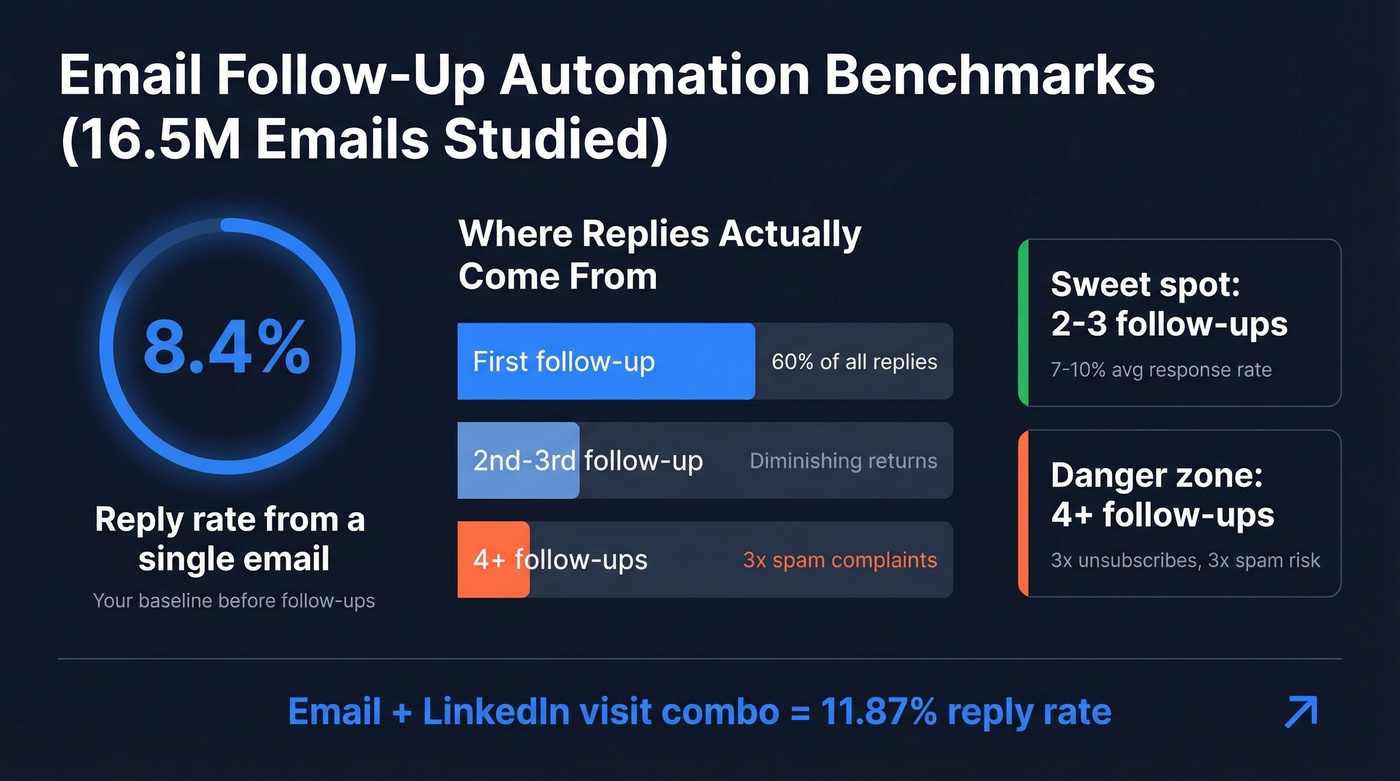
The first follow-up is the most important email in your sequence. Roughly 60% of all replies come after that first follow-up, not the original email. After that, returns diminish fast. Average cold email response rates sit around 7-10%, and SMBs tend to tolerate more follow-ups than enterprise buyers, who punish persistence quickly.
When email follow-ups plateau, consider adding LinkedIn touchpoints. That same 16.5M-email study found a message-plus-visit combo hit an 11.87% reply rate, outperforming extended email threads. Multichannel isn't optional anymore.
Here's the thing: fewer follow-ups with clean data beats more follow-ups with bad data. Every time. A 3-email sequence to verified contacts will outperform a 7-email sequence where 8% of addresses bounce.
CRM Automation vs. Outreach Tools
Use your CRM if: you're running warm follow-ups to inbound leads, your sequences are simple with time-based delays, and you're already on HubSpot Professional or higher.
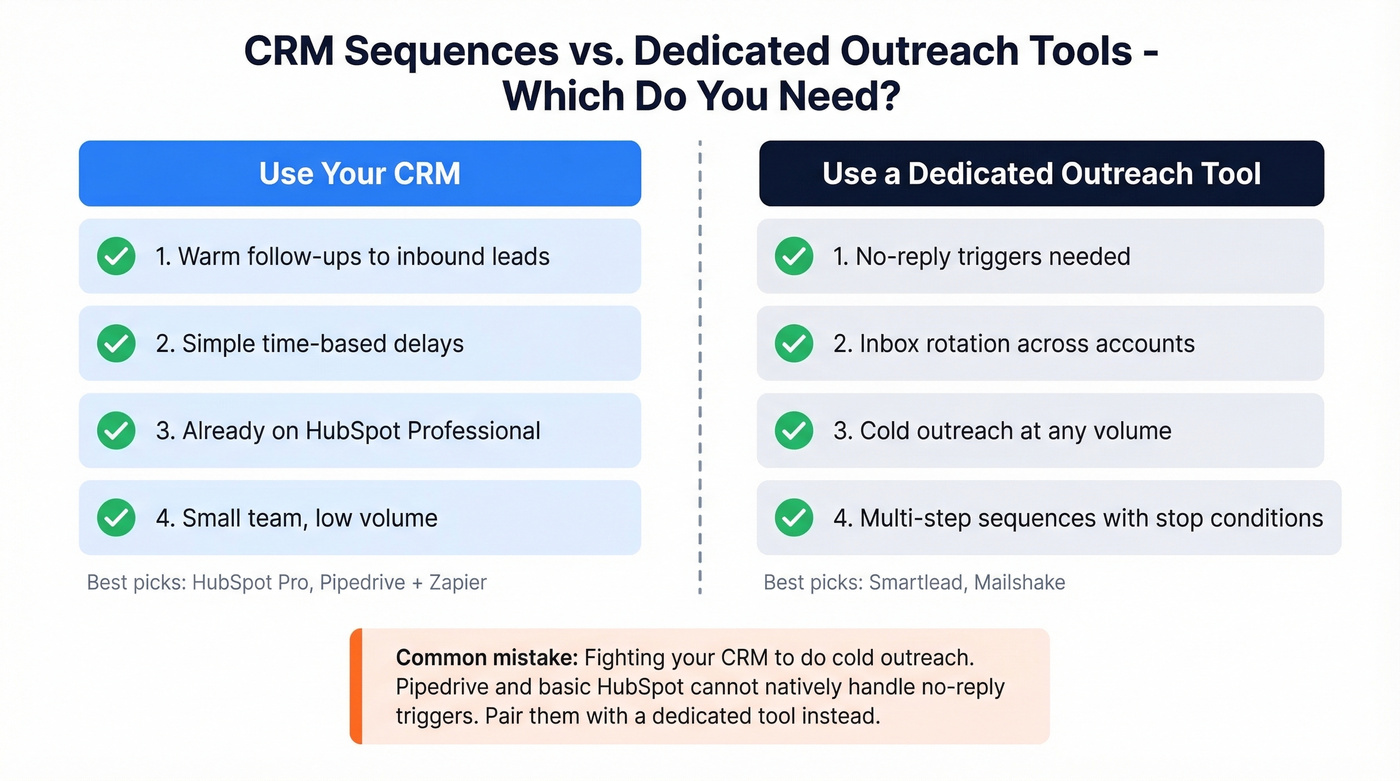
Skip your CRM if: you need "follow up if no reply" triggers, inbox rotation across multiple sending accounts, or you're doing cold outreach at any real volume. Even for a three-person team sharing a single inbox, the same principles apply - you just need lighter tools.
Most CRMs can't natively handle the "no reply" trigger. Pipedrive users hit this wall constantly - the platform doesn't support automatically emailing a contact who hasn't responded within a set number of days. HubSpot can do it, but sequences are gated to the Professional tier, which typically lands around $90-$150/user/month depending on the package. That's real money if you have five reps.
For teams on Pipedrive, Zoho, or basic HubSpot, the practical path is pairing your CRM with a dedicated outreach tool. Smartlead or Mailshake handle the sequencing; your CRM handles the pipeline. Pipedrive's Zapier integration guide walks through the bridge - trigger a sequence when a deal moves to a specific stage, or log replies back to your CRM automatically. Stop fighting your CRM to do something it wasn't built for.

Bad data is the #1 reason follow-up sequences destroy domain reputation. Prospeo's 5-step email verification and 7-day data refresh cycle keep your bounce rate under 2% - exactly where it needs to be for automated sequences. At $0.01 per verified email, cleaning your list costs less than a single bounced follow-up costs your sender reputation.
Verify your list in five minutes. Protect your domain for months.
Step-by-Step Setup Guide
These steps work regardless of which tool you're using.
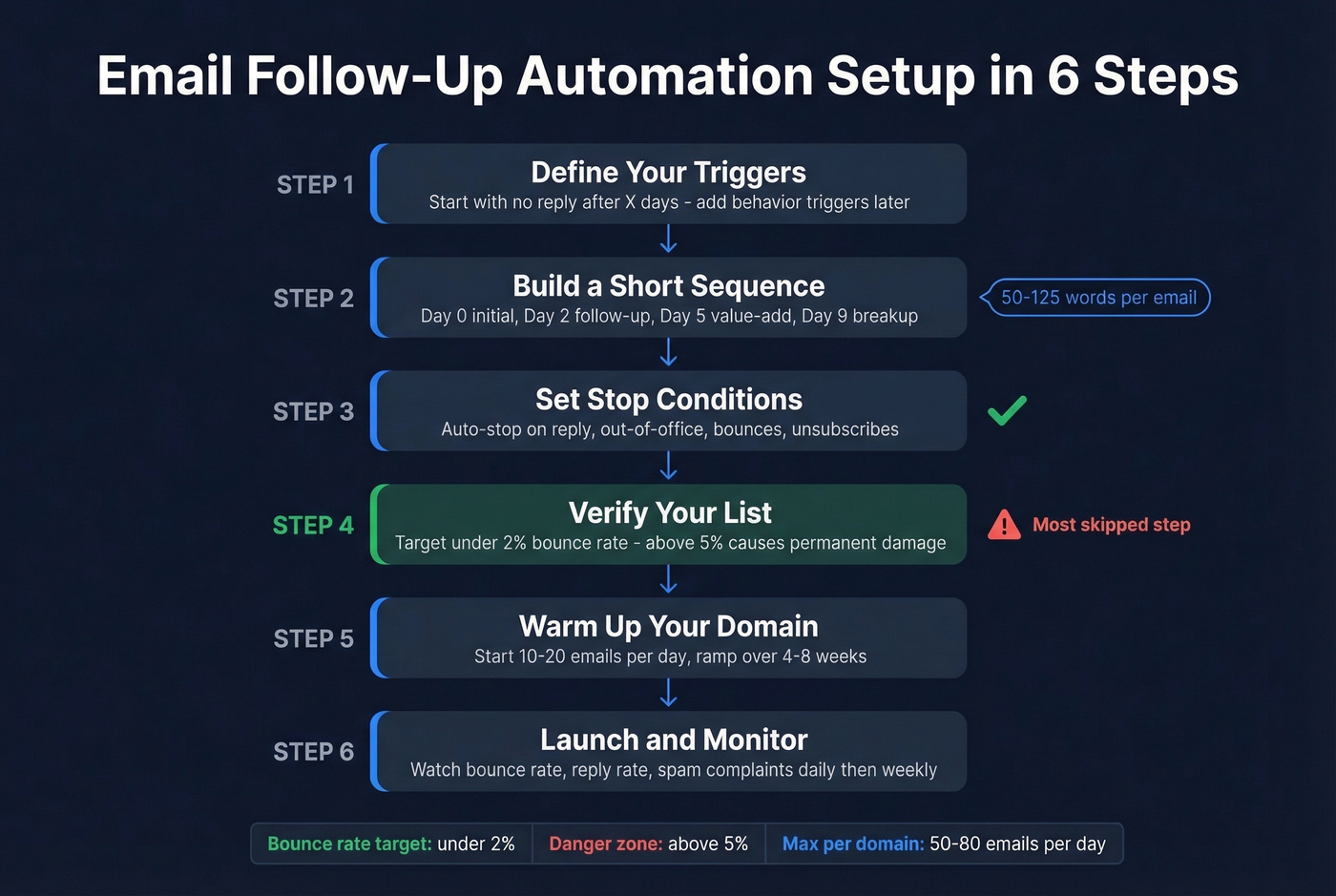
Step 1: Define your triggers. The most common trigger is "no reply after X days." Start there. Behavior-based triggers like opened email or clicked link are useful but add complexity - save them for round two. (If you want to go deeper on trigger design, see sales triggers.)
Step 2: Build a short sequence. Two to three follow-ups is the sweet spot. Not seven. Your cadence should look something like Day 0 (initial email), Day 2 (first follow-up), Day 5 (value-add), Day 9 (breakup). Keep each email between 50-125 words. If you need examples, borrow from sales follow-up templates.
Step 3: Set stop conditions. Auto-stop on reply is mandatory. Also set stops for out-of-office replies, bounces, and unsubscribes. Every modern outreach tool supports this.
Step 4: Verify your list. Run your contacts through an email verification tool before launching. You're aiming for under 2% bounce rate. Anything above 5% risks permanent domain reputation damage. This step takes five minutes and saves weeks of recovery. (More on bounce thresholds in email bounce rate.)
Step 5: Warm up your domain. If you're sending from a new or underused domain, start at 10-20 emails per day and ramp gradually over 4-8 weeks. Sudden spikes get flagged. For a full playbook, use unlimited email warmup tools.
Step 6: Launch and monitor. Watch bounce rates, reply rates, and spam complaints daily for the first week. Weekly after that. If bounce rate creeps above 2%, pause and clean your list.
The Deliverability Layer Nobody Talks About
Every guide on automated follow-ups talks about templates and timing. Almost none talk about deliverability - the unsexy thing that determines whether your emails actually land in inboxes.
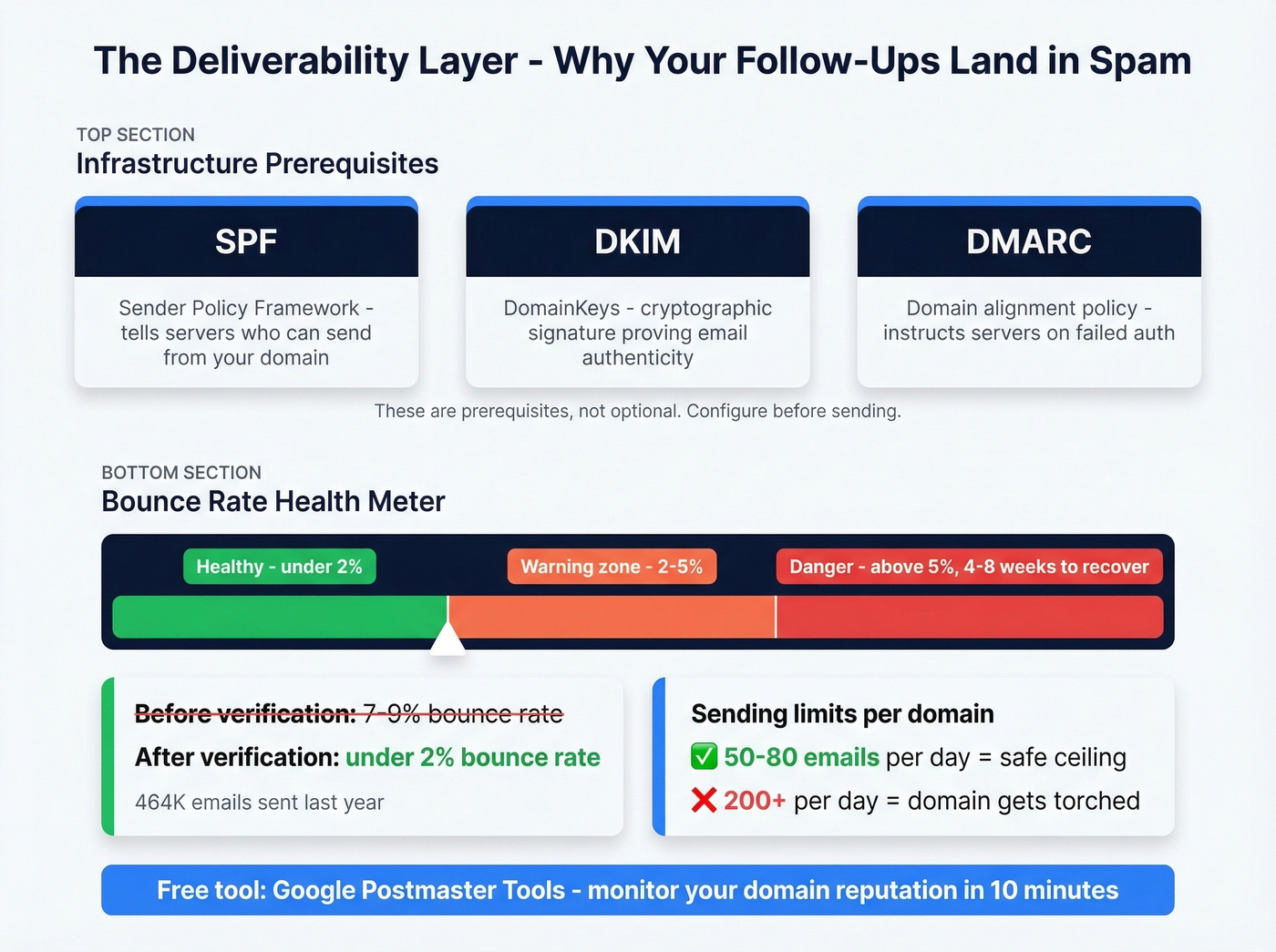
Deliverability starts with infrastructure. SPF, DKIM, and DMARC records are prerequisites, not optional. If you haven't configured these for your sending domain, stop reading and go do that first. Google Postmaster Tools lets you monitor your domain reputation over time - it's free and takes ten minutes to set up. If you want the full checklist, use this email deliverability guide.
Bounce rate is the single most important metric for domain health. Under 2% is healthy. Above 5% causes reputation damage that can take 4-8 weeks to recover from. If you're troubleshooting, start with email reputation tools and how to improve sender reputation.
One Reddit practitioner who sent 464K emails last year shared their results: bounce rate dropped from 7-9% to under 2% after switching to freshly validated lists. That same practitioner runs 34 domains at 75 emails per day each - because sending 200+ per day from a single domain gets torched. In our experience, 50-80 emails per domain per day is the ceiling before deliverability starts degrading. (For safe sending limits, see email velocity.)
Inbox placement rates range from 83% to 94% depending on your sending tool, according to EmailToolTester benchmarks. But the biggest variable isn't your tool - it's your list quality. Stack Optimize built their agency to $1M ARR using Prospeo's 5-step verification process and maintained 94%+ deliverability across all clients with bounce rates under 3%. That kind of result comes from validating every address before it enters a sequence - a 98% email accuracy rate and 7-day data refresh cycle mean you're working with contacts that are current, not stale records recycled from months-old databases.
You don't need more follow-ups - you need the right contacts. Prospeo gives you 300M+ profiles with 98% email accuracy, so your 3-email sequence outperforms their 7-email sequence. Teams using Prospeo-verified data see bounce rates drop from 8%+ to under 2%, which means your automated follow-ups actually land in inboxes.
Stop automating emails to addresses that don't exist.
Best Tools for Automated Follow-Ups
Look, if your average deal size is under $10k, you don't need a $100/user/month CRM sequence tool. A $39/mo outreach platform paired with solid verification will outperform HubSpot Professional for cold outreach nine times out of ten.
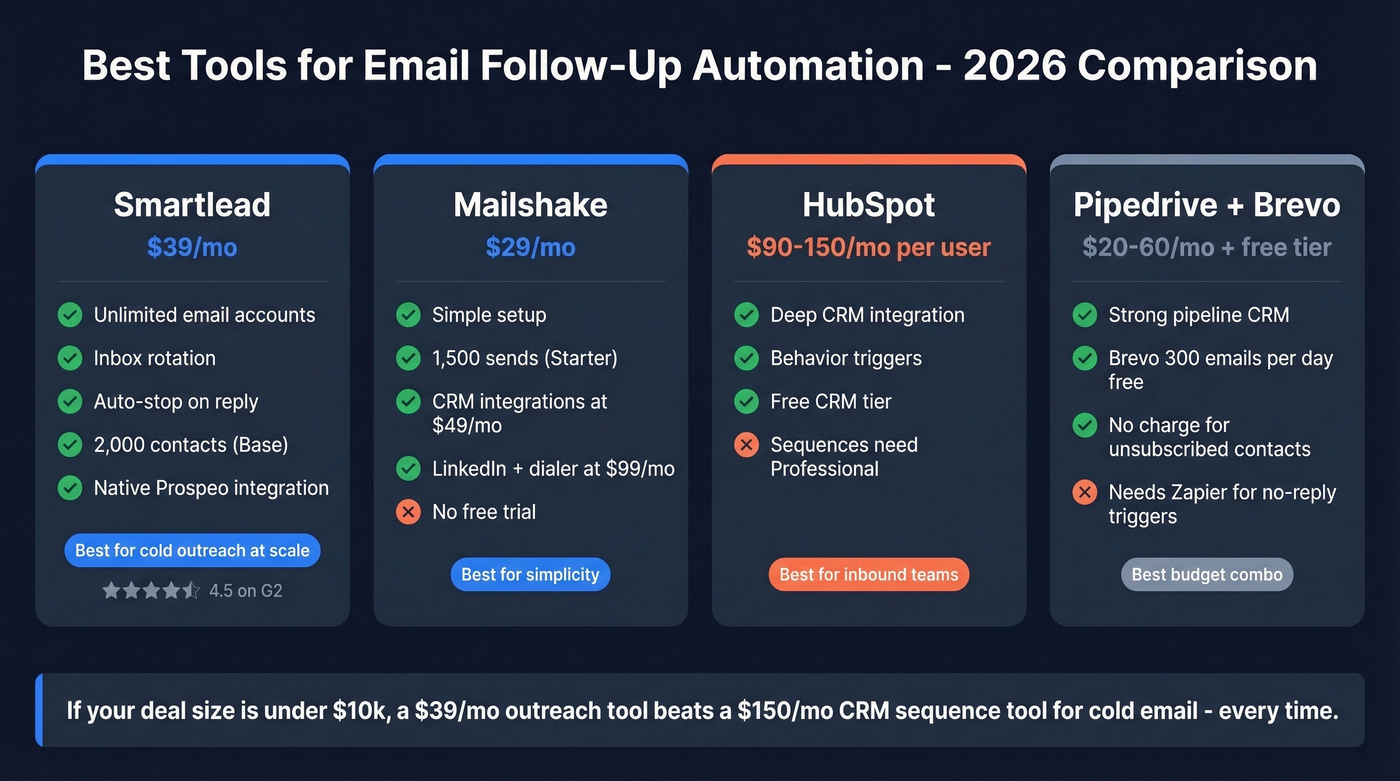
If you're choosing one tool, start with Smartlead.
| Tool | Best For | Starting Price | Free Tier |
|---|---|---|---|
| Smartlead | Cold outreach at scale | $39/mo | No |
| Mailshake | Simple cold email | $29/mo | No |
| HubSpot | CRM-integrated sequences | ~$90-$150/mo/user | Free CRM only |
| Pipedrive + Brevo | Pipeline CRM + marketing | ~$20-$60/mo/user + Brevo free tier | Trial / Yes |
Smartlead
Smartlead is the go-to for teams running cold outreach at volume. Unlimited email accounts, inbox rotation, and auto-stop on reply are the headline features. The Base plan at $39/mo gets you 2,000 contacts and 6,000 sends. Pro at $94/mo jumps to 30,000 contacts. If you're sending more than a few hundred cold emails per week, this is where you should start - 87,000+ businesses use it, and it carries a 4.5 G2 rating. It also integrates natively with Prospeo, so you can pipe verified contacts directly into sequences without exporting CSVs.
Mailshake
Mailshake is the simplest path to cold email follow-ups, but there's a catch: no free trial. You're paying upfront. Starter runs $29/mo for one email address and 1,500 sends. Email Outreach at $49/mo adds unlimited sends and CRM integrations with Salesforce, Pipedrive, and HubSpot. Sales Engagement at $99/mo layers in LinkedIn automation and a phone dialer. For teams that want follow-up sequences running in an afternoon without a learning curve, it delivers - just commit before you test.
HubSpot, Pipedrive, and Brevo
HubSpot is the best CRM-integrated option if your budget allows it. The free CRM is genuinely useful, but sequences require Professional, which typically lands around $90-$150/mo per user. If you're evaluating CRMs, compare a few examples of a CRM.
Pipedrive is a solid pipeline CRM but needs Zapier for no-reply triggers - plan on typical CRM pricing in the $20-$60/mo per user range plus Zapier costs. Skip it for cold outreach unless you're already locked into the ecosystem.
Brevo is worth a look for marketing automation with a generous free tier of 300 emails per day. Unlike Mailchimp, Brevo doesn't charge for unsubscribed contacts - a detail that matters as your list matures.
Follow-Up Email Templates
Keep subject lines under 50 characters. Subject lines with fewer than nine characters show the highest open rates according to the Higher Logic 2024 Association Email Benchmark Report. Every email below should be 50-125 words. If you want more options, pull from these cold email follow-up templates and email subject line examples.
Day 2 - The Nudge. This is your highest-value email. 60% of replies come here. Keep it short, reference your original email, and ask one question. "Hi [Name], wanted to make sure this didn't get buried. Quick question - [one-line value prop]? Worth a 15-minute call?"
Day 5 - The Value-Add. Share something useful - a relevant case study, a data point, or a resource. Don't repeat your pitch. "Thought this might be relevant - [Company X] cut their [metric] by 40% using [approach]. Happy to walk through how."
Day 9 - The Breakup. Frame it as closing the file. Loss aversion is powerful - breakup emails can drive re-engagement rates as high as 40%. "Looks like the timing isn't right. I'll close this out on my end. If things change, I'm here."
Mistakes That Kill Your Sequences
- Sending 4+ emails per sequence. Data from 16.5M cold emails is clear: this more than triples spam complaints and triples unsubscribes. Stick to 2-3 follow-ups.
- Ignoring bounce rates. Above 5% and your domain reputation takes damage that lasts weeks. Verify before you send.
- Slow welcome emails. Subscriber engagement peaks in the first 15 minutes after opt-in. If your welcome email fires an hour later, you've already lost momentum.
- "Launch and disappear." Review metrics weekly for active campaigns. Bounce rate creeping up? Reply rate dropping? Catch it early or pay later.
- Blasting 200+ emails per day from one domain. The consensus on r/coldemail is consistent: run 3-5 domains sending 50-80 per day each. A single overloaded domain gets flagged fast.
FAQ
How many follow-up emails should I send?
Two to three follow-ups is the sweet spot for most outbound campaigns. A study of 16.5M cold emails shows that 4+ emails triples unsubscribes and spam complaints. The first follow-up generates roughly 60% of all replies - after that, returns diminish fast.
Can my CRM handle automated follow-ups?
Most CRMs can't natively trigger "follow up if no reply." HubSpot Professional supports conditional sequences but costs $90-$150/mo per user. Pipedrive and most others need Zapier or a dedicated tool like Smartlead ($39/mo) to handle no-reply triggers properly.
How long should I wait between follow-ups?
Send your first follow-up 2-3 days after the initial email, then stretch to 4-5 days for subsequent touches. Enterprise buyers generally prefer more spacing than SMBs. Start with Day 0, Day 2, Day 5, Day 9 and adjust based on your reply rate data.
What's the best free option for email follow-up automation?
Pair Brevo's free tier (300 emails/day) with a free verification tool to get a zero-cost stack that handles both list cleaning and sequence sending. HubSpot's free CRM works for basic time-based follow-ups but lacks no-reply triggers. Prospeo offers 75 free email credits per month with full verification - enough for small teams running real campaigns.