

Email Identifier: How to Find, Verify, and Identify Any Email Address
You uploaded 2,000 "verified" contacts into your sequencer last Tuesday. By Friday, 23% had bounced, your domain reputation took a hit, and your SDR is asking why the tool you're paying for can't deliver working email addresses. The #1 complaint on r/coldemail? Tools that say "verified" but still produce 20%+ bounce rates in the real world.
"Email identifier" is a messy term, and almost nobody explains what it actually means - or which flavor of tool you need. Here's the breakdown.
What you need (quick version):
- Need to find emails from names + domains? Use an email finder like Prospeo or Hunter (or see other email search tools).
- Need to verify emails you already have? Use a verifier like ZeroBounce or Bouncer (and track your email bounce rate).
- Need both in one step? A combined finder-verifier eliminates the two-tool tax entirely.
What Does "Email Identifier" Actually Mean?
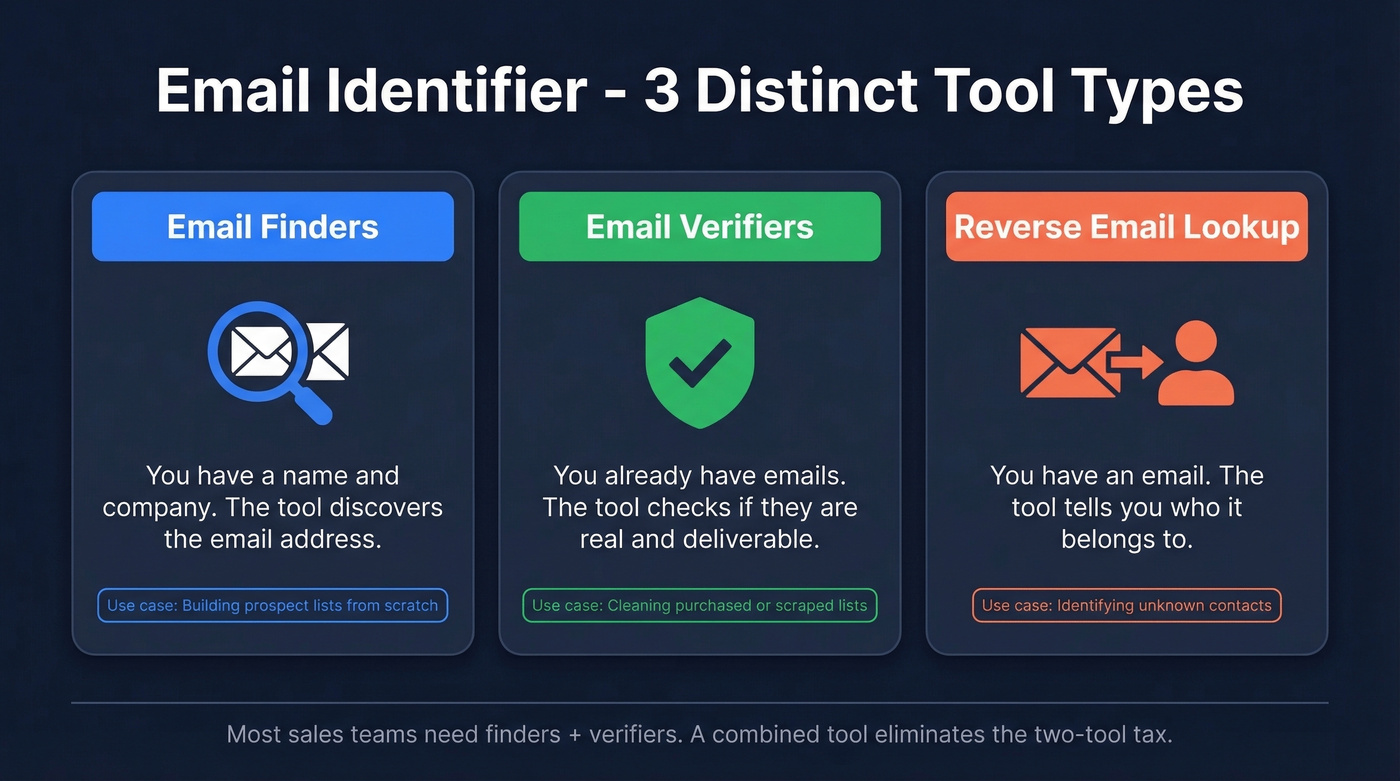
It's not a single product category. It's an umbrella covering three distinct things, and which one you need determines which tool you should buy.
One market-size estimate pegs the email finder tools market at roughly $13.9B in 2024, with ~10.5% CAGR through 2032 - so there's no shortage of options. The challenge is picking the right type.
Email Finders
An email finder discovers unknown email addresses. You feed it inputs - a person's name plus their company domain, a professional profile URL, or a company name - and it returns a working address. Finders use pattern matching, proprietary databases, and SMTP-level verification to generate results. If you're building prospect lists from scratch, this is what you need (more on name to email workflows).
Email Verifiers
A verifier validates addresses you already have. You upload a list of known emails, and it checks each one against a series of technical tests - syntax, DNS records, SMTP handshake, catch-all detection - then returns a status: valid, invalid, risky, or unknown. Bought a list or scraped contacts from an event? Verification keeps your domain safe (and supports broader email deliverability hygiene).
Reverse Email Lookup
You have an email address and want to know who it belongs to. Hunter's database indexes 100M+ email addresses for this purpose. Background-check tools like Instant Checkmate (around $35/mo) also serve this use case but are consumer-focused, not B2B. For most sales and marketing teams, reverse lookup is a niche need - the real demand is for finders and verifiers.
How Email Identification Works
Whether you're finding or verifying, the underlying technology follows a similar pipeline. Here's what happens in the milliseconds between clicking "verify" and getting a result.
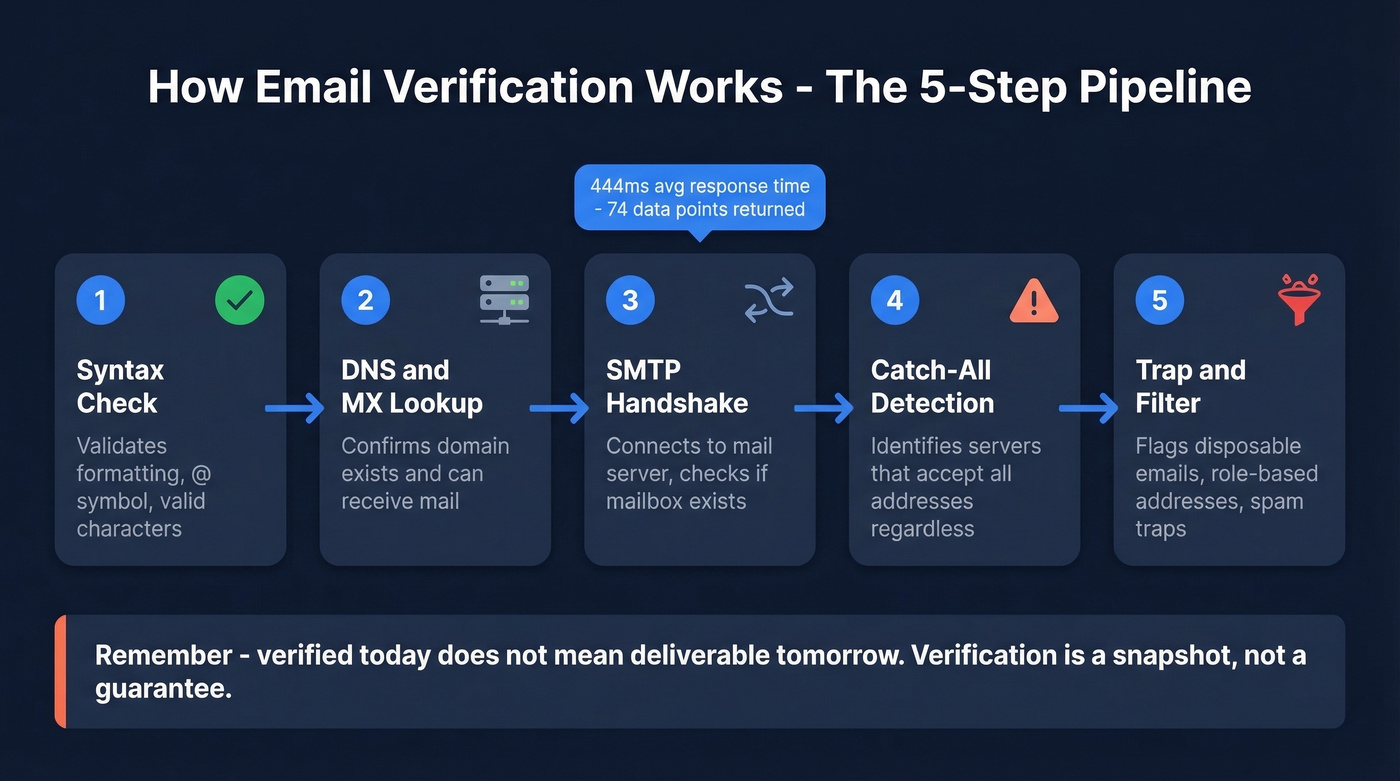
Step 1: Syntax validation. The tool checks whether the email follows proper formatting rules - correct use of the @ symbol, valid characters, no spaces. This catches typos and garbage entries instantly.
Step 2: DNS and MX record lookup. The tool queries the domain's DNS records to confirm the domain exists and has mail exchange records configured. No MX record? The domain can't receive email. Period.
Step 3: SMTP handshake. This is where it gets interesting. The tool connects to the mail server and initiates a conversation - it "shakes hands with the server without sending an actual email." The server's response reveals whether the specific mailbox exists. Email Hippo reports 444 ms API response time and returns 74 data points per email.
Step 5: Disposable, role-based, and spam-trap filtering. The tool flags throwaway services like Guerrilla Mail and Mailinator, generic role addresses like info@ and sales@, and known spam traps. Sending to any of these tanks your sender reputation (and can require spam trap removal work later).
Here's the thing: "verified" doesn't always mean "deliverable." A tool can confirm a mailbox exists today, but if the person leaves the company next month, that address is dead. Verification is a snapshot, not a guarantee.
Understanding Verification Results
When a verification tool returns results, you'll see status codes that determine your next move.
| Status | What It Means | Action |
|---|---|---|
| Valid | Mailbox exists, accepts mail | Send confidently |
| Invalid | Mailbox doesn't exist | Remove immediately |
| Catch-All | Server accepts everything | Send in small batches |
| Unknown | Server didn't respond clearly | Retry later or skip |
| Risky | Disposable, role-based, or flagged | Skip unless high-value |
Catch-all deserves extra attention. Your rep uploaded a purchased list, half the addresses come back as catch-all, and now you're deciding whether to send or skip. Send everything and you risk a 15%+ bounce rate. Skip everything and you lose 30% of your prospects.
The right answer: send catch-all addresses in small, throttled batches and monitor bounce rates in real time. If bounces spike above 2%, pull back immediately.

The article above explains why most "verified" lists still bounce - stale data. Prospeo refreshes every 7 days (not the 6-week industry average) and runs every email through 5-step verification with catch-all handling, spam-trap removal, and honeypot filtering. 98% accuracy. $0.01/email.
Stop paying twice for a finder and a verifier. Get both in one platform.
The Accuracy Gap
Every verification vendor claims 97-99% accuracy. The Mailgun State of Deliverability survey (2024, 1,100+ senders) found that 60% of teams regularly conduct list hygiene - yet Reddit threads are full of practitioners reporting 20%+ bounce rates on "verified" lists.
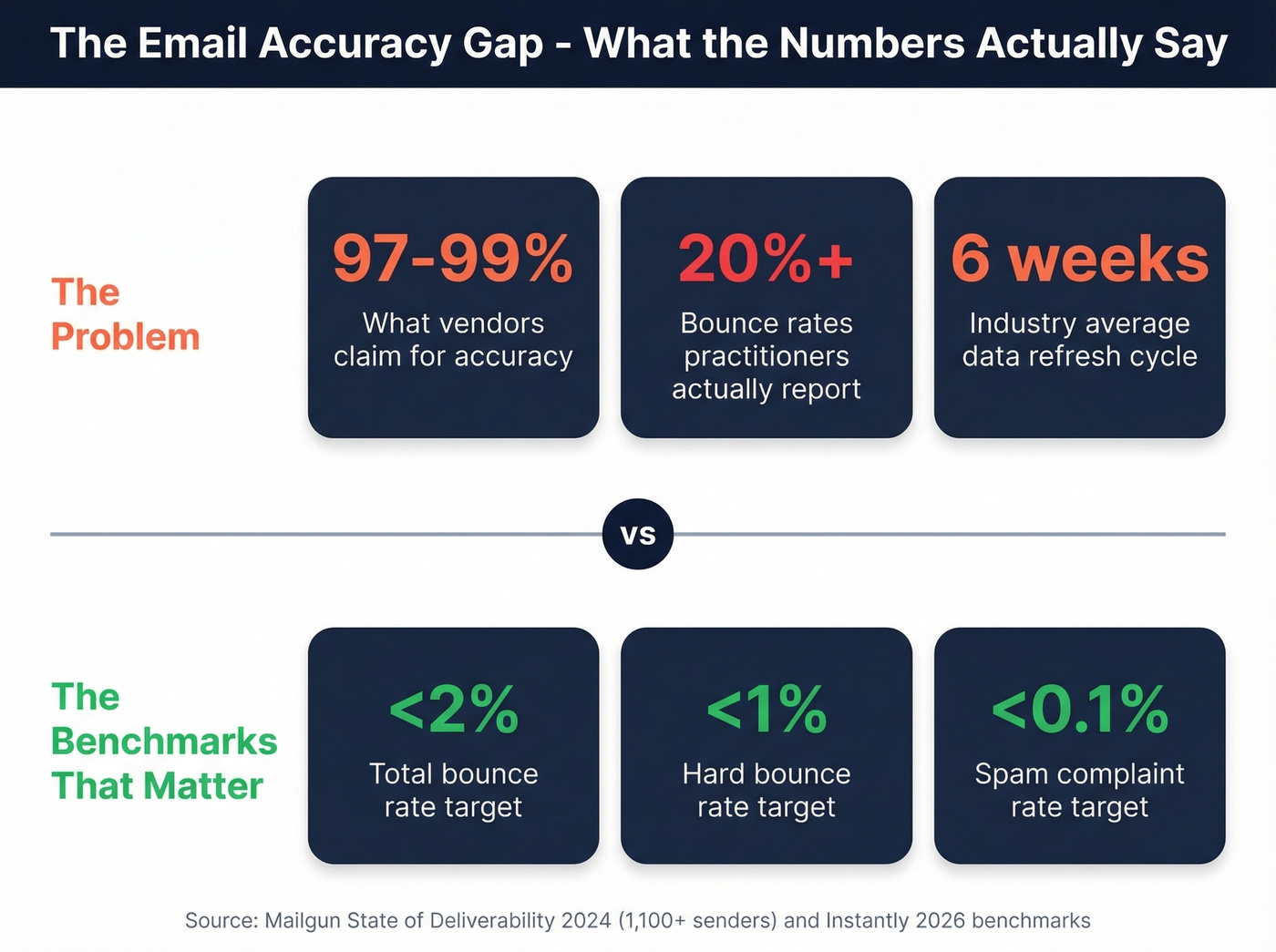
The gap comes down to data freshness. An email verified six weeks ago isn't necessarily valid today. People change jobs, companies restructure, domains expire. The industry average refresh cycle is six weeks, which means by the time you send, your "verified" data is already stale.
Let's be honest: most email verification tools are commodity products. The underlying technology - syntax checks, DNS lookups, SMTP handshakes - is well-understood and widely replicated. The real differentiator isn't the verification algorithm. It's how fresh the data is when it reaches you. If your deal sizes are modest, you probably don't need the most expensive tool on the market. You need the freshest data you can get.
For context, the benchmarks that matter for cold email deliverability: total bounces below 2%, hard bounces under 1%, spam complaints under 0.1%. Gmail and Yahoo now require SPF, DKIM, and DMARC authentication for bulk senders - and 71% of high-volume senders already use DMARC. If you aren't there yet, no verification tool will save you (see DMARC alignment for the gotchas).
Best Email Identifier Tools in 2026
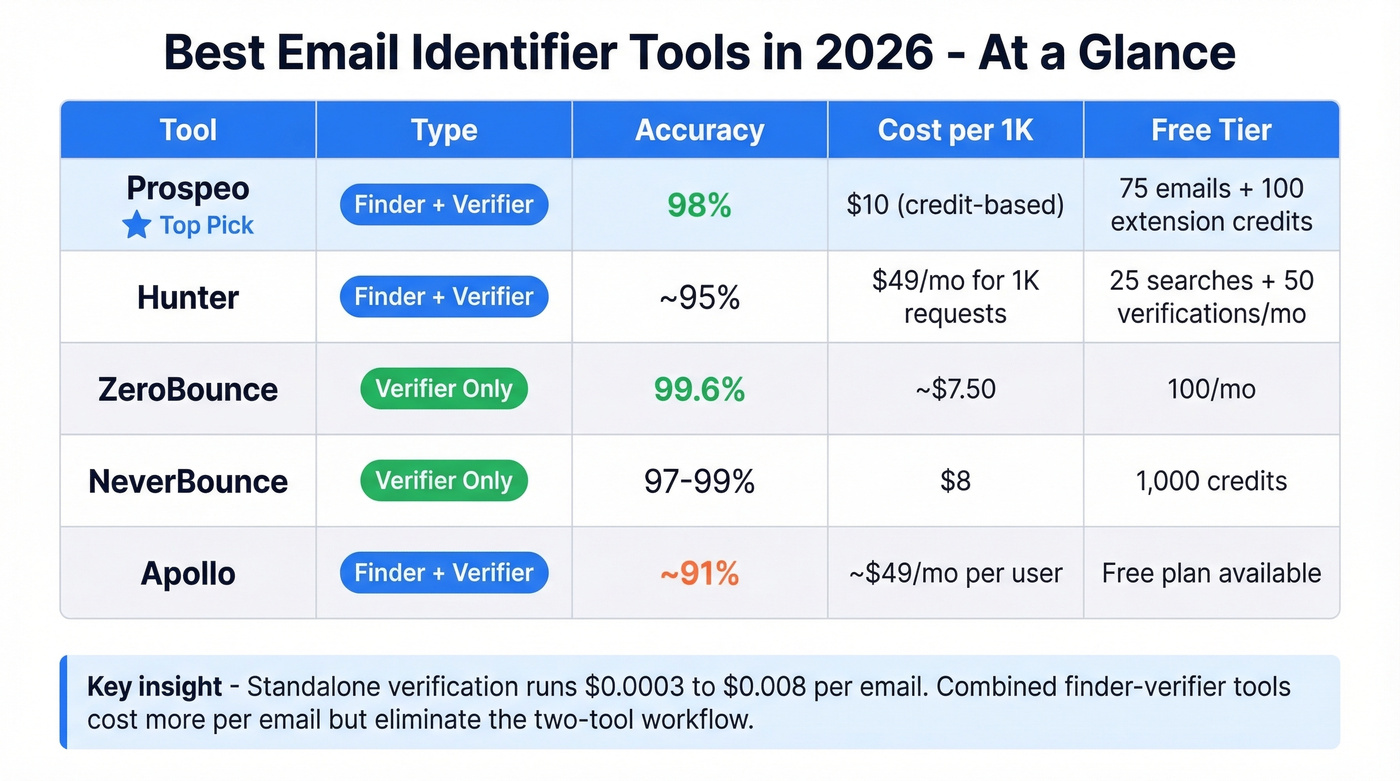
Standalone verification commonly runs $0.0003 to $0.008 per email, depending on volume and vendor. Here's how the top tools stack up.
| Tool | Type | Accuracy | Cost/1K | Free Tier | Best For |
|---|---|---|---|---|---|
| Hunter | Both | ~95% | $49/mo (1,000 requests) | 25 searches + 50 verifications/mo | Catch-all verification |
| ZeroBounce | Verifier | 99.6% | ~$7.50 per 1K | 100/mo | High-volume list cleaning |
| NeverBounce | Verifier | 97-99% | $8 | 1,000 free credits | Pay-as-you-go verification |
| Bouncer | Verifier | ~97% | $7 | 1,000 free credits | Budget verification |
| RocketReach | Finder | ~95% (est.) | ~$50-80/mo | Limited | Accuracy with minimal input |
| Skrapp | Both | 98% deliverability | Bundled | 100/mo | Prospecting with built-in verification |
| Clearout | Verifier | ~98% | ~$7-10 | - | Bulk list cleaning |
| Verifalia | Verifier | N/A (widget) | Free | Free widget | Quick single checks |
| Apollo | Both | ~91% | ~$49/mo/user | Free plan | Large database access |
Prospeo
Prospeo is the tool to start with if you need finding and verification in a single workflow. The database covers 300M+ professional profiles with 143M+ verified emails, and the proprietary email-finding infrastructure doesn't rely on third-party providers - which is why the 98% accuracy holds up in production, not just on a landing page.
The 5-step verification process handles catch-all domains, strips spam traps, and filters honeypots before you ever export a list. Stack Optimize built their agency from $0 to $1M ARR using Prospeo, maintaining 94%+ client deliverability with bounce rates under 3% and zero domain flags across all clients. That's not a cherry-picked case study - we've seen similar results from outbound agencies running thousands of emails per week.
Pricing runs about $0.01 per email on a credit-based model. The free tier gives you 75 verified emails plus 100 Chrome extension credits per month - enough to test the workflow before committing. No contracts, no annual lock-in.
If you're comparing options, start with the broader list of SDR tools your team actually needs.
Hunter
Hunter does finding and verification competently, but it doesn't lead in either category. Six million users trust it, with ratings of 4.6 on Capterra and 4.4 on G2, and the proprietary catch-all verification across major providers is genuinely useful.

Verification doesn't just ping the SMTP server - it cross-references against Hunter's own B2B database for an extra confidence layer. The free plan gives you 25 searches and 50 verifications per month. Paid plans start at $49/mo for 1,000 requests, scaling to $399/mo for 50,000.
Use this if you need a reliable verification layer on top of another data source and want catch-all handling you can trust. Skip this if you need a primary prospecting database - Hunter's database is smaller than dedicated platforms, and the consensus on r/agency is that it's better for verification than for sourcing.
ZeroBounce
ZeroBounce advertises 99.6% accuracy, and while every vendor inflates their number, ZeroBounce earns its premium reputation. It's verification-only - no email finding - but if you have a list and need it cleaned to near-perfect accuracy, this is where you go.

Pricing starts at $15 for 2,000 emails (the minimum purchase), which works out to about $7.50 per 1,000. You get 100 free monthly verifications to test. The tradeoff is clear: ZeroBounce won't help you build a list, but it'll make sure the list you have doesn't destroy your domain.
NeverBounce
NeverBounce is a popular verifier with a straightforward pay-as-you-go option: $8 per 1,000 emails. You get 1,000 free credits to start, enough to validate the tool against your own data. Accuracy sits at 97-99%. It's the tool you pick when you already have emails and just need a quick validation pass before launching a campaign.
Bouncer
At $7 per 1,000 emails, Bouncer is one of the cheapest per-email verification options in this group. You get 1,000 free credits to test. It's a pure verifier with no finder capability, but for teams on a tight budget, the math is hard to beat. We've seen agencies use Bouncer as their "second pass" verifier on lists that already went through a finder with built-in verification, just to catch stragglers (see more Bouncer alternatives if you're shopping).
RocketReach
One Reddit user on r/coldemail tested multiple finders and landed on RocketReach, reporting their bounce rate "dropped a lot." The tool's strength is finding accurate emails with minimal input - sometimes just a name and rough company info is enough. It's finder-focused, so pair it with a verification tool if you're sending at scale. Expect ~$50-80/mo for individual use.
Quick Mentions
Skrapp bundles finding and verification with 100 free credits per month and 98% deliverability. Best for prospecting workflows where you need both capabilities without juggling tools.
Clearout is a bulk list cleaner in the $7-10 per 1,000 range. Does one thing, does it reliably.
Verifalia is a top-ranking result for email identifier searches, which is ironic because it's essentially a free widget for quick single-email checks. Useful for one-off verification, not for production workflows.
Apollo has a massive database and a generous free plan, but accuracy on older contacts is a known issue. One Reddit user on r/agency noted that "data feels bad sometimes" with more bounces on stale records. If you're using Apollo, run your exports through a dedicated verifier before sending (or compare sales prospecting databases if you're evaluating data sources).
How to Choose the Right Tool
The decision tree is simpler than vendors want you to think.
Find or verify? If you're building lists from scratch, you need a finder or a combined tool. If you have a list from an event, a purchase, or a CRM export, you need a verifier.
What's your volume? Under 100 emails per month, free tiers will cover you. At 500-1,000 emails per day - the typical agency benchmark - you need a tool that keeps bounce rates under 5% at scale (and you’ll want to manage email velocity carefully).
For budget, pure verifiers run $7-10 per 1,000 emails. Combined finder-verifiers cost more per email but eliminate the two-tool tax. Enterprise platforms like Apollo charge per seat, which adds up fast when you're scaling a team.
Can your tool handle catch-all domains? If it can't, you're either bouncing on valid addresses or skipping 30% of your prospects. That's the hidden cost nobody talks about.
And if your workflow runs through Salesforce or HubSpot, check native integration support before committing. Rebuilding a workflow around a tool that doesn't connect to your stack wastes more money than the tool saves (use this guide to connect outreach tool to CRM).
You read about the accuracy gap - tools claiming 99% while users report 20%+ bounces. Prospeo's proprietary email infrastructure doesn't rely on third-party providers. Teams using Prospeo cut bounce rates from 35%+ to under 4% and book 26% more meetings than ZoomInfo users.
Get 75 free verified emails and see real accuracy, not marketing claims.
Email Identification Best Practices
You don't need a better verifier. You need fresher data and tighter hygiene.
Keep total bounces below 2% and hard bounces under 1%. These are the benchmarks top-performing senders hit consistently. Anything above and you're risking domain reputation damage that takes weeks to undo.
Hold spam complaints under 0.1%. Gmail and Yahoo will throttle you if complaints spike to 0.3%. One bad campaign can set you back a month.
Authenticate everything. SPF, DKIM, and DMARC at minimum p=none are non-negotiable for bulk sending in 2026. DMARC adoption jumped 11% year-over-year - the industry is moving fast, and laggards feel it. Google's bulk sender guidelines spell out the requirements clearly (and it helps to validate your setup against SPF record examples).
Reverify every 2 weeks for active outbound lists. Monthly for smaller or marketing-only lists. Emails decay faster than the 6-week industry average refresh cycle, especially in high-turnover industries like tech and SaaS. I've personally watched a list go from 97% valid to 89% in under three weeks during a round of layoffs at a target account.
Prioritize data freshness over one-time accuracy scores. A 99% accuracy number means nothing if the data was verified 8 weeks ago. Weekly refresh cycles matter more than the number on the vendor's landing page.
Verify at the point of capture, not just before sending. Real-time API verification on forms and imports catches bad data before it enters your CRM.
FAQ
What is an email identifier tool?
An email identifier tool finds, verifies, or looks up email addresses. The term covers email finders that discover unknown addresses from a name and company, verifiers that validate whether existing addresses accept mail, and reverse lookup tools that identify who owns a given address. Most B2B teams need a combined finder-verifier or a standalone verifier.
How often should I verify my email list?
Every 2-4 weeks for active outbound lists, monthly for marketing lists. People change jobs and domains expire faster than most teams realize. The industry average data refresh is 6 weeks, but tools with weekly refresh cycles - like Prospeo's 7-day cycle - help teams consistently maintain bounce rates under 3%.
What should I do with catch-all emails?
Send them in small, throttled batches and monitor bounce rates in real time - pull back immediately if bounces exceed 2%. Catch-all servers accept all mail regardless of whether the mailbox exists, so no verification tool can give a definitive answer. Hunter and Prospeo both offer proprietary catch-all handling that reduces but doesn't eliminate the risk.
Is email verification legal?
Yes. Verification checks whether a mailbox exists by communicating with the mail server - it doesn't send an email or access private data. GDPR compliance depends on how you obtained the address, not on the verification step itself. As long as you have a lawful basis for processing the contact data, verifying it is standard practice.
What's a good free email identifier to start with?
Prospeo's free tier offers 75 verified emails plus 100 Chrome extension credits per month with full find-and-verify capability. Hunter gives 25 searches and 50 verifications monthly. ZeroBounce provides 100 free verifications. For testing workflows before committing budget, a combined finder-verifier covers the most ground since it handles both discovery and validation in one step.