

Email Identity Verification: 3 Types Explained for 2026
Three different teams at the same company can all say they need "email identity verification" and mean three completely different things. A cold email sender wants to confirm a mailbox exists before hitting send. A domain admin wants to stop attackers from spoofing their company's address. A product engineer wants to prove that the person signing up actually controls the email they entered.
The term covers all three - which is why most guides on the topic are confusing and incomplete. This one isn't.
What You Need (Quick Version)
Before going deep, figure out which problem you're actually solving:
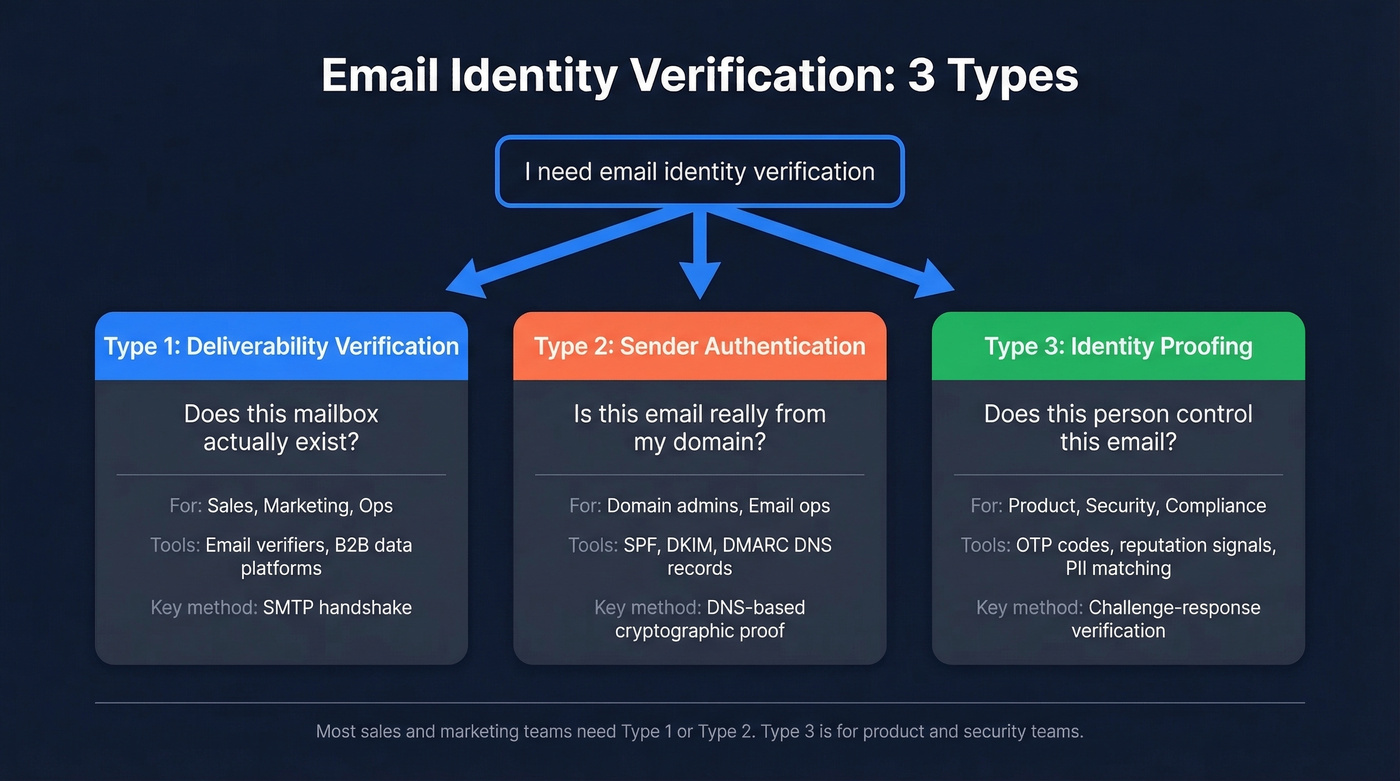
Verifying email addresses exist (deliverability). You've got a list of contacts and need to confirm the mailboxes are real before sending. Use a standalone verifier or a B2B data platform that verifies emails during the finding step - no separate tool needed. (If you’re building lists from scratch, start with these outbound lead generation tools.)
Proving your emails are really from you (authentication). You want inbox providers to trust that messages from your domain aren't spoofed. Set up SPF, DKIM, and DMARC records on your DNS. (If you need examples, see SPF record syntax and common pitfalls.)
Confirming a user's identity via email (KYC/fraud prevention). You're building a product and need to verify that the person signing up actually controls the email they entered. Use OTP codes, reputation signals, and PII matching.
If you're in sales, marketing, or ops, you need path one or two. Path three is for product and security teams.
Why It Matters in 2026
The stakes for getting this wrong have never been higher.
Attackers send roughly 3.4 billion phishing emails per day - 1.2% of all email traffic. Without proper sender authentication, your domain is a target for spoofing, and your recipients can't tell your real messages from fakes.
Google and Yahoo's stricter bulk sender requirements, enforced since late 2025, mean that sending 5,000+ messages a day without SPF, DKIM, and DMARC gets your emails throttled or rejected outright. And yet, only 33.4% of domains with DMARC records have reached enforcement. The other two-thirds run p=none - monitoring-only mode that doesn't block spoofing at all. (If you’re trying to fix inbox placement end-to-end, use this email deliverability guide.)
Email Deliverability Verification
This is the most common meaning for sales and marketing teams. You have email addresses. You need to know which ones are real before you hit send.
Here's the stat that should shape your tool choice: in one 10,000-email bake-off, catch-all resolution rates ranged from 8% to 94% across tools. That gap is the difference between actually cleaning your list and barely touching it. (Related: email bounce rate benchmarks and what the codes mean.)
How SMTP-Level Checks Work
Every verification tool follows the same basic sequence. It does an MX lookup to confirm the domain has mail servers, then opens an SMTP connection and initiates a handshake - knocking on the door and asking "does this mailbox exist?" The server responds with a status code:
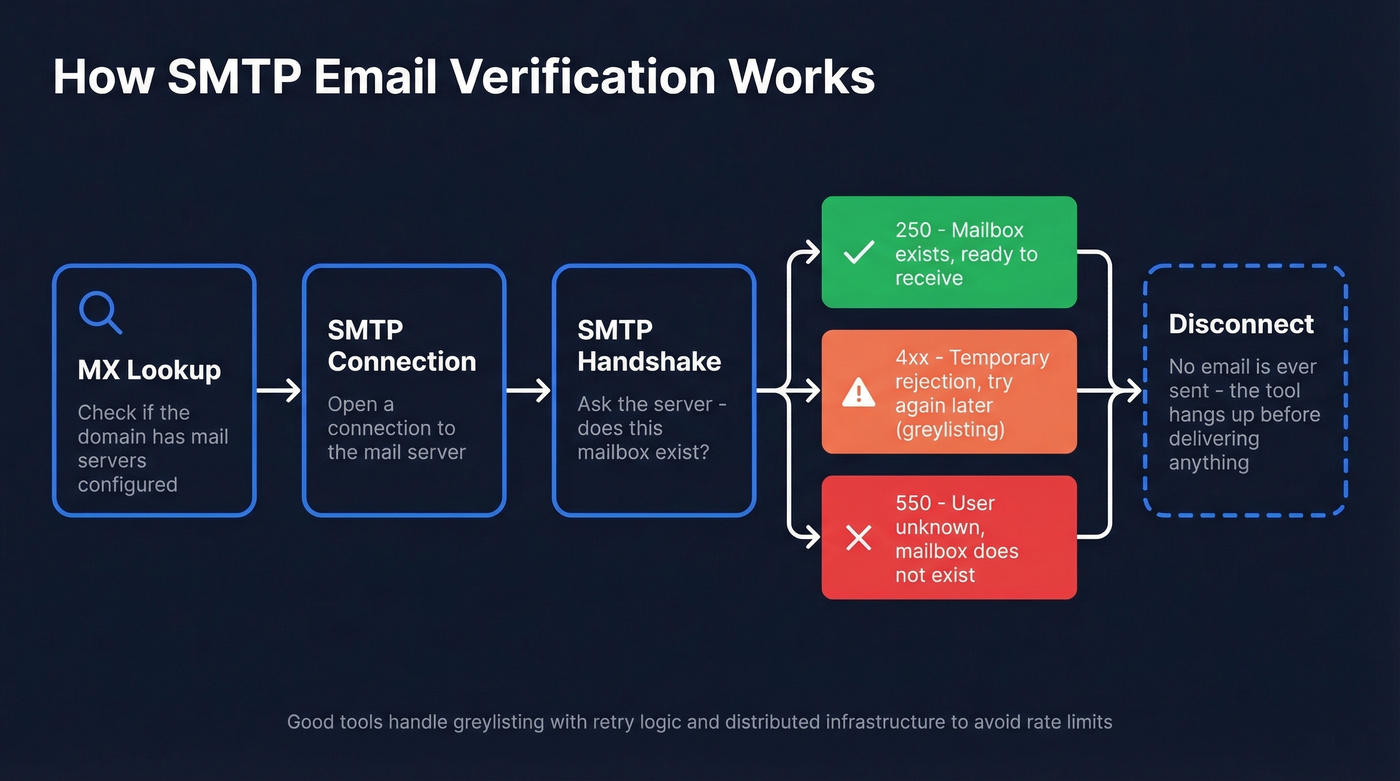
- 250 - mailbox exists, ready to receive
- 550 - user unknown, mailbox doesn't exist
- 4xx - temporary rejection (often greylisting)
No actual email gets sent. The tool disconnects before delivering any message. But it's not foolproof. Some servers use greylisting, which temporarily rejects the first connection to filter spam bots. Others rate-limit verification queries, so running 50,000 checks at once triggers blocks. Good tools handle both with retry logic and distributed infrastructure. (If you need a deeper walkthrough, see how to check if an email exists.)
The Catch-All Problem
About 28% of B2B email addresses sit on catch-all domains - servers configured to accept mail for any address, whether the mailbox exists or not. A basic SMTP check marks every address on a catch-all domain as "valid," even if half of them are dead.
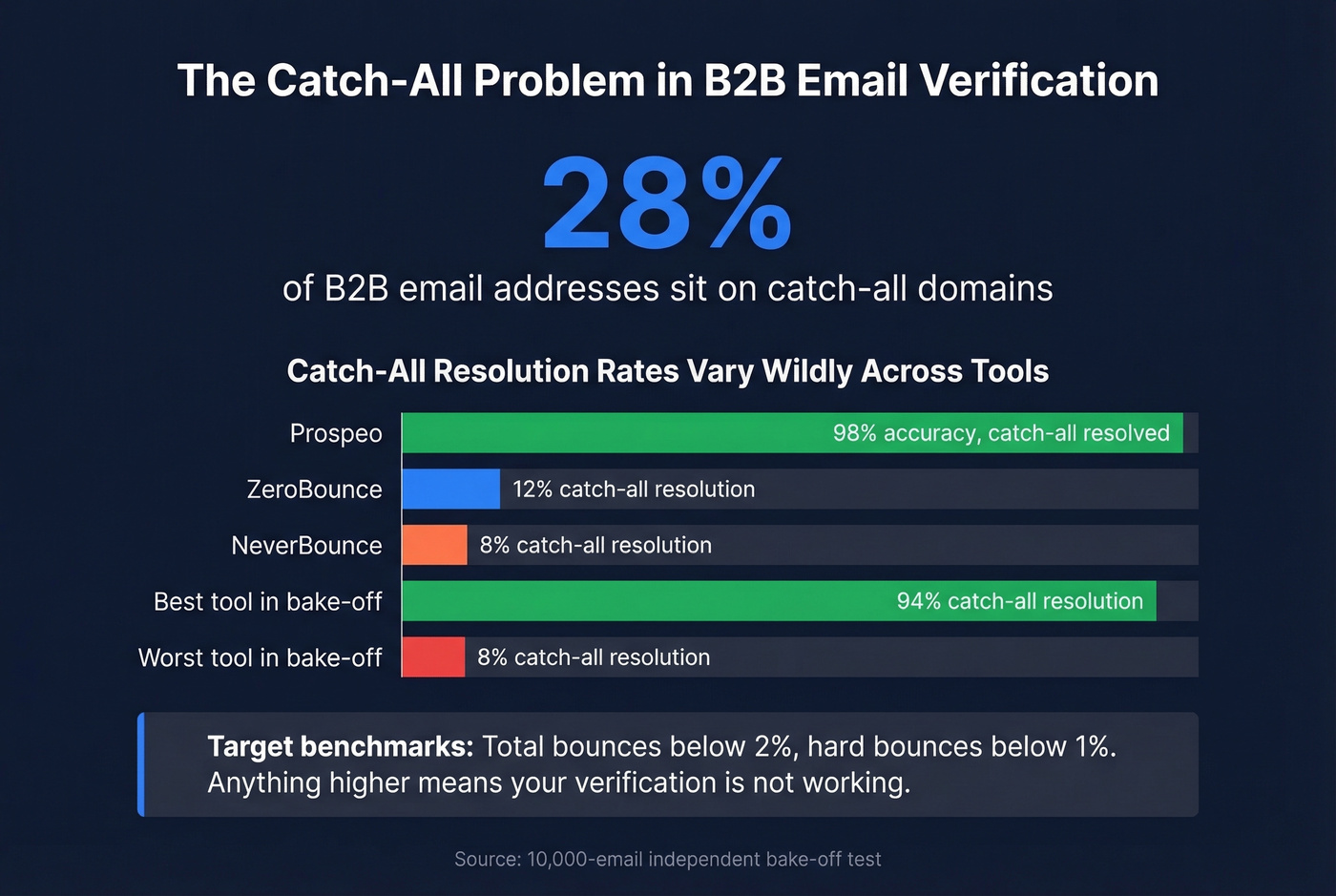
This is the single biggest differentiator between verification tools, and it's where cheap options fall apart. The benchmark to hit: total bounces below 2%, hard bounces below 1%. Anything higher means your verification isn't working. (If you’re cleaning risky lists, add spam trap removal to your checklist.)
Tools and Pricing Compared
| Tool | Best For | Accuracy / Catch-All | Cost/Email | Free Tier |
|---|---|---|---|---|
| Prospeo | B2B prospecting + verify | 98% / Yes | ~$0.01 (find + verify) | 75 emails/mo |
| ZeroBounce | Standalone list cleaning | 97.8% / Limited (12%) | ~$0.007-0.01 | 100/mo |
| NeverBounce | Budget bulk verification | 96.9% / Limited (8%) | ~$0.008 | None |
| MillionVerifier | High-volume bulk | 99%+ claimed | ~$0.0003 | None |
| Hunter | Find + verify combo | Catch-all support varies | ~$0.024-$0.025 | 100 verifs/mo |
Prospeo is the pick for B2B teams because it collapses two steps into one. Instead of finding emails in one tool and verifying them in another, every address runs through a 5-step pipeline - MX validation, SMTP handshake, catch-all resolution, spam-trap removal, and honeypot filtering - before it ever hits your export. At roughly $0.01 per email, that cost includes both finding and verifying the address, which makes the per-verification cost effectively lower than standalone tools. The 7-day data refresh cycle means addresses don't go stale between when you build a list and when you send, which matters a lot for outbound agencies running multiple client campaigns simultaneously. (If you’re comparing options, start with Hunter alternatives.)

ZeroBounce is the strongest standalone verifier if you already have lists from another source. 97.8% accuracy in independent testing is solid, and pricing starts around $15/mo for 2,000 emails. The weak spot is 12% catch-all resolution - if your list is heavy on corporate domains, risky addresses will slip through.
NeverBounce is the budget play at ~$0.008 per email. But 8% catch-all resolution means you're essentially skipping the hardest part of verification. Fine for marketing lists with mostly consumer addresses, not great for B2B outbound.
MillionVerifier is the cheapest at $0.0003 per email - useful for cleaning millions of records where edge-case accuracy isn't critical. Hunter bundles finding and verification but costs about ~$0.024-$0.025 per credit, making it expensive at scale.
Here's the thing: if your deal sizes are under five figures and you're running outbound, you probably don't need a separate verification tool at all. Use a platform that verifies during the finding step and stop paying twice for the same outcome. (Also make sure your sending speed is sane - see email velocity.)

Most teams find emails in one tool and verify them in another. Prospeo's 5-step verification - MX check, SMTP handshake, catch-all resolution, spam-trap removal, honeypot filtering - runs automatically before any email reaches your export. 98% accuracy at ~$0.01 per email, refreshed every 7 days.
Stop splitting your workflow. Find and verify in one click.
Catch-all domains hide 28% of B2B emails from basic verifiers. Prospeo resolves them - no separate tool, no extra cost. Teams using Prospeo cut bounce rates from 35%+ to under 4% and book 26% more meetings than ZoomInfo users.
Real verification means solving catch-all. Start with 75 free emails.
Sender Authentication (SPF, DKIM, DMARC)
This is the second meaning of email identity verification: proving to inbox providers that messages from your domain are actually sent by you. If deliverability verification asks "does this mailbox exist?", authentication asks "is this sender who they say they are?" (If you’re troubleshooting deliverability after setup, use email reputation tools.)
SPF - Who's Allowed to Send
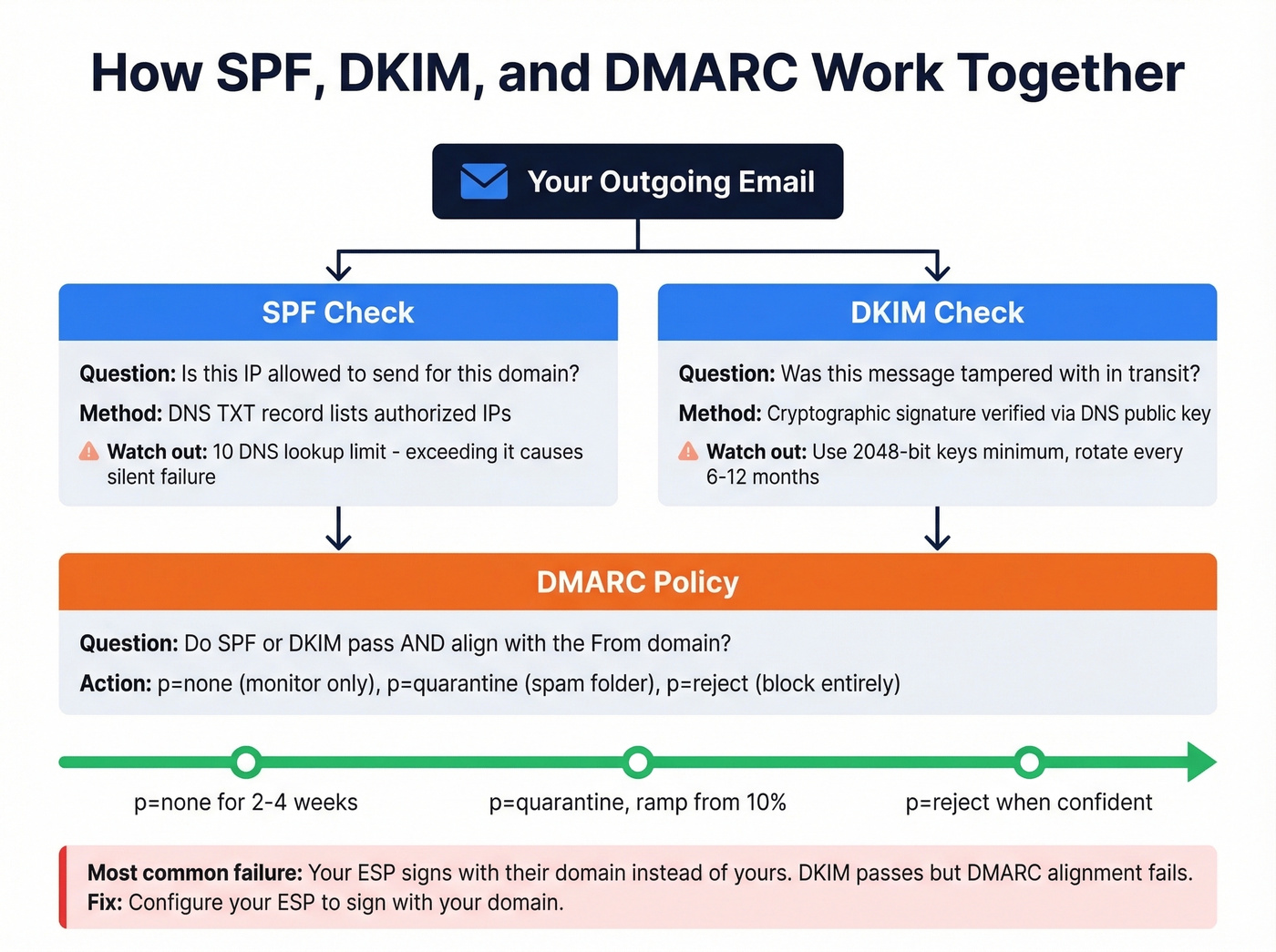
SPF (Sender Policy Framework) is a DNS record that lists every IP address and service authorized to send email on behalf of your domain. When a receiving server gets a message, it checks the sending IP against your SPF record.
A typical record looks like this:
v=spf1 ip4:203.0.113.0/24 include:_spf.google.com include:sendgrid.net ~all
The critical detail most teams miss: SPF has a 10-DNS-lookup limit. Every include, a, mx, and redirect mechanism counts as a lookup, and nested includes count too. Exceed 10 and you get a permerror - your entire SPF record silently stops working. Roughly 20% of Fortune 500 companies exceeded this limit during 2024 audits, which is a staggering number for something so preventable. The fix is flattening your includes into direct IP ranges, though that requires maintenance when your ESPs change their infrastructure.
Move from ~all (softfail) to -all (hardfail) once you've confirmed all legitimate senders are listed. Softfail is training wheels.
DKIM - Proving No Tampering
DKIM (DomainKeys Identified Mail) adds a cryptographic signature to every outgoing email. The receiving server looks up your public key via DNS and verifies the signature matches. If someone altered the message in transit, the signature breaks.
Your DKIM public key lives at a selector-based DNS location:
default._domainkey.example.com TXT "v=DKIM1; k=rsa; p=MIIBIjANBgkqh..."
Use 2048-bit keys minimum - 1024-bit is considered weak in 2026. Rotate keys every 6-12 months by publishing a new selector, updating your signing configuration, then retiring the old selector after a grace period.
The most common DKIM mistake we see is the "double domain" error in DNS UIs. Some providers auto-append your domain to the record name, so default._domainkey.example.com becomes default._domainkey.example.com.example.com. Always check your records with MXToolbox after publishing. (If you want a step-by-step test plan, see how to verify DKIM is working.)
DMARC - Tying It Together
DMARC tells receiving servers what to do when SPF and DKIM checks fail. Without it, SPF and DKIM are informational only - servers can ignore failures entirely.
_dmarc.example.com TXT "v=DMARC1; p=reject; rua=mailto:dmarc@example.com"
The rollout progression matters. Start with p=none for 2-4 weeks to collect reports without affecting delivery. Then move to p=quarantine with a pct ramp - start at 10%, increase weekly. Once you're confident all legitimate mail passes, move to p=reject. (If alignment is confusing, read DMARC alignment.)
The alignment requirement trips people up: the domain in the From: header must match either the SPF domain or the DKIM d= domain. If your ESP signs with their own domain instead of yours, DMARC alignment fails even if SPF and DKIM individually pass. Configure your ESP to sign with your domain. This is the single most common reason DMARC fails for teams that think they've set everything up correctly.
For monitoring during the p=none phase, Valimail Monitor is a free tool that surfaces which senders are passing and failing alignment, so you know exactly when it's safe to move to enforcement.
Mistakes That Break Authentication
- 11+ SPF lookups causing
permerror- your entire SPF record silently stops working - DKIM signed by ESP domain instead of your domain - passes DKIM but fails DMARC alignment
- Multiple SPF records on the same domain - instant
permerror(you can only have one) - Ignoring subdomains without an
sp=policy in your DMARC record - attackers spoofbilling.yourdomain.cominstead - Relaxed alignment masking real issues -
aspf=randadkim=rlet subdomains pass, hiding misconfigurations you should fix
Google & Yahoo Bulk Sender Rules
If you're sending 5,000+ messages per day, these aren't suggestions. They're requirements:
- SPF and DKIM must be configured and passing for your sending domain
- DMARC record required (minimum
p=none, thoughp=rejectis the goal) - SPF or DKIM alignment with the
From:domain - Spam complaint rate below 0.3%, ideally below 0.1% - monitor this in Google Postmaster Tools
- One-click unsubscribe header in every commercial email, honored within 2 business days
- Visible unsubscribe link in the email body
Let's be honest about priorities here: if your complaint rate is above 0.1%, fix that before worrying about anything else. No amount of authentication will save you if recipients are hitting the spam button. (For a full sending playbook, see best way to send bulk email without getting blacklisted.)
BIMI and Verified Logos
Once you've reached DMARC enforcement, there's one more layer worth pursuing. BIMI (Brand Indicators for Message Identification) displays your verified brand logo next to emails in supported inboxes like Gmail, Yahoo, and Apple Mail. It's the visual payoff for doing authentication right.
The prerequisites are straightforward: DMARC at p=quarantine or p=reject, plus a BIMI DNS TXT record pointing to a BIMI-compliant SVG Tiny PS logo file. For the certificate, you've got two options. A VMC (Verified Mark Certificate) requires a registered trademark and gets you Gmail's blue checkmark. A CMC (Common Mark Certificate), introduced in early 2025, doesn't require a trademark but needs proof your logo has been publicly displayed on your domain for 12 months.
For B2B senders running cold outreach, BIMI is a trust signal that compounds over time. Recipients see your logo, recognize your brand, and are more likely to open. It won't fix bad targeting, but it helps good emails land better.
Email-Based Identity Proofing (KYC/Fraud)
The third meaning belongs to product and security teams. This isn't about whether an email address exists or whether your domain is authenticated - it's about confirming that the person using an email address is who they say they are.
If you've ever seen a developer forum thread where someone asks about "email verification" and gets answers about SPF records when they meant account confirmation, you know how tangled this terminology gets. Skip this section if you're purely on the sales/marketing side.
Persona's framework breaks this into three checks. First, access: send an OTP code to the inbox and confirm the user can retrieve it. This proves they control the mailbox right now, but nothing more - shared inboxes and compromised accounts mean access doesn't equal identity.
Second, reputation signals: analyze the email address itself. How old is it? Is it from a disposable domain? What's the velocity of signups from this address? Is it on any blocklists? Domain age, free vs. corporate provider, "first seen vs. last seen" timestamps, and local-part pattern analysis all feed a risk score. Random strings like xk7q9@gmail.com behave very differently from jane.smith@acme.com in fraud models.
Third, ownership: match the email to other PII via external databases. Does this email address appear in credit bureau records, utility databases, or other authoritative sources linked to the person's name and address? This ownership layer is what elevates basic email checks into genuine identity proofing.
The typical flow for a product team: collect email, send OTP, verify code, run reputation check, and if risk is elevated, escalate to stronger IDV like document verification or biometrics. One abuse vector to watch for: signup bombing, where attackers use a victim's email to trigger hundreds of verification emails from different services simultaneously, burying legitimate notifications in noise.
FAQ
What's the difference between email validation and verification?
Validation checks syntax and format - is the address properly structured with an @ symbol and a valid domain? Verification confirms the mailbox actually exists via SMTP-level checks. Authentication (SPF/DKIM/DMARC) is a third process proving sender identity. All three get called "email identity verification," which is where the confusion starts.
Do I need all three - SPF, DKIM, and DMARC?
Yes. SPF and DKIM alone don't enforce anything - they're informational signals. DMARC ties them together and tells receiving servers what to do when checks fail. Google and Yahoo require all three for bulk senders, and without DMARC at enforcement your domain remains spoofable.
What's a safe bounce rate for cold email?
Keep total bounces below 2% and hard bounces below 1%. Anything higher risks domain reputation damage and potential blacklisting by major inbox providers. If you're consistently above these thresholds, your data source or verification process needs work.
Can sender authentication prevent phishing?
Deliverability verification (checking if an address exists) doesn't stop phishing. Sender authentication via SPF, DKIM, and DMARC at enforcement does - it prevents attackers from spoofing your domain in the From: header. BIMI adds a visual trust layer by displaying your verified logo in supported inboxes.
How does email ID verification differ from deliverability checks?
Email ID verification confirms a real person's identity behind an address - using OTP codes, reputation scoring, and PII matching - while deliverability checks simply confirm the mailbox exists and can receive mail. Product teams building signup flows need the former; sales teams cleaning prospect lists need the latter.