Email Read Tracking: How It Works in 2026
You sent 500 cold emails last Tuesday. Your tracking tool says 312 were opened - a 62% open rate. Here's the problem: at least a third of those "opens" were Apple Mail prefetching images through a proxy server, and nobody actually saw your email. Over 50% of all emails now contain tracking pixels, yet the gap between "opened" and "read" has never been wider. In enterprise-heavy B2B campaigns, we estimate 30-50% of reported opens are false - from MPP prefetches, security scans, and image caching combined.
Most teams don't realize how much of their email read tracking data is noise.
The Short Version
- Email tracking uses invisible pixels to detect opens - but "opened" doesn't mean "read." A 2-second preview pane, an automated prefetch, or a security bot all register as opens.
- Apple Mail Privacy Protection and Gmail caching have made open data far less reliable since 2021. If a large chunk of your audience uses Apple Mail, your open rates are inflated. Period.
- The best thing you can control isn't the tracking tool - it's the quality of your email list. Tracking opens on bounced or invalid addresses actively corrupts your metrics.
How Email Open Tracking Works
Email tracking relies on three core techniques, each with different strengths and blind spots.
Tracking Pixels
This is the dominant method. A tracking pixel is a tiny 1x1 transparent image embedded in the HTML of your email. Here's the lifecycle:
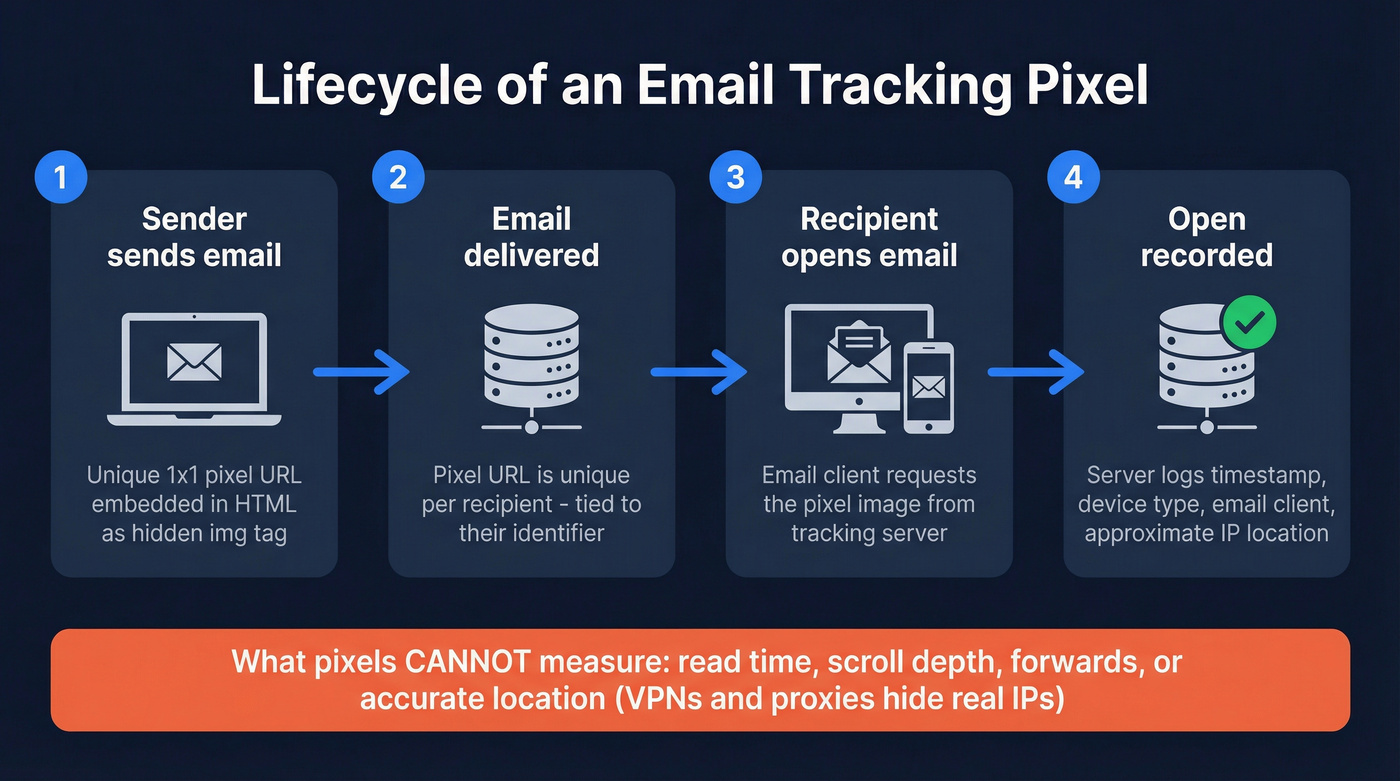
- The tracking tool generates a unique pixel URL tied to each recipient.
- That URL gets embedded as a hidden
<img>tag in the email's HTML. - When the recipient's email client renders the message, it requests the image from the tracking server.
- The server logs the request and records an "open" tied to that recipient's identifier.
The server captures a timestamp, device type, email client, and sometimes an IP address for approximate location. That's it. Pixels can't measure how long someone read your email, whether they forwarded it, or whether they scrolled past the first line. And with widespread VPN and proxy usage, even the IP-based location data is increasingly unreliable - you might see a "New York" open from someone sitting in Berlin.
If you want a deeper breakdown of what to trust (and what to ignore), see our guide to real-time email tracking.
Trackable Links
Some tools wrap your links in redirect URLs. When a recipient clicks, the software logs who clicked, when, and can capture browser and geo data. This is more reliable than pixel tracking - a click is a deliberate action, not an automated prefetch. The tradeoff: it only captures recipients who actually click something.
This is also why many teams shift reporting from opens to clicks - here’s a practical framework on open rate vs click rate.
Read Receipts
The oldest method and the least reliable. Read receipts require the recipient to authorize sending a confirmation back. Most people decline. They work best when sender and recipient use the same email client, which limits usefulness in B2B outreach across dozens of different environments.
Why Tracking Is Less Reliable Now
We once watched a team celebrate 12 opens on a single email to a prospect - convinced the VP was deeply interested. Turns out the prospect's corporate email gateway had scanned the message multiple times, Apple Mail prefetched the pixel, and the actual human never opened it once.
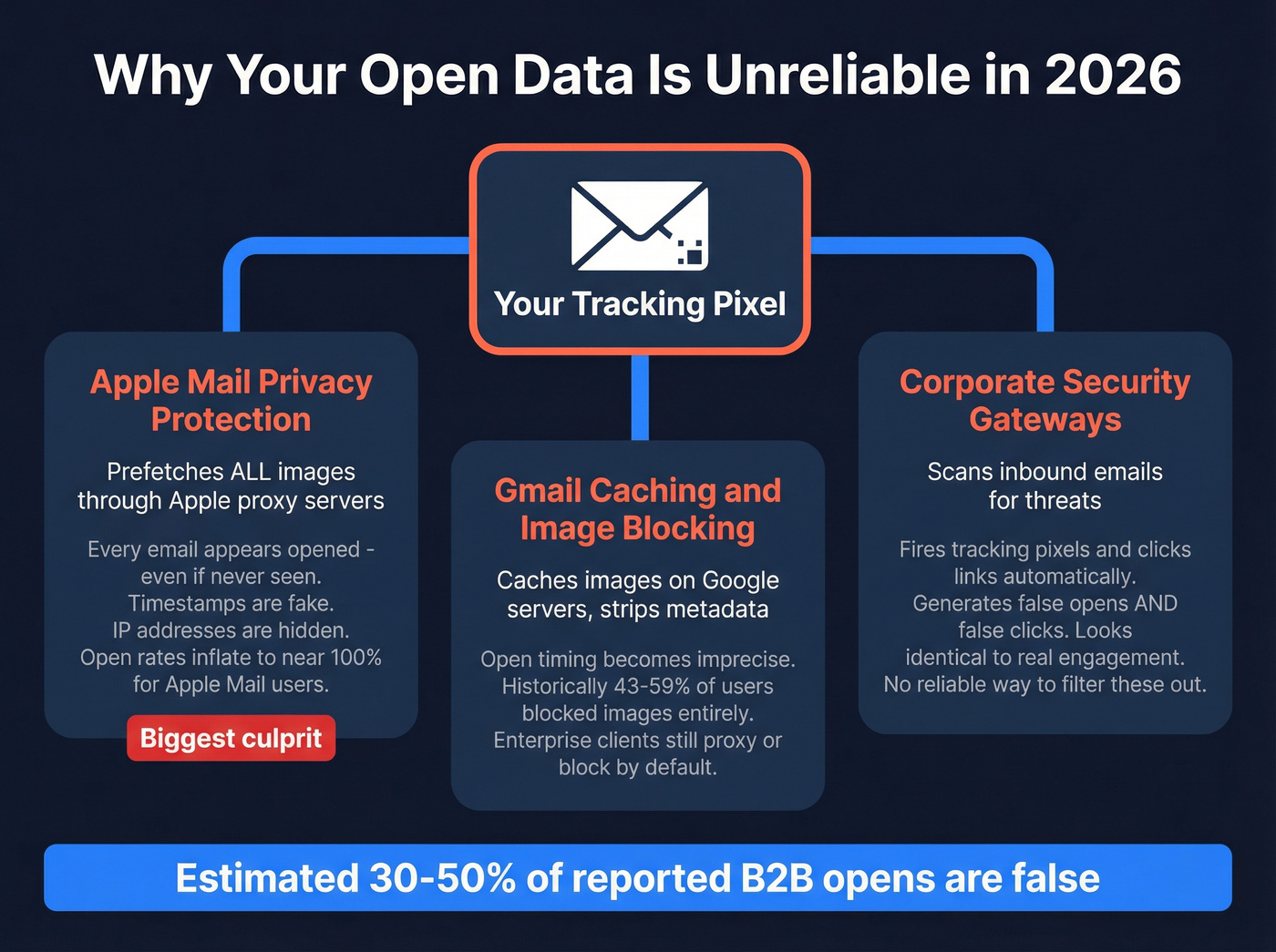
That scenario isn't unusual. It's the norm for a meaningful chunk of B2B email. So how can you tell if someone received your email and actually engaged with it? Pixels alone can't give you that certainty.
Apple Mail Privacy Protection
Apple Mail Privacy Protection (MPP), introduced in late 2021, preloads all remote images - including tracking pixels - through Apple's proxy servers. Every email sent to an Apple Mail user with MPP enabled appears "opened," regardless of whether the recipient saw it. Timestamps become unreliable, real IP addresses are hidden, and device/location data turns generic.
If a large chunk of your audience uses Apple Mail, your open rate for that segment gets inflated to near-100%. The data isn't just noisy - it's actively misleading.
If you’re running cold outbound, it’s worth understanding whether tracking itself can impact inboxing - see does open tracking hurt cold email.
Gmail Caching and Image Blocking
Gmail caches images on its own servers, stripping some metadata from tracking pixels and making open timing less precise. Historically, roughly 43% of users viewed emails with images disabled, and MarketingSherpa reported up to 59% routinely blocking images. Those numbers have improved since Gmail started auto-loading images, but enterprise clients still proxy or block images by default.
Corporate Security Gateways
Here's the thing about B2B outbound: corporate security tools scan inbound emails for malicious links and images. These scans fire tracking pixels and can also trigger trackable links - generating false opens and false clicks that look identical to real engagement. There's no reliable way to filter these out across all tools, and they disproportionately affect outbound sales emails sent to enterprise recipients.
If you’re seeing weird spikes, it often helps to pair tracking with deliverability diagnostics - start with email deliverability tracking.
Best Email Tracking Tools in 2026
Let's be honest: most teams overpay for email tracking. If you're a solo operator, a free Gmail extension does 90% of what you need. For sales teams, the tracking tool matters less than the data feeding it. Pick based on your actual workflow, not feature lists.
For a broader stack view (beyond trackers), compare options in our roundup of cold email marketing tools.
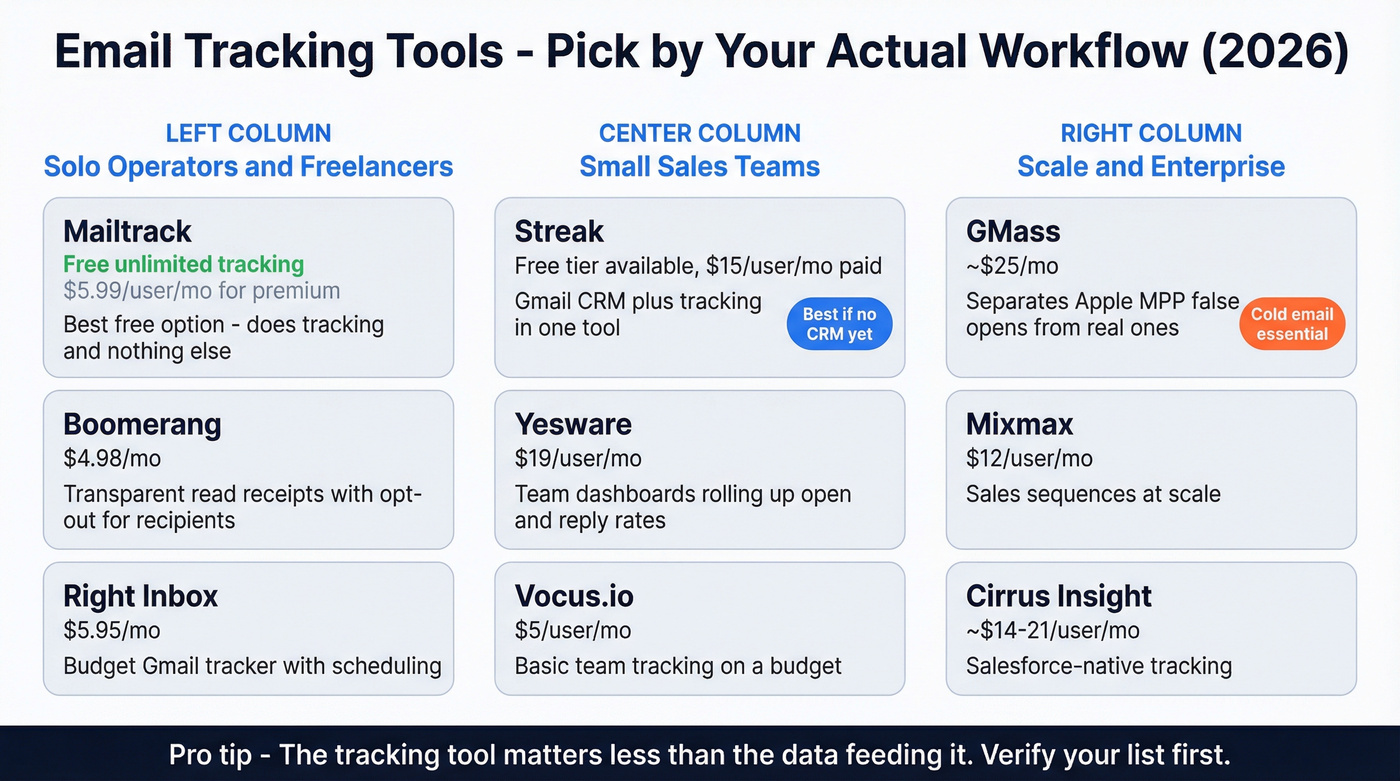
| Tool | Free Tier | Starting Price | Best For |
|---|---|---|---|
| Mailtrack | Yes, unlimited | $5.99/user/mo (or $2.99/user/mo yearly) | Best free option |
| Streak | Yes, with tracking | $15/user/mo | Gmail CRM + tracking |
| Boomerang | 10 msgs/mo | $4.98/mo | Visible read receipts + reminders |
| Yesware | 10 recipients/mo | $19/user/mo | Sales teams |
| GMass | No | ~$25/mo | Cold email at scale |
| Mixmax | No | $12/user/mo | Sales sequences |
| Right Inbox | Limited | $5.95/mo | Budget Gmail tracker |
| Mailbutler | Limited | $4.95/mo | Multi-client support |
| Vocus.io | No | $5/user/mo | Basic team tracking |
| Cirrus Insight | Trial | ~$14-21/user/mo | Salesforce-native |
Mailtrack (Mailsuite)
Biggest strength: Truly unlimited free tracking. Biggest weakness: Does tracking and nothing else.
The free tier includes a small signature badge; Premium removes it and adds extras like reporting. Mailtrack is CASA-compliant with yearly security reviews. For freelancers and solo operators who want a lightweight "did they see it?" signal, this is the obvious starting point. Don't expect sequences, CRM features, or team analytics.
Streak
Streak is the tool you pick when you want tracking bundled with a CRM inside Gmail. The free tier includes tracking, and paid plans start at $15/user/month. It's genuinely useful for solo sellers and small teams who don't want to toggle between Gmail and a separate CRM. Skip this if you're already running HubSpot or Salesforce - you don't need a second CRM.

Boomerang
Use this if: You want read receipts that are explicit and transparent. Boomerang's tracking can add a fully visible image in the email that explains a read receipt was requested and gives the recipient an opt-out option.
Pricing runs from free (10 message credits/month) through Personal at $4.98/mo, Pro at $14.98/mo, and Premium at $49.98/mo on annual billing. The scheduling and follow-up reminder features are strong for individual productivity.
Skip this if: You're doing high-volume outbound. Boomerang is built for individual workflows, not sales teams blasting 500 emails a day.
Yesware
Yesware targets sales teams who need tracking plus team-level analytics. The free tier covers 10 recipients/mo; paid plans run $19/user/mo (Pro), $45/user/mo (Premium), and $85/user/mo (Enterprise). Team dashboards that roll up open and reply rates across reps are the standout feature for sales managers. It only makes sense if you need that reporting layer.
GMass
GMass separates potentially false opens from Apple Mail Privacy Protection - a feature that's become essential for cold email at scale. Paid plans start around $25/mo. It's built for mass outreach inside Gmail with mail merge, auto follow-ups, and campaign-level analytics. Not pretty, but effective.
Others Worth Knowing
Right Inbox starts at $5.95/mo and covers basic Gmail tracking with scheduling and reminders. Mailbutler starts at $4.95/mo and supports Gmail, Outlook, and Apple Mail - the most affordable cross-client option. Vocus.io runs $5/user/mo for basic tracking with team features. Cirrus Insight at roughly $14-21/user/mo is the pick for Salesforce-native teams who want tracking data flowing directly into their CRM without middleware.

You just read that 30-50% of reported opens are false. But here's a worse problem: tracking opens on bounced or invalid emails doesn't just skew your data - it wrecks your sender reputation. Prospeo's 5-step email verification delivers 98% accuracy, so every open you do track is a real person at a real address.
Fix your list before you fix your tracking. Start free with 75 verified emails.
What Good Open Rates Look Like
Even with the caveats above, open rates remain a directional signal. Here are recent industry benchmarks:
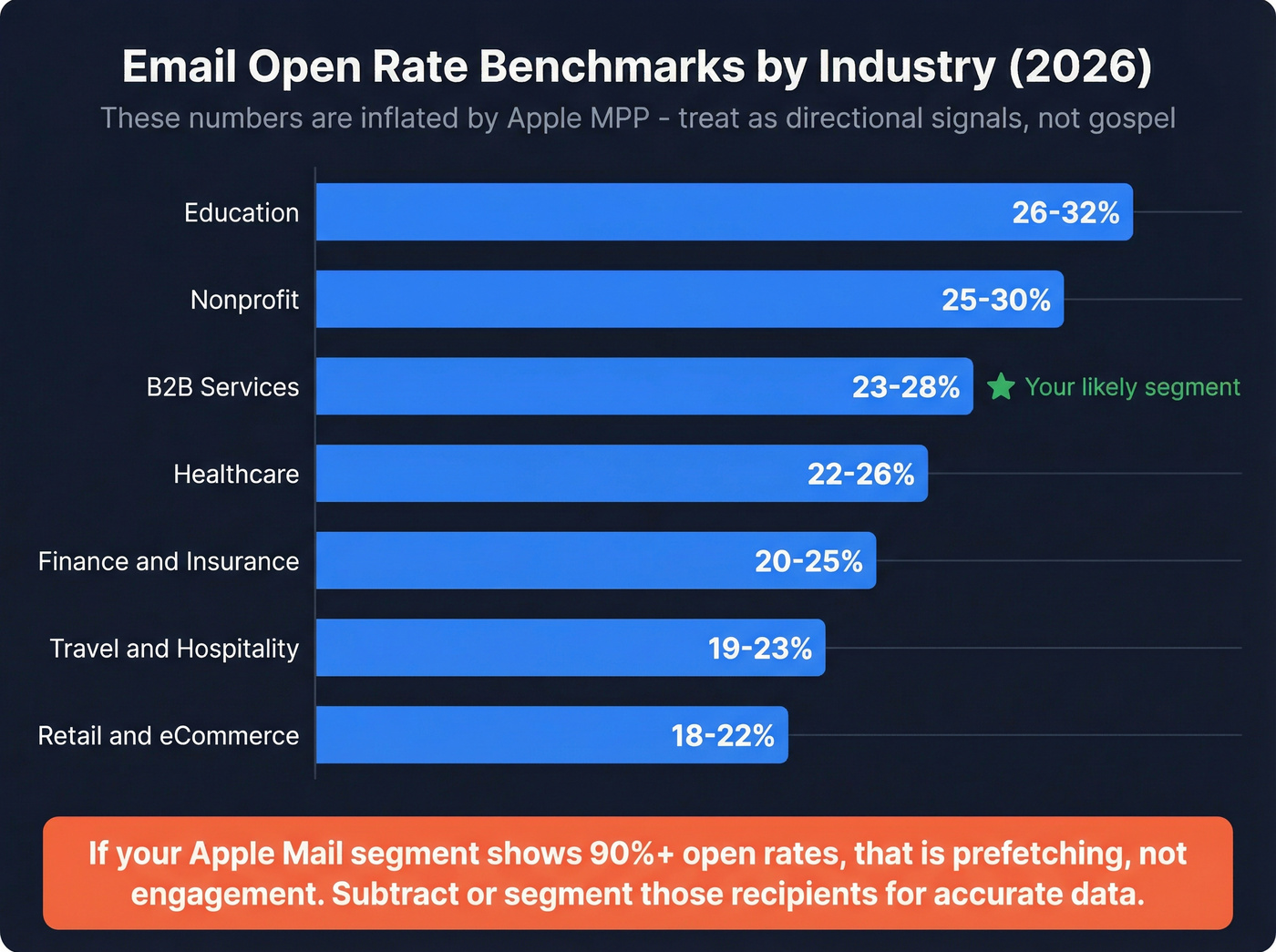
| Industry | Open Rate Range |
|---|---|
| B2B Services | 23-28% |
| Education | 26-32% |
| Nonprofit | 25-30% |
| Healthcare | 22-26% |
| Finance & Insurance | 20-25% |
| Travel & Hospitality | 19-23% |
| Retail & eCommerce | 18-22% |
These benchmarks are inflated by Apple MPP. If your Apple Mail segment shows 90%+ open rates, that's prefetching, not engagement. Treat these numbers as rough guides, not gospel.
If you’re trying to lift opens despite MPP noise, focus on fundamentals like list quality and subject lines - see how to increase email open rates for sales.
How Recipients Block Tracking
Your recipients aren't passive. Here's how they disable tracking:
- Gmail: Settings > General > Images > "Ask before displaying external images." Prevents tracking pixels from auto-loading.
- Apple Mail: System Settings > Privacy > Mail Privacy Protection > "Protect Mail Activity." Preloads all remote content through Apple's servers.
- Outlook: File > Options > Trust Center > Automatic Download > "Don't download pictures automatically."
Any recipient who follows these steps becomes invisible to your tracking. Privacy-conscious professionals - exactly the senior buyers you're trying to reach - are increasingly doing this.
Privacy and Compliance
Email tracking sits in a legal gray area that's getting less gray every year.
If you’re doing outbound into the EU/UK, align your process with a practical playbook for GDPR for Sales and Marketing.
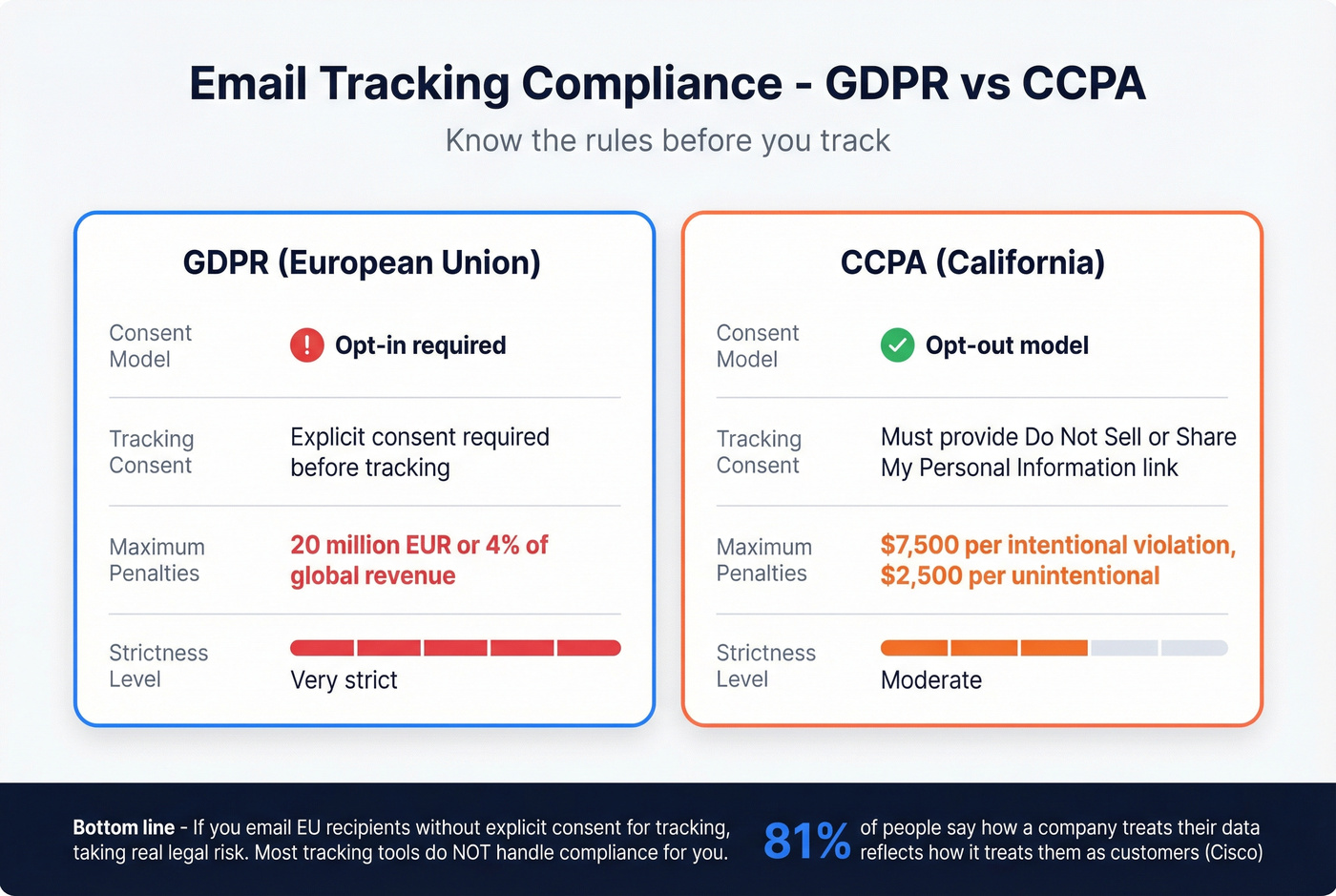
| GDPR (EU) | CCPA (California) | |
|---|---|---|
| Model | Opt-in | Opt-out |
| Tracking consent | Required | "Do Not Sell or Share My Personal Information" link when applicable |
| Max penalties | EUR 20M / 4% global revenue | $7.5K intentional / $2.5K unintentional |
GDPR is the stricter standard. If you're tracking emails sent to EU recipients without explicit consent, you're taking a real legal risk. Most tracking tools don't handle compliance for you.
A Cisco survey found 81% of respondents believe how an organization treats personal data reflects how much it respects them. Even if you're technically compliant, invisible tracking can erode trust with the people you're trying to build relationships with.
When to Stop Relying on Opens
Look, even if you track opens, replies and meetings booked tell you everything that matters.
We've seen SDR teams celebrate a 65% open rate while their actual reply rate sat at 0.8%. The opens were noise - MPP prefetches, security scans, preview pane flickers. The team spent two weeks "optimizing subject lines" based on data that meant nothing. Two weeks. For nothing.
If your bounce rate is above 5%, your tracking data is severely distorted. You're measuring opens on emails that never reached a real inbox. The upstream problem isn't your tracking tool - it's your data quality. Prospeo's 5-step email verification catches spam traps, honeypots, and catch-all domains before you hit send, and teams like Snyk saw bounce rates drop from 35-40% to under 5% after switching, with AE-sourced pipeline up 180%. When your list is clean, tracking data actually means something - opens correlate with real humans, not bots.
If you’re troubleshooting bounces specifically, start with the basics: hard bounce.

The decision framework is straightforward: shift your primary metrics from opens to clicks, replies, and meetings booked. Use open rates as a directional signal for A/B testing subject lines, but don't build your pipeline strategy around them. And before you track anything, verify your list.
The article makes it clear: the tracking tool matters less than the data feeding it. If you're sending cold emails to stale or unverified addresses, no pixel trick will save your metrics. Prospeo refreshes 300M+ profiles every 7 days - not every 6 weeks - so your outbound hits real inboxes, not spam traps.
Stop tracking ghost opens. Send to emails that actually exist.
FAQ
How do you know if someone got your email?
You can't know with certainty from pixels alone. A tracking pixel confirms an email client loaded your message, but that could be a bot, a prefetch, or a security scan. The most reliable engagement signals are replies and link clicks. For delivery confirmation, check your bounce logs - a 0% bounce rate on a verified list means the message reached the server.
Can you track emails in Outlook, not just Gmail?
Yes. Boomerang, Mailbutler, and Cirrus Insight all support Outlook natively. Most free Chrome extensions are Gmail-only, so check compatibility before committing. Mailbutler at $4.95/mo is the most affordable cross-client option.
Does email read tracking work with Apple Mail?
Apple Mail Privacy Protection preloads all tracking pixels through proxy servers, so every email appears "opened" regardless of actual engagement. GMass is one of the few tools that flags potentially false opens from Apple MPP, making it the better choice for campaigns targeting Apple-heavy audiences.
Should I verify my email list before tracking opens?
Absolutely - tracking opens on invalid addresses corrupts your metrics and damages sender reputation. Tools like Prospeo catch catch-all domains, spam traps, and honeypots at 98% accuracy, so your open data reflects real recipients rather than dead addresses.