

Best Email Scrapers in 2026: What Actually Works
You sent 2,000 cold emails last quarter. 14% bounced. Your ESP flagged the domain, and your SDR spent two days cleaning the mess instead of booking meetings. The email scraper that built that list promised "95% accuracy." It lied.
Here's the thing: in the Dropcontact benchmark - 20,000 real contacts, live sends, hard-bounce tracking - the best tool delivered a verified, deliverable email for about half the list (54.9% real enrichment). So the gap between tools isn't small. It's the difference between a list you can safely send and a list that burns your domain.
The market has shifted. Standalone scrapers are giving way to platforms that bundle finding, verification, enrichment, and CRM sync into one step. You probably don't need a raw extraction tool at all. You need an email finder with built-in verification. Let's break down what actually works, what's overhyped, and where your money should go.
Our Picks (TL;DR)
| Pick | Best For | Why |
|---|---|---|
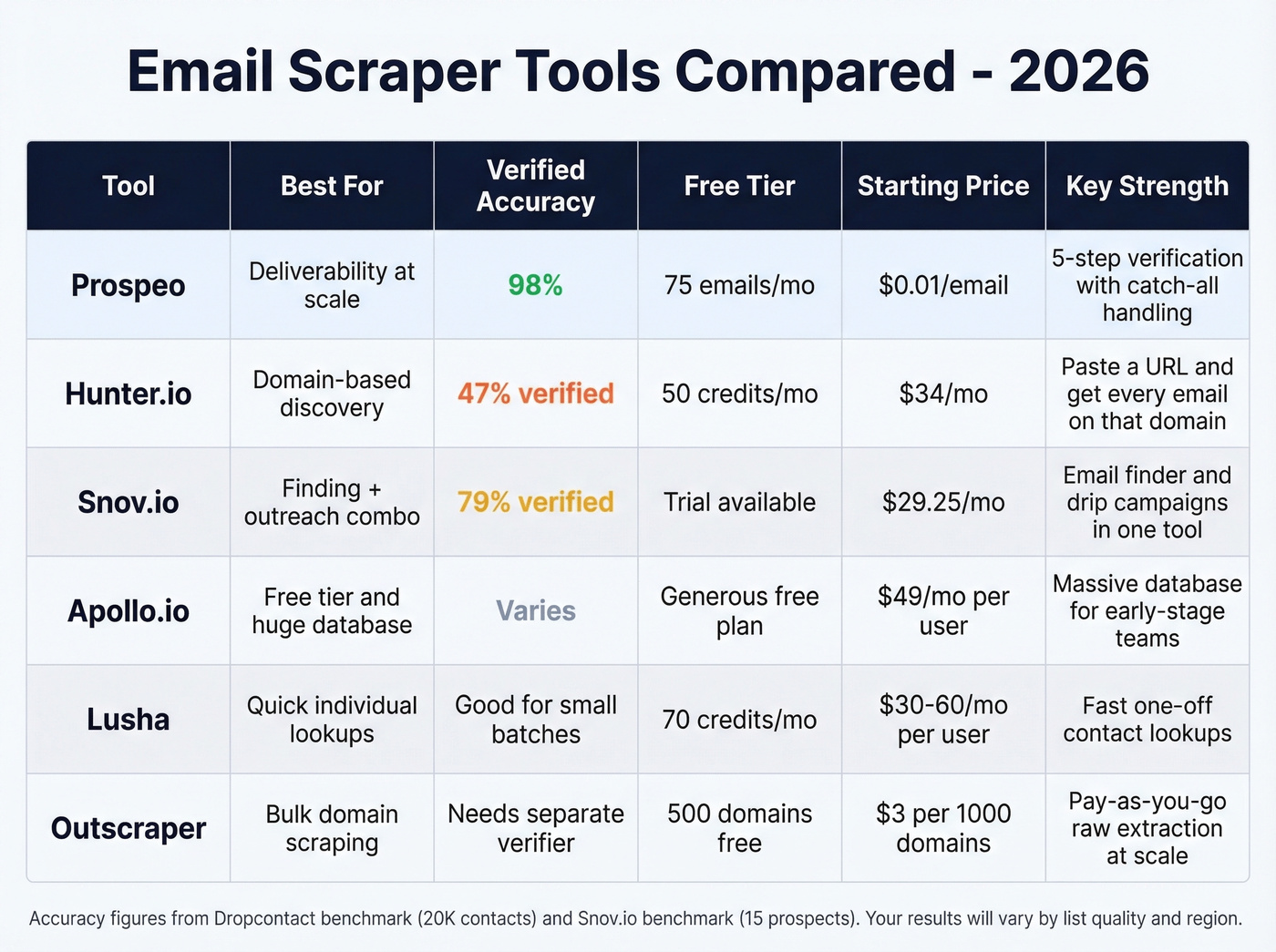
| Prospeo | Email accuracy and freshness | 98% verified email accuracy, 7-day data refresh, free tier (75 emails/mo) |
| Hunter.io | Domain-based discovery | Paste a company URL, get every email on that domain. Simple and reliable |
| Snov.io | Finding + outreach in one | Combined email finder and drip campaigns for teams that want one workflow |
Prospeo wins on data quality. Hunter wins when you have a URL but no name. Snov.io wins when you want finding and sequencing in a single tool. Full reviews below.
Scraper vs. Finder vs. Verifier
These three terms get used interchangeably everywhere. They're not the same thing, and the distinction matters for your bounce rate.
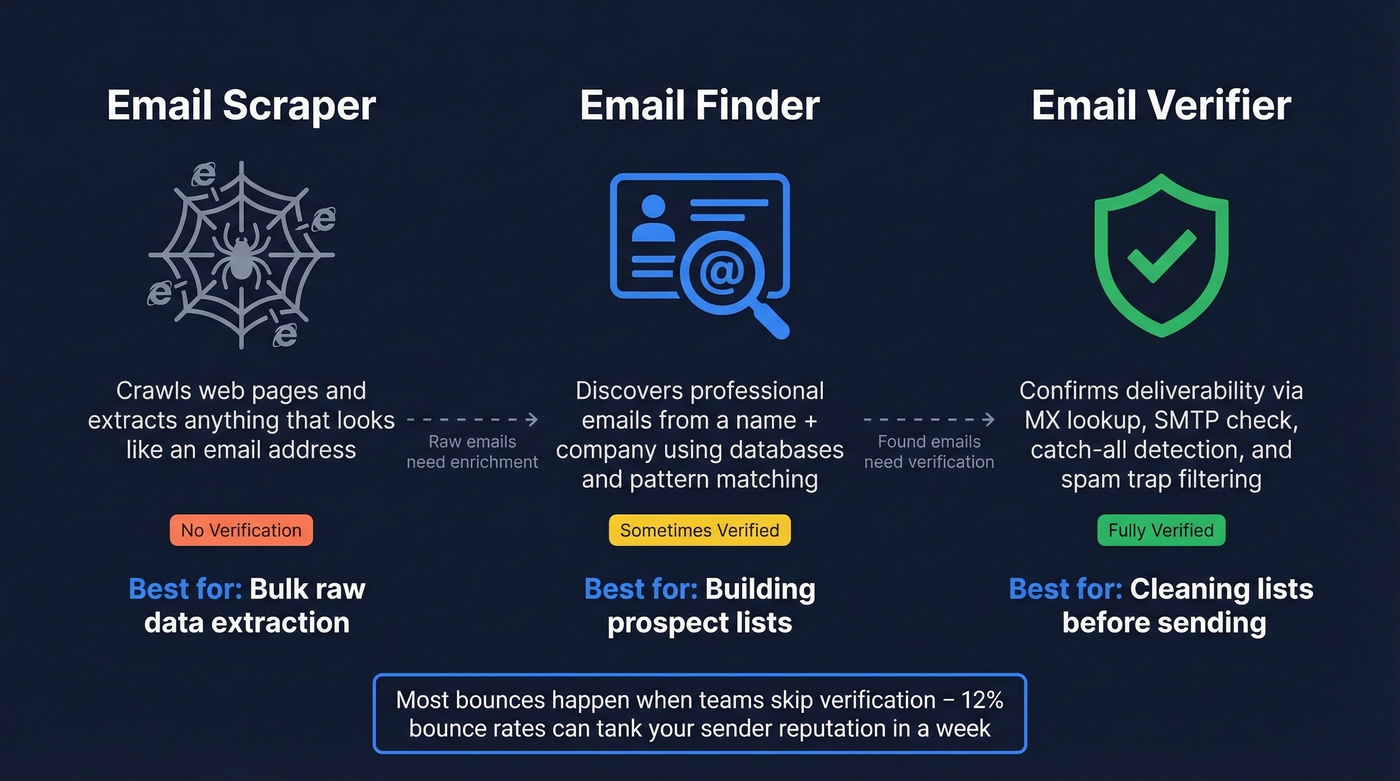
An email scraper crawls web pages and extracts mailto: links or anything that looks like an email address. It's raw extraction - no verification, no enrichment, no guarantee the address is current or even real. Think Octoparse or a custom Python script hitting company websites.
An email finder discovers professional email addresses from structured inputs, typically a name and company. It queries a database or runs pattern-matching against known formats like firstname.lastname@company.com, then returns a result. Hunter, Snov.io, and Prospeo all fall here.
An email verifier checks whether an existing email address can actually receive mail. It runs syntax checks, MX lookups, SMTP verification, catch-all detection, and disposable domain filtering. Some finders bundle verification in; many don't.

Hunter's own documentation draws a sharp line between validation and verification. Validation checks format - "this email could exist." Verification confirms the mailbox actually receives mail. A tool that validates but doesn't verify will still hand you catch-all domains that bounce on send.
Catch-all domains are the silent killer. These servers accept mail to any address, so SMTP checks come back "valid" - but the actual mailbox doesn't exist. Without catch-all handling, you're flying blind on a meaningful chunk of your list. Teams that skip verification entirely hit bounce rates around 12%, enough to tank sender reputation in a week.
| Category | What It Does | Verification? | Best For |
|---|---|---|---|
| Scraper | Extracts emails from pages | No | Bulk raw data |
| Finder | Discovers emails from name + company | Sometimes | Building prospect lists |
| Verifier | Confirms deliverability | Yes | Cleaning existing lists |
How Accurate Are These Tools, Really?
Every tool claims 90%+ accuracy. Almost none deliver it in production.
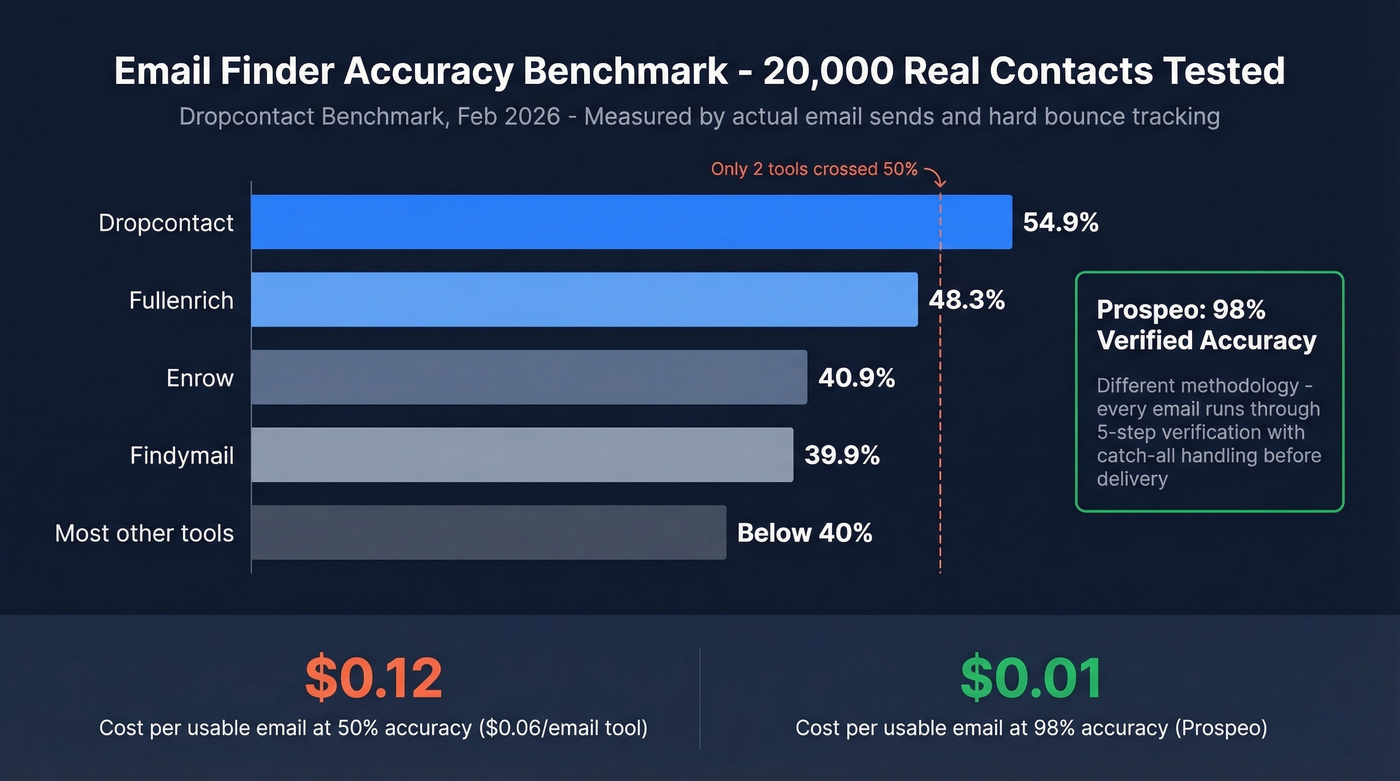
The most rigorous benchmark we've seen comes from Dropcontact's email finder benchmark, updated February 2026. They tested 15 tools against 20,000 real contacts - 9,800 US, 9,700 Europe, 500 rest of world. The input was deliberately messy: first name, last name, and company name only. No domains, no URLs, no profile links.
What makes this benchmark credible is the methodology. They measured accuracy by actually sending every email and tracking hard bounces, then cross-checked domains with a manual double-entry audit. This isn't SMTP pinging - it's live delivery.
The results are sobering. The best tool in the benchmark - Dropcontact themselves - hit a real enrichment rate of 54.9%. Fullenrich came in at 48.3%. Enrow at 40.9%. Findymail at 39.9%. Most tools landed below 40%. That means even the best email finder returns a usable, deliverable email for roughly half your list.
Snov.io ran their own mini-benchmark across 15 prospects per tool. The sample is tiny and the source is self-interested, but the relative rankings are still useful:
| Tool | Emails Found | Verified | Risky |
|---|---|---|---|
| Snov.io | 93% | 79% | 14% |
| Skrapp.io | 92% | 71% | 0% |
| Hunter.io | 70% | 47% | 27% |
| GetProspect | 73% | 50% | 23% |
The cost-per-usable-lead math changes fast when accuracy drops. A tool charging $0.06/email that only verifies 50% of results actually costs you $0.12 per usable contact - plus the domain reputation damage from the other 50%. At ~$0.01/email with 98% accuracy, you pay less and get more deliverable addresses. The economics aren't even close.
For more options, see our breakdown of free lead generation tools and outbound lead generation tools.

The best email scraper in the Dropcontact benchmark found deliverable emails for 55% of contacts. Prospeo delivers 98% verified accuracy because it doesn't scrape - it runs every address through 5-step verification with catch-all handling, spam-trap removal, and honeypot filtering. At ~$0.01/email, your cost-per-usable-lead stays at $0.01, not $0.12.
Start with 75 free verified emails - no credit card, no contracts.
Best Email Scraping Tools in 2026
Verified B2B Databases
Prospeo
Use this if: You care about deliverability above everything else. You're running outbound at scale and can't afford bounces. If you're building a full outbound stack, pair it with the right SDR tools and a clean lead generation workflow.
Prospeo's database covers 300M+ professional profiles with 143M+ verified emails and 125M+ verified mobile numbers. The 98% email accuracy comes from a proprietary 5-step verification process that handles catch-all domains, strips spam traps, and filters honeypots before you ever download a record. Every record refreshes on a 7-day cycle - the industry average is six weeks.

You can filter by buyer intent across 15,000 Bombora topics, spot companies with recent headcount growth or funding rounds, and layer in firmographic and technographic data - the kind of targeting that turns a cold list into a warm one. The Chrome extension has 40,000+ users and works on company websites, web sources, and CRMs. For enrichment workflows, the API returns 50+ data points per contact with a 92% match rate.
Real-world proof: Stack Optimize built from $0 to $1M ARR using Prospeo as their primary data source. Client deliverability stayed above 94%, bounce rates under 3%, zero domain flags across all accounts. Snyk's 50 AEs cut bounce rates from 35-40% to under 5% and saw AE-sourced pipeline jump 180%.
Pricing starts free - 75 verified emails and 100 Chrome extension credits per month. Paid plans run ~$0.01/email with no contracts and no sales calls required.
Lusha
Lusha works best as a quick-lookup tool for founders and individual contributors doing targeted outreach. The free tier gives you 70 credits/month - enough for 15-20 prospects a week if you only need emails. The credit model gets expensive fast at volume, though: emails cost 1 credit each, but phone numbers cost 10, which burns through allocations quickly.
Expect $30-60/mo per user for basic plans. For the same budget, you'll get more verified contacts from tools with transparent self-serve pricing. Lusha is fine for one-off lookups; it's not built for scale.
Snov.io
Use this if: You want email finding and drip campaigns in one platform. Snov.io collapses the "find, verify, sequence" workflow into a single tool, which saves time for small teams that don't want to manage integrations.

Skip this if: You need best-in-class accuracy on either finding or sending. Bundled tools tend to be good-enough at both rather than excellent at either. In their own benchmark, Snov.io reported 93% of emails found and 79% verified - solid numbers, but the sample was 15 prospects and the source is the vendor.
Pricing: Starter at $29.25/mo for 1,000 credits, Pro at $74.25/mo for 5,000 credits. The automation add-on runs $69/mo extra per slot, which adds up fast if you're running multi-channel sequences.
Apollo.io
Apollo is the go-to for early-stage teams that need a massive database and a free tier to get started. The database is enormous, and the free plan is genuinely useful for testing. Paid plans start at ~$49-99/mo per user, and the platform does a lot - sequencing, analytics, intent data.
The tradeoff is freshness. The consensus on r/sales is that Apollo's data quality degrades at scale, and teams often supplement with a separate verification tool. If you're closing deals under $15k and sending fewer than 500 emails a month, Apollo's free tier is a reasonable starting point. Beyond that, you'll feel the data quality gap.
Domain and Website Extractors
Hunter.io
Use this if: You have a company URL and need every email associated with that domain. Hunter's domain search is the standout feature - paste a URL, get a list of addresses with confidence scores. It's the fastest path from "I know the company" to "I have emails."

Skip this if: You need high verified-email rates. In the Snov.io benchmark, Hunter found emails for 70% of prospects but only 47% came back verified, with 27% flagged as risky. That's a lot of waste at volume.
Pricing is transparent: free at 50 credits/mo, Starter $34/mo annual, Growth $104/mo annual, Scale $209/mo annual. Fair value for domain-based discovery, but you'll likely need a separate verifier. If you're comparing options, see our list of Hunter alternatives.
Outscraper
Outscraper handles bulk domain scraping on a pay-as-you-go model. First 500 domains are free, then $3 per 1,000 domains. Best for teams that need raw email extraction at scale and have their own verification pipeline downstream. Not a replacement for a B2B finder - think of it as the plumbing layer.
Multi-Platform Automation
PhantomBuster
PhantomBuster automates data extraction across multiple platforms - not just email, but profile data, company info, and social signals. One user on Reddit documented running 142 campaigns across five platforms, chaining "Phantoms" into pipelines via Zapier and n8n.
The downsides are real. The UI overwhelms beginners, error handling breaks when platforms update their interfaces, and support is inconsistent. The bigger issue: platforms are blocking automation faster now. Instagram is significantly stricter post-2024, and detection has improved across the board. If you want simplicity, look elsewhere.
Pricing: Starter $69/mo, Pro $149/mo, Team $439/mo+. No free trial - just a 14-day refund window.
Clay
Clay isn't an email extractor - it's a data workflow platform. If you're stitching together 5+ data sources and need an orchestration layer to waterfall across providers, enrich records, and route leads, Clay is the tool. (If you're doing this specifically for prospecting, our guide to Clay list building breaks down the real workflow and costs.)
The Starter plan runs $134/mo annual, and the learning curve is steep. For most teams, a single high-accuracy finder handles 90% of the job without the complexity. Clay shines when your data needs are genuinely complex - multiple enrichment sources, custom scoring logic, conditional routing. If that doesn't describe your workflow, you're overengineering it.
SocLeads
SocLeads scrapes contact data from social platforms - a niche use case for teams doing social-first prospecting. Free tier gives 100 contacts/mo, Pro runs $59/mo for 10K contacts, Business $149/mo for 100K contacts. Useful if your ICP lives on specific social communities, but not a replacement for a B2B database.
Chrome Extensions
Skrapp.io
Skrapp offers a Chrome extension for one-off email lookups. Free tier includes 100 credits/mo, Professional plan is $30/mo for 1,000 credits. In the Snov.io benchmark, it found 92% of emails with 71% verified - decent hit rates for individual lookups. It doesn't scale for team workflows, but if you're an individual contributor who needs to grab an email while browsing a company page, Skrapp does the job.
Full Comparison
| Tool | Accuracy | Free Tier | Starting Price | Verification |
|---|---|---|---|---|
| Prospeo | 98% verified | 75/mo | ~$0.01/email | Yes (5-step) |
| Hunter.io | ~47% verified* | 50/mo | $34/mo | Partial |
| Snov.io | ~79% verified* | 50/mo | $29.25/mo | Yes |
| Apollo.io | Not public | Yes | ~$49/mo/user | Basic |
| Lusha | Not public | 70/mo | ~$30-60/mo | Yes |
| PhantomBuster | N/A | No | $69/mo | No |
| Clay | Varies by source | No | $134/mo | Via providers |
| Skrapp.io | ~71% verified* | 100/mo | $30/mo | Yes |
| Outscraper | N/A | 500 domains | $3/1K domains | No |
| SocLeads | Not public | 100/mo | $59/mo | No |
* Accuracy figures for Hunter, Snov.io, and Skrapp are from Snov.io's 15-prospect benchmark - small sample, vendor source.
Look, most teams don't need 10 tools on a comparison table. If you're closing deals under $20k and sending fewer than 1,000 emails a month, pick one verified B2B database and stop shopping. The time you spend evaluating tools is time you're not spending on outreach.
Raw email scrapers hand you unverified addresses and let your domain take the hit. Prospeo's 300M+ database refreshes every 7 days - not every 6 weeks - so you're never emailing someone who changed jobs last month. Stack Optimize kept bounce rates under 3% across every client. Snyk's 50 AEs dropped from 35% bounces to under 5%.
Replace your email scraper with data that actually delivers.
The Complete Email Scraping Workflow
The best email scraper in the world is useless without a clean workflow around it. We've tested dozens of pipeline configurations with our own outbound, and this four-step process consistently keeps bounce rates under 2%.
1. Identify targets. Build your ICP filters - job title, company size, industry, intent signals. The tighter your targeting, the less waste downstream. Your SDR shouldn't spend 4 hours building a list in a Chrome extension, one profile at a time. Batch your targeting upfront. If you need a tighter definition, use an ideal customer profile template.
2. Find and verify emails. Use a verified B2B database or domain finder. Tools that combine finding and verification in a single step handle catch-all domains, spam traps, and honeypots before you ever download a file. If your tool doesn't verify, bolt on a dedicated verifier before you send anything. (More on keeping bounces down in our email bounce rate guide.)
3. Enrich. Layer on firmographic and technographic data - funding stage, tech stack, headcount growth. This fuels personalization in your sequences and separates "spray and pray" from targeted outbound. If you're comparing vendors, see our roundup of data enrichment services.
4. Send. Push verified contacts to a sequencer like Instantly, Smartlead, or Lemlist. Keep total bounces below 2% and hard bounces below 1%. If you're sending at scale, follow an email deliverability guide and watch your email velocity.
Some tools collapse steps 2 and 3 into a single action, returning 50+ data points per contact and pushing directly to Salesforce, HubSpot, or your sequencer via native integrations. The fewer handoffs in your pipeline, the fewer records get lost or corrupted.
The real risk isn't picking the wrong tool - it's skipping verification entirely. We've seen teams burn sender domains in under a week because they exported a raw list and hit send. Don't be that team.
Is Email Scraping Legal?
The tool matters less than how you use the data.
Under GDPR (EU/UK), scraped email addresses are personal data. You almost never have consent for cold outreach to scraped contacts. The "legitimate interest" basis can apply for B2B prospecting, but it requires a documented balancing test: your commercial interest weighed against the individual's privacy rights, plus a clear opt-out mechanism. Named emails like firstname.lastname@company.com carry higher risk than generic addresses like info@company.com because they're directly identifiable.
The Kaspr enforcement is instructive. CNIL, France's data authority, opened proceedings against Kaspr over data-scraping practices. The order was closed after Kaspr implemented compliance measures - proof that regulators are watching this space but also that compliance is achievable.
Under CAN-SPAM (US), the focus shifts from collection to sending behavior. You need accurate sender headers, a physical mailing address, a working unsubscribe link, and you must honor opt-outs within 10 business days. CAN-SPAM doesn't ban scraping outright, but state privacy laws like California's CCPA and Virginia's CDPA add layers.
Use tools that maintain GDPR compliance and enforce opt-outs. Document your legitimate interest basis if you're prospecting in the EU. And regardless of jurisdiction, always include an unsubscribe mechanism - it's both legally required and good for deliverability.
FAQ
What's the difference between an email scraper and an email finder?
An email scraper extracts mailto: links from web pages - raw, unverified data pulled from HTML. An email finder discovers professional emails using name and company inputs, querying a database with built-in verification. For B2B outreach, you want a finder with verification, not a raw scraper that leaves you with addresses that tank deliverability.
Are free email scrapers accurate enough for cold outreach?
Rarely. Free tiers work for testing workflows, but most skip verification. The Dropcontact benchmark showed even the best paid tools max out around 55% usable emails. Without verification, expect 10-15% bounce rates - enough to damage your sender domain within days.
How many emails can I scrape per day without getting blocked?
Browser extensions typically throttle at 50-200 lookups per day. API-based tools handle thousands of daily lookups without platform restrictions because they query a proprietary database rather than scraping live websites. The bottleneck shifts from extraction limits to your sending volume.
Do I need a separate email verification tool?
Only if your finder doesn't verify. Tools with built-in multi-step verification - catch-all handling, spam-trap removal, honeypot filtering - eliminate the need for a separate verifier. If you're using a raw scraper without verification, always run your list through a dedicated verifier before sending.
What bounce rate is safe for cold email?
Keep total bounces below 2% and hard bounces below 1%. Anything above 5% risks ESP flags and domain blacklisting. The simplest way to stay safe is using a finder with built-in verification rather than bolting together separate tools and hoping nothing falls through the cracks.