

How to Find Anyone's Email by Name - Free Tools & Methods That Actually Work
You've got a name and a company. You need an email. So you open five tabs, create three free accounts, and spend 20 minutes cross-referencing results that may or may not bounce.
That's how a free email search by name usually goes: juggling Apollo, Lusha, DropContact, and half a dozen others because no single tool finds every contact. Reddit users say Apollo has the "biggest database" but data goes stale fast, while Hunter has a "tiny database" that's "best suited for US" contacts. We've tested dozens of these tools over the years, and the pattern holds - you need a short stack, not a single solution. Let's clean it up.
Our Picks (TL;DR)
- Best accuracy on a free plan: Prospeo - 75 free verified emails/month, 98% accuracy, catch-all handling included.
- Biggest free allowance: Skrapp - 100 free credits/month with rollover. Solid volume for light prospecting.
- No signup needed: EXPERTE.com - free SMTP-level checks, but catch-all domains often come back "Unknown." Fine for quick one-offs.
How Name-Based Email Lookup Works
Every free email finder runs the same basic playbook. You give it a name and a company domain. It generates permutations - firstname.lastname@, first@, flast@, f.lastname@ - then runs each one through a verification pipeline.
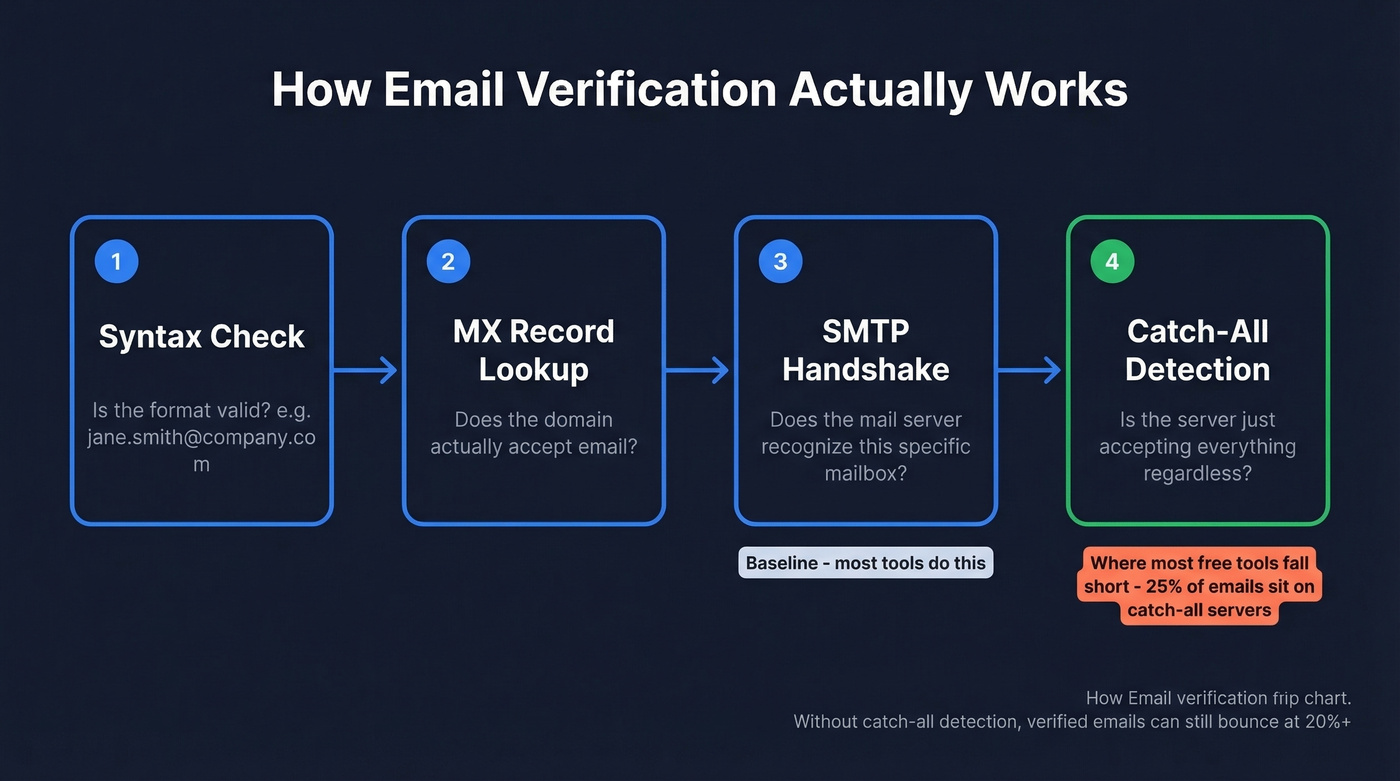
That pipeline has four stages:
- Syntax check - is the format valid?
- MX record lookup - does the domain accept email?
- SMTP handshake - does the mail server recognize this specific mailbox?
- Catch-all detection - is the server just accepting everything regardless?
The first three are baseline. The fourth is where most free tools fall short.
About 25% of emails used globally sit on catch-all servers that accept mail to any address at the domain, whether the mailbox exists or not. ZeroBounce found that nearly 28% of all emails checked were invalid or risky - which is why verification isn't optional. A tool that skips catch-all handling will tell you an email is "verified" when it's really just a guess. That's why users on Reddit report "verified" emails bouncing at 20%+. Any tool you rely on should include catch-all detection, and ideally spam-trap and honeypot protection on top.
Best Free Tools to Find Email by Name (2026)
Prospeo
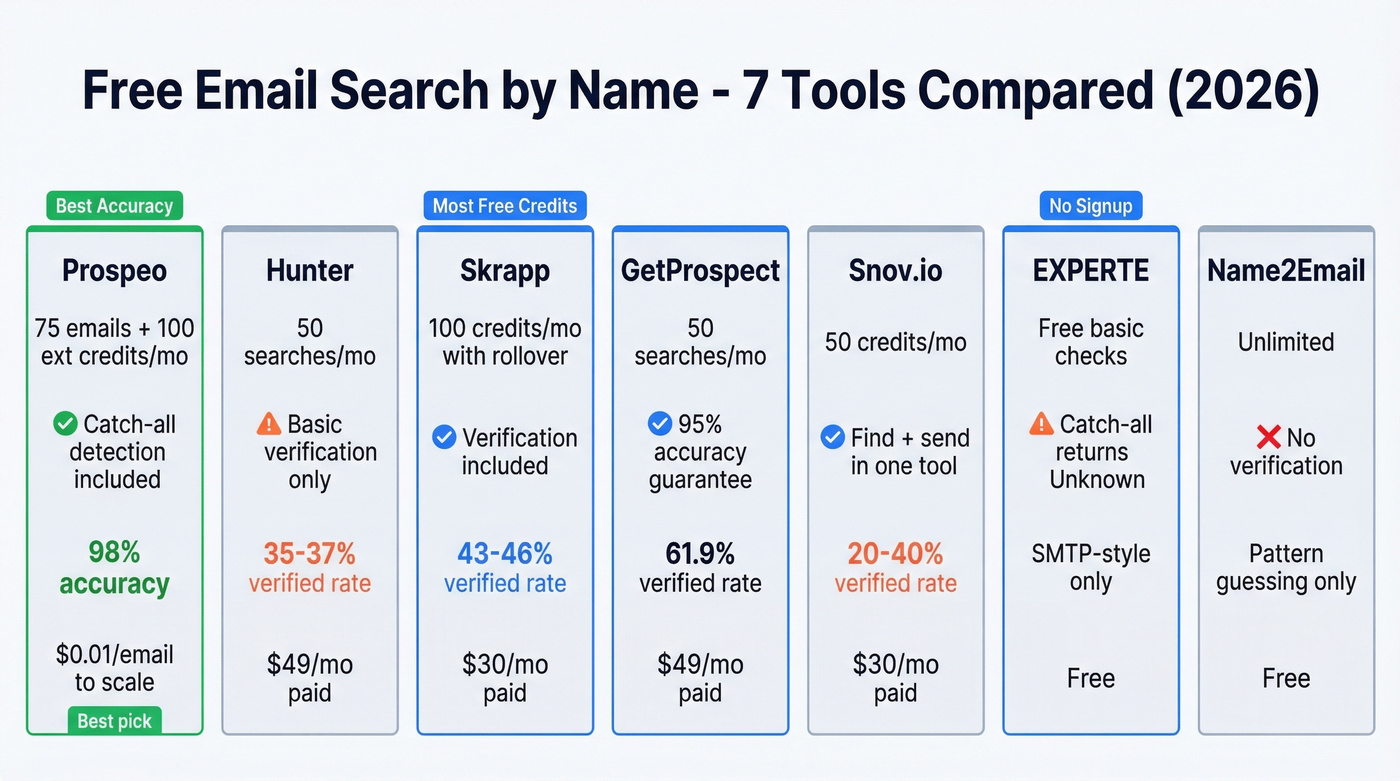
Use this if you care more about deliverability than raw volume. Prospeo's free tier gives you 75 verified emails plus 100 Chrome extension credits per month. That's not the biggest free allowance, but the 98% email accuracy and 7-day data refresh cycle mean you aren't wasting credits on dead addresses.
Catch-all handling is included at every tier, including free, and verification runs on proprietary infrastructure with no third-party email providers in the chain. When Snyk rolled out Prospeo across 50 AEs, their bounce rate dropped from 35-40% to under 5%, and AE-sourced pipeline jumped 180%. That's what happens when the emails you find actually land.
Paid plans start at ~$39/mo. Credits cost roughly $0.01 per email.

Hunter.io
Skip this if accuracy is your top priority.
Hunter is the tool most people try first - it's been around since 2015 and dominates search results for email finder queries. The free plan gives you up to 50 searches per month. Paid plans start at ~$49/mo.
The problem is performance. In a 5,000-contact benchmark, Hunter hit a 37.6% verified rate. A separate Reddit bake-off on 2,500 contacts put it at 35.5%. That means roughly two-thirds of your lookups come back empty. Recognizable brand, polished UI, thin database.

If you're comparing options, see our full breakdown of Hunter alternatives.
Skrapp.io
The free-tier champion. Skrapp gives you 100 email credits per month on the free plan, and unused credits roll over - a mechanic almost no competitor offers. You're only charged for results that come back "Valid" or "Catch-all," not for misses.
Paid plans start at $30/mo for 1,000 credits. In benchmarks, Skrapp lands around ~43-46% for verified rate. Not the highest, but the generous free tier and rollover credits make it a strong secondary tool alongside a more accurate primary finder.
For deeper pricing math, check Skrapp pricing.
GetProspect
GetProspect offers 50 free searches per month against a database it sizes at 200M+ contacts. In the Anymail Finder benchmark, it posted a 61.9% verified rate - one of the stronger showings among mid-tier tools. GetProspect backs its results with a 95% accuracy guarantee and credit refunds for bad data, which is a nice safety net. Worth adding to your rotation if you need decent coverage without paying. Paid plans start at ~$49/mo for 1,000 valid emails.
If you're building a stack, data enrichment services can help fill gaps after lookup.
Snov.io
Here's the pitch: Snov.io's free tier includes 50 credits per month, and the platform doubles as a cold email sequencer - find, verify, and send from one tool. That integration is its main draw.
The tradeoff is accuracy. Benchmarks put Snov.io around ~20-40% verified rate, which is the low end. If you're already using a dedicated sequencer like Instantly or Smartlead, pair it with a higher-accuracy finder instead. Paid plans start at ~$30/mo for 1,000 credits.
If you're evaluating sending tools too, see our guide to free cold email software.
EXPERTE.com
No signup, no credit card, no account. Just enter a name + domain and get an SMTP-style check. EXPERTE is useful for quick one-off verification when you've guessed a format and want to see if the mail server responds. The limitation: catch-all domains return an "Unknown" status, so you don't always get a clean yes/no. Free for basic checks.
If you need a more systematic approach, use a dedicated workflow to check if an email exists.
Name2Email
A lightweight Chrome extension that generates email permutations directly inside Gmail. Type a name and domain, and it suggests likely formats you can test by composing a draft. No credits, no dashboard - just pattern guessing with a Gmail integration. Best for occasional lookups when you don't want to open another tool. Completely free.
If you're doing this at scale, a dedicated name to email process is faster and more reliable.

Most free email finders skip catch-all detection - so your "verified" emails bounce at 20%+. Prospeo includes catch-all handling, spam-trap removal, and honeypot filtering on every tier, including free. 75 emails/month, 98% accuracy, $0.01/email when you scale.
Find emails by name that actually land in inboxes.
Free-Tier Comparison
| Tool | Free Credits/Mo | Verification? | Signup? | Best For |
|---|---|---|---|---|
| Prospeo | 75 emails + 100 ext. | Yes (catch-all) | Yes | Accuracy-first prospecting |
| Hunter | Up to 50 searches | Yes (basic) | Yes | Brand recognition |
| Skrapp | 100 (rollover) | Yes | Yes | Volume on free tier |
| GetProspect | 50 searches | Yes | Yes | Mid-tier coverage |
| Snov.io | 50 credits | Yes | Yes | Find + send in one tool |
| EXPERTE | Free basic checks | SMTP-style only | No | Quick one-offs |
| Name2Email | Unlimited | No | No | Gmail-based guessing |
What the Benchmarks Actually Show
"Best email finder" means different things depending on what you're measuring, and most people conflate two metrics that should be kept separate.
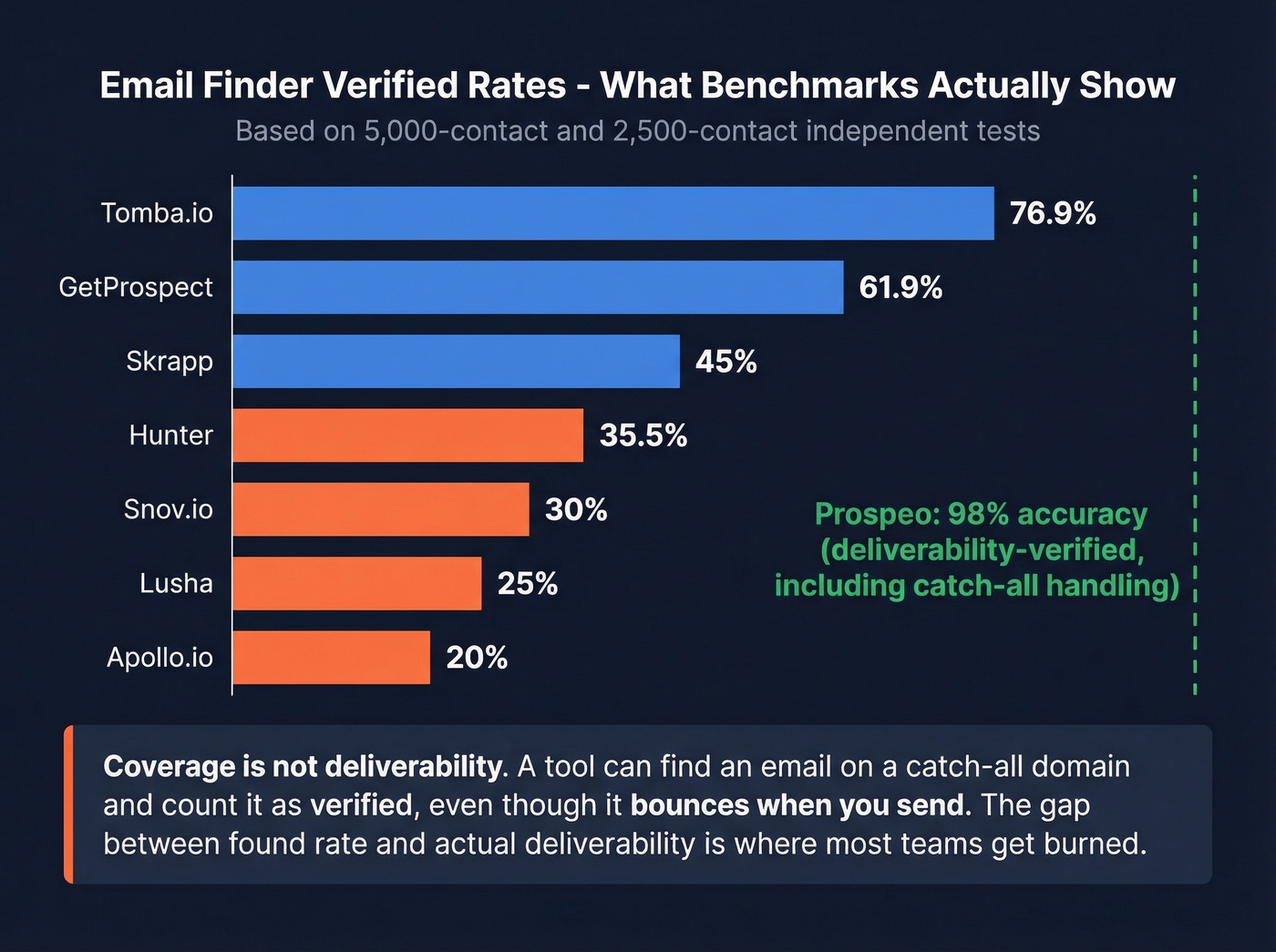
An Anymail Finder benchmark tested 5,000 contacts across multiple tools. Verified rates ranged from 77.5% down to under 20%. A separate Reddit bake-off on 2,500 contacts showed a similar spread - Tomba.io at 76.9%, Hunter at 35.5%. Tomba.io and Anymail Finder topped their respective tests, but both have limited free tiers that don't fit this guide's focus. RocketReach gets consistent praise on Reddit for accuracy, though its free tier caps at just 5 lookups per month - not practical for regular prospecting.
Here's what those benchmarks don't tell you: they measure coverage (how many emails a tool finds), not deliverability (how many of those emails actually land in an inbox). A tool can "find" an email on a catch-all domain and count it as verified, even though it'll bounce when you send. In our experience, the gap between "found" rate and actual deliverability is where most teams get burned. A 98% accuracy stat that reflects deliverability - emails surviving full verification including catch-all handling and risk filtering - is worth more than a 70% coverage rate padded with catch-all guesses.
Let's be honest: if your bounce rate is above 5%, your email finder isn't saving you time. It's burning your domain reputation. The cheapest tool is the one that doesn't get your sending domain blacklisted. (If you're troubleshooting, start with email bounce rate benchmarks and fixes.)

Find Someone's Email Without Any Tool
Sometimes you don't need software. Five manual methods that still work:
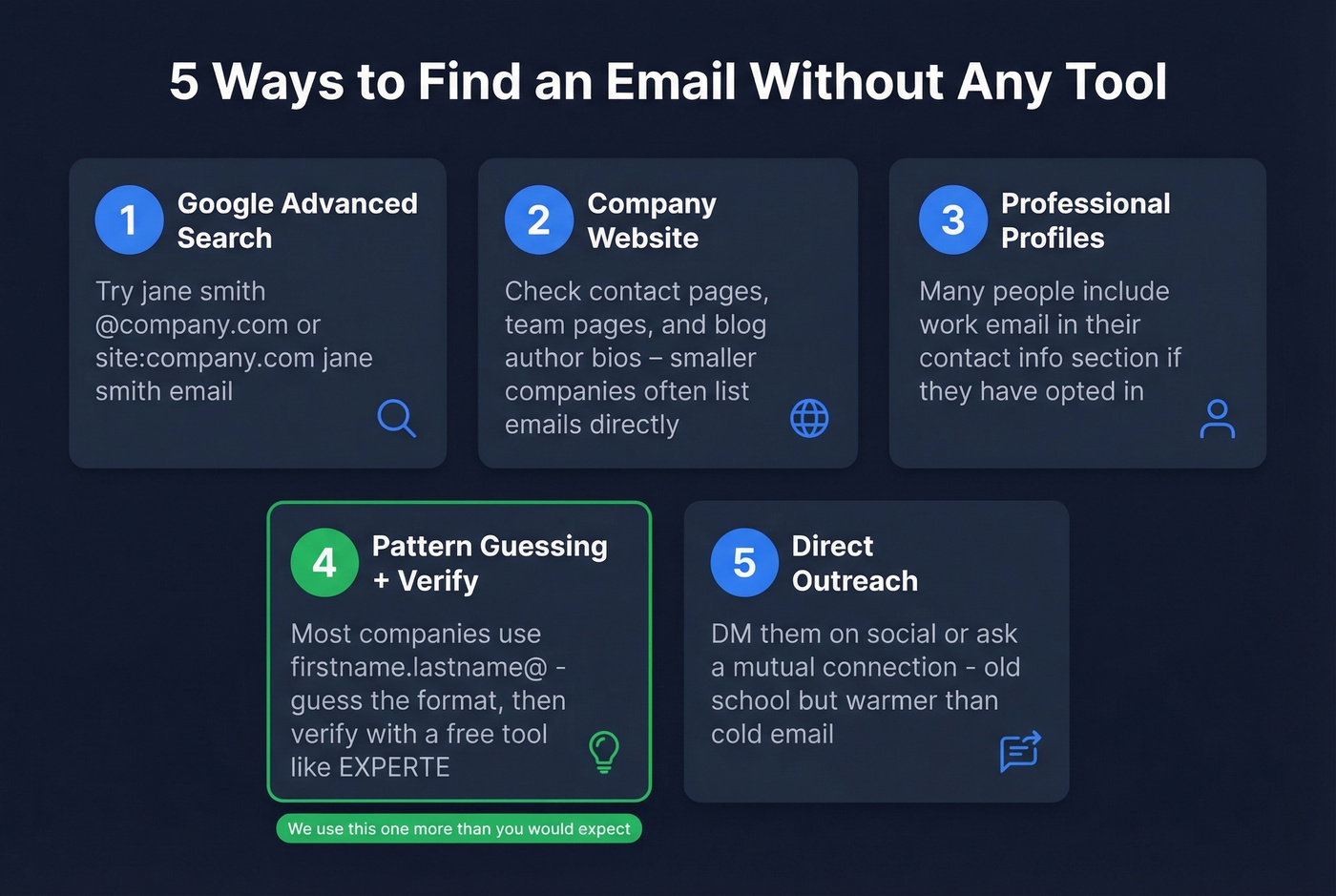
- Google advanced search. Try
"jane smith" "@company.com"orsite:company.com "jane smith" email. You'd be surprised how often contact info lives on public pages. - Company website. Check the contact page, team page, and blog author bios. Smaller companies especially tend to list emails directly.
- Professional profiles. Many people include their work email in the contact info section of their professional profiles. It's right there if they've opted in.
- Pattern guessing + manual verification. If you know the company uses firstname.lastname@domain.com - check existing contacts or email headers - generate the likely address and verify it with a free tool like EXPERTE.
- Direct outreach. DM them on a social platform or ask a mutual connection for an intro. Old school, but it works - and it's warmer than a cold email anyway.
We use method #4 more than you'd expect. Most companies stick to one of a few common email formats, and guessing correctly takes about 30 seconds.
If you're doing outbound regularly, pair this with proven sales prospecting techniques so you’re not just finding emails - you’re booking meetings.
Staying Legal - GDPR in 30 Seconds
GDPR and CAN-SPAM work differently. GDPR requires a legal basis before you email someone - for B2B, that's typically "legitimate interest" under Article 6(1)(f). CAN-SPAM is opt-out: you can email anyone as long as you honor unsubscribe requests. Cumulative GDPR fines have hit ~EUR5.88B across 2,245 enforcement actions, so this isn't theoretical risk.
Practical advice: use tools that are GDPR compliant, honor every opt-out immediately, and keep records of your legal basis for outreach. Don't overthink it, but don't ignore it either.
If you want to protect deliverability while scaling, follow an email deliverability guide and keep an eye on sender reputation.
You saw the benchmarks - most tools verify under 40% of lookups. Prospeo refreshes its 300M+ profiles every 7 days (not 6 weeks), so the email you find today is still valid tomorrow. No third-party data providers. No stale records burning your sender reputation.
Stop cross-referencing five tools for one working email address.
FAQ
Can I find personal email addresses with a free email search by name?
Most email finder tools focus on business emails tied to company domains - they can't run permutations without a known domain. For personal Gmail or Outlook addresses, manual methods work better: Google the person's name in quotes, check their social profiles, or look for public directories. SaaS finders aren't built for personal lookups.
What if I only have a name and no company?
Start with a Google search or professional profile lookup to identify their current employer. Once you have the company domain, any email finder can generate and verify permutations against it. Without a domain, the tools have nothing to work with - the domain is the essential input for every name-based lookup.
How do I avoid bounces when I find emails for free?
About 25% of emails sit on catch-all servers that accept any address, so basic verification returns false positives. Prioritize finders that include catch-all detection and risk filtering. Prospeo's 5-step verification - catch-all handling, spam-trap removal, honeypot filtering - keeps bounce rates under 5% even on free-tier lookups. Always verify before you send.