Email Sentiment Tracking: What It Is, What It Costs, and How to Set It Up
Your CS lead says replies have been "feeling angrier lately." Your sales manager swears prospects are more engaged this quarter. Neither has a number to back it up. Knowledge workers spend 28% of their workweek on email - and yet most teams treat the emotional signal buried in those messages as vibes, not data.
Email sentiment tracking changes that. Here's the practical version: what it actually measures, what it costs from free to $3,000/mo, and the preprocessing steps that most guides skip entirely.
Under 100 emails/month: a manual spreadsheet with positive/negative/neutral tags works fine. At 100+ emails/month: automation starts to make sense fast, whether that's a cloud API pipeline or a dedicated platform. And before any of this matters, you need verified contact data so your outreach actually generates replies worth analyzing.
What Is Email Sentiment Tracking?
It uses NLP to classify email text as positive, negative, or neutral. At its simplest, an AI model reads an email body and returns a polarity score. More sophisticated implementations go further - emotion detection (frustration, excitement, confusion), aspect-based analysis that separates product love from onboarding hate, and intent classification that distinguishes cancellation signals from upgrade interest.
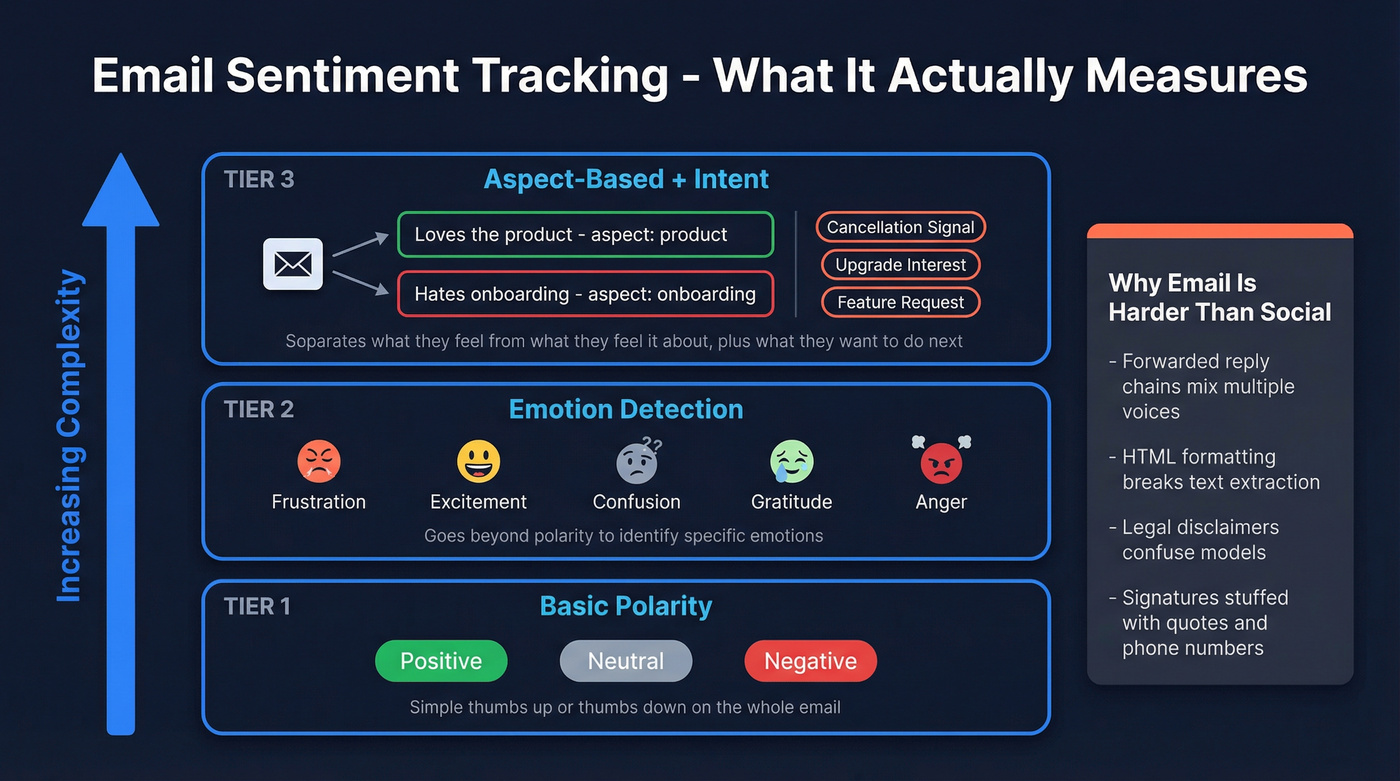
It's not the same as social media sentiment analysis, and that distinction matters more than most people realize. Emails carry unique noise: forwarded reply chains where three people's words get mashed together, HTML formatting that breaks plain-text extraction, legal disclaimers that confuse models, and signatures stuffed with inspirational quotes and phone numbers. A sentiment engine trained on tweets will choke on a five-deep email thread.
The tools that work for email either handle this preprocessing natively or require you to build it yourself.
Three Use Cases Worth Tracking
Support Triage
An angry customer email sitting in a shared inbox for six hours is a churn event waiting to happen. Sentiment scoring lets you auto-route negative emails to senior agents or escalation queues, and the best implementations go beyond simple polarity to tag specific complaint types like "billing dispute" or "feature regression" so the right specialist gets the ticket immediately.
If routing one furious email to the right person 30 minutes faster saves even one account per quarter, the tool pays for itself.
Sales Reply Analysis
Salesloft already includes native sentiment scoring inside cadences. It sorts replies into buckets - interested, objecting, annoyed, spam-report threats - so reps don't waste time manually reading every response to a 2,000-person sequence. Gong does something similar across calls and emails, giving managers a dashboard view of prospect sentiment across the full pipeline.
Churn Prediction
Here's the sleeper use case that deserves more attention. A single negative email doesn't mean much. But a sentiment trend line drifting from neutral to negative over three months? That's a leading indicator of churn that no health score based on product usage alone will catch. Teams running quarterly business reviews can layer email sentiment trends alongside NPS and usage data for a much sharper picture of account health.
How Accurate Is NLP Classification?
According to Edge Delta's accuracy benchmarks, production sentiment analysis typically lands in these ranges:
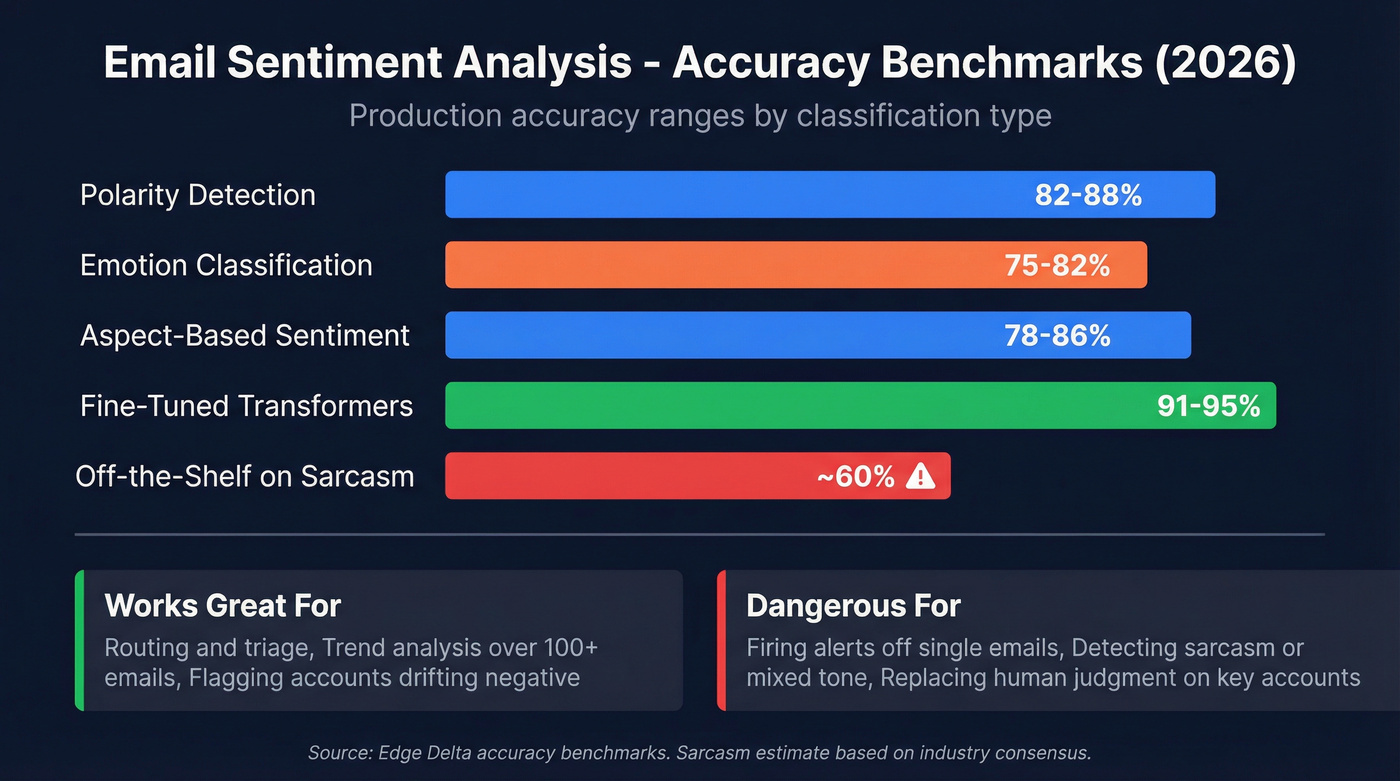
- Polarity detection: 82-88%
- Emotion classification: 75-82%
- Aspect-based sentiment: 78-86%
- Fine-tuned transformers: 91-95%
Those numbers drop when the model hits sarcasm, mixed sentiment, cultural tone differences, or domain-specific slang. A customer writing "great, another update that breaks everything" will fool most off-the-shelf models into scoring it positive.
Let's be honest: this is a triage system, not a lie detector. Treat the output as a probabilistic signal - useful for routing and trending, dangerous if you're firing alerts off individual classifications. In our experience, teams that expect 95%+ accuracy from an off-the-shelf API end up disappointed. Teams that use it to surface patterns across hundreds of emails wonder how they ever operated without it.

Sentiment tracking only works when prospects actually reply. Bad emails bounce - and bounces generate zero signal. Prospeo delivers 98% verified email accuracy across 300M+ profiles, so your sequences produce the reply volume you need for meaningful sentiment analysis.
Stop analyzing silence. Start with emails that actually land.
Preprocessing: The Step Most Guides Skip
This is where we've seen teams go wrong over and over. They plug raw email text into a cloud API and wonder why the results are garbage. The model isn't the problem. The input is.
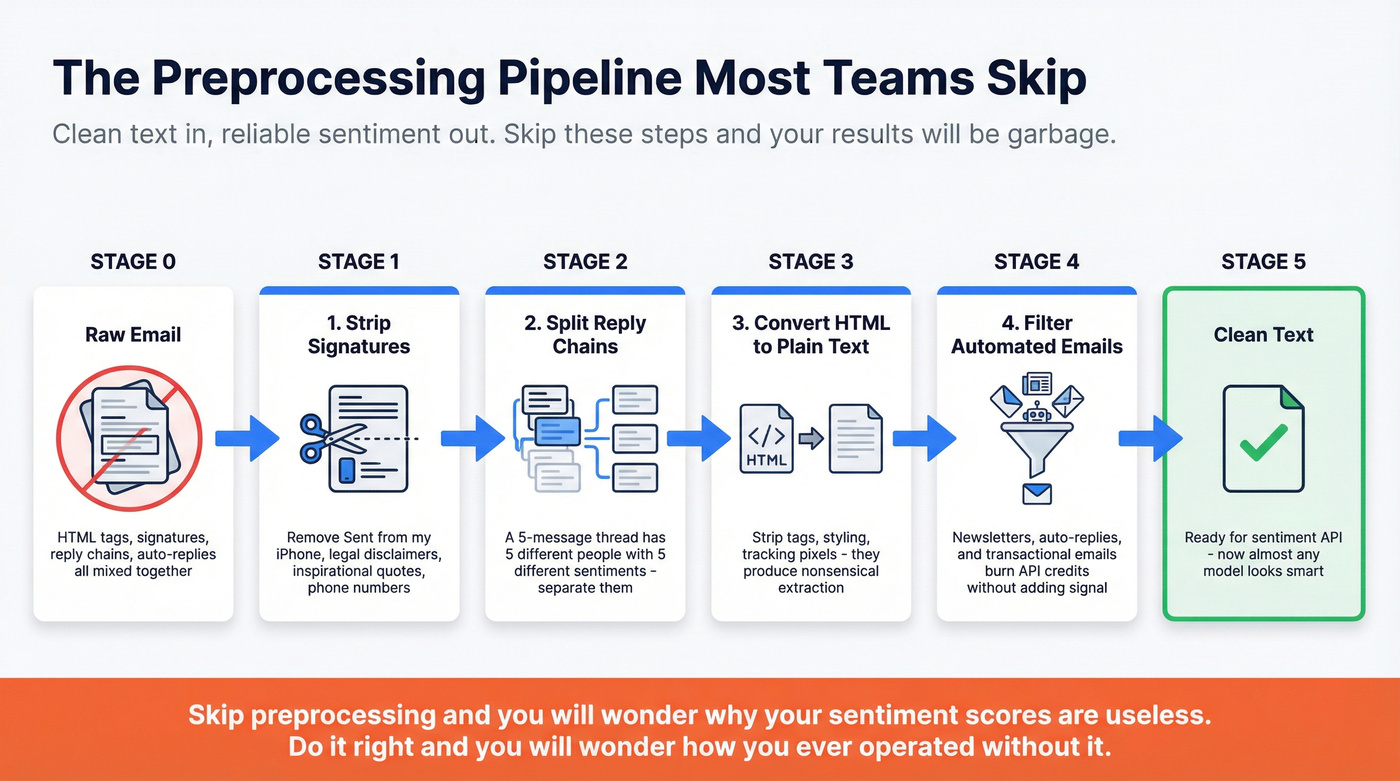
SigParser's documentation lays out the preprocessing steps that email-specific pipelines need:
Strip signatures. Your model doesn't need to analyze "Sent from my iPhone" or a three-line legal disclaimer. Signatures inject neutral text that dilutes actual sentiment. Split reply chains. A five-message thread contains five different people's sentiments - feeding the whole chain to the API attributes the original sender's words to the latest replier. Convert HTML to plain text. Raw HTML emails contain tags, styling, and tracking pixels that produce nonsensical extraction. Filter automated emails. Newsletters, auto-replies, and transactional emails burn API credits without adding signal.
Preprocessing is the difference between "this is useless" and "this is now a reliable signal." Clean text makes almost any model look smarter.
Best Tools for Tracking Email Sentiment
| Tool | Best For | Starting Price | Free Tier | Email-Ready | Verdict |
|---|---|---|---|---|---|
| AWS Comprehend | DIY pipelines | Low pay-per-use | 50K units (1st year) | No | Best value |
| SentiSum | Support tickets | $3,000/mo | No | Yes | Best turnkey |
| Gong | Enterprise sales | $30K-$100K+/year | No | Yes | Best multi-channel |
| Salesloft | Sales sequences | $100-200+/user/mo | No | Yes | Best for existing users |
| Google Cloud NLP | DIY pipelines | Pay-per-use | Up to 5K units | No | Best ongoing testing |
| monday CRM | CRM-native | $12/seat/mo | 14-day trial | Partial | Best budget CRM |
| Hugging Face | Self-hosted | Free | Yes | No | Best open-source |
| IBM Watson NLU | DIY pipelines | Pay-per-use | Up to 30K items | No | Best free volume |
Cloud APIs: Pennies per Email
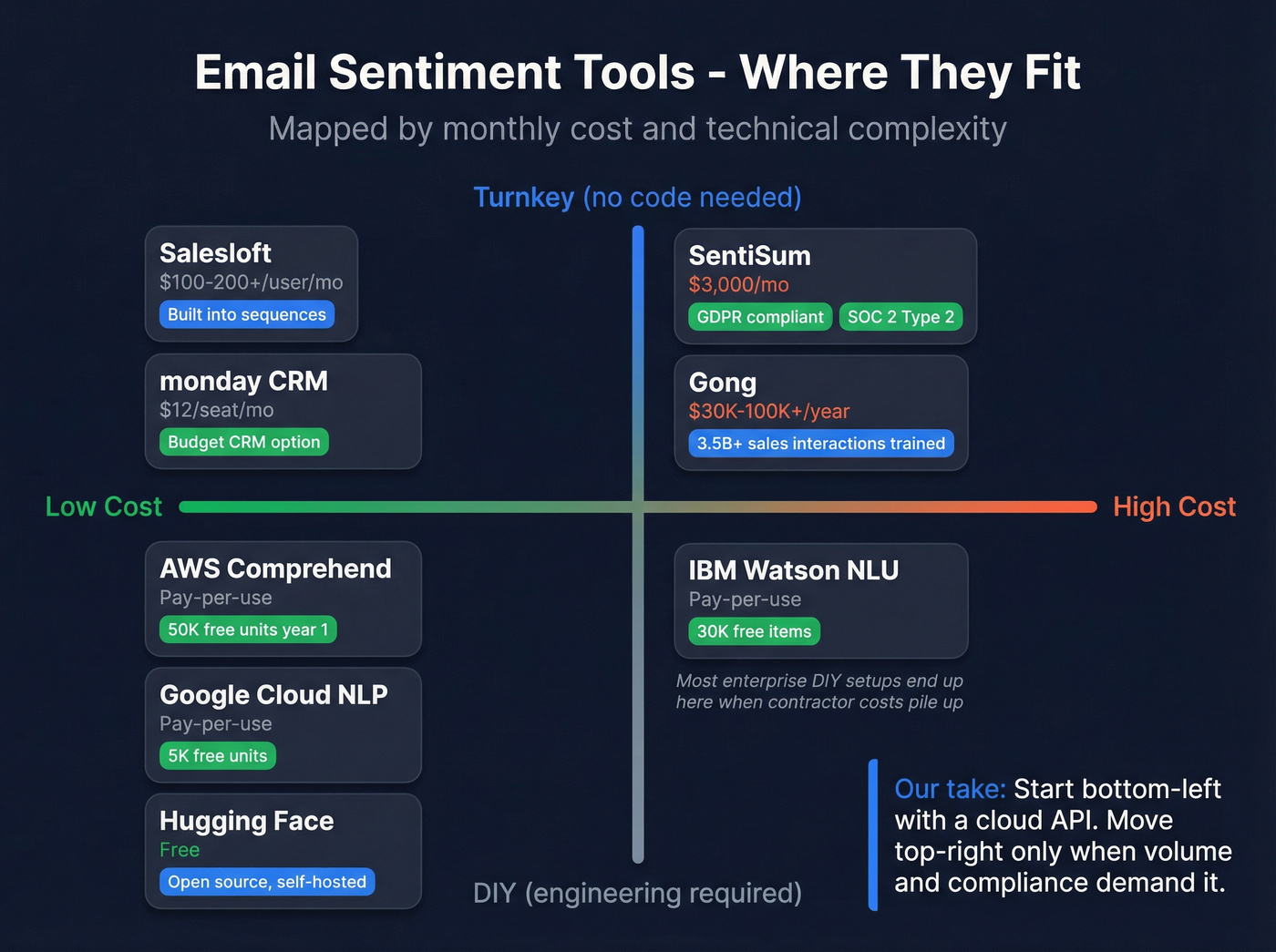
The cost gap is staggering. Cloud APIs run pennies per email at scale, while dedicated platforms can hit thousands per month. None of the cloud APIs are email-aware out of the box - you'll need the preprocessing pipeline above - but if you have an engineer who can wire up Make or Zapier, this is the obvious starting point.
Skip this route if nobody on your team can maintain a simple integration. The savings evaporate when you're paying a contractor $150/hr to debug a broken Zapier flow every other week.
Dedicated Platforms: Compliance Included
SentiSum is the strongest turnkey option for support teams. The Core Insights plan starts at $3,000/mo billed annually, covering 5,000 monthly conversations with five users. It's GDPR-compliant and SOC 2 Type 2 certified - a real differentiator when you're processing customer email content.
Gong approaches sentiment from the revenue intelligence angle, with AI models trained on over 3.5 billion sales interactions. Diligent reported a 7.4% increase in close rates after embedding Gong into their workflow. Skip Gong if you only need reply-level sentiment - you're paying for a full conversation intelligence platform, and that's overkill for most teams under 50 reps.
Already in a Sales Tool?
If you're running sequences through Salesloft, sentiment scoring on replies is often already baked into what you're paying for. It won't match a dedicated NLP platform's depth, but for sorting "interested" from "unsubscribe me" at scale, it's the path of least resistance. No separate tool, no integration headaches.
Budget Picks
If your team already lives in monday CRM, test its AI text and sentiment-analysis workflows at $12/seat/mo before adding another tool. Hugging Face hosts hundreds of open-source sentiment models that are completely free and fully customizable, though you'll need engineering resources to deploy and maintain them. The consensus on r/MachineLearning is that fine-tuned DistilBERT models hit surprisingly good accuracy for email classification tasks without requiring serious GPU infrastructure.
Privacy and Compliance
Running email body text through AI creates real compliance exposure. AWS Comprehend stores and uses your text inputs to improve its services by default - you can opt out via an AWS Organizations policy, but you need to do it proactively.
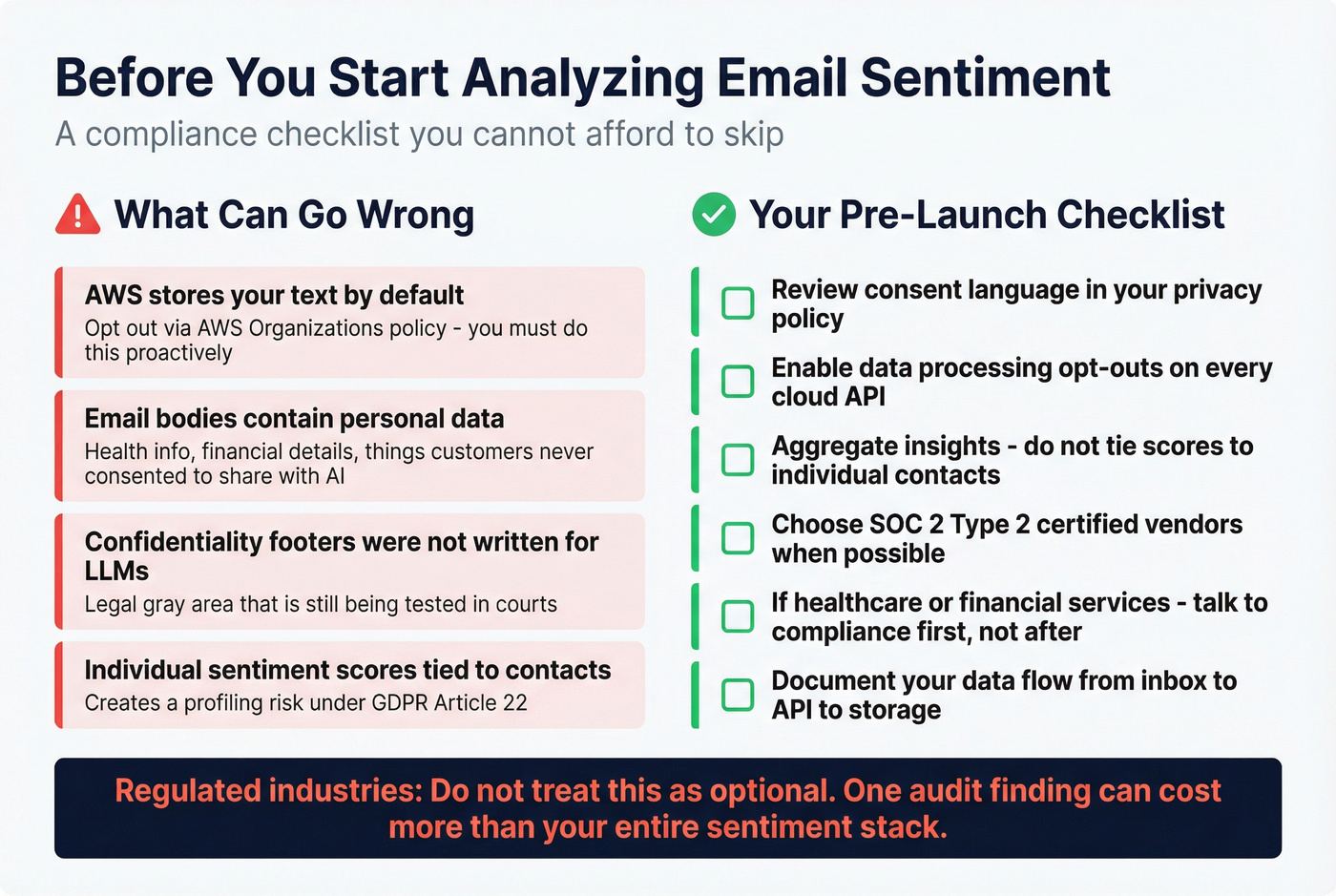
GDPR implications are significant. Email bodies often contain personal data, health information, and financial details that customers never consented to have analyzed by a third-party AI model. As martech.org has noted, confidentiality footers in emails weren't written with LLM analysis in mind.
Before you start: review consent language in your privacy policy, enable data processing opt-outs on every cloud API you use, and aggregate insights rather than tying sentiment scores to individual contacts. If you're in healthcare or financial services, talk to your compliance team first. Not after.
The Data Quality Foundation
Nobody talks about this in sentiment tracking guides, but you can't analyze replies you never received. We've seen teams running 15-30% bounce rates because they're working with stale contact databases. That means a quarter of your outreach never lands, never generates a reply, and never produces any sentiment data. Your sample is biased from the start.
If you're seeing high bounce rates, start with an email checker tool or a dedicated email ID validator before you invest in sentiment automation.

You're building a sentiment pipeline to read buyer signals at scale. But garbage-in starts before NLP - it starts with bad contact data. Prospeo's 7-day data refresh and 5-step verification mean your outreach hits real inboxes, giving you the reply volume that makes sentiment trending statistically useful.
More verified emails. More replies. More signal to analyze.
FAQ
Can I run email sentiment analysis without code?
Yes. A common no-code pipeline is Make -> SigParser for email parsing -> ParallelDots for sentiment scoring -> Google Sheets or your CRM. monday CRM also supports lightweight sentiment workflows. Both paths get you running in an afternoon without writing a single line.
How many emails do I need before tracking sentiment is useful?
At least 50 emails per month to spot meaningful patterns. Below that threshold, manual scoring in a spreadsheet with positive/negative/neutral tags works just as well and costs nothing. Above 200/month, automation becomes essential - you simply can't read that many replies manually and still do your actual job.
Does sentiment analysis work for sales outreach?
Salesloft includes native reply sentiment scoring inside cadences, and Gong captures conversations across emails, calls, and meetings. For custom pipelines, any cloud NLP API works - you just need preprocessing to handle reply chains and signatures first.
What's the cheapest way to start?
Amazon Comprehend's free tier includes 50K units in the first year - enough to test on thousands of emails. Hugging Face models are completely free if you can self-host. For the contact data side, Prospeo's free tier covers 75 email verifications per month, ensuring your outreach data is clean before you analyze what comes back.