

Email Subject Line for Introduction: What 5.5 Million Emails Reveal
Every introduction email subject line article gives you 100 templates and zero evidence. You've seen them - long lists of generic lines like "Quick question" and "Introduction from [Your Name] at [Company]," with no data showing whether any of them actually work. Email still returns $36 for every $1 spent, which means your subject line is the highest-leverage sentence you'll write all day. A study of 5.5 million cold emails tells a different story than the template lists: most popular subject lines violate the patterns that actually drive replies.
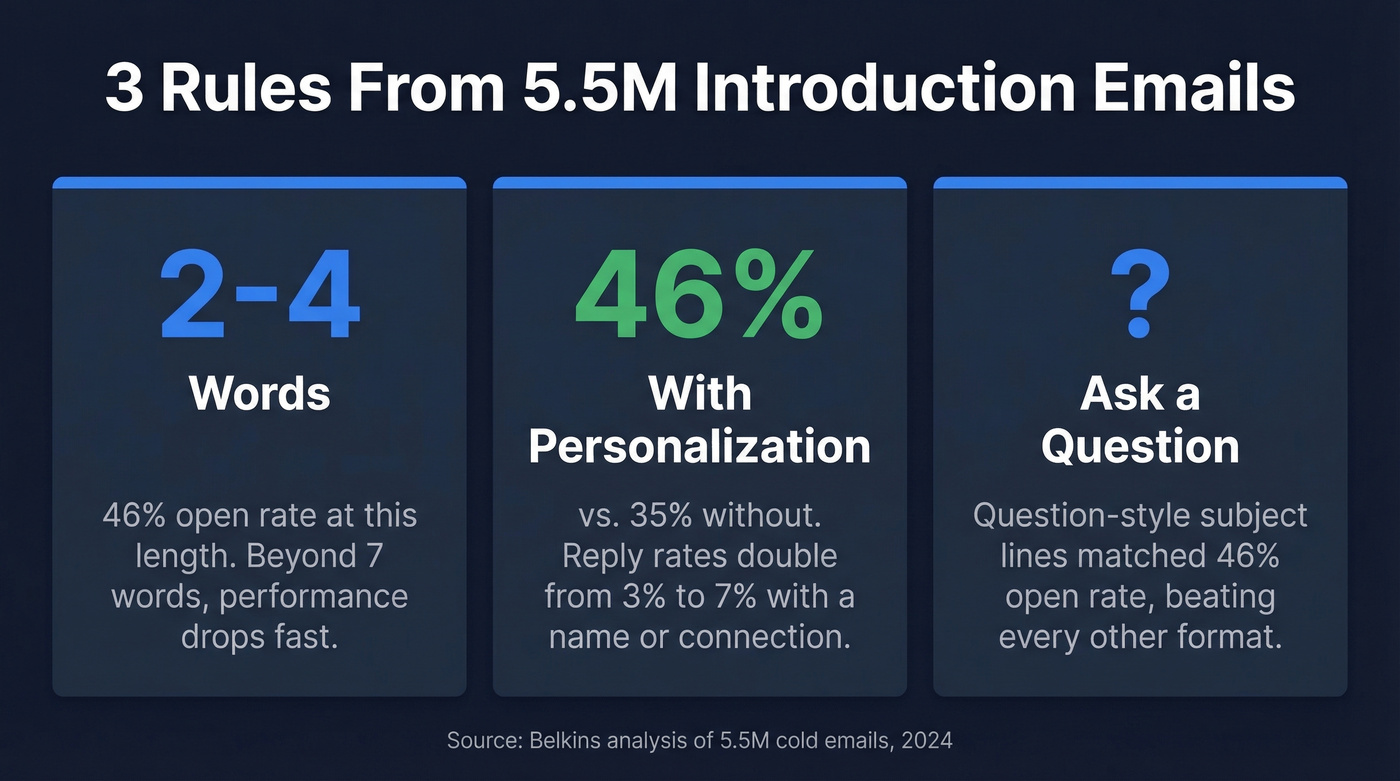
Three Rules Backed by 5.5M Emails
- Keep it to 2-4 words. This length hits a 46% open rate. Beyond 7 words, performance drops fast.
- Personalize with a name or mutual connection. Personalized subject lines pull a 46% open rate vs. 35% without - reply rates more than double (7% vs. 3%).
- Ask a question. Question-style subject lines matched the 46% open rate, outperforming every other format tested.
None of this matters if the email bounces. Verify the address before you send. (If you want benchmarks and fixes, see bounce rate.)
What the Data Actually Says
The Belkins analysis covered 5.5M emails sent in 2024, with additional data from Reply.io. The numbers are clear: personalization isn't optional. It's the single biggest factor. A 31% lift in open rate and a 133% lift in reply rate just from including a name, company, or mutual connection in the subject line.
If you're building a full outbound motion, pair this with a solid B2B cold email sequence so the subject line isn't doing all the work.
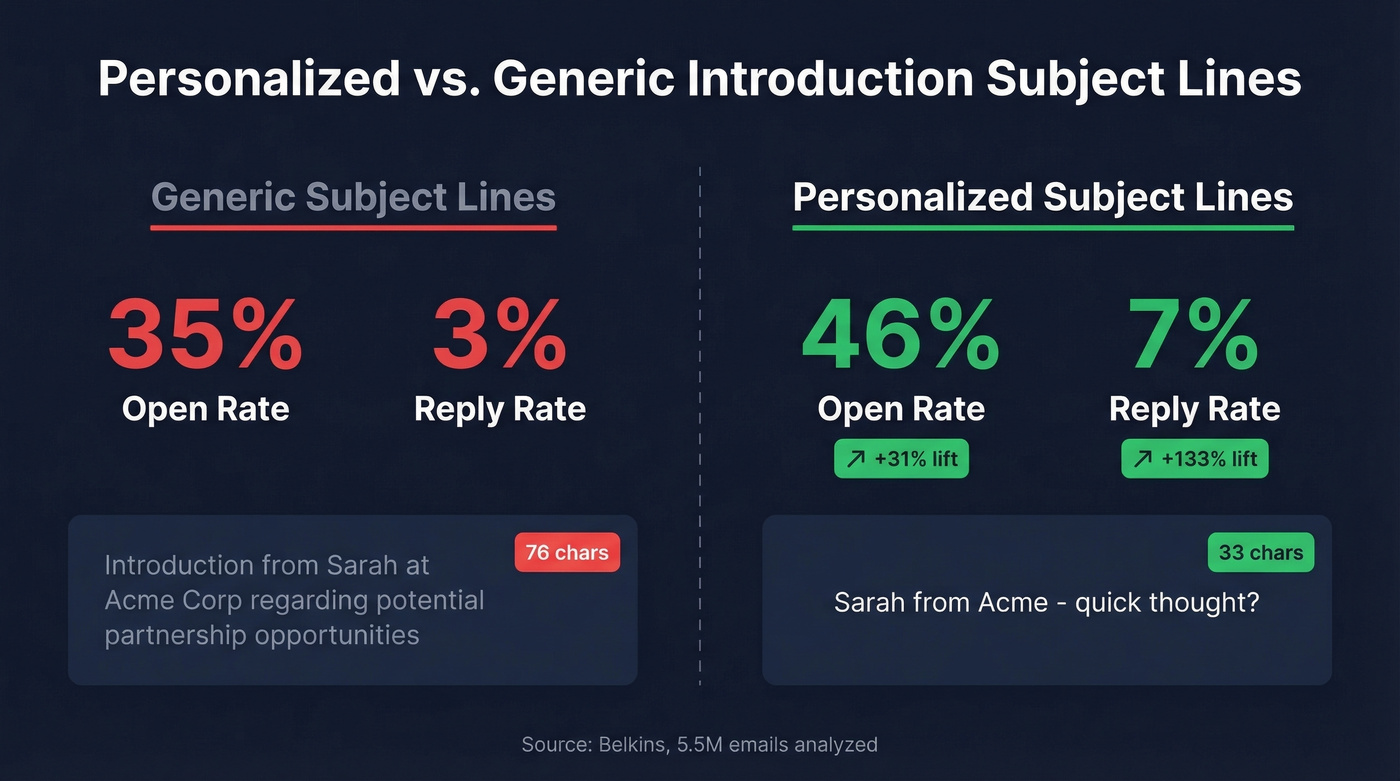
Question-style subject lines performed equally well at 46% open rate. The two patterns overlap - a personalized question ("Quick thought on [Company]'s pipeline?") hits both triggers simultaneously.
One surprise: numbers in subject lines slightly hurt performance. Lines with numbers averaged 27% open rate vs. 28% without. If you're debating "3 ideas for [Company]" vs. "Ideas for [Company]," drop the number.
Here's the thing most guides won't tell you: open rates are increasingly unreliable. Apple Mail Privacy Protection pre-loads tracking pixels, inflating open rates across the board. The cross-industry average open rate is 42.35%, but that number is noisy. Track positive reply rate instead. If you're above 5%, you're beating the B2B cold email benchmark of 4%. We've seen teams obsess over open rates for months while their reply rates stagnate - don't make that mistake. (More context: what is a good email open rate.)
How Long Should Your Intro Subject Line Be?
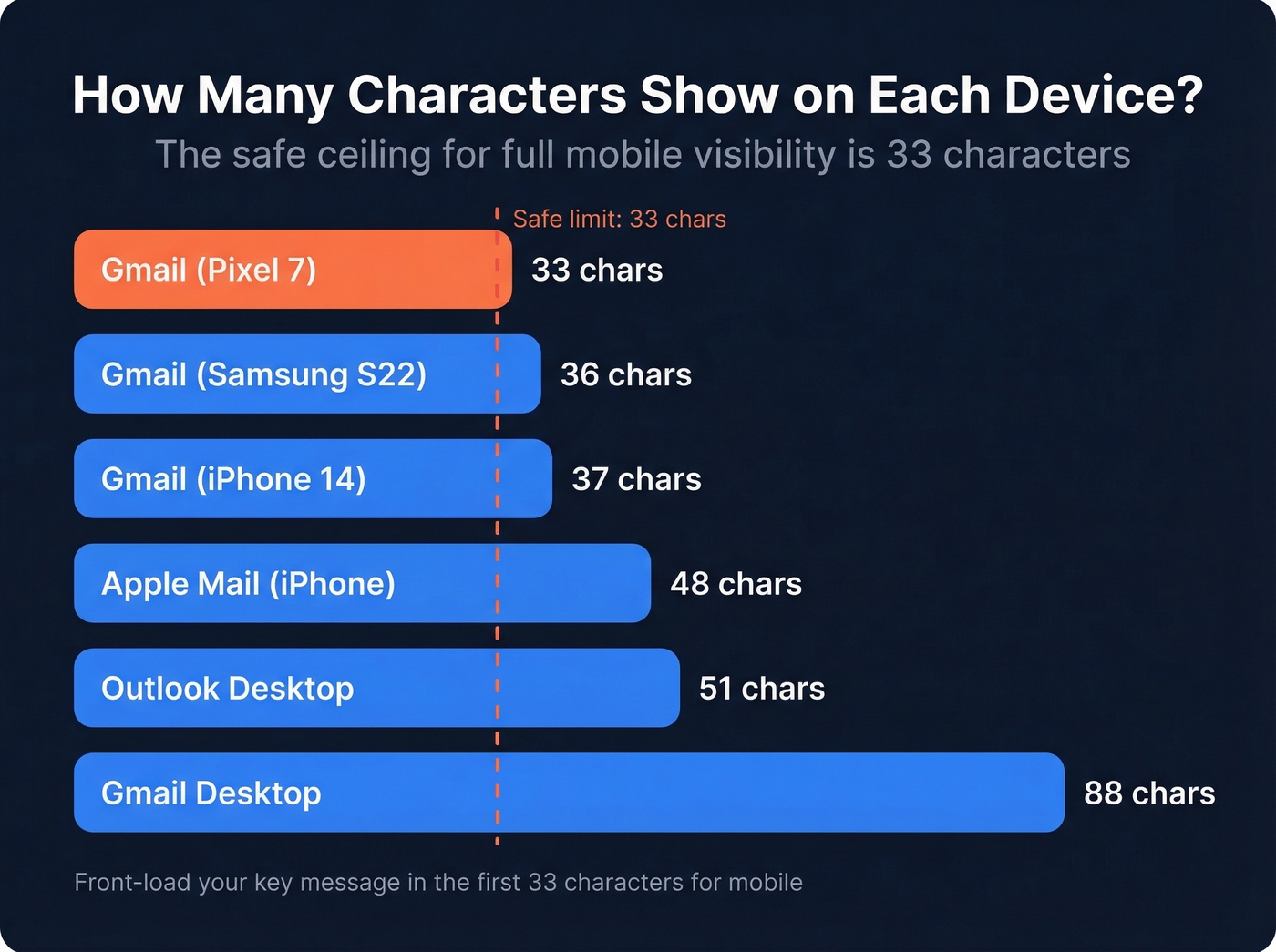
Every guide says "keep it short," but nobody agrees on what short means. Here's what device-level testing shows:
| Device / Client | Max Visible Chars |
|---|---|
| Gmail (Pixel 7) | 33 |
| Gmail (iPhone 14) | 37 |
| Gmail (Samsung S22) | 36 |
| Apple Mail (iPhone) | 48 |
| Outlook Desktop | ~51 |
| Gmail Desktop | ~88 |
The safe ceiling for full mobile visibility is 33 characters - roughly 4-6 words. SendGrid's analysis backs this up: their best-performing subject lines ran 2-4 words.
Front-load your key message in the first 33 characters. If your subject line is "Following up on our conversation at SaaStr about your pipeline challenges," a Pixel user sees "Following up on our conversation." Generic. Flip it: "SaaStr follow-up - pipeline." Now the context lands immediately.
If you want more patterns to test, pull from these email subject line examples and adapt them to your audience.

A 46% open rate means nothing if 35% of your emails bounce. Prospeo's 5-step verification and 98% email accuracy ensure your carefully crafted introduction subject lines actually reach the inbox - not a dead address.
Stop perfecting subject lines for emails that never arrive.
Subject Lines by Scenario
Cold Sales Prospecting
A strong email subject line for introduction in a sales context means combining personalization with brevity. These examples follow the data:
- "[First Name], quick question" - Personalized + question format. Hits both top-performing patterns. Under 30 characters.
- "Idea for [Company]" - Three words, personalized, curiosity-driven.
- "[Mutual Connection] suggested this" - Social proof in four words.
- "Saw [Company]'s [specific thing]" - Shows you did homework. Specificity signals a human wrote this.
Before: "Introduction from Sarah at Acme Corp regarding potential partnership opportunities" (76 chars) After: "Sarah from Acme - quick thought?" (33 chars)
If you're sending a second touch, use a tighter sales follow-up subject line instead of reusing the intro.
Networking and Post-Event
Skip the "It was wonderful connecting" preamble. On mobile, that kind of opener eats the only part of the subject line people actually see. The best post-event subject lines drop the recipient straight back into the moment.
"[Event] follow-up" is clean and scannable. "Coffee after [Event]?" adds a question format with a specific next step in under 25 characters. "[Shared topic] - let's continue" references the conversation, not your pitch. A "nice to meet you" email subject works too - just keep it under 33 characters and add context beyond the pleasantry.
Before: "It was wonderful connecting with you at the B2B Sales Summit last week" (94 chars) After: "B2B Sales Summit - loved your take" (35 chars)
Warm Introductions (Referral-Based)
The referrer's name does all the heavy lifting here. Always confirm with the referrer before using their name - a double opt-in where the referrer introduces both parties first converts better than a cold name-drop.
| Subject Line | When to Use |
|---|---|
| "[Referrer] said we should talk" | Referrer hasn't sent a heads-up yet |
| "From [Referrer]'s intro" | Referrer already introduced you |
| "[Referrer] thought of you" | Flattering, curiosity-driven |
| "Following [Referrer]'s suggestion" | Senior executives, formal tone |
Before: "Introduction - [Referrer] from [Company] recommended that I reach out to discuss collaboration" (97 chars) After: "[Referrer] recommended we connect" (33 chars)
For full structure and body copy, compare with a company introduction email example.
Internal Introductions
- "New [Role] - excited to connect" - Direct, warm, under 35 characters.
- "Joining [Team] next Monday" - Adds a clear timeline.
- "Your new [Role] - hi!" - Casual, approachable. Works in less formal cultures.
- "[Name] joining your team" - Third-person works when someone else makes the introduction.
Quick tip: when CC'ing others on an internal introduction, skip using the recipient's name in the subject line. It can feel awkward for others on the thread.
Words That Kill Your Email
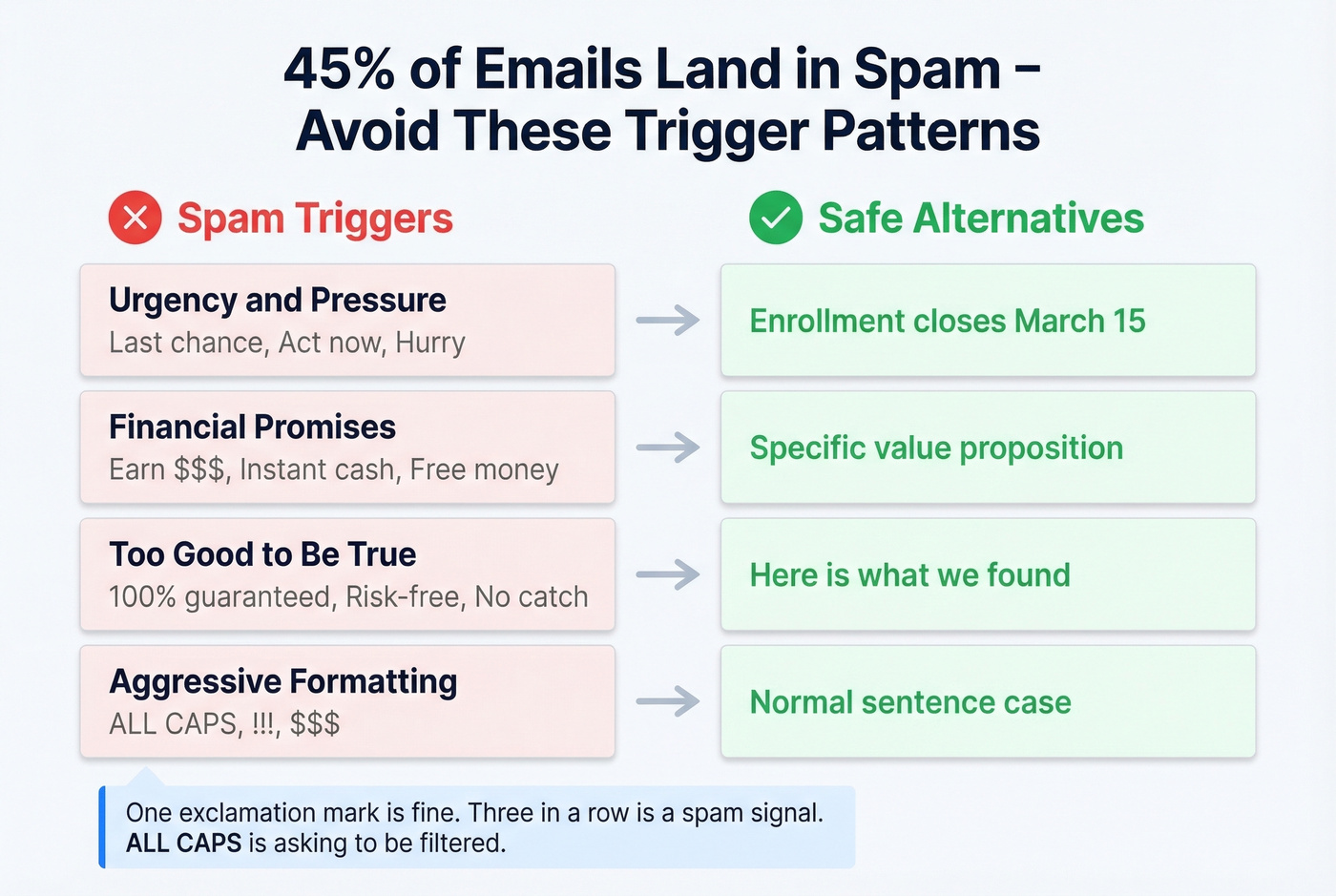
Roughly 45% of all emails land in spam. Filters scrutinize subject lines and opening lines closely, so trigger patterns in your introduction email subject carry extra weight. If you need a checklist, run it through an email spam checker.
| Trigger Pattern | Example | Say This Instead |
|---|---|---|
| Urgency/pressure | "Last chance," "Act now" | "Enrollment closes [date]" |
| Financial promises | "Earn $$$," "Instant cash" | Specific value proposition |
| Too-good-to-be-true | "100% guaranteed," "Risk-free" | "Here's what we found" |
| Aggressive formatting | ALL CAPS, !!!, $$$ | Normal sentence case |
A single exclamation mark is fine. Three in a row ("Don't miss this!!!") is a spam signal. ALL CAPS is essentially asking to be filtered.
Stick to sentence case and normal punctuation. Your introduction email should read like a human wrote it, because that's the whole point.
Verify the Address Before You Send
Let's be honest about something. You just spent 20 minutes crafting the perfect subject line for an introduction email to a VP of Sales. Four words, personalized, question format. You hit send. It bounced because the email address was 8 months old.
Most failed cold emails don't fail because of the subject line - they fail because the email never arrives. Subject line optimization is wasted effort if the email bounces. We run every outbound list through Prospeo's verification before sending - it uses a 5-step process with 98% email accuracy on a 7-day data refresh cycle, so you're checking against current data, not a stale database from last quarter. The free tier covers 75 emails per month, enough to verify your weekly outreach list. (Related: email deliverability and improve sender reputation.)

How to A/B Test Subject Lines
Change one variable at a time. If you're testing personalization vs. no personalization, keep everything else identical - same send time, same audience segment, same body copy. Send to 250+ contacts per variant. Anything less and you're reading noise, not signal.
If you want a faster workflow, use a subject line tester before you run the full experiment.
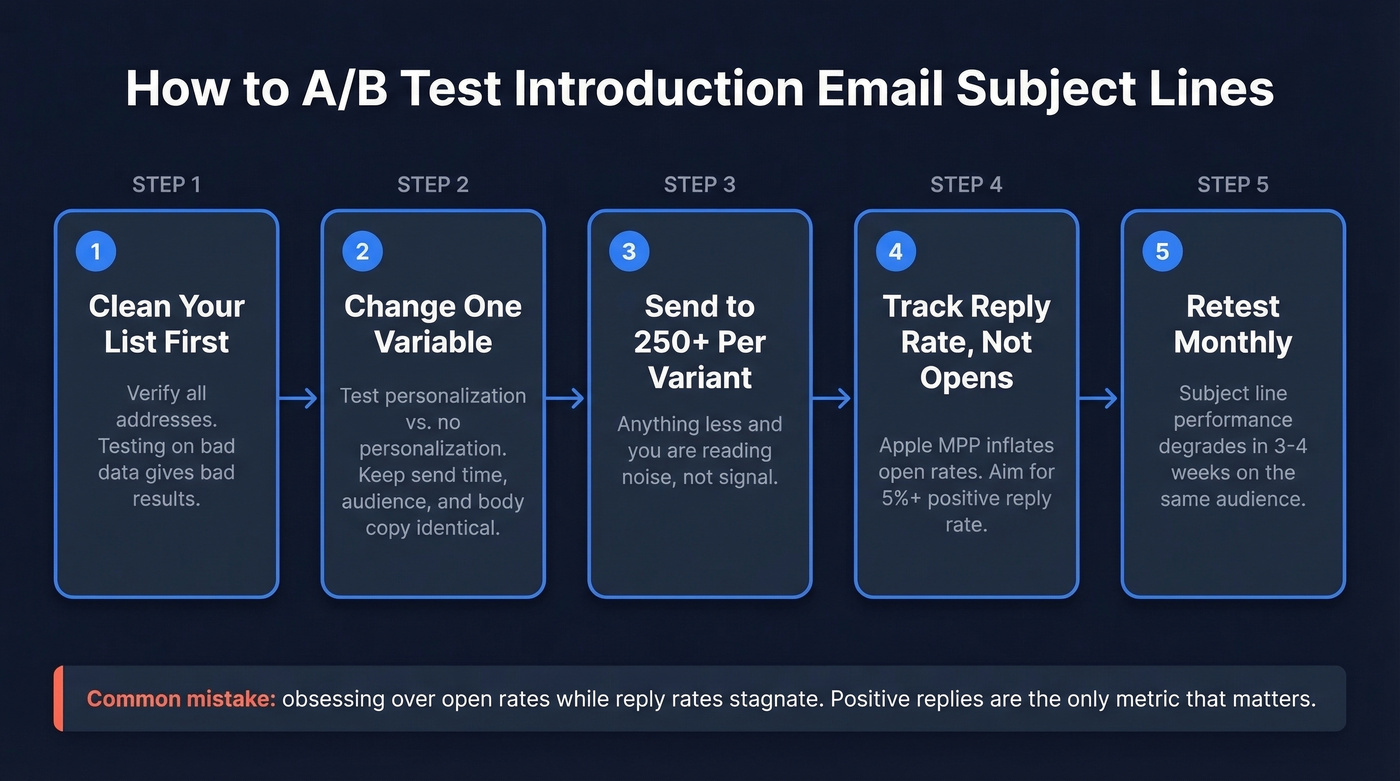
Track positive reply rate, not opens. Apple MPP makes open rates unreliable. A 5%+ positive reply rate beats the B2B cold email benchmark. Test monthly - what works in January won't necessarily work in March. Audience fatigue is real, and the consensus on r/coldemail is that subject line performance degrades faster than most people expect, sometimes within 3-4 weeks of heavy use on the same audience segment. And clean your list first: testing on bad data produces bad results.
Personalized subject lines drive 133% more replies - but only if you're emailing real people. Prospeo gives you 300M+ verified contacts with names, titles, and companies so every "[First Name], quick question" lands with the right person.
Personalization starts with accurate data. Get both at $0.01 per email.
FAQ
What's a good open rate for introduction emails?
The cross-industry average is 42.35%, but Apple Mail Privacy Protection inflates this by pre-loading tracking pixels. For cold introductions, focus on positive reply rate instead - aim for 5%+ to beat the B2B benchmark of 4%.
How many words should an introduction email subject line be?
Two to four words hit a 46% open rate in a study of 5.5 million emails. Beyond seven words, performance drops significantly. Keep it under 33 characters for full mobile visibility.
What's the best professional introduction email subject line?
Combine personalization with brevity. Data shows including the recipient's name or company in a 2-4 word subject line outperforms every other format. "[Name], quick question" or "Idea for [Company]" consistently beats longer, formal alternatives.
How do I make sure my introduction email doesn't bounce?
Verify every address before sending. Prospeo's free tier lets you check 75 emails per month at 98% accuracy with a 7-day data refresh cycle. Even a perfectly crafted subject line is worthless if the email bounces - verification is the last mile most senders skip.
Should I use emojis in introduction email subject lines?
No. Emojis can lift open rates in consumer email, but for cold B2B introductions, plain text is the safer default. Stick to sentence case and normal punctuation - professionalism wins in this context.