

Email Subjects for Checking In That Get Replies (2026)
You're about to send a follow-up email. The body copy is tight, the ask is clear, and the timing feels right. Then you stare at the subject line field for ten minutes and type "Just checking in."
That subject line is doing more damage than you think.
392.5 billion emails hit inboxes daily in 2026. Your recipient decides whether to open yours based almost entirely on the subject line - 47% open on subject line alone, and 69% flag emails as spam for the same reason. Choosing the right email subjects for checking in isn't a formality. It's the entire pitch.
The Short Version
- Use personalized, short subject lines. Personalized subjects hit 46% open rates and 7% reply rates. Two to four words is the sweet spot. Question-format subject lines are top performers, especially when paired with personalization.
- Stop writing "just checking in." That phrase pulled ~13% reply rate in one A/B test - but at scale, personalized subject lines average 7% reply vs 3% for generic. You're leaving replies on the table. (If you need alternatives, see just checking in professionally.)
- Wait three days, not one. Next-day follow-ups reduce replies by 11%. Waiting three days increases them by 31%.
Why "Just Checking In" Costs You Replies
Here's the thing: "just checking in" isn't unprofessional. It's just lazy. It tells the recipient nothing about why they should care, what's changed, or what you need from them.
A Reddit thread referencing a SalesHacker A/B test found that "just checking in" pulled roughly a 13% reply rate. But in the Belkins/Reply.io dataset of 5.5 million emails, generic subject lines average 3% reply while personalized ones average 7%. That's more than double from swapping a few words.
NetHunt's take is blunter: phrases like "touching base," "circling back," and "just checking in" are annoying and meaningless. They signal you don't have a real reason to email. And if you don't have a real reason, the recipient won't have a real reason to reply. The same goes for any touching base email subject line - if there's no substance behind it, people move on.
The fix isn't complicated. Replace the generic check-in with something specific: a reference to their last comment, a new data point, a question that requires a real answer.
What 5.5M Emails Reveal
A Belkins and Reply.io analysis of 5.5 million cold emails gives us the clearest picture of what actually works at scale. The best follow-up subject lines share three traits: they're short, specific, and personal. (For more examples, compare with these cold email subject line examples.)
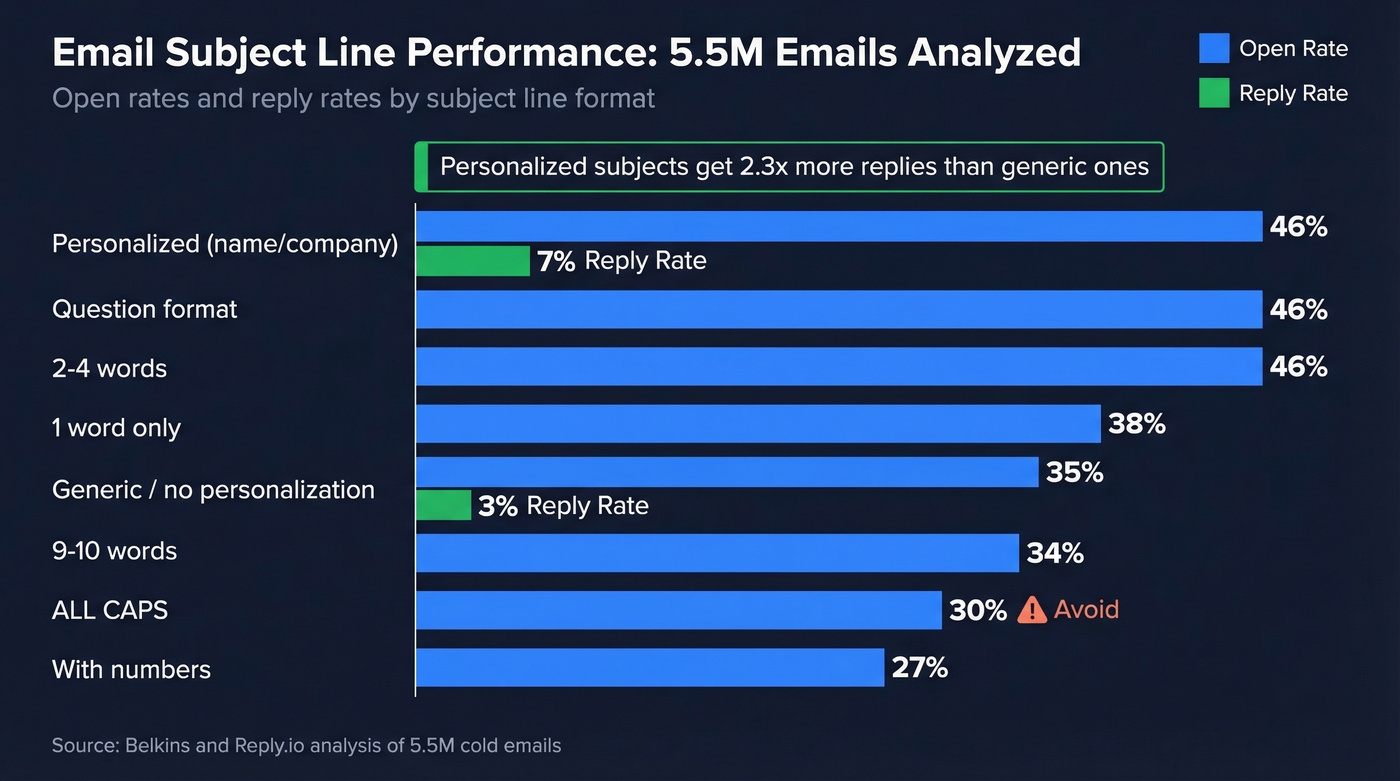
| Format | Open Rate | Reply Rate | Verdict |
|---|---|---|---|
| Personalized (name/company) | 46% | 7% | Best performer |
| Question format | 46% | - | Strong, pair w/ personalization |
| 2-4 words | 46% | - | Length sweet spot |
| 1 word only | 38% | - | Too vague for most contexts |
| 9-10 words | 34-35% | - | Getting cut on mobile |
| ALL CAPS | 30% | - | Feels spammy - avoid |
| With numbers | 27% | - | Skip numbers in subjects |
| Generic / no personalization | 35% | 3% | Baseline - do better |
One caveat: Apple Mail Privacy Protection inflates open rates by 10-30%. Reply rate is the metric that actually matters - and personalized subjects win there too.
Reddit practitioners back this up with real-world numbers. "Quick question, [First Name]" pulls roughly 25-30% response rates - but only when the email contains an actual question. One B2B marketer on r/b2bmarketing reported that referencing a prospect's recent blog post in the subject line pushed response rates above 30%. And "[Their Company] and [Your Company]" lands around 20-25% by framing relevance immediately.
The consensus on r/sales and r/b2bmarketing is consistent: anything that sounds like marketing copy gets ignored. "Boost your ROI" and "Transform your business" aren't subject lines - they're spam triggers. (If you're building a full outbound motion, start with sales prospecting techniques and then refine your prospecting email subject lines.)
40+ Check-In Subject Lines by Scenario
Here's the swipe file. Every line follows the patterns that perform: short, specific, and human. Customize the bracketed sections. (If you want full emails to match these subjects, use these sales follow-up templates.)
After a Meeting or Call
- Next steps from [day]'s call
- One thing I forgot to mention
- Quick follow-up on [topic]
- [Their name], thoughts on [specific point]?
- The [metric/resource] I mentioned
- Recap + one question
These work because they reference a shared experience - the recipient remembers the conversation and feels obligated to close the loop. (For post-call structure, see a sales meeting follow-up email.)
After Sending a Proposal
- Any questions on the proposal?
- [Company name] proposal - quick thought
- Tweaked the numbers on [section]
- Timeline for [project name]?
- One thing I'd adjust
- Updated scope attached
Don't just ask if they received it. Add something new - a revised number, a clarification, a deadline reference.
First Follow-Up (No Response)
The first follow-up should feel light. You're not frustrated yet - you're just making sure it landed. In our testing, question-format subjects consistently outperformed statements here.
- Did this slip through?
- Quick question, [First Name]
- [Their Company] + [Your Company]
- Bumping this - [one-line reason]
- Still relevant, [First Name]?
- Worth 2 minutes?
Second or Third Follow-Up
Each follow-up needs to add something the previous one didn't. A new stat, a different angle, a relevant trigger event. Bumping without new information is the fastest way to get archived.
- Different angle on [topic]
- [New data point] for [Their Company]
- Tried you a couple times
- [Mutual connection] suggested I follow up
- New info since my last note
- Still thinking about [specific problem]?
Networking and Catch-Up
Whether you need a catch up email subject line for a dormant relationship or a warm reconnection after a conference, specificity still wins. "Great meeting you" is forgettable. "Saw your [post/talk/article]" proves you're paying attention.
- Saw your [post/talk/article] - loved it
- Coffee catch-up?
- Congrats on [specific milestone]
- [Event name] - you going?
- Something reminded me of our chat
Next Steps Subjects
Most people write "Thoughts?" and wonder why nobody responds. A strong next steps email subject line names the decision and makes it easy to answer - vague subjects let the recipient postpone indefinitely.
- Need your input on one thing
- Quick decision needed by [date]
- [Project name] - green light?
- Your take on [specific option]?
- Two options - which works?
- Waiting on your side for [specific item]
Breakup Emails
The breakup email is counterintuitive - threatening to stop emailing often triggers the reply you've been waiting for. "Can I close your file?" is one of the most-used breakup subject lines in cold email because it creates gentle urgency without being pushy.
- Can I close your file?
- Should I stop reaching out?
- Last note from me
- Not a fit right now?
- Permission to move on

Personalized subject lines double your reply rate - but only if your email actually reaches the inbox. Prospeo's 98% verified emails and 7-day data refresh mean your carefully crafted check-ins land with real people, not dead addresses.
Stop perfecting subject lines for emails that bounce.
Mobile Truncation: What Gets Cut
You can write the perfect subject line and still lose half of it to truncation. 42% of emails are opened on mobile, and mobile clients are ruthless with character limits. (If you want to test variants quickly, use a subject line tester.)
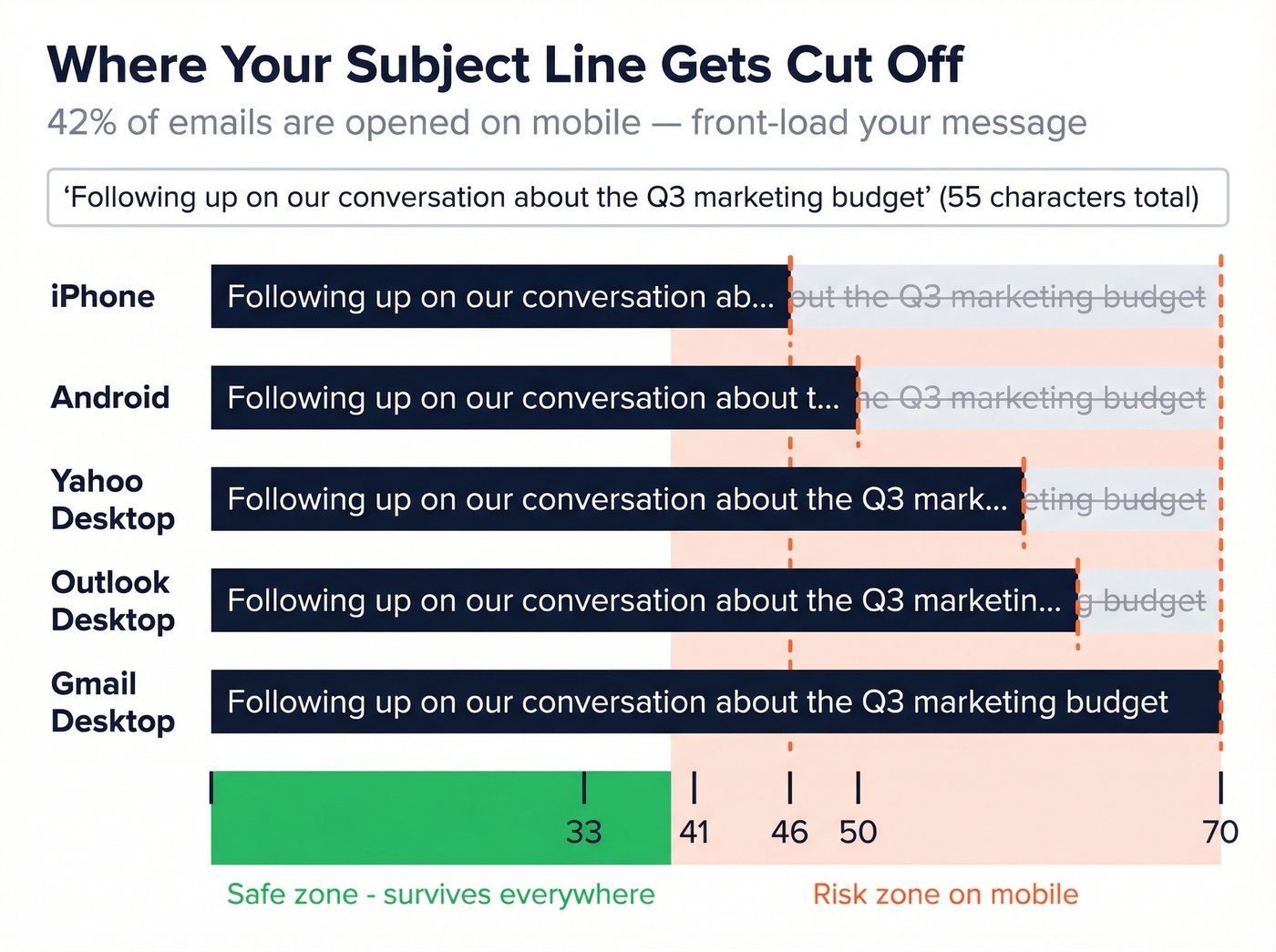
Here's what each client displays before cutting you off, per Twilio SendGrid's truncation data:
| Client/Device | Characters Shown |
|---|---|
| iPhone | 33-41 |
| Android | 35-50 |
| Gmail (desktop) | ~70 |
| Yahoo (desktop) | ~46 |
| Outlook (desktop) | 50-70 |
The safe zone is 33 characters - that's what survives on every device. Longer subjects can perform well on desktop (61-70 characters hit ~43% open rates in one study), but mobile is where you lose people. Front-load your key message. If your subject line is "Following up on our conversation about the Q3 marketing budget," the iPhone user sees "Following up on our conversation ab..." - and that's not compelling anyone to tap.
When to Send Your Check-In
Timing matters more than most people think. 55% of cold email replies come from follow-ups, not the first email. But the spacing between those follow-ups determines whether you look persistent or desperate. (For a deeper timing breakdown, see best time to send cold emails.)
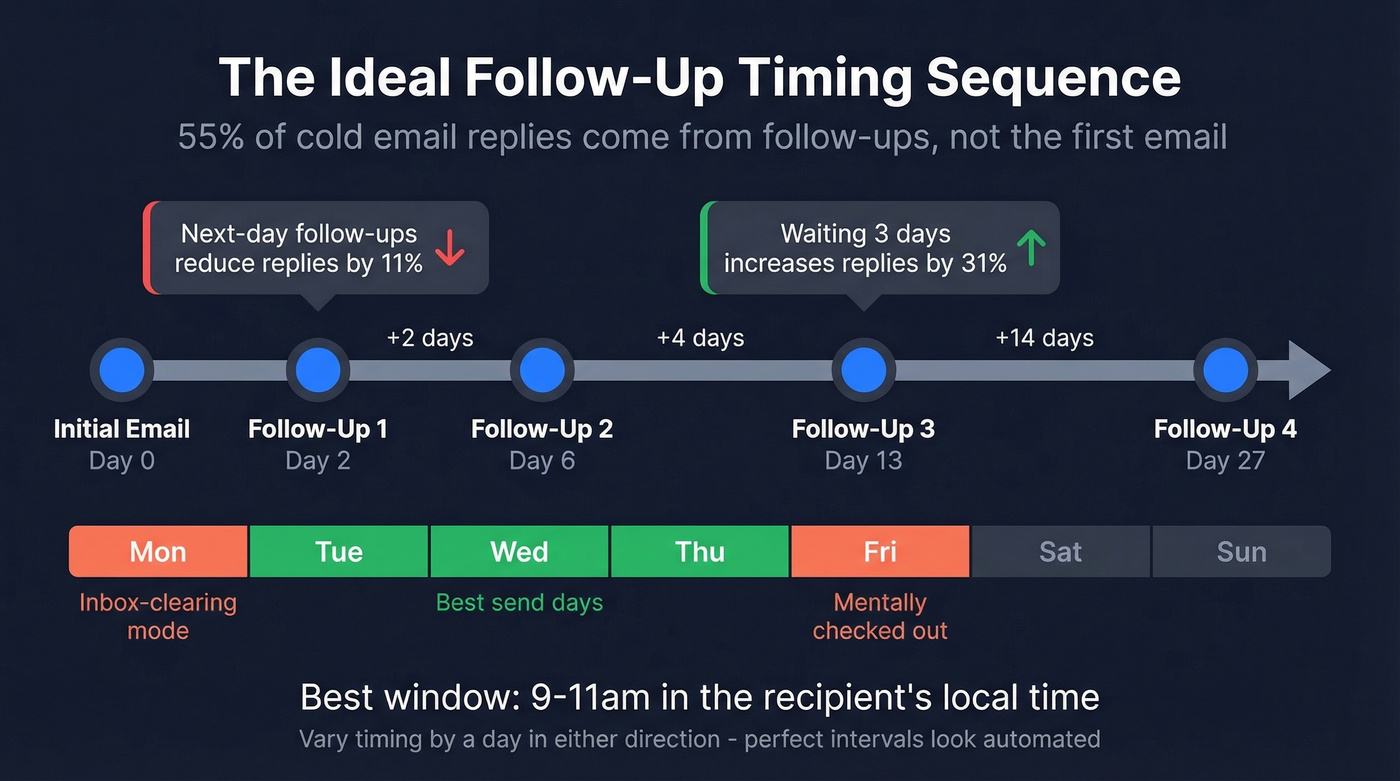
Space your follow-ups at 2, 4, 7, then 14 days. This graduated spacing feels natural and avoids the robotic cadence that screams automation. Next-day follow-ups actually reduce replies by 11%, while waiting three days increases them by 31%. For warm inbound leads, the 5-minute rule applies - but that's a different playbook entirely.
Best send window: Tuesday through Thursday, 9-11am in the recipient's local time. Monday mornings are inbox-clearing mode. Friday afternoons are mentally-checked-out mode. Mid-week mornings are when people actually read and respond.
5 Mistakes That Kill Reply Rates
1. Bumping without new information. "Just making sure you saw this" adds zero value. Each follow-up should introduce something the previous email didn't - a new data point, a different angle, a relevant case study. If you don't have something new to say, don't send the email yet.
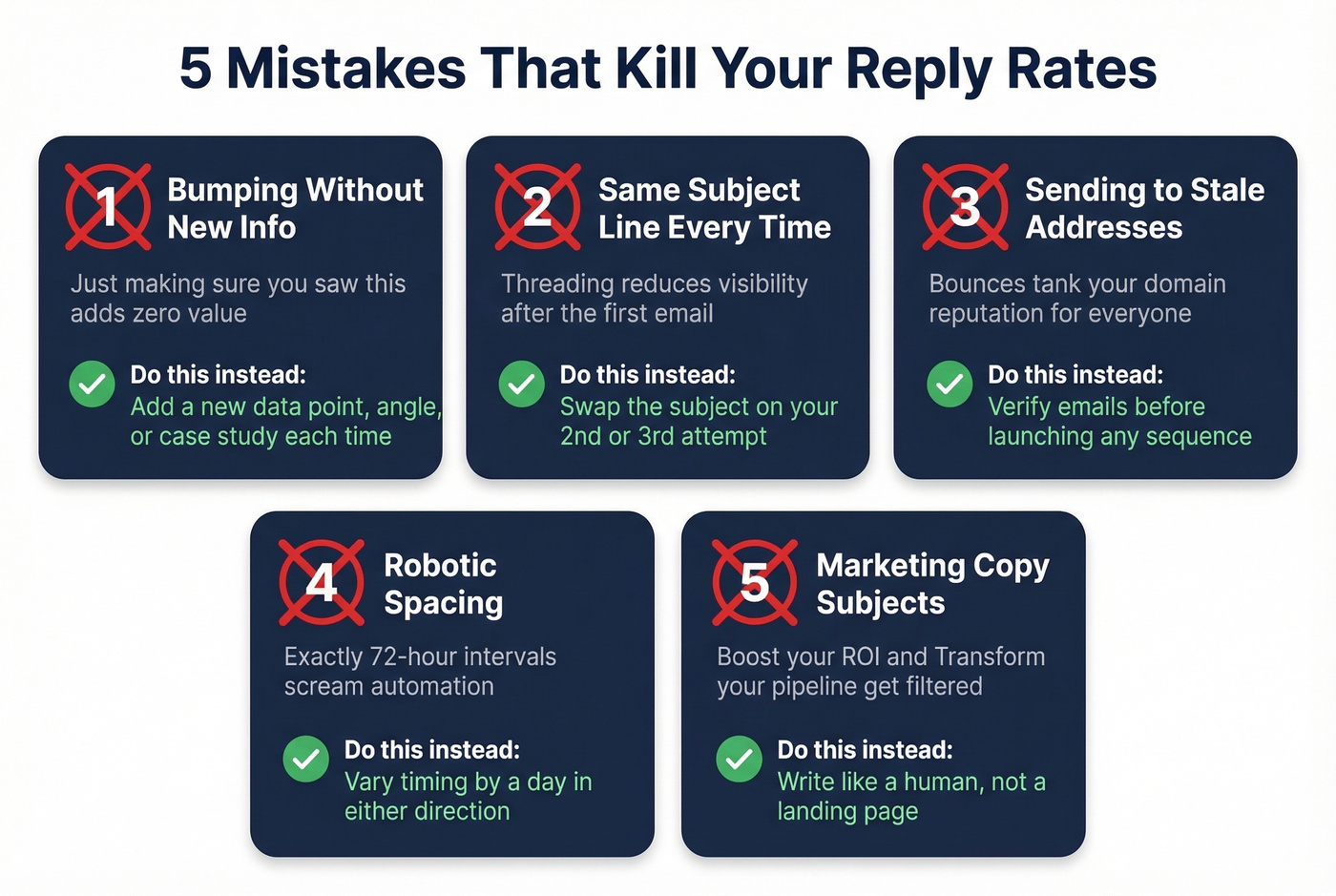
2. Using the same subject line every time. Threading can reduce visibility. Swap the subject line on your second or third attempt - it resets attention and gives you a fresh shot at the open.
3. Sending to stale or invalid addresses. You can optimize subject lines all day, but if a chunk of your list bounces, your domain reputation tanks and even the good addresses stop seeing your emails. We've seen teams double their reply rates just by cleaning their lists before launching a sequence. Prospeo checks emails in real time with 98% accuracy - if the address is dead, no subject line saves you. (If you're troubleshooting bounces, start with email bounce rate and then work through this email deliverability guide.)
4. Static spacing that looks automated. Sending follow-ups at exactly 72-hour intervals screams "sequence tool." Vary your timing by a day in either direction. Human patterns are irregular.
5. Subject lines that sound like marketing copy. Reddit practitioners are unanimous: "Boost your ROI," "Transform your pipeline," and anything with excessive punctuation gets filtered or ignored. Write like a person, not a landing page.
Subject Lines to Retire in 2026
Some phrases have been so overused they've become anti-patterns. Kill these:
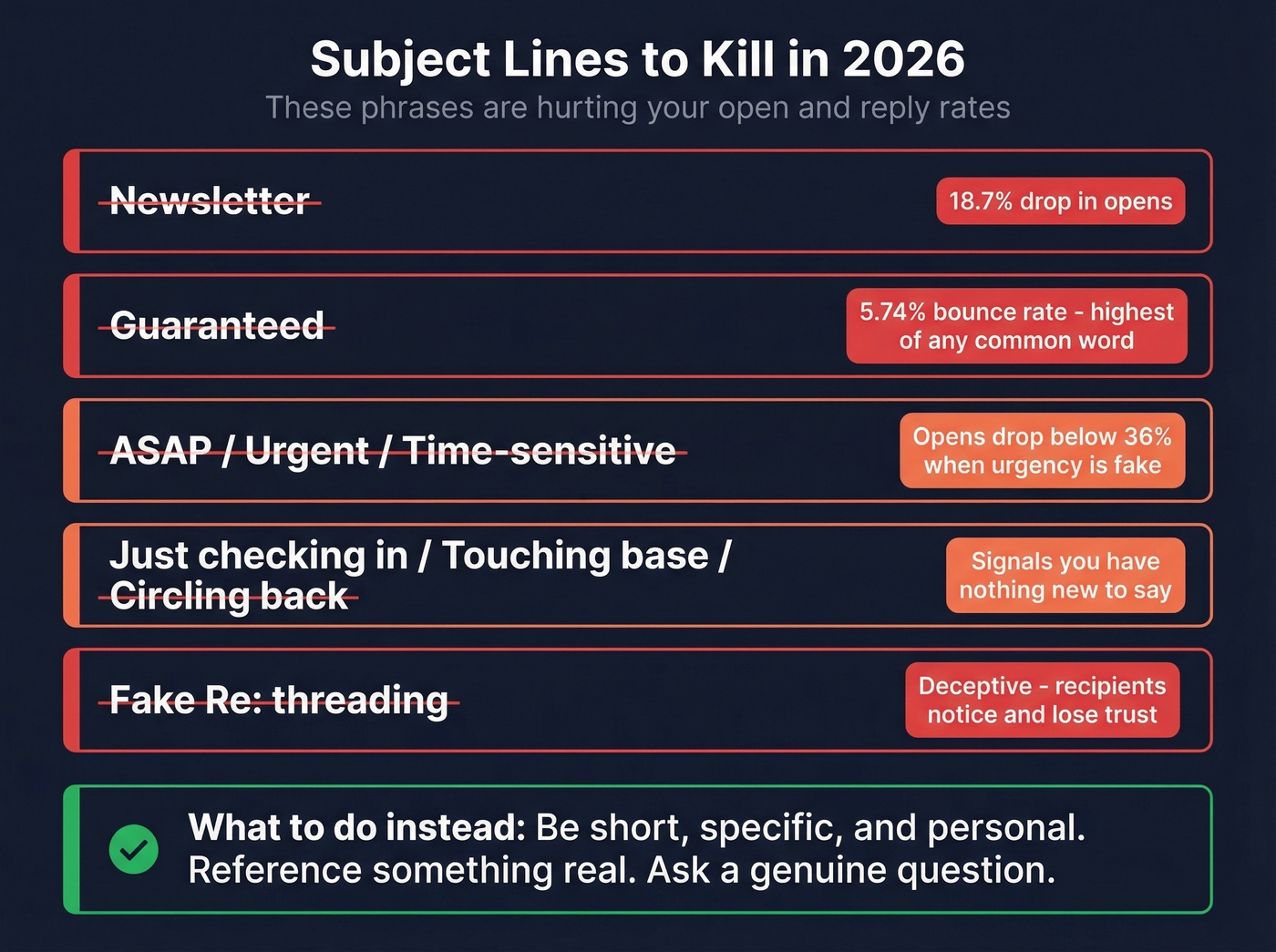
- "Newsletter" in the subject line drops opens by 18.7%.
- "Guaranteed" carries the highest bounce rate of any common word at 5.74%.
- Urgency words like "ASAP," "Urgent," and "Time-sensitive" push opens below 36% when the urgency isn't real.
- "Just checking in," "Touching base," "Circling back" - all three signal you have nothing new to say.
- Fake "Re:" threading - adding "Re:" to a first-touch email is deceptive, and recipients notice.
Let's be honest: if your average deal closes under $15k, you don't need a clever subject line framework. You need volume with clean data and one personalized detail per email. The teams obsessing over A/B testing subject line word order are usually the same teams sending to 40% invalid addresses. Fix the foundation first.
You just bookmarked 40+ check-in subject lines. Now you need the right contacts to send them to. Prospeo gives you 300M+ profiles with 30+ filters - buyer intent, job changes, technographics - so every check-in hits a decision-maker who's actually relevant.
Great subject lines deserve prospects who actually match.
FAQ
Is "just checking in" unprofessional?
Not unprofessional - just ineffective. It pulled ~13% reply rate in one A/B test, while personalized subject lines average 7% reply (vs 3% for generic) across a 5.5M-email dataset. Replace it with a specific reference to a past conversation or a concrete question.
How many follow-ups should I send?
Three to four is the sweet spot for most B2B scenarios. Space them at 2, 4, 7, then 14 days. After four unanswered emails, send a breakup email ("Can I close your file?") and move on.
What's a good reply rate for check-in emails?
Average cold email reply rate runs 1-5%. Highly personalized campaigns hit 3-8.5%. SaaS teams typically see 3-6%, while recruiting emails pull 5-9%. If you're below 3%, verify your contact data first - dead addresses tank your sender reputation before subject lines even matter.