

The Complete Guide to Executive Email in 2026
You crafted the perfect cold email. Personalized opener, compelling hook, tight CTA. Then it bounced. The CTO left that company three months ago, and your domain reputation just took a hit with a Fortune 500 mail server.
The real reason executive email fails isn't bad writing - it's stale data. Fix your data before you fix your copy.
The average employee receives 117 emails per day and gets interrupted roughly every two minutes. Executives get more. Your message has about 20 seconds - on a phone screen, between meetings - to earn a response.
What You Need (Quick Version)
Finding the email: Use a verified email finder with a 7-day refresh cycle. Start with a free tier to test accuracy before scaling.
Writing the email: Keep it under 125 words. Lead with a timeline hook, not a problem statement. Use a soft CTA like "Worth a conversation?" (If you want more examples, pull from these cold email subject line examples.)
Verifying before sending: Executive contact data goes stale fast. If your tool refreshes every 6 weeks (common across the industry), you're gambling with every send. (This is also where email deliverability starts or dies.)
How to Find Executive Email Addresses
Knowing how to find contact information for company executives is the foundation of any outbound strategy. Three tiers of methods exist, and they scale very differently.
Manual methods work for one-off research. Google operators like site:company.com + "email" + "CEO" or filetype:pdf + "contact" + [executive name] can surface addresses in press releases, conference bios, and PDF reports. Company newsletters and leadership bios occasionally list direct contacts. Free, but painfully slow beyond a handful of targets.
Pattern guessing gets you partway there. Most companies use firstname.lastname@company.com or firstinitial.lastname@company.com. Without verification, though, you're sending blind - and a bounced message to a VP looks unprofessional and can burn the relationship entirely. Don't buy static email lists, either. They're stale on arrival. Build verified lists instead. (If you’re building lists at scale, this name to email workflow helps.)
Email finder tools are the scalable path. They combine discovery, pattern matching, and real-time verification in one workflow. (For a broader stack view, see these SDR tools.)
Prospeo
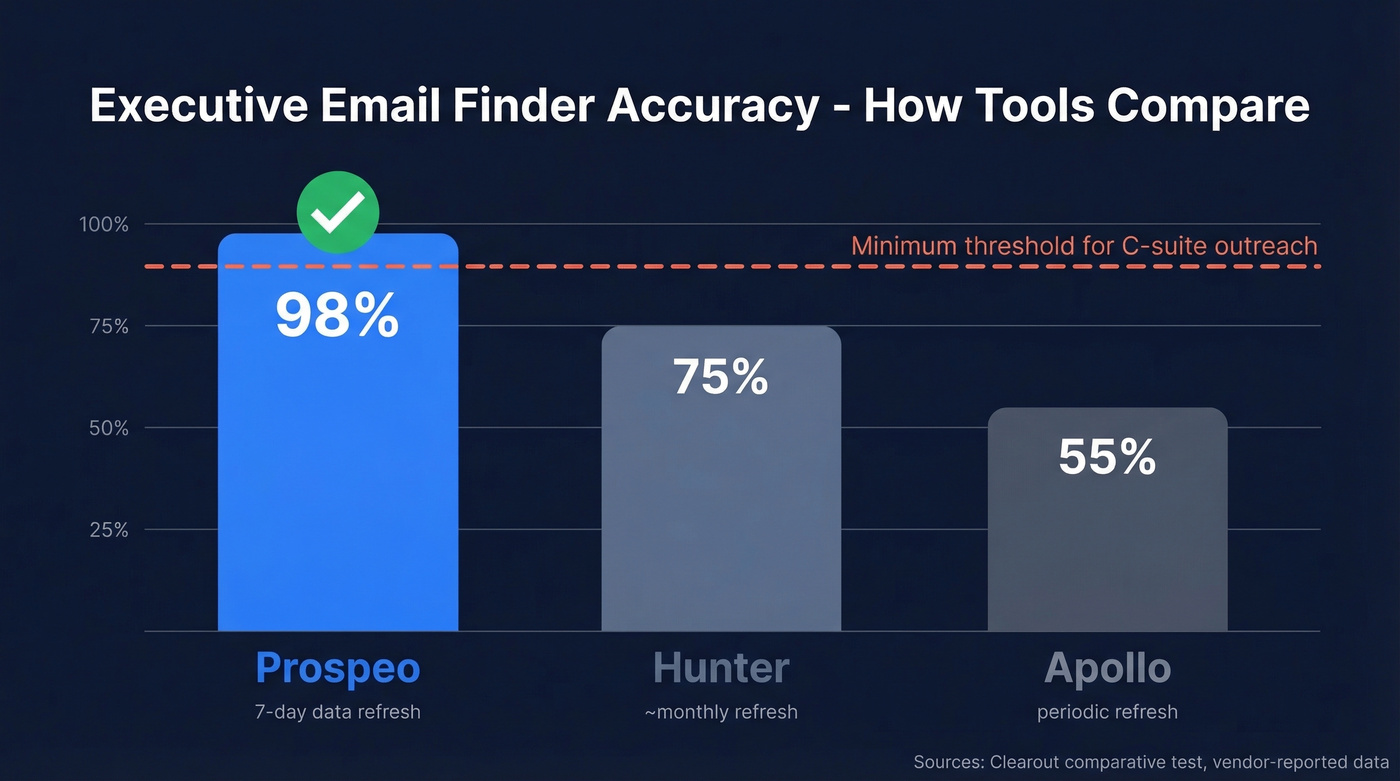
Prospeo covers 300M+ professional profiles with 143M+ verified emails, backed by a 5-step verification process that includes catch-all handling, spam-trap removal, and honeypot filtering. The 98% accuracy rate and 7-day data refresh cycle make it the strongest option for C-suite outreach, where a single bounce can close a door permanently. (If you’re comparing vendors, start with best email search tools.)

The Chrome extension pulls verified emails from any website or professional profile in one click. Pricing starts free - 75 emails per month, no credit card. Paid plans run about $0.01 per email, and you only pay for valid addresses.
Hunter
Hunter is the most recognizable name in email finding. The domain search feature is genuinely useful: plug in a company domain and Hunter shows you the email pattern plus any addresses it's found. You get a limited free tier to test it, with paid plans starting around $49/month. A solid starting point, but not deep enough for teams doing serious C-suite outreach at volume. (If you’re evaluating options, see Hunter alternatives.)
Apollo
Apollo's strength is sheer scale - 265M+ contacts, with a free tier of 50 credits per month. For teams that need volume prospecting across multiple roles, Apollo is hard to beat on breadth. The tradeoff is accuracy, which we'll cover next. (Related: best sales prospecting databases.)
How Accuracy Varies
We've tested dozens of email finders, and accuracy variance is wider than most teams expect. A small-scale comparative test of 20 executive contacts found Hunter delivering valid emails for 75% and Apollo for about 55%. Small sample, but directionally consistent with what we hear from outbound teams. For C-suite contacts, where one bounce can damage a relationship, that gap matters enormously.
Executive Email Tool Comparison
| Tool | Starting Price | Free Tier | Best For |
|---|---|---|---|
| Prospeo | ~$0.01/email | 75 emails/mo | Verified exec contacts |
| Hunter | ~$49/mo | Limited free | Domain pattern search |
| Apollo | $49/mo/user | 50 credits/mo | Volume prospecting |
| LeadIQ | $15/mo | - | Pipeline workflow |
| Kaspr | ~EUR30/mo | Free signup | European contacts |
| Lusha | $22.45/mo | - | Quick lookups |
| RocketReach | $19/mo | - | Individual research |
| Clearbit | ~$99/mo | Usage-based | Enrichment-first teams |
| ZoomInfo | ~$15,000/yr | None | Enterprise GTM teams |
ZoomInfo is the elephant in the room. At ~$15,000/year minimum, it's built for large sales orgs running full GTM motions - not for teams that just need verified executive contacts. Kaspr focuses heavily on European contacts with a 120M+ database verified against 120 sources. LeadIQ and RocketReach work fine for individual lookups, but for high-stakes exec outreach, accuracy and verification depth matter more than anything. (If enrichment is your priority, compare data enrichment services.)
Here's the thing: ZoomInfo is still the most complete GTM platform on the market. But if your average deal size is under $20k or your team is under 10 reps, you're paying for a fighter jet to commute to work. A focused tool with better accuracy will outperform it for reaching executives specifically.
Why Verification Isn't Optional
The #1 complaint on r/techsales about executive email tools isn't price or features - it's stale data. Reps report that even in 2026, exec addresses still bounce or route to people who left months ago.

The industry average for data refresh is around 6 weeks. Executive roles turn over faster than that. A VP gets promoted, a CTO joins a startup, a CEO retires - and your "verified" address is now a dead end. A 7-day refresh cycle with multi-step verification should be your baseline for C-suite outreach, not a nice-to-have. (To go deeper on bounces, see email bounce rate.)

One bounced email to a CEO can close that door forever. Prospeo's 5-step verification and 7-day data refresh cycle keep executive contacts current - not 6-week-old guesses. 143M+ verified emails at 98% accuracy, starting free.
Stop gambling your domain reputation on stale executive data.
Benchmarks Worth Knowing
Know the numbers before you write a single word.
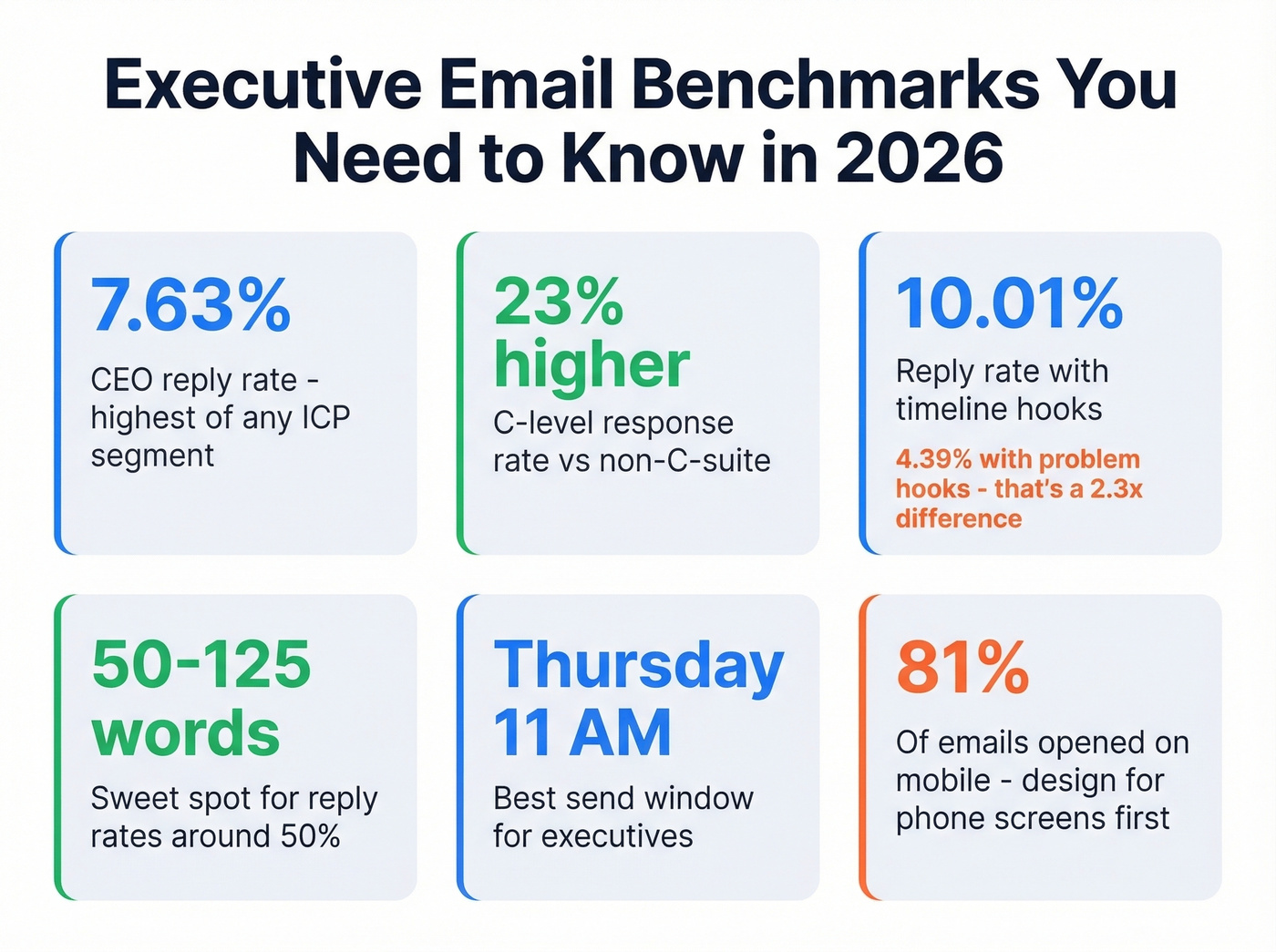
CEOs and founders hit a 7.63% reply rate in cold outreach - the highest of any ICP segment. C-level contacts respond 23% more often than non-C-suite. Executives read cold email. They just don't read bad cold email.
Hook type matters enormously. Timeline-based hooks ("We helped [similar company] cut onboarding time by 40% in 6 weeks") average a 10.01% reply rate. Problem-focused hooks ("Struggling with employee retention?") average 4.39%. That's a 2.3x lift just from changing your opening angle. Problem hooks are dead for executive outreach - stop using them.
Emails between 50-125 words tend to receive ~50% reply rates, with sharp dropoffs beyond that. Thursday at 11 AM is the optimal send window; Tuesday at 4 PM performs worst. And 81% of emails are opened on mobile - if your message doesn't scan on a phone screen, half your recipients will delete it unread. (More timing data here: best time to send cold emails.)
Writing Emails Executives Actually Read
Most advice on emailing executives is stuck in 2018 - long value propositions, formal greetings, multiple paragraphs explaining your company. That approach is dead.
Subject Lines That Get Opened
69% of recipients mark emails as spam based on the subject line alone. Keep it to 2-4 words. Personalized subject lines hit 46% open rates versus 35% without. Drop the cleverness - "[First name], quick question" or "[Company] + [specific metric]" outperforms anything cute.
The 20-Second Rule
A practitioner framework from r/sales nails this: assume the executive is reading on their phone between meetings. Send your draft to yourself, open it on your phone, and read it. If the first sentence isn't the point, rewrite it. Use the BLOT principle - Bottom Line On Top.
The Modern Format
The consensus on r/copywriting is clear: the offer does the heavy lifting, not the copy. The format working in 2026 is tight - 40-60 words following this structure:
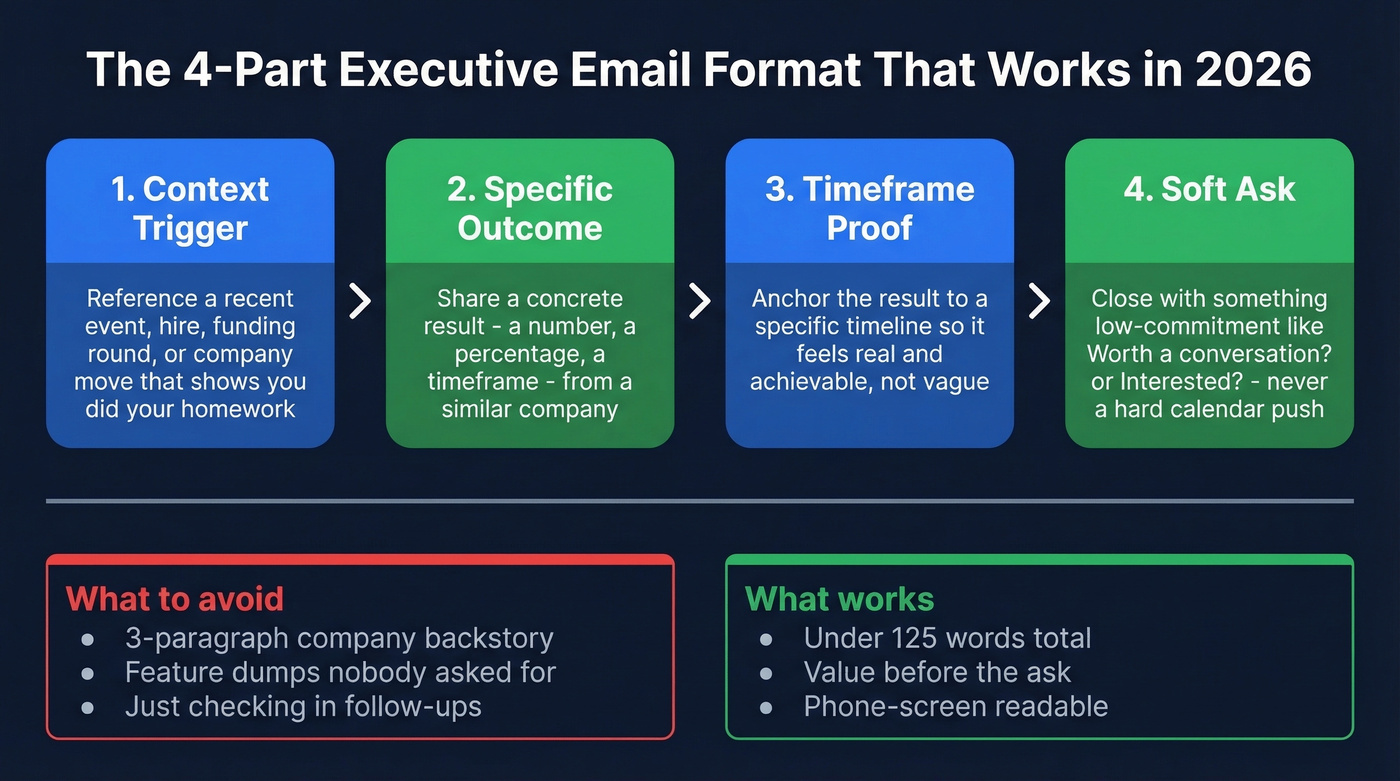
Context trigger -> Specific outcome -> Timeframe proof -> Soft ask
No 3-paragraph company backstory, no feature dumps, no "just checking in." Give value before asking for anything - a quick audit, a competitor insight, a relevant data point. Then close with "Worth a conversation?" or "Interested?" (For more structure, see AI cold email outreach.)
Three Templates That Get Responses
Template 1: Cold Outreach (Timeline Hook)
Hi [Name], [Similar company] cut their [metric] by [X%] in [timeframe] after changing [specific thing]. Given [Company]'s recent [trigger event], the same playbook could apply. Worth 15 minutes this week?
Timeline hook with a 2.3x lift over problem hooks, specific proof, soft CTA. Under 50 words.
Template 2: Internal Escalation
[Name], I've been working with [their direct report] on [initiative]. We've identified [specific opportunity] that impacts [executive's priority]. [Direct report] suggested looping you in. Can we schedule 15 minutes?
Internal referral removes cold-email friction. Ties to something already in motion.
Template 3: Follow-Up
Hi [Name], wanted to circle back on my note from [day]. The [specific insight] I mentioned is especially relevant given [new trigger]. Happy to share the full analysis - just say the word.
Adds new value instead of just "bumping" the thread. Gives a reason to respond now.
The Follow-Up Framework
Most replies come from follow-ups, not first touches. In our experience, the third touch is where most deals either open or die. The data supports a 3-7-7 cadence:
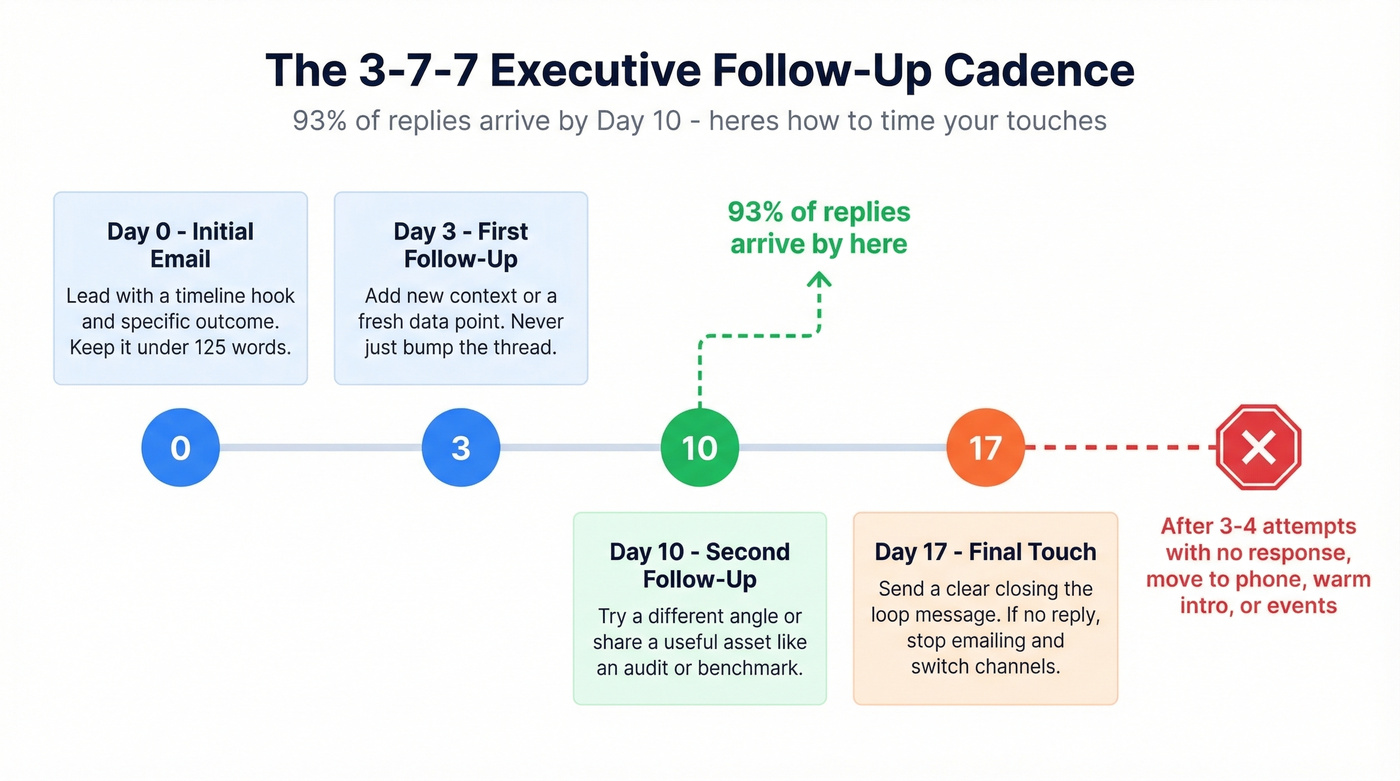
- Day 0: Initial email
- Day 3: First follow-up - add new context or value
- Day 10: Second follow-up - different angle or asset
- Day 17: Final follow-up - clear "closing the loop" signal
93% of replies arrive by Day 10. After 3-4 attempts with no response, stop emailing. You're not being persistent - you're being annoying. Switch channels: try a direct dial, a warm intro through their network, or an in-person touchpoint at an event. (Need more copy/paste options? Use these cold email follow-up templates.)
Let's be honest about something most guides skip: if your data is bad, none of this cadence matters. We've seen teams obsess over follow-up timing while sending to addresses that bounced on the first touch. Verify first, then sequence.
C-suite contacts reply at 7.63% - but only if your email actually reaches them. Prospeo delivers 98% email accuracy at $0.01 per address, with catch-all handling and spam-trap removal built in. 75 free emails to test it yourself.
Reach the executives who actually sign the checks.
FAQ
How many words should an executive email be?
50-125 words. The modern sweet spot is 40-60 words with a single clear ask. Emails beyond 125 words see sharp reply-rate dropoffs, especially on mobile where 81% of messages are opened.
What day and time should I send?
Thursday at 11 AM consistently performs best for C-suite outreach. Avoid Tuesday at 4 PM and weekends - open rates crater during those windows.
Do executives actually read cold emails?
Yes. C-level contacts respond 23% more often than non-C-suite, with CEOs hitting 7.63% reply rates. The issue isn't whether they read; it's whether your message earns a response in 20 seconds.
How do I find executive email addresses for free?
Prospeo's free tier gives you 75 verified emails per month with no credit card required. Hunter also offers a limited free plan. For one-off research, Google operators like site:company.com + "CEO" + "email" can surface addresses in press releases and bios.
How do I verify an executive's email is still valid?
Use a tool with a 7-day refresh cycle and multi-step verification including catch-all domain handling. Batch-verify your list before every campaign - executive roles turn over faster than the 6-week industry-average refresh, so stale data is the default without active verification.