

How to Write an Executive Introduction Email That Actually Gets Read
The executive introduction email is the highest-leverage message in B2B outreach - and most people blow it. Executives receive 120-200 emails per day, yet they reply at a 14.16% positive rate, 3.3x more than managers. The gap between "deleted in two seconds" and "replied before lunch" comes down to a handful of rules: under 125 words, informal tone, one clear CTA, sent Tuesday through Thursday before 7:30 AM their time.
Put your ask in the first sentence. Verify the address before sending. Templates below.
How Executives Read Email
Executives don't read your email. They triage it.
BLOT - Bottom Line On Top. Your request goes in the first sentence, not the third paragraph. Over 60% of executives read email on their phone, so your carefully designed three-column layout renders as a wall of text. The read-vs-delete decision happens in about 5-7 seconds - sometimes faster - and 71% of decision makers ignore outreach that lacks clear relevance to their current priorities. In larger orgs, expect 30-60% of unsolicited exec outreach to get screened by an executive assistant or routed to a delegate first, which is another reason your subject line and first sentence carry all the weight.
Personality profiling data shows CEOs are more fast-paced than 90% and more dominant than 99% of the general population. They don't want context before the ask. They want the ask, then context if they care enough to keep reading. That's why every CEO introduction email that works follows the same pattern: lead with the point, prove it fast, and get out.
7 Rules for Emailing Executives
These aren't opinions. They're patterns from 2M+ cold emails.
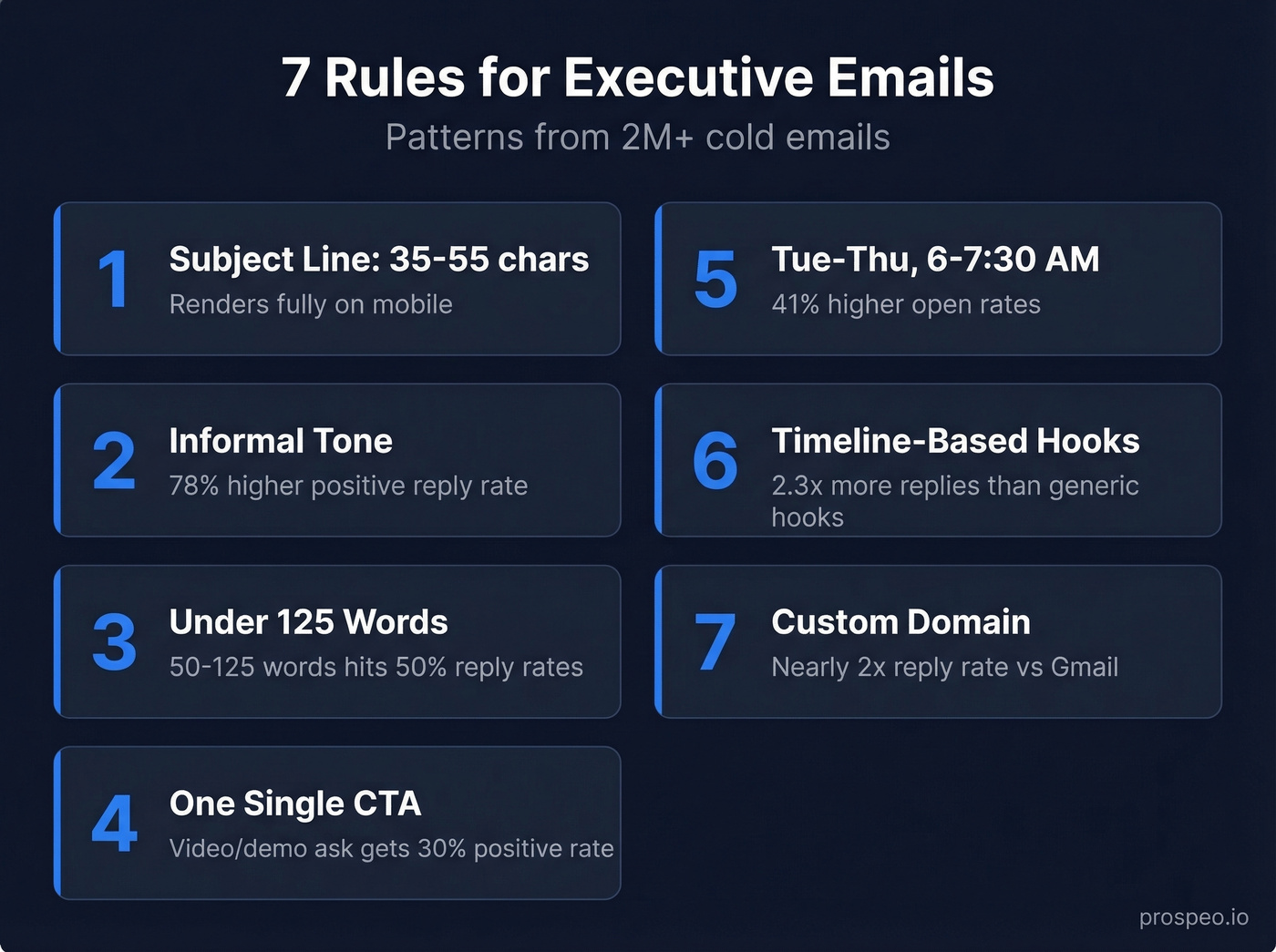
Subject line: 35-55 characters. Enough to convey relevance, short enough to render fully on mobile. If you need ideas, borrow from proven subject line patterns and test variations.
Informal tone. Informal emails generate 78% higher positive reply rates than formal ones. Write like you'd talk to a peer at a conference, not like you're drafting a legal brief.
Under 125 words. The 50-125 word range hits roughly 50% reply rates. A popular r/sales thread recommends under 90 words with two-sentence paragraphs - that's the sweet spot for scannability. If you want a deeper framework, use a modern email copywriting checklist.
One CTA. Asking for a video or demo drives a 30.05% positive rate, 3.5x better than "mind if I send over some info?" One question. That's it. (More examples: email call to action.)
Send Tuesday through Thursday, 6:00-7:30 AM recipient time. This window drives 41% higher open rates. Weekends drop below 1% response. If you want the broader data, see best time to send cold emails and the research behind 6:00-7:30 AM recipient time.
Use timeline-based hooks. Referencing a deadline, quarter-end, or upcoming event drives 2.3x more replies than generic problem hooks. "Before Q3 planning" beats "struggling with pipeline?" every time. This works even better when paired with personalized outreach.
Send from a custom domain. Custom domains get nearly 2x the reply rate of generic Gmail addresses. If you're still sending cold outreach from a @gmail.com, fix that before you fix anything else. (Related: email deliverability fundamentals.)
One more thing: executives can sense when a communicator lacks conviction. Propose a clear recommendation. Don't hedge with "I thought maybe we could possibly explore..." - state what you think they should do and why.
Templates That Get Replies
Cold Outreach to an Executive
Target VPs first - they reply at 11.3%, which is 48% higher than CEOs at 7.63%. The structure is simple: acknowledge their world, prove credibility, ask one question.
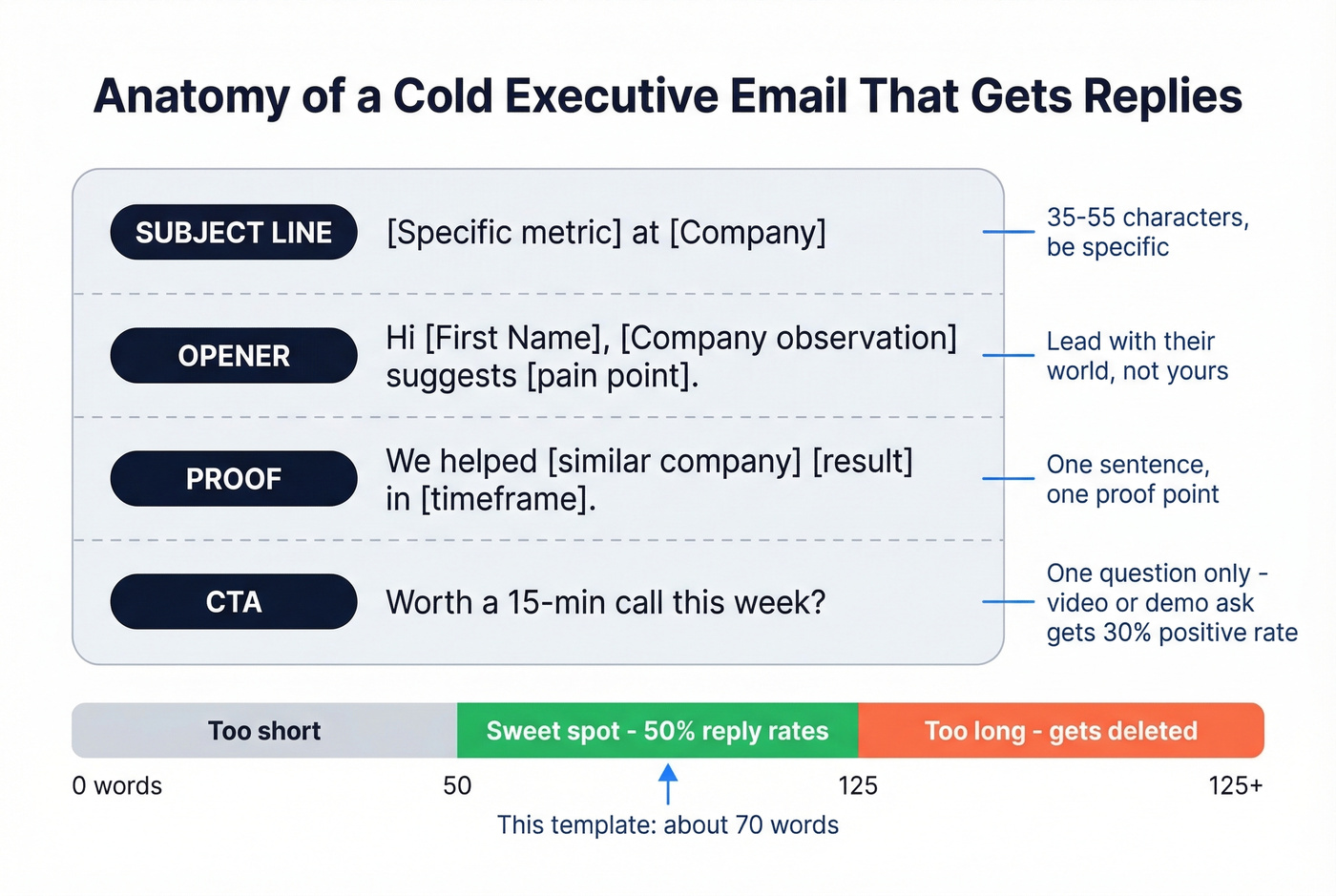
Use this if you've identified a specific pain point and can tie it to a result. Skip this if you're mass-blasting a generic pitch - it'll fall flat without the specificity.
Subject: [Specific metric] at [Company]
Hi [First Name],
[Company]'s [specific observation - hiring, tech stack, recent news] suggests [pain point]. We helped [similar company] [specific result] in [timeframe].
Worth a 15-minute call this week?
[Your name]
That's roughly 60-80 words once filled in. It'll outperform your 200-word pitch every time. Save this template and customize it per account - the specificity is what earns the reply.
Warm Introduction Between Two Executives
Always double opt-in - ask both parties for permission before connecting them. The subject line format is simple: "[Name] <> [Name] Introduction."
Subject: Sarah Chen <> Mark Rivera Introduction
Sarah, Mark - you've both been working on [shared interest]. I think a conversation would be valuable for [specific reason].
I'll let you two take it from here.
[Your name]
The etiquette rule most people miss: after sending, walk away. Don't follow up asking how it went. Your job as connector ends at the send button.
Introduction to Senior Management
Keep it short - especially if you're senior. You don't need to prove yourself in an introduction to your new team. Name, role, one thing you're excited about, how to reach you. Resist the urge to list your resume.
Subject: Excited to join [Team/Company]
Hi team,
I'm [Name], your new [Title]. I'm joining from [Company/Background] and I'm looking forward to [one specific thing].
My door's open - grab time on my calendar or just reply here.
[Name]
Referral-Based Introduction
Name-drop in the subject line. It's the single highest-leverage move in cold outreach.
Subject: [Mutual connection] suggested I reach out
Hi [First Name],
[Mutual connection] mentioned you're [specific context]. We recently helped [similar company] with [result].
Would it make sense to connect for 15 minutes?
[Your name]
The Escalation Email
Here's the thing: this one breaks the "under 90 words" rule and still works. The approach, which we've seen discussed extensively on r/sales, goes like this - talk to end users and subordinates first, learn their pain points, then email the executive with specific intel. The subject line "Redirect from [Name]" signals internal context.
Subject: Redirect from [Subordinate Name]
Hi [First Name],
We've been speaking with [Name/Team] about [specific process]. The current workflow [specific flaw you learned]. We've solved this for 100+ companies in [industry], typically [specific result].
Could you loop in the relevant person to evaluate this further?
[Your name]
The CTA - "could you loop in the relevant person?" - works because it gives the exec an easy action. They forward it. Done. We've seen this outperform direct-ask emails because it respects the executive's role as a router, not an evaluator.

You just learned how to write an executive introduction email that earns replies. But none of it matters if you're sending to a dead inbox. Prospeo's 98% verified emails and 7-day refresh cycle mean your perfectly crafted 80-word pitch actually lands in front of the VP you targeted - not a bounce-back.
Stop perfecting emails that bounce. Verify the address first.
Phrases Executives Hate
| Phrase | Why It Fails |
|---|---|
| "I know you're busy" | Wastes your first line. |
| "Hope you're doing well" | Signals a template. |
| "Can I get 15 minutes?" | Asks before earning it. |
| "Pick your brain" | Implies you'll take, not give. |
| "Not sure if you saw my last email" | Passive-aggressive guilt trip. |
| "I just wanted to..." | "Just" undermines your authority. |
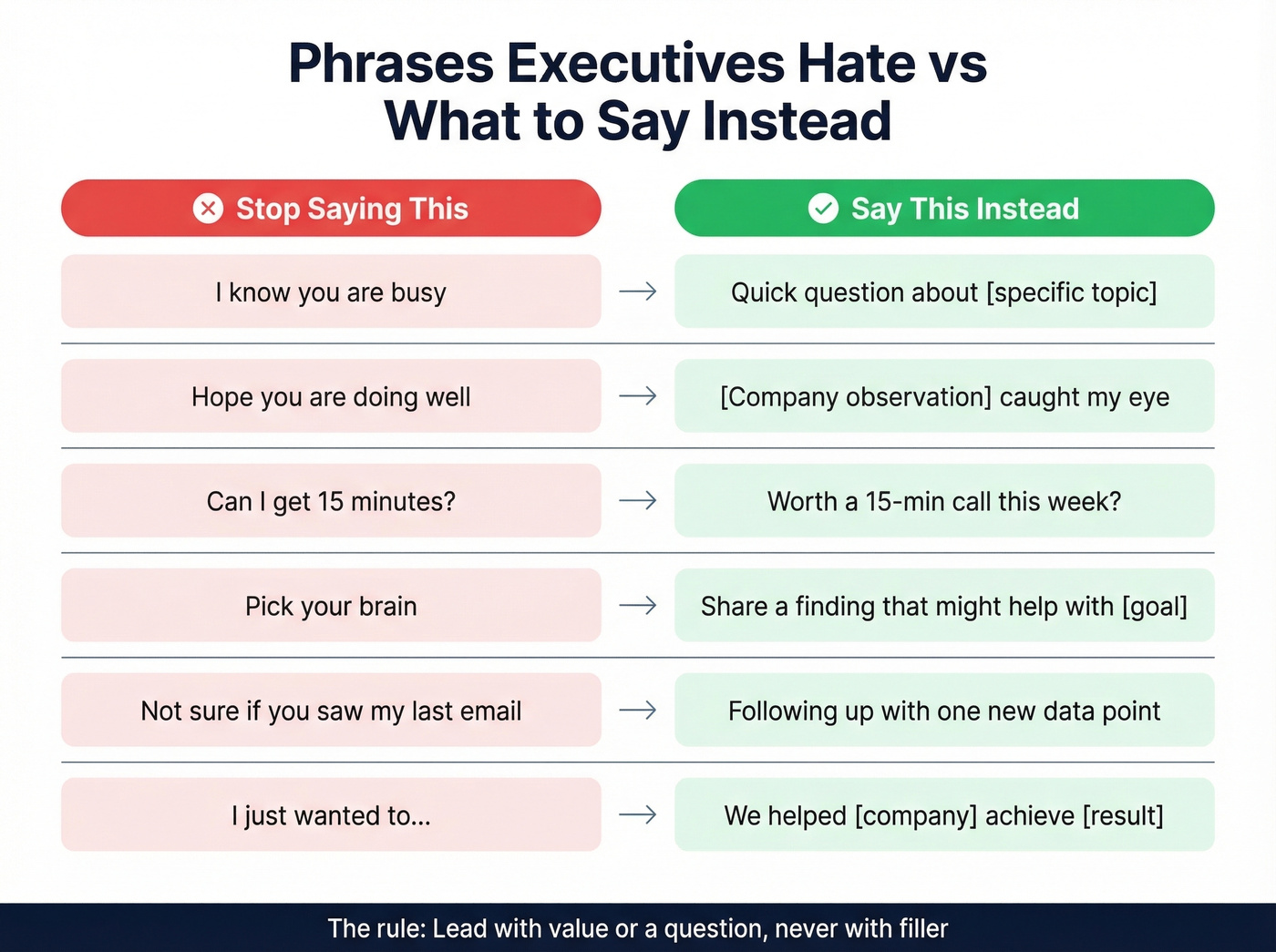
Every one of these phrases shares a common problem: they put the sender's needs before the reader's. Lead with value or lead with a question - never with filler.
Reply Rate Benchmarks by Title
| Title | Positive Reply Rate |
|---|---|
| VP-level | 11.3% |
| CTO / VP Tech | 7.68% |
| CEO / Founder | 7.63% |
| CFO | 7.59% |
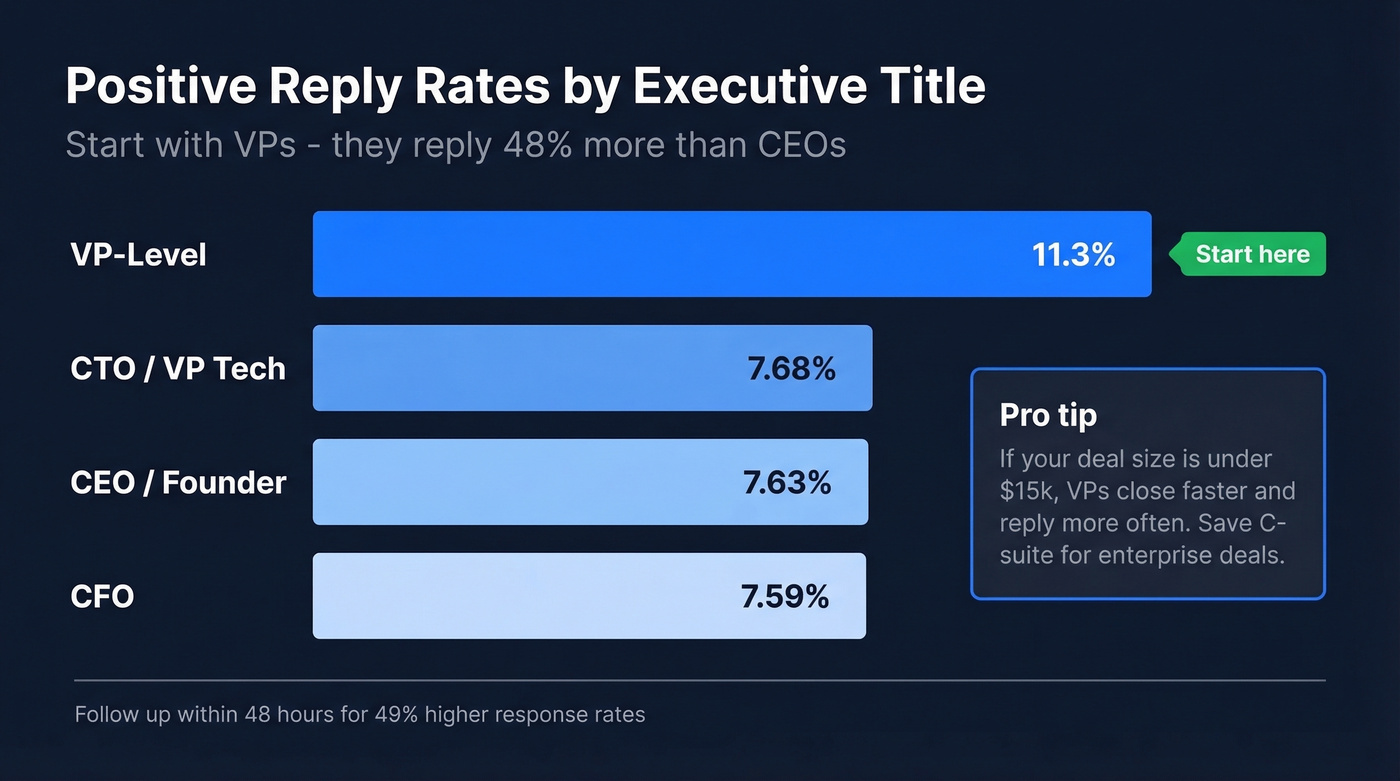
Start with VPs. They're closer to the problem, more likely to reply, and can champion you upward. CEOs and founders have higher deal authority but lower reply rates - save them for when you've got internal context from the VP conversation.
Follow-up within 48 hours increases response rates by 49%. A 3-4 touch cadence over two to three weeks is the standard. After four attempts with no reply, move on. Pair email with a connection request on professional networking platforms - decision makers report roughly 30% reply rates there versus 14.16% for C-level email outreach alone. If you need copy you can plug into your cadence, use these sales follow-up templates.
Hot take: If your average deal size is under $15k, you probably don't need to email the CEO at all. VPs close those deals faster, reply more often, and don't require six months of multi-threading. Save the C-suite outreach for enterprise deals where executive sponsorship actually changes the outcome.
Verify Before You Send
Let's be honest - none of this matters if the email bounces. A bounce rate above 5% damages your sender reputation, and once your domain's flagged, every email you send suffers. In our experience running outbound campaigns, the fastest way to tank deliverability is sending to unverified executive lists scraped from random sources. If you're troubleshooting, start with email bounce rate benchmarks and fixes, then work on improve sender reputation.
Prospeo's email verification runs a 5-step process with catch-all handling, spam-trap removal, and honeypot filtering - delivering 98% email accuracy across 143M+ verified addresses. The free tier gives you 75 verifications per month, enough to validate your entire executive target list before launching a sequence.
The data says target VPs first - they reply 48% more than CEOs. Prospeo's 300M+ profiles with 30+ filters let you pinpoint VPs by department, company size, tech stack, and buyer intent so every executive introduction email you send is backed by real targeting, not guesswork.
Find the right VP in seconds. Send the intro that gets replied to.
FAQ
How long should an executive introduction email be?
Under 125 words. The 50-125 word range hits roughly 50% reply rates in cold outreach studies. Stick to two-sentence paragraphs and one clear question - anything longer gets triaged to trash on mobile.
What's the best time to email an executive?
Tuesday through Thursday, 6:00-7:30 AM in the recipient's time zone. This window drives 41% higher open rates than other send times. Weekends drop below 1% response.
Should I tailor my message differently by executive title?
Yes. VPs respond to operational specifics and measurable outcomes, while CEOs care about strategic impact and board-level priorities. Use the reply-rate benchmarks above - VPs at 11.3% vs. CEOs at 7.63% - to decide where to start your outreach.
How do I find a verified executive email address?
Paste a professional profile URL into Prospeo's Chrome extension to get a verified address in seconds. With 98% accuracy across 143M+ records, you avoid the bounces that damage your sender domain - critical when targeting a small list of high-value executives.