

How to Find Out If an Email Address Exists - Without Sending a Single Email
An estimated 392.5 billion emails cross the internet daily in 2026. A meaningful chunk of them bounce. The average bounce rate across industries sits at 2.48%, and if yours is higher, your domain reputation is quietly eroding with every failed delivery. The good news: you can find out if an email address exists before you ever hit send.
What You Need (Quick Version)
Three scenarios, three paths:
Check one email fast. Use a free tool like Email Hippo, Hunter, or Verifalia. Paste the address, get a result in seconds.
Verify a list before a campaign. ZeroBounce or Bouncer for accuracy. MillionVerifier if budget matters more than catch-all handling. Upload your CSV and get results fast - even 100,000 emails can process in under an hour.
Find AND verify emails you don't have yet. Prospeo finds verified emails from 300M+ professional profiles at 98% accuracy, with 75 free emails/month. This is the path when you're building a list from scratch, not just cleaning one. (If you’re building from scratch, see our guide on generate an email list.)
How Email Verification Works
Every verification tool runs some version of the same pipeline. When you submit an address, five things happen in sequence:
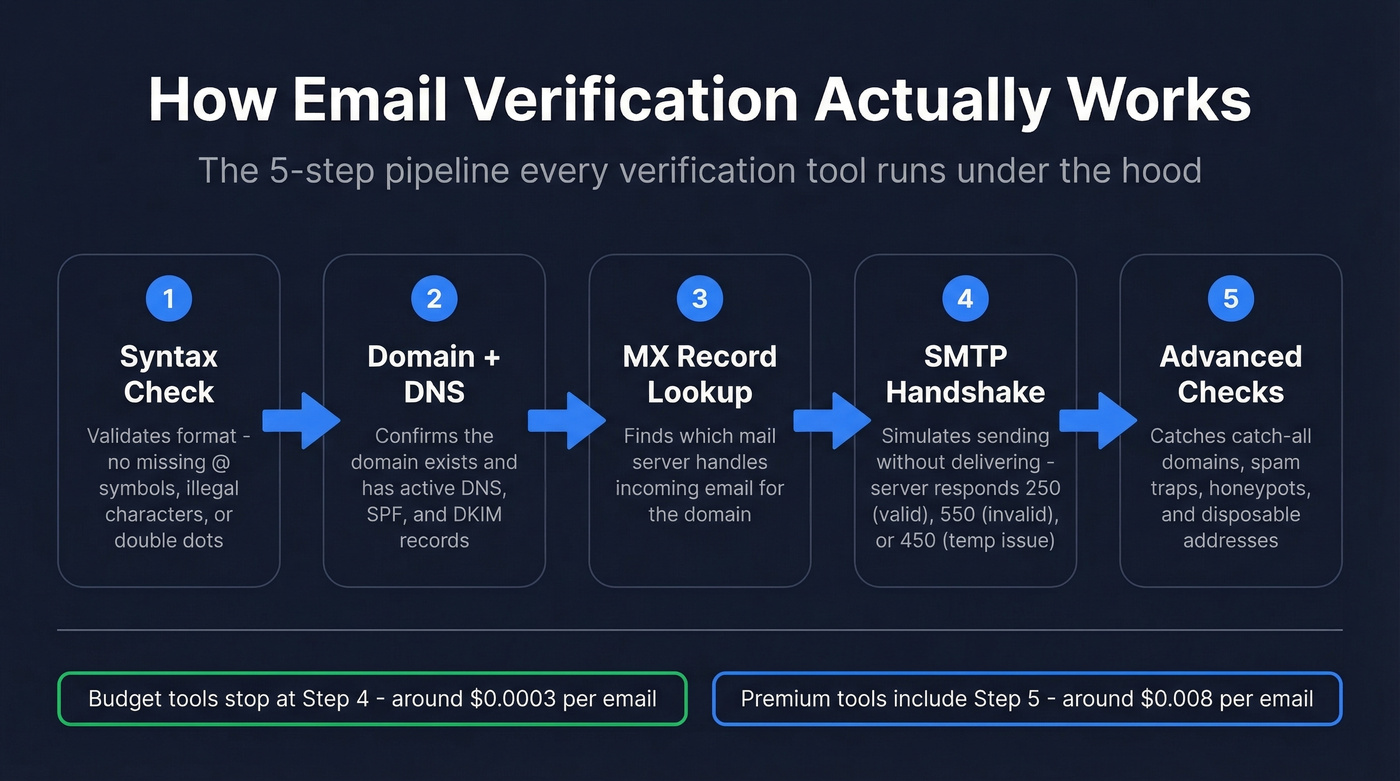
Step 1: Syntax check. The tool confirms the address follows valid formatting - no missing @ symbols, no illegal characters, no double dots. This catches typos instantly.
Step 2: Domain and DNS validation. It checks whether the domain actually exists and has active DNS records. Some tools also check SPF and DKIM records to assess the domain's authentication posture. A domain that doesn't resolve means the email can't possibly work. (If you want to go deeper, here’s how to verify DKIM is working.)
Step 3: MX record lookup. The tool queries the domain's mail exchange records to find which server handles incoming email. No MX records, no mail delivery.
Step 4: SMTP handshake. This is where real verification happens. The tool connects to the mail server and simulates sending an email - without actually delivering one. The server responds with a status code: 250 means the server accepted the recipient during the SMTP dialogue, 550 means the recipient is invalid, and 450 signals a temporary issue like greylisting.
Step 5: Advanced checks. The best tools go further - identifying catch-all domains, flagging spam traps, removing honeypots, and detecting disposable addresses. This step is what separates ultra-budget tools (around $0.0003/email) from premium verifiers (around $0.008/email). (If you’re cleaning risky lists, use a dedicated spam trap removal workflow.)
Email verification isn't just for outbound campaigns, either. It's a fraud prevention control. Fake signups using nonexistent emails enable freemium abuse, fake reviews, and identity fraud - which is why verification at the point of registration is increasingly standard for SaaS and e-commerce platforms.
Four Ways to Check If an Email Exists
1. Use an Email Verification Tool
This is the right approach for almost everyone. Whether you need to verify a single prospect or thousands before a campaign launch, dedicated tools handle both. Paste a single address into a free checker for a quick result, or upload a CSV of thousands for bulk processing. We cover the best options by use case and budget in the comparison section below. (If you’re troubleshooting deliverability, start with email bounce rate basics.)
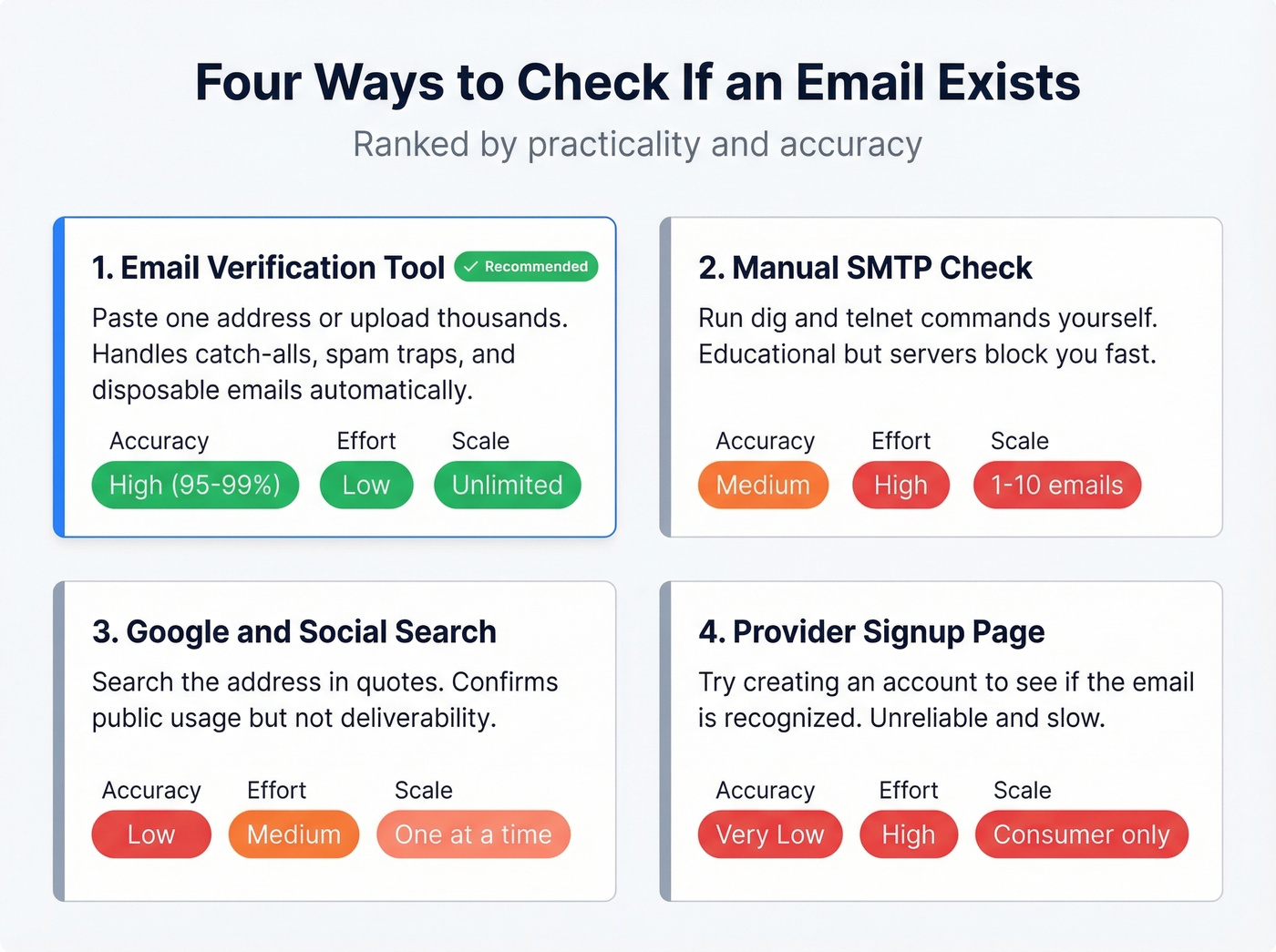
2. Manual MX Lookup + SMTP Check
If you're technical and curious - or you want to understand what verification tools do under the hood - you can run the check yourself.
Find the mail server on Linux with dig MX example.com +short or on Windows with nslookup -type=MX example.com. Then connect via Telnet:
telnet mail.example.com 25
ehlo yourdomain.com
mail from: <test@yourdomain.com>
rcpt to: <target@example.com>
A 250 2.1.5 Ok response means the server accepted the recipient. A 550 5.1.1 User unknown means it doesn't exist. A 421 means the server is blocking your connection - which happens frequently, because many major inbox providers rate-limit or restrict SMTP probing as an anti-enumeration measure.
MXToolbox handles MX lookups and diagnostics without touching the command line.
Let's be honest: this method is educational but impractical for anything beyond a handful of addresses. It doesn't scale, it doesn't handle catch-alls, and you'll get blocked by most major providers pretty quickly. For anything at scale, use a dedicated tool.
3. Google and Social Search (OSINT)
Search "target@example.com" in Google with quotes. If the address appears on a public profile, forum post, or company page, you've confirmed someone uses it publicly. The limitation: this confirms the address is used, not that it's deliverable. Someone could've changed jobs six months ago and the email still shows up in search results. (For more outbound tactics, see these sales prospecting techniques.)
4. Check the Provider's Signup Page
Some websites reveal whether an email exists during account creation. A test across major sites found that Amazon, Canva, and Craigslist send verification codes (blocking fake signups), while Shopify and Wix let accounts proceed even with nonexistent emails. Unreliable, slow, and only works for consumer providers. Skip it for B2B.

You just learned four ways to check if an email exists. Prospeo combines the best one - finding AND verifying - into a single step. Our 5-step verification pipeline handles catch-all domains, strips spam traps, and delivers 98% accuracy across 300M+ profiles.
Get 75 verified emails free this month. No bounces, no guessing.
Why You Should Never Send a Test Email
The most intuitive approach - just send something and see if it bounces - is also the most damaging. ZeroBounce COO Brian Minick puts it bluntly: sending test emails to validate addresses can "kill your sending reputation." And if your reputation is already degraded, you'll get false results anyway - servers will reject your messages regardless of whether the recipient exists.
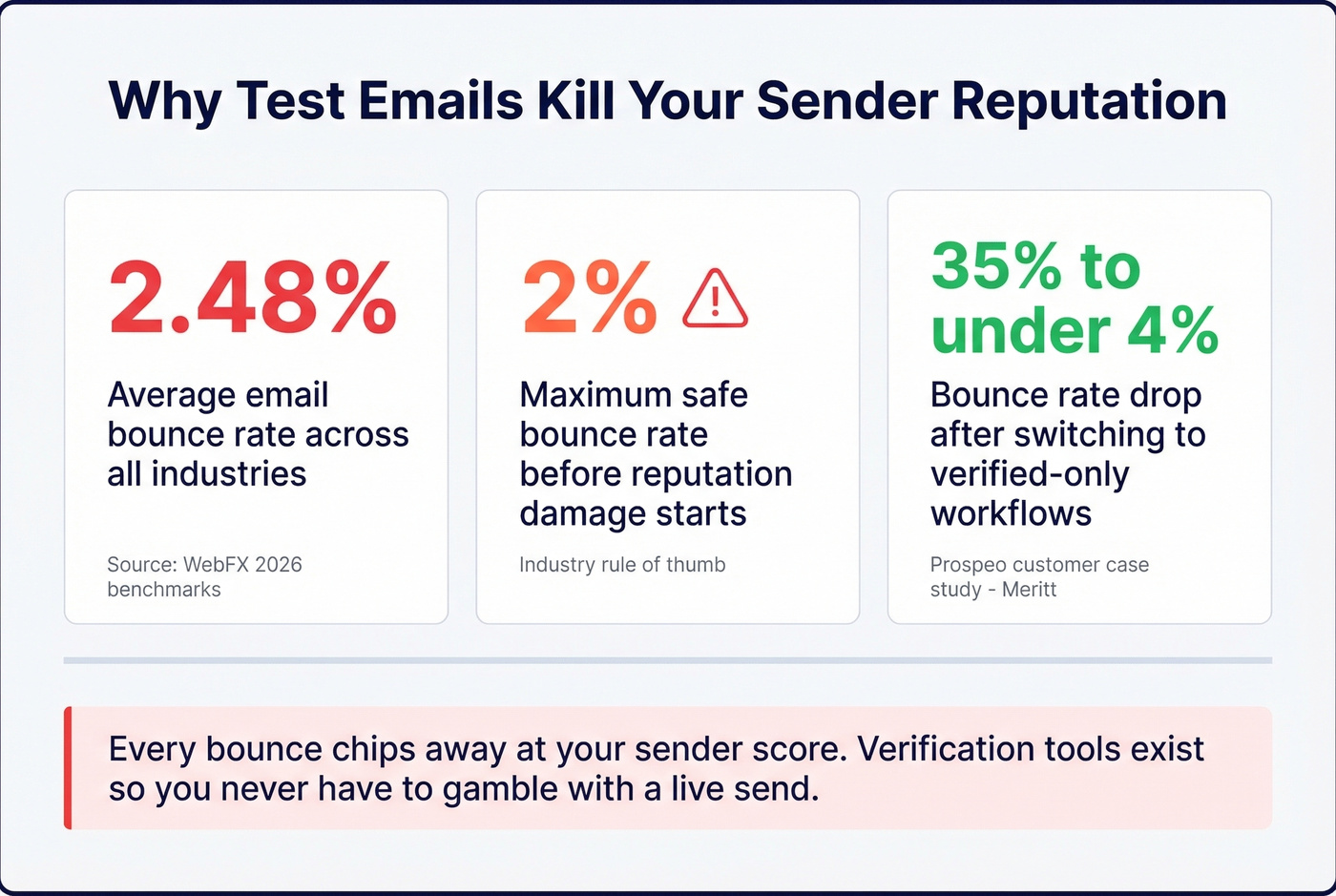
Every bounce chips away at your sender score. The industry rule of thumb: keep bounce rates below 2% to protect deliverability. We've seen teams cut bounce rates from double digits to under 3% simply by switching to verified-only workflows. Verification tools exist precisely so you never have to gamble with a live send. (If you’re repairing deliverability, here’s how to improve sender reputation.)
Email Verification Tools Compared
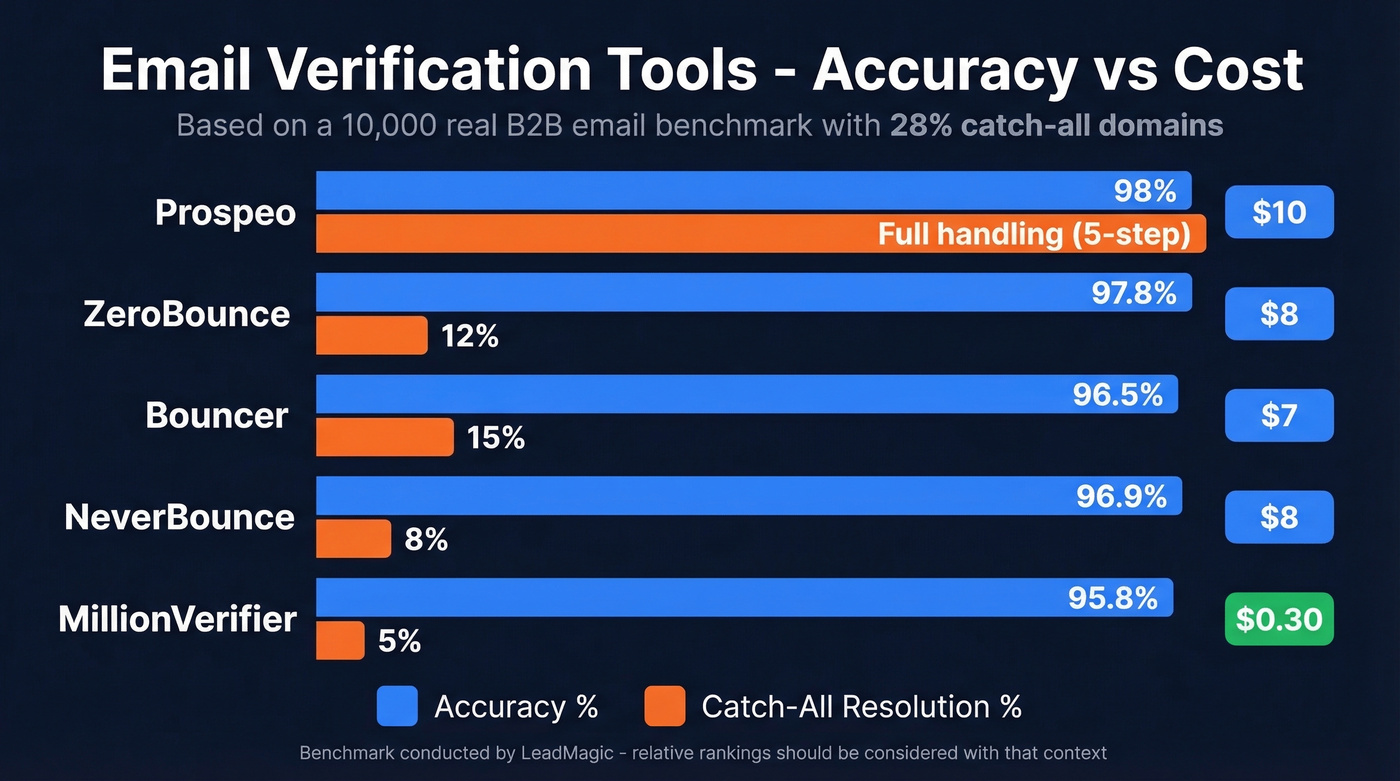
Not all verifiers are built the same. A benchmark of 10,000 real B2B emails - with 28% catch-all domains in the mix - showed accuracy ranging from 95.8% to 99.5% depending on the tool. That benchmark was conducted by LeadMagic, whose own tool scored highest, so take the relative rankings with appropriate context. Catch-all handling is where the biggest gaps appear.
| Tool | Cost/1K (Free Tier) | Accuracy | Catch-All | Best For |
|---|---|---|---|---|
| Prospeo | ~$10 (75 free/mo) | 98% | Yes (5-step) | Find + verify |
| ZeroBounce | $8 (100 free/mo) | 96-98% | 12% resolved | Bulk accuracy |
| Bouncer | $7 (1K free credits) | 96.5-99.5% | 15% resolved | Catch-all on budget |
| NeverBounce | $8 (1K free credits) | 96.9% | 8% resolved | CRM integrations |
| MillionVerifier | $0.30 (none) | 95.8% | 5% resolved | Massive lists, tight budget |
| Hunter | From $49/mo (100 free/mo) | 70% (tested) | Not reported | Free single checks |
| Email Hippo | From ~$25/mo (100 free/day) | Not published | Not reported | Quick one-offs |
| Verifalia | ~$8-$10/1K (free tier) | Not published | Not reported | Occasional checks |
Prospeo - Find and Verify in One Step
Use this if you don't have the email address yet. You have a name and a company - Prospeo finds the verified email from 300M+ professional profiles and runs it through a 5-step verification pipeline before you ever see it. Most tools on this list only verify addresses you already have. Prospeo handles the upstream problem. (Related: name to email.)
98% email accuracy, a 7-day data refresh cycle (the industry average is six weeks), and catch-all handling baked into every result. One customer, Meritt, saw their bounce rate drop from 35% to under 4% after switching - and their pipeline tripled from $100K to $300K per week. Pricing starts free at 75 emails/month and scales to roughly $0.01/email on paid plans. No contracts, no sales calls.

Skip this if you already have a clean list and just need a bulk verification pass.
Bounce rates above 2% erode your domain reputation with every send. Teams using Prospeo's verified-only workflow cut bounce rates from 35% to under 4% - because every email is confirmed real before it leaves your outbox. At $0.01 per email, protecting your sender score costs less than a single bounced message.
Find out if every email on your list actually exists - before you hit send.
ZeroBounce - Safe Pick for Bulk Campaigns
In the 10,000-email benchmark, ZeroBounce hit 97.8% accuracy and processed the full batch in 22 minutes. Catch-all resolution landed at 12%. Pricing runs $0.008/email on pay-as-you-go, with a starter plan at $15/month for 2,000 verifications. Where ZeroBounce earns its reputation is consistency - it doesn't have the wild accuracy swings you see with budget tools when the dataset shifts from standard corporate domains to catch-all-heavy enterprise lists. If you're running a 50,000-email campaign and need confidence in the results, this is the safe pick. (If you’re sending at scale, also watch your email velocity.)

Bouncer - Best Catch-All Resolution
Forget the headline accuracy claims for a moment. Bouncer's real differentiator is 15% catch-all resolution - the highest among mainstream bulk verifiers in the benchmark (excluding LeadMagic). For teams targeting enterprise companies running catch-all configurations, Bouncer resolves more of those ambiguous addresses than most tools at this price point. One benchmark measured 96.5% real-world accuracy. At $7 per 1,000 emails with 1,000 free credits, it's worth testing on your specific list.
NeverBounce - Already in Your Stack
NeverBounce's edge isn't accuracy (96.9%, solid but not best-in-class) - it's that you'll never have to think about it. With 80+ integrations to CRMs, ESPs, and marketing platforms, verification happens inside the tools your team already uses. When your workflow lives in HubSpot or Marketo and you want verification without Zapier glue, NeverBounce is the pragmatic choice. Pricing matches ZeroBounce at $0.008/email.
MillionVerifier - 25x Cheaper, With a Tradeoff
Here's the hot take: if your average deal size is under $15K and your list is mostly standard corporate domains, you probably don't need a premium verifier. MillionVerifier costs $0.0003/email - roughly 25x less than ZeroBounce. For a 100,000-email list, you're paying about $30 instead of $800. The tradeoff is real: 95.8% accuracy and only 5% catch-all resolution. But for high-volume outbound where a few extra bounces won't sink your domain, the math works.
Hunter
Hunter's value is transparency. Their own benchmark tested 15 verifiers on 3,000 real emails and published the raw data - including their own 70% accuracy score, which sounds low until you realize their methodology counts unknowns as failures. The free tier gives you 100 verifications/month, and the tool doubles as an email finder. Paid plans start at $49/month for 500 verifications. For quick, free single-address checks, it's perfectly adequate. (If you’re comparing options, see Hunter alternatives.)
Email Hippo and Verifalia
Email Hippo offers 100 free checks per day - a generous free tier for one-off lookups. Paid plans start around $25/month. Verifalia offers a pay-as-you-go model that typically lands around $8-$10 per 1,000 verifications depending on speed and options, with a free tier for occasional use. Neither publishes independent accuracy data, so treat them as spot-check tools rather than campaign-scale solutions.
The Catch-All Problem
Here's the thing most verification guides gloss over: roughly 28-30% of a typical B2B email list sits on catch-all domains. These domains accept all incoming email regardless of whether the specific mailbox exists. During SMTP verification, the server returns a 250 code for every address - real or completely fabricated.
In our testing, catch-all domains consistently account for the biggest accuracy gaps between tools. The benchmark data shows resolution rates ranging from 5% (MillionVerifier) to 15% (Bouncer), meaning even the best tools leave most catch-all addresses unresolved.
The practical workflow: treat catch-all results as a flag, not a verdict. Quarantine them into a separate segment. Test a small batch first to see how they behave. If the test segment bounces materially higher than your normal verified segment, suppress the rest. Keep catch-all addresses as a minority of any single campaign.
If a verification tool can't tell you what to do with a catch-all result, it's only doing half the job.
Is It Legal to Verify an Email?
SMTP probing touches personal data under GDPR - you're querying whether a specific person's email address is active. For B2B prospecting, legitimate interest is the standard justification, but it requires a balancing test: the email must be relevant to the recipient's professional role, and the intrusion must be proportionate. (For more on compliance, see Is it illegal to buy email lists.)
The stakes aren't theoretical. GDPR fines can reach euro20M or 4% of global revenue. In the US, eight new state privacy laws took effect in 2025, adding another layer of compliance complexity heading into 2026. To stay clean: source emails from reputable providers (not scraped lists), re-verify quarterly at minimum, include a clear opt-out in every outreach, document your legitimate interest assessment, and honor deletion requests promptly.
FAQ
Can you check if an email exists without sending one?
Yes. Verification tools use an SMTP handshake to query the recipient's mail server without delivering a message. The tool connects, asks "does this mailbox exist?", records the server's response code (250 for valid, 550 for invalid), and disconnects before any email is sent.
Are free email verification tools accurate?
For standard corporate domains, most free tools deliver reliable results - typically 90%+ accuracy. Accuracy drops significantly on catch-all domains, which make up roughly 28% of typical B2B lists. Benchmarks show real-world accuracy ranging from about 65% to 99.5% depending on the tool and dataset.
What does "catch-all" mean in verification?
A catch-all domain accepts all incoming email regardless of whether the specific mailbox exists, returning a success code for every address - real or fabricated. Verification tools can't distinguish valid from invalid on these domains. Results come back as "unknown" or "risky," requiring quarantine and micro-batch testing before sending.
How often should I re-verify my list?
Re-verify before every campaign at minimum. Email lists decay around 25-30% per year as people change jobs, companies restructure, and domains go offline. Quarterly cleaning is a safe baseline for active lists. High-volume senders running weekly campaigns should verify monthly.
What's a good free tool to find out if an email address exists?
For single checks, Hunter (100 free/month) and Email Hippo (100 free/day) are solid starting points. For finding and verifying emails you don't have yet, Prospeo's free tier includes 75 verified emails per month with full catch-all handling - better value if you're building a prospecting list rather than just spot-checking addresses.