

Follow Up Email After Webinar: 9 Templates & the Exact Sequence
You ran the webinar. 300 people registered. Maybe 150 showed up. You send one follow up email after the webinar with the replay link, and then... nothing.
That single email is leaving pipeline on the table. GoToWebinar found that 47% of attendees become leads when follow-up is done right, and 65% of buyers say webinars are the most valuable format in their decision-making process. Considering email generates $36 for every $1 spent, one thank-you email doesn't capture that value. A post-webinar email sequence does.
What You Need Before Writing
Three segments, not two. Attendees, no-shows, and early leavers each need different messaging. Your first email goes out the same day - within 24 hours. Faster is better, but "tomorrow" is already late.
Plan for a 5-email sequence over 30 days. One thank-you email isn't a strategy. Keep subject lines to 2-4 words, question format, zero hype - data from 5.5M emails backs this up. (If you need more ideas, pull from these email subject lines.)
And verify your registrant list before sending. Around 5-15% of webinar registration emails are invalid: typos, disposable addresses, role-based inboxes. Bounces tank your sender reputation for the contacts that are real.
Benchmarks That Shape Your Sequence
| Metric | Value | Source |
|---|---|---|
| Follow-up open rate | 58% | ActiveCampaign |
| Registration to attendance | 46-57% | Livestorm / ON24 |
| On-demand viewing share | ~47-50% | Contrast / ON24 |
| Consumption gap | 31.2 hours | NetLine |
| Qualification drop (5 to 30 min) | 21x | Default |
| Personalized subject opens | 46% vs 35% | Belkins |
| Personalized email transactions | 6x higher | Experian |
| Meeting bookings during webinars | 3x increase | ON24 |
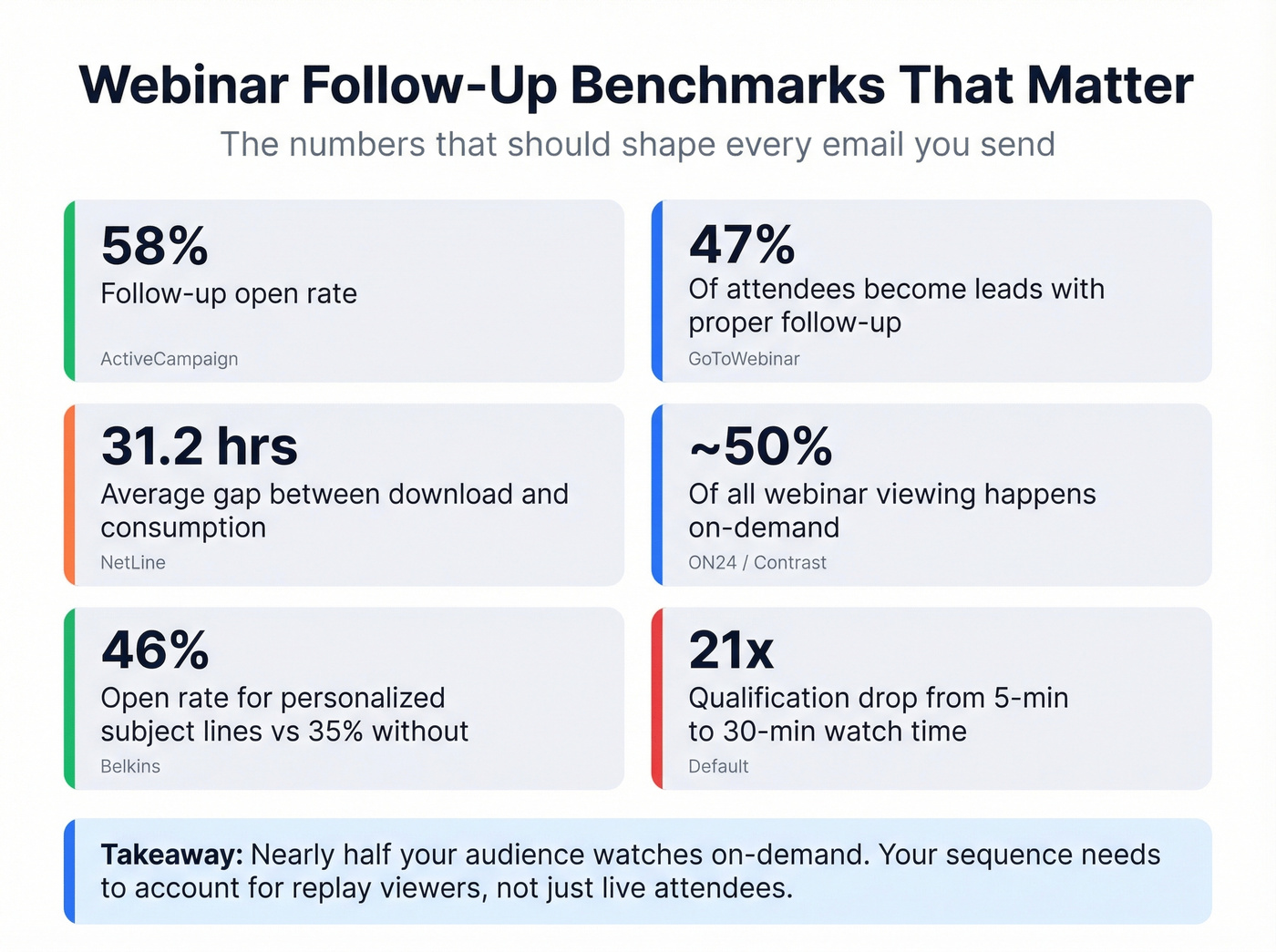
Two numbers jump out. Nearly half of all webinar viewing happens on-demand, which means your post-webinar follow-up needs to account for people who watch the replay days later. Then there's the 31.2-hour consumption gap between when someone downloads content and when they actually consume it. That's why a replay nudge a day or two later isn't "too early" - it's timed for how people actually behave.
Three Segments You're Probably Missing
Most teams split their list into attendees and no-shows. That's a start, but you're leaving a third segment on the floor. With 75% of webinars drawing fewer than 50 live attendees, every single person in each segment matters.
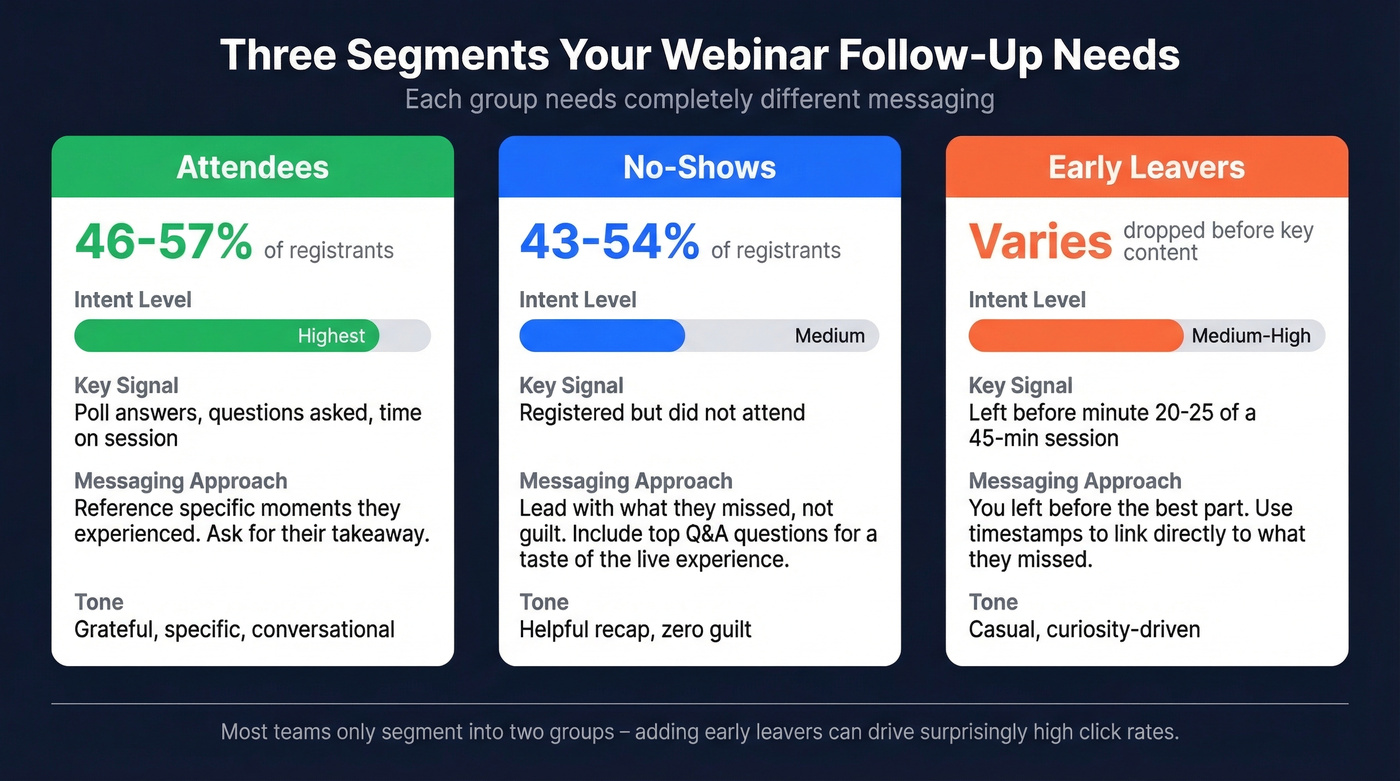
Attendees are your highest-intent group. They showed up, stayed, and engaged. But "attended" isn't one bucket - someone who answered 3 poll questions and asked about pricing is fundamentally different from someone who had the tab open while checking Slack. ON24's benchmarks show webinars average 130 poll responses and 14 attendee questions. Use those engagement signals to separate active participants from passive viewers.
No-shows make up roughly 43-54% of your registrants. They raised their hand by registering - they just didn't make it. Lead with what they missed, not guilt about not showing up. Include the top 2-3 Q&A questions to give them a taste of the live experience. Your no-show email should feel like a helpful recap, not a guilt trip.
Early leavers are the segment nobody talks about. Someone who dropped off at minute 12 of a 45-minute webinar missed your best content, your Q&A, and your CTA. We've seen early-leaver emails pull surprisingly high click rates - the message writes itself: "You left before the best part." Timestamps become your secret weapon here.
The 5-Email Webinar Follow Up Sequence
| Email # | Timing | Segment | Purpose | Subject Style |
|---|---|---|---|---|
| 1 | Same day (within 24 hrs) | All segments | Replay + thanks / FOMO | Question (2-4 words) |
| 2 | 48 hours | All segments | Value-add / top Q&A | Personalized |
| 3 | Day 5 | Attendees + replay viewers | Related resource | Question |
| 4 | Day 14 | High-engagement | Sales handoff / demo | Personalized |
| 5 | Day 30 | All remaining | Final value offer | Short (2-3 words) |
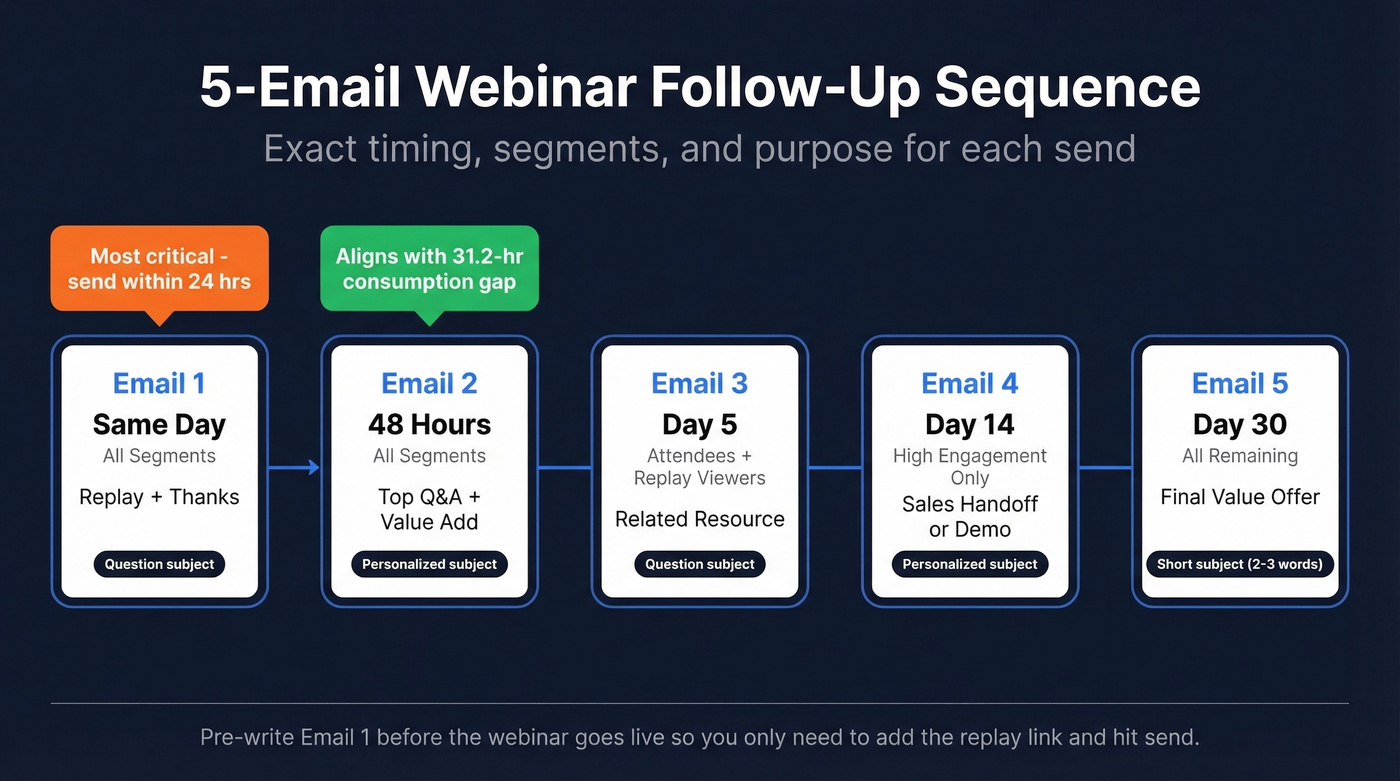
Email #1 is the most important decision in this sequence. Most guides say "within 24 hours" - and they're right about the window. If you can send it faster, do it, but don't miss same-day delivery.
The 48-hour Email #2 pairs well with the 31.2-hour consumption gap: it lands after people have had time to actually watch (or plan to watch) the replay, while the topic's still fresh. Together, these five emails form a webinar follow up drip campaign that nurtures leads without overwhelming them. (If you want a broader framework for building sequences, see sequence management.)

You mentioned 5-15% of webinar registration emails are invalid. Prospeo's 5-step verification catches typos, disposable addresses, and spam traps before they tank your sender reputation. At 98% email accuracy and $0.01 per email, cleaning your registrant list takes minutes - not your deliverability.
Verify your entire webinar list before that first follow-up goes out.
9 Templates by Segment
Every template below uses question-style subject lines (2-4 words), includes a clear CTA, and goes beyond "[First Name]" personalization. Reference poll answers, watch time, or specific moments from the webinar wherever possible. (For more reply-focused options, compare these sales follow-up templates.)
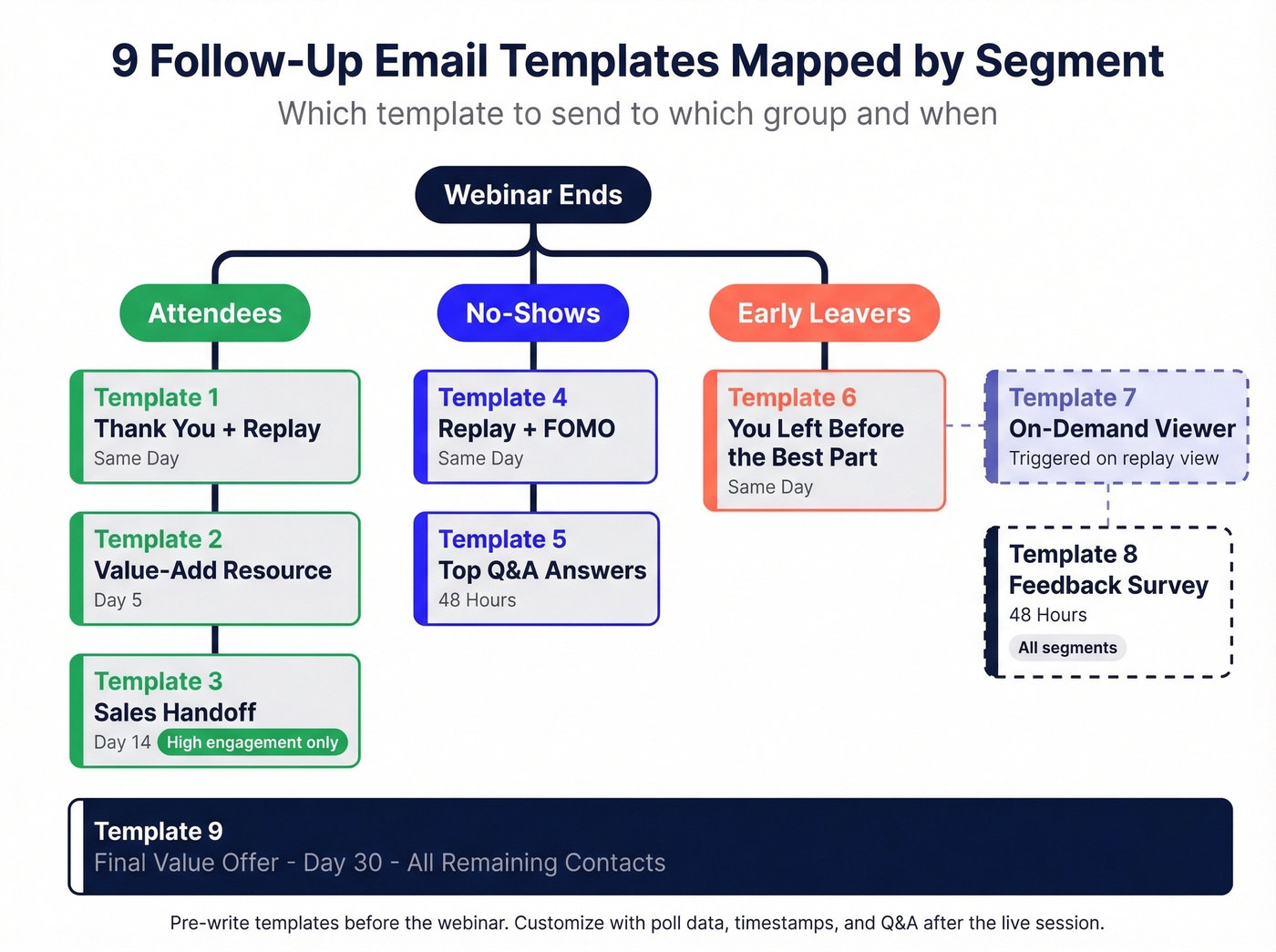
Here's the thing - the most common reason webinar follow-ups underperform isn't frequency. It's irrelevance. If your email ignores what happened in the session, it reads like "just another marketing touch." These templates are built to fix that.
Attendee Templates
Template 1: Thank-You + Replay (Email #1, same day)
Subject: Worth the hour?
Hi [First Name],
Thanks for joining today's session on [topic]. Here's the replay if you want to revisit anything: [replay link]
At [timestamp], [speaker] broke down [specific framework/insight]. That section alone is worth bookmarking.
[Slides/PDF link]
What was your biggest takeaway? Hit reply - I read every one.
[Your name]
Template 2: Value-Add Resource (Email #3, Day 5)
Subject: Related to [topic]?
Hi [First Name],
After the webinar, a few attendees asked about [related topic]. We put together [resource type - guide/case study/checklist] that goes deeper: [link]
If you're working on [specific problem the webinar addressed], this fills in the gaps we didn't have time to cover live.
[Your name]
Template 3: Sales Handoff for High-Engagement Leads (Email #4, Day 14)
Subject: Quick question, [First Name]
Hi [First Name],
You were one of the most engaged attendees in our [webinar topic] session - [reference specific action: asked about pricing, answered the ROI poll, clicked the demo CTA].
I'd love to show you how [your product] handles [specific problem from webinar]. Would a 15-minute call this week work?
[Calendar link]
[Your name]
No-Show Templates
Template 4: Replay + FOMO (Email #1, same day)
Subject: Missed the live?
Hi [First Name],
We missed you at today's [webinar topic] session. Here's what happened: [1-sentence summary of the key insight].
The replay is ready: [replay link]
Jump to [timestamp] for the part everyone's talking about - [speaker]'s breakdown of [specific framework].
[Your name]
Template 5: Top Q&A Questions (Email #2, 48 hours)
Subject: Three questions everyone asked
Hi [First Name],
During the live Q&A, three questions came up repeatedly. Here are the answers:
- [Question] - [2-sentence answer]
- [Question] - [2-sentence answer]
- [Question] - [2-sentence answer]
Full replay here if you want the context: [link]
[Your name]
Early-Leaver Templates
Template 6: "You Left Before the Best Part" (Email #1, same day)
Subject: Catch the ending?
Hi [First Name],
Looks like you had to drop off early - no worries. But the last 15 minutes were where it got good.
At 32:15, [speaker] walked through [specific framework/demo/offer]. Here's the replay - jump straight to that timestamp: [timestamped replay link]
[Your name]
On-Demand Viewer Template
66% of buyers consume additional vendor content after a webinar that resonates. This template capitalizes on that momentum the moment someone watches the replay.
Template 7: Triggered After Replay View (Immediate)
Subject: Thoughts on [topic]?
Hi [First Name],
Saw you watched the [webinar topic] replay - glad it was worth your time. Here's a related piece that goes deeper: [related resource link]
If [specific problem] is on your radar right now, let's talk: [calendar link]
[Your name]
Feedback & Re-Engagement Templates
Template 8: Survey/Feedback Request (48 hours)
Subject: How'd we do?
Hi [First Name],
Quick favor - 2 questions, 30 seconds:
- What was the most useful part of [webinar topic]?
- What should we cover next?
[Survey link]
Your answers directly shape our next session. Thanks for the 30 seconds.
[Your name]
Template 9: Final Value Offer (Email #5, Day 30, all segments)
Subject: Last chance
Hi [First Name],
We're closing out the [webinar topic] series. Before we move on, here's everything in one place:
- Replay: [link]
- Slides: [link]
If [specific outcome] is still a priority, [CTA - book a call / start a trial / download the framework]: [link]
[Your name]
Bonus tactic for smaller, high-touch webinars: A $15 Starbucks gift card attached to your attendee thank-you email can meaningfully boost reply rates. It's not scalable at 500 registrants, but for a 30-person executive roundtable, it's worth every cent.
Subject Lines That Actually Work
A Belkins study of 5.5 million emails gives us hard rules - and while it's cold email data, the principles transfer directly to webinar follow-ups. If you want more data-backed patterns, use these subject lines that get opened.
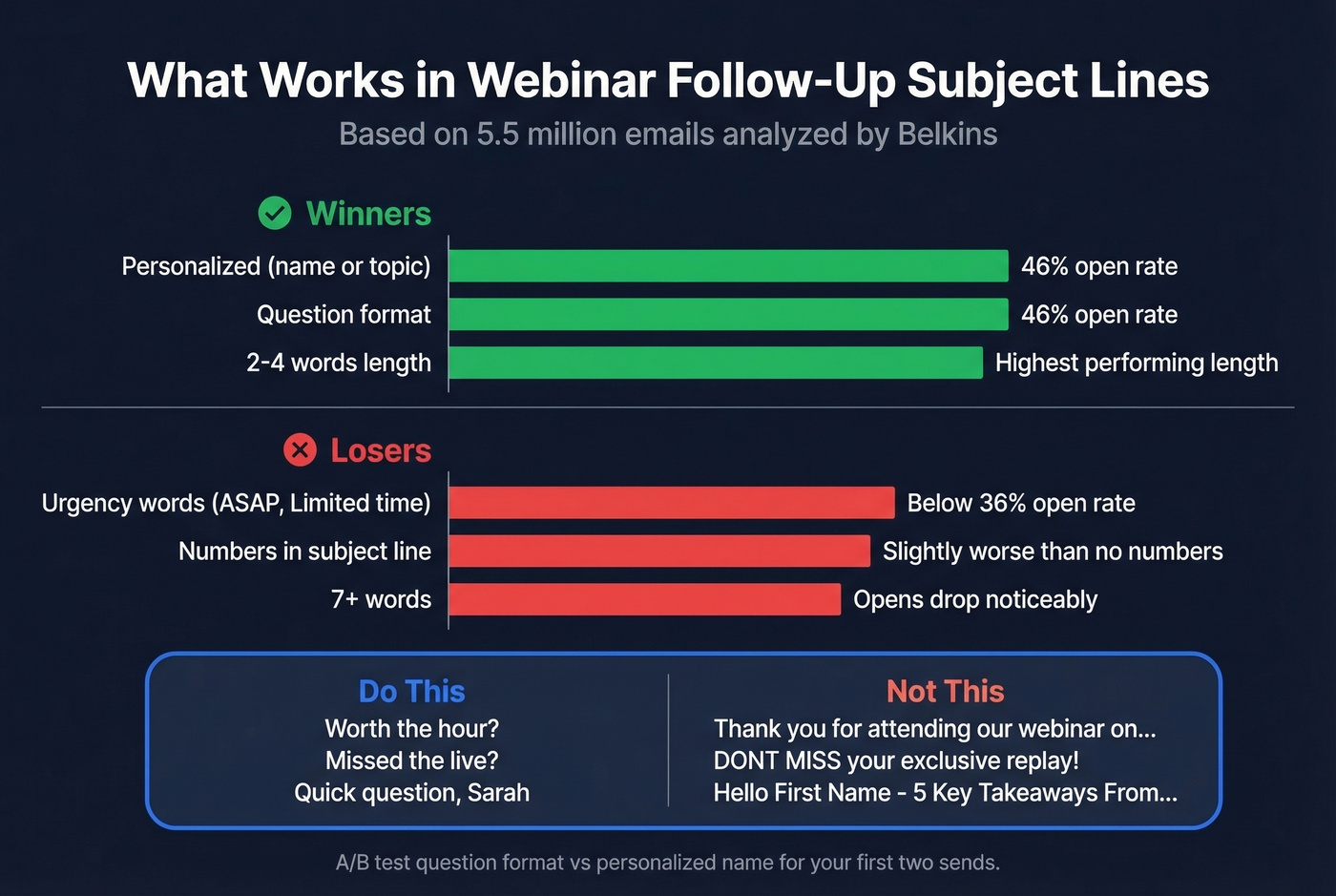
Personalized subject lines hit 46% open rates versus 35% without personalization. Question-format subject lines also hit 46%. And 2-4 word subject lines outperformed everything longer. Once you pass 7 words, opens drop noticeably.
The losers: urgency language ("ASAP," "Don't miss," "Limited time") dragged opens below 36%. Numbers in subject lines performed slightly worse than no numbers.
Let's be honest - most post-webinar email subject lines violate every one of these rules. "Hello [First Name], thank you for attending our webinar on [Topic]" is 10+ words, not a question, and screams automation. A/B test question-format against personalized-name subject lines for your first two sends. The winner will likely carry through the rest of your sequence.
10 subject lines that follow the data:
- Worth the hour?
- Missed the live?
- Catch the ending?
- Thoughts on [topic]?
- How'd we do?
- Three questions everyone asked
- Related to [topic]?
- Quick question, [First Name]
- Last chance
- [First Name], replay ready
Short. Question-driven. No hype.
Mistakes That Kill Your Follow-Up
Waiting until tomorrow. The "within 24 hours" advice is everywhere for a reason. Pre-write your first email before the webinar goes live so you're just adding the replay link and hitting send.
Same email to everyone. Attendees, no-shows, and early leavers have completely different contexts. Sending one generic "thanks for registering" email wastes the behavioral data your webinar platform already captured. Use poll answers, watch time, and Q&A participation to personalize. (If you want a system for this, build intent based segmentation into your tags.)
Robotic subject lines. "Hello [First Name], thank you for attending our webinar" tells the recipient it's automated before they even open it. Use 2-4 word questions instead.
No clear CTA. Every email needs exactly one ask. Watch the replay. Read this resource. Book a call. Take the survey. When you give people three options, they pick none. (More examples here: email call to action.)
Sending to an unverified list. This is the one nobody talks about. Webinar registration forms collect around 5-15% invalid emails - typos, disposable addresses, role-based inboxes, spam traps. Send your beautifully crafted sequence to a dirty list and you'll bounce hard enough to damage your sender reputation for the contacts that are real. Before you trigger your sequence, run your registrant list through Prospeo's email verification. It catches disposable addresses, typos, catch-all domains, and spam traps with 98% accuracy. The free tier handles 75 verifications per month - enough for most webinar lists.

Template #3 only works if you can actually reach high-engagement attendees. Prospeo gives you verified emails and direct dials for every lead in your webinar funnel - 143M+ verified emails, 125M+ mobile numbers, 30+ filters to segment by intent, job title, and company size.
Turn engaged attendees into booked meetings with contact data that connects.
How to Automate the Whole Thing
You don't need to send these manually. The workflow is straightforward: registrant signs up, Zapier pushes to your CRM, email gets verified, CRM tags by segment (attended / no-show / early leaver), and your ESP triggers the right sequence.
Your webinar platform - whether that's Demio, GoToWebinar, ON24, or Livestorm - captures registration and attendance data. Zapier or Make connects it to HubSpot or ActiveCampaign, which runs the segmented sequence based on attendance status and engagement signals. Prospeo integrates natively with HubSpot, Zapier, and most ESPs, so verification happens automatically inside the workflow rather than as a manual step. (If you're evaluating tooling, start with follow up email software.)
Set it up once and every future webinar runs on autopilot.
Most Teams Don't Need More Registrants
The instinct after a webinar is to chase more registrations for the next one. But with 47-50% of viewing happening on-demand, the real opportunity is in your follow up email after the webinar, not your promotion. We've seen this play out repeatedly: a 200-registrant webinar with a proper sequence outperforms a 500-registrant webinar with one thank-you email every single time.
Fix the back end before you scale the front end. (To quantify impact, track funnel metrics across each send.)
FAQ
How soon should I send a follow up email after a webinar?
Same day - within 24 hours of the live session ending. Speed-to-lead data shows qualification odds drop 21x when response time goes from 5 to 30 minutes. Pre-write your first email before the webinar starts so you're only adding the replay link post-event.
What should I say to webinar no-shows?
Lead with what they missed, not guilt about skipping. Include the replay link, share the top 2-3 Q&A questions from the live session, and timestamp the best moment. About 47-50% of all webinar viewing happens on-demand, so your no-show email is really an invitation to join the majority.
How many follow-up emails should I send after a webinar?
Five emails over 30 days, segmented by attendee behavior. One thank-you email captures a fraction of the value - GoToWebinar found 47% of attendees convert to leads with proper follow-up. Space emails at same-day, 48 hours, day 5, day 14, and day 30 for optimal engagement without fatigue.
How do I clean my webinar list before sending?
Run your registrant list through an email verification tool before triggering any sequence. Webinar forms collect 5-15% invalid addresses. Prospeo's free tier verifies 75 emails per month with 98% accuracy, catching typos, disposable addresses, and spam traps that would otherwise damage your sender reputation.