

Follow-Up Status Email: Templates, Timing, and What to Say Instead of "Just Checking In"
A follow-up status email has one of two jobs: asking for an update or providing one. Either way, the goal is the same - move something forward without wasting anyone's time.
You were told you'd hear back in 24 hours. It's been five days. Now you're staring at a blank compose window, trying to sound professional without sounding desperate. Or maybe it's the reverse - your client hasn't responded to last week's deliverable, your dev team is blocked, and you need to nudge without torching the relationship.
Here's what works.
What You Need (Quick Version)
A status follow-up isn't a generic "just checking in." It has one job: get or give a specific update.
Wait 2-3 business days for project dependencies, 7-10 business days for job applications. Use a 2-4 word, question-form subject line - these hit a 46% open rate in a 5.5M-email study. Pick the right template below and send it.
When to Send a Status Email
| Scenario | Wait Before Following Up |
|---|---|
| Project dependency | 2-3 business days |
| Job application | 7-10 business days |
| Post-interview | 24-48 hours |
| Urgent blocker | 24 hours |
| Vendor follow-up / invoice | 5-7 business days |
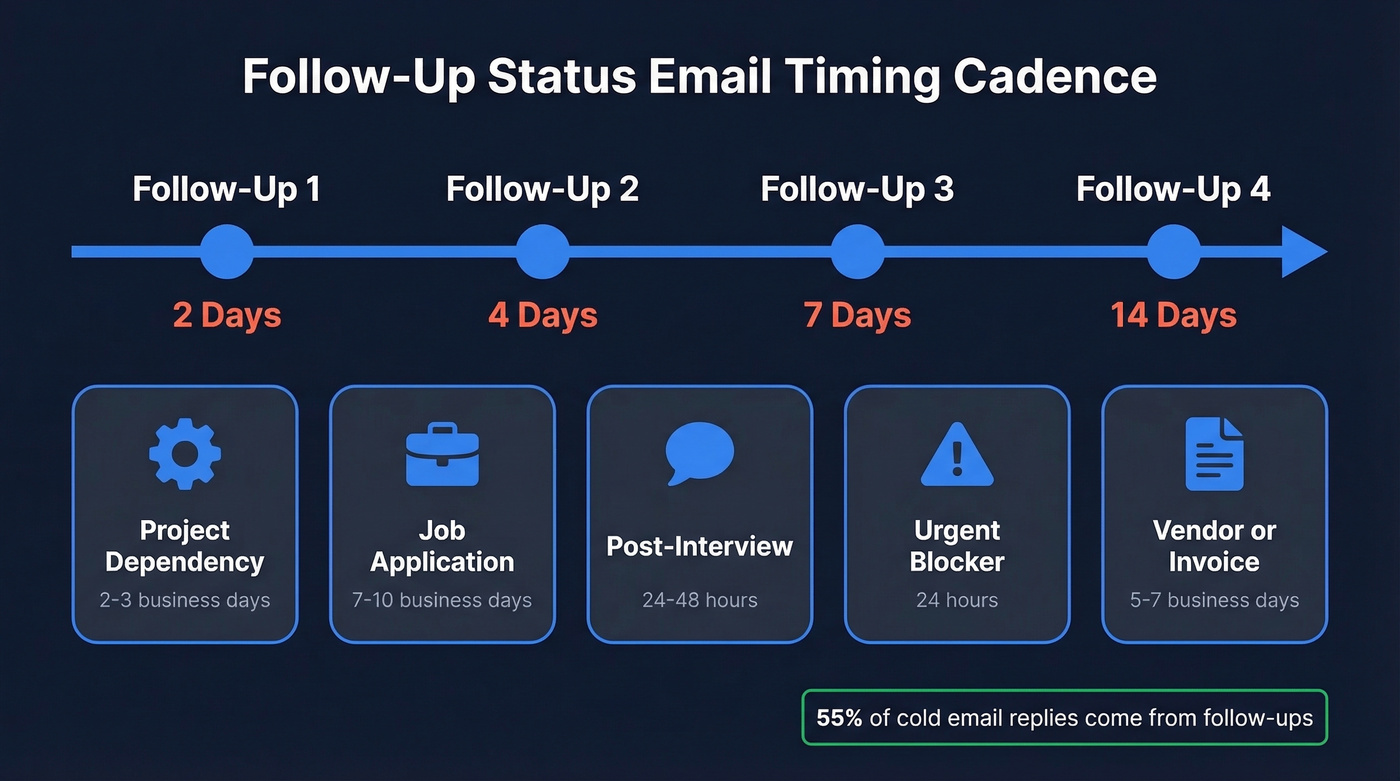
For multiple follow-ups, use graduated spacing: 2 days, then 4, then 7, then 14. This cadence gives you persistence without the spam feel.
55% of all cold email replies come from follow-ups, so don't quit after one attempt.
Best send window: Tuesday through Thursday, 9-11 AM in the recipient's time zone.
When NOT to follow up: Don't send before a stated deadline has passed, after a clear rejection, or during major holidays. Patience isn't passive - it's strategic.
Subject Lines That Get Opened
A Belkins study of 5.5 million B2B emails found personalized subject lines hit 46% open rates vs. 35% without personalization. Question-form and 2-4 word subject lines also averaged 46%. Apply the same logic to status emails:
If you want more options, pull from a swipe file of subject lines and adapt them to your context.
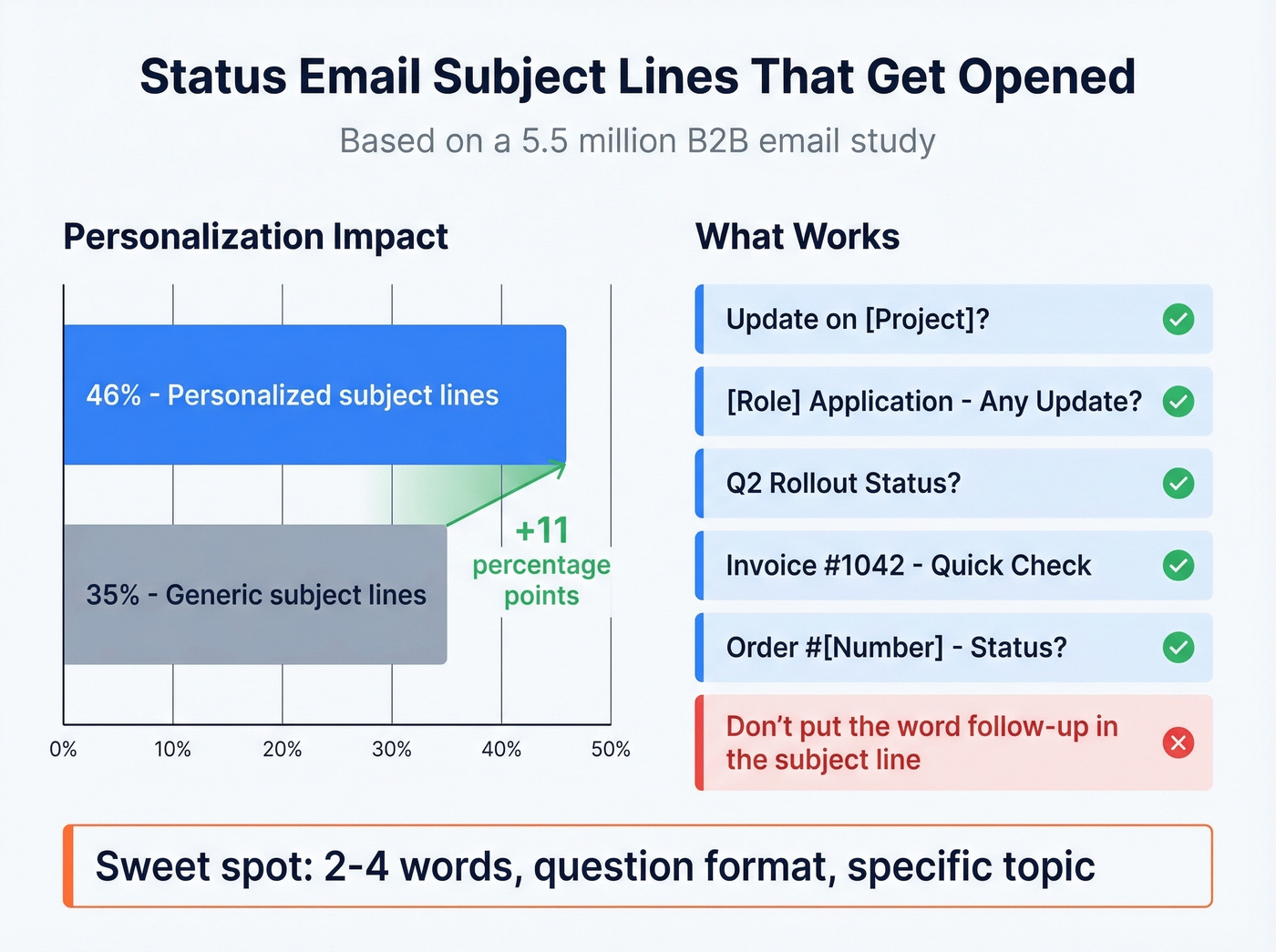
- Update on [Project]?
- [Role] Application - Any Update?
- Q2 Rollout Status?
- Invoice #1042 - Quick Check
- Order #[Number] - Status?
Don't put the word "follow-up" in the subject line. It adds zero value and signals you're chasing, not contributing.
If you're building a full sequence (not just one nudge), use these sales follow-up templates as a starting point.

A perfect follow-up template means nothing if it bounces. Prospeo delivers 98% email accuracy across 300M+ professional profiles - so your status emails actually reach the person who owes you an answer.
Stop following up with invalid addresses. Start with verified contacts.
6 Templates You Can Copy Today
Asking for a Project Status Update
This one's for when your team is blocked and you need a concrete timeline.
Subject: Q2 migration status?
Hi [Name],
Following up on the database migration we discussed on [date]. The front-end team is blocked until we have the updated API endpoints, and our sprint deadline is [date].
Could you share a quick status update by end of day [day]? Even a one-liner on timeline works.
Thanks, [Your name]
Following Up on a Job Application
The consensus on r/jobs is that candidates agonize over this exact email for way too long. The trick is restating their timeline, not yours - it's a gentle reminder without sounding accusatory.
Subject: [Role title] - any update?
Hi [Name],
I applied for the [Role] position on [date] and wanted to check in. You mentioned a decision by [timeframe they gave]. Is there an update you can share?
I'm happy to provide any additional information.
Best, [Your name]
Restate their timeline, keep it under 75 words, include one clear ask. That's it.
For more job-search-specific follow-ups, you can also borrow structure from an email after introduction and swap in the right context.
Following Up After No Response
Silence after one email usually means the other person is busy. Offer an alternative channel and keep it light.
Subject: Re: [Original subject line]
Hi [Name],
I sent a note on [date] about [specific topic] and wanted to follow up. Would it be easier to connect by phone? I'm available [two time slots]. Otherwise, a quick reply here works.
Thanks, [Your name]
If you're emailing someone who’s overloaded, use a tighter version of a follow-up email to a busy person.
Providing a Status Update to a Client
If your client can't get the picture in 30 seconds, the update is too long.
Subject: [Project name] - weekly status
Hi [Name],
Completed: User testing for Module A; final design handoff. In progress: Backend integration (on track for [date]). Blocker: We need your sign-off on the revised scope doc by [date].
Next step from you: Review and approve [link].
Best, [Your name]
If you need a more delicate nudge, a polite chaser email format often lands better than “any update?”
Status Update for Leadership
Executives scan. They don't read. Lead with the TL;DR and the decision request in the first three lines.
Subject: Q2 pipeline - status + decision needed
TL;DR: Pipeline at 78% of target. Need budget approval for the contractor by Friday to hit Q2.
Results: 312 qualified leads (up 14% MoM). Two enterprise deals in final negotiation. Risk: Contractor budget expires June 1. Without renewal, lead volume drops ~30%. Ask: Approve contractor extension by [date]; I'll handle the SOW.
If you’re reporting on revenue motion, align your language with pipeline health metrics so leadership can act fast.
Final Follow-Up (Closing the Loop)
After two or three unanswered emails, send a close-out. It creates urgency without being aggressive - and in our experience, this format pulls more replies than another standard nudge ever would.
Subject: Should I close this out?
Hi [Name],
I've followed up a couple of times on [topic] and haven't heard back. Totally understand if priorities shifted.
If I don't hear from you by [date], I'll assume we're tabling this for now. Happy to pick it back up anytime.
Best, [Your name]

Say This Instead of "Just Checking In"
Vague openers waste the reader's time and make you sound like you don't have a reason to email.
If you want more phrasing options, see how to say just checking in professionally.
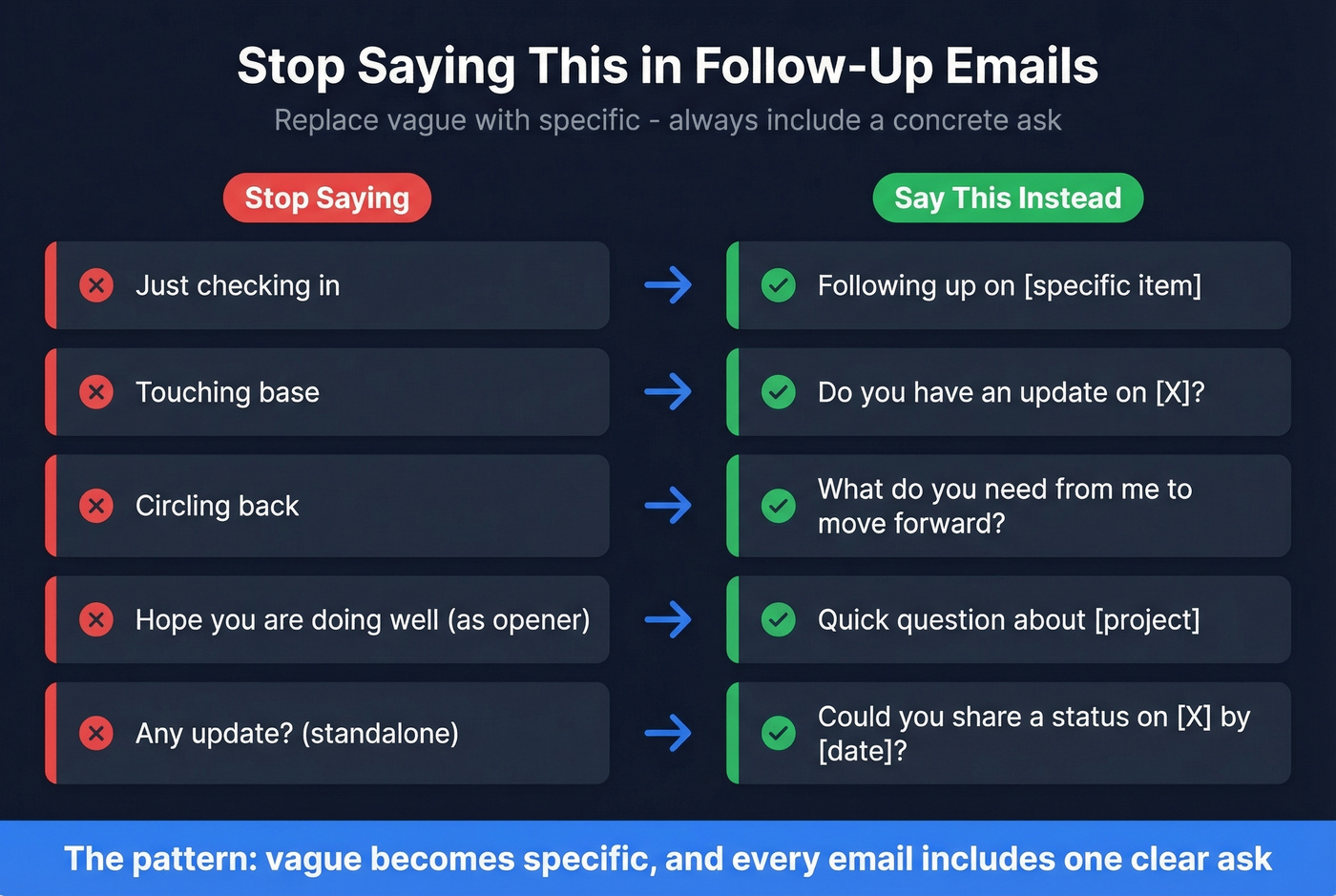
| Instead of... | Try... |
|---|---|
| "Just checking in" | "Following up on [specific item]" |
| "Touching base" | "Do you have an update on [X]?" |
| "Circling back" | "What do you need from me to move forward?" |
| "Hope you're doing well" (as opener) | "Quick question about [project]" |
| "Any update?" (standalone) | "Could you share a status on [X] by [date]?" |
The pattern: replace vague with specific, and always include a concrete ask.
Other Common Follow-Up Scenarios
The templates above cover status updates, but the same principles apply elsewhere. Here's how we'd adapt them.
After a pitch: Restate the core value proposition in one sentence, reference a specific pain point from the conversation, and propose a concrete next step. Don't just say "wanted to follow up on our call" - that's the email equivalent of dead air. (If you need a tighter opener, borrow from these sample elevator pitches.)
After sending a company profile: Don't ask "did you get it?" Highlight one relevant capability and tie it to their stated need.
Case study follow-up: Share a result that mirrors their situation. A line like "Company X faced the same integration challenge and cut onboarding time by 40%" turns a follow-up into something worth reading.
Order status inquiry: Include the order number, expected delivery date, and the specific question. This saves the recipient from digging through records.
Requesting a forecast from a customer: Lead with why the forecast matters to them - resource allocation, priority scheduling - not just why you need it internally. If forecasting is a recurring pain, consider a lightweight process from sales forecasting solutions.
In each case, the formula stays the same: context, specificity, one clear ask.
Mistakes That Kill Your Follow-Up
Let's be honest - most follow-ups fail before anyone reads a word. Here's what we see go wrong constantly:
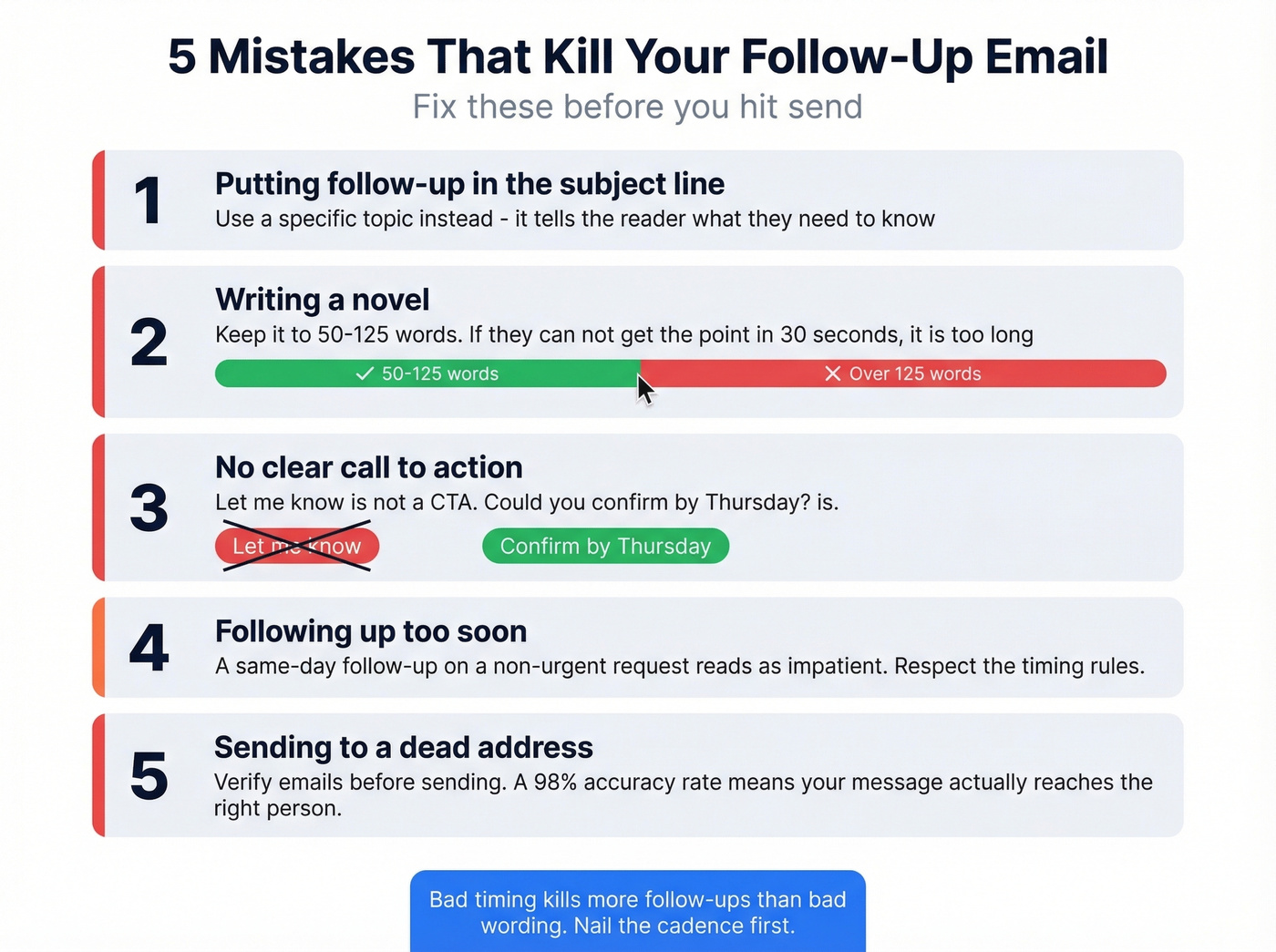
- Putting "follow-up" in the subject line. It tells the reader nothing. Use a specific topic instead.
- Writing a novel. Aim for 50-125 words. If they can't get the point in 30 seconds, it's too long.
- No clear CTA. "Let me know" isn't a CTA. "Could you confirm by Thursday?" is. (More examples: email call to action.)
- Following up too soon. A same-day follow-up on a non-urgent request reads as impatient. Respect the timing table above.
- Sending to a dead address. Your perfectly crafted follow-up status email is worthless if it bounces. Tools like Prospeo verify emails in real time with 98% accuracy, so your message actually reaches the right person.
Here's the thing most people miss: bad timing kills more follow-ups than bad wording. Nail the cadence and even a mediocre email gets replies.
No response after three follow-ups? The problem might not be your copy - it might be a dead email address. Prospeo refreshes data every 7 days and verifies every email through a 5-step process. Bounce rates under 4% aren't aspirational - they're standard.
Send follow-ups that land, not ones that bounce at 35%.
FAQ
How long should I wait before sending a follow-up status email?
Two to three business days for project dependencies, 24-48 hours after an interview, and 7-10 business days for job applications. For urgent blockers, 24 hours is fine. Space multiple follow-ups using graduated intervals - 2, 4, 7, then 14 days - to stay persistent without becoming a nuisance.
Is it unprofessional to ask for a status update?
Not at all. A polite, specific request is standard professional communication. Keep it between 50-125 words, lead with context ("Following up on the Q2 scope doc from Tuesday"), and include a concrete deadline ("Could you confirm by Thursday?"). Vague messages feel pushy; specific ones feel helpful.
What's the best approach when a pitch email gets no response?
Reference something specific from the original conversation - a metric, a pain point, or a question they raised - then add new value like a relevant case study or fresh data point. The best re-engagement emails give the recipient a reason to reply, not just a reminder that you exist.
What should I do if my follow-up email bounces?
A bounce means the address is invalid or outdated. Verify it before resending. If the address is confirmed bad, find an alternative contact through a colleague or different channel. We've found that real-time verification before you hit send eliminates this problem almost entirely.
How many follow-up emails is too many?
Two to three follow-ups over two to three weeks is the practical ceiling for status requests. After that, escalate to a different contact or send a close-out email ("Should I close this out?"). That final message often pulls more replies than a fourth standard nudge ever would.