

Formal Introduction Email Templates: 10 Ready-to-Send Examples for 2026
You spent twenty minutes drafting a three-paragraph email to a VP you've never met, and it still reads like a legal disclaimer crossed with a cover letter. You're not alone - a common complaint on Reddit about professional email templates is that they "all give out different advice," leaving you more confused than when you started. In our experience, the fix isn't another formal introduction email template. It's one framework and the discipline to keep things short.
Here are both.
What You Need (Quick Version)
- One framework: BLUF - purpose in sentence one), context in sentence two, ask in sentence three.
- One constraint: Under 150 words. One ask. One next step.
- Three templates that cover 80% of formal scenarios: self-introduction to a stakeholder, cold business introduction, and introducing two people. The other seven below handle the edge cases.
Formal vs. Professional vs. Casual
These three registers get conflated constantly, and the confusion causes real problems. One Reddit user described getting disciplined at work for tone in emails they thought were perfectly fine - a gap that's smaller than you think but still matters.
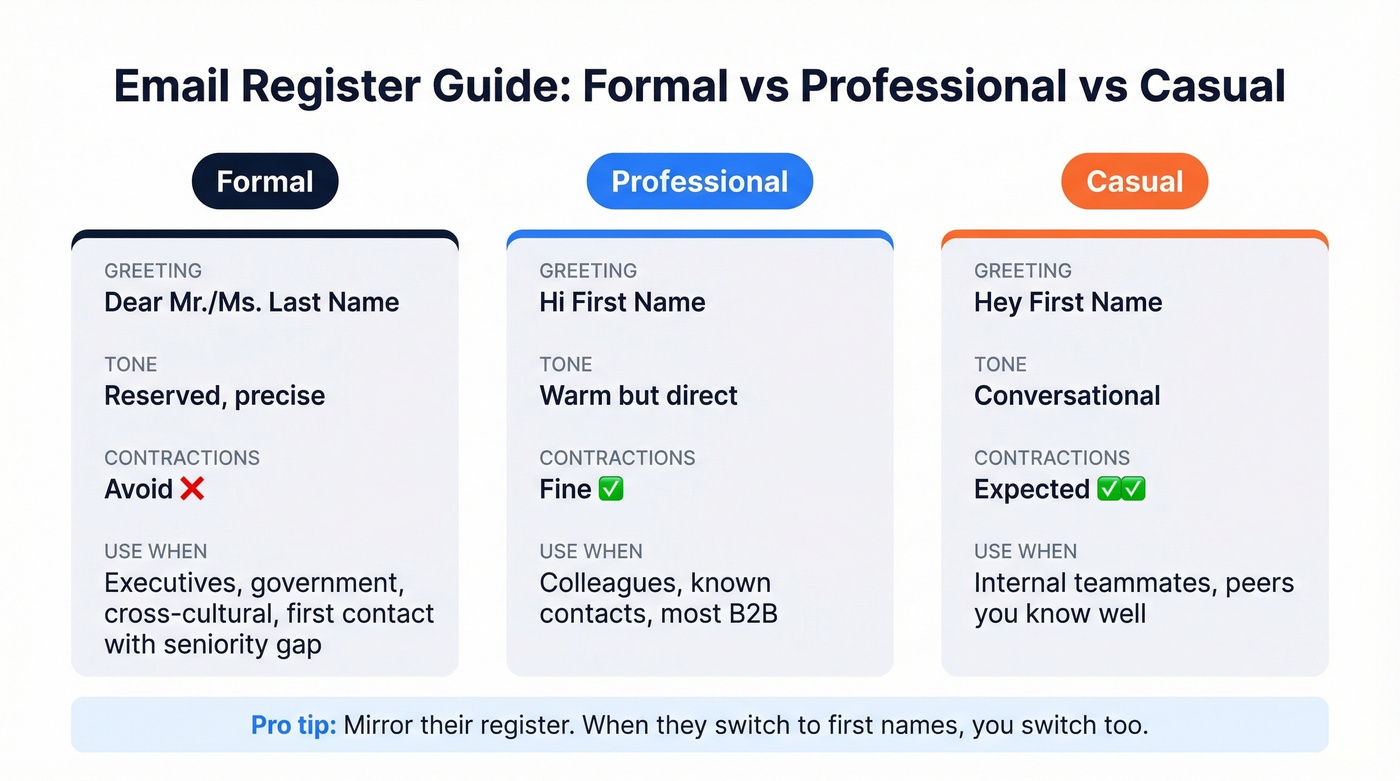
| Formal | Professional | Casual | |
|---|---|---|---|
| Greeting | Dear Mr./Ms. [Last Name] | Hi [First Name] | Hey [First Name] |
| Tone | Reserved, precise | Warm but direct | Conversational |
| Contractions | Avoid | Fine | Expected |
| Use when | Executives, government, cross-cultural, first contact with seniority gap | Colleagues, known contacts, most B2B | Internal teammates, peers you know well |
Formal doesn't mean stiff. It means you're signaling respect for the recipient's time and position. Use "Dear Mr./Ms. [Last Name]" when there's a seniority gap, a cultural expectation, or you simply don't know the person. Switch to first names once they do - mirroring their register is the fastest way to calibrate.
How to Write a Formal Introduction Email
Think of your email as the ad and the meeting as the product. WordStream nails this framing: nobody reads a long ad. They glance, decide, and either click or scroll past. Your introduction needs to survive that same two-second scan.
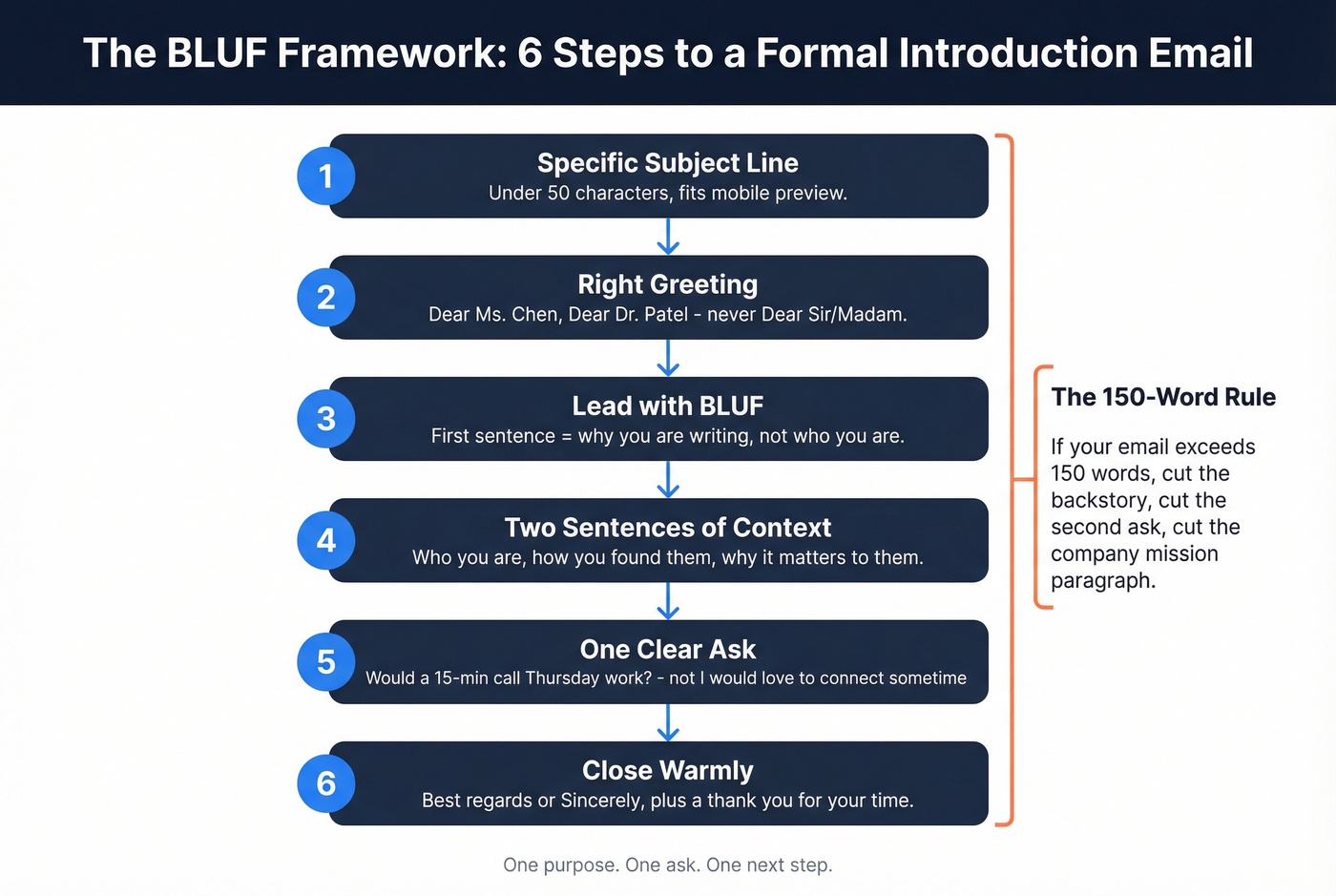
Here's the six-step structure:
Step 1: Write a specific subject line. Personalized subject lines perform significantly better - keep yours under 50 characters so it fits most mobile previews. "Introduction - [Your Name], [Company]" works. "Quick question" doesn't. (If you want more options, see our subject line formulas.)
Step 2: Use the right greeting. "Dear Ms. Chen" for formal. "Dear Dr. Patel" if they hold a title. Never "Dear Sir/Madam" unless you genuinely can't find a name - it signals you didn't research.
Step 3: Lead with BLUF. Bottom Line Up Front. Your first sentence states why you're writing. Not who you are - why you're writing. CEOs get 200+ emails a day and decide within seconds whether to keep reading, which is why Superhuman's executive email guidance centers on this principle.
Step 4: Add two sentences of context. Who you are, how you found them, and why this matters to them specifically. This is where personalization lives.
Step 5: Make one clear ask. EngageBay's guidance emphasizes one ask per email to reduce decision fatigue. "Would a 15-minute call on Thursday work?" beats "I'd love to connect sometime." (For more examples, see email wording to schedule a meeting.)
Step 6: Close warmly. "Best regards" or "Sincerely" for formal. Add a warmth marker - a simple "Thank you for your time" prevents neutral tone from reading as negative. This matters more than most people realize: without vocal cues or facial expressions, neutral emails can land as cold or even hostile.
The 150-word rule: If your formal introduction exceeds 150 words, you're writing an essay, not an email. Cut the backstory. Cut the second ask. Cut the paragraph about your company's mission. One purpose, one ask, one next step.
10 Templates That Actually Work
Let's be honest: templates are starting points, not scripts. Swap in your details, cut anything that doesn't apply, and resist the urge to add "just one more paragraph." Every sample below follows the BLUF framework, so you can adapt it without reinventing the structure.
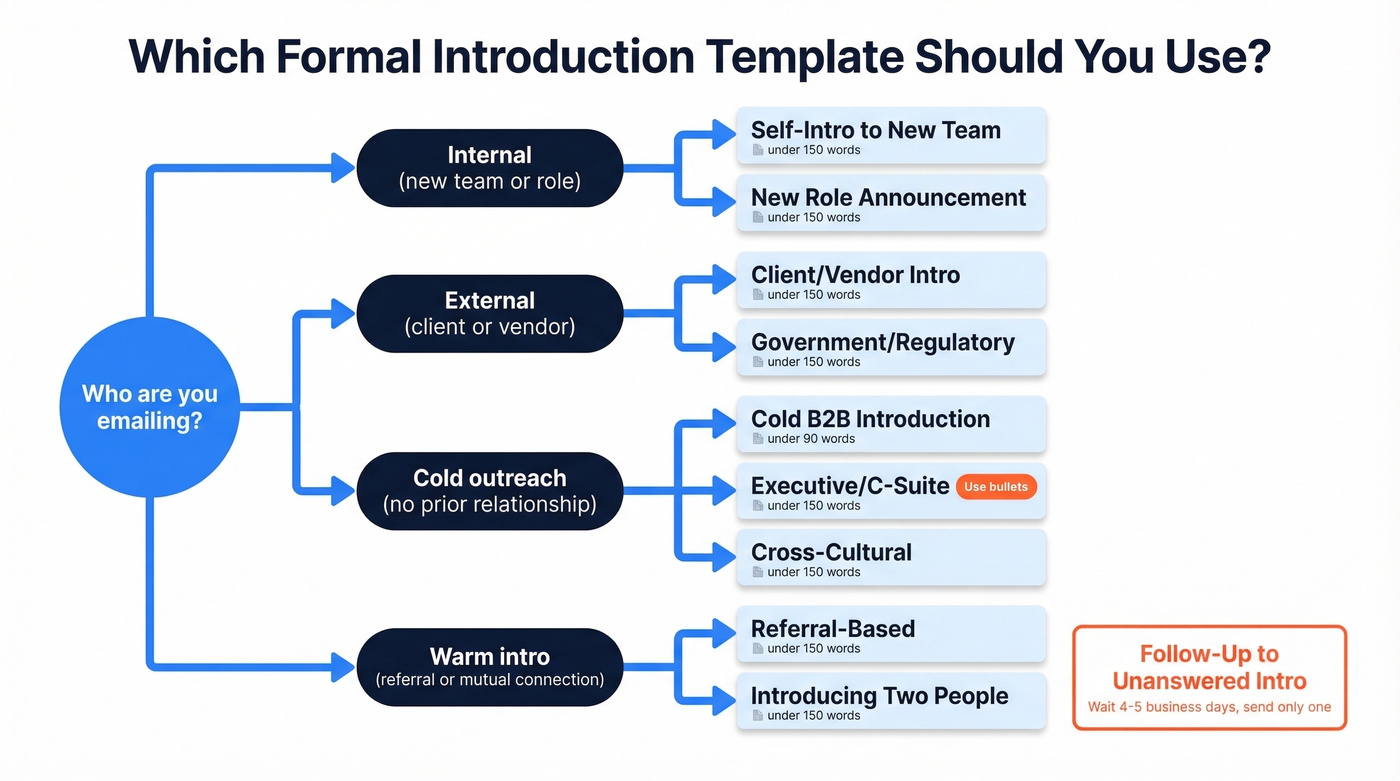
Self-Introduction to a New Team
Subject: Introduction - [Your Name], New [Title] on [Team Name]
Dear [Team/Name],
I'm joining [Company] as [Title] starting [Date], and I wanted to introduce myself before my first day. I'll be working on [specific area] and reporting to [Manager Name].
Previously, I spent [X years] at [Company] focused on [relevant experience]. I'm looking forward to learning how your team approaches [specific topic] - I'll be reaching out individually over the next few weeks.
Best regards, [Your Name]
Use this to establish credibility before you walk in the door.
Self-Introduction to a Client or Vendor
Here's what most people get wrong with account transition emails: they forget to name the predecessor. Naming them signals continuity and shows you've done your homework.
Subject: Introduction - [Your Name], Your New Point of Contact at [Company]
Dear Ms. [Last Name],
I'm writing to introduce myself as your new [Title] at [Company], taking over from [Predecessor Name] effective [Date]. I've reviewed our account history and want to make sure nothing falls through the cracks.
I'd welcome a 20-minute call this week to learn your current priorities. Would Thursday or Friday afternoon work?
Sincerely, [Your Name]
Introducing Two People (Double Opt-In)
Subject: Introduction - [Name A] <> [Name B]
Dear [Name A] and [Name B],
I'd like to connect you both. [Name A] leads [function] at [Company A] and is working on [specific initiative]. [Name B] runs [function] at [Company B] and recently [relevant accomplishment].
I think there's a strong overlap around [specific topic]. I'll let you two take it from here.
Best, [Your Name]
Always get permission from both parties before sending.
Cold B2B Introduction Email
Subject: [Their Company] + [Your Company] - [Specific Outcome]
Dear Mr. [Last Name],
I noticed [Company] recently [specific trigger - funding round, new hire, product launch]. We help [type of company] solve [specific problem], and I thought the timing might be relevant.
[One sentence about a result you've delivered for a similar company.]
Would a 15-minute call next week make sense?
Best regards, [Your Name]
Keep cold introductions under 90 words. Practitioners on r/sales consistently report that shorter emails with one question outperform longer pitches. No attachments, max one link. (If you need a sequence, use these cold email follow-up templates.)
Executive / C-Suite Introduction
Executives scan, they don't read. Bullets beat paragraphs. A deadline beats "whenever works." This template uses the BLOT framework - Bottom Line On Top.
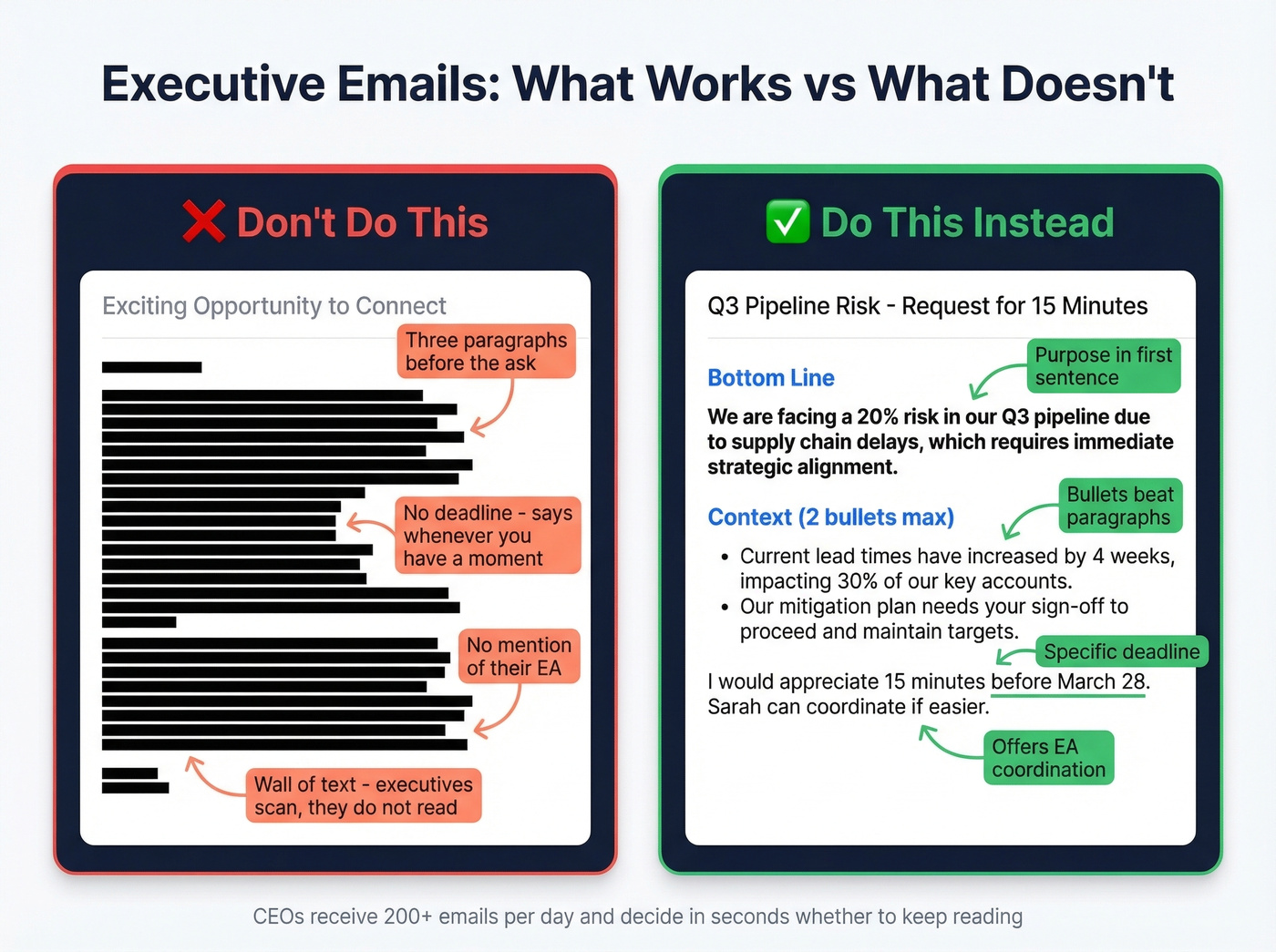
Don't do this: Three paragraphs of background before your ask, no deadline, "whenever you have a moment."
Do this instead:
Subject: [Specific Topic] - Request for 15 Minutes
Dear [Title] [Last Name],
[One-sentence bottom line: what you want and why it matters to them.]
Context: [Two bullets max - who you are, what prompted this outreach, one proof point.]
I'd appreciate 15 minutes on your calendar before [specific date]. [EA Name] can coordinate if that's easier.
Respectfully, [Your Name]
New Role Announcement
Subject: Transition Update - [Your Name], Now at [New Company]
Dear Ms. [Last Name],
I wanted to share that I've joined [New Company] as [Title], effective [Date]. I valued our work together at [Previous Company] and hope to stay connected.
In my new role, I'm focused on [area]. If there's ever an opportunity to collaborate, I'd welcome the conversation.
Warm regards, [Your Name]
Don't pitch in a role announcement. This is relationship maintenance, not sales.
Government or Regulatory Introduction
Subject: Formal Introduction - [Your Name], [Title], [Organization]
Dear [Title] [Last Name],
I am writing to formally introduce myself as [Title] at [Organization]. Our office is responsible for [specific mandate or function], and I will serve as your primary liaison regarding [topic].
I would welcome the opportunity to schedule an introductory meeting at your convenience. Please feel free to direct scheduling through [contact method].
Respectfully, [Your Name], [Title] [Organization] | [Phone] | [Email]
Government emails skip contractions entirely. Include your full signature block. Omit marketing language and links.
Cross-Cultural Introduction
Subject: Introduction - [Your Name], [Company], Regarding [Topic]
This template is deliberately conservative - better to be slightly too formal than accidentally disrespectful.
Dear [Appropriate Title] [Last Name],
I hope this message finds you well. My name is [Your Name], and I serve as [Title] at [Company] in [City/Country].
I am reaching out regarding [specific purpose]. [One sentence of context relevant to their region/organization.]
I would be grateful for the opportunity to discuss this further at a time convenient for you.
With kind regards, [Your Name]
Referral-Based Introduction
Subject: [Referrer Name] Suggested I Reach Out
Dear Ms. [Last Name],
[Referrer Name] recommended I contact you regarding [specific topic]. [He/She] mentioned your work on [specific project or area] and thought there might be a fit.
I lead [function] at [Company], and we're currently [one sentence about what you're working on that's relevant to them].
Would you have 15 minutes for a brief call this week?
Best regards, [Your Name]
Lead with the referrer's name - in the subject line and the first sentence. It's the single strongest trust signal in any introduction.
Follow-Up to an Unanswered Introduction
Subject: Re: [Original Subject Line]
Dear Mr. [Last Name],
I sent an introduction last [day of week] regarding [topic] and wanted to follow up briefly. I understand schedules fill up quickly.
[One sentence restating the core value proposition or ask.]
If the timing isn't right, no need to reply - I appreciate your consideration either way.
Best regards, [Your Name]
Wait four to five business days. Send one follow-up, not three. Reference the original email - don't resend it verbatim. (More options: sales follow-up templates and when should I follow up on an email.)

A perfect formal introduction template means nothing if it bounces. Prospeo's 98% email accuracy and 5-step verification ensure your carefully crafted BLUF email actually reaches the VP's inbox - not their spam folder.
Stop perfecting emails that never arrive. Verify first.
Subject Line Formulas
Your subject line gets roughly 40-50 characters of mobile preview space. Clear beats clever every time. Including the recipient's name lifts open rates by roughly 26%, so personalize when you can. (If you want a swipe file, use these email subject line examples.)
For context on why subject lines carry so much weight: the most recent MailerLite benchmark, covering Dec 2024-Nov 2025 across 3.6 million campaigns, shows a 43.46% average open rate. But Apple Mail Privacy Protection inflates those numbers, so real opens are lower - meaning your subject line and first sentence do more heavy lifting than the metrics suggest.
Ten formulas that work across every template above:
- Introduction - [Your Name], [Company]
- [Referrer Name] Suggested I Reach Out
- [Their Company] + [Your Company] - [Topic]
- Transition Update - [Your Name], Now at [Company]
- Request for 15 Minutes - [Specific Topic]
- Following Up: Introduction Re [Topic]
- [Name A] <> [Name B] - Introduction
- Formal Introduction - [Your Title], [Organization]
- [Specific Trigger Event] - Quick Question
- Regarding [Project/Initiative] - Introduction
Two things to avoid. First, don't use "Re:" in a first-touch email. Native English speakers read it as a reply to an existing thread, and non-native speakers often misread it entirely - use "Regarding" or "About" instead. Second, skip vague subject lines like "Hello" or "Quick question." They get ignored or flagged.
Cultural Norms That Change Everything
Formal email norms vary dramatically by region, and getting them wrong can torpedo a relationship before it starts. We've seen teams lose deals in Japan by jumping to first names too early, and confuse German partners by being too casual in initial outreach. The fix isn't memorizing rules for every country - it's defaulting to the conservative end of the spectrum and adjusting from there.
| Region | Greeting Norm | Tone | Key Do | Key Don't |
|---|---|---|---|---|
| North America | First name after first exchange | Direct, warm | Balance efficiency with warmth | Sound abrupt |
| Latin America | Formal titles with superiors | Personal, relationship-first | Ask about well-being first | Jump straight to the ask |
| Germany / Switzerland | Family name + title | Direct, precise | Be organized and specific | Use first names uninvited |
| Japan / South Korea | Family name + honorific | Indirect, respectful | Use softening language | Be blunt or skip pleasantries |
| MENA | Formal + warm | Courteous, relationship-driven | Open with warm greetings | Rush to business |
A critical pitfall for English-language emails: starting with "My name is..." can trigger phishing associations for native English speakers. English business emails almost never open with the sender's name - it goes in the second or third sentence, after the purpose. In German and Japanese business culture, family names are used far more consistently even with long-term contacts, so don't assume first-name basis just because you've exchanged a few emails.
For MENA contacts, expect warm greetings and inquiries about family and health before any business discussion. A follow-up phone call is common alongside email. Patience with response times is a sign of respect, not disinterest.
Three Mistakes That Kill Formal Emails
Mistake 1: Leading with "My name is..."
In English, this reads like a phishing email or a cold call script. Your name belongs in the second sentence, after you've stated why you're writing. The BLUF framework handles this automatically - purpose first, identity second.
- Bad: "My name is Sarah Chen and I work at Acme Corp. I wanted to reach out because..."
- Good: "I'm reaching out regarding the Q3 vendor review. I'm Sarah Chen, the new procurement lead at Acme Corp."
Mistake 2: Information overload
The Muse flags this consistently: don't overload with information. If your email has more than two paragraphs, you've lost the thread. A formal introduction email isn't a cover letter. Cut your company history, cut your full bio, cut the second ask.
Mistake 3: Missing warmth markers
Here's the thing - neutral tone reads as negative in email. Without vocal cues or facial expressions, a perfectly polite email can land as cold or even hostile. Add one warmth signal: "Thank you for your time," "I appreciate the introduction," or "I look forward to connecting." It costs you five words and prevents a misread that could cost you the relationship. I've watched colleagues agonize over whether a one-line reply from a VP was angry or just busy - a single warmth marker from either side would have eliminated the ambiguity entirely.
Make Sure Your Email Actually Arrives
A perfectly crafted formal introduction is worthless if it bounces. Make sure your domain has SPF, DKIM, and DMARC configured. For cold introductions, skip attachments and limit yourself to one link. Keep your bounce rate under 2% or your sender reputation degrades fast. (If you need a deeper checklist, see our email deliverability guide and how to improve sender reputation.)
Before sending an introduction to someone you've never emailed, verify the address. Prospeo's email finder checks addresses in real time with 98% accuracy, so your first impression doesn't land in a bounce folder. The free tier gives you 75 verified emails per month - enough to cover your high-stakes introductions without spending a dollar.

A bounced introduction to a C-suite contact doesn't just fail - it tells them you didn't do basic homework. If your deal size is under five figures, you probably don't need a full sales engagement platform. But you absolutely need verified email addresses. (Related: email bounce rate benchmarks and fixes.)
Cold B2B introductions need a real trigger and a real email. Prospeo gives you both - 300M+ profiles with 30+ filters like funding rounds, job changes, and buyer intent so your formal outreach is timely and lands at $0.01 per email.
Find the right contact, write the right email, land in the right inbox.
FAQ
How long should a formal introduction email be?
Under 150 words. State one purpose, make one ask, and include one clear next step. Save background details and supporting material for the actual meeting.
When should I follow up on an unanswered introduction?
Wait four to five business days, then send one follow-up referencing the original email. After that, move on or try a different channel like a phone call.
Should I use "Dear Sir/Madam"?
Only as a last resort when you genuinely can't find the recipient's name. Generic salutations signal you didn't research the person - tools like Prospeo's email finder can surface verified contacts so you always address someone by name.
When is email the wrong channel?
When the relationship is high-stakes and time-sensitive - board introductions, crisis escalations, or cultures where a phone call is expected before written outreach. Skip this template entirely for those situations and pick up the phone.