

Gmail Bouncing Back Emails: Every Error Code, Cause, and Fix
You just sent a perfectly normal email - maybe to a client, maybe to 40 parents on your kid's hockey team - and every single one bounced. The error message links to a Google help page that tells you almost nothing useful. If Gmail is bouncing back emails on you, here's the guide that page should've been.
The Short Version
Find your bounce error code in the reference table below - it tells you exactly what's wrong. Most Gmail bounces in 2026 trace back to missing authentication (SPF/DKIM/DMARC), damaged sender reputation, or hitting sending limits. Fix the root cause, then prevent future bounces by verifying your email list before sending.
Why Gmail Rejects Your Messages
Picture this: you're the parent volunteer who just BCC'd 40 families about Saturday's game. Your Gmail account is two months old. Every single message bounces with a generic "Message rejected." No error code, no explanation, no fix.
Or maybe you're the IT admin who set up SPF and DKIM months ago, and everything was fine - until late 2025, when Gmail ramped up enforcement of its sender requirements and your domain started getting hit with 550-5.7.26 rejections. You've checked MXToolbox. Everything looks clean. The bounces keep coming.
Google's own troubleshooting page is frustratingly vague - it tells you to "check your message" without explaining what to check or why. Gmail's anti-abuse systems have gotten significantly more aggressive since the 2024 sender requirements took effect, and the error codes they return are your best diagnostic tool. Let's decode them.
Find Your Error Code
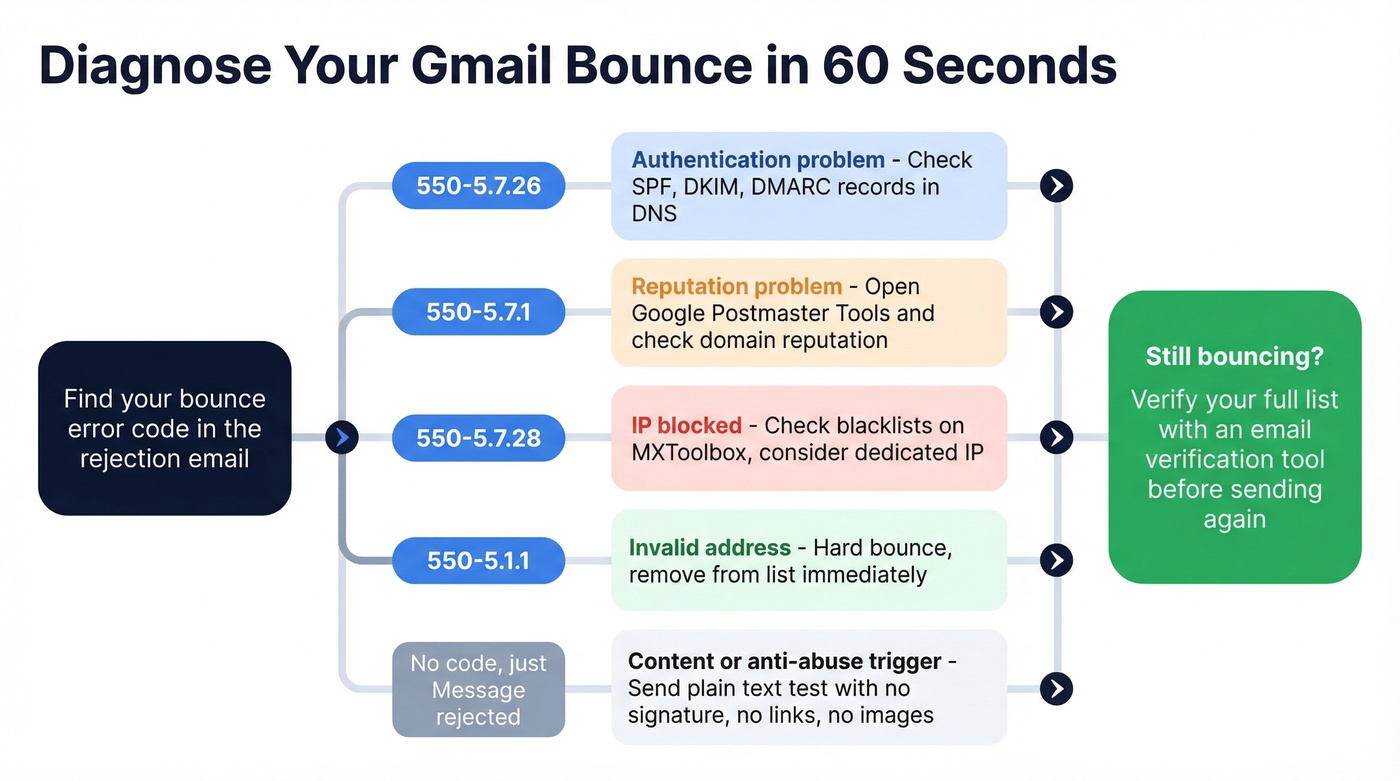
This table covers the most common bounce codes. Find yours, then jump to the fix section below.
| Error Code | What It Means | Quick Fix |
|---|---|---|
| 550-5.1.1 | Address doesn't exist | Remove from list - hard bounce |
| 550-5.7.1 | Low domain reputation | Check Postmaster Tools, fix engagement |
| 550-5.7.26 | Unauthenticated mail | Set up SPF and/or DKIM (and add DMARC) |
| 550-5.7.28 | IP blocked (unsolicited) | Fix reputation signals, stop unwanted bursts, warm sending |
| 421-4.7.28 | URL rate limited / reputation issue | Reduce volume, check link reputation |
| "Message rejected" | Generic - no code given | Content trigger or anti-abuse flag |
The 5xx codes are permanent rejections - Gmail won't accept that message no matter how many times you retry. The 4xx codes are temporary, meaning the server is telling you to try again later. And the generic "Message rejected" with no code? That's the most maddening of all, because it could be anything from your email signature to your account age.
Hard vs. Soft vs. Block Bounces
Not all bounces are created equal, and understanding the category matters more than memorizing codes.
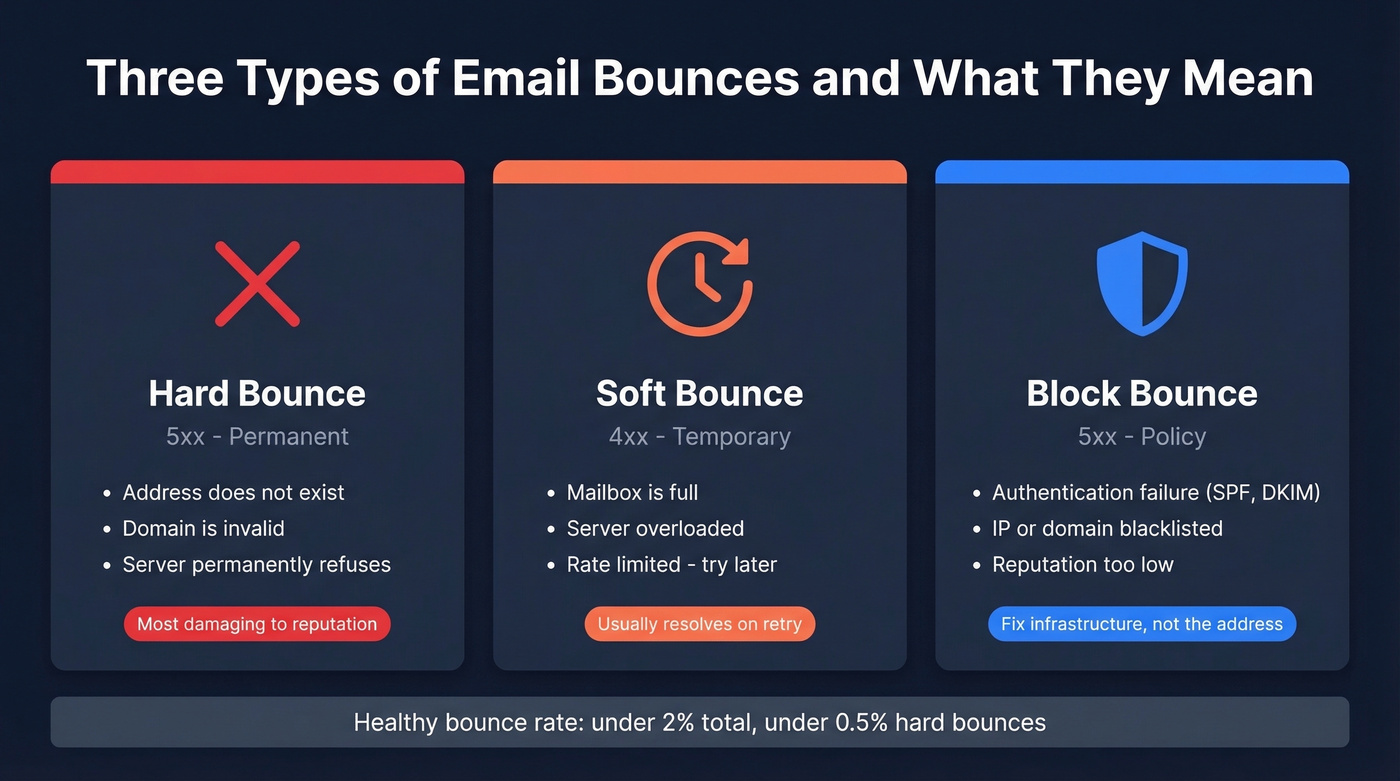
Hard bounces (5xx, permanent) mean the address doesn't exist or the server permanently refuses your mail. These are the most damaging to your sender reputation because they signal you're sending to bad data. A healthy hard bounce rate sits below 0.5%.
Soft bounces (4xx, temporary) happen when a mailbox is full, the server is overloaded, or you've been rate-limited. They're temporary failures that often clear after retrying.
Block bounces are policy-driven rejections - authentication failures, blacklist hits, or reputation problems. These look like hard bounces (5xx codes) but the fix isn't removing an address; it's fixing your infrastructure.
The fix for hard bounces from invalid addresses is straightforward: verify addresses before sending. Prospeo's 5-step verification flags invalid emails, spam traps, and catch-all domains before they generate a bounce and damage your reputation.

Your overall bounce rate should stay under 2%. Once you're above that, email providers treat your domain as a risk - and recovery is slow. (If you want the benchmarks and how to calculate them, see our guide to bounce rate.)

Every bounce damages your sender reputation - and recovery takes weeks. Prospeo's 5-step verification catches invalid addresses, spam traps, and catch-all domains before you hit send. 98% email accuracy. Under 2% bounce rate guaranteed.
Fix your bounce rate at the source, not after the damage is done.
Gmail's Sender Rules (Enforced in 2026)
SPF, DKIM, and DMARC aren't optional anymore. They haven't been since February 2024, but Gmail gave senders a long grace period. That grace period ended in late 2025, when enforcement ramped up hard. Non-compliance now causes both temporary and permanent rejections - the bounces you're probably reading this article about.
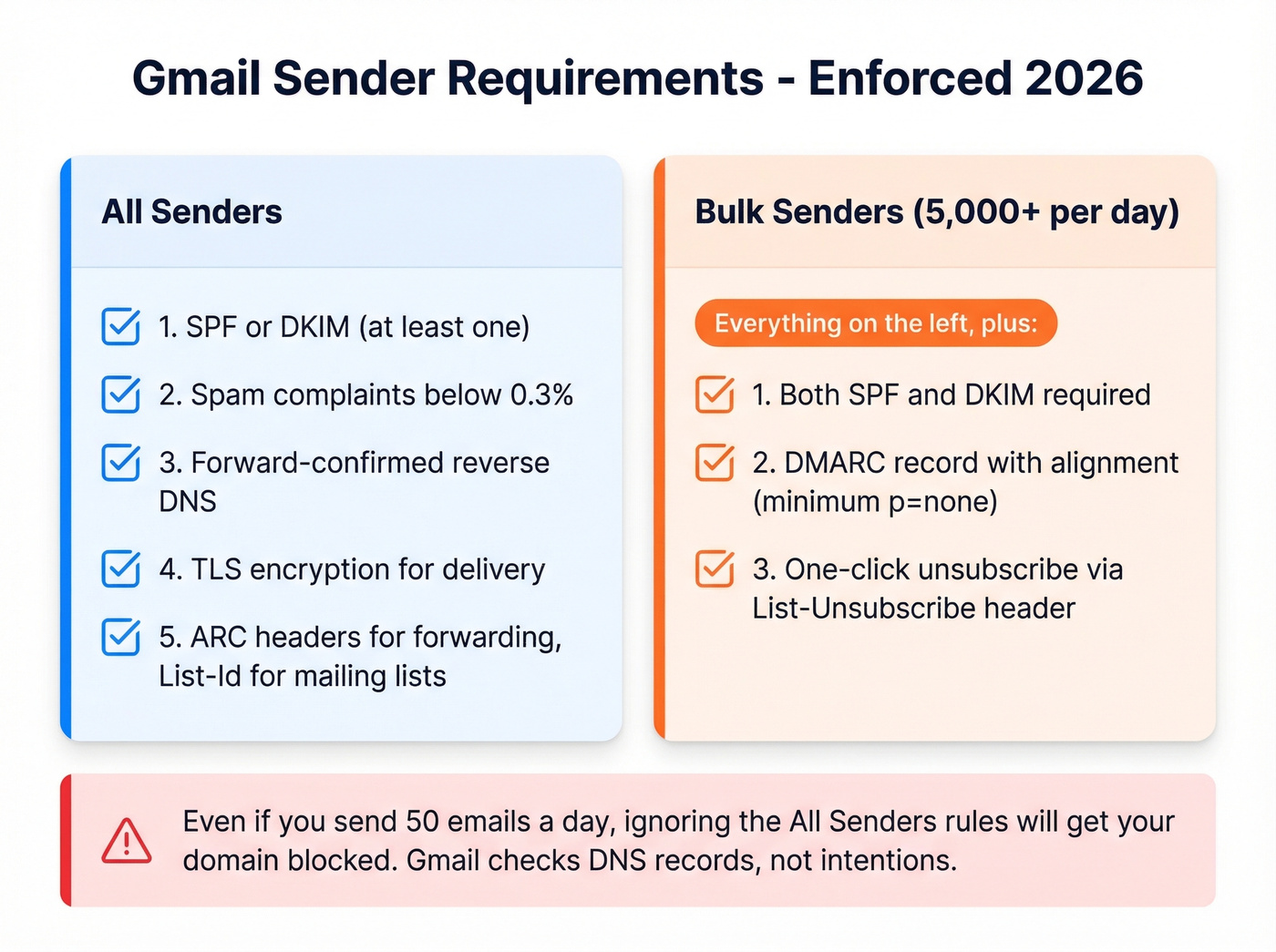
All senders must:
- Configure at least SPF or DKIM (minimum one)
- Keep spam complaints below 0.3%
- Set up forward-confirmed reverse DNS on sending IPs
- Use TLS for delivery to Google
- Add ARC headers if forwarding; add List-Id for mailing lists
Bulk senders (5,000+ messages/day to Gmail) must also:
- Implement both SPF and DKIM
- Publish a DMARC record with alignment (minimum
p=none) - Enable one-click unsubscribe via
List-Unsubscribeheader
Here's the thing - even if you're sending 50 emails a day, not 5,000, the "all senders" requirements will still get you blocked if you ignore them. We've seen domains with perfectly fine content get rejected purely because DKIM wasn't configured. Gmail doesn't care about your intentions; it cares about your DNS records.
Fixing Gmail Bounces
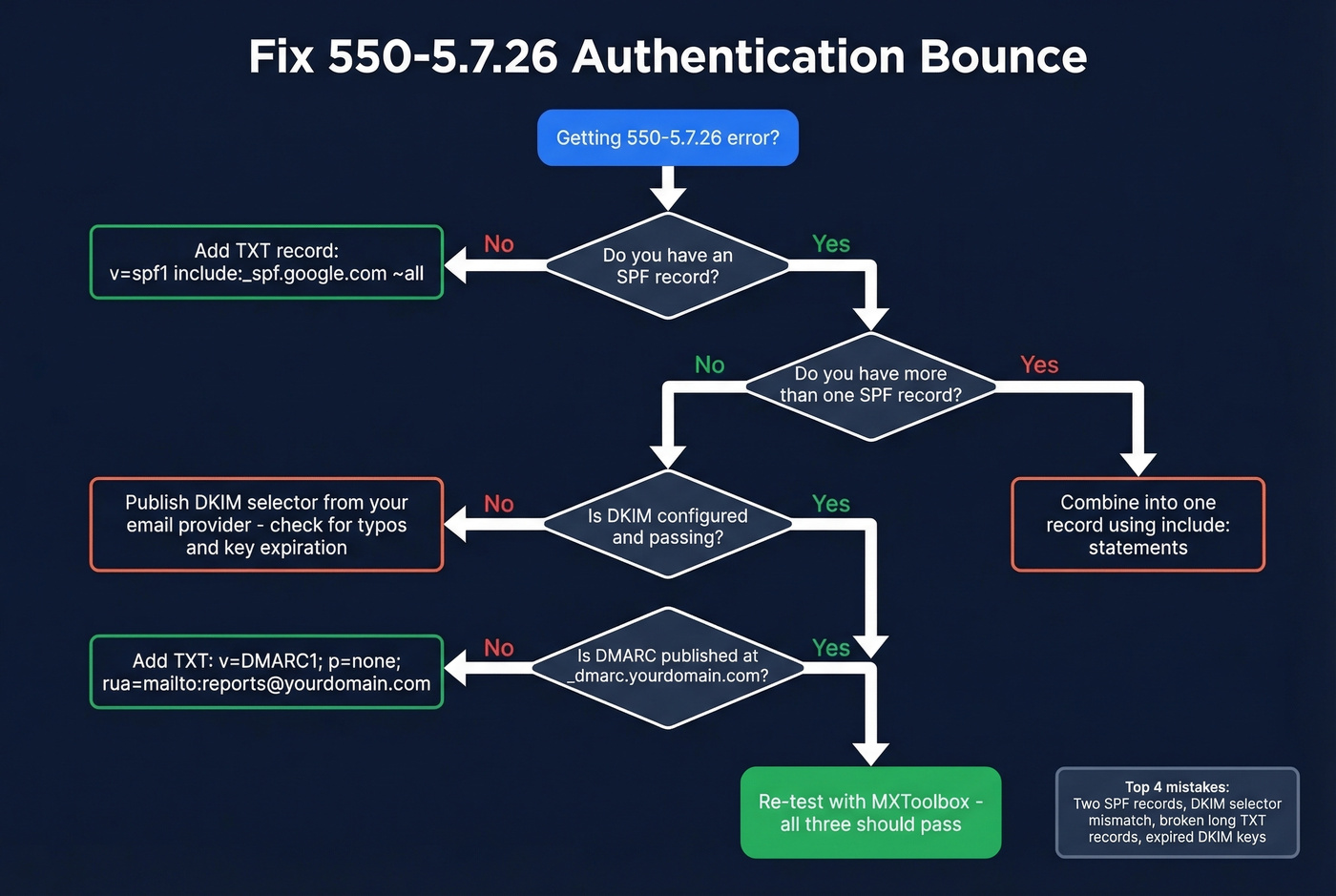
Authentication Failures (550-5.7.26)
This is the bounce you'll see most often in 2026. Here's what the actual rejection looks like:
550-5.7.26 This mail is unauthenticated, which poses a security risk to
the sender and Gmail users. The sender must authenticate with at least
one of SPF or DKIM. DKIM checks did not pass and SPF check for
[yourdomain.com] did not pass.
To fix it, you need DNS records for SPF, DKIM, and DMARC. Starter examples:
SPF (TXT record on your root domain):
v=spf1 include:_spf.google.com ~all
DKIM (publish the selector + value your email provider gives you): Your provider will generate a DKIM selector and the exact DNS value you must publish. Add it exactly as provided, then re-test until DKIM passes. (If you need a quick checklist, use this guide on how to verify DKIM is working.)
DMARC (TXT record at _dmarc.yourdomain.com):
v=DMARC1; p=none; rua=mailto:dmarc-reports@yourdomain.com
The most common mistakes we see: publishing two SPF records (you're only allowed one - combine them with include: statements), a DKIM selector mismatch between what your provider generated and what's in DNS, your DNS host splitting a long TXT record across multiple lines and breaking it, and expired DKIM keys that nobody remembered to rotate. Check those four things before you do anything else. (More examples: SPF record syntax and common fixes.)
Reputation & IP Blocks (550-5.7.28)
This is the bounce that makes sysadmins lose sleep:
[550-5.7.28](https://knowledge.workspace.google.com/admin/support/troubleshooting/gmail-smtp-errors-and-codes) ... Gmail has detected an unusual rate of unsolicited mail
originating from your IP address. Mail sent from your IP address has
been blocked.
One Reddit thread on r/sysadmin captures this perfectly - a small VPS sending roughly 10 automated emails a day to a personal Gmail account, SPF configured, server locked down, no bulk sending. Still blocked. The lesson: "not bulk" doesn't mean "not suspicious." Gmail evaluates IP reputation and domain reputation independently, and either one can trigger a block.
Most guides stop at "check SPF/DKIM/DMARC." That's step one of several. Here's another pattern worth knowing: Postmark has documented that Gmail sometimes issues DMARC-related bounces as a warning shot. If those go unresolved, Gmail can escalate to a full reputation-based ISP block. By the time you see 550-5.7.28, you've likely been ignoring earlier signals.
Another underappreciated cause: form abuse. Bots submitting your website contact form can trigger bursts of unwanted mail from your domain, generating spam complaints that tank your reputation overnight. Add CAPTCHA and rate-limiting to every form on your site. Also check whether you're on a shared IP - if your hosting provider lumps you in with other senders, their spam becomes your problem. Dedicated IPs cost more but give you full control over your reputation.
Recovery takes 2-4 weeks of consistently improved sending behavior - lower volume, higher engagement, zero spam complaints. Monitor progress in Google Postmaster Tools. (If you need a step-by-step plan, see how to improve sender reputation and a list of email reputation tools.)
Sending Limits & Anti-Abuse Triggers
Remember the hockey parent? A Reddit user in r/Gmail reported exactly this scenario: new Gmail account, about two months old, one message BCC'd to 40 recipients. All 40 bounced with "Message rejected." The content was simple - no links, no money ask. Didn't matter.
Gmail throttles new accounts aggressively. A two-month-old account sending to 40 BCC recipients looks identical to a spammer's first blast. The fixes: send in smaller batches (10-15 at a time), age the account with normal back-and-forth email before using it for group sends, use Google Groups for distribution lists, and if you're on shared hosting, check whether other tenants' spam is dragging down your shared IP.
Look - if you're sending more than 25 emails at once from a personal Gmail account, you're using the wrong tool. Gmail is a personal email client, not a broadcast platform. Use Google Groups, a mailing list service, or a proper email platform. Fighting Gmail's anti-abuse systems is a losing battle. (Related: bulk email threshold and the best way to send bulk email without getting blacklisted.)
Content-Based Rejections
Sometimes the problem isn't your infrastructure - it's your email itself. One Reddit thread describes a case where Google support identified the email signature as the trigger. Removing the signature temporarily fixed the bounces, though they later returned intermittently for some users.
Other content triggers include link shorteners (especially bit.ly), excessive images with minimal text, and HTML formatting that matches known spam templates. The diagnostic step is dead simple: send a plain-text test email with no signature, no links, and no images. If it goes through, the content is your problem. Add elements back one at a time until you find the culprit. (If you suspect content filters, run a quick email spam checker pass before your next send.)
How to Diagnose Your Bounce
MXToolbox
MXToolbox offers two tools that cover bounce diagnostics. For the deliverability test, send an email to pings@mxtoolbox.com. You'll get a reply with a link to "View your full deliverability report." That report checks your sending IP against blacklists, validates SPF/DKIM/DMARC alignment, and analyzes your email headers for red flags.

For bounce analysis, copy the full bounce message (including headers) from the bounced email, paste it into MXToolbox's Bounce Analysis tool, and click "Analyze Message." It matches the error against their bounce repository and returns a plain-English interpretation plus a permalink you can share with your IT team.
Google Postmaster Tools
Postmaster Tools is Gmail's own reputation dashboard, and it's the only way to see how Gmail actually views your domain. Setup takes a few minutes: add your domain, publish the TXT verification record Google provides in your DNS, and verify. DNS propagation can take up to 48 hours, and data updates with a 24-48 hour lag - this isn't real-time monitoring.
The critical caveat: you need roughly 100+ daily messages to unique Gmail recipients for data to appear consistently. Low-volume senders will see empty charts, which tells you nothing. If that's you, stick with MXToolbox.
For spam rate interpretation: below 0.1% is healthy, above 0.3% consistently triggers blocks. If you see "100% spam rate" on a day you didn't send anything, don't panic - that's a calculation artifact from delayed complaints. Focus on weekly trends, not daily spikes. V1 was retired September 30, 2025, so make sure you're using the V2 dashboards.
Preventing Future Bounces
Fixing a bounce is reactive. Here's how to stop them before they happen.
Authentication
SPF + DKIM + DMARC, all configured and passing. Check quarterly - DNS changes, provider switches, and key rotations can silently break authentication you set up months ago. Set a calendar reminder. Seriously. (If you want the technical nuance, DMARC alignment is where many setups fail.)
List Hygiene
Run your contact list through a verification tool before every campaign. In our experience, the single fastest way to wreck a domain's reputation is sending to a list you haven't cleaned in six months. Prospeo catches invalid addresses, spam traps, and catch-all domains before they hit Gmail's servers - with 98% email accuracy across 143M+ verified addresses. The free tier covers 75 verifications per month, enough to clean a small list before your next send.
Engagement & Warm-Up
Check Postmaster Tools weekly. Spam rate creeping up? Pause and clean your list before it crosses the 0.3% threshold. For new domains or IPs, start with low volume to recipients who'll actually open and reply. Scale gradually over 2-4 weeks. Jumping from 0 to 500 emails on day one is the fastest way to get flagged. (If you're doing outbound, pair warm-up with a solid email deliverability guide.)
A single batch of hard bounces to invalid addresses can undo weeks of reputation recovery. Keep your overall bounce rate under 2% and your hard bounces below 0.5%. Skip the warm-up phase at your own risk - we've watched teams burn brand-new domains in under a week because they couldn't wait.
Bad data is the #1 cause of Gmail bounces. Prospeo refreshes 300M+ profiles every 7 days - not every 6 weeks like competitors. That means the emails you send today were verified this week, not last quarter.
Start sending to addresses that actually exist - at $0.01 per verified email.
FAQ
Why does Gmail say "Message rejected" with no error code?
Gmail sometimes returns a generic rejection without a specific SMTP code, typically caused by content triggers - signatures, link shorteners, suspicious formatting - or anti-abuse filters on new or low-activity accounts. Send a plain-text test with no signature or links. If it delivers, add elements back one at a time to isolate the trigger.
Why are emails bouncing even with SPF and DKIM configured?
Authentication alone doesn't guarantee delivery. If your domain or IP reputation is low, Gmail can still reject messages despite passing SPF and DKIM. Check Google Postmaster Tools for reputation data and confirm your spam complaint rate is below 0.3%. Reputation blocks typically require 2-4 weeks of improved sending behavior to resolve.
Do I need DMARC if I'm not a bulk sender?
Yes. Gmail only requires SPF or DKIM for non-bulk senders, but without DMARC, authentication warnings can escalate into full reputation blocks over time. A basic p=none DMARC record takes five minutes to publish and costs nothing.
Can email verification prevent Gmail bounces?
Hard bounces from invalid addresses are the fastest way to damage sender reputation. Verifying your list before sending removes bad addresses, spam traps, and honeypots before they ever touch Gmail's servers.
What's the minimum volume for Google Postmaster Tools data?
You need around 100+ daily messages to unique Gmail recipients for data to appear consistently. Below that threshold, charts stay empty. Low-volume senders should use MXToolbox's deliverability test (send to pings@mxtoolbox.com) as their primary diagnostic tool instead.