

Gmail Warmup: The Honest Guide to What Works, What Doesn't, and What It Costs
On January 31, 2023, Google forced GMass to shut down its warmup system. The numbers were staggering: 1.3 billion warmup emails sent across 236,000 accounts over two years. Google's message was blunt - stop, or lose API access. That moment sent a shockwave through the cold email world, and plenty of people declared gmail warmup dead.
It's not dead. But the rules have changed, and most guides haven't caught up.
What You Need (Quick Version)
- Authentication is non-negotiable. SPF, DKIM, and DMARC must be live before you send a single warmup email. Without them, warming up is pointless. (If you need a deeper baseline, start with this email deliverability guide.)
- Follow the 4-week or 8-week schedule below depending on whether your domain is established or brand new.
- Warmup alone won't save you. If your email list has more than 5% invalid addresses, you're destroying sender reputation faster than warmup can build it. Verify your list first. (More on managing bounces in our email bounce rate guide.)
Does Email Warmup Actually Work?
Everyone asks this. The honest answer: it depends entirely on the tool.
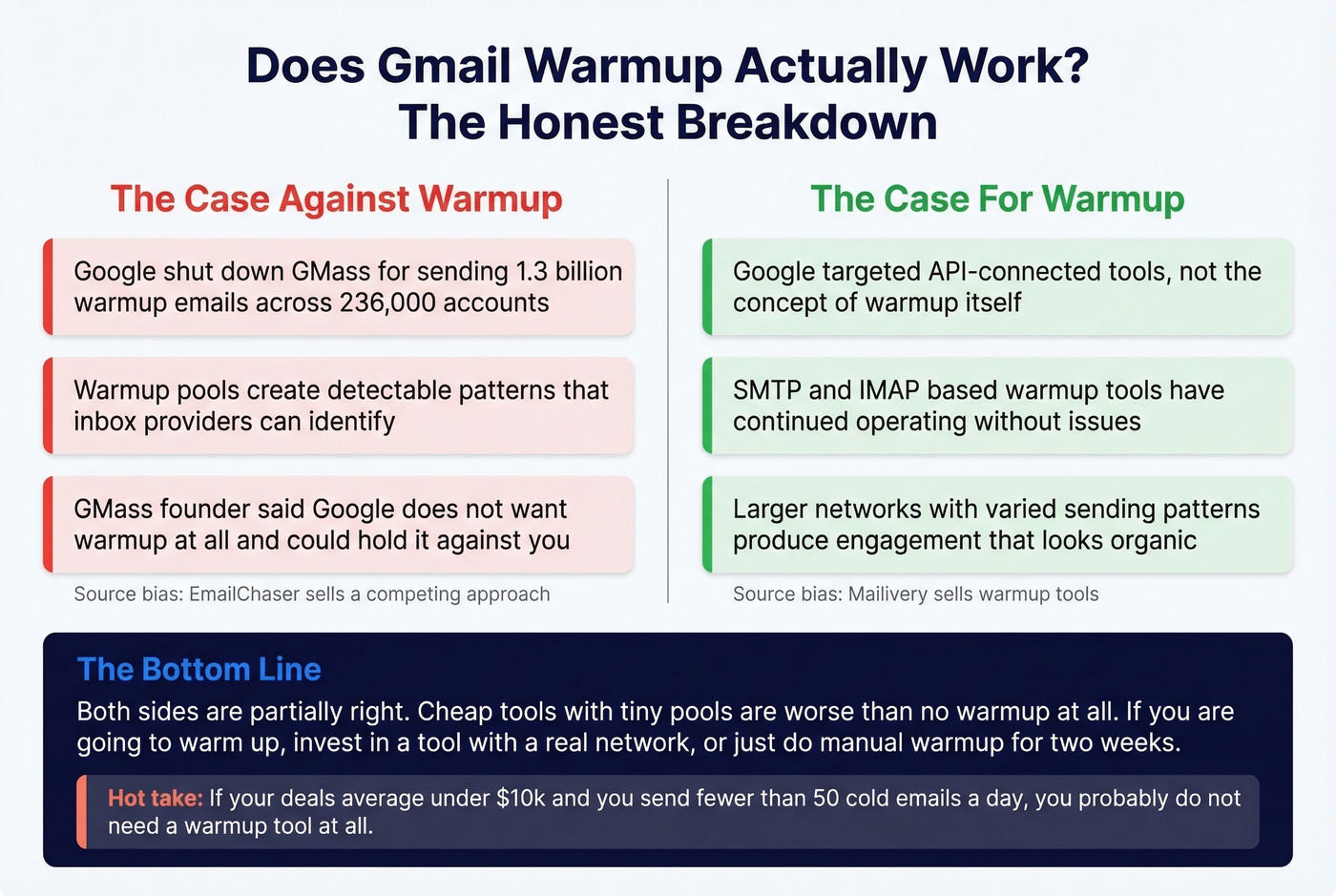
The anti-warmup camp has a real argument. EmailChaser makes the case that warmup pools - where hundreds of accounts email and reply to each other - create patterns Google can detect. They point to the GMass shutdown as proof that Google considers warmup a TOS violation. Worth noting: EmailChaser sells a competing approach, so factor that bias in. The GMass founder himself said Google "doesn't want warmup at all" and could hold it against you.
The pro-warmup camp is equally convincing. Mailivery's position is that Google's crackdown targeted tools connecting through Gmail's API, not the concept of warmup itself. Tools using SMTP/IMAP connections have continued operating without issue. The quality of the warmup network matters enormously - cheap tools with small pools generate engagement that inbox providers can easily discount, while larger networks with varied sending patterns produce engagement that looks organic.
Both sides are partially right. On Reddit, the debate in r/coldemail splits cleanly between people who call warmup "virtually nothing" and those who treat it as a silver bullet. Here's the thing: warming up a Gmail account works when the network is large enough and engagement looks organic. Cheap tools with tiny pools are worse than no warmup at all - they create detectable patterns that actively hurt your reputation. If you're going to warm up, invest in a tool with a real network, or don't bother.
Hot take: If your deals average under $10k and you're sending fewer than 50 cold emails a day, you probably don't need a warmup tool at all. Manual warmup - sending real emails to real contacts for two weeks - will get you 80% of the way there for free. (If you're scaling outbound, this cold email marketing breakdown will help.)
Why Warming Up Matters More Than Ever
In February 2024, Google and Yahoo began enforcing new requirements for bulk senders - anyone sending more than 5,000 messages per day to Gmail addresses. The rules demand proper authentication, easy unsubscribe, and a reported spam rate below 0.10%. Hit 0.30% and you're in the danger zone. (Related: how to think about the bulk email threshold in practice.)
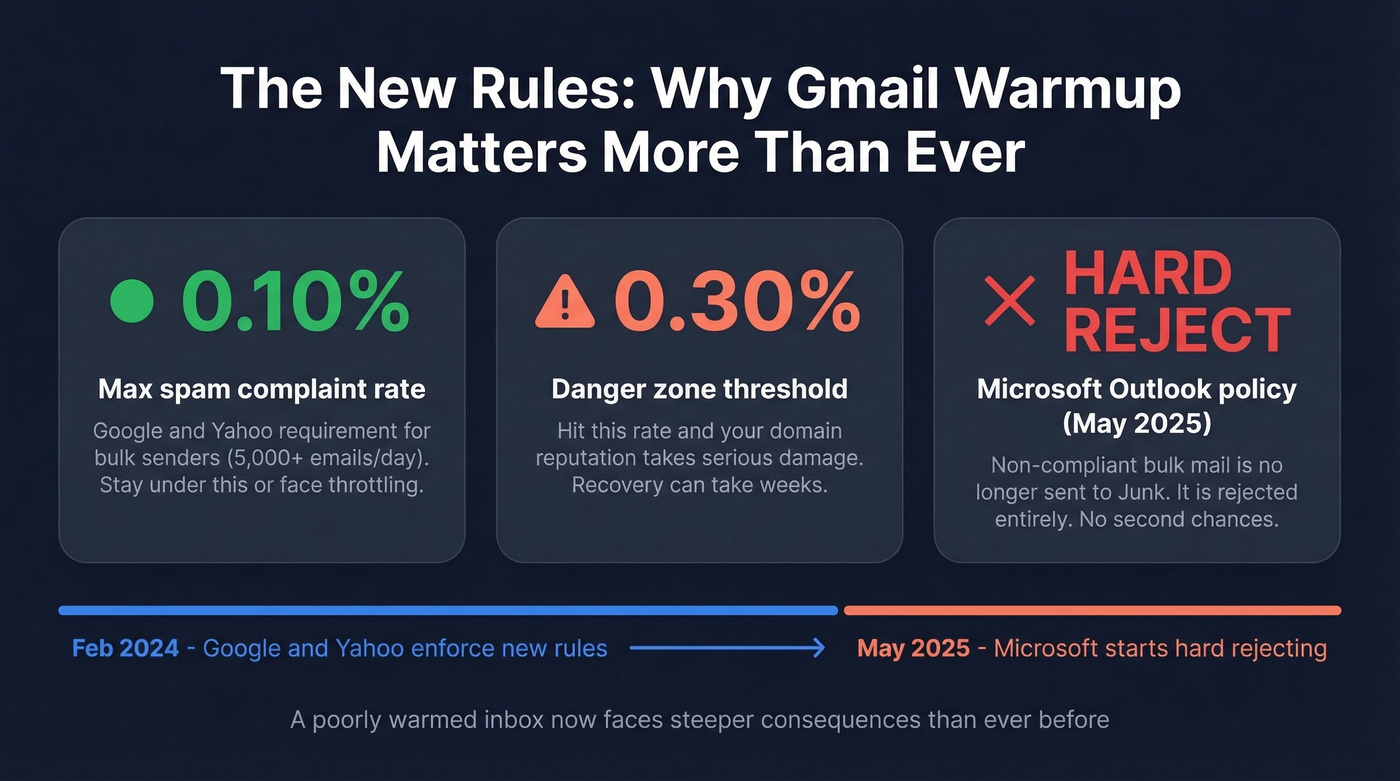
Microsoft followed suit. As of May 2025, Outlook.com doesn't just route non-compliant bulk mail to Junk - it rejects it entirely. That's a hard bounce, not a soft landing in spam.
A new or poorly warmed inbox now faces steeper consequences for missteps. Gradual volume ramp-up isn't just best practice anymore - it's survival. (If you're troubleshooting, see how to improve sender reputation.)
Authentication Before You Start
Skip this and warmup is pointless. Every inbox provider now requires authentication, and they're enforcing it.
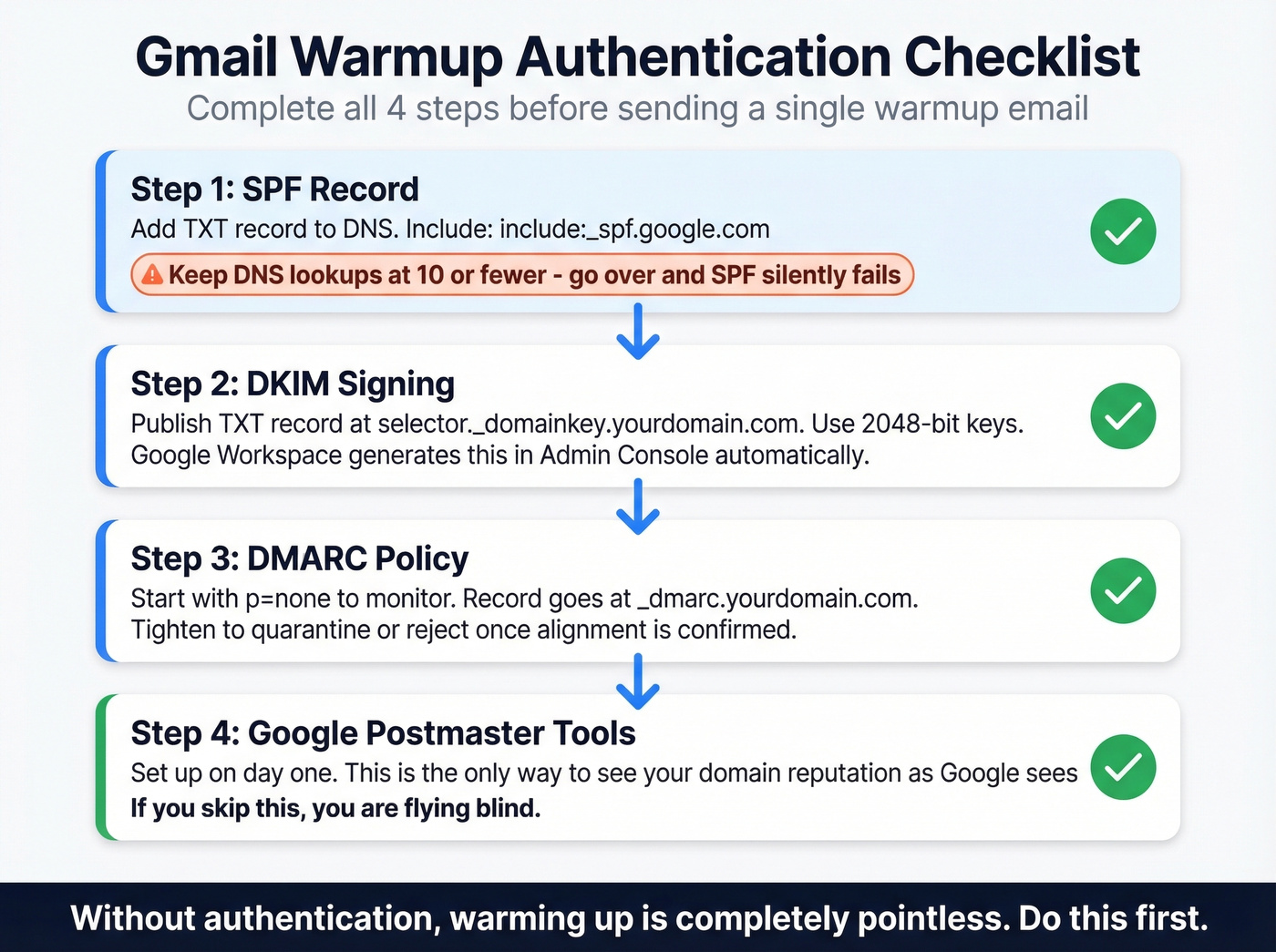
SPF: Add one TXT record to your DNS. For Google Workspace, include include:_spf.google.com. Keep total DNS lookups at 10 or fewer - go over and SPF silently fails. (Need syntax examples? Use these SPF record examples.)
DKIM: Publish a TXT record at selector._domainkey.yourdomain.com. Use 2048-bit keys when your DNS provider supports them. Google Workspace generates this automatically in Admin Console -> Apps -> Gmail -> Authenticate Email. (If you want to confirm it’s live, see how to verify DKIM is working.)
DMARC: Start with v=DMARC1; p=none; rua=mailto:dmarc@yourdomain.com at _dmarc.yourdomain.com. The p=none policy lets you monitor without blocking anything. Tighten to quarantine or reject once you've confirmed alignment. (More detail on DMARC alignment.)
Google Postmaster Tools: Set this up on day one. It's the only way to see your domain's reputation as Google sees it. If you're not monitoring Postmaster Tools, you're flying blind.
Gmail Sending Limits
Understanding the ceiling matters before you plan your ramp.
| Account Type | Daily Limit | Notes |
|---|---|---|
| Free Gmail (browser) | 500/day | Rolling 24-hour window |
| Free Gmail (SMTP) | 100/day | Lower limit via external clients |
| Google Workspace | 2,000/day | Full paid account |
| Workspace trial | 500/day | Until $100 paid + 60 days |
A few things most guides miss: the quota is a rolling 24-hour window, not a midnight reset. Auto-responders, replies, and alias sends all count toward your limit. There's also a soft threshold around 20 emails per hour - exceed it and you risk a 1-24 hour suspension. For cold outreach, staying well below these ceilings is the whole point of a proper warmup. (For a deeper playbook, see email velocity.)

You just read it: warmup is pointless if more than 5% of your list is invalid. Prospeo's 5-step verification delivers 98% email accuracy - catch-all handling, spam-trap removal, honeypot filtering included. At $0.01 per email, cleaning your list costs less than one bounced domain repair.
Fix your list before you fix your warmup.
Week-by-Week Warmup Schedule
Two approaches. The aggressive 4-week schedule works for established domains with some sending history. The conservative 8-week schedule is for brand-new domains or accounts recovering from deliverability issues.
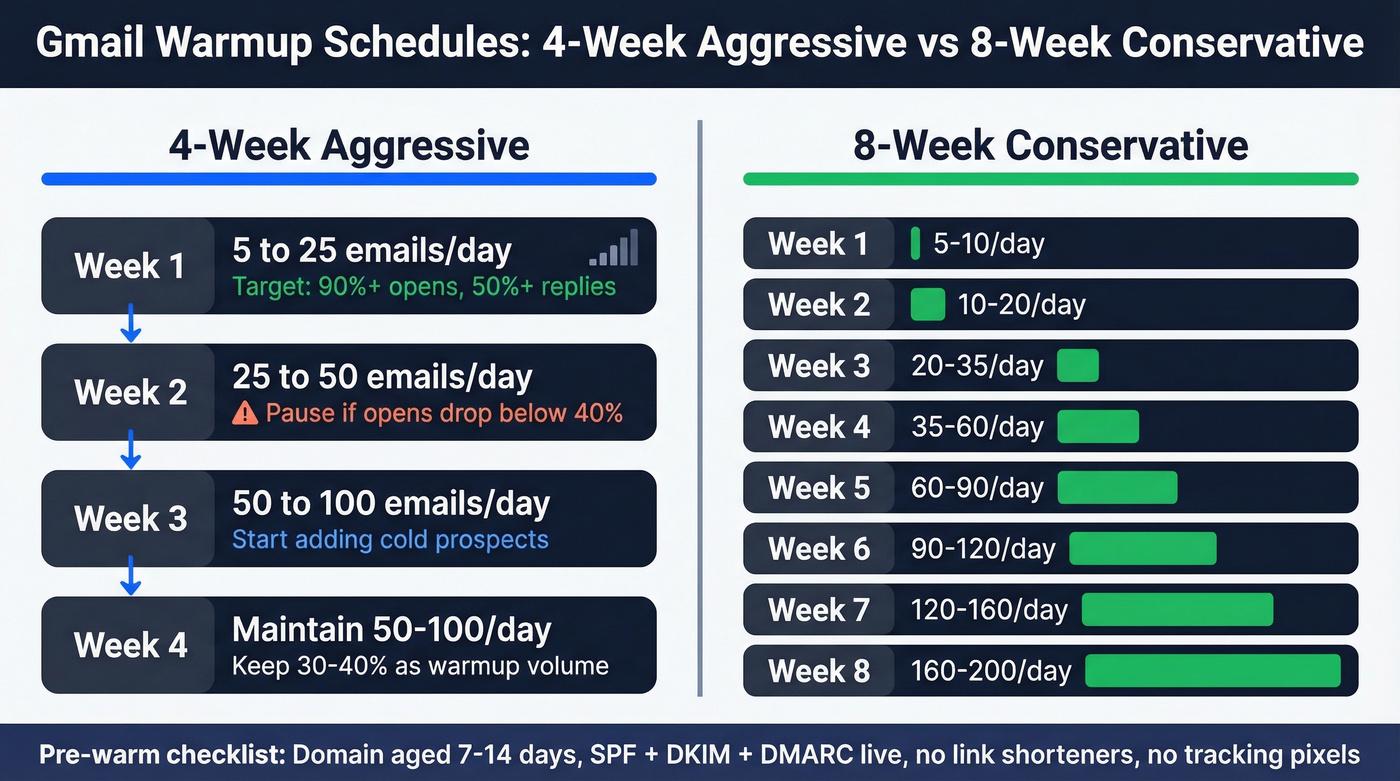
Pre-warm requirements for both: Domain aged at least 7-14 days with authentication live. No link shorteners, no heavy HTML, no tracking pixels during warmup.
4-Week Aggressive Schedule
| Week | Daily Volume | Targets |
|---|---|---|
| Week 1 (Days 1-7) | 5 -> 25/day | 90%+ opens, 50%+ replies |
| Week 2 (Days 8-14) | 25 -> 50/day | Pause if opens drop below 40% |
| Week 3 (Days 15-21) | 50 -> 100/day | Introduce cold prospects |
| Week 4 (Days 22-28) | Maintain 50-100/day | Keep 30-40% as warmup volume |
8-Week Conservative Schedule
| Week | Daily Volume |
|---|---|
| Week 1 | 5-10/day |
| Week 2 | 10-20/day |
| Week 3 | 20-35/day |
| Week 4 | 35-60/day |
| Week 5 | 60-90/day |
| Week 6 | 90-120/day |
| Week 7 | 120-160/day |
| Week 8 | 160-200/day |
Scaling rule of thumb: You can safely double daily volume when you're under 100 emails/day. Between 100 and 500, scale by 1.5x. Above 500, keep increases to 1.25x at most.
Sending distribution matters. Spread emails across business hours with 2-3 minutes between sends. Reduce weekend volume by 50-70% but don't stop entirely - a complete weekend gap looks unnatural.
Should you campaign and warm up simultaneously? Woodpecker advises against it, recommending you separate the two entirely. Most other tools and practitioners disagree - running warmup at 30-40% of total volume alongside campaigns is standard practice. For brand-new domains, we'd recommend starting with warmup only for the first two weeks, then blending in campaigns gradually.
If you see deferrals or soft bounces: Cut volume in half for at least 3 days. Only email engaged contacts during recovery. Resume growth once errors subside.
Best Warmup Tools for Gmail (With Pricing)
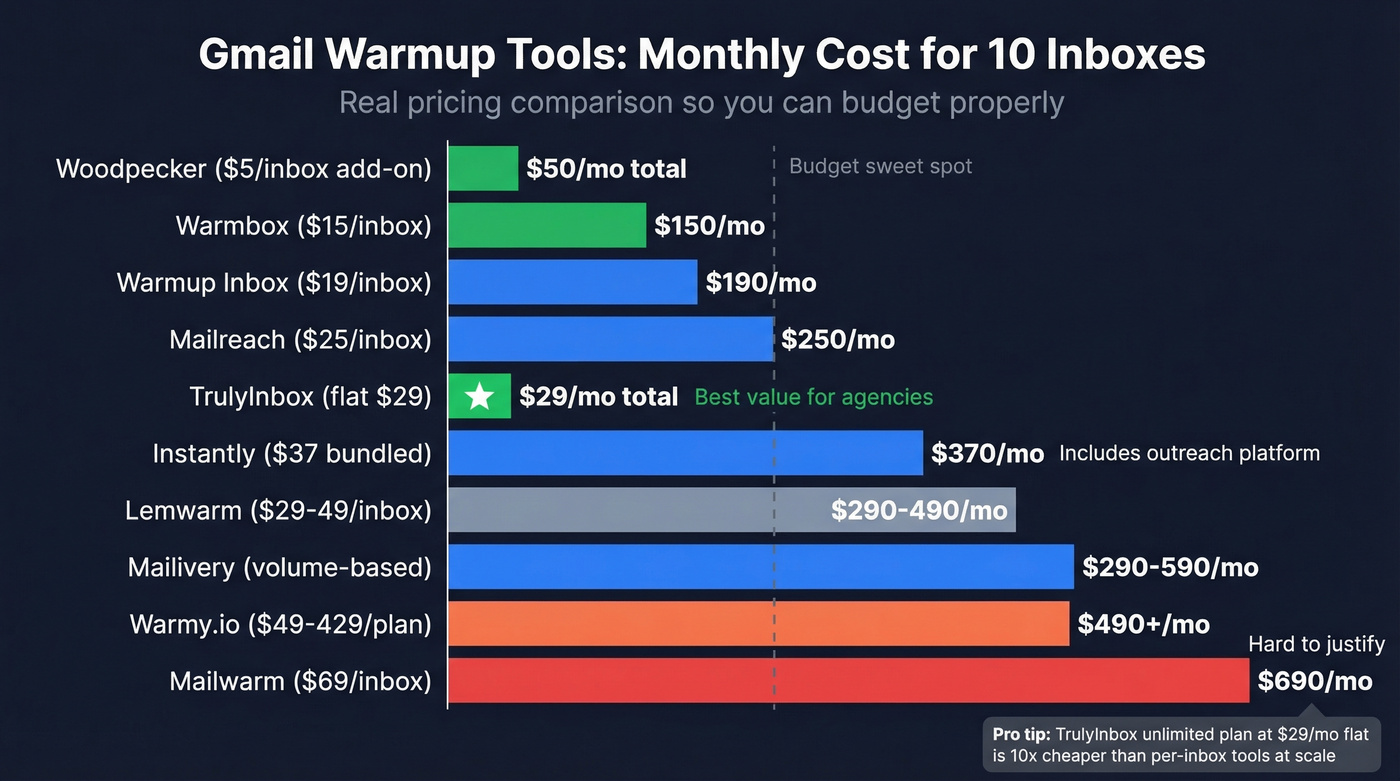
Here's what warmup actually costs. If you're running 10 inboxes, you're looking at $250-690/month depending on the tool. That math matters.
One thing that separates good tools from bad ones: engagement emulation quality. The best tools don't just open and reply - they emulate human-like reading patterns like scrolling and time-on-email, generating more natural-looking threads. Simple open/reply patterns are exactly what filters look for.
| Tool | Price/Inbox | Inboxes Included | Bundled Outreach? | Verdict |
|---|---|---|---|---|
| Instantly | $37/mo (bundled) | Per plan | Yes | Best all-in-one |
| Warmbox | $15-99/mo (tiered) | Up to 25 (Growth) | No | Best budget pick |
| TrulyInbox | $29/mo flat | Unlimited | No | Best for agencies |
| Mailivery | $29-199/mo | Volume-based | No | Best for high-volume |
| Lemwarm | $29-49/mo | Per mailbox | With Lemlist | Mixed reviews |
| Mailreach | $25/mo | Per mailbox | No | Solid + spam test |
| Woodpecker | $5/mo add-on | Per mailbox | Yes (required) | Cheapest option |
| Warmup Inbox | $19/mo | Per mailbox | No | Unremarkable |
| Warmy.io | $49-429/mo | Per plan | No | Overpriced |
| Mailwarm | $69/mo | Per mailbox | No | Skip |
Instantly
The best value if you also need a sending platform. At $37/month you get warmup bundled with outreach sequences, lead management, and analytics. In warmup discussions on Reddit, Instantly is one of the tools most often framed as the "silver bullet." Their deliverability pool reportedly includes 1,000,000+ real email accounts - exactly what you want if you're relying on warmup engagement to look organic.
Warmbox
Use this if you want standalone warmup without committing to a full outreach platform. $15/month for a single inbox is the most accessible entry point. Skip this if you're running more than 25 inboxes - you'll hit the Growth plan ceiling and should look at TrulyInbox instead.
TrulyInbox
Unlimited mailboxes for a flat $29/month. The math is simple: if you're an agency running 10+ client inboxes, TrulyInbox costs $29 total where Mailreach would cost $250. That's the entire pitch, and it's a compelling one.
Mailivery
Volume-based pricing: $29/month for 200 warmup emails/day, $79 for 800, $199 for 2,500. Mailivery argues that bigger networks produce more organic-looking engagement patterns. Good for high-volume senders who need serious warmup throughput.
Lemwarm
$29-49/month per mailbox, tightly integrated with the Lemlist ecosystem. Great if you're already a Lemlist user. Reddit sentiment is mixed - one user in r/coldemail described being "quite disappointed" with results after a full month of warmup. If you're not locked into Lemlist, there are better standalone options.
Mailreach
$25/month per mailbox with spam testing included (20 spam test credits). The deliverability statistics they publish are genuinely useful for benchmarking. Solid middle-of-the-road choice that earns its price through the spam-testing feature alone.
Woodpecker
$5/month add-on to an existing Woodpecker subscription. The cheapest warmup option by far, but you need to already be paying for Woodpecker's outreach platform. If you are, it's a no-brainer.
The Rest
Warmup Inbox at $19/month per mailbox is functional but doesn't stand out. Warmy.io ranges from $49 to $429/month - premium pricing that's hard to justify when Instantly bundles warmup with outreach for $37. Mailwarm at $69/month per mailbox is the worst value on this list. Skip it.
Mistakes That Kill Deliverability
We've seen teams invest months in warmup only to torch their reputation in a single campaign. These seven mistakes do the most damage.
Skipping authentication. No SPF/DKIM/DMARC means inbox providers don't trust you from the start. Warmup can't fix a trust deficit this fundamental.
Ramping too fast. Going from 10 to 200 emails/day in a week triggers throttling. Follow the schedule. Patience pays.
Using cheap warmup pools. A 500-account network creates patterns Google can spot. If your warmup tool doesn't have a large, diverse network, it's doing more harm than good.
Inconsistent sending patterns. Blasting 100 emails Monday, zero Tuesday, 200 Wednesday looks robotic. Maintain steady daily volume.
Ignoring Google Postmaster Tools. Your domain reputation is visible there. Check it weekly.
Spammy content during warmup. Subject lines with "FREE" or "ACT NOW" during warmup train filters to flag your domain. Keep warmup emails conversational. (If you want safer options, pull from these cold email subject line examples.)
Sending to unverified email lists. A 10% bounce rate undoes weeks of warmup overnight. Verify every address before any campaign touches your warmed inbox.
The Missing Piece: Data Quality
Let's be honest - this is the part most gmail warmup guides completely ignore, and it's the part that matters most once warmup is running.
Warmup builds reputation. Sending to invalid emails destroys it faster than warmup can repair it. Every bounce signals to Google that you're sending to addresses that don't exist, which is exactly what spammers do. A few bounces are normal. A 5-10% bounce rate is a reputation emergency. And if you're buying lists or scraping contacts without verification, that's exactly where you'll land.
The numbers back this up in practice. Stack Optimize built their agency to $1M ARR by pairing warmup discipline with rigorous list verification through Prospeo - their clients maintain 94%+ deliverability, bounce rates under 3%, and zero domain flags. Prospeo's 5-step verification catches invalid addresses, handles catch-all domains, and removes spam traps and honeypots before they ever touch your inbox. With a 7-day data refresh cycle, you're never sending to stale contacts - a critical edge when most data providers refresh every six weeks. (If you’re cleaning a damaged list, start with spam trap removal.)
The free tier gives you 75 email verifications per month - enough to test accuracy yourself. If you're spending $50/month per inbox on warmup but sending to unverified lists, you're lighting money on fire.
You're spending 4-8 weeks warming up each inbox. Don't waste that effort sending to stale data. Prospeo refreshes 300M+ profiles every 7 days - not the 6-week industry average - so the contacts you reach after warmup are still at the company, in the role, and at a live address.
Warm inboxes deserve fresh data. Prospeo delivers both.
Gmail Warmup FAQ
How long does it take to warm up a Gmail account?
Two to four weeks for established domains, six to eight weeks for brand-new ones. Monitor Google Postmaster Tools - you're looking for domain reputation to reach "High" before scaling outreach.
Can Google detect warmup tools?
Google cracked down on API-based warmup tools in 2023, forcing the GMass shutdown. SMTP/IMAP-based tools still operate, but cheap pools with predictable engagement patterns risk detection. Larger networks with diverse sending patterns are significantly harder to flag.
Should I warm up and send campaigns at the same time?
Most practitioners run warmup at 30-40% of total sending volume alongside campaigns. Woodpecker recommends separating them entirely. For brand-new domains, start with warmup only for the first two weeks, then blend in campaigns gradually.
Is there a free way to warm up Gmail?
You can warm up manually by sending real emails to colleagues and contacts for two weeks - that's free and effective for low-volume senders. Paid tools range from $5/month (Woodpecker add-on) to $69/month (Mailwarm) per inbox. Instantly at $37/month bundles warmup with outreach - the best value for teams that need both.
What's the fastest way to improve Gmail deliverability?
Verify your email list first - invalid addresses cause bounces that destroy reputation. Then authenticate your domain with SPF, DKIM, and DMARC. Then warm up gradually using the schedules above. Skipping any of these three steps undermines the others.