

Google Workspace Email Deliverability: What Actually Works in 2026
You set up a fresh Google Workspace domain, configure SPF, DKIM, and DMARC, run it through every testing tool - green checks across the board. Then your first batch of emails to Outlook recipients lands in spam. You contact Google support and get a non-answer about "AI filtering" and "no prior interaction history."
Here's the thing: Google Workspace email deliverability doesn't start and end with DNS records. Authentication is the floor, not the ceiling. If your SPF, DKIM, and DMARC all pass but emails still hit spam, the problem is domain reputation, sending patterns, or bad contact data. Most guides stop at DNS records. This one covers the three layers that actually determine inbox placement - plus Google's bulk sender rules that quietly changed the game starting in late 2024.
Workspace Deliverability Benchmarks
Microsoft's spam rate runs a little over 2x Gmail's. Here's where things stand based on Validity and Litmus benchmarks:
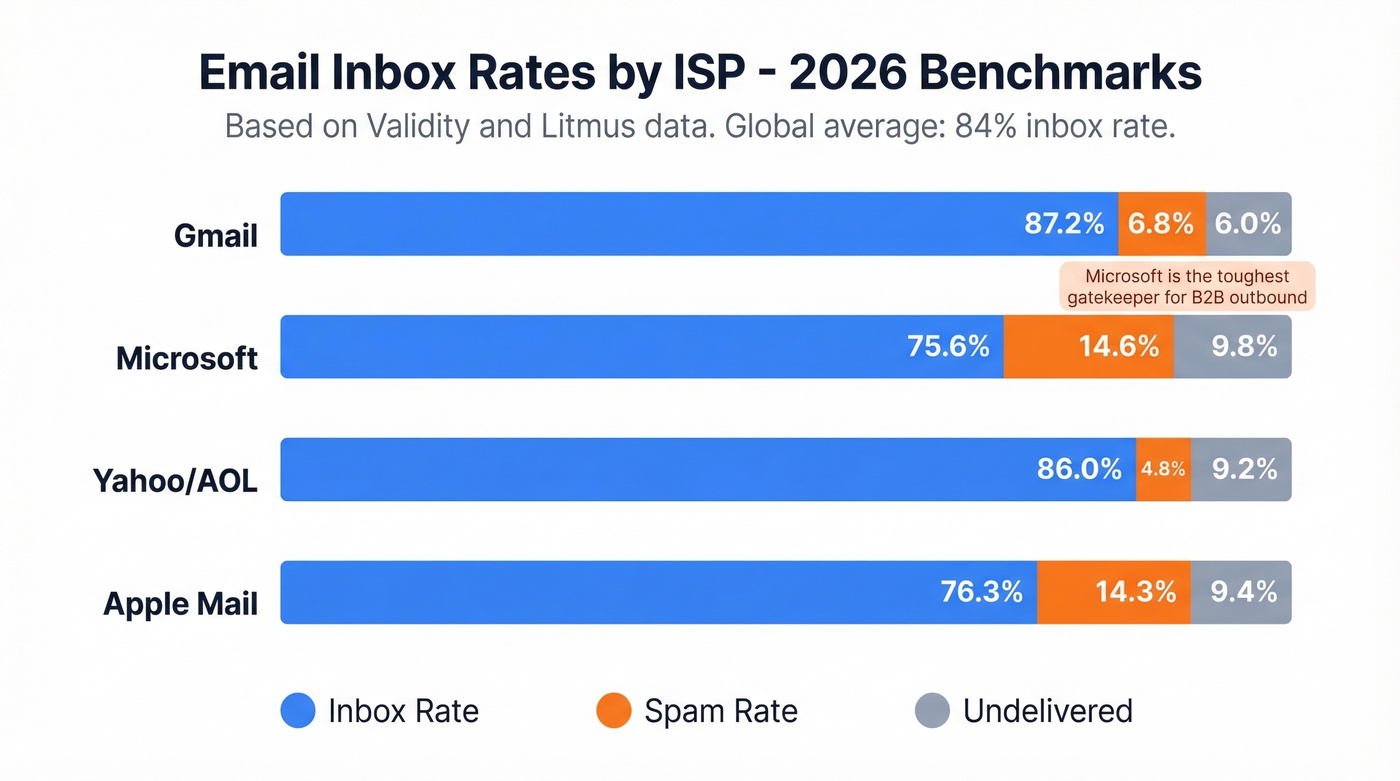
| ISP | Inbox Rate | Spam Rate | Undelivered |
|---|---|---|---|
| Gmail | 87.2% | 6.8% | 6.0% |
| Microsoft | 75.6% | 14.6% | 9.8% |
| Yahoo/AOL | 86.0% | 4.8% | 9.2% |
| Apple Mail | 76.3% | 14.3% | 9.4% |
The global average sits around 84% - roughly one in six emails never reaches the inbox. Gmail's own inbox rate dropped from 89.8% to 87.2% after bulk sender enforcement kicked in. Microsoft is the toughest gatekeeper by a wide margin, and if you're doing B2B outbound, that matters because a huge chunk of your prospects sit on Outlook.
For a broader baseline on what "good" looks like across providers, compare your numbers against a standard email open rate and your email bounce rate over time.
Authentication Setup Done Right
Get these three records configured before anything else:
- SPF: Add a single TXT record -
v=spf1 include:_spf.google.com ~all. One record only. Multiple SPF records cause authentication failure. Watch the 10 DNS lookup limit; too manyinclude:mechanisms from other services will break it. (If you want more syntax examples, see these SPF record examples.) - DKIM: In Admin Console, go to Apps > Google Workspace > Gmail > Authenticate Email. Generate your domain key, copy the DKIM TXT record, and publish it at
google._domainkey.yourdomain.com. If you're unsure it's live, follow a quick checklist to verify DKIM is working. - DMARC: Start with
v=DMARC1; p=none; rua=mailto:dmarc@yourdomain.com. This gives you visibility into who's sending as your domain. Once you're confident in your authentication, move top=quarantineand eventuallyp=rejectto block spoofing. (More on strictness and matching in DMARC alignment.)
These three are table stakes. Every major ISP requires them, but they won't fix deliverability alone.
Why Authentication Isn't Enough
Workspace runs on shared infrastructure. Your outbound IP is Google's, not yours. We've seen users panic because a blacklist check shows their sending IP flagged on six lists - but that IP serves thousands of Workspace accounts. Those blacklist results are misleading noise.
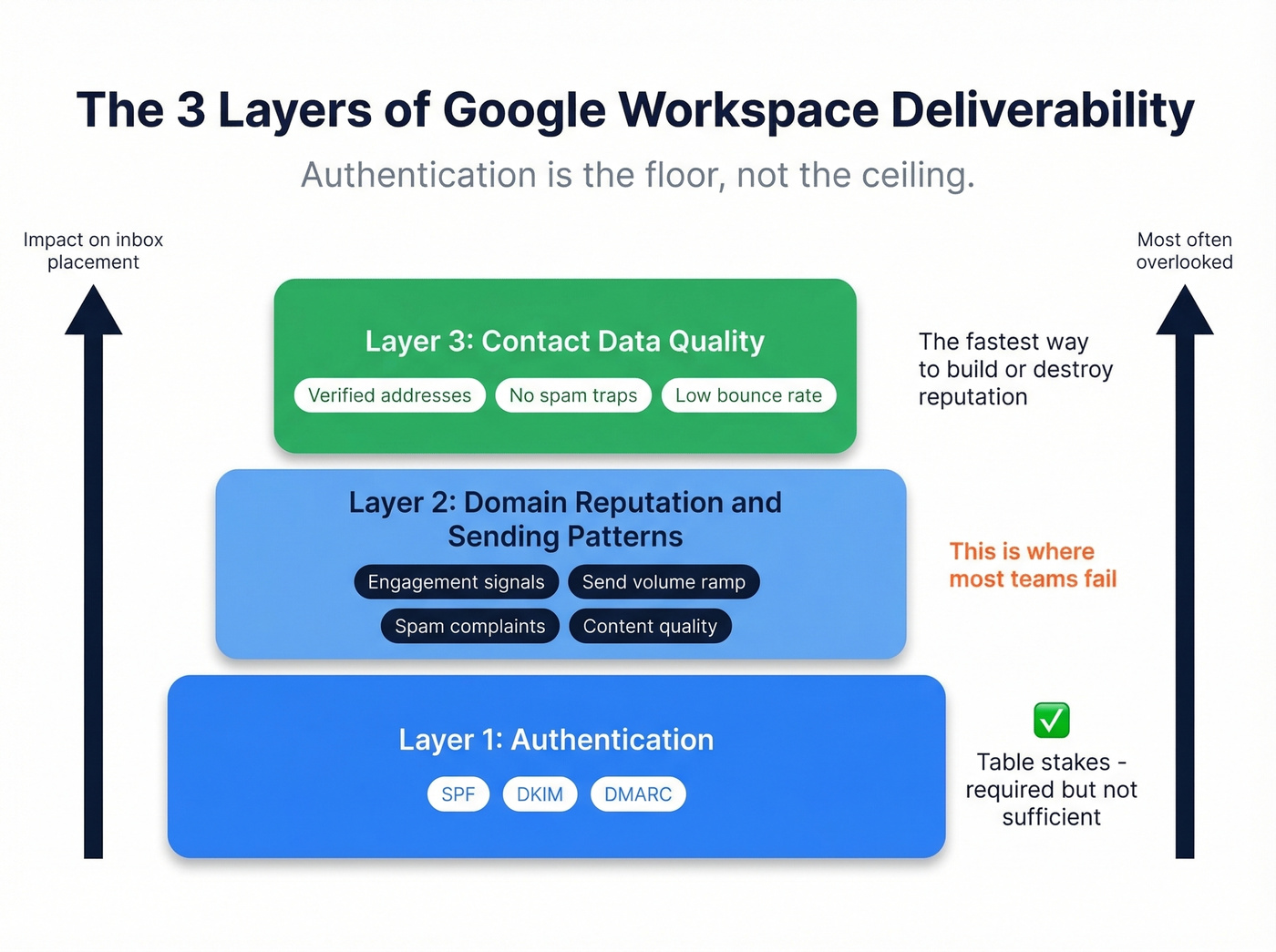
Domain reputation usually matters more than IP reputation for Workspace senders. ISPs track how recipients interact with your emails: opens, replies, spam reports, deletes-without-reading. A brand-new domain with zero engagement history gets treated with suspicion, especially by Microsoft. The consensus on r/coldemail is that templated language gets flagged instantly - personalized, lower-volume sends outperform every time. Content filtering adds another layer, with excessive links and image-heavy emails triggering additional scrutiny. If you need a deeper framework, use this email deliverability guide alongside a dedicated set of email reputation tools.
Google's Bulk Sender Rules
If you send 5,000+ emails per day to personal Gmail accounts, you're permanently classified as a bulk sender. No going back.
| Requirement | Threshold |
|---|---|
| Authentication | SPF + DKIM + DMARC (p=none minimum) |
| Spam rate | Below 0.1%, never above 0.3% |
| Unsubscribe | One-click, RFC 8058 compliant |
| Processing | Honor within 48 hours |
Your emails need both List-Unsubscribe and List-Unsubscribe-Post headers. Google also expects valid PTR records and recommends ARC headers for forwarded messages. Non-compliance triggers 4.7.x temporary failures that escalate to 5.7.x permanent blocks. Enforcement has been ramping steadily since late 2025, and there's no sign it's slowing down.
Skip this section if you're sending fewer than 5,000 daily messages - but still keep your spam rate under 0.1%. That threshold applies to everyone. (If you're unsure where you fall, this bulk email threshold breakdown helps.)

Your Google Workspace warm-up is only as good as the data you feed it. Every hard bounce on a fresh domain pushes you closer to spam. Prospeo's 5-step verification - with catch-all handling, spam-trap removal, and honeypot filtering - delivers 98% email accuracy at $0.01 per address.
Stop wasting warm-up volume on dead addresses. Verify before you send.
Warming Up a New Domain
We've tested dozens of warm-up sequences, and starting at 10-20 emails per day consistently outperforms aggressive ramp-ups. Here's the progression that works:
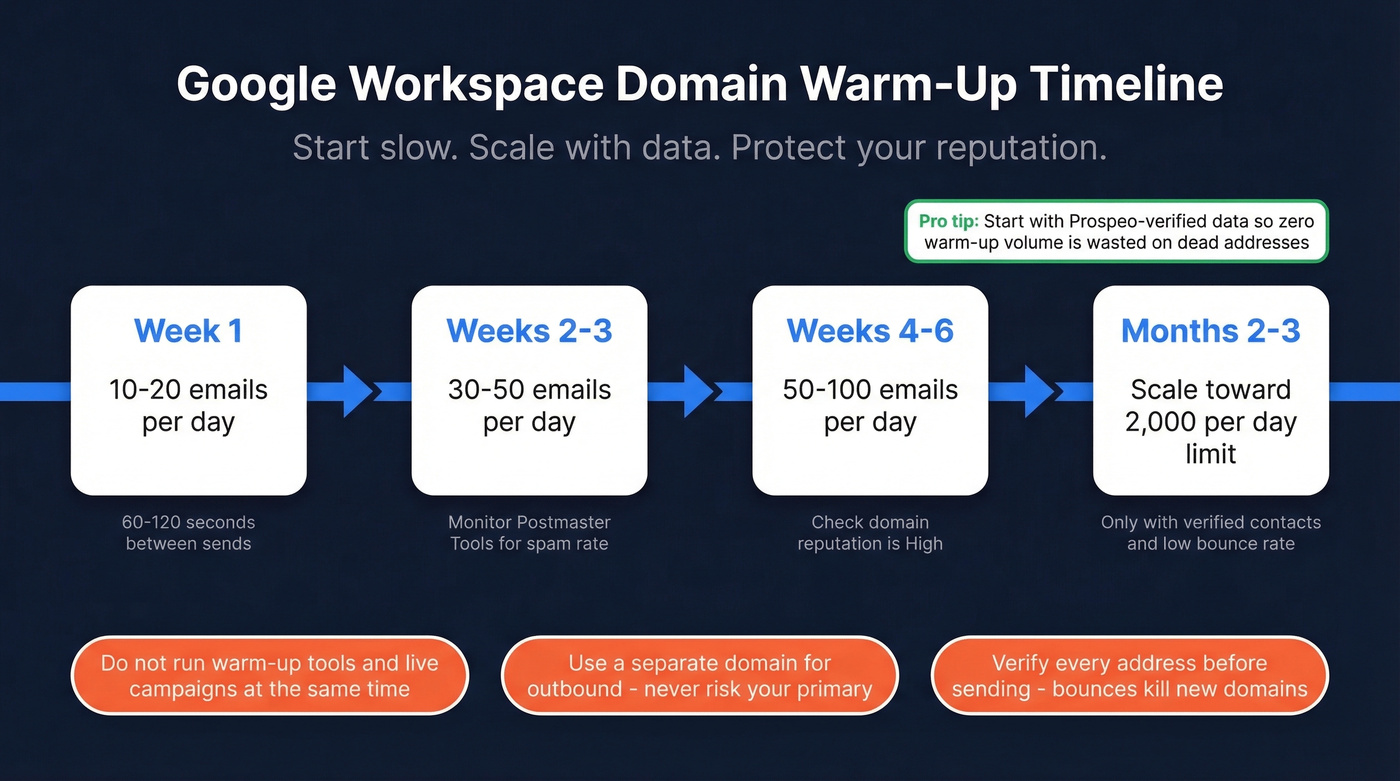
- Week 1: 10-20 emails/day
- Weeks 2-3: 30-50/day
- Weeks 4-6: 50-100/day
- Months 2-3: Scale toward Workspace limits
Space emails 60-120 seconds apart rather than blasting in batches. Use a separate domain for outbound - don't risk your primary domain's reputation on cold campaigns. And don't run warm-up tools and live campaigns simultaneously. The mixed signals confuse ISP algorithms, and we've watched teams set themselves back weeks by making this mistake.
Workspace caps you at 2,000 emails per day per user. Adding users increases your theoretical quota, but it doesn't automatically give a new domain "instant" reputation for higher volume. Start with verified data so you're not wasting warm-up volume bouncing off dead addresses. For pacing and caps, follow a clear email velocity plan.
Reading Google Postmaster Tools
Go to postmaster.google.com, add your domain, and verify ownership via a DNS TXT record. This is the only tool that shows you how Gmail specifically views your domain. The catch: you need to send roughly 1,000+ messages per day to Gmail addresses before data appears.
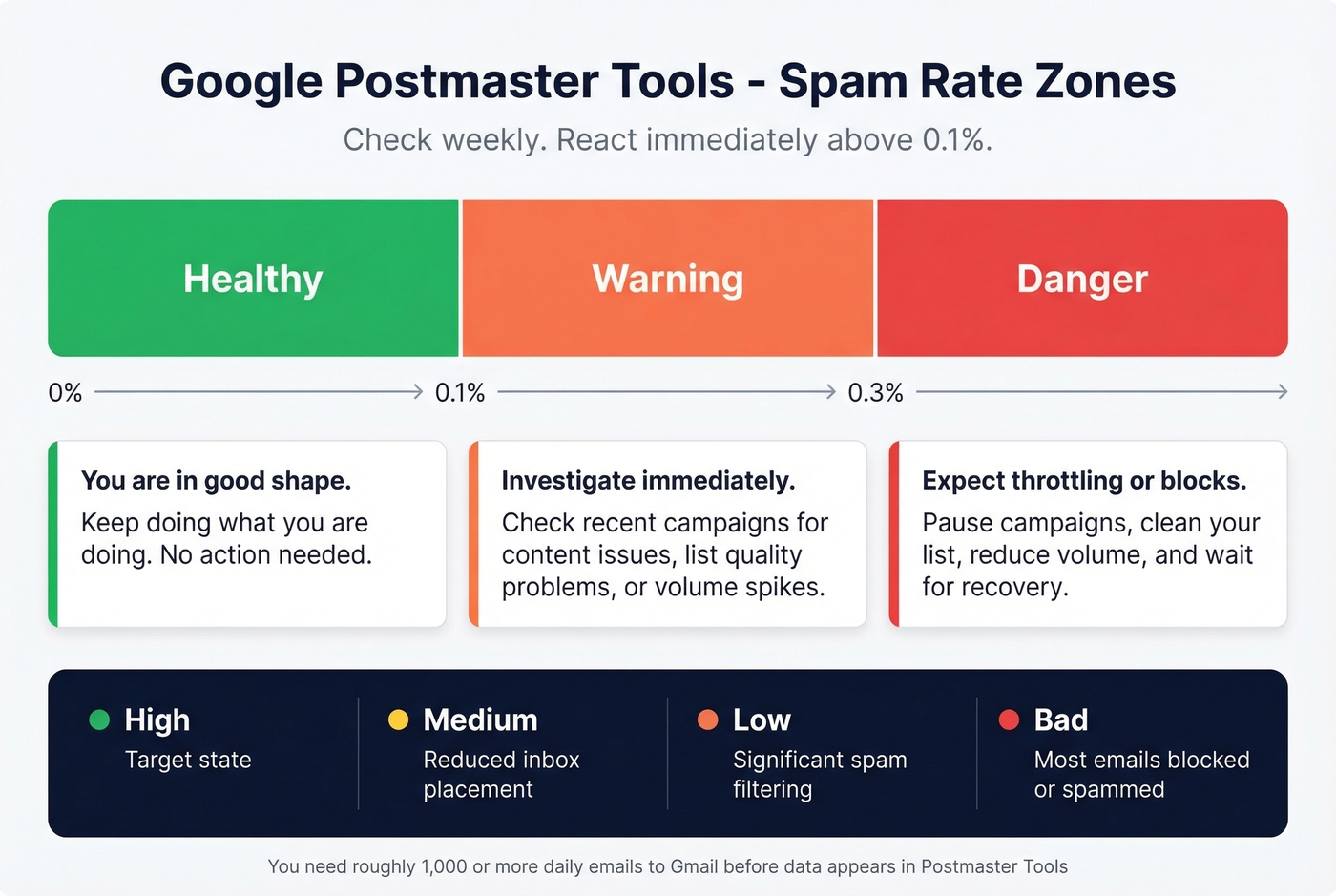
Once data populates, here's how to read it:
- Spam rate below 0.1%: Healthy. Keep doing what you're doing.
- 0.1%-0.3%: Warning zone. Investigate immediately.
- Above 0.3%: Danger. Expect throttling or blocks.
Domain reputation shows as High, Medium, Low, or Bad. Anything below High correlates with increased spam placement. In our experience, checking authentication pass rates and delivery errors weekly catches problems before they snowball into something that takes months to recover from.
How Bad Data Destroys Inbox Placement
Authentication and warm-up get all the attention. But the fastest way to destroy a new domain's reputation is sending to bad addresses. High bounce rates on a new domain can trigger spam placement that lasts weeks. Every hard bounce tells ISPs you're sending to addresses that don't exist - a hallmark of purchased lists and spammers.
Let's be honest: most deliverability problems we see aren't technical. They're data problems.
Stack Optimize, an outbound agency using Prospeo for verification, built to $1M ARR while maintaining 94%+ client deliverability and under 3% bounce rates across every client domain. Meritt cut their bounce rate from 35% to under 4% after switching to verified contacts. At 98% email accuracy and roughly $0.01 per verified address, pre-send verification is the cheapest deliverability insurance you'll find. Prospeo's 5-step verification process includes catch-all handling, spam-trap removal, and honeypot filtering - the exact threats that silently tank Workspace sender reputation.

If your average deal size is under five figures, you probably can't afford not to verify. The cost of burning a domain and starting over dwarfs the fraction of a cent per email check.
Deliverability Checklist
Before your next send, confirm every item:
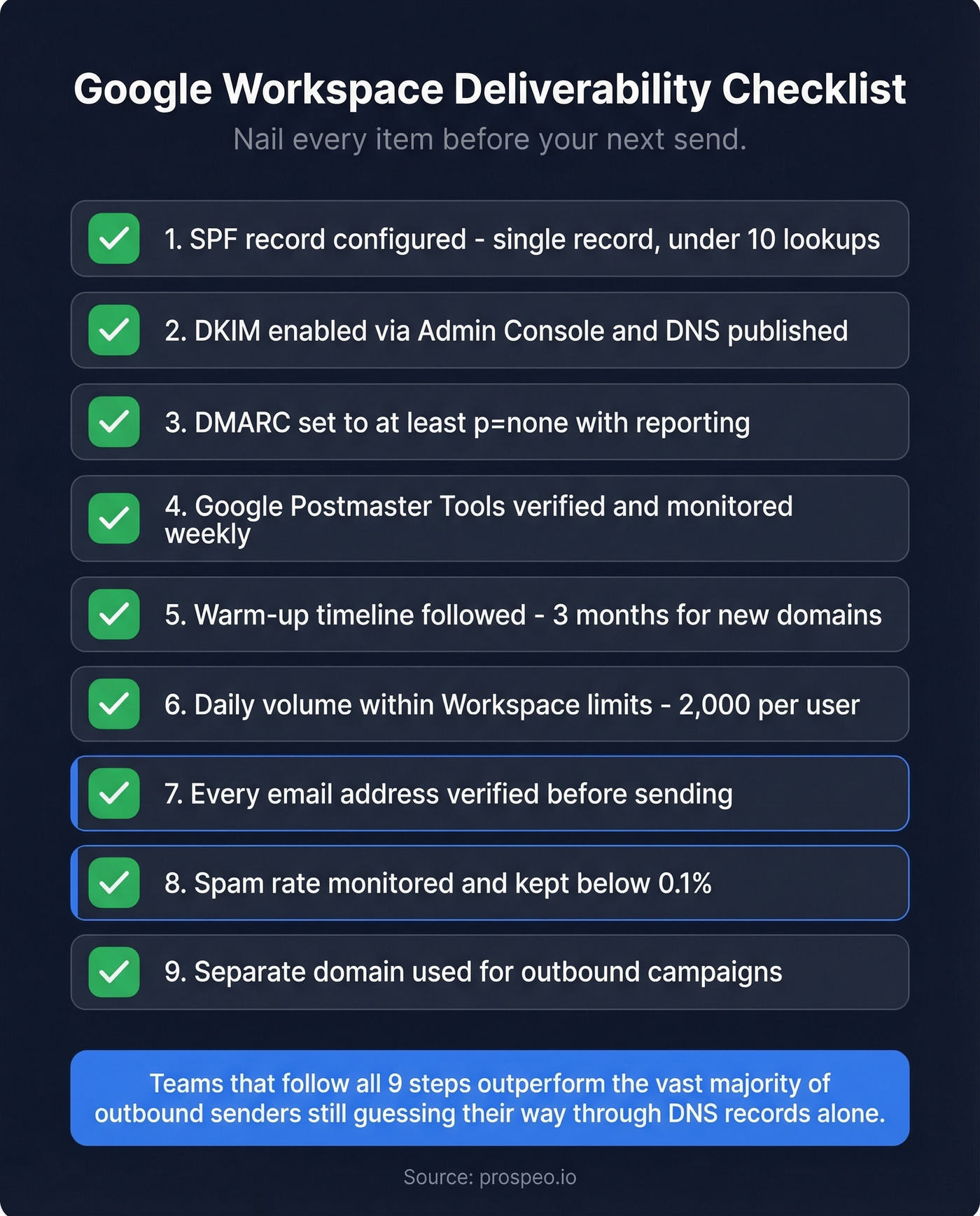
- SPF record configured (single record, under 10 lookups)
- DKIM enabled via Admin Console and DNS published
- DMARC set to at least
p=nonewith reporting - Google Postmaster Tools verified and monitored
- Warm-up timeline followed (3 months for new domains)
- Daily volume within Workspace limits (2,000/user)
- Every email address verified before sending
- Spam rate monitored below 0.1%
- Separate domain used for outbound campaigns
Nail every item on this list and your Google Workspace email deliverability will outperform the vast majority of outbound teams still guessing their way through DNS records alone.
Stack Optimize hit $1M ARR with 94%+ deliverability and under 3% bounce rates using Prospeo-verified contacts. Meritt cut bounces from 35% to under 4%. When your Workspace reputation depends on every send, 98% accuracy isn't optional - it's the difference between inbox and spam folder.
The cheapest deliverability fix is never sending to a bad address in the first place.
FAQ
Does Google Workspace guarantee better deliverability than shared hosting?
Workspace provides trusted IP pools and stronger infrastructure than shared hosting, but it doesn't guarantee inbox placement. Domain reputation, sending patterns, authentication, and contact data quality all determine whether emails land. Moving to Workspace is a strong foundation - not a standalone fix.
Why do my Workspace emails land in spam at Outlook but not Gmail?
Microsoft applies its own reputation scoring independent of Google. New domains with no sending history at Microsoft inboxes get filtered aggressively - expect 2-4 weeks of friction even with perfect authentication. Consistent, low-volume sending with strong engagement signals (replies, not just opens) typically breaks through within a month.
How do I check my domain reputation in Postmaster Tools?
Add your domain at postmaster.google.com, verify via DNS TXT record, and monitor the reputation dashboard. You need roughly 1,000+ daily emails to Gmail recipients before data populates. Check spam rate and domain reputation weekly - anything above 0.1% spam rate or below "High" reputation needs immediate attention.
How can I reduce bounce rates before they hurt my domain?
Verify every address before sending. Prospeo's 5-step verification catches invalid addresses, spam traps, and honeypots at 98% accuracy for roughly $0.01 per check. Teams like Meritt dropped bounce rates from 35% to under 4% after switching to verified contacts, protecting their sender reputation from day one.