

How to Answer Emails Professionally - The System, Not the Platitudes
Your manager just sent a passive-aggressive reply, CC'd the whole department, about a deadline you didn't miss. You're staring at the screen, cursor blinking, trying to figure out how to respond without torching the relationship or looking weak. This is the moment most email advice fails you - because "be professional" isn't a strategy.
Knowing how to answer emails professionally requires a repeatable system, not vibes.
Over 376 billion emails get sent every day. The difference between a reply that gets action and one that gets ignored comes down to structure and specificity.
What You Need (Quick Version)
Three rules matter more than everything else combined:
- Reply within the right time window for the context. Support emails: 1 hour. Client emails: 24 hours. Internal: same business day.
- Keep it under 100 words. If you need more, book a meeting.
- End every email with a clear next step. No next step = no action.
That's the foundation. If you're here for copy/paste material, jump to the 10 templates or the phrase-swap table. If you want the full system, keep reading.
Why Your Replies Shape Your Career
Here's the thing: most email advice boils down to "be clear and polite." That's not wrong - it's just not useful.
The average professional spends 28% of their workweek, roughly 13 hours, on email, according to McKinsey Global Institute. That's not a productivity stat. That's a career stat. Every reply you send shapes how colleagues, clients, and prospects perceive your competence, reliability, and judgment - and building a deliberate email response strategy is one of the highest-return career moves you can make.
It takes 23 minutes to refocus after an interruption, per research from Gloria Mark at UC Irvine. A poorly written reply that generates a confused follow-up just cost both of you nearly an hour. Multiply that across a team and you're burning entire days on clarification threads that shouldn't exist.
The stakes are even higher externally. Accenture found that 66% of customers have switched to a competitor after a poor experience - and email is often the first touchpoint where that experience breaks down. A vague, slow, or tone-deaf reply doesn't just lose a conversation. It loses revenue.
The 5-Step Framework for Every Reply
Forget the advice about "matching the sender's tone." Here's a framework that works for every email, every time.
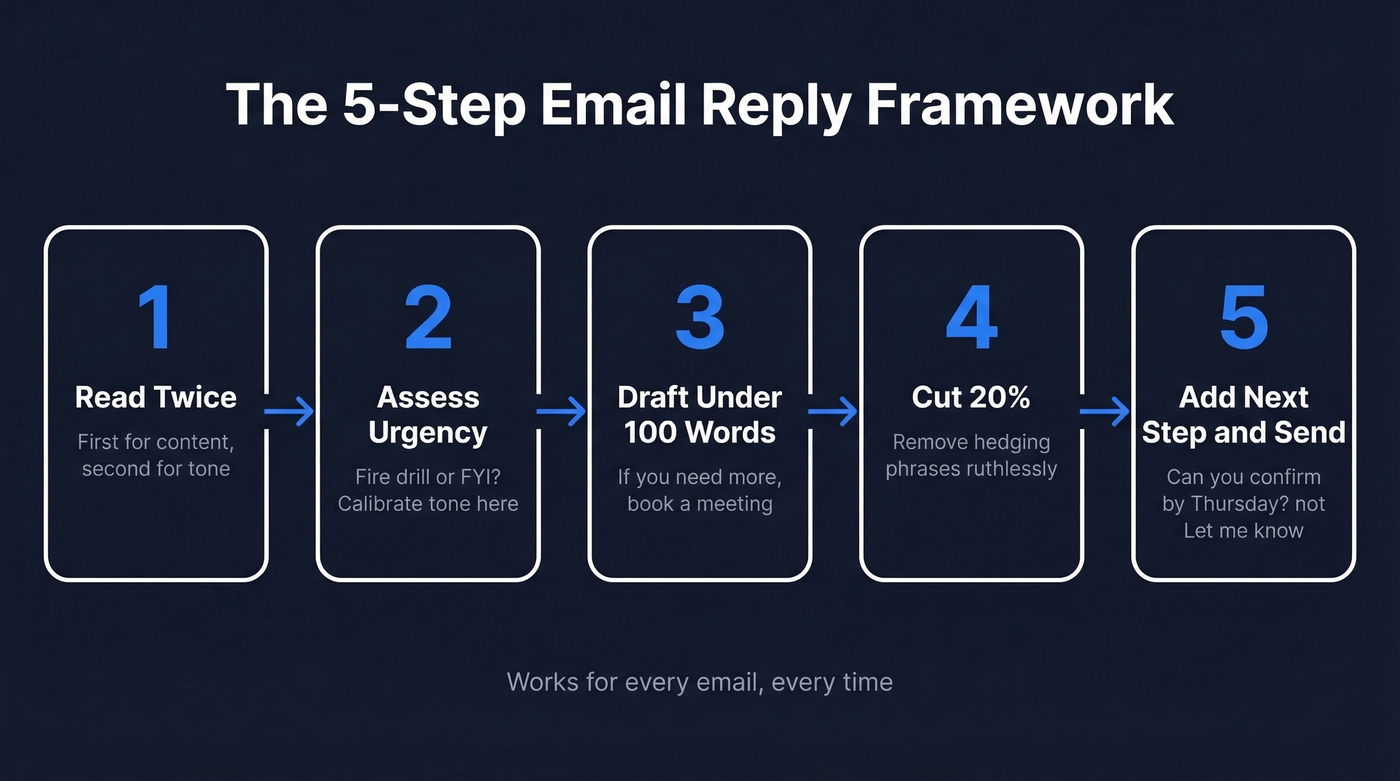
Step 1: Read the full email twice. The first read is for content. The second is for tone and subtext. We've found that most reply mistakes trace back to this step being skipped entirely - people skim and fire back, and that's where misinterpretations start.
Step 2: Assess urgency and required tone. Is this a fire drill or a FYI? Is the sender a direct report, a VP, or a prospect? Your tone calibration starts here.
Step 3: Draft under 100 words. PowerWriting recommends a sweet spot of 80-100 words for most workplace emails. If you can't say it in 100 words, the email isn't the right medium.
Step 4: Cut 20%. Go back through and remove hedging phrases like "I just wanted to," "I think maybe," and "if that makes sense." These add words without adding meaning. Be ruthless.
Step 5: Add a clear next step and send. "Let me know" isn't a next step. "Can you confirm by Thursday?" is. Following these reply best practices consistently will set you apart from the majority of senders in any inbox.
How Fast Should You Reply?
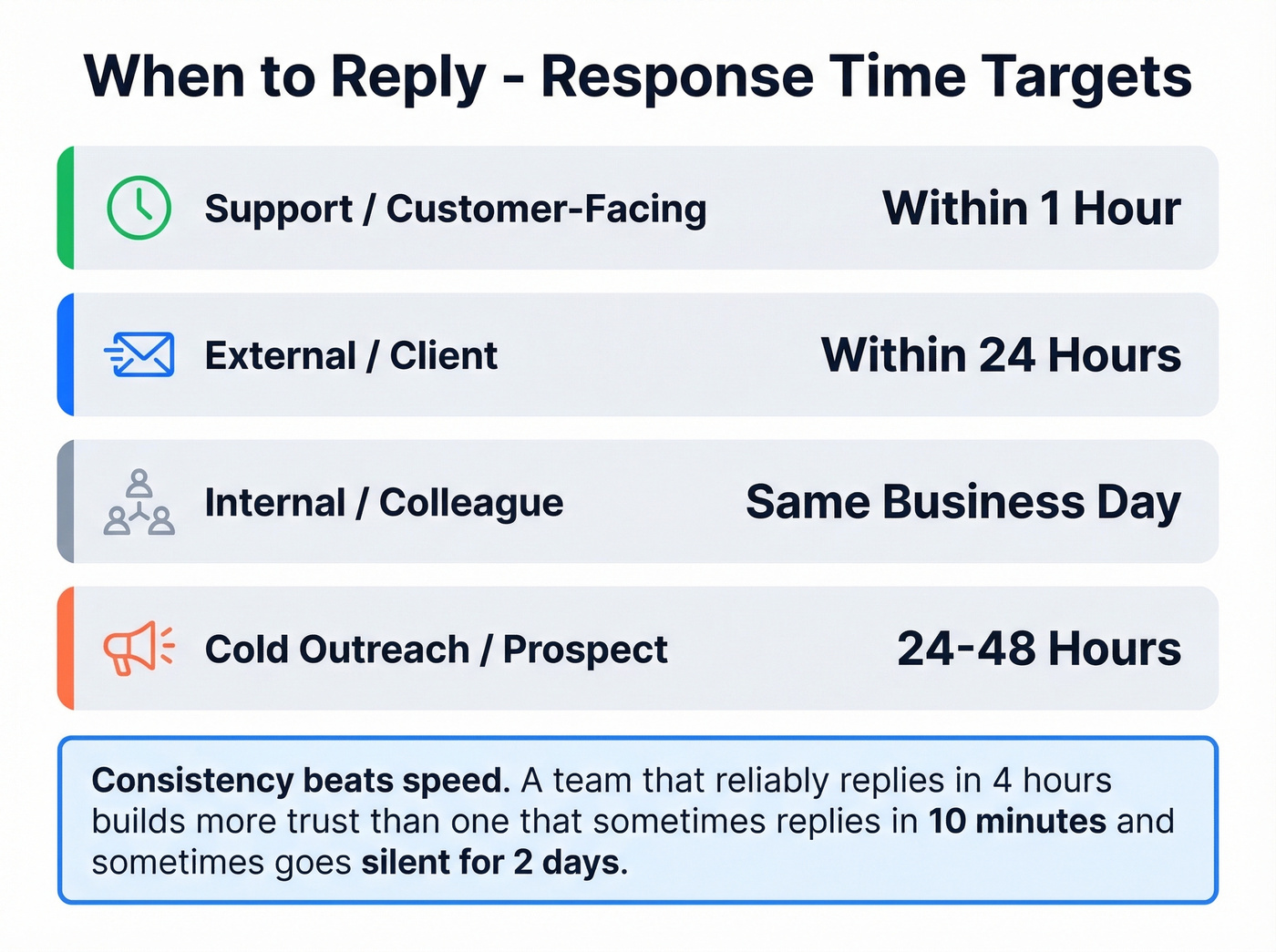
Speed matters, but the right speed depends on context:
| Context | Target Response Time |
|---|---|
| Support / customer-facing | Within 1 hour |
| External / client | Within 24 hours |
| Internal / colleague | Same business day |
| Cold outreach / prospect | 24-48 hours |
The key insight isn't just speed - it's consistency. A team that reliably replies within 4 hours builds more trust than one that sometimes replies in 10 minutes and sometimes goes silent for two days. Pick a window and hold it.
For cold outreach, replying too fast can signal desperation. A 24-48 hour window feels deliberate.
If you're building a repeatable follow-up cadence, borrow from proven sales follow-up templates instead of improvising every time.

You just learned how to craft replies that get action. But the best-written email is worthless if it bounces. Prospeo gives you 98% verified emails so every professionally crafted reply and outreach message actually reaches the person who matters.
Stop perfecting emails that never arrive. Start with verified contacts.
Professional Email Reply Templates
These are copy/paste ready. Adjust the bracketed fields and send.
Acknowledging Receipt
Hi [Name],
Got it - thanks for sending this over. I'll review and get back to you by [day/time] with [next step].
Best, [Your name]
Use this when you need to buy time without leaving the sender in a void. The specific deadline is what makes it professional, not the pleasantries.
Following Up After a Meeting
Hi [Name],
Thanks for the conversation today. Here's what I took away:
- [Action item 1 - owner, deadline]
- [Action item 2 - owner, deadline]
Let me know if I missed anything. I'll send [deliverable] by [date].
Best, [Your name]
If you want more options for post-call recaps, use these sales meeting follow-up email patterns.
Saying No to a Request
Most people agonize over this one. The secret is offering an alternative so the "no" doesn't feel like a dead end.
Hi [Name],
Thanks for thinking of me for this. I won't be able to take it on right now - my current workload is at capacity through [timeframe]. I'd recommend reaching out to [alternative person/resource].
Happy to revisit after [date] if it's still open.
Best, [Your name]
Pushing Back on Scope
Here's what most people send versus what actually works:
Weak version: "I'm not sure I can get all of that done by Friday, but I'll try my best."
Strong version:
Hi [Name],
The current scope covers more than we can deliver at full quality by [date]. I can deliver [core deliverable] by then, or the complete package by [realistic date].
Which works better for you?
Best, [Your name]
The "which works better" close gives them a choice instead of a problem. I've seen this framing defuse tension far more effectively than a flat "I can't."
Responding to Criticism
Hi [Name],
Thanks for the feedback. Could you help me understand what you were looking for specifically? I want to make sure the next version hits the mark.
I'll have a revised draft ready by [date].
Best, [Your name]
Replying to an Angry Customer
Hi [Name],
I understand your frustration, and I'm sorry this happened. Here's what I'm doing right now to fix it: [specific action].
You'll hear back from me by [time/date] with an update. If you need anything before then, reply here and I'll prioritize it.
Best, [Your name]
Sales and Outbound Replies
The next three templates are for revenue-facing conversations. The stakes are different here - you're not just maintaining a relationship, you're building one from scratch.
Answering a Pricing Inquiry:
Hi [Name],
Thanks for your interest. [Product/service] starts at [price/range] for [what's included]. I've attached a breakdown of what each tier covers.
Want to jump on a 15-minute call this week to walk through which option fits? [Calendar link]
Best, [Your name]
If you're tightening your outbound messaging, pair these replies with stronger email copywriting fundamentals.
Handling a "Not Interested" Reply:
Hi [Name],
Totally understand - timing matters. If [specific pain point] becomes a priority down the road, I'd be happy to pick this back up.
No follow-ups from me unless you reach out. Thanks for letting me know.
Best, [Your name]
Respecting the "no" builds more goodwill than a pushy follow-up sequence ever will. The consensus on r/sales backs this up - the reps who earn the most callbacks are the ones who know when to stop.
Responding to an Introduction:
Hi [Name],
Great to connect - [Referrer] mentioned you're working on [specific challenge]. Would a 15-minute call on [day] or [day] work to explore whether we can help?
Best, [Your name]
For more variations, see company introduction email examples.
How to Reply to Difficult Emails
Remember the CC'd-the-whole-team scenario from the top? Let's break down exactly how to handle it.
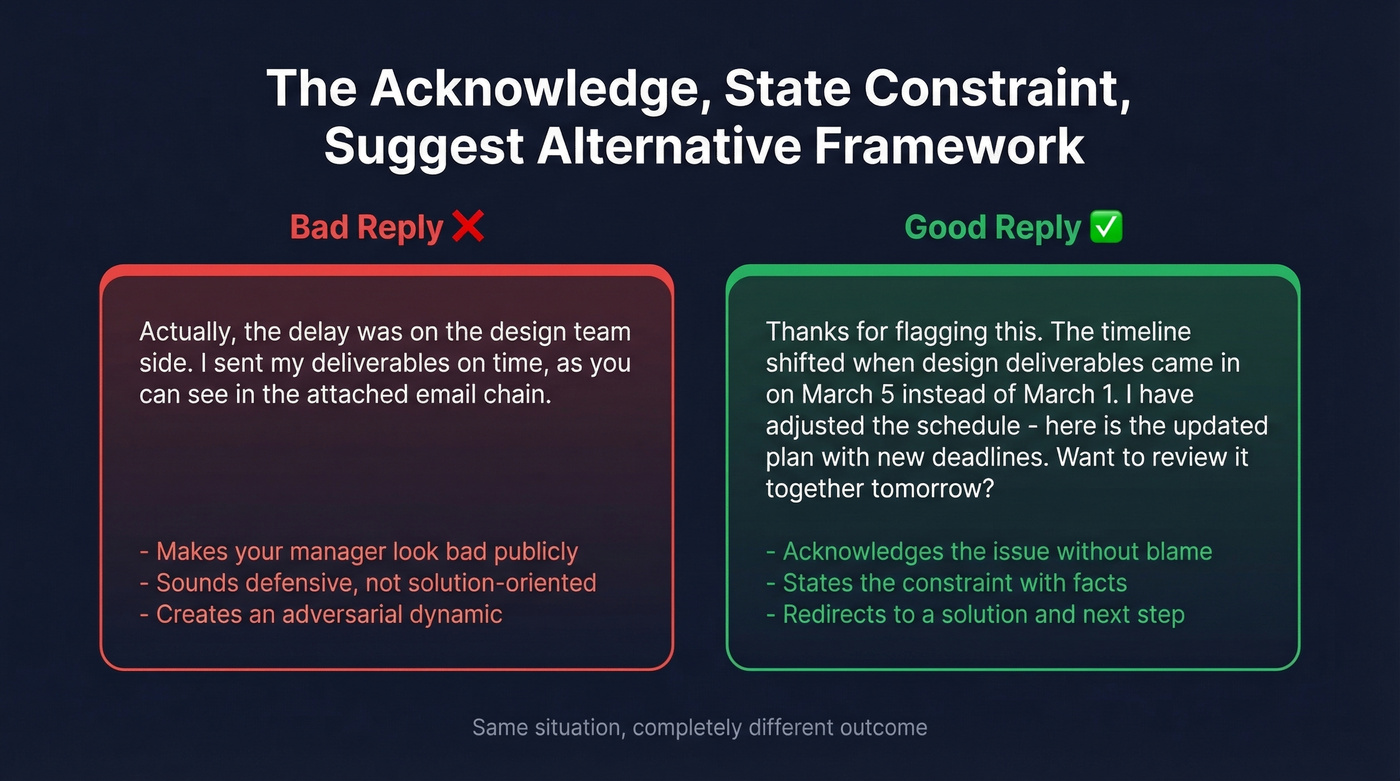
Difficult emails aren't about being right. They're about controlling the outcome. The framework: Acknowledge, State Constraint, Suggest Alternative.
Scenario: Your manager publicly blames you for a missed deadline that was caused by another team's delay.
Bad reply: "Actually, the delay was on the design team's side. I sent my deliverables on time, as you can see in the attached email chain."
Factually correct. Professionally disastrous. You've made your manager look bad in front of the same audience they CC'd.
Good reply: "Thanks for flagging this. The timeline shifted when [design deliverables] came in on [date] instead of [original date]. I've adjusted the schedule - here's the updated plan with new deadlines for each milestone. Want to review it together tomorrow?"
Notice what happened: you acknowledged the issue, stated the constraint without pointing fingers, and redirected to a solution. The CC'd audience sees competence, not defensiveness.
If your company has a culture where managers routinely CC entire teams to assign blame, your email skills aren't the problem. But until you fix the culture - or leave - this framework keeps you out of the blast radius.
If you need a more structured way to keep conversations moving, adopt a simple sequence management approach for sensitive threads.
Phrases to Stop Using
This table lives on a sticky note next to our monitors. It should live next to yours.
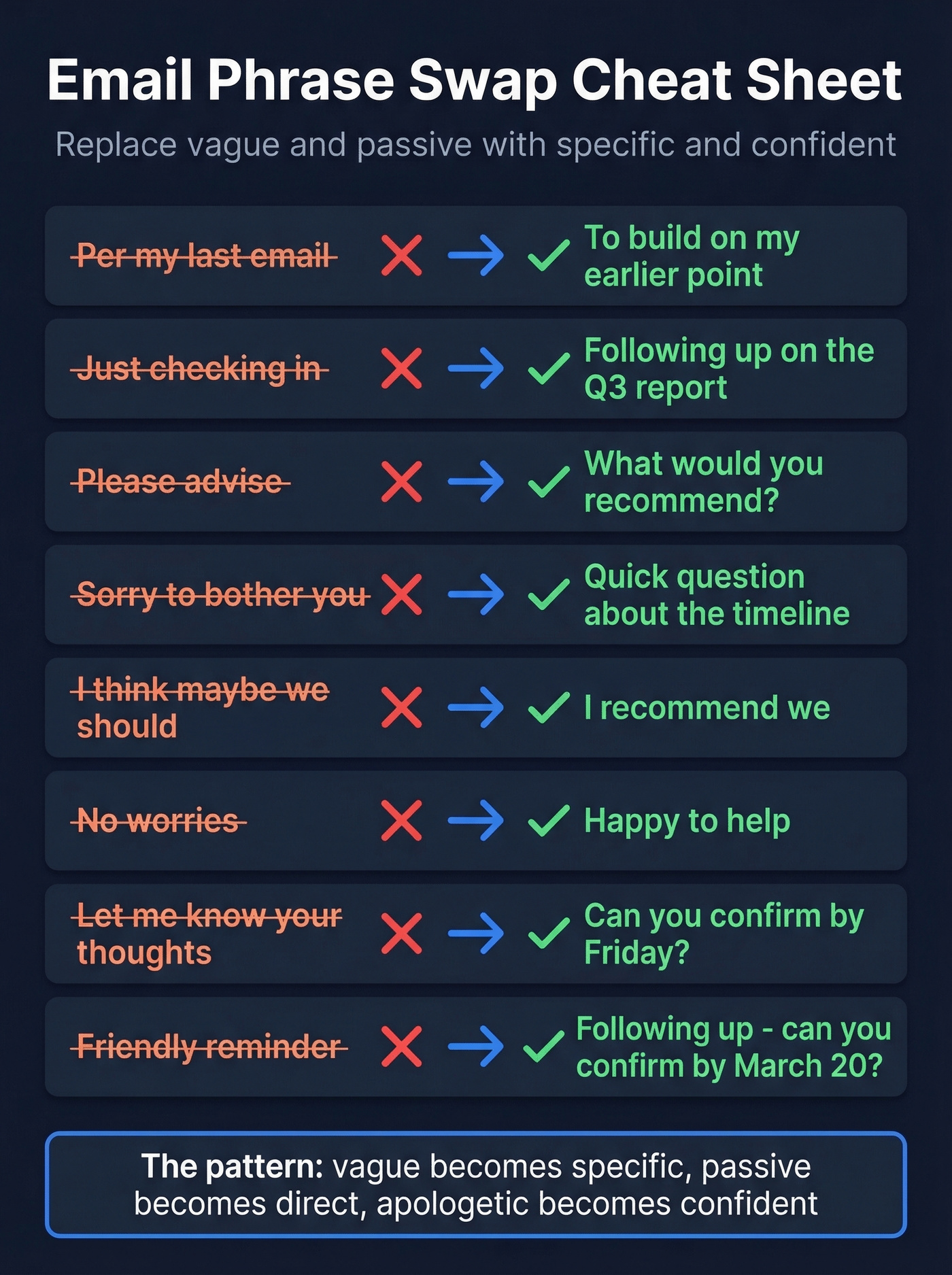
| Stop Saying | Say This Instead |
|---|---|
| Per my last email | To build on my earlier point |
| Just checking in | Following up on [specific item] |
| Please advise | What would you recommend? |
| As previously stated | To clarify |
| Sorry to bother you | Quick question about [topic] |
| Hope this helps | Let me know if you need anything else |
| Going forward | Starting [date/next step] |
| I think maybe we should | I recommend we |
| No worries (to a client) | Happy to help |
| Friendly reminder | Following up - can you confirm by [date]? |
| Let me know your thoughts | Can you confirm by [date]? |
| Just wanted to touch base | Checking in on [project] - any updates? |
The pattern is simple: vague becomes specific, passive becomes direct, apologetic becomes confident. Phrases like "per my last email" and "just checking in" read as passive-aggressive regardless of intent. Replace them and you eliminate an entire category of misinterpretation.
If "Just checking in" is your default, use these alternatives for how to say just checking in professionally.
Email Formatting Rules for 2026
78% of emails are now opened on mobile, and 75% of recipients delete emails that aren't optimized for small screens. That wall of text you just wrote? It looks like a hostage note on an iPhone.
Here's the formatting checklist:
- 80-100 words max for standard replies. Over 150 and you need a meeting, not an email.
- Bullet points for anything with 3+ items. Paragraphs bury action items. Bullets surface them.
- Clear subject lines. "Project Update: Deadline Extended to July 15" beats "Quick update" every time. (If you want inspiration, steal from these email subject line examples.)
- One exclamation mark per email, maximum. Zero in formal client emails. Two makes you sound like you're selling timeshares.
- Emoji guidance: fine internally if your culture supports it. Never in a first email to a client or executive.
- AI drafting is normal now. 85% of companies are adopting AI email tools - but always review for robotic tone. Recipients can tell when a reply feels templated, and a generic AI response undermines the trust you're trying to build.
Skip the formatting advice if you're only sending one-liners to your team. But for anything client-facing or cross-functional, these rules aren't optional.
Outbound Email Replies That Land
Everything above assumes the email reaches a real inbox. For outbound teams, that's not a given.
The top 25% of cold outreach campaigns generate 20%+ reply rates. The other 75% sit below that - and a big reason is deliverability, not copywriting. Never use a no-reply address, hold consistent response times, and make sure your reply-to is a real, monitored inbox.
But here's the upstream problem most teams miss: a perfectly crafted reply is worthless if the email address doesn't exist. Before you spend time perfecting templates, verify the address actually works. Tools like Prospeo's Email Finder check addresses in real time with 98% accuracy, and the free tier gives you 75 verifications per month without a credit card.
If you're troubleshooting bounces and inbox placement, start with an email deliverability guide before you rewrite your copy.
FAQ
How do you respond to a rude email professionally?
Use the Acknowledge, State Constraint, Suggest Alternative framework. Never match their tone - it escalates every time. Wait 15 minutes before replying, then focus your response on the solution, not the slight.
How quickly should you reply to a professional email?
Customer-facing emails deserve a response within 1 hour. Client and external emails within 24 hours. Internal emails the same business day. Consistency matters more than raw speed - a reliable 4-hour window beats sporadic instant replies.
Is "Hi" or "Dear" better for professional emails?
"Hi [Name]" is the safe default for most business emails in 2026. Reserve "Dear" for first-contact formal situations or industries like law, finance, and government. When in doubt, mirror what the sender used.
How do you make sure outbound emails reach the recipient?
Verify the email address before sending - invalid addresses tank your deliverability and sender reputation. Tools like NeverBounce, ZeroBounce, and Prospeo all offer verification, though Prospeo bundles finding and verifying in one step.
Your outbound reply templates above are ready to send. Now make sure you're sending them to real decision-makers. Prospeo's 300M+ profiles and 143M+ verified emails mean your polished sales replies land in inboxes, not bounce folders - at $0.01 per email.
Pair professional replies with professional-grade data. That's how pipelines grow.