

How to Automate Sales Outreach in 2026 (Full Playbook)
You're sending 500 cold emails a day. Two weeks later, your primary domain is flagged, your reply rate is stuck around 2%, and your deliverability score looks like a credit report after a bankruptcy. This isn't a hypothetical - it's the most common outcome when teams try to automate sales outreach without fixing the foundations first.
LinkedIn connection requests get ignored. Paid ads burn budget with low conversion. The "spray and pray" era isn't dying - it's already dead for anyone paying attention. The teams getting 15-25% reply rates aren't sending more emails. They're sending better emails to better-targeted prospects with infrastructure that actually reaches the inbox.
Bain's research found that AI paired with process redesign can drive 30%+ improvement in win rates. The keyword there is "process redesign." Automating a broken process just breaks it faster and at scale.
What You Need (Quick Version)
- Fix your data first. If your emails aren't 98%+ verified, you're automating bounces.
- Set up deliverability infrastructure - secondary domains, SPF/DKIM/DMARC, warm-up - before sending a single cold email.
- Build a multichannel sequence with conditional branching, not a 12-email blast that gets you flagged as spam.
- Use 3-4 tools, not 16. Recommended stack: Prospeo (data) + Instantly or Smartlead (sequencing) + Make.com (orchestration) + HubSpot (CRM).
Why Most Outreach Automation Fails
The tone on r/coldemail is blunt. One practitioner summed up the default playbook: "Export 20K leads from Apollo or Clay. Dump them into a sequence. Pray." That's not automation - that's database blasting with extra steps.
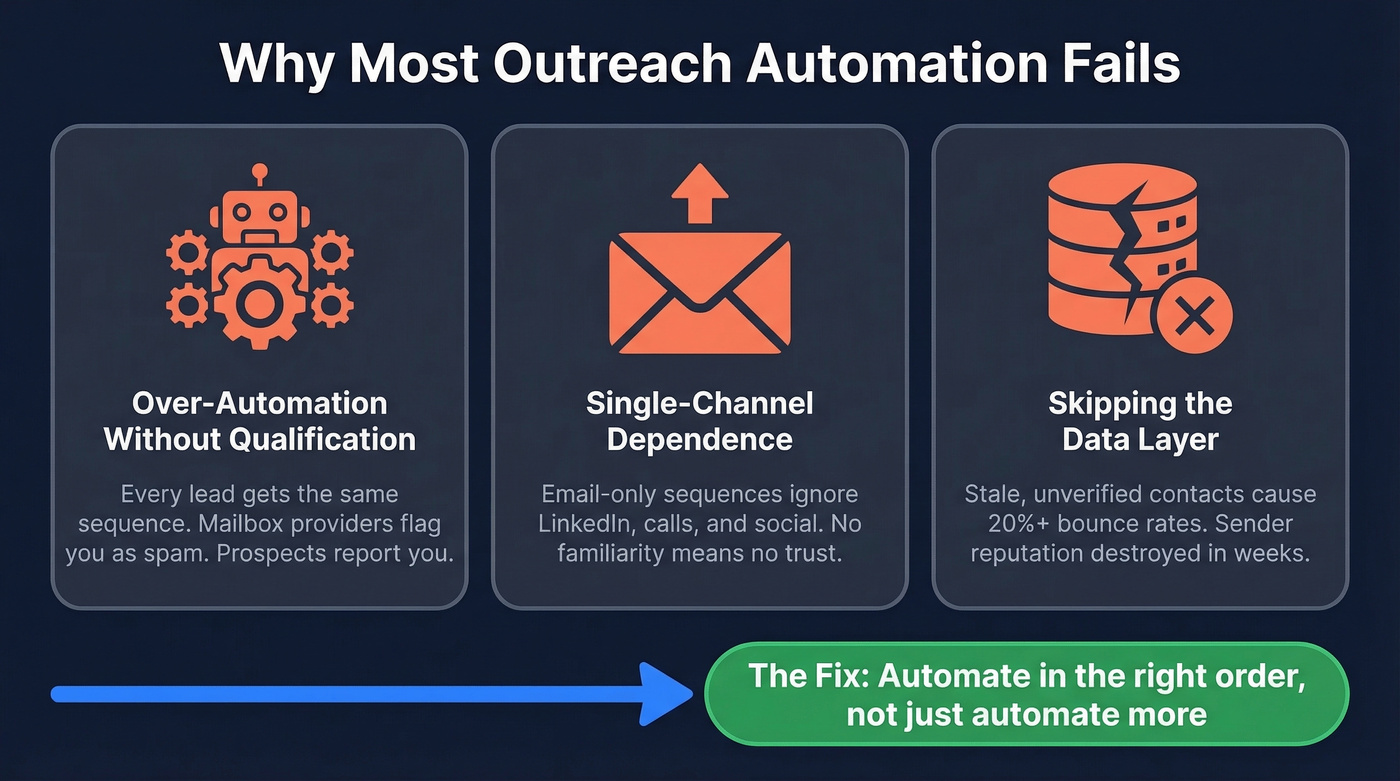
Three failure modes kill outreach automation before it starts.
Over-automation without qualification. When every lead gets the same sequence regardless of fit or timing, you're training mailbox providers to treat you as spam. Cold prospects don't forgive impersonal outreach - they report it.
Single-channel dependence. Email-only sequences ignore the reality that prospects live across channels. A LinkedIn touchpoint before or after an email shifts the dynamic from "who is this person?" to "oh, I've seen this name before." That familiarity compounds.
Skipping the data layer. Teams automate on top of stale, unverified data and wonder why bounce rates hit 20%+. Automation amplifies whatever you feed it. Feed it garbage, and you get garbage at scale - plus a wrecked sender reputation that takes months to rebuild. The fix isn't less automation. It's automating in the right order.
Step 0 - Fix Your Data First
Every outreach guide jumps straight to sequences and copy. But if your contact data is bad, nothing downstream matters.
GreyScout learned this the hard way. Their bounce rate sat at 38% before they overhauled their data layer. After that overhaul, they dropped under 4% - and pipeline jumped 140%. Stack Optimize built from $0 to $1M ARR with 94%+ client deliverability and zero domain flags across all clients, starting with the same foundation: verified data before automation.
Data decays fast. The industry average refresh cycle is six weeks. People change jobs, companies get acquired, email servers get reconfigured.

Prospeo runs a 7-day data refresh cycle with a 5-step verification process that catches spam traps, honeypots, and catch-all domains before they damage your sender reputation. The free tier gives you 75 verified emails per month to test the difference, and credit-based pricing runs about $0.01 per email with no contracts.
The rule is simple: verify every email before it enters a sequence. If your bounce rate exceeds 2-3%, your data isn't ready for automation. (If you want the benchmarks and fixes, see bounce rates.)
Step 1 - Signal-Based Prospecting
Database blasting targets everyone. Signal-based prospecting targets people who are actually in-market right now. The difference in results isn't incremental - it's a different category entirely.
One practitioner on r/coldemail shared a workflow that generated 34 sales conversations in 45 days with a 30-35% connection acceptance rate. The approach: find influencers whose posts attract ICP buyers, mine the engagement as a live intent pool, then reach out to those engagers with a non-pushy connection request. No pitch in the connect note - just "Would love to add you to my network."
That's signal-based selling in practice. 81% of sales teams are experimenting with or have implemented AI-driven prospecting, and the teams using intent signals report 15-25% reply rates versus the 3-5% industry average.
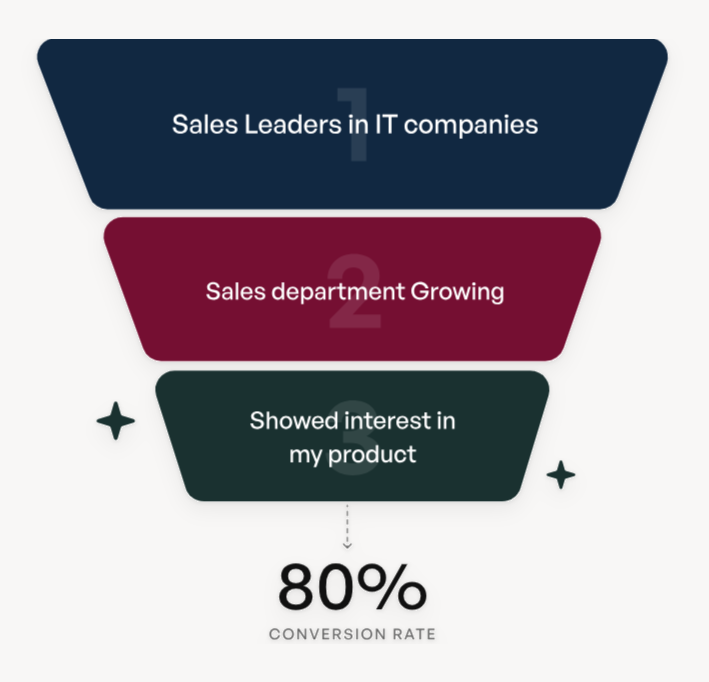
The engagement-mining approach works, but it doesn't scale past a handful of accounts. The scalable version is intent data - tracking which companies are actively researching topics in your category. That's the difference between cold and warm. (To operationalize this, use a simple scoring model for buying signals.)
Here's the thing: only about 25% of B2B companies use intent data tools. If you're in the other 75%, you're competing with one hand tied behind your back. Intent data is the single highest-leverage addition most teams can make to their outreach stack right now.
Step 2 - Deliverability Setup
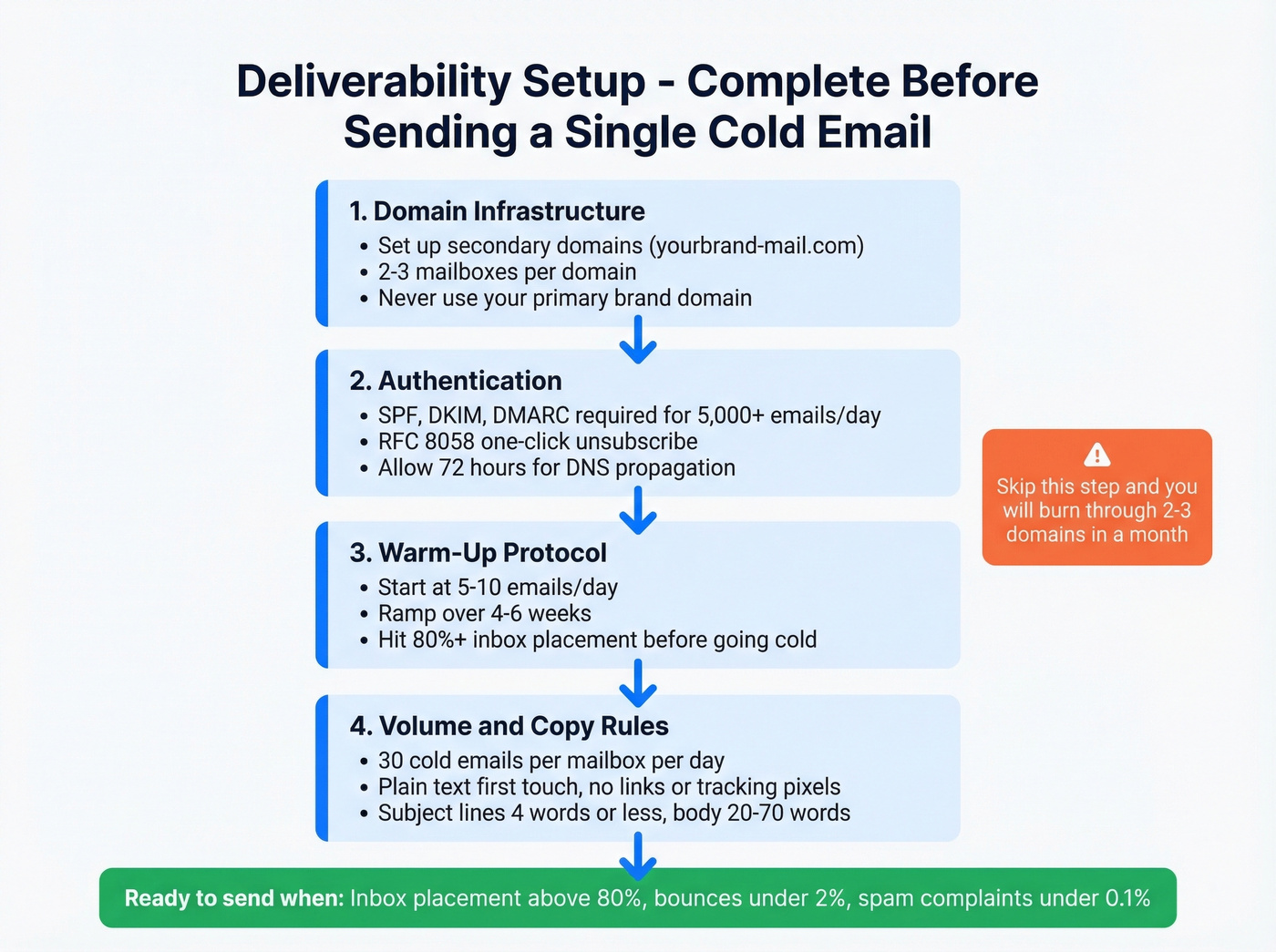
This is the section most guides either skip or bury at the bottom. It should be at the top, because none of your brilliant copy matters if it lands in spam. We've watched teams burn through 2-3 secondary domains in a month because they skipped this step. Don't be that team. (For the full checklist, see our deliverability guide.)
Domain Infrastructure
Never send cold outreach from your primary brand domain. Set up secondary domains - variations like yourbrand-mail.com or getyourbrand.com - with reputable TLDs. Create 2-3 mailboxes per domain.
Authentication
Google, Yahoo, and Microsoft now require SPF, DKIM, and DMARC for bulk senders pushing 5,000+ emails per 24 hours. They also require RFC 8058 one-click unsubscribe. If you haven't set this up, stop reading and go do it now. DNS propagation takes up to 72 hours, so plan accordingly. (If you need a quick diagnostic, use this guide on DKIM.)
Warm-Up Protocol
Start new domains at 5-10 emails per day and ramp over 4-6 weeks: 10-20/day week one, 20-40/day week two, then 40-50/day when healthy. Run seed tests until you hit 80%+ inbox placement before sending any cold email. Budget per mailbox: roughly 20 warm-up emails plus 30 cold emails per day.
Volume and Copy Rules
At 30 cold emails per mailbox per day across 2-3 mailboxes on a single domain, you're looking at 60-90 cold emails per domain daily. Scale by adding domains, not by cranking up volume on existing ones.
Your first touch should be plain text - no links, attachments, calendar invites, or images. Disable open and link tracking on initial sends, since tracking pixels hurt deliverability. Keep subject lines to 4 words or less and body copy between 20-70 words. (If you need options, pull from these subject lines.) Space emails 2-5 minutes apart per mailbox, and leave 3+ days between early follow-ups, stretching to 7-14 days for later touches.
Keep spam complaints under 0.3% - under 0.1% is ideal. At 0.3%, Google withdraws mitigation support. Keep bounces under 2%, which circles back to Step 0 and data quality.
Step 3 - Build Your Multichannel Sequence
Single-channel sequences underperform multichannel ones. The reason is psychological: LinkedIn establishes familiarity, while email delivers the ask. Together they create a compound effect that neither channel achieves alone. (If you want a deeper build, start with a B2B cold email sequence.)
Volume Math
Email tops out at about 50 sends per day per inbox, which means 1,000-1,250 prospects per month per inbox. LinkedIn allows 100-150 connection requests per week, translating to 400-600 per month with reasonable acceptance rates.
Conditional Branching
Based on Lemlist's multichannel framework, here's how conditional logic should work:
If prospect opens email but doesn't reply: Continue email nurture with longer delays, then add LinkedIn touchpoints later.
If prospect doesn't open email: Switch to LinkedIn - send a connection invite, wait up to 7 days, then follow with a LinkedIn message. If the invite isn't accepted, return to email with a 14-day delay before a breakup message.
SaaS 4-Touch Example
- Day 1: LinkedIn connect request, no pitch
- Day 3: Email - short, personalized, plain text
- Day 7: LinkedIn message with a relevant insight or resource
- Day 10: Email with a case study and a clear ask
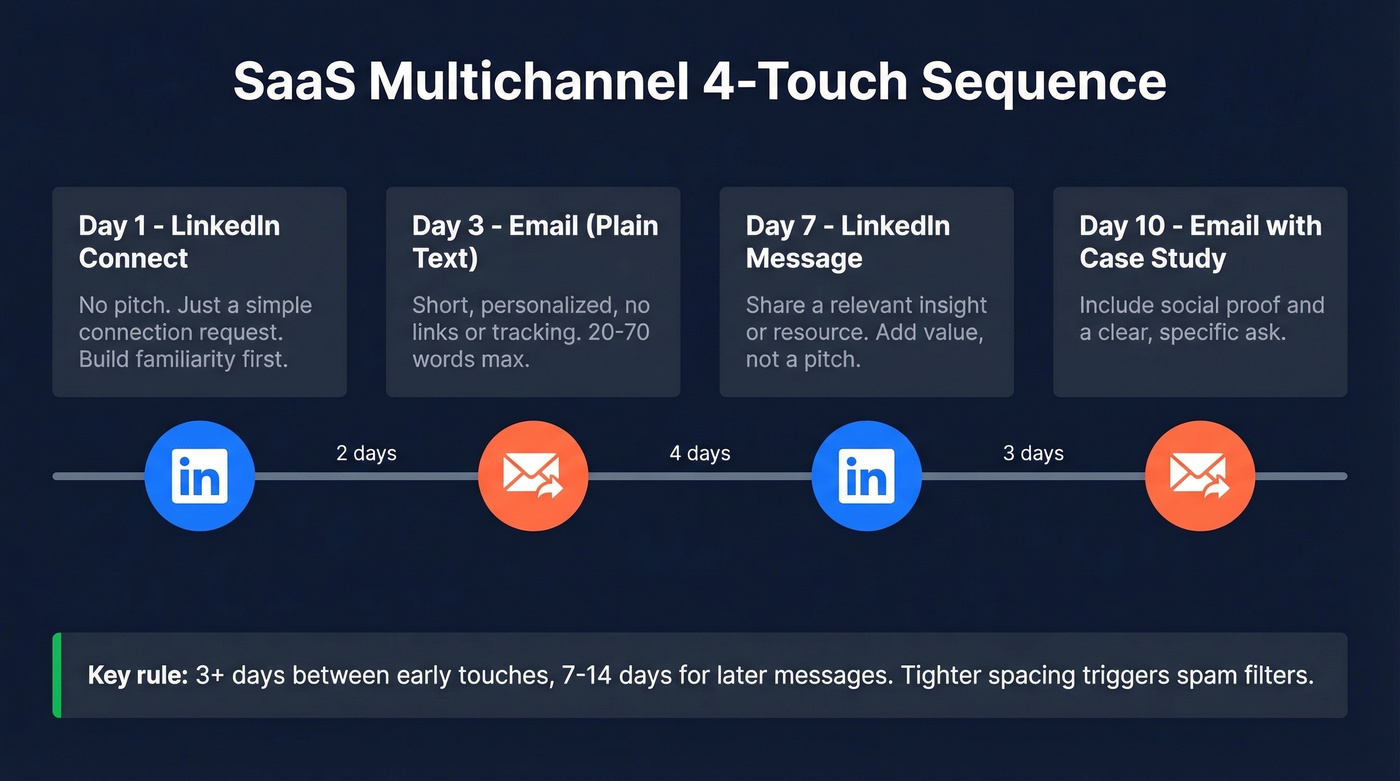
Spacing matters. Three or more days between early touches, stretching to 7-14 days for later messages. Tighter spacing triggers spam filters and annoys prospects in equal measure. (If you want plug-and-play copy, use these follow-up templates.)

This playbook only works if your data is clean. Prospeo's 7-day refresh cycle and 5-step verification keep bounce rates under 3% - the threshold where automation actually scales. At $0.01 per verified email, you stop paying for bounces and start paying for pipeline.
Automate outreach that reaches real inboxes, not spam folders.
Step 4 - Automate Follow-Up and CRM Sync
This is where most automation stacks fall apart. Replies come in, and nobody knows what to do with them because there's no classification system. (This is also where sequence management makes or breaks scale.)
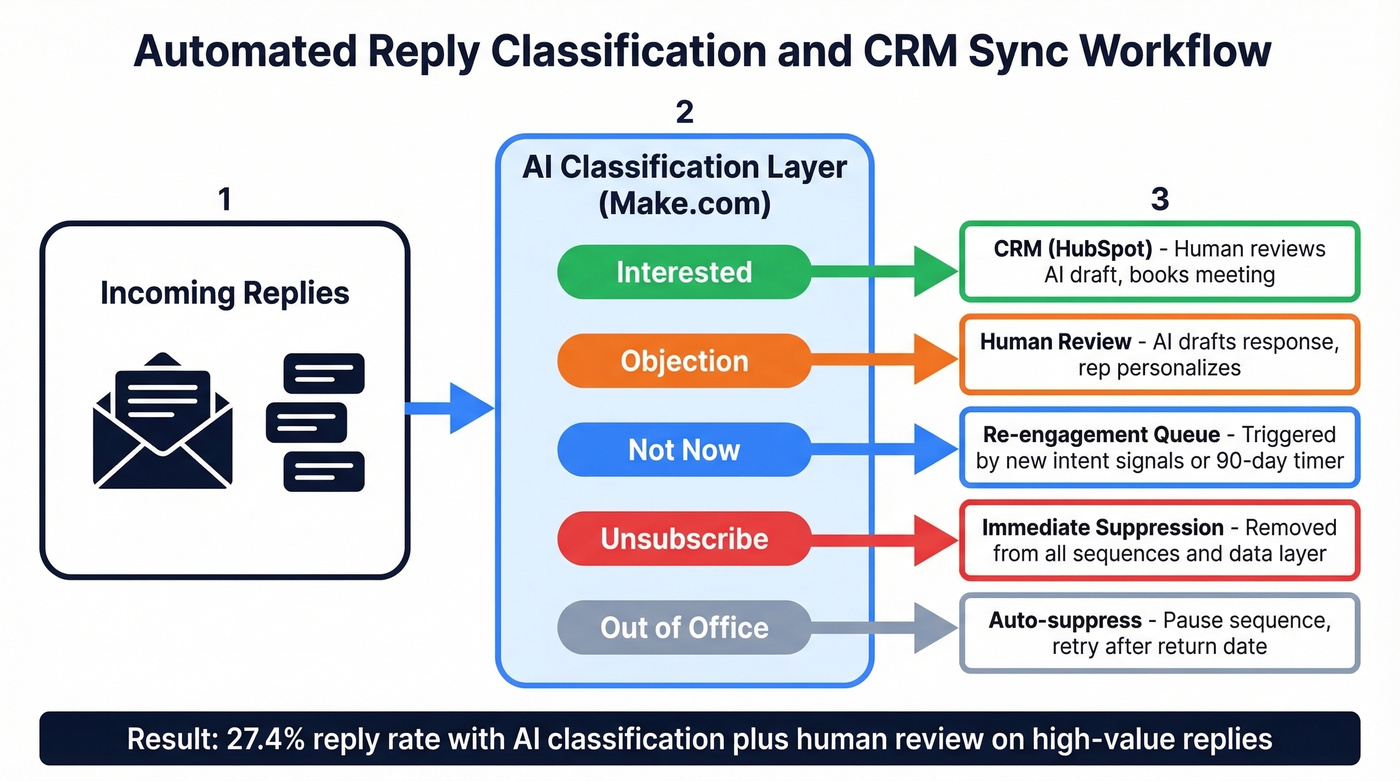
The best workflow we've seen uses Make.com with an AI classification layer. Every reply gets sorted into clear categories: interested, objections, not now, unsubscribe, or out of office. The AI handles classification and drafts responses. A human reviews before anything goes out for interested leads and objection handling. One team running this architecture reported 29% connection acceptance and 27.4% reply rate - numbers that are 5-10x above the generic cold outreach baseline.
Sync interested replies, meeting bookings, and objection context to your CRM. Suppress out-of-office autoreplies, unsubscribe requests (process these immediately), and bounces. Build a feedback loop that routes unsubscribes and bounces back to your data layer so you're not re-contacting them next quarter. (If you need the wiring, follow this guide to connect your outreach tool to your CRM.)
For leads that went cold after initial interest, set up automatic re-engagement sequences triggered by new intent signals or time-based delays. A prospect who said "not now" three months ago may be in-market today - your system should catch that shift without manual intervention.
The AI Layer - What to Automate vs. Keep Human
45% of teams already use a hybrid AI-SDR model. The AI SDR market sits at $3.1B and is growing at 42% annually. This isn't experimental anymore - it's the operating model. (If you're building your stack, start with these SDR tools.)
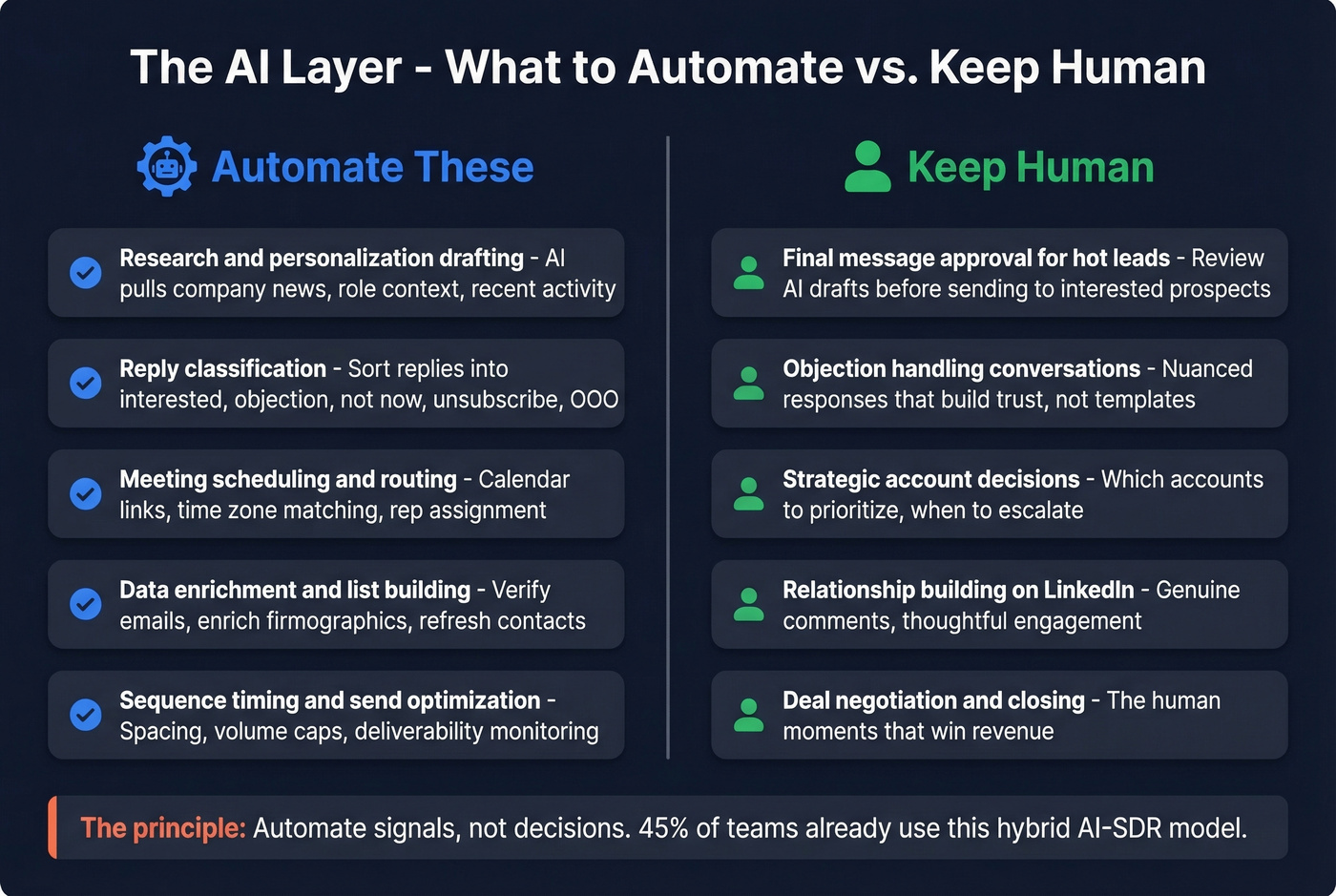
But the principle that separates winning teams from the ones burning budget is simple: automate signals, not decisions.
Automate: research and personalization drafting, reply classification, meeting scheduling and routing, data enrichment and list building, sequence timing and send optimization.
Keep human: qualification decisions (is this actually a good-fit opportunity?), deal strategy for complex buying committees, proposal and pricing where context matters too much for templates, and relationship-building conversations that close deals.
The median time to first positive response from AI-driven outreach is 22.7 days. Let's be honest - teams expecting AI to replace SDRs overnight are setting themselves up for disappointment. 72% of sales teams rely on AI assistance, but only 46% trust it fully. That gap between adoption and trust is exactly where the human-in-the-loop model lives.
Implementation Timeline
Most teams try to launch everything at once and wonder why nothing works. Here's the phased approach that actually produces results:
Weeks 1-2: Foundation. Clean your data, set up secondary domains, configure SPF/DKIM/DMARC, and begin warm-up. No cold emails yet. This part feels slow. It isn't - it's the reason everything after it works.
Weeks 3-4: First sequences. Launch your first multichannel sequence to a small, highly targeted list of 100-200 prospects. Measure bounce rates, inbox placement, and reply rates. Fix problems before scaling.
Weeks 5-8: Scale and optimize. Add domains and mailboxes to increase volume. A/B test subject lines and messaging. Layer in intent signals. By week 8, you should have a repeatable system producing consistent pipeline.
Months 3-6: Compound returns. This is when the system pays off. Your domains have strong sender reputation, your sequences are optimized from real data, and your team spends time on conversations instead of list building. Expect 15-25% reply rates on well-targeted segments. This is also the right window to re-engage prospects who went dark during earlier phases - their circumstances may have changed, and a well-timed touchpoint can reopen stalled conversations.
Tool Stack Recommendations
You don't need 16 tools. Every additional tool creates integration points that break, data that doesn't sync, and complexity that slows your team down.
| Layer | Tool | Starting Price | Best For |
|---|---|---|---|
| Data & Verification | Prospeo | Free (75 emails/mo) | 98% accuracy, 7-day refresh, intent data |
| Data & Verification | Apollo | Free (1,200 credits/yr) | Large DB + built-in sequences |
| Enrichment | Clay | $134/mo | Complex enrichment workflows |
| Email Sequencing | Instantly | $37/mo | Unlimited accounts, warm-up |
| Email Sequencing | Smartlead | $39/mo | Inbox rotation, agency use |
| Email Sequencing | Lemlist | $69/user/mo | Multichannel + LinkedIn steps |
| Sales Engagement | Outreach.io | ~$100/user/mo | Enterprise teams, 50+ reps |
| Sales Engagement | Salesloft | ~$125/user/mo | Enterprise + coaching |
| Orchestration | Make.com | Free / $9/mo | Conditional logic between tools |
| Orchestration | Zapier | Free / $20/mo | Simple integrations |
| CRM | HubSpot | Free / $20/user/mo | SMB + startup teams |
For SMB and startup teams under 10 reps: Prospeo + Instantly + Make.com + HubSpot. Total cost around $60-$100/month on starter tiers before extra seats or add-ons. Native integrations between these tools keep your data flowing without custom middleware.
For mid-market and enterprise at 50+ reps: You'll likely need Outreach.io or Salesloft for the engagement layer, Clay for complex enrichment, and a verified data foundation underneath. Budget $150-300/user/month all-in.
Apollo deserves a mention for teams that want database and sequencing in one tool. The free tier is generous, and paid plans start at $49/user/month. The tradeoff is data accuracy - Apollo's email verification doesn't match a 98% accuracy standard, which means more bounces in your sequences. Skip it if deliverability is already a problem for you.
Signal-based prospecting needs real intent data. Prospeo tracks 15,000 buyer intent topics via Bombora and layers them with 30+ filters - job changes, headcount growth, technographics, funding - so your sequences hit prospects who are actively in-market. Teams using this stack book 35% more meetings than Apollo users.
Stop blasting databases. Start reaching buyers who are already looking.
Mistakes That Kill Outreach Automation
Automating before fixing data. If your bounce rate is above 3%, adding automation just damages your domain faster. Verify first, automate second.
Skipping deliverability setup. No secondary domains, no authentication, no warm-up. Teams that skip this tank their sender reputation within two weeks. We've seen it happen more times than we can count. (If you're already in trouble, start with sender reputation.)
Running single-channel sequences. Email-only outreach ignores how buyers evaluate sellers. An analysis of 12 million outreach emails found personalized multichannel sequences got 30.5% more responses than generic single-channel blasts.
Over-automating qualification. AI can classify replies. It shouldn't decide which opportunities to pursue. Poor qualification leads to a 15% drop in lead-to-sale conversion rates.
Ignoring compliance. At 0.3% complaint rate, Google stops helping you. One sloppy campaign can flag your entire domain infrastructure.
Compliance Quick-Reference
CAN-SPAM (US): No prior consent required for B2B cold email. Include a valid physical address and clear opt-out mechanism. Honor opt-outs within 10 business days.
GDPR (EU/EEA): Professional emails are personal data. The most common legal basis is Legitimate Interest - document a Legitimate Interest Assessment and keep records.
CASL (Canada): Requires express or implied consent. Implied consent applies if the contact's email is publicly published without a "no solicitation" notice and your message is role-relevant. Consult legal counsel - CASL rules are more nuanced than any summary captures.
Bulk sender thresholds: Once you cross 5,000 emails to Google/Yahoo users in 24 hours, keep spam rates below 0.1%. At 0.3%, Google withdraws mitigation support entirely.
FAQ
How many emails can I send per day safely?
Budget 20 warm-up plus 30 cold emails per mailbox per day. Use 2-3 mailboxes per secondary domain. Scale by adding domains, not increasing volume on existing ones.
What's a realistic reply rate for automated outreach?
Generic cold email averages around 2%. Signal-personalized multichannel sequences achieve 15-25%. The difference is targeting quality and verified data, not send volume.
Do I need separate domains for cold email?
Yes - always. Never send cold outreach from your primary brand domain. If a secondary domain gets flagged, your brand domain stays clean. Budget $10-15 per domain annually; it's the cheapest insurance in your stack.
What's the best free tool to start automating outreach?
Prospeo's free tier (75 verified emails/month) paired with HubSpot's free CRM covers data and pipeline tracking at zero cost. Add Instantly at $37/month for sequencing, and you've got a functional outbound system for under $40/month.
How long before automated sequences produce pipeline?
Expect 6-8 weeks minimum. Weeks 1-2 go to domain warm-up and data verification, weeks 3-4 to initial sequences, and weeks 5-8 to optimization. The median time to first positive AI-driven response is 22.7 days - patience is part of the process.