

How to Cold Email: A Step-by-Step Guide That Actually Works
You sent 500 emails from your primary domain last month. Open rate: 4%. Reply rate: barely measurable. Your domain reputation is now in the gutter, and every future email - including the ones to existing customers - lands closer to spam.
Most cold email guides are written by content marketers who've never configured a DNS record. They tell you to "personalize more" and hand you a template. They skip the deliverability foundation that determines whether your messages reach inboxes at all.
Cold email still works. A study of 16.5 million emails found an average reply rate of 5.8% - down from 6.8% the year before, but still one of the most cost-effective B2B outreach channels when the foundation is right. If you're learning how to cold email for the first time, this guide covers what actually matters: infrastructure first, subject lines second.
What You Need (Quick Version)
- Secondary domain + SPF/DKIM/DMARC - set this up before you write a single word
- Verified prospect list - 98% email accuracy keeps your bounce rate safe
- 40-60 word emails with a strong offer and a soft CTA
- 3 follow-ups max spread over 14-21 days
- Sending platform - Instantly (~$30/mo) or Lemlist (~$55-79/mo)
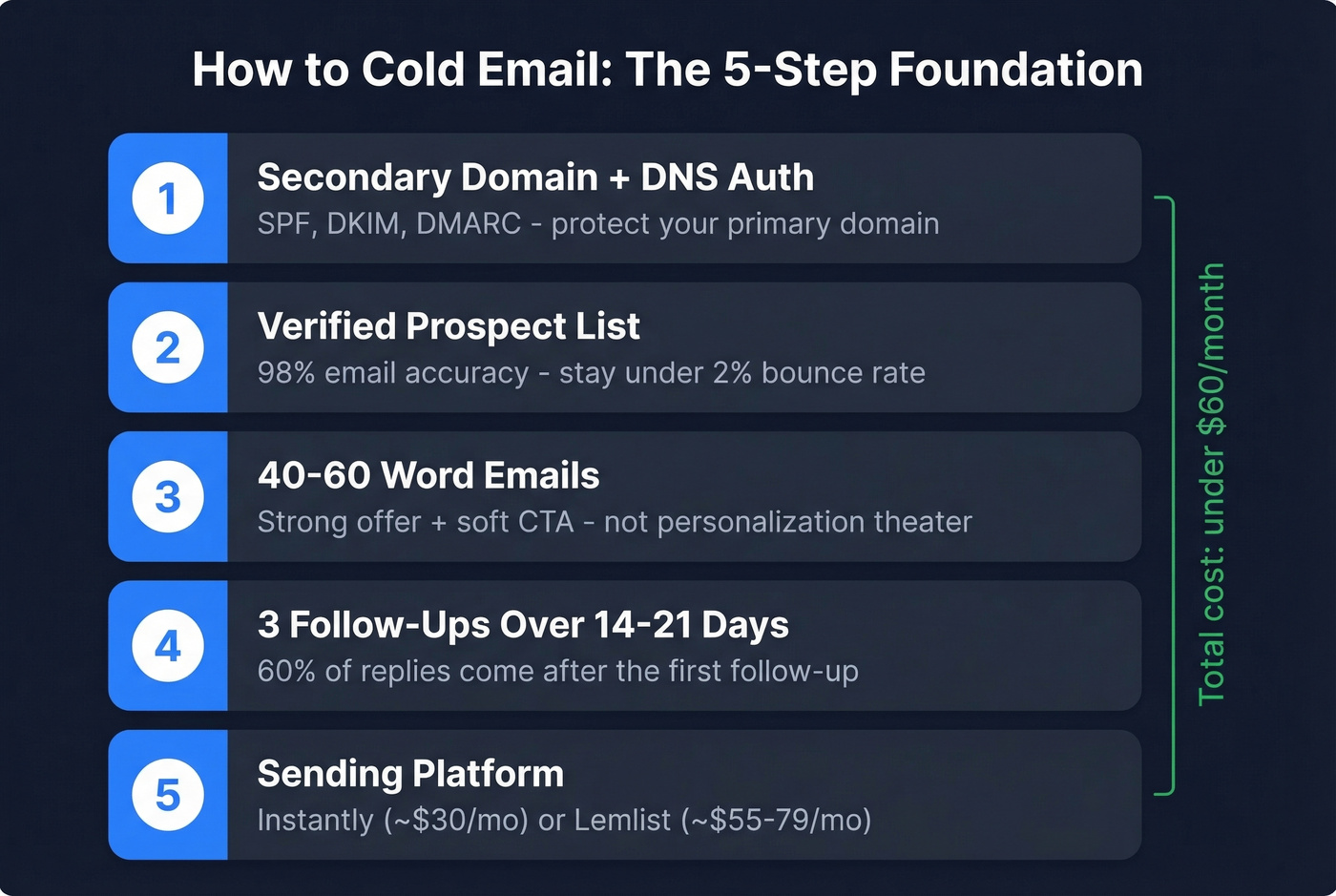
Total cost to get started: under $60/month plus a secondary domain around $10/year. You don't need expensive courses. The fundamentals are straightforward once you understand the infrastructure.
Three Types of Cold Email
Not all cold emails are the same. The type you're sending changes everything about how you write it.
Sales - You're reaching out to someone who doesn't know you, offering something specific, and asking for a next step. The tone is direct, the CTA is a meeting or a reply, and the proof needs to be concrete. This is where most of the data and tactics in this guide apply.
Networking - You're not selling anything. You're asking for advice, an introduction, or a conversation. The tone is humble, the ask is small, and you should never disguise a sales pitch as networking. That's a trust-killer.
Job-Seeking - You're targeting a hiring manager or someone at a company you want to work for. Lead with one or two credibility bullets relevant to their team, keep it under 100 words, and make the ask easy to say yes to.
The rest of this guide focuses on B2B sales cold email, but the infrastructure and deliverability principles apply to all three. Here are quick templates for the other two:
Networking template: Hi [Name], I've been following your work on [specific topic] - your take on [specific insight] changed how I think about [area]. I'm building something in the same space and would love to pick your brain for 10 minutes. No pitch, just learning. Would you be open to a quick call?
Job-seeking template: Hi [Name], I saw [Company] is hiring for [role]. I led [specific result] at [Previous Company] and built [relevant thing] that drove [metric]. I'd love to chat about how I could do the same for your team. Would a 15-minute call work this week?
Set Up Your Sending Infrastructure
This is the step everyone skips. It's also the step that determines whether your emails reach inboxes or spam folders.
SPF, DKIM, and DMARC
Google, Yahoo, and Microsoft bulk sender rules now require SPF, DKIM, and DMARC authentication. These aren't optional. If your DNS records aren't set up correctly, your emails won't land. Period.
Start DMARC at p=none and tighten later once you're monitoring reports. Make sure your From-domain aligns with either your SPF or DKIM domain. This takes about 20 minutes to configure and saves you months of deliverability headaches.
Secondary Domain + Custom Tracking
Never send outbound from your primary domain. Buy a secondary domain (something like yourcompany-mail.com) for around $10/year and use that exclusively for outreach. If the domain gets burned, your main business email stays clean.
Set up a branded CNAME for link tracking too. Shared tracking domains are a reputation liability - isolate yours. (If you want the technical setup details, see our tracking domain guide.)
Warm Up Your Domain
New domains have zero reputation. Start blasting 200 emails on day one and you'll land in spam immediately. We've seen teams destroy a domain's reputation in 48 hours by skipping this step. If you need a deeper playbook, use an email deliverability checklist and monitor sender reputation as you ramp.
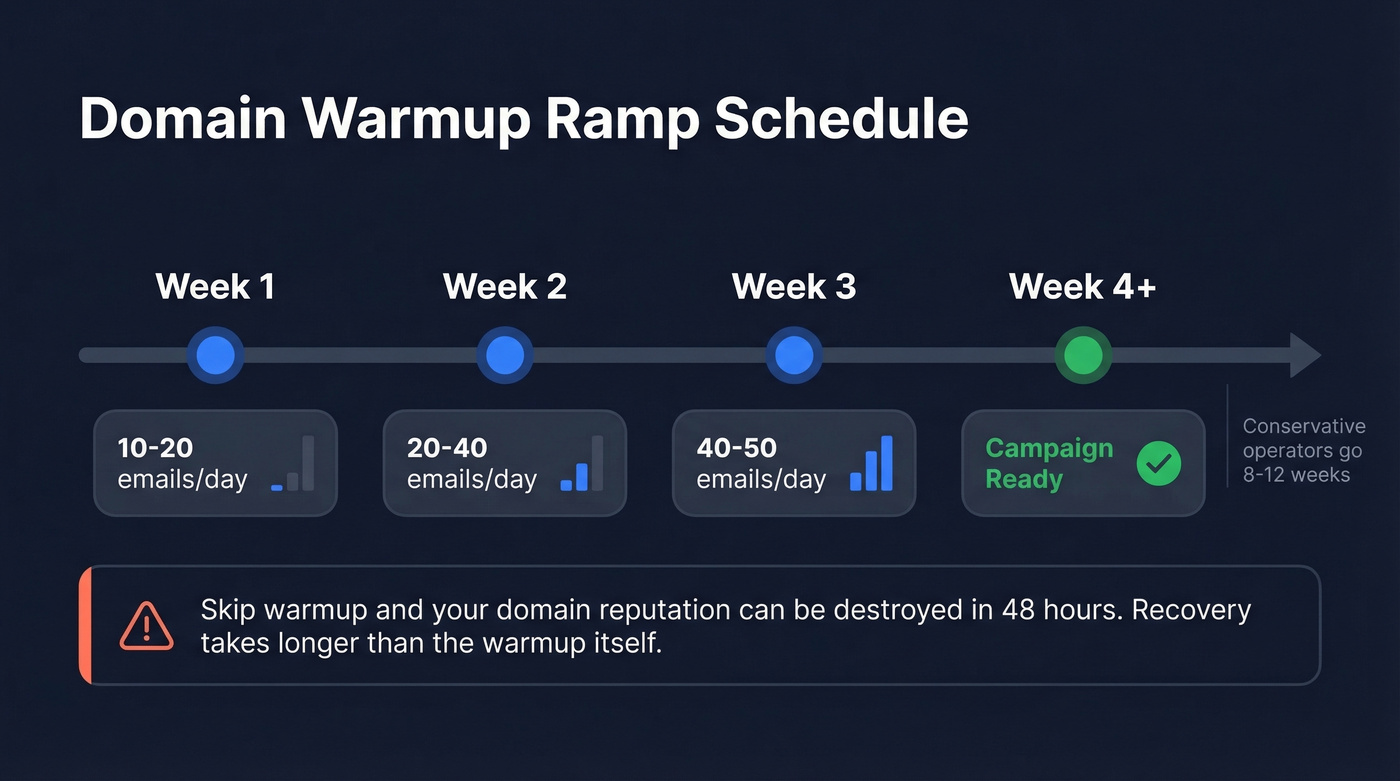
Follow this ramp schedule:
- Week 1: 10-20 emails/day
- Week 2: 20-40 emails/day
- Week 3-4: 40-50 emails/day
Budget 2-4 weeks minimum before running real campaigns. Conservative operators go 8-12 weeks. The consensus on r/coldemail is clear: skipping warmup wrecks your domain, open rates collapse, and recovery takes longer than the warmup would have.
One thing to note: Google banned automated warmup services for Gmail in early 2023. If you're using Gmail-based inboxes, you need manual warmup or a third-party warmup tool on a non-Gmail domain.
Hard Thresholds
These numbers keep you out of spam:
- Spam complaints: under 0.3%
- Bounce rate: under 2% (see email bounce rate benchmarks and fixes)
- Unsubscribe mechanism: one-click, RFC 8058 compliant (required)
Exceed any of these and your sending reputation degrades fast. Monitor them weekly.
Build a Verified Prospect List
Your campaign is only as good as the list behind it. Forty bounced emails out of 200 sends pushes your bounce rate to 20% - and signals to inbox providers that you're a spammer.
Define Your ICP First
Before you find a single email address, get specific about who you're targeting. Use filters like buyer intent, technographics, job changes, headcount growth, and department size to narrow your list. If you need a framework, start with an ideal customer profile template.
Data from 16.5 million emails backs this up: emailing 1-2 contacts per company produced a 7.8% reply rate. Emailing 10+ contacts at the same company? Just 3.8%. Precision beats volume every time.
Find and Verify Emails
Verification isn't a nice-to-have. It's the difference between a healthy domain and a burned one. That 2% bounce threshold is unforgiving, and a single bad batch can set you back weeks.
We use Prospeo for this step. It runs emails through a 5-step verification process - catch-all handling, spam-trap removal, honeypot filtering - across a database of 143M+ verified addresses. The 98% accuracy rate keeps bounce rates well under the threshold that triggers deliverability problems. (If you're comparing tools, see our Bouncer alternatives roundup.)

Cold email deliverability lives or dies at the 2% bounce threshold. Prospeo's 5-step verification - catch-all handling, spam-trap removal, honeypot filtering - keeps you well under it. 143M+ verified emails, 98% accuracy, ~$0.01 per address.
Stop burning domains with unverified lists. Start sending to real inboxes.
Write the Email
Stop obsessing over personalization. "I noticed you posted on LinkedIn about..." isn't a differentiator anymore - everyone does it. A mediocre email with a great offer outperforms a beautifully personalized email with a weak one.
Here's the thing: if your average deal size is under $10k, you don't need AI-powered personalization at scale. You need a better offer and a clean list. The tooling obsession is a distraction from the fundamentals.
The 2026 Format: 40-60 Words
The format that's working right now is brutally short:
Context trigger → What you do for their ICP → Proof (X to Y in Z) → Soft ask
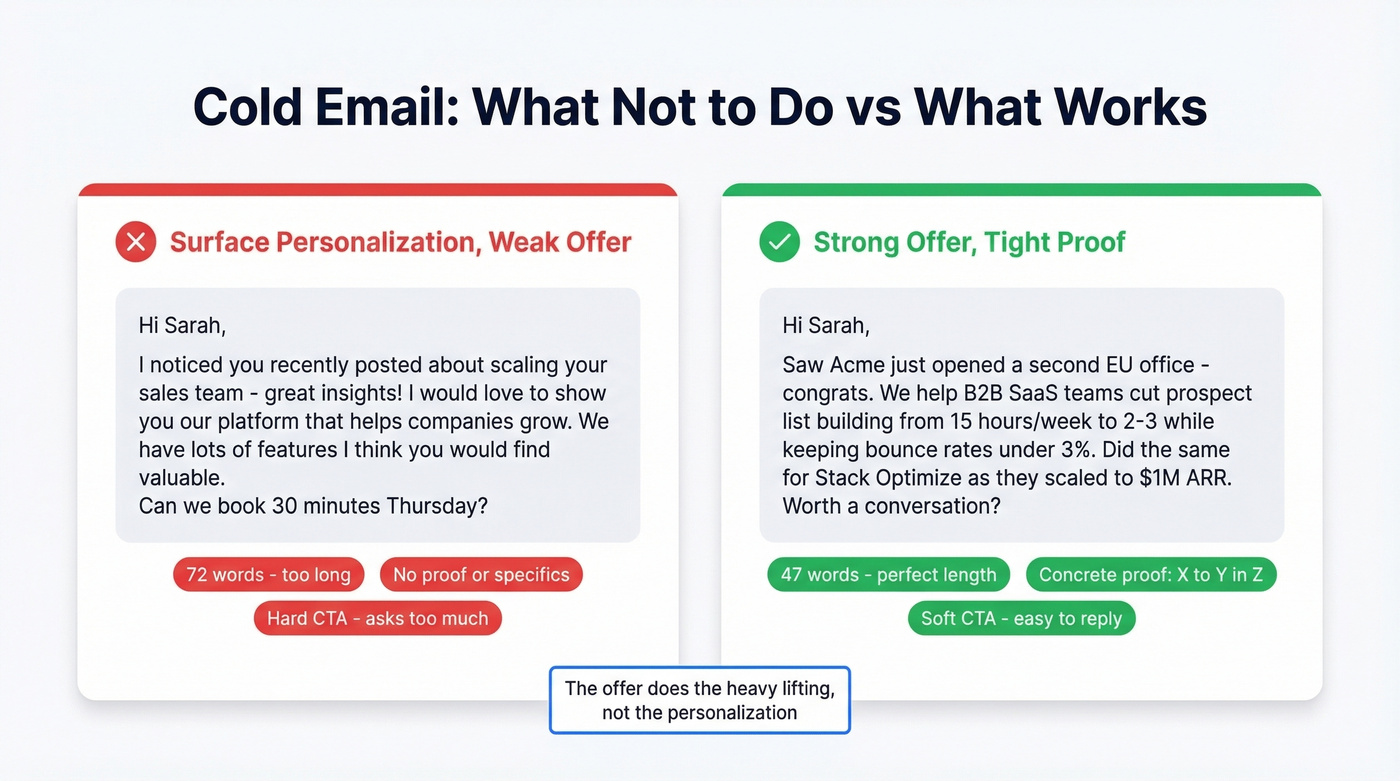
Here's a bad email vs. a good one:
❌ Surface personalization, weak offer: Hi Sarah, I noticed you recently posted about scaling your sales team - great insights! I'd love to show you our platform that helps companies grow. We have lots of features I think you'd find valuable. Can we book 30 minutes Thursday?
✅ Strong offer, tight proof: Hi Sarah,
Saw Acme just opened a second EU office - congrats. We help B2B SaaS teams cut prospect list building from 15 hours/week to 2-3 while keeping bounce rates under 3%.
Did the same for Stack Optimize as they scaled to $1M ARR.
Worth a conversation?
The second email is 47 words. The offer does the heavy lifting, not the personalization. The same 16.5M-email dataset confirms this direction: emails with 6-8 sentences hit a 6.9% reply rate, and messages under 200 words consistently outperform longer ones. For more examples, borrow structures from our email copywriting guide.
One tactic worth stealing: move your personalization to the P.S. line instead of the opener. Personalizing in the P.S. can lift performance by 35% - the body stays focused on the offer while the P.S. adds a human touch.
Use soft CTAs. "Worth a conversation?" or "Interested?" dramatically outperform hard asks like "Can we book 30 minutes Thursday?" You're asking for a reply, not a calendar commitment.
Subject Lines That Get Opens
47% of recipients decide whether to open based on the subject line alone. Keep yours to 6-10 words, skip exclamation marks, and never be deceptive. If you want a swipe file, use these cold email subject line examples.
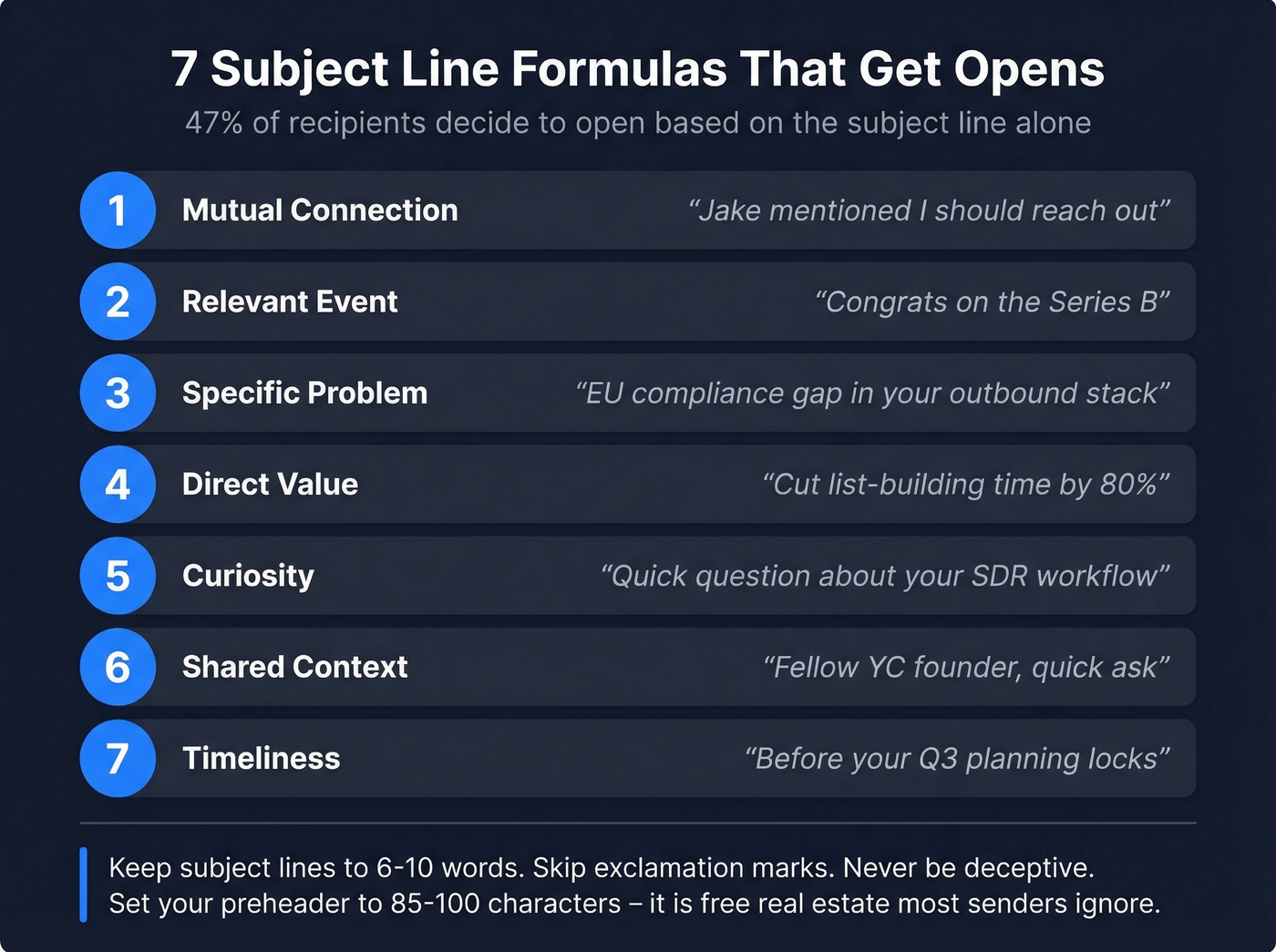
- Mutual connection: "Jake mentioned I should reach out" - bypasses the "who is this?" filter instantly
- Relevant event: "Congrats on the Series B" - shows you're paying attention, not mass-blasting
- Specific problem: "EU compliance gap in your outbound stack" - names a pain they're already thinking about
- Direct value: "Cut list-building time by 80%" - leads with the outcome, not the product
- Curiosity: "Quick question about your SDR workflow" - low-commitment, high-open
- Shared context: "Fellow YC founder, quick ask" - tribal affiliation drives opens
- Timeliness: "Before your Q3 planning locks" - creates urgency without being pushy
Set your preheader to 85-100 characters. It's the second thing people see after the subject line, and most senders leave it blank. Free real estate.
Format for Mobile
85% of emails get read on phones first. Your email needs to work on a 4-inch screen: under 150 words, 6th-grade reading level, short sentences that follow an F-shape scanning pattern. Grammar mistakes alone can reduce leads by 25%, so proofread before you send. One CTA per email. No walls of text.
The guide says to email 1-2 contacts per company for a 7.8% reply rate. Prospeo's 30+ filters - buyer intent, technographics, job changes, headcount growth - let you find exactly the right person, with a verified email, on data refreshed every 7 days.
Precision targeting starts with accurate data. Get both for free.
Send and Follow Up
Timing
Thursday is the best day to send, with a 6.87% reply rate in the 16.5M-email dataset. Monday is the worst at 5.29%. The 8-11 PM window produces the highest reply rates - people catch up on email after dinner. Always send in the recipient's time zone, not yours. (For a deeper breakdown, see the best time to send cold emails data.)
Follow-Up Cadence
Three follow-ups is the sweet spot. Space them over 14-21 days. Around 60% of replies come after the first follow-up, so skipping follow-ups entirely means leaving more than half your potential replies on the table. If you need copy, use these cold email follow-up templates.
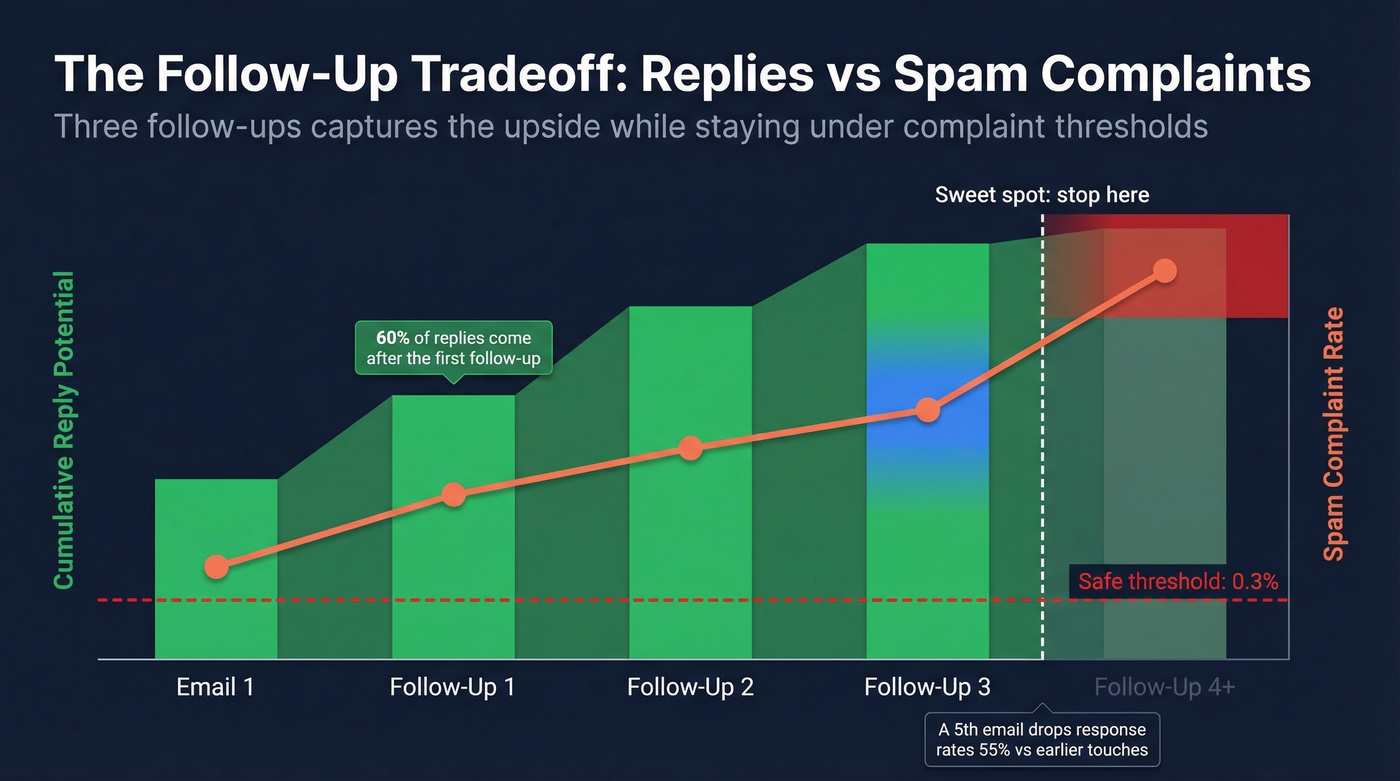
But here's the tradeoff nobody talks about: spam complaints rise from 0.5% on your first email to 1.6% by the fourth. Unsubscribes hit 2% by round four. A fifth email drops response rates 55% versus earlier touches. Three follow-ups captures the upside while keeping you under the complaint thresholds that trigger deliverability problems.
Tracking Pixels
Real talk: turning off open tracking improves response rates by roughly 3%. Tracking pixels add invisible images that inbox providers flag as marketing signals. For small, targeted campaigns, disable open tracking entirely and measure replies instead. Replies are the metric that matters anyway. (If you want the technical why, see our email tracking pixel guide.)
Measure and Iterate
A 5-10% reply rate is a solid campaign. Above 10% is excellent. Below 3% means something's broken - your offer, your targeting, or your deliverability. Diagnose in that order.
When you A/B test, send a minimum of 200-300 emails per variant before drawing conclusions. Anything less and you're reading noise, not signal. Test one variable at a time, measure over 200+ sends, then move to the next. Patience here separates teams that iterate toward 10%+ reply rates from teams that thrash between templates forever.
Test in this priority order - ranked by impact on reply rates:
- Offer - what you're proposing moves the needle most
- Subject line - controls whether they open at all
- CTA - soft vs. hard, question vs. statement
- Personalization - the least impactful variable, despite what most guides claim
Your Cold Email Tool Stack

| Tool | What It Does | Starting Price | Best For |
|---|---|---|---|
| Prospeo | Email finding + verification | Free (75/mo) | Bounce-proof email lists |
| Instantly | Sending + warmup | ~$30/mo | Scale + analytics |
| Lemlist | Sending + personalization | ~$55/mo | Image personalization |
| SmartReach | Multichannel sending | ~$29/mo | Agencies buying domains in-tool |
| Apollo | Database + sequencing | ~$59/mo | All-in-one prospecting |
A few tradeoffs worth knowing. Instantly's lower tiers run on shared infrastructure, which means your sender reputation is partially tied to other users on the same IP. Apollo bundles a lead database with sequencing, but deliverability isn't as strong as dedicated sending platforms - practitioners on r/coldemail flag this consistently. Lemlist's image personalization is genuinely useful, but costs climb once you add multichannel features. SmartReach lets you buy domains and inboxes directly inside the tool - a real time-saver for agencies managing multiple client accounts.
The starter stack we recommend: Prospeo free tier + Instantly or SmartReach + a secondary domain. Under $100/month for a professional outbound operation.
Mistakes That Kill Campaigns
These are the errors we see repeatedly - especially from beginners. Each one can tank a campaign on its own.
- Sending from your primary domain - one spam flag and your business email suffers
- Skipping warmup - new domains need 2-4 weeks minimum before real campaigns
- Not verifying your list - bounces above 2% destroy sender reputation
- Missing unsubscribe link - required by law and by inbox providers
- Multiple CTAs in one email - performs worse than emails with zero CTAs
- No A/B testing - you're guessing instead of learning
- Too much HTML or too many links - triggers spam filters; plain text wins
- No custom tracking domain - shared tracking domains tank deliverability
- Generic openers - "Hope this email finds you well" gets you deleted
- Deceptive subject lines - "Re:" with no prior conversation can violate CAN-SPAM and is a trust-killer
Is Cold Email Legal?
Yes - in every major market - but the rules vary by region.
US (CAN-SPAM): Cold email is legal for both B2B and B2C. You need truthful header info, non-deceptive subject lines, a physical mailing address, and a functional opt-out mechanism. Honor opt-out requests within 10 business days. Penalties run up to $53,088 per email - the FTC's largest CAN-SPAM fine hit Verkada for $2.95 million.
EU (GDPR): GDPR allows B2B cold email under "legitimate interest," but you need to document why you're emailing, why email is necessary, and how you've balanced your interest against the recipient's privacy. Keep that paperwork. Maximum penalties reach EUR 20 million. Always include an easy opt-out and only contact corporate email addresses.
Canada (CASL): The strictest of the three. CASL operates on a consent-first model - you need either express or implied consent before sending. Honor unsubscribe requests within 10 business days and maintain opt-out records for a minimum of three years.
When in doubt, follow the stricter standard. Include an unsubscribe link, use non-deceptive subject lines, and keep records of where you sourced every contact.
FAQ
Is cold email dead in 2026?
No. The average reply rate across 16.5 million cold emails was 5.8% - down from 6.8% the prior year. It's harder than it was in 2023, but it's far from dead. When infrastructure and targeting are done right, it remains one of the most cost-effective B2B outreach channels available.
How many emails should I send per day?
Start at 10-20 per day on a new domain and ramp over 2-4 weeks. Mature domains with established reputation can handle 50-100 per day per inbox. Never exceed what your warmup supports - volume that outpaces reputation is the fastest path to spam.
What's a good reply rate?
5-10% indicates a solid campaign. Above 10% is excellent and usually means your offer-ICP fit is strong. Below 3% signals a problem with your offer, targeting, or deliverability - diagnose in that order.
How do I find verified email addresses for outreach?
Use a verified email finder that delivers 98%+ accuracy with real-time verification. Prospeo's free tier includes 75 verified emails per month - enough to test your first campaign. Never guess email formats; bounces above 2% damage your domain and tank future deliverability.
Do I need an unsubscribe link?
Yes. Google, Yahoo, and Microsoft require one-click unsubscribe compliant with RFC 8058. CAN-SPAM also mandates a functional opt-out mechanism. Skipping it risks spam filtering by inbox providers and legal penalties up to $53,088 per email.