

How to Find a CEO Email Address (Methods That Actually Work)
You send 47 cold emails to C-suite targets on a Monday morning. By Tuesday, 12 have bounced, your ESP flags your domain, and your deliverability tanks for the next two weeks. That's the cost of trusting unverified email data. Email lists decay by roughly 28% every year, and once your bounce rate crosses 5%, you're doing real damage to your sender reputation.
Here's the thing: finding a CEO's email isn't the hard part. Finding one that's accurate, current, and won't torch your domain - that's where most people get it wrong. The rest of this article covers nine methods that work, how to verify what you find, and how to actually land in their inbox. If you just want to email a CEO to complain about a product, check the company's Contact page and save yourself the read.
What You Need (Quick Version)
- Google search operators as a free backup. Copy-paste templates below.
- Verification before every send. One bad bounce can flag your domain. This step isn't optional.
That's the stack. Let's break down each method.
9 Ways to Find CEO Email Addresses
1. Use an Email Finder Tool
This is the fastest, most reliable method - and where most teams should start.
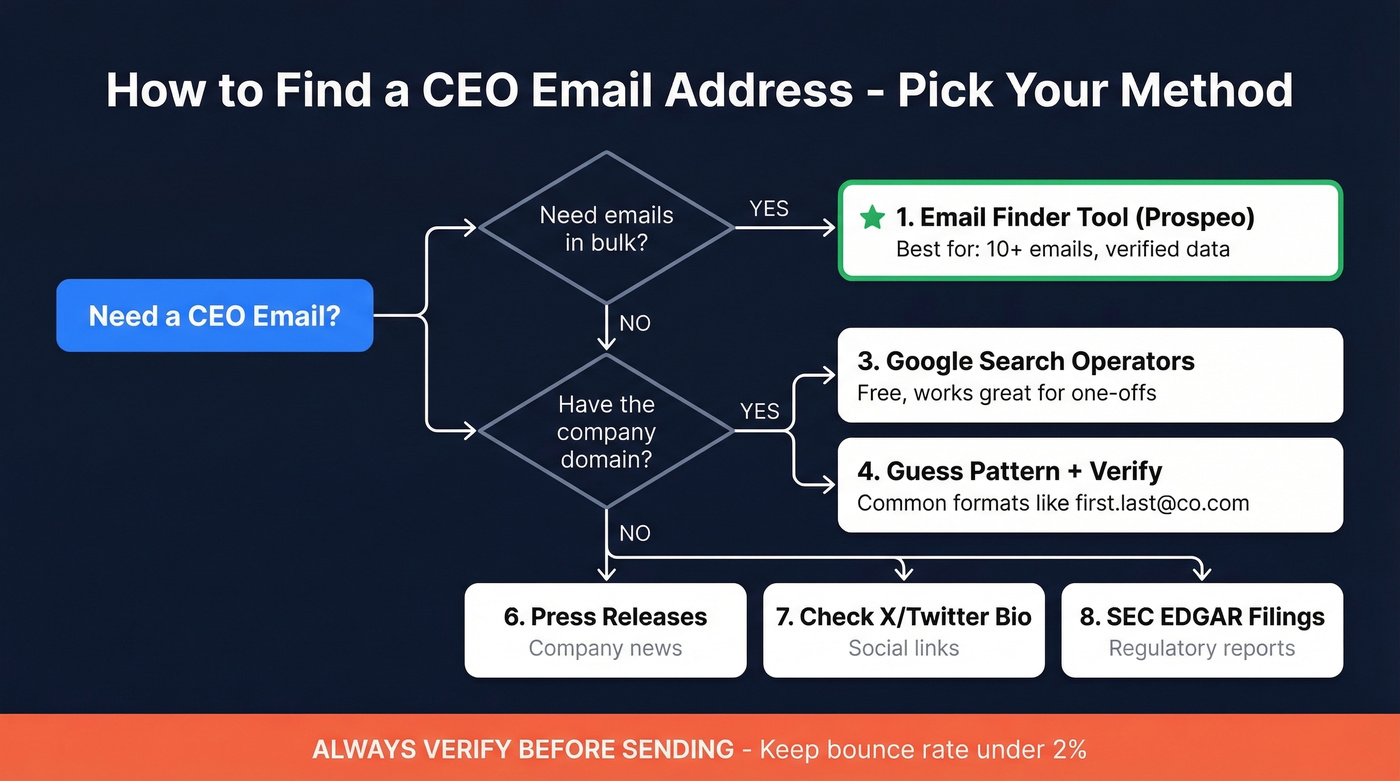
Prospeo covers 300M+ professional profiles with 98% verified email accuracy and a 7-day data refresh cycle (the industry average is six weeks). Every search runs through a 5-step verification process that handles catch-all domains, spam traps, and honeypots before you ever see the result. If you need executive emails in bulk, 30+ search filters - job title, company size, funding stage, buyer intent - let you build targeted CEO lists instead of searching one at a time. The free tier gives you 75 emails per month, and paid plans work out to about $0.01 per email. No contracts, no sales calls required.

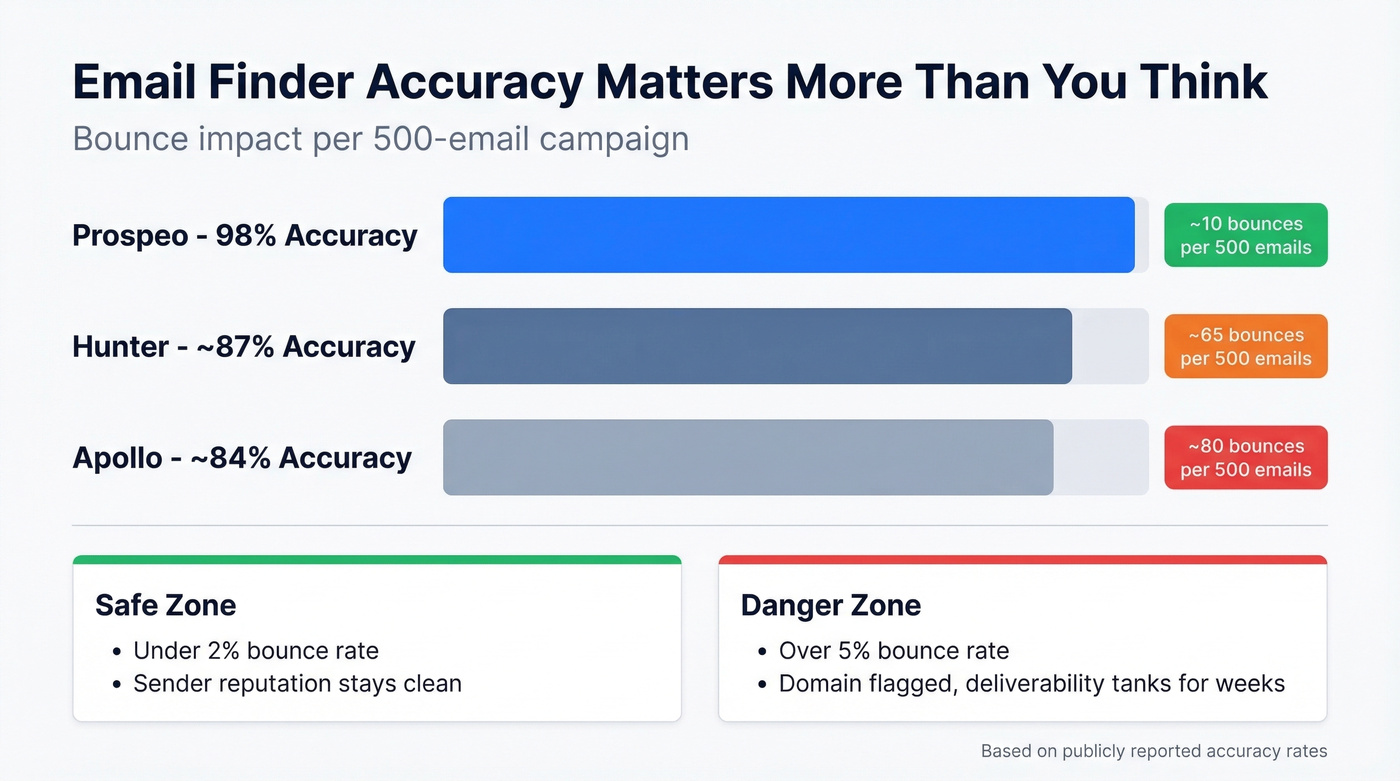
Skip Apollo if you only need emails. Apollo's database covers 275M+ contacts, but accuracy sits around 84%. The consensus on r/sales is that the data "feels bad sometimes" with "lots of bounces on older contacts." Per-seat pricing ($49/user/month) also adds up fast for teams. Hunter works well as a verification layer, but its database is smaller - better as a complement than a primary source. If you're comparing options, see our breakdown of email search tools.
2. Use a Browser Extension
Browser extensions are great for quick lookups while you're on LinkedIn or a company site, but they can be inconsistent on executive contacts. If you're building lists, you'll usually get better results with a dedicated email ID finder workflow.
3. Google Search Operators
Free, immediate, and surprisingly effective. We've used the PDF mining operator to pull CEO emails from investor decks that weren't linked anywhere on the main site. Here are the operators that actually produce results:
Find emails on a company domain:
site:company.com ("@company.com" OR "email" OR "contact")
Target a specific person:
"CEO Name" "@company.com"
Mine PDFs for contact info:
site:company.com filetype:pdf (email OR "@")
Search press/media pages:
site:company.com (press OR "media") ("contact" OR "email")
Cross-reference on Crunchbase:
"CEO Name" site:crunchbase.com email
One note: the cache: operator was deprecated in 2024. Plenty of guides still recommend it. Don't bother.
4. Guess the Email Pattern + Verify
Most companies follow predictable email formats. The three most common are first.last@company.com, first@company.com, and f.last@company.com. The first pattern dominates at SMBs and mid-market companies.
The workflow is simple: guess the format, then verify before sending. Never send to a guessed address without verification - we can't stress this enough. Watch out for catch-all domains, too. These accept any email address at the domain level, so your message won't bounce, but it also won't reach anyone. A good verification tool flags catch-all status so you know what you're dealing with. If you want a deeper walkthrough, see how to check if an email exists.
5. Check the Company Website (and Google Reviews)
Start with the About, Team, and Contact pages. For startups and SMBs, you'll sometimes find the CEO's email listed directly - founders at smaller companies tend to be more accessible. Enterprise CEOs almost never list their email publicly, so don't spend more than two minutes here before moving on.
Two bonus spots most people miss: Google Reviews, where business owners sometimes reply with their direct email visible in the response, and old job postings on the company's careers page that occasionally include a hiring manager email routing straight to the CEO at smaller companies.
6. Search Press Releases and News
PR contacts frequently include executive emails, especially around funding announcements, acquisitions, and product launches. These are great trigger events for outreach anyway. Funding announcements on sites like TechCrunch or PR Newswire sometimes include direct contact blocks with exec emails. This approach is particularly useful when standard finder tools don't surface the address you need.
7. Check X (Twitter) Profiles
Some CEOs list their email in their bio or pinned posts. Hit-or-miss, but worth a 30-second check. Twitter's advanced search also lets you search for @company.com mentions from a specific account, which occasionally surfaces email addresses shared in public replies.
8. Search Public Filings (SEC EDGAR)
For US public companies, SEC filings sometimes contain executive contact information in cover letters and correspondence. Search the company name on SEC EDGAR, browse recent filings, and look for contact blocks. It's niche, but when it works, you're getting a verified corporate address that other prospectors haven't scraped.
9. Ask for a Referral (or Call the Front Desk)
A warm intro from a mutual connection, investor, or board member cuts through inbox noise in a way no cold email can. If you share a connection, use it.
If you don't have a mutual connection, try calling the company's main line and asking to be transferred or for the CEO's direct email. It works one at a time, not at scale - but the conversion rate is unmatched. If calling is part of your motion, build it into your sales prospecting techniques playbook.
Email Finder Tool Comparison
If your deal sizes are under $10k, you probably don't need a $1,000/month data platform. A focused email finder with high accuracy will outperform a bloated all-in-one suite where you're paying for CRM features you'll never touch.
Here's how the major tools stack up for executive email lookup:
| Tool | Free Tier | Paid From | Accuracy | Best For |
|---|---|---|---|---|
| Hunter | 25 searches/mo | $24/mo | ~87% | Domain search + verification |
| Apollo | Limited free | $49/user/mo | ~84% | Large DB + CRM features |
| Reply.io | 200 searches/mo | $49/mo | Not public | Outreach + email finding combo |
| Snov.io | 50 searches/mo | $30/mo | Not public | International leads |
| Voila Norbert | 50 searches/mo | $39/mo | Not public | Simple email lookup |
| GetProspect | 50 searches/mo | $49/mo | Not public | Bulk prospecting |
| Lusha | Limited free | ~$49/user/mo | Not public | Quick direct dials + emails |

The accuracy gap matters more than it looks. At 84% accuracy, you're bouncing roughly 1 in 6 emails. At 98%, you're bouncing 1 in 50. Over a 500-email campaign, that's the difference between a clean sender reputation and a deliverability crisis. For context, outbound agency Stack Optimize maintains 94%+ deliverability and sub-3% bounce rates across all clients using Prospeo's built-in verification. If you're troubleshooting bounces, start with email bounce rate benchmarks and fixes.

Guessing email patterns and mining PDFs works - until you need 50 CEO emails by Friday. Prospeo covers 300M+ profiles with 98% verified accuracy and a 7-day refresh cycle, so you're never emailing a CEO who left the company six weeks ago.
Stop guessing CEO emails. Start verifying them at $0.01 each.
How to Verify Before You Send
Even the best email finder isn't perfect, and the verification landscape is messier than vendors admit. A Hunter benchmark study tested 15 verification tools against 3,000 real business emails. The top accuracy score? 70%. Hunter ran the test using their own activity data to classify valid emails, so take the exact numbers with context, but the broader point stands: standalone verification isn't as reliable as you'd think.
If you want a step-by-step process, use this guide on how to check if an email will bounce before you send.
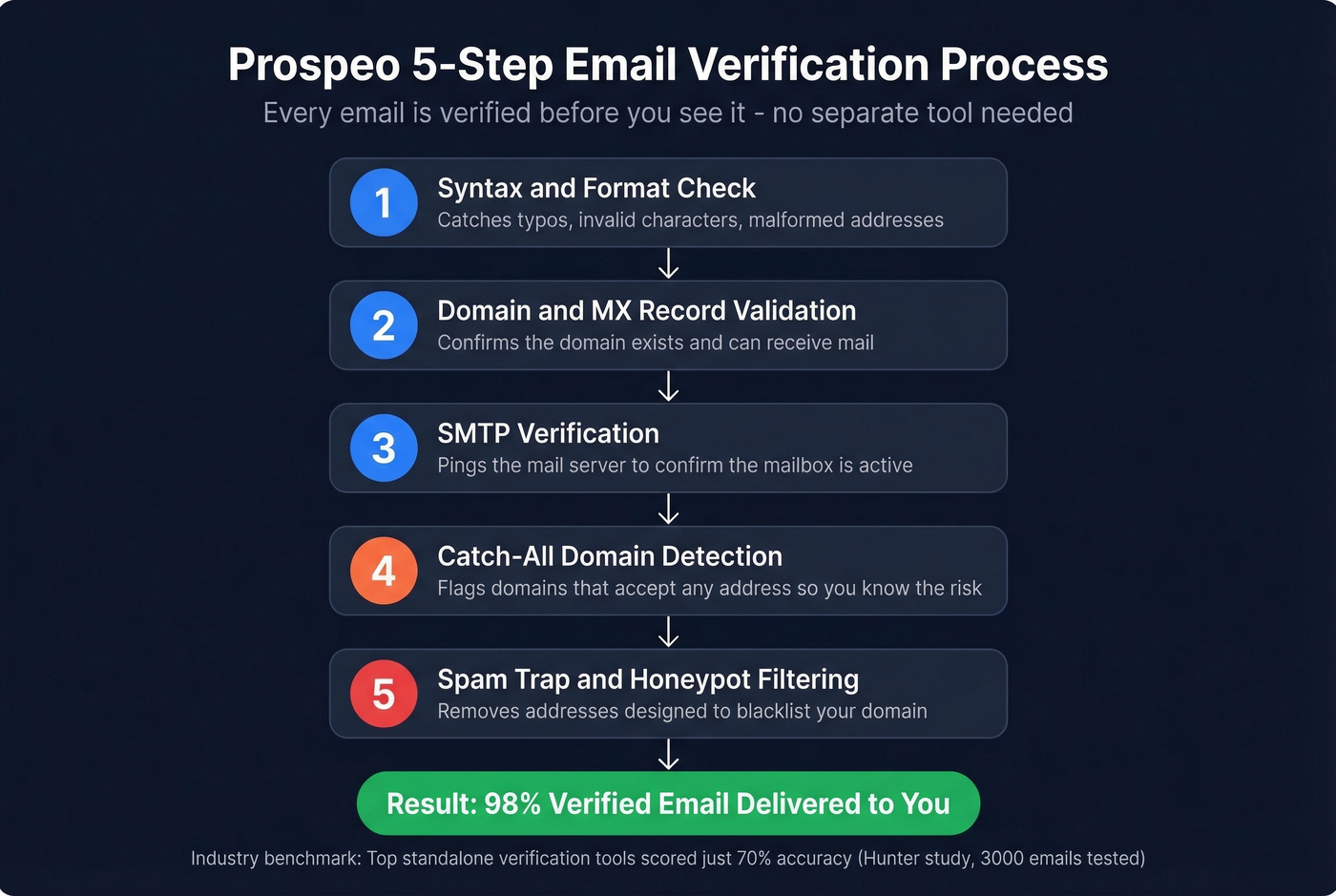
The industry standard is to keep total bounces below 2%. Above 5%, you're risking domain reputation damage that takes weeks to recover from. If you're already seeing issues, focus on how to improve sender reputation before scaling volume.
In our testing, tools that bundle verification with finding consistently outperform the find-then-verify workflow. Prospeo runs every email search through a 5-step verification process - SMTP validation, catch-all detection, spam traps, and honeypots filtering - before you see the result. You don't need a separate verification tool or an extra line item in your budget.
At 84% accuracy, 1 in 6 emails bounces. At 98%, it's 1 in 50. Prospeo's 5-step verification catches catch-all domains, spam traps, and honeypots before you ever hit send - so your domain stays clean and your outreach actually lands.
Get 75 free verified CEO emails this month. No credit card required.
Stay Legal: CAN-SPAM, GDPR, and CASL
Cold emailing a CEO is legal in most jurisdictions. The rules differ, and the penalties are steep if you get them wrong.
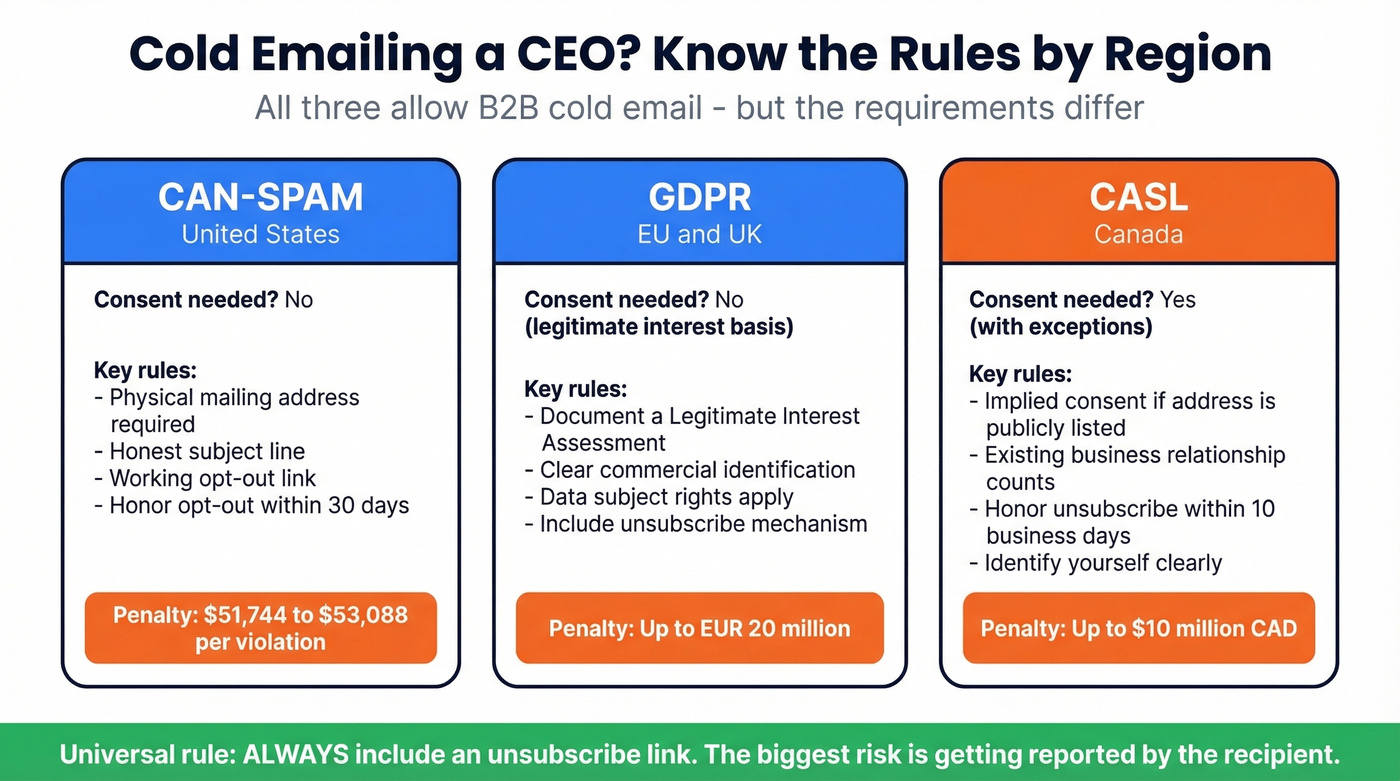
CAN-SPAM (US): Cold email is legal without prior consent. You need a physical mailing address, an honest subject line, clear commercial identification, and a working opt-out honored within 30 days. Penalties run $51,744-$53,088 per non-compliant message.
GDPR (EU/UK): B2B cold email is permitted under the legitimate interest basis (Article 6(1)(f)). Document a Legitimate Interest Assessment before you start. Maximum penalty: EUR 20 million.
CASL (Canada): Consent-first regime. Implied consent applies if the address is conspicuously published or you have an existing business relationship. Honor unsubscribe requests within 10 business days.
The biggest compliance risk isn't a regulator finding you. It's not including an unsubscribe link and getting reported by the recipient. Always include one. If you're building a repeatable outbound motion, follow a modern cold email marketing compliance checklist.
Writing the Email That Gets Opened
CEO inboxes get 100+ emails a day. You have three seconds. Lead with their problem, not your product.
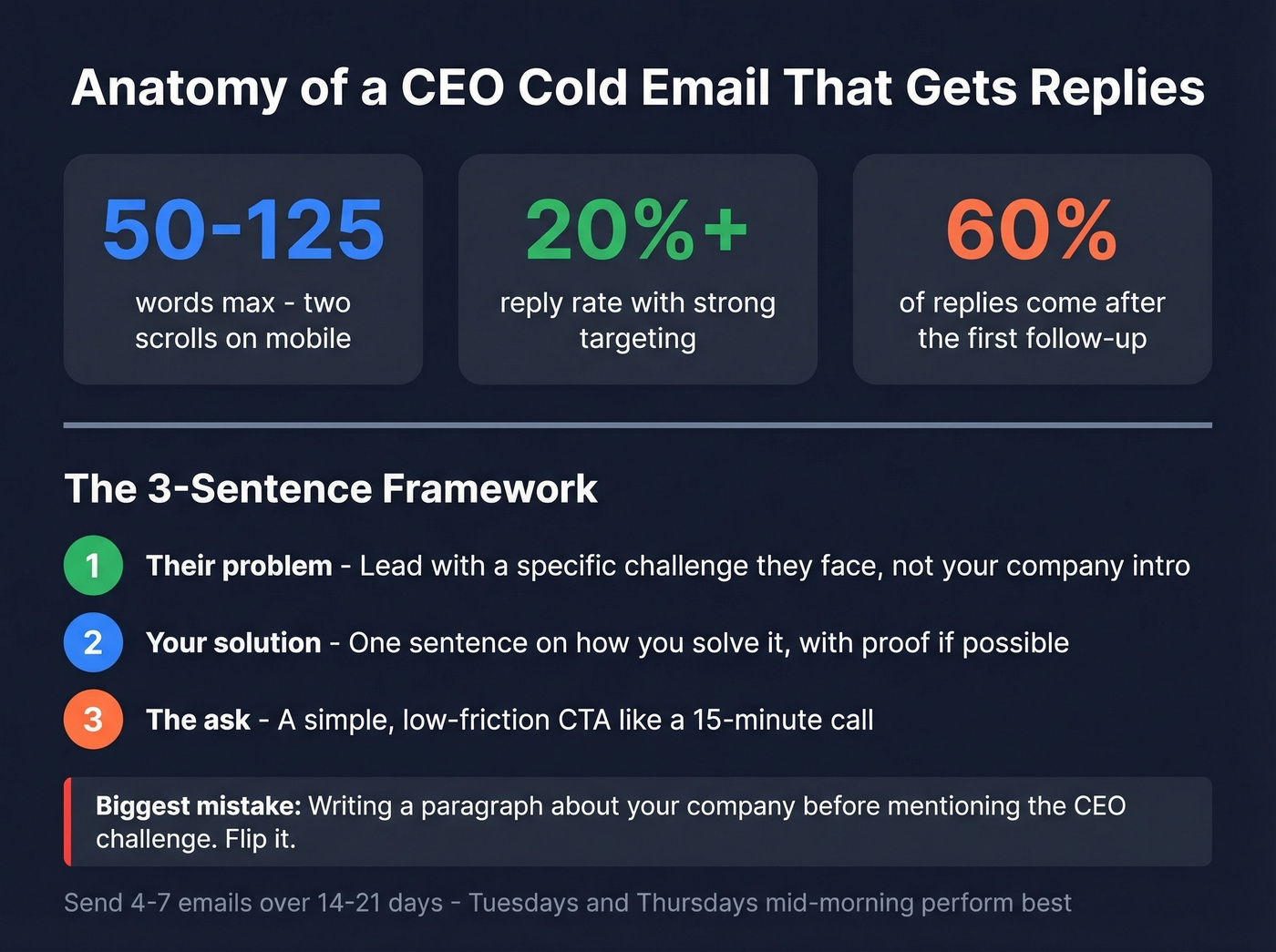
Keep the email between 50 and 125 words - two scrolls or fewer on mobile. The average cold email reply rate sits at 7-10%, but with strong targeting and personalization, 20%+ is realistic. About 60% of replies come after the first follow-up, so plan a sequence of 4-7 emails over 14-21 days. Tuesdays and Thursdays mid-morning tend to perform best, though we've seen execs reply at 11 PM more often than you'd expect. For timing benchmarks, see best time to send cold emails.
The biggest mistake? Writing a paragraph about your company before mentioning the CEO's specific challenge. Flip it. First sentence: their problem. Second sentence: how you solve it. Third sentence: the ask. That's the whole email. If you need help tightening your opener, use these cold email subject line examples.
FAQ
Is it legal to cold email a CEO?
Yes, in most jurisdictions. CAN-SPAM allows unsolicited commercial email with a physical address, honest subject line, and working opt-out honored within 30 days. Under GDPR, B2B cold email is permitted under legitimate interest (Article 6(1)(f)). Always include an unsubscribe link regardless of where the recipient is located.
What's the most common CEO email format?
The most common format is first.last@company.com, followed by first@company.com and f.last@company.com. Always verify the address before sending - guessing without verification risks bounces that damage your sender reputation. A single campaign with a 5%+ bounce rate can flag your domain for weeks.
How do I verify a CEO's email is real?
Use a verification tool that checks SMTP validity, catch-all status, and spam traps. Standalone options include NeverBounce (~$0.008/email) and ZeroBounce (~$10 per 1,000 emails). Tools that bundle verification into the finding step tend to produce better results since the data doesn't go stale between steps.
What's a good free tool to find CEO emails?
Prospeo's free tier includes 75 verified emails per month with full 5-step verification - enough for targeted executive outreach. Hunter offers 25 free searches monthly but caps enrichment. Google search operators cost nothing and can surface emails from press releases, PDFs, and company websites.
How do I reach a CEO at a large enterprise?
Enterprise CEOs rarely list contact details publicly, so website checks won't get you far. Your best options are an email finder tool with a large B2B database, SEC EDGAR filings for public companies, or a warm referral through a mutual connection. Confirm the CEO's full name and current role on professional profiles before running your search.