

How to Find a CEO's Email Address for Free in 2026 (Without Burning Your Domain)
Finding a CEO's email address for free is the easy part. The hard part is getting one that doesn't bounce, tank your domain reputation, and quietly kill every campaign you send afterward.
Here's the good news: 61% of decision-makers prefer cold email over any other channel, and 60% of them receive fewer than 10 cold emails per week. The inbox isn't as crowded as people claim. But 20% of decision-makers say they've never received a cold email that was actually relevant, which tells you where the real bar is - it's not finding the address, it's finding the right address, verifying it, and sending something worth reading.
What You Need (Quick Version)
- Check the company website's About or Team page
- Use a free email finder like Hunter or Apollo
- Search Google with operators:
"CEO name" "email" site:company.com(more ideas in our guide to search for email addresses on Google) - Guess the email pattern and verify with a free tool (see guess email address format)
- Check press releases, SEC filings, or social media bios
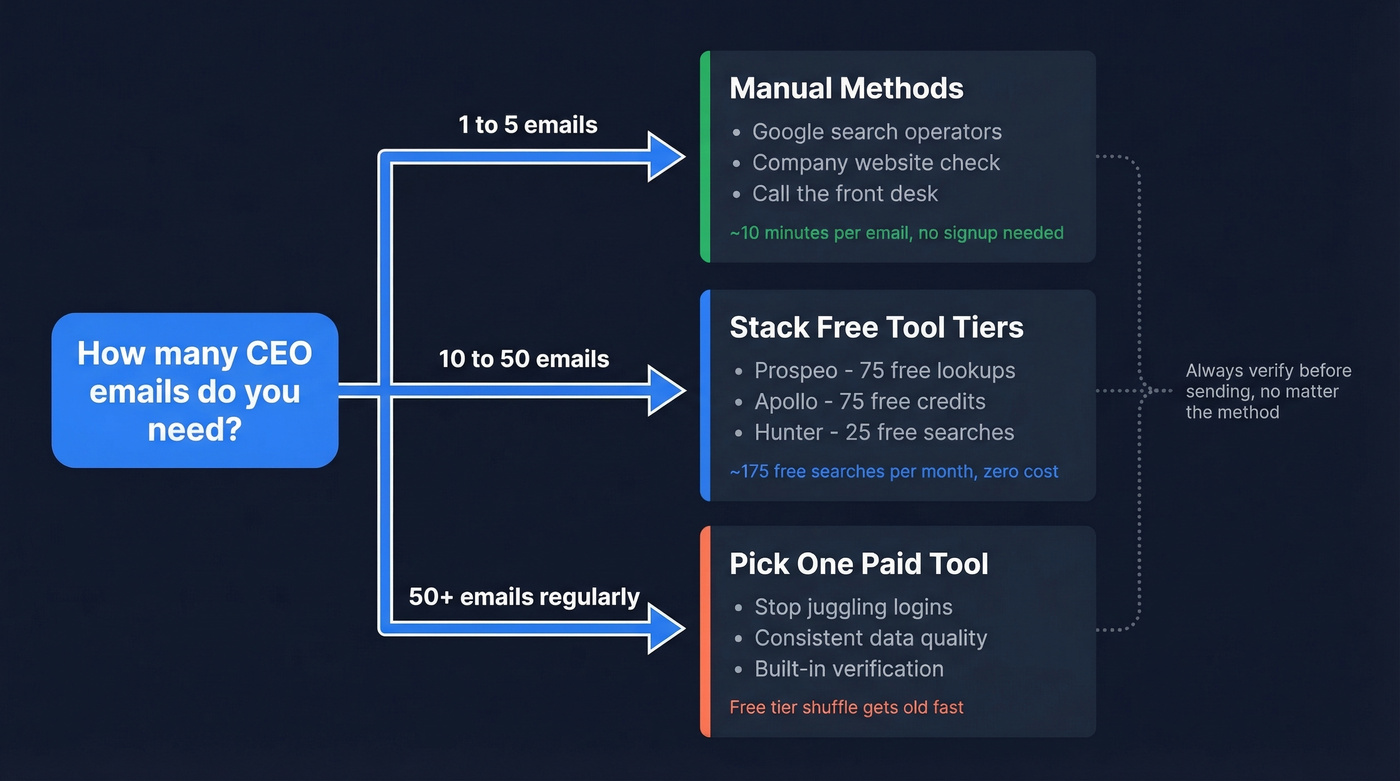
How deep you go depends on volume:
- Need 1-5 emails - Manual methods work fine. No signup required, maybe 10 minutes of work.
- Need 10-50 - Stack free tool tiers. Prospeo gives you 75 free emails per month, Apollo adds another 75 credits, and Hunter contributes 25 searches. That's roughly 175 free searches per month without spending a dollar. (If you want a bigger breakdown, see 100 free email lookup.)
- Need 50+ regularly - Pick one paid tool and stop juggling logins. The free-tier shuffle gets old fast.
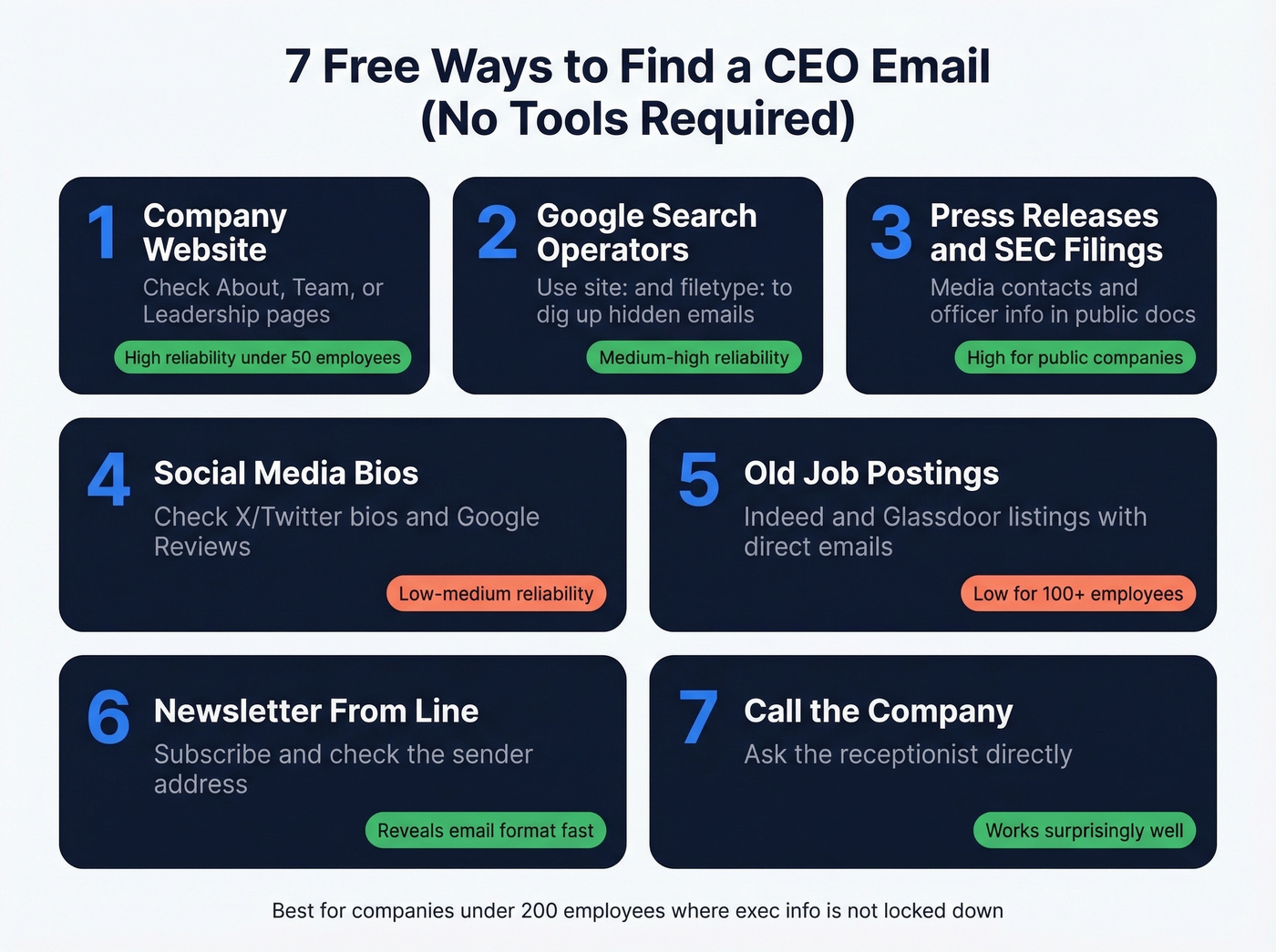
Free Ways to Find CEO Contact Info (No Tools Required)
Before you sign up for anything, these manual approaches work well - especially for companies under 200 employees where executive contact info isn't locked behind enterprise privacy layers.
Company Website
Reliability: High for companies under 50 employees, low for enterprise.
The About, Team, Leadership, or Contact page sometimes lists executive emails directly. Even when the email isn't there, you'll confirm the CEO's full name and title, which every other method on this list requires.
Google Search Operators
Reliability: Medium-high. Works best when the CEO has been quoted in press or published content.
Google is an underrated email finder. Copy-paste these:
"Jane Smith" "email" site:company.com"@company.com" "CEO"site:company.com filetype:pdf "email""Jane Smith" "@company.com"
The filetype operator is the sleeper hit. We've pulled CEO emails from annual reports, press kits, and investor decks that never show up in normal search results - documents most people don't think to check.
Press Releases, SEC Filings & Public Records
Reliability: High for public companies and funded startups.
Press releases frequently include a media contact email, and for smaller companies, that's often the CEO's direct address. SEC EDGAR filings list officer contact information. State Secretary of State business registrations sometimes include registered agent emails, which at early-stage companies is usually the founder.
Social Media & Google Reviews
Reliability: Low-medium. Hit or miss, but worth 2 minutes.
Check X/Twitter bios - some executives list their email. Google Reviews for local businesses sometimes reveal the owner's response patterns that lead to contact info.
Old Job Postings & Industry Directories
Old job postings on Indeed or Glassdoor occasionally include a direct email for applications. Industry directories and association membership pages sometimes list executive contacts that have been sitting there for years. Reliability drops sharply for companies over 100 employees.
The Newsletter From-Line Trick
Subscribe to the company's newsletter. When the first email arrives, check the "From" address. At smaller companies, newsletters often send from the CEO's actual email - or at least reveal whether the format is firstname@ or first.last@. This one trick has saved us hours of guessing on more than a few campaigns.
Call the Company
Look, this sounds old-school, but it works. Call the main line and ask for the CEO's email. Receptionists at small companies will often just give it to you. For larger companies, you'll at least confirm the email format, which narrows your guess-and-verify work to a single attempt.
Best Free Tools for CEO Email Lookup
The r/coldemail community shows what this looks like in practice: people maintain free accounts across multiple platforms and switch depending on which one finds a match. It's messy, but it works when you need to find a CEO email address for free without committing to a paid plan.
Prospeo
Prospeo's free tier gives you 75 email lookups plus 100 Chrome extension credits per month, drawn from 300M+ professional profiles at 98% email accuracy. Every email runs through real-time 5-step verification - catch-all handling, spam-trap removal, honeypot filtering - before it counts against your credits. The 7-day data refresh cycle means you're pulling current addresses, not stale data from six weeks ago. No contract, no credit card required, and paid plans scale to roughly $0.01 per email. The Chrome extension works on company websites and professional profiles - paste a URL and get verified contact data in seconds. (If you're comparing options, see our roundup of B2B email finders.)
In our experience, the real differentiator isn't the database size. It's that you don't waste credits on bad emails, because verification happens before delivery, not after your campaign bounces.

Hunter
Hunter is still the first tool most people think of. The free plan gives you 25 searches and 50 verifications per month. The domain search feature is genuinely useful - plug in a company domain and see every email pattern associated with it. Accuracy sits in the 89-95% range across a database of 100M+ verified professional emails. Paid plans start at $24/mo. Hunter's strength is domain-level pattern detection; its weakness is that 25 searches disappear fast when you're prospecting across multiple companies. (More: Hunter.io domain search.)

Apollo
Apollo's free tier includes 75 credits and access to 275M+ contacts across 70M+ companies. It's more than an email finder - it's a lightweight CRM with sequencing built in. Email accuracy sits around 70-80%, which is lower than the top-tier finders, but the breadth of the database and the built-in workflow tools make it a solid starting point for teams that want everything in one place. Paid plans run $59-149/user/month. (Related: Apollo email finder.)
RocketReach
Use this if you're targeting mid-size SaaS companies and want very high per-lookup accuracy. RocketReach's database covers 700M+ profiles, and one Reddit user said their bounce rate "dropped a lot" after switching to it. Skip this if you need volume - the free tier is only 5 lookups per month. Paid plans start at $39/user/month. (Overview: what is RocketReach.)
Lusha
Lusha gives you 40 free credits per month with 280M+ contacts. Email accuracy sits around 80%. The Chrome extension is smooth and the interface is clean, but the data quality doesn't match the top-tier tools. Paid plans start at $29/user/month. (More: Lusha email finder.)
Snov.io
Snov.io's free plan includes 50 searches per month and bundles a built-in email verifier and drip campaign tool. Accuracy claims vary by dataset. Paid plans start at $30/mo. It's a decent all-in-one for solo founders who want finding, verification, and sequencing in one place. (More: Snov.io email finder.)
Quick Mentions
Reply.io offers 200 free searches per month - the most generous free tier by search count ($49/mo paid). Kaspr has 15 free email credits and focuses on European data, worth trying for EMEA-based CEOs ($59-99/user/mo paid). Skrapp.io provides 100 free credits ($45/mo paid). ContactOut offers 5 daily lookups from professional profiles.
Tool Comparison
| Tool | Free Credits/Mo | Accuracy | Database | Paid From | Best For |
|---|---|---|---|---|---|
| Prospeo | 75 + 100 Chrome | 98% | 300M+ profiles | ~$0.01/email | Accuracy + free volume |
| Hunter | 25 searches + 50 verifs | 89-95% | 100M+ emails | $24/mo | Domain pattern detection |
| Apollo | 75 credits | 70-80% | 275M+ contacts | $59/user/mo | All-in-one CRM workflow |
| RocketReach | 5 lookups | 90-98% | 700M+ profiles | $39/user/mo | Per-lookup accuracy |
| Reply.io | 200 searches | Not public | Not public | $49/mo | Maximum free volume |
| Lusha | 40 credits | 80% | 280M+ contacts | $29/user/mo | Quick backup lookups |
| Snov.io | 50 searches | Mixed | Not public | $30/mo | Solo founder all-in-one |
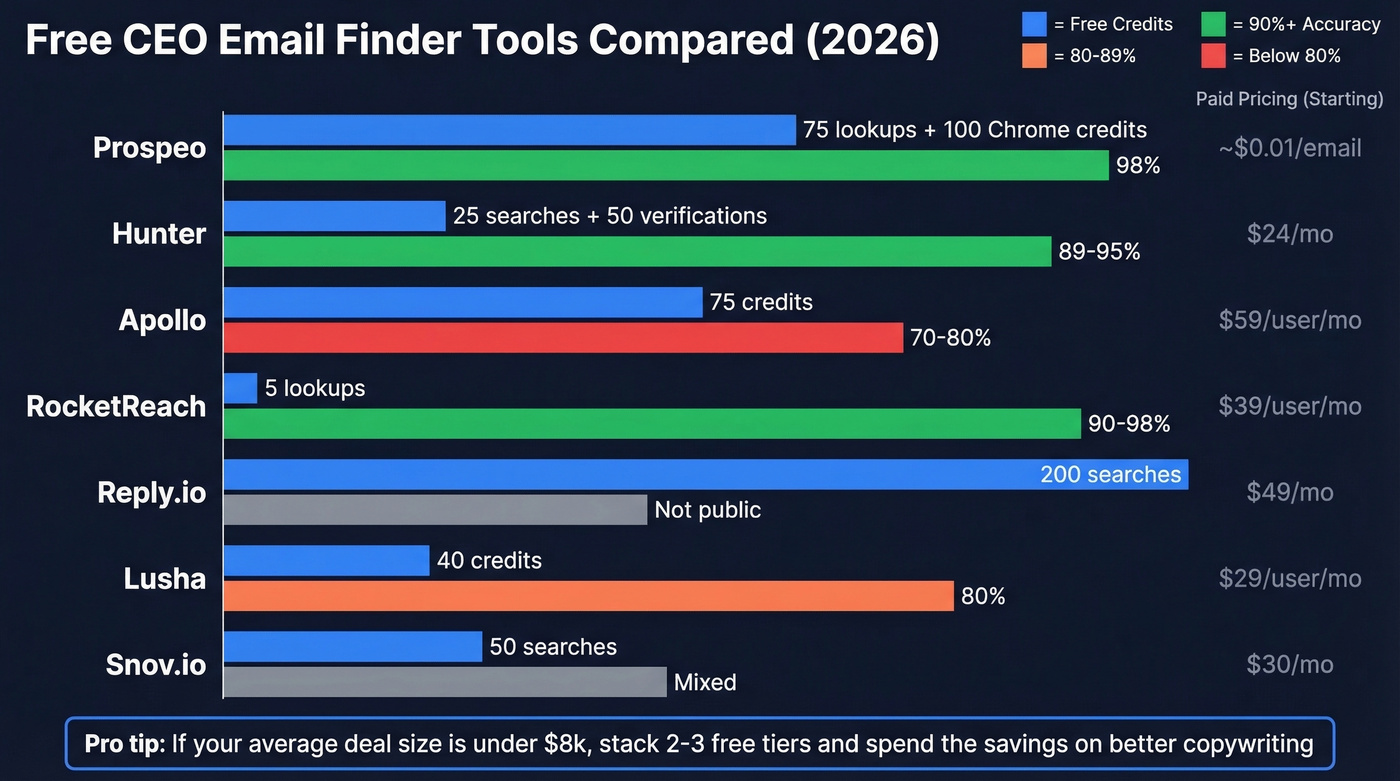
Let's be honest: if your average deal size is under $8k, you don't need a $59/user/month tool. Stack two or three free tiers, verify everything, and spend the money on better copywriting instead.

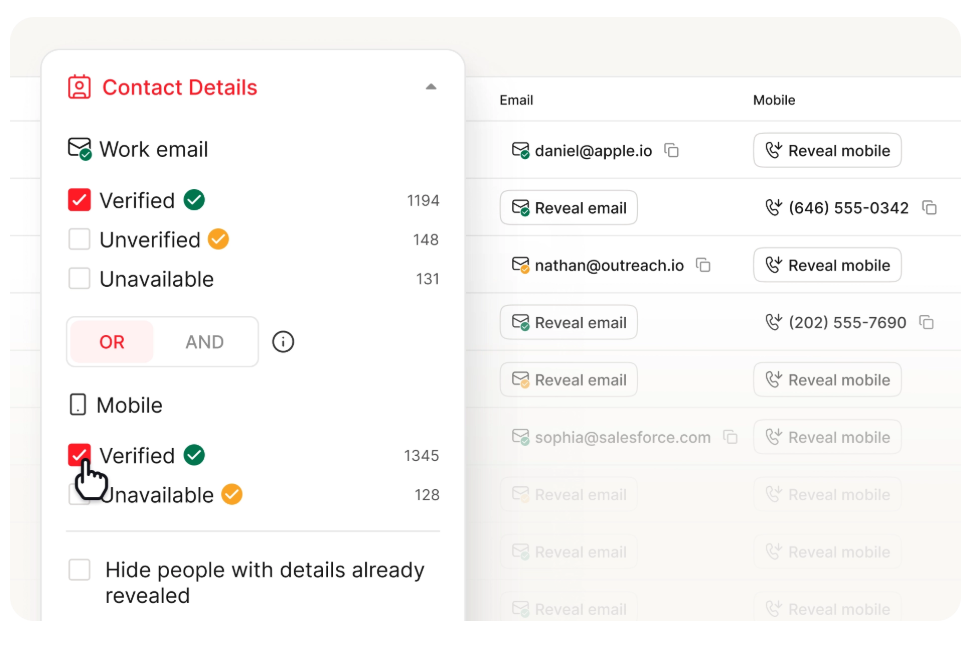
You just read about juggling free tiers across Hunter, Apollo, and RocketReach. Prospeo gives you 75 free email lookups + 100 Chrome extension credits monthly - from 300M+ profiles at 98% accuracy. Every CEO email is verified in real time before it hits your inbox.
Stop burning your domain on guessed emails. Verify before you send.
The guess-and-verify method works for 5 emails. But when you're prospecting dozens of CEOs, you need a tool that handles verification automatically. Prospeo's 5-step verification catches spam traps, honeypots, and catch-all domains - so you never waste a credit on a bad address. Data refreshes every 7 days, not 6 weeks.
Find any CEO's verified email in seconds - no credit card required.
The Guess-and-Verify Method
When no tool returns a result, reverse-engineer the email yourself.
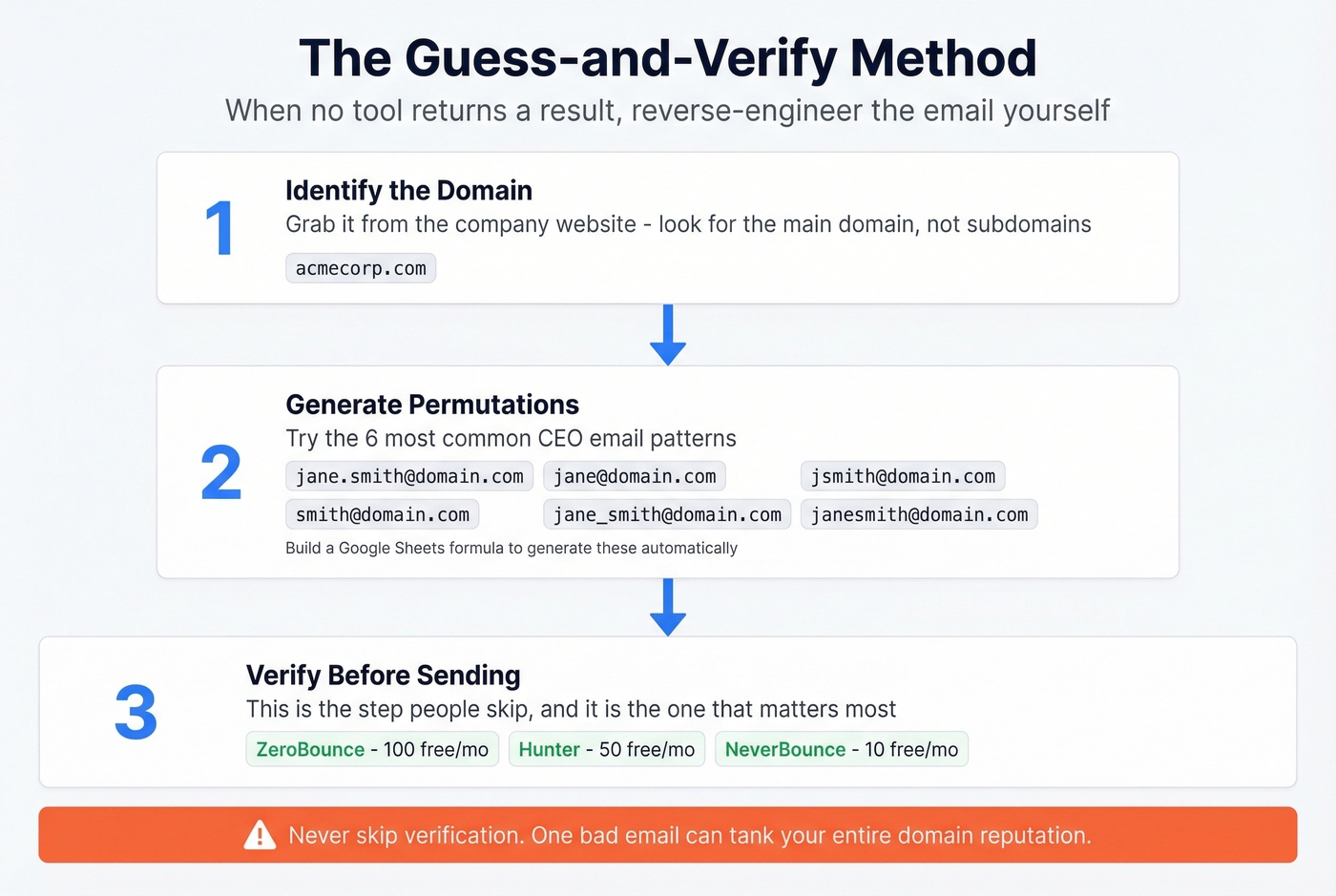
Step 1: Identify the domain. Grab it from the company's website.
Step 2: Generate permutations. Six common CEO email patterns:
firstname.lastname@domain.comfirstname@domain.comfirstinitiallastname@domain.comlastname@domain.comfirstname_lastname@domain.comflastname@domain.com
Use a free permutator like Voila Norbert's tool to generate all variations, or build a simple Google Sheets formula that concatenates first name, last name, and domain across these patterns. Takes about three minutes to set up and you can reuse it forever. (Deep dive: email permutation.)

Step 3: Verify before sending. This is the step people skip, and it's the one that matters most. Run your permutations through a free verifier: ZeroBounce offers 100 free verifications per month, Hunter gives you 50, and NeverBounce provides 10 free credits. The verifier checks syntax, domain validity, and mailbox existence. (More options: best email validation.)
If the company runs a catch-all domain - meaning the server accepts email to any address - verification tools can't definitively confirm the mailbox exists. Start with first.last@ and monitor your bounce rate on a small test batch.
Verification: The Step That Saves Your Domain
Here's the thing: "verified" doesn't always mean verified. One Reddit user described seeing 20%+ bounce rates on emails that tools had labeled as verified. That's domain-reputation-destroying territory.
The industry benchmark is clear: keep total bounces below 2% and hard bounces under 1%. Above that, inbox providers start throttling your domain. Executive contacts are especially risky because roughly 20% of C-suite emails turn over annually as people change companies, domains get restructured, and assistants take over inboxes.
Running every address through a dedicated verifier - even when the finder tool says it's good - catches bad addresses that would otherwise bounce. We've seen teams go from 15% bounce rates to under 3% just by adding a second verification pass before hitting send. Don't skip this step.
Your pre-send checklist:
- Verify every email with a dedicated tool, not just the finder (see email verification for outreach)
- Remove catch-all results unless confirmed via a second source
- Check if the CEO has changed roles in the last 6 months
- Send from a warmed domain with proper SPF/DKIM/DMARC (setup: how to set up SPF and DKIM)
- Start with small batches of 10-20 and monitor bounce rates before scaling
One more thing: if you can only find a generic inbox like info@ or contact@, put the CEO's name in the subject line. Internal teams often forward emails addressed to a specific person. It's not as good as a direct address, but it works more often than you'd expect.
Compliance: Don't Skip This
Finding the email is one thing. Being legally allowed to use it is another.
Do:
- Include a clear unsubscribe link in every cold email - CAN-SPAM requires it
- Use your real business name and physical address
- Document your legitimate interest basis if emailing EU/UK contacts
- Send from a custom domain, not Gmail - custom domains get almost twice the reply rate
Don't:
- Use misleading subject lines. Washington state alone carries a $500 penalty per recipient for this
- Assume "it's a business email, so GDPR doesn't apply." An email containing a person's name is personal data under GDPR, even if you generated it from public information
- Ignore the eight US state privacy laws that went into effect in 2025 and are now actively enforced
The GDPR penalty ceiling is EUR20M or 4% of global revenue. Meta got hit with a EUR1.2B fine for a single violation. You're not Meta, but you also don't want to be the cautionary tale in someone's compliance training deck. If you're emailing CEOs in the EU or UK, make sure your legitimate interest basis is documented and defensible.
FAQ
How can I find a CEO's email address for free?
Start with the company website and Google search operators like "CEO name" "@company.com". If that doesn't work, stack free tiers from email finder tools - Prospeo (75 credits), Apollo (75 credits), and Hunter (25 searches) give you roughly 175 free lookups per month. Always verify before sending.
Is it legal to cold email a CEO?
Yes, in most jurisdictions. CAN-SPAM allows unsolicited commercial email if you include an unsubscribe link, your physical address, and non-deceptive subject lines. In the EU/UK, you need a documented legitimate interest basis under GDPR. Honor every unsubscribe request within 10 business days.
What's the most common CEO email format?
first.last@company.com is the most common format, followed by first@company.com. Smaller companies lean toward firstname@. Always verify before sending - guessing the right format doesn't guarantee the mailbox exists or is actively monitored.
How do I verify a CEO email without paying?
Use ZeroBounce (100 free verifications/month), Hunter (50 free verifications), or NeverBounce (10 free credits). Each tool checks syntax, domain validity, and mailbox existence. For catch-all domains, no free tool gives a definitive answer - send a small test batch and monitor bounces.
What bounce rate is too high for cold email?
Keep total bounces below 2% and hard bounces under 1%. Above those thresholds, inbox providers flag your sending domain and deliverability drops across all campaigns - not just the one with bad addresses. Verify every email before sending, even if the finder tool says it's valid.