

How to Find How Many Employees a Company Has - And Which Sources to Actually Trust
A 30-employee company showing 350 on its public profile. A one-person shop displaying 1,500+. These aren't edge cases - they're common data hygiene failures that happen when platforms rely on self-reported profiles that never get updated after someone leaves.
If you need to find how many employees a company has, the answer depends entirely on which source you check. Poor data quality costs organizations an average of $15M annually, and employee count is one of the most frequently wrong data points in B2B. Here's how to get the real number.
Quick Guide by Company Type
Three paths, depending on your situation:
- Public company? Go to SEC EDGAR, pull the 10-K. Three minutes, free.
- Private company? Check the company website first, then cross-reference with Crunchbase's free tier.
- Need headcount for dozens or hundreds of companies at once? Use a B2B data platform - filter by headcount range instead of looking them up one at a time.
Never trust a single source. Cross-check with at least two.
The Headcount Definition Problem
Before you look anything up, understand why every source gives a different number: they're measuring different things.
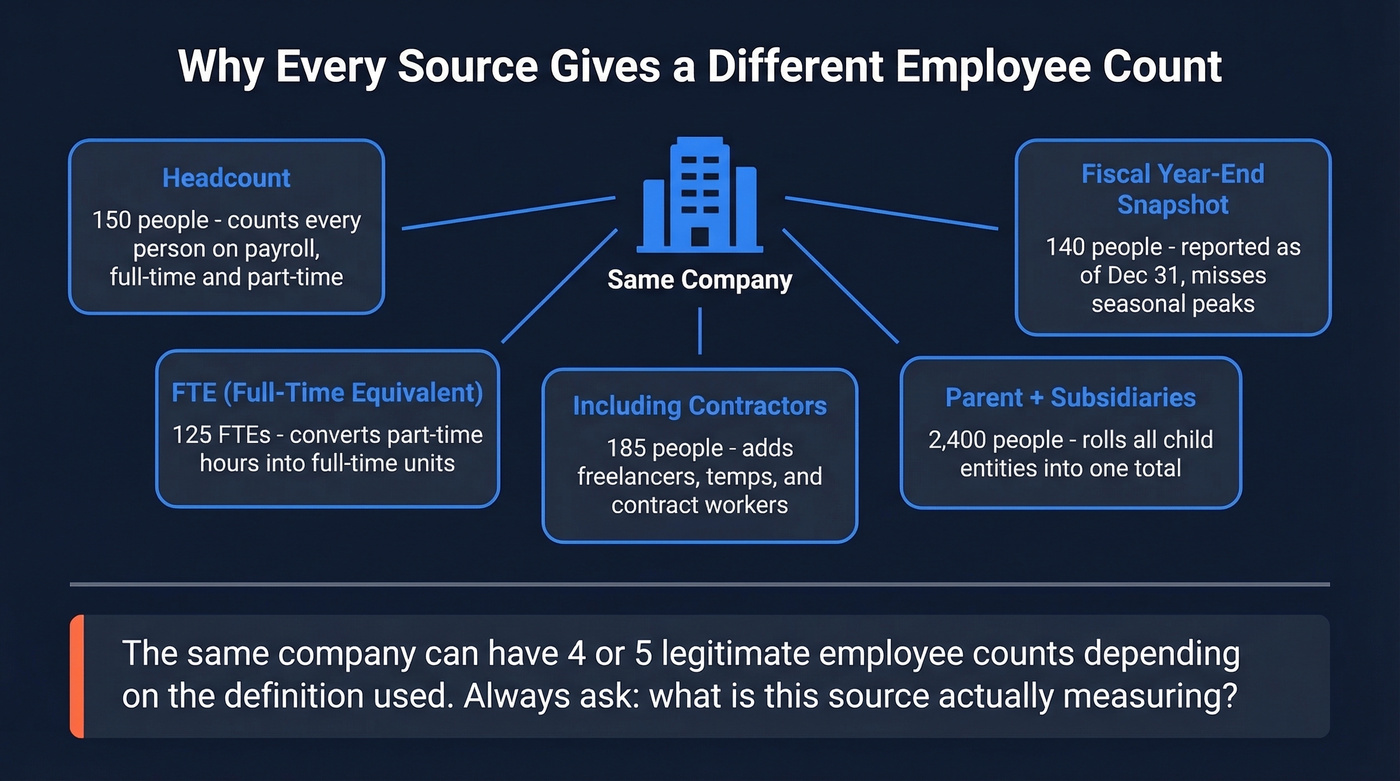
"Headcount" counts every person on payroll - full-time, part-time, doesn't matter. FTE, or Full-Time Equivalent, converts part-time hours into full-time units, so a company with 100 full-time and 50 half-time workers has a headcount of 150 but an FTE of 125. Some sources include contractors. Others don't. Some roll subsidiaries into the parent company's total while others report each entity separately.
Then add seasonal workers, global vs. local counts, and the fact that some companies report "as of fiscal year end" while others report a rolling average. The same company can legitimately have three or four different "employee counts." Keep this in mind as you evaluate every source below.
Free Methods to Look Up Employee Count
LinkedIn Company Pages
Skip this if you need an accurate number for deal qualification, financial modeling, or anything consequential.
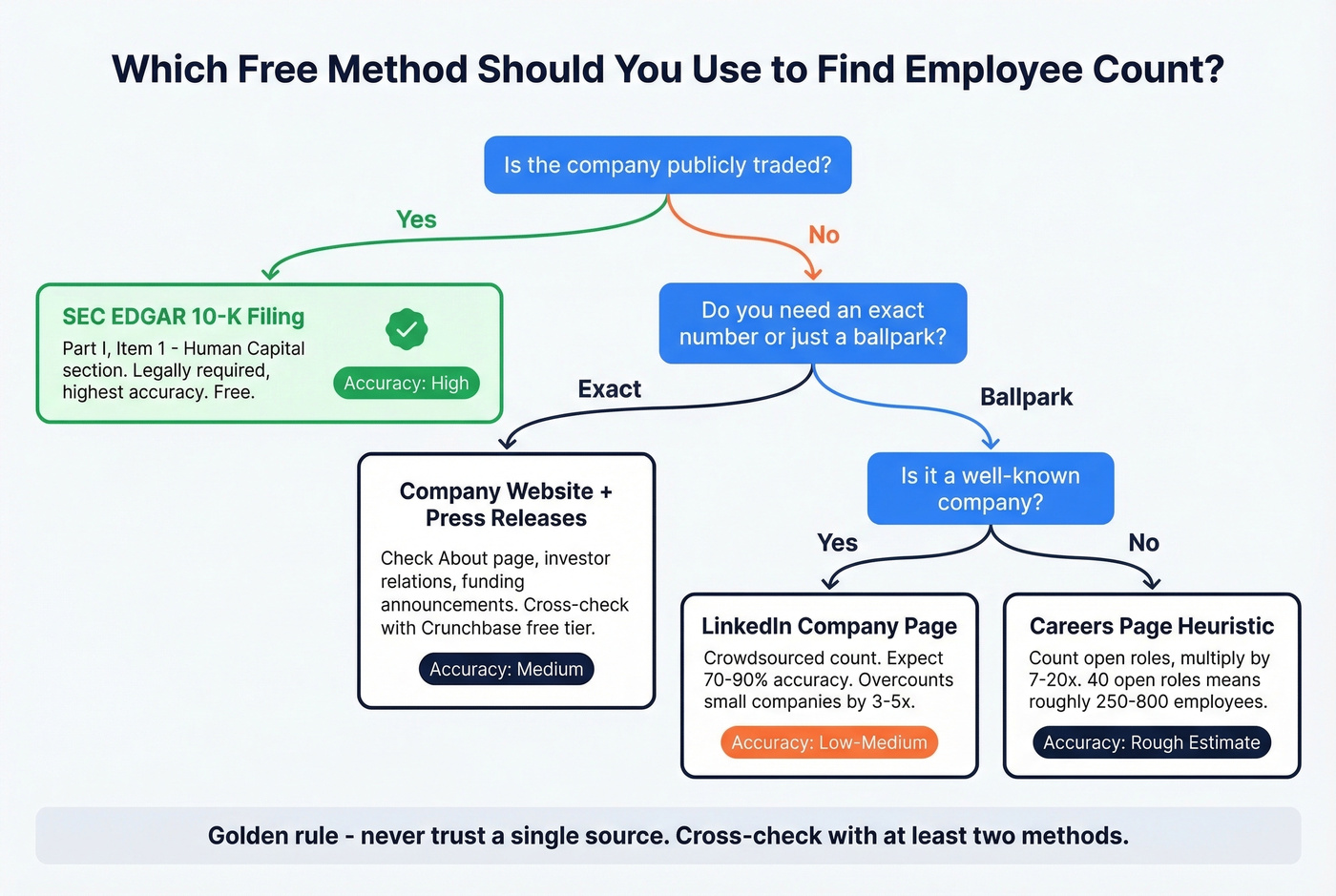
LinkedIn's employee count is crowdsourced - it tallies members who list the company as their current employer. That sounds reasonable until you realize only 10-20% of profiles truly reflect real-world, up-to-date employment. The practical accuracy sits around 70-90% depending on company size and industry, but the failure modes are brutal.
We've seen LinkedIn overcount small companies by 3-5x. Stale profiles from people who left years ago, contractor and intern inflation, mis-assigned profiles where users select the wrong company page during setup - all of it compounds. LinkedIn also revises figures roughly twice a year. Treat it as a starting point, never a final answer.
Company Website and Press Releases
The company's own About page is surprisingly useful. Many companies state their workforce size directly, especially after a funding round or milestone. If they don't list a number, try these approaches:
Count open roles on the Careers page and apply the 5-15% heuristic - open positions typically represent 5-15% of total staff. Forty open roles suggests roughly 250-800 employees. It's rough, but it's directional. Check the investor relations page for annual reports or investor decks, and search press releases for funding announcements that often include headcount. Try "[Company name] employees site:businesswire.com" for quick results.
For physical businesses, you can estimate headcount from square footage: roughly 125-250 sq ft per office employee, 60-90 sq ft per call center agent, and 500-4,000+ sq ft per warehouse worker depending on the operation. Back-of-napkin? Sure. But it catches obvious lies.
The limitation is obvious: companies control the narrative. They'll round up, use the most flattering definition, or simply not update the page for two years.
SEC Filings for Public Companies
This is the gold standard - the only legally required employee count you'll find at scale. The SEC's 2020 amendments to Regulation S-K require public companies to disclose "the number of persons employed by the registrant" in their annual 10-K filing.
Go to EDGAR, search the company name, find the most recent 10-K, and navigate to Part I, Item 1. Look under "Human Capital" or "Business Overview." The number is usually a single line - "As of [fiscal year end], we employed approximately 14,200 full-time employees."
The catch? Disclosure quality is declining. 57% of S&P 100 companies decreased the length of their human capital disclosures year-over-year, and only 14% break out full-time vs. part-time. You'll get a total number, but granularity is hit-or-miss.
Government Data (BLS QCEW)
The Bureau of Labor Statistics publishes the Quarterly Census of Employment and Wages, covering more than 95% of U.S. jobs. It includes establishment counts, monthly employment, and quarterly wages broken down by county, state, and national levels at 6-digit NAICS codes.
QCEW won't tell you "Company X has Y employees." It's aggregated by industry and geography. But it's incredibly useful for sanity-checking claims. If someone tells you a 50-person company dominates a local market with 12,000 industry employees, QCEW can confirm or deny that fast.
AI Tools for a Quick Ballpark
ChatGPT and Claude can give you a rough employee count for well-known companies, but the number is pulled from training data with a cutoff that's months or years stale. Useful as a sanity check. Not a final answer.

Cross-referencing SEC filings, LinkedIn pages, and press releases for every company on your list? Prospeo's 30+ search filters - including headcount range, department headcount, and headcount growth - let you qualify hundreds of companies by size in seconds. Data refreshes every 7 days, not every 6 weeks.
Filter by employee count across 300M+ profiles instead of Googling them one at a time.
B2B Data Platforms for Bulk Headcount Lookup
Looking up one company's headcount is a research task. Qualifying fifty or two hundred companies by size is a workflow problem - and that's where data platforms earn their keep.
Here's the thing: if your average deal size is under $15K, you probably don't need ZoomInfo-level data. A self-serve platform with headcount filters will get you 90% of the way there at a fraction of the cost.
Prospeo covers 300M+ professional profiles with 30+ search filters including headcount growth, department headcount, funding, and revenue - all on a 7-day data refresh cycle versus the 6-week industry average. It also includes real-time email and mobile verification, API access, and CRM/CSV enrichment. There's a free tier with 75 emails and 100 Chrome extension credits per month, and pricing is transparent and credit-based with no contracts.
If you're building lists for outbound, pair headcount filters with a clean ideal customer profile and a repeatable B2B prospecting workflow.

ZoomInfo is the enterprise default - deep firmographic data, strong U.S. coverage. But a mid-market contract runs $15-40K/year and you'll talk to sales before you see anything. Skip this if your team has fewer than 50 reps or your budget is tight.
Apollo and Crunchbase serve different niches. Apollo offers a generous free tier and paid plans from ~$49-99/mo per user - solid for startups that need a quick headcount filter alongside prospecting, though less accurate on employee headcount data than dedicated data platforms. Crunchbase is better for VC-backed and startup data, with Pro at ~$29-49/mo, and it often shows headcount bands instead of a single exact number.
If you're comparing vendors, it helps to understand how data enrichment and data validation impact headcount accuracy over time.
Bad headcount data costs organizations $15M a year. Prospeo's 7-day refresh cycle and 5-step verification process mean you're working with current employee counts - not stale numbers from profiles that haven't been updated in two years. Layer headcount with funding, revenue, and technographic filters to build lists that actually match your ICP.
Get accurate company size data at $0.01 per lead - 90% cheaper than ZoomInfo.
Source Accuracy Comparison
| Source | Best For | Accuracy | Update Freq. | Cost |
|---|---|---|---|---|
| SEC 10-K | Public companies | High (legally required) | Annual | Free |
| Company Website | Any company | Medium | Varies | Free |
| Prospeo | Bulk qualification | Medium-High | 7-day refresh | Free tier + ~$0.01/email |
| ZoomInfo | Enterprise teams | Medium-High | ~6 weeks | ~$15-40K/yr |
| Apollo | Startups, SMBs | Medium | ~4-6 weeks | Free-~$99/mo |
| Crunchbase | Startups, VC data | Medium | Varies | Free-~$49/mo |
| Quick ballpark | Low-Medium | ~2x/year | Free | |
| BLS QCEW | Market sizing | High (aggregated) | Quarterly | Free |
| Direct Outreach | Critical decisions | High | Real-time | Free (time cost) |
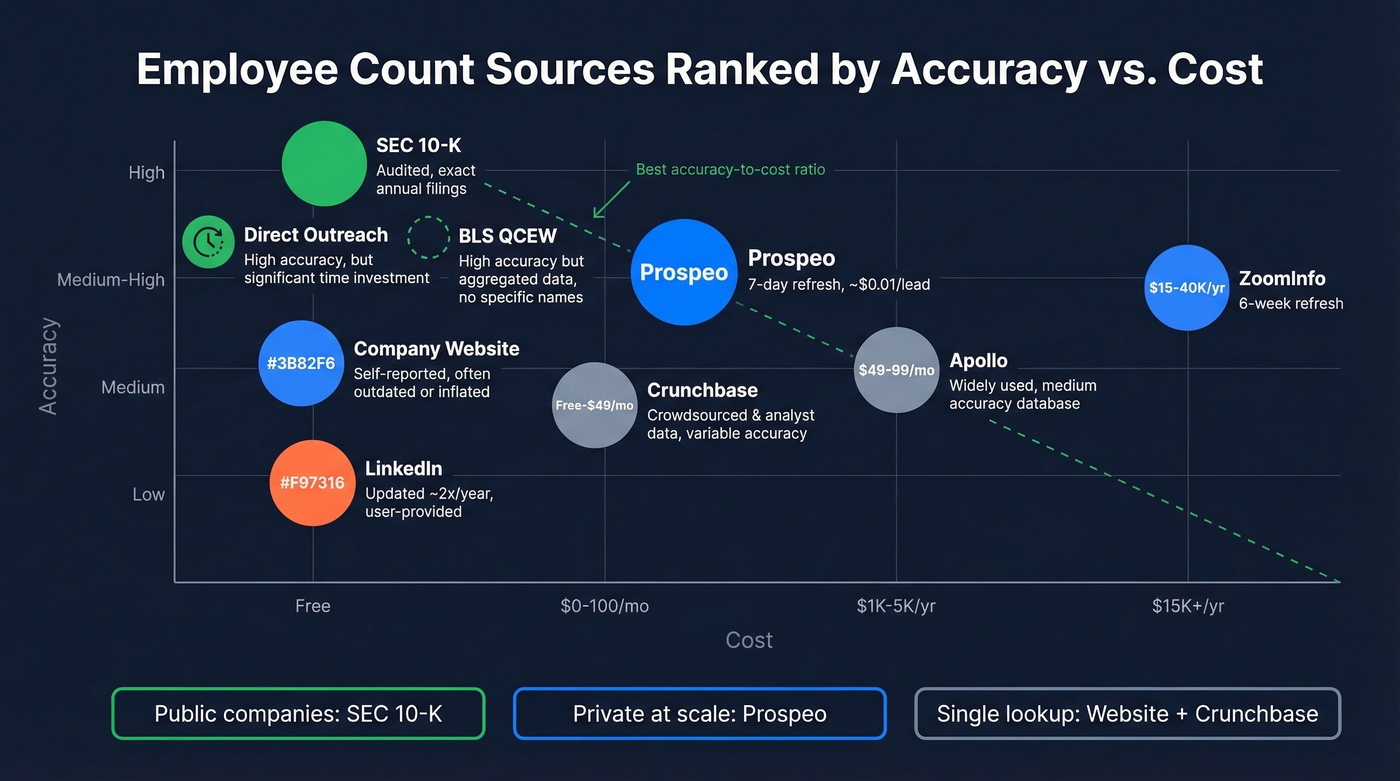
Winners by scenario: For public companies, SEC 10-K is the only answer worth trusting. For private companies at scale, a B2B data platform with headcount filters gives you the best accuracy-to-speed ratio. For a single private company lookup, the company website plus Crunchbase gets you there for free.
Choosing the Right Method

Public company? Pull the 10-K from EDGAR. Done. Cross-check with the company website if you want a second source.
Private, just one company? Check the About page and Careers page first. Cross-reference with Crunchbase's free tier. If you still can't find the number, call the company directly - it's old-school, but it works.
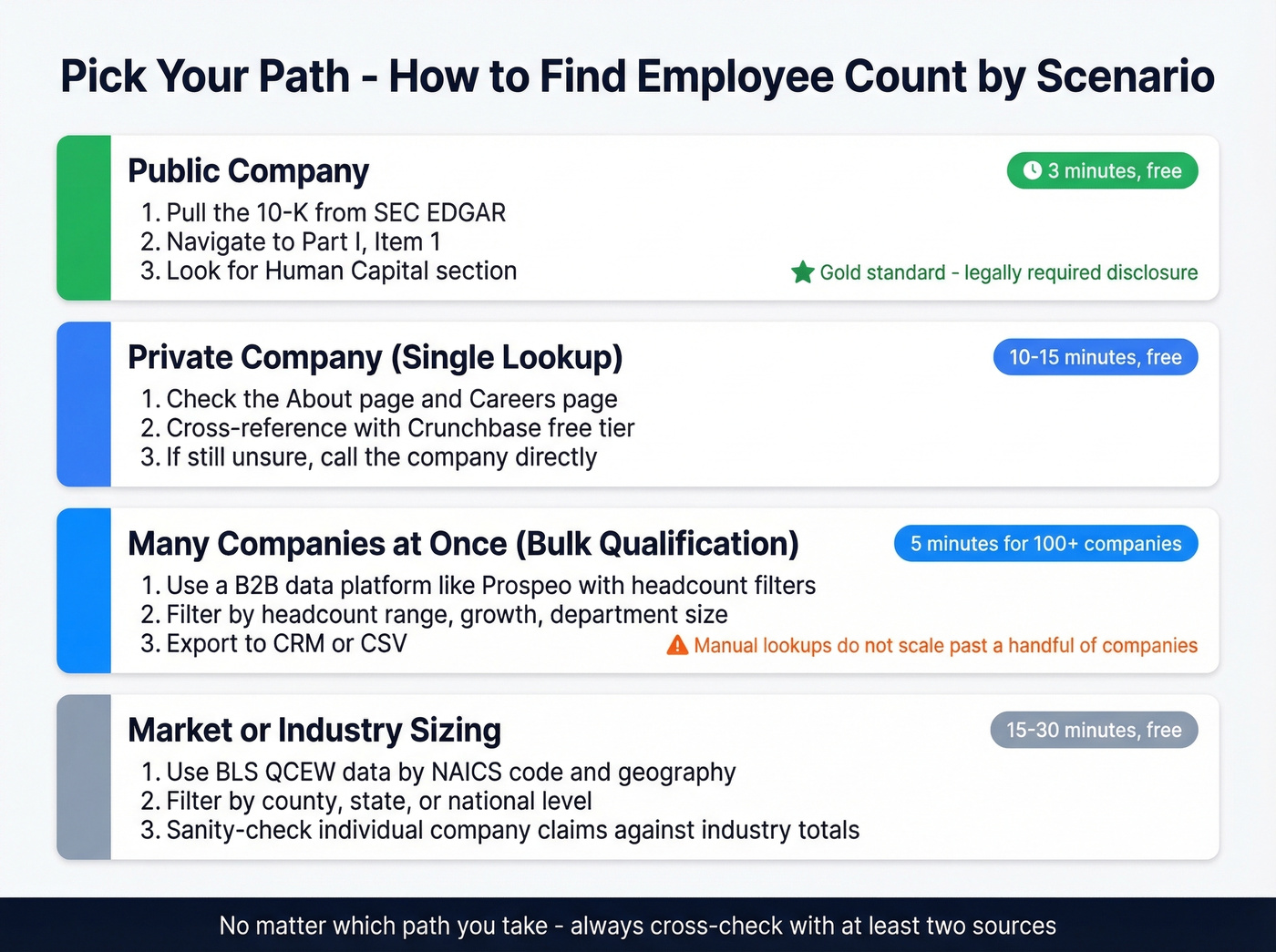
Need headcount for many companies at once? Use a B2B data platform with headcount and growth filters. Manual lookups don't scale past a handful of companies, and we've burned enough hours on that to know.
Sizing a market or industry? BLS QCEW gives you quarterly employment data by industry and geography. It won't name companies, but it'll tell you how big the market is.
For teams that need ongoing monitoring, a data platform with regular refresh cycles is the only practical option. Set alerts or re-run filters quarterly.
If you're a solo founder, don't waste time with enterprise platforms - a self-serve tool or Crunchbase will get you 80% of the way there.
How to Cross-Check and Validate
Let's be honest: most people skip validation and regret it later. We've found that cross-checking SEC filings with the company's About page catches most discrepancies. Use this hierarchy:
- SEC filing - legally required, highest trust
- Company website or press release - self-reported but usually directional
- B2B data platform - modeled from multiple sources, refreshed regularly
- LinkedIn range - crowdsourced, treat as a floor/ceiling estimate
81% of B2B marketers use firmographic segmentation - including company size - as a primary targeting method. If you're one of them, the accuracy of that number directly impacts your pipeline quality. Re-check headcount after major events: funding rounds, layoffs, earnings, or M&A activity. Relying on stale headcount data without periodic validation is one of the fastest ways to degrade your targeting over time.
If you're operationalizing this in RevOps, tie headcount changes to your CRM automation and RevOps tech stack so routing and scoring stay current.
FAQ
Can I find a company's employee count for free?
Yes. SEC EDGAR gives you legally required numbers for public companies at no cost. For private companies, check the About page and cross-reference with Crunchbase's free tier.
How accurate is LinkedIn's employee count?
Typically 70-90% accurate depending on company size and industry. LinkedIn counts members who list the company as their current employer, but stale profiles, contractors, and mis-assigned company pages inflate the number significantly for smaller firms. Always cross-check with at least one other source.
Where is employee count in a 10-K filing?
Part I, Item 1, under "Human Capital" or "Business Overview." It's usually a single line stating total employees as of fiscal year end. On EDGAR, search the company, open the most recent 10-K, and use Ctrl+F for "employees" or "human capital."
How do I find employee count for a specific office location?
No single public source provides location-level headcount reliably. Your best options are calling the company directly, checking local business journals, or using a B2B data platform with department and location-level filters.
What's the difference between headcount and FTE?
Headcount counts every person regardless of hours - full-time, part-time, all equal one. FTE converts part-time hours into full-time units. A company with 100 full-time and 50 half-time employees has a headcount of 150 but an FTE of 125. SEC filings usually report headcount; internal HR systems often track FTE.