

How to Find Out an Email Address: 7 Methods for 2026
You need someone's email address. Maybe it's a VP of Engineering at a target account, maybe it's a prospect who ghosted you on every other channel. Half the advice out there is just thinly disguised product pages. Here's what actually works - from free manual methods to tools that cost a penny per email, plus the accuracy data nobody else shows you.
What You Need (Quick Version)
If you need 1-5 emails, free methods will get you there. Google search operators, company websites, and social bios cost nothing and work surprisingly often.
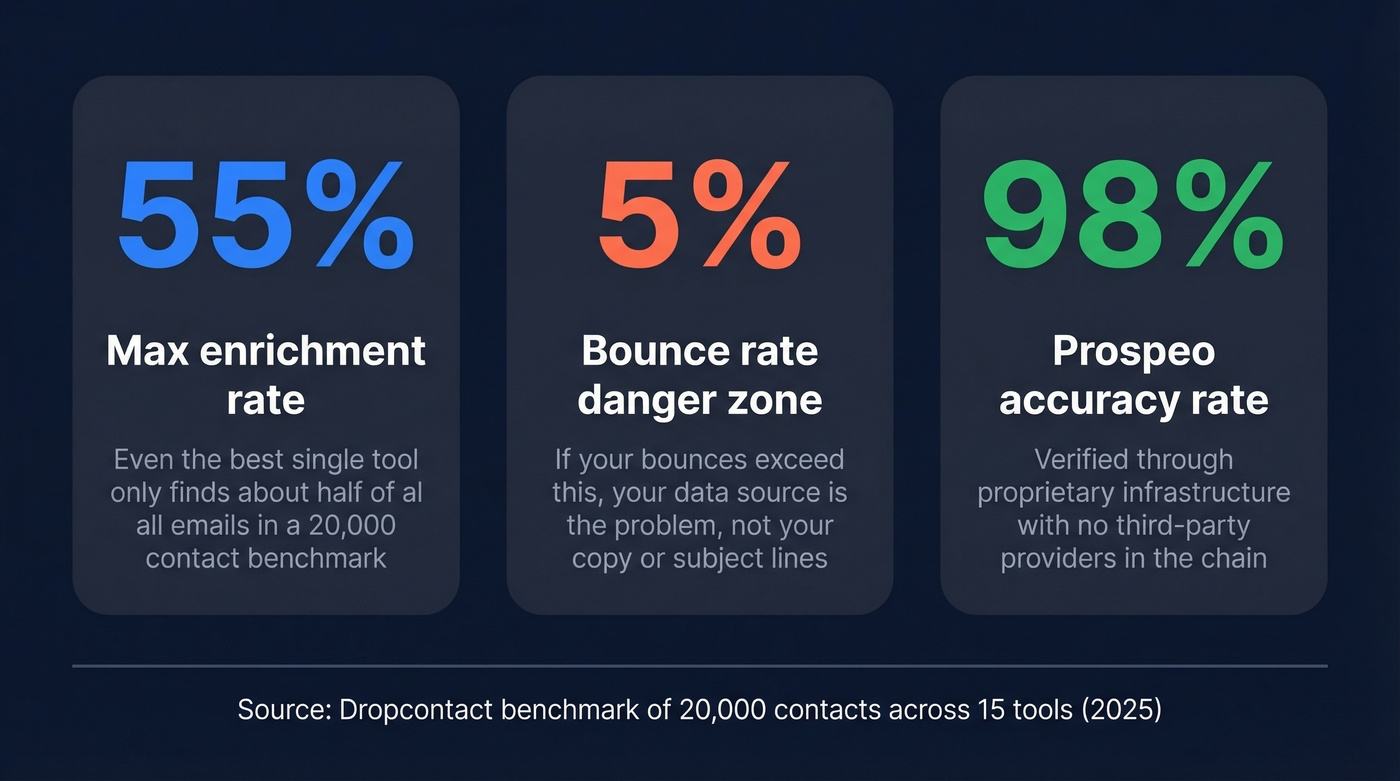
Always verify before sending. If your bounce rate is above 5%, your data source is the problem - not your copy, not your subject lines, not your sending schedule. Fix the data first.
Finding Your Own Email Address
This sounds obvious, but it's a real search intent - and the fix takes 30 seconds.
Gmail (web): Click your profile icon in the top-right corner. Your email address sits right below your name. If you've got multiple accounts, the account switcher shows all of them.
Outlook (desktop): Go to File > Account Settings > Account Settings. Your email address is listed under the Email tab.
Apple Mail (Mac): Open Mail > Preferences > Accounts. Each configured email address appears in the left sidebar.
iOS: Settings > Mail > Accounts. Tap any account to see the associated address.
Android: Open the Gmail app > Settings > tap the account name at the top.
If you've lost track of an old address, try your provider's account recovery flow. Google's recovery page lets you search by phone number or recovery email. Also check whether you're still logged in on an old device or browser - that's often the fastest path back.
How to Find Out Someone Else's Email Address
The best approach is sequential: start with what's free and easy, then escalate to tools when manual methods run dry.
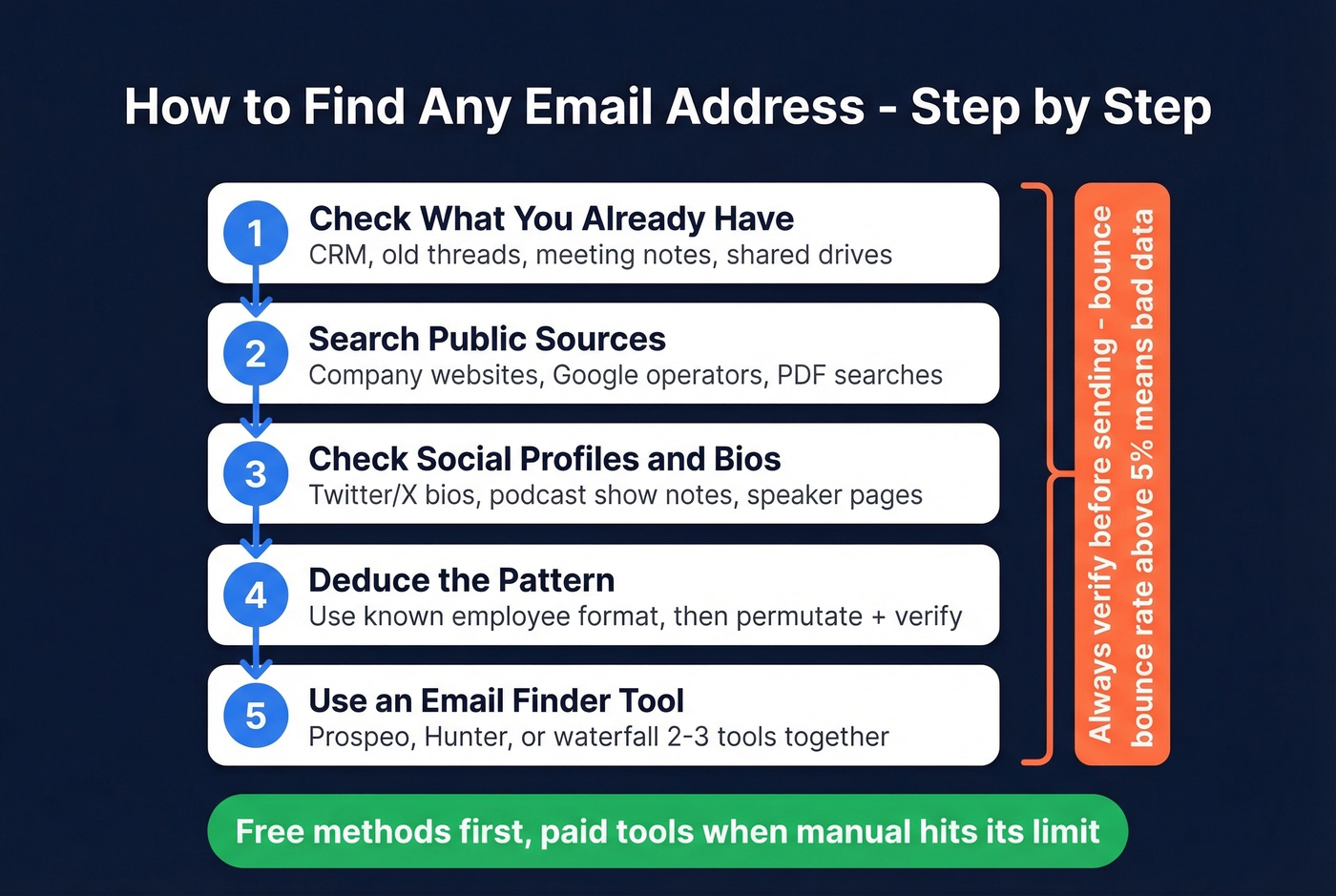
Check What You Already Have
Before you search anywhere, check your own systems. Your CRM might already have the contact from a past interaction. Search old email threads - maybe a colleague corresponded with this person two years ago. Check shared drives and meeting notes for business cards or attendee lists.
One warning: generic inboxes like contact@company.com or info@company.com are functionally useless for outbound. The chances of a decision-maker reading those are close to zero. You need a personal address.
Search Publicly Available Sources
Most guides skip this and jump straight to tools, but a surprising number of email addresses are sitting in plain sight - on company websites, conference speaker pages, and public documents. Searching these public channels first saves you credits on paid tools.
Company websites are your first stop. Check the About, Team, Leadership, and Contact pages. Smaller companies especially tend to list individual addresses for key staff.
Google search operators are the power move here. These narrow your search to exactly what you need:
"Jane Smith" "@acme.com"- searches for the person's name alongside their company email domain[site:acme.com "@acme.com"](https://developers.google.com/search/docs/monitor-debug/search-operators/all-search-site)- finds any address published on the company's own sitefiletype:pdf "@acme.com"- catches addresses buried in PDFs like whitepapers, press releases, and conference proceedings
These operators work best in combination. If site:acme.com returns nothing, try the PDF search - companies often publish contact details in documents they'd never put on their homepage.
Check Social Profiles and Bios
Social platforms require a different search workflow than Google. On Twitter/X, don't just check the bio line - expand the "About" section and look at pinned tweets, which founders often use to share contact info. For conference speakers, skip the event homepage and go straight to the session detail page or the speaker's submitted bio, since those pages often include contact details that the main listing omits. Podcast show notes are another goldmine: hosts routinely link guest contact info in episode descriptions.
This method won't scale, but for high-value targets, a five-minute manual search often beats any tool.
Deduce the Address from the Pattern
If you know someone's name and company domain, you can often figure out their email address. Don't guess randomly - the patterns are well-documented.
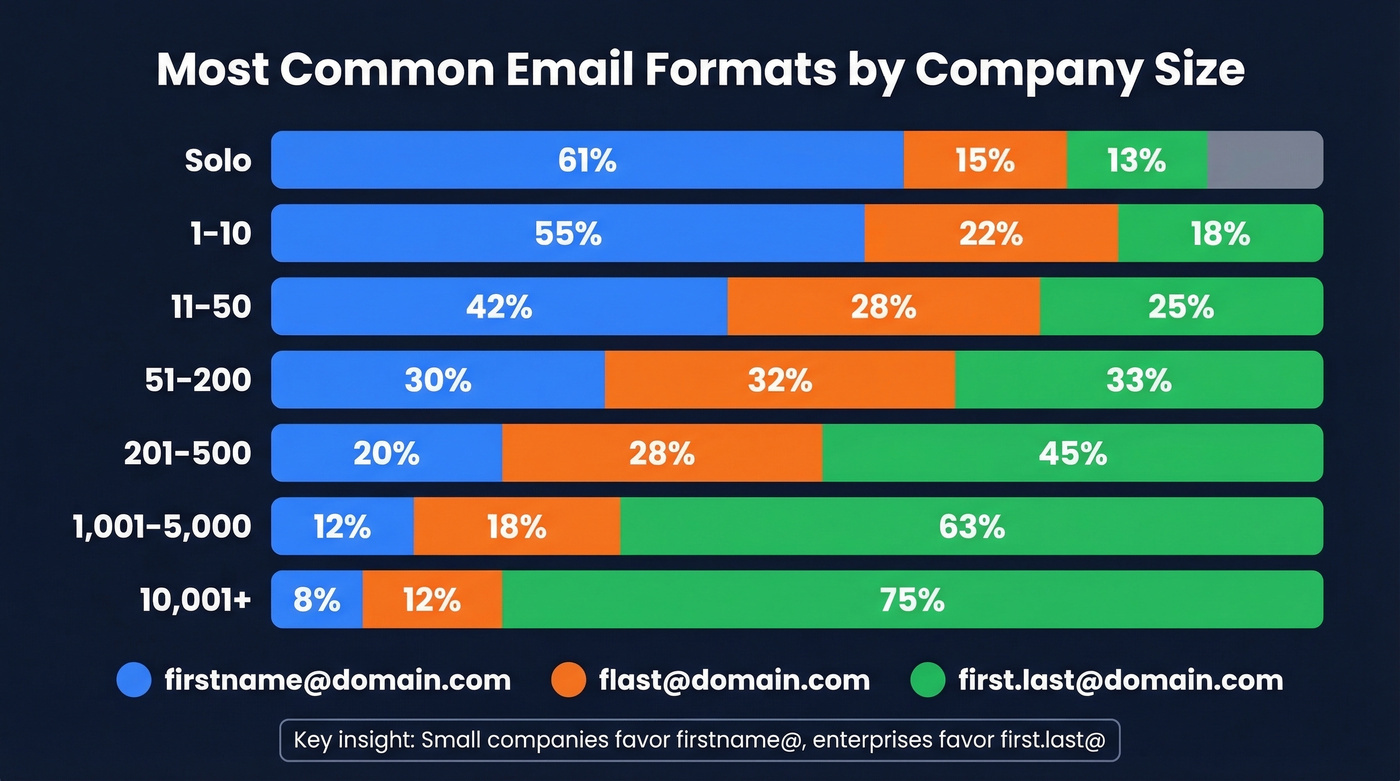
Small companies (Solo to 50 employees):
| Company Size | #1 Format | #2 Format | #3 Format |
|---|---|---|---|
| Solo | firstname@ (61%) |
flast@ (15%) |
first.last@ (13%) |
| 1-10 | firstname@ (71%) |
flast@ (13%) |
first.last@ (10%) |
| 11-50 | firstname@ (42%) |
flast@ (27%) |
first.last@ (23%) |
Mid-size to enterprise (51+ employees):
| Company Size | #1 Format | #2 Format | #3 Format |
|---|---|---|---|
| 51-200 | flast@ (42%) |
first.last@ (30%) |
firstname@ (17%) |
| 201-500 | flast@ (45%) |
first.last@ (35%) |
firstname@ (7%) |
| 1,001-5,000 | first.last@ (48%) |
flast@ (35%) |
firstname@ (4%) |
| 10,001+ | first.last@ (56%) |
flast@ (22%) |
firstname@ (7%) |
Once you confirm one employee's email format at a company, you've unlocked the pattern for the entire org. Find the marketing coordinator's address on a press release, and you can apply it to every other employee.
Quick terminology check: a permutator generates possible email combinations from a name and domain - it's a guessing engine. A finder searches databases and web sources to locate an existing address. A verifier checks whether a specific address can receive mail. You usually need at least two of these three. A permutator without verification is just rolling dice.
Use an Email Finder Tool
When manual methods hit their limit - and they will, especially at scale - email finder tools take over. But here's the thing: even the best tools don't locate every address. A benchmark of 20,000 contacts across 15 tools found that the top performer only achieved about 55% effective enrichment. The rest either couldn't find the email or returned bad data.
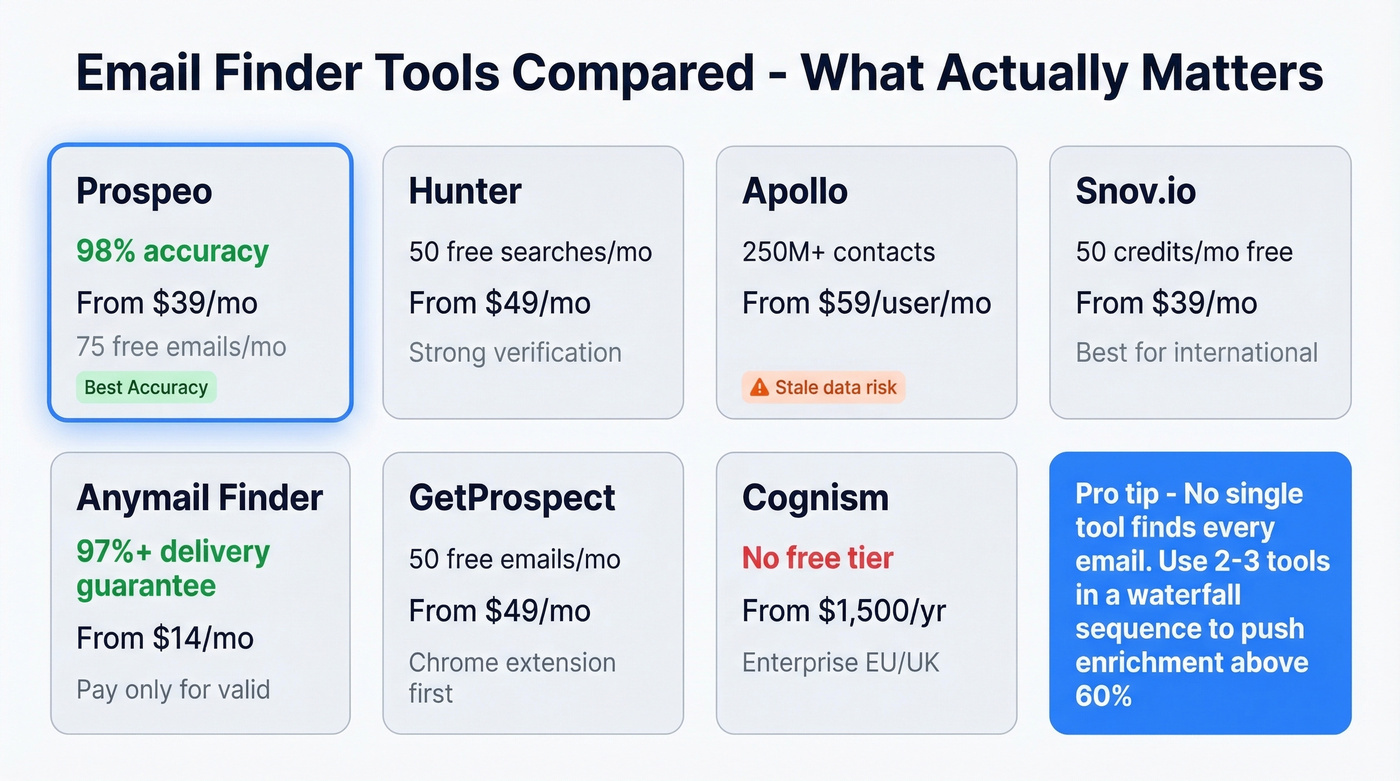
That means tool selection matters enormously. You're choosing between coverage and accuracy, and those two things rarely come in the same package. If you're comparing vendors, start with email search tools and data enrichment services to understand what “coverage” really includes.
| Tool | Free Tier | Paid From | Best For | Accuracy Note |
|---|---|---|---|---|
| Prospeo | 75 emails/mo | ~$39/mo | Verified accuracy | 98% email accuracy |
| Hunter | Up to 50 searches/mo | $49/mo | Verification layer | Strong verification |
| Apollo | Limited free | $59/user/mo | Large database | Stale data risk |
| Snov.io | 50 credits/mo | $39/mo | International leads | Strong outside the US |
| GetProspect | 50 emails/mo | $49/mo | Quick lookups | Chrome-first |
| Kaspr | Free plan | $59/mo | One-off searches | Basic verification |
| Anymail Finder | 100 free credits | $14/mo | Pay-for-valid | 97%+ delivery guarantee |
| Cognism | None | ~$1,500/yr | EU/UK compliance | Enterprise-grade |
Prospeo leads this list for a reason. Its 143M+ verified email database runs on proprietary email-finding infrastructure - no third-party providers in the chain, which means the verification pipeline is end-to-end controlled. We've seen the 98% accuracy rate hold up in production: customers like Meritt went from a 35% bounce rate to under 4% after switching, and their pipeline tripled from $100K to $300K per week. The 7-day data refresh cycle keeps records current while most competitors refresh every 4-6 weeks. You get 75 free emails per month, and paid plans start around $39/mo.

Hunter is the other strong option, especially if you already have addresses and need to verify them. It's popular and known for solid verification accuracy. The tradeoff is database size - Hunter works better as a verification layer than a primary prospecting source. Free tier gives you up to 50 searches per month, paid plans from $49/mo. If you're evaluating options, see Hunter alternatives and the deeper Hunter vs SignalHire breakdown.

Apollo brings one of the biggest databases - 250M+ contacts - and a generous free tier that makes it tempting. But we've seen teams run into real problems with data freshness. The consensus on r/agency is that Apollo's data "feels bad sometimes" with "lots of bounces on older contacts." For fast-moving industries where people change jobs frequently, Apollo's stale records will hurt your deliverability. Paid plans start at $59/user/mo.
Snov.io is the sleeper pick for international prospecting. It bundles basic email automation, charges on credits rather than per-seat, and starts at $39/mo. If your outbound spans multiple geographies, Snov deserves a trial.
GetProspect offers a Chrome extension that overlays contact data while you browse professional profiles and company websites. The 50 free emails per month make it a decent supplement for one-off lookups. Kaspr fills a similar niche with a free plan and quick lookup functionality, including 5 phone credits and 5 direct email credits per month.
Anymail Finder takes a different approach: you only pay for verified results, with a 97%+ delivery guarantee on emails returned as Valid. Starting at $14/mo, it's the budget pick if you'll accept lower coverage. Cognism is the enterprise play for EU/UK data, with strong GDPR compliance and human-verified mobile numbers - but at ~$1,500/year minimum, it's priced for teams, not individuals.
Skip Cognism if you're a solo founder or small team. The data quality is real, but you'll never use enough of it to justify the price.
Pro tip: waterfall enrichment. No single tool finds every email. Sophisticated teams run contacts through 2-3 tools sequentially - if Tool A misses, Tool B catches it. This approach can push effective enrichment rates above 60%, well beyond what any single provider achieves alone. Sequence your cheapest tool first to keep costs down. (If you want a step-by-step workflow, see lead enrichment and lead generation workflow.)

You just read that the best email finder tools top out at 55% enrichment - and most return stale data. Prospeo's proprietary infrastructure verifies 143M+ emails through a 5-step process, delivering 98% accuracy. No third-party providers in the chain. Customers like Meritt dropped their bounce rate from 35% to under 4%.
Find any email address for $0.01 - pay only for verified results.
Use a Chrome Extension
If you're prospecting one contact at a time - browsing company websites or professional profiles - a Chrome extension is the fastest workflow. Prospeo's extension overlays verified contact data with 40+ data points per contact directly in your browser. Hunter's extension does something similar with fewer data points. The advantage over the web app is speed: you're already on the page, and the data appears in a sidebar without switching tabs. If you're considering scraping-based approaches, compare with email scraper Chrome extensions and the risks in email crawlers.
Just Ask
The most underrated method of all. If you have a mutual connection, ask for an introduction. If you don't, try the company's contact form or reach out via a different channel - a comment on their blog post, a reply to their tweet, a message through a mutual community.
We've seen cases where a polite "What's the best email to reach you?" on Twitter got a response in minutes, after hours of searching turned up nothing. Sometimes the simplest approach is the one nobody tries.
Manual methods work for 5 emails. When you need 500, you need a tool that doesn't guess - it verifies. Prospeo combines a 300M+ profile database with catch-all handling, spam-trap removal, and a 7-day data refresh cycle. That's why teams book 35% more meetings than with Apollo.
Get 75 verified emails free this month - no credit card, no sales call.
How Email Verification Works
Understanding verification helps you evaluate tools and interpret results. The process runs through five layers:
- Syntax validation - checks that the email follows proper formatting rules, including valid characters and correct structure.
- DNS/MX record lookup - confirms the domain exists and has mail servers configured to receive email.
- SMTP handshake - connects to the mail server and initiates a delivery conversation, stopping before actually sending anything. This confirms the specific mailbox can receive mail.
- Catch-all detection - identifies domains that accept mail to any address. These return "risky" instead of "valid" because you can't confirm the individual mailbox.
- Spam-trap and honeypot removal - filters out addresses that exist solely to catch spammers. Hitting one of these can blacklist your domain instantly.

The catch-all problem deserves a closer look. Some companies configure their mail servers to accept all incoming email regardless of the specific address. When a verification tool encounters this, it can't confirm whether jane.smith@company.com is a real mailbox or just a catch-all bucket. That's why results come back as "risky" - and why you should treat them differently in your sending strategy. Send catch-all addresses in smaller batches and monitor bounces closely. For more on keeping inbox placement stable, use an email deliverability guide and track email bounce rate by campaign.
How Accurate Are Email Finders?
Every tool claims 95%+ accuracy. Independent testing tells a different story.
The 20,000-contact benchmark found effective enrichment rates ranging from about 31% to 55%:
| Tool | Effective Enrichment | Hard Bounce Rate | Wrong Domain Rate |
|---|---|---|---|
| Dropcontact | 54.9% | 0.9% | 1.0% |
| Fullenrich | 48.3% | 3.6% | 11.7% |
| Enrow | 40.9% | 2.3% | 5.8% |
| Findymail | 39.9% | 1.1% | 5.2% |
| Icypeas | 31.6% | 1.0% | 5.8% |
The quality-versus-coverage tradeoff is real. Clay's regional data tests show it clearly: Hunter scores 89.56% data quality but only 47.62% coverage, while Findymail hits 90.05% quality with 83.73% coverage. You're always trading one for the other.
Let's be honest about what these numbers mean in practice. If a tool tells you it has 95%+ accuracy across the board, it's either measuring something different than you think or cherry-picking its test set. The tools that verify in real-time rather than relying on cached data tend to perform better in production. A tool with 50% coverage and 2% bounce rate will protect your domain reputation far better than one with 80% coverage and 8% bounces. Coverage is a vanity metric if it tanks your deliverability. If you're sending at scale, also watch email velocity and use email reputation tools to catch issues early.
The Legal Part You Can't Skip
Finding someone's email address is legal in most B2B contexts. Sending them unsolicited email without following the rules is where you get into trouble.
GDPR / UK GDPR treats an email address containing a person's name as personal data under Article 4(1). That means jane.smith@company.com is personal data, full stop. Fines run up to EUR20M or 4% of annual global turnover. There's a strong legal argument that generating personal email addresses from public name data - without the person ever having published that address - can violate GDPR/UK GDPR and PECR, particularly when "legitimate interest" fails the necessity and balancing tests.
CAN-SPAM (US) is more permissive but still has teeth. Penalties reach $46,517 per email for violations. The requirements are straightforward but non-negotiable: non-deceptive subject lines and headers, your physical mailing address included, a clear unsubscribe mechanism, and opt-outs honored within 10 business days.
The contrarian take for 2026: stop guessing email patterns without verification. It's both unreliable and legally risky. If you're generating firstname.lastname@company.com addresses in a spreadsheet and blasting them without confirming they exist, you're sending to unverified addresses that the recipient never shared. Use a finder with built-in verification, or run your guessed addresses through a verification tool before sending. It protects your domain reputation and your legal standing simultaneously. (Related: is it illegal to buy email lists.)
FAQ
Can I find out an email address for free?
Yes. Google search operators, company websites, and social media bios cost nothing and work for one-off lookups. For higher volume, Prospeo offers 75 free verified emails per month and Hunter provides up to 50 free searches. These free tiers cover most light prospecting needs without a credit card.
What's an acceptable bounce rate for cold email?
Under 3% is excellent. Under 5% is acceptable. Above 5% means your data source needs replacing - your sender reputation is actively degrading with every campaign. If you're consistently above 5%, switch tools before you switch copy or subject lines.
Is it legal to cold email someone whose address you found online?
In most B2B jurisdictions, yes - but you must comply with CAN-SPAM (US) or GDPR/UK GDPR (EU/UK). Include an unsubscribe link, your physical address, and honor opt-outs within 10 business days. GDPR requires a lawful basis for processing, which in B2B typically means legitimate interest with proper documentation.
What email format do large companies use?
first.last@company.com dominates at companies with 1,000+ employees, accounting for 48-56% of addresses. Smaller companies favor firstname@ - used by 42-71% of companies with under 50 employees. Confirming one employee's format usually unlocks the pattern for everyone at that org.
How do email finder tools verify without sending a message?
They query mail servers using SMTP handshake protocols, initiating a delivery conversation but stopping before the DATA command - so no message is ever sent. Combined with DNS/MX record lookups and syntax validation, this confirms whether a mailbox can receive mail without actually delivering anything to it.