

How to Get Prospecting Lists That Don't Waste Your Time
Reps lose 68% of their time to non-selling activities, according to Salesforce's State of Sales report. List building is one of the biggest culprits. We've watched teams burn entire mornings assembling call sheets that bounce at 15-20%, then wonder why their pipeline looks anemic by Thursday. Knowing how to get prospecting lists the right way isn't about working harder - it's picking the right sourcing method and verifying before you send.
What a Good List Actually Looks Like
A list isn't names and emails. It's fit + signal + reachability in one row. Every contact should carry enough context that a rep can personalize in 30 seconds and dial with confidence.
| Name | Title | Company | Industry | Headcount | Verified Email | Verified Mobile | Intent Signal |
|---|---|---|---|---|---|---|---|
| Jane Doe | VP Sales | Acme SaaS | Software | 200 | jane@acme.com | +1-555-0123 | Evaluating CRM |
If you can't fill most of those columns, you don't have a prospecting list. You have a spreadsheet of maybes.
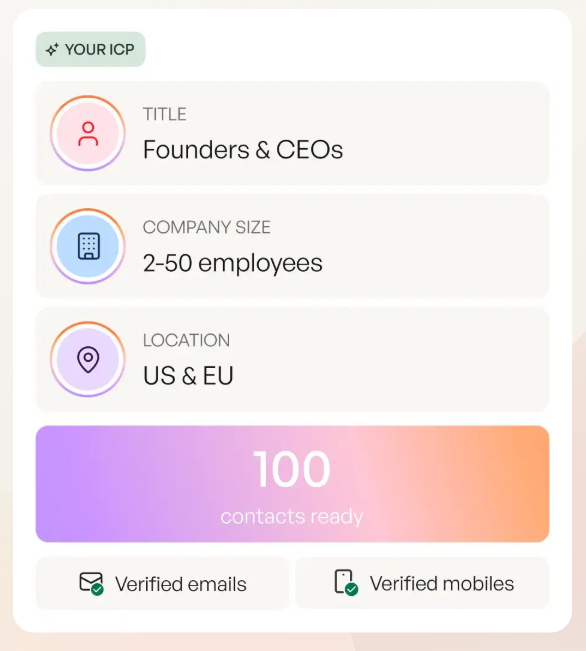
Three Ways to Get Prospecting Lists
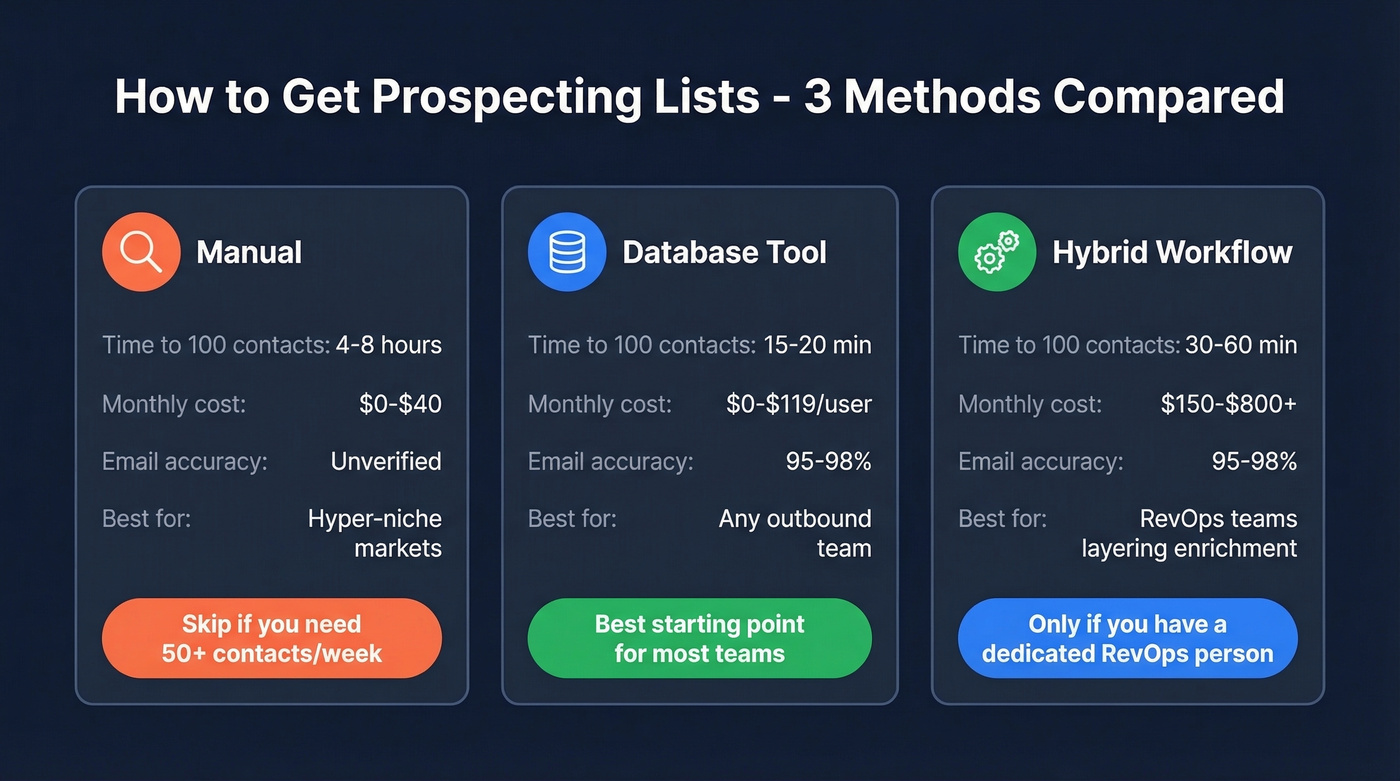
Here's the tradeoff at a glance:
| Manual | Database | Hybrid | |
|---|---|---|---|
| Time to 100 contacts | 4-8 hours | 15-20 minutes | 30-60 minutes |
| Monthly cost | $0-$40 | $0-$119/user | $150-$800+ |
| Email accuracy | Unverified unless you add a step | 95-98% (tool-dependent) | 95-98% |
| Best for | Hyper-niche markets | Any regular outbound team | RevOps teams layering enrichment |
Manual Sources
Browse professional profiles, company websites, job boards, and industry directories. Copy-paste into a spreadsheet, then enrich and verify separately.
This works for hyper-niche markets where databases lack coverage - local manufacturing, boutique consulting, that sort of thing. In r/LeadGeneration threads, teams doing manual list building consistently hit a wall after the first few dozen prospects. Export tools like Thunderbit (starts at $15/mo), Evaboot ($39/mo), or Surfe ($30/mo) speed things up, but you're still stitching together multiple steps.
Skip if: You need more than 50 contacts per week. The math just doesn't work.
Database Tools
Self-serve platforms let you search by filters, export verified contacts, and push them straight to your sequencer. This is where most teams should start - and it's not close.
Apollo is the easiest default for pulling a list fast, but email bounce rates run 15-20% and data quality drops noticeably in niche industries and smaller markets. Watch the credit model too - Apollo charges separately for email vs. phone credits, which adds up. ZoomInfo has the deepest US database at $15k-$40k+/year, but requires an annual contract and charges per export on top of the subscription. In our experience, most teams under 500 employees don't need that level of spend.
If you want a broader comparison before you pick a platform, start with our guide to sales prospecting databases.
Skip if: You're doing fewer than 10 outbound touches per month. At that volume, manual works fine.

Hybrid Workflow
Search a database for your initial list, then layer on additional enrichment from a second source. Clay ($149-$800/mo) is popular for chaining enrichment across 75+ data providers, though it requires real setup time and a RevOps person who enjoys tinkering with data pipelines.
Skip if: You don't have that person. A single database tool gets you 80% of the way there with a fraction of the complexity.
Here's the thing: most teams overcomplicate this. If your average deal size is under $20k, a database tool with built-in verification beats any Frankenstein stack of five point solutions. Save the hybrid workflow for when you've outgrown the basics.
Buy or Build a Prospect List?
Build it. Always.
The decision comes down to quality control. Purchased lists promise speed but deliver stale data, unverified emails, and compliance headaches. Building your own with a database tool takes marginally more effort upfront but gives you full control over ICP fit, verification, and freshness. Mailchimp and Klaviyo ban imported purchased lists outright, so you're already starting on the wrong foot if you buy.

You just read why building your own list beats buying one. Prospeo gives you 300M+ profiles with 30+ filters - intent, technographics, funding, headcount growth - so you go from ICP definition to verified export in under 20 minutes. 98% email accuracy. 7-day data refresh. No stale spreadsheets.
Build a prospecting list that actually converts - starting at $0.01 per email.
Worked Example: Search to Send in 20 Minutes
You're selling a sales enablement tool to mid-market SaaS companies. Target: VP of Sales, 100-500 employees, Series B funding in the last 12 months.
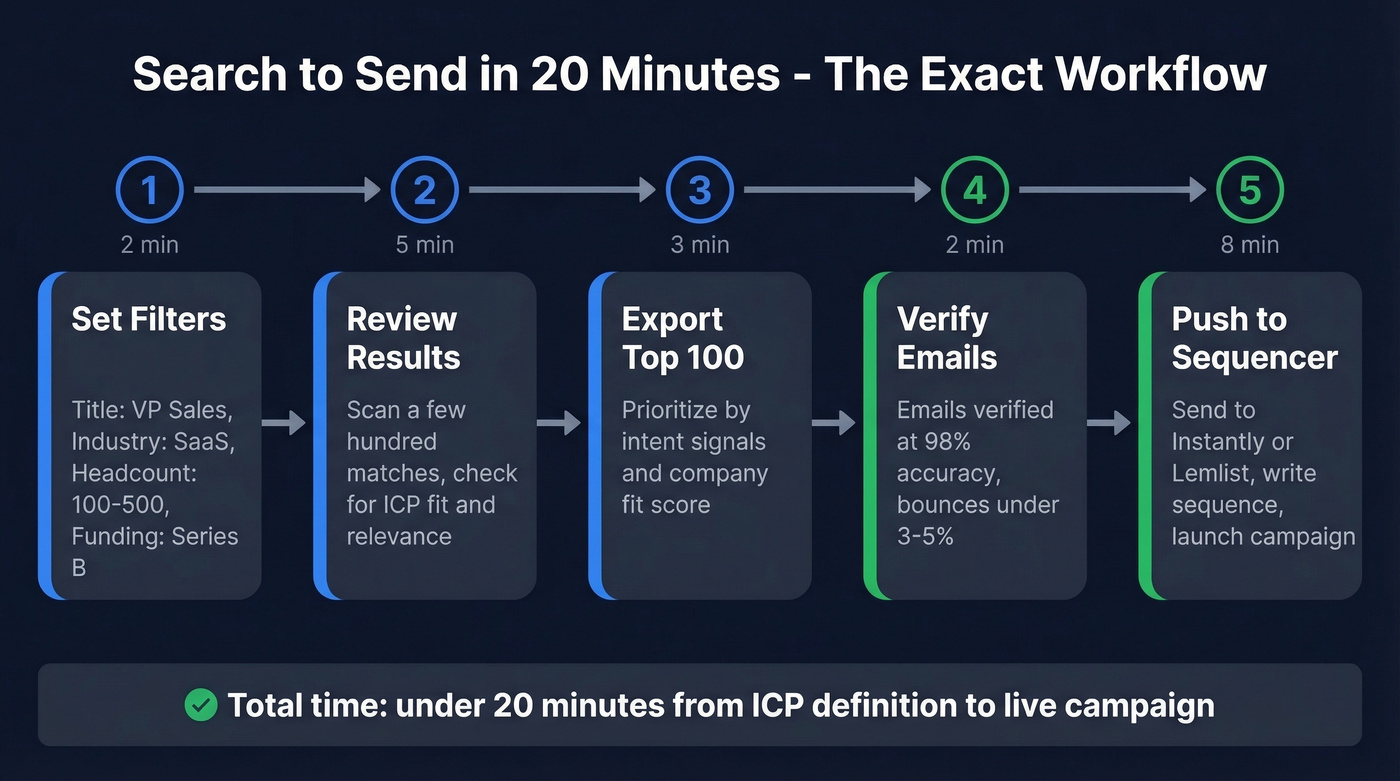
We've run this exact workflow dozens of times. Open the database, set filters - title contains "VP Sales," industry "SaaS," headcount 100-500, funding round Series B. You'll typically get a few hundred results. Export the top 100 and prioritize by intent + fit. Emails come back verified at 98% accuracy, and the dataset refreshes weekly, so you're not working with stale data. Push the list to Instantly or Lemlist, write your sequence, launch.
Total time: under 20 minutes. That's it.
For context, cold outbound bounces average around 7.5%. A properly verified list should land under 3-5%. That gap is the single biggest variable in campaign performance - it's the difference between a healthy domain and one that's flagged. (If you want the deeper benchmarks and fixes, see our guide to email bounce rate.)
Verify Before You Send
Let's be honest: this is where most outbound campaigns die.
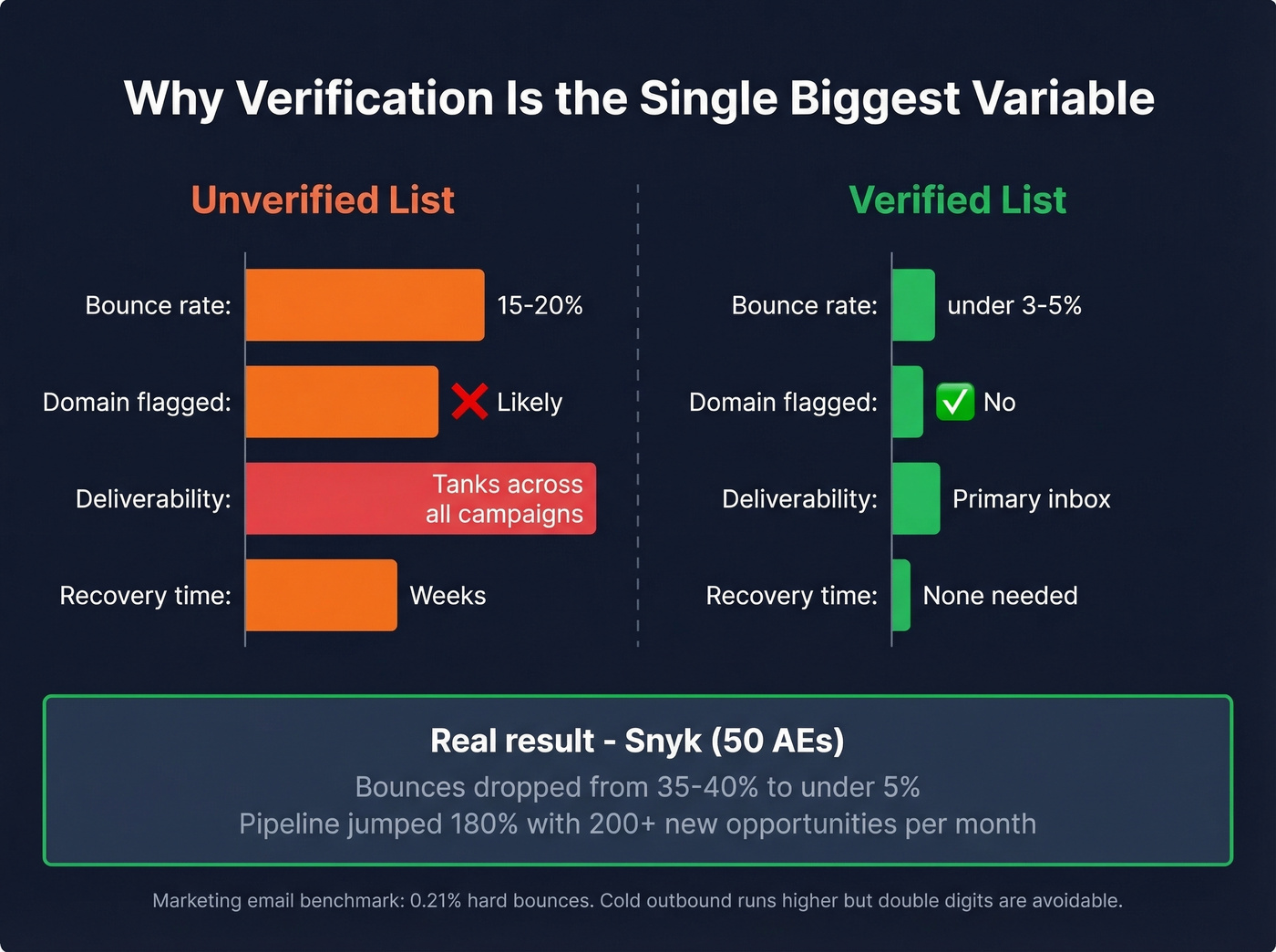
Unverified list: You import 1,000 contacts from a cheap source. Bounce rate hits 15-20%. Your ESP flags the domain. Deliverability tanks across all campaigns - not just the bad one. Recovery takes weeks.
Verified list: Same 1,000 contacts run through proper verification. Bounces stay under 3-5%. Domain reputation stays clean. Replies land in primary inboxes.
The marketing email benchmark is 0.21% hard bounces. Cold outbound runs higher, but there's no excuse for double-digit bounce rates. Snyk's 50-AE sales team went from 35-40% bounces to under 5% after switching to verified data - and saw AE-sourced pipeline jump 180% with 200+ new opportunities per month.
If you're troubleshooting deliverability after a bad import, start with how to improve sender reputation and then lock in a repeatable email deliverability checklist.

Compliance in 60 Seconds
| Jurisdiction | Key Rule | Max Penalty |
|---|---|---|
| US (CAN-SPAM) | Opt-out + sender ID required | $46,517/violation |
| US (TCPA) | Consent for calls/SMS | $500-$1,500/violation |
| Canada (CASL) | Express consent | $10M CAD |
| EU (GDPR) | Lawful basis needed | EUR 20M or 4% revenue |
| UK (PECR) | Corporate subscriber carve-out, but emailing named individuals still triggers UK GDPR lawful-basis requirements | GBP 500K |
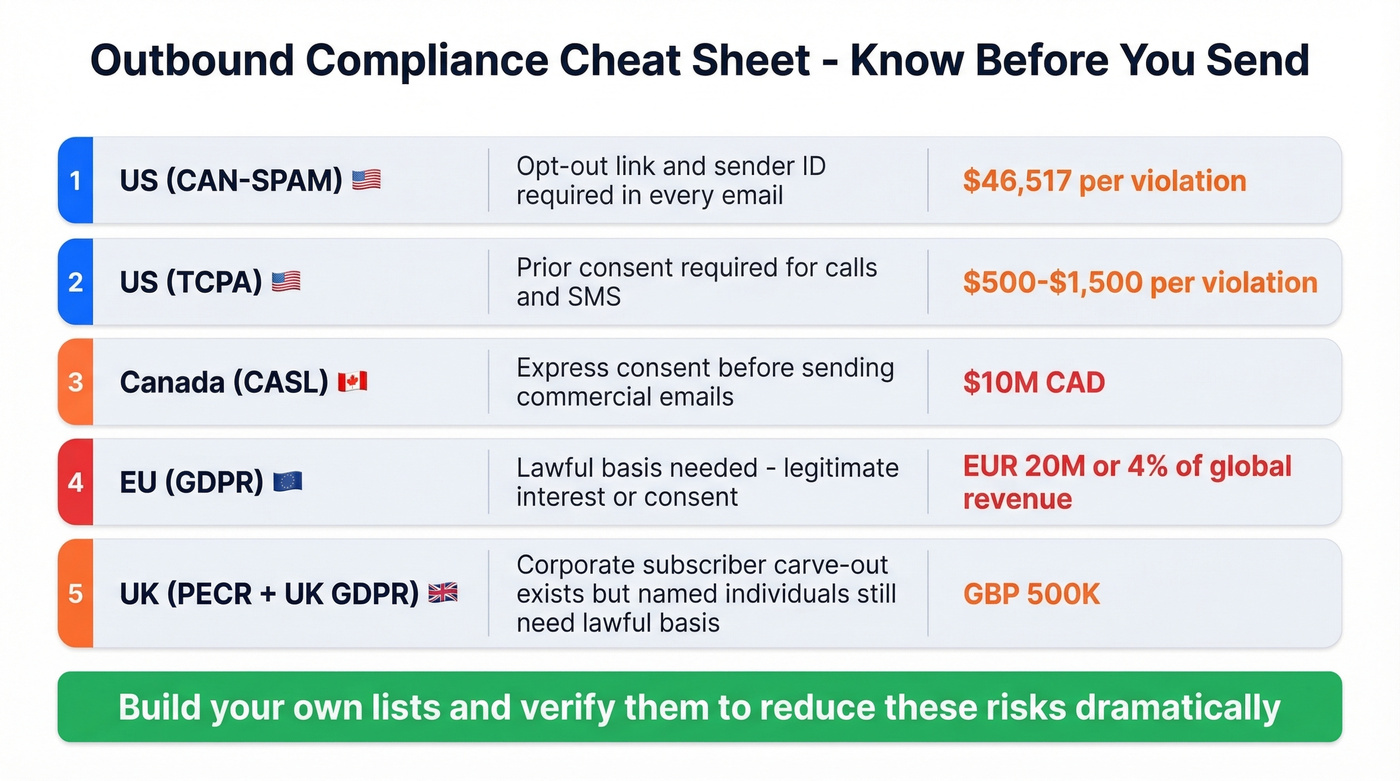
Build your own lists, verify them, and you reduce these risks dramatically. (If you need the legal breakdown, read Is it illegal to buy email lists?.)
Keep Your List Alive
Data decays fast. The industry average refresh cycle is six weeks - by then, people have changed jobs and your "verified" list is full of dead ends. Research from RAIN Group shows 43% of buyers accept meetings only after 5+ touches, so stale data doesn't just waste one email. It kills entire sequences.
Weekly maintenance cadence: dedupe against your CRM before every import, suppress opted-out contacts and closed-lost accounts, re-verify anything that bounced in the last sequence, and refresh your source data on a weekly cycle rather than monthly. This sounds like a lot, but once you've built the habit it takes maybe 15 minutes.
Stop trying to build the perfect list. Build 100 verified contacts, launch a sequence, iterate weekly. Momentum beats perfection every time.
Snyk's 50-AE team dropped bounce rates from 35% to under 5% and added 200+ opportunities per month. The difference wasn't effort - it was verified data refreshed every 7 days, not every 6 weeks. Prospeo's 5-step verification catches spam traps, honeypots, and catch-all domains before they torch your sender reputation.
Get prospecting lists that protect your domain and fill your pipeline.
FAQ
Should I buy or build a prospecting list?
Build it. Major ESPs ban imported purchased lists, and you'll see 20-40% bounce rates plus potential GDPR/CASL violations. Using a database tool to build and verify your own list gives you cleaner deliverability, tighter ICP fit, and full compliance control.
How many contacts should a prospecting list have?
Start with 100 verified contacts per ICP segment. A tight, verified 100 outperforms a 10,000-row unverified dump every time - lower bounces, higher reply rates, and no domain reputation damage.
What's the cheapest way to build a verified list?
Prospeo's free tier includes 75 verified emails and 100 Chrome extension credits per month - enough to test a full outbound sequence before paying. Paid plans start around $39/mo for higher volume. Apollo also has a free tier, but expect higher bounce rates without additional verification.