

How to Resend an Email That Was Not Answered
We've sent hundreds of follow-ups over the years, and the ones that work all share the same traits. But first, the stat that should kill your hesitation: 40% of consumers have 50+ unread emails sitting in their inbox right now. Your message got buried, not ignored.
The first follow-up gets a 40% higher response rate than the initial email. Resending an email that wasn't answered isn't pushy - it's how professionals communicate.
Before You Resend - Check 3 Things
Rule out the obvious problems first. A better follow-up won't fix an email that never arrived.
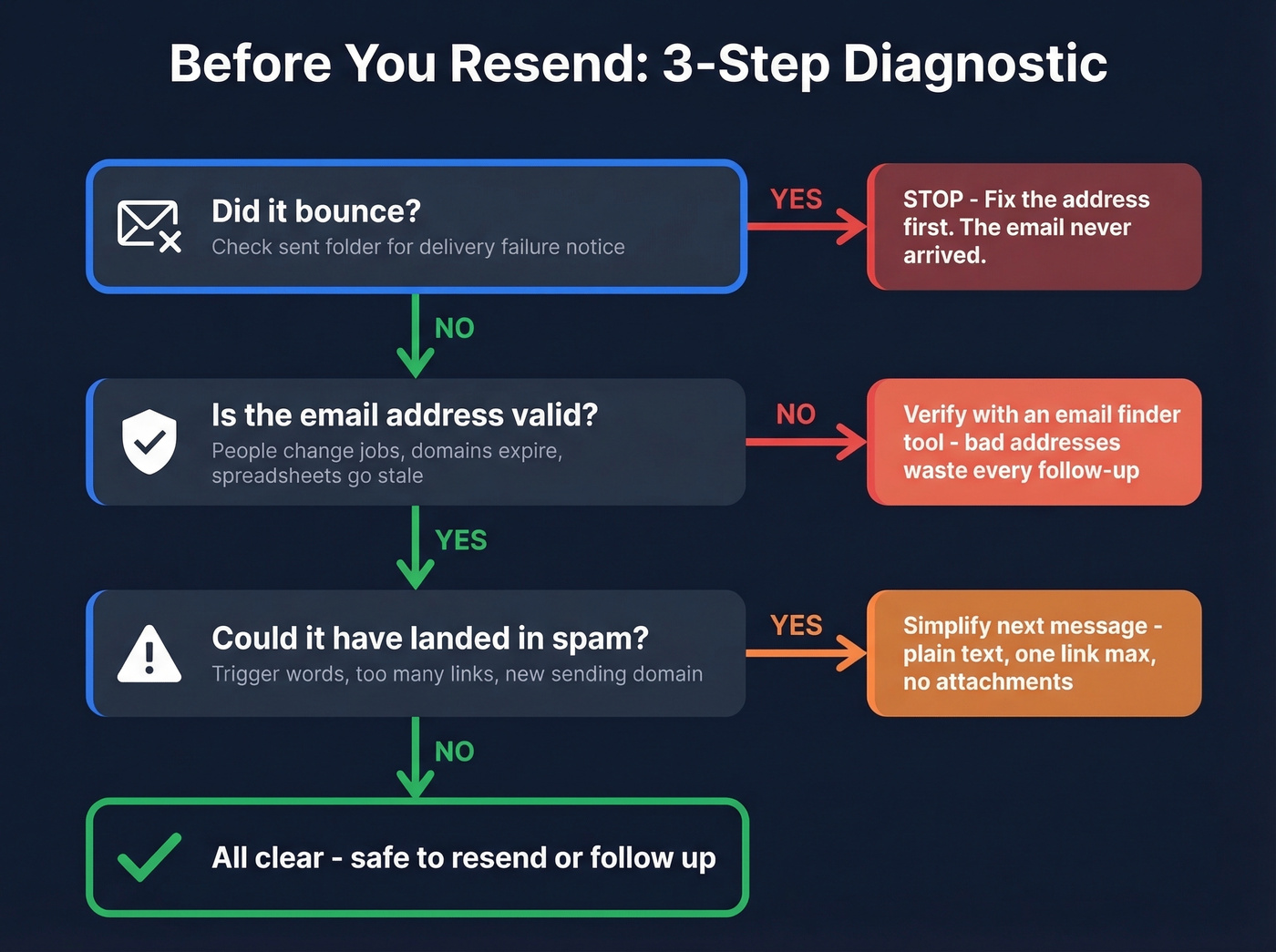
1. Did it bounce? Open your sent folder and look for a delivery failure notification. If you got one, the address is wrong or the mailbox is full - no amount of follow-up fixes a dead address. (If you want benchmarks and fixes, see our guide to bounce rate.)
2. Is the email address valid? People change jobs, companies rebrand domains, and that address from a six-month-old spreadsheet might be completely dead. Prospeo's email finder verifies emails in real time with 98% accuracy at roughly $0.01 per email, with a free tier for small checks. One customer, Meritt, dropped their bounce rate from 35% to under 4% after switching to verified addresses. If you're doing this at scale, data enrichment services can help keep records current.

3. Could it have landed in spam? Trigger words like "free," "urgent," and "act now," plus too many links or a brand-new sending domain, can route your email straight to junk. If you suspect this, simplify your next message - plain text, one link max, no attachments. For a deeper checklist, use an email spam checker and review your sender reputation.
Resending in Gmail vs. Outlook
Gmail (No Resend Button)
Gmail doesn't have a native resend feature. Here's the workaround:
- Go to your Sent folder and open the original email.
- Click the three-dot menu and select Forward.
- Paste the original recipient's address in the "To" field.
- Delete "Fwd:" from the subject line so it looks like a fresh send.
- Hit Send.
One annoyance: forwarding as a resend workaround can mess up formatting in some clients. If formatting matters, copy-paste the body text into a fresh compose window instead.
Outlook (Built-In Resend)
Outlook makes this straightforward:
- Open the sent email.
- Go to Actions → Resend This Message.
- Click Send.
A resent email includes only the previously sent message with no added information, unlike forwarding which tacks on previous header info like sender, date, and recipients. One gotcha worth knowing: in new Outlook for Windows, resend is only available for Microsoft 365 work accounts - personal accounts don't have it.
Apple Mail: No resend feature. Use the same forward workaround as Gmail.
Resend vs. Reply in the Same Thread
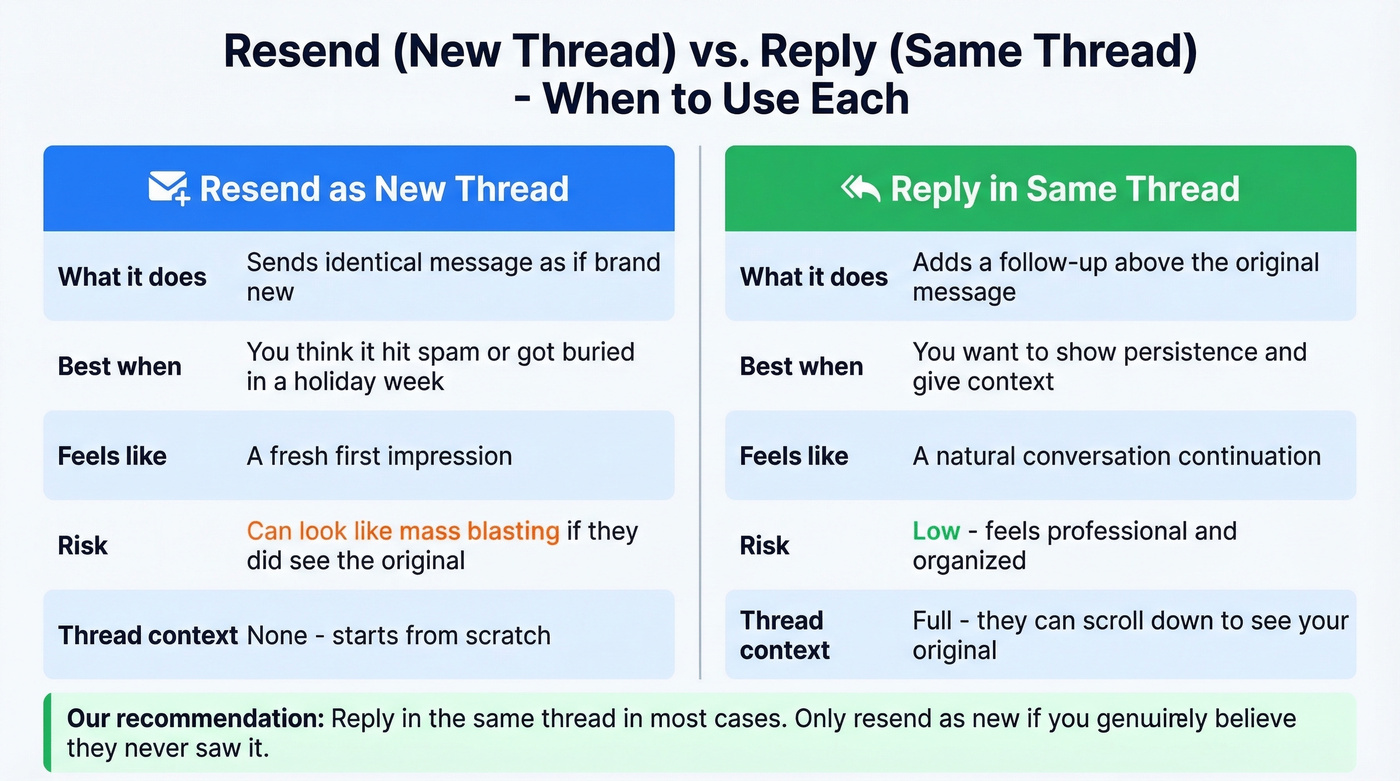
A true resend - identical message, new thread - only makes sense if you believe they never saw the original. Maybe it hit spam, or it got buried during a holiday week. In most cases, reply in the same thread. It gives context, shows you're not mass-blasting, and keeps the conversation organized.
If you’re running sequences, good sequence management prevents accidental over-follow-up.

Most unanswered emails aren't ignored - they never arrived. Prospeo verifies emails in real time with 98% accuracy so your follow-ups actually land. One customer cut their bounce rate from 35% to under 4%.
Stop crafting perfect follow-ups to dead addresses.
Writing Follow-Ups That Get Replies
In our experience, Tuesday or Thursday late morning tends to perform best. But timing is just one piece. (For a data-backed breakdown, see the best time to send cold emails.)
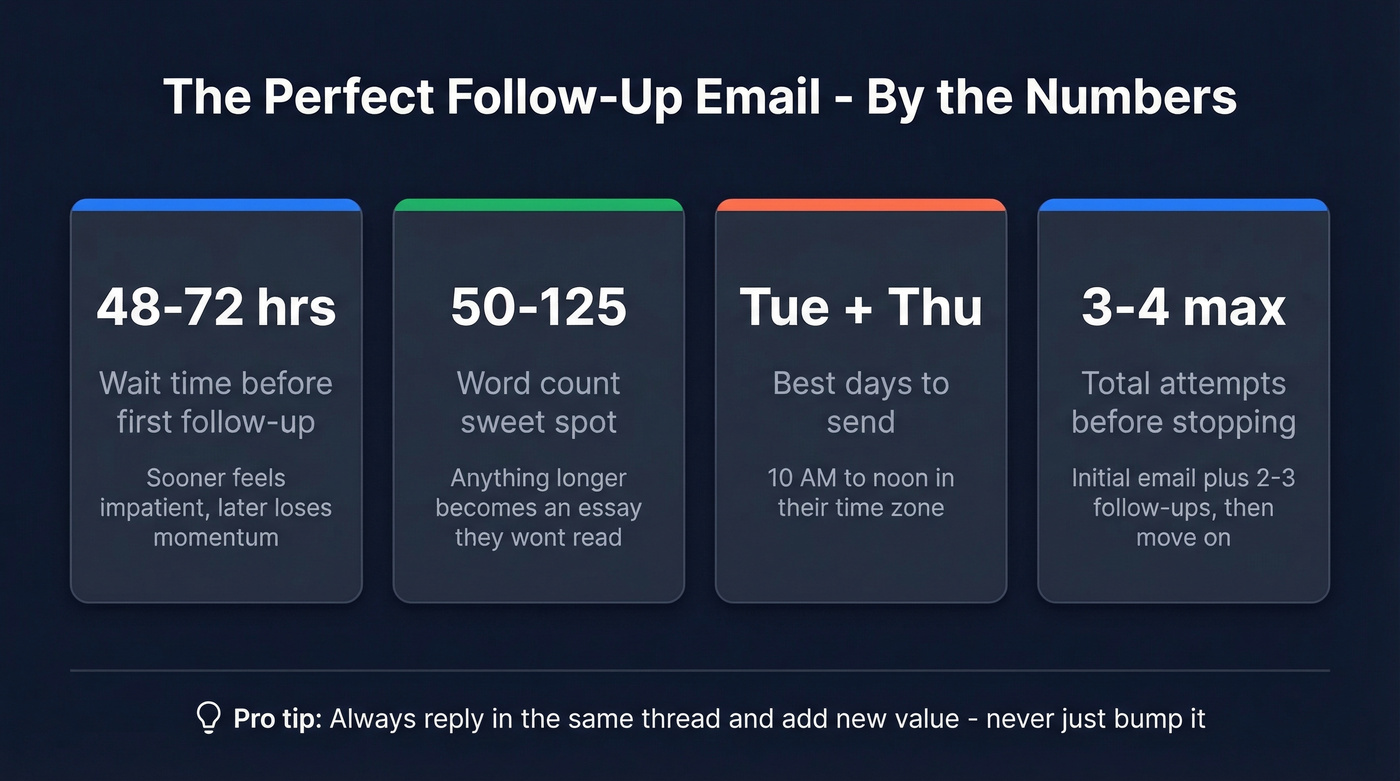
Wait 48-72 hours. Anything sooner feels impatient. After about a week, momentum drops. Tuesday and Thursday between 10 AM and noon tend to be high-response windows for business emails.
Reply in the same thread. Don't start a new subject line unless the original was genuinely bad. If you need ideas, pull from these email subject line examples.
Keep it under 125 words. The sweet spot is 50-125 words. Anything longer and you're writing an essay they won't read.
Add new value. Here's the thing: "just bumping this" is the laziest follow-up in existence. Attach a relevant resource, reference something specific to them, or reframe your ask. You really only need two templates - a polite nudge and a break-up email. Everything in between is the same message with different words. For more options, use these sales follow-up templates.
Polite vs. Pushy - Know the Line
| ✅ Polite | ❌ Pushy | |
|---|---|---|
| Timing | 48-72 hours after last email | Same day or next morning |
| Tone | "Wanted to make sure this didn't get buried" | "You haven't responded yet" |
| Subject | "Quick follow-up on [topic]" | "SECOND ATTEMPT - please respond" |
Follow-Up Templates You Can Copy
Professional / Business Follow-Up
Subject: Quick follow-up on [topic]
Hi [Name],
Wanted to make sure this didn't get buried - I know inboxes are brutal. Any thoughts on [specific topic]? Happy to jump on a quick call if that's easier.
Best, [Your name]
Job Application Follow-Up
Subject: Following up - [role] application
Hi [Name],
Following up on my application for [role]. I'm still very interested and wanted to check if there's any update on the timeline. Happy to provide additional materials if helpful.
Thanks, [Your name]
Sales / Cold Outreach Follow-Up
Subject: [Resource] for [Company] - worth a look?
Hi [Name],
Sent a note last [day] about [one-line value prop]. Figured it might've gotten lost. Here's a [case study/resource] that shows how [similar company] solved [problem]. Worth a look?
[Your name]
The Break-Up Email (Final Attempt)
Subject: Closing the loop
Hi [Name],
I've reached out a few times and haven't heard back - totally understand if the timing's off. I'll close the loop on my end, but if this becomes relevant later, just reply to this thread.
All the best, [Your name]
Let's be honest - most of these templates work fine as-is. The real variable is whether you're emailing the right person at a valid address. Everything else is polish. If you’re building lists from scratch, start with sales prospecting techniques.
You just read it yourself: bad targeting kills more deals than bad copy. Prospeo gives you 300M+ verified contacts with 30+ filters to find the actual decision-maker - not the wrong person at a dead address.
Find the right person before you write the follow-up.
When to Stop Following Up
Three to four attempts is the ceiling for most outreach. If you've sent an initial email plus a few follow-ups and gotten zero response, treat it as a no and move on. (Related: when should you follow up on an email.)
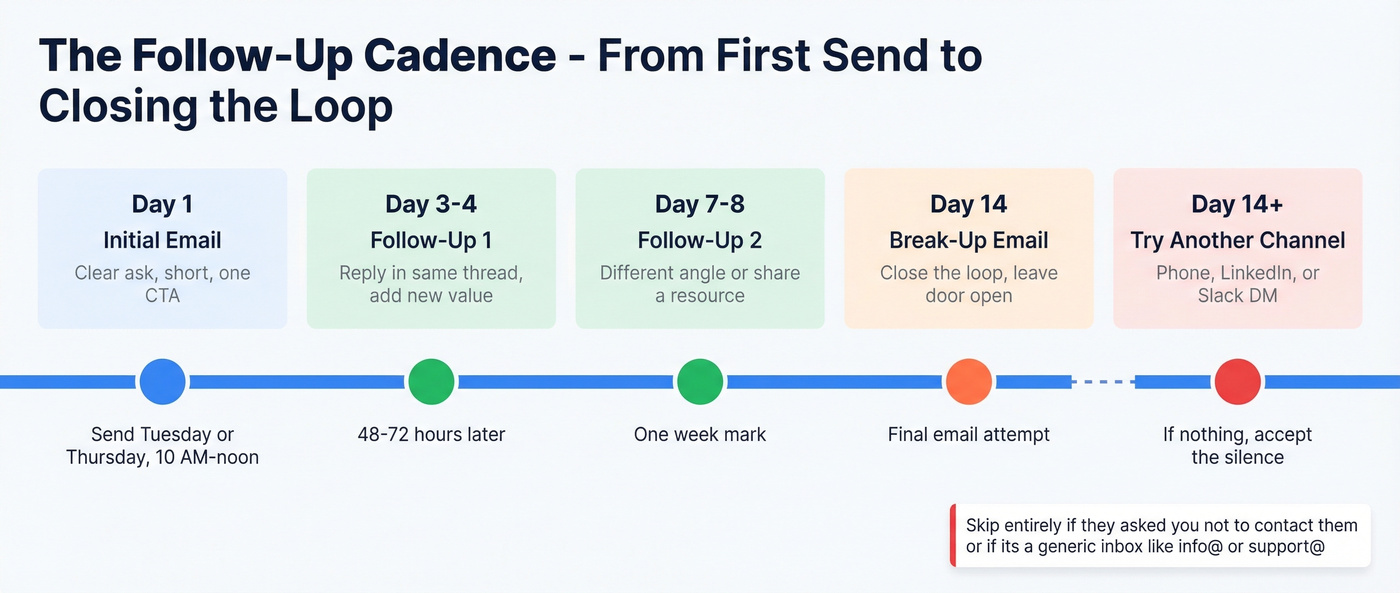
Before you fully close the file, try one different channel - a phone call, a short message on a professional network, or even a Slack DM if you share a workspace. If that also gets nothing, stop. There are other people who actually want to hear from you.
Skip the follow-up entirely if the person explicitly asked you not to contact them, or if you're reaching out to a generic inbox like info@ or support@. Those addresses are black holes for outreach.
I'll say what nobody wants to hear: most people agonize over follow-up wording when the real problem is they're emailing the wrong person. A perfectly crafted follow-up to someone who has zero authority over your ask is still a dead end. Verify the contact and the decision-maker before you invest three rounds of follow-up. The consensus on r/sales backs this up - bad targeting kills more deals than bad copy ever will.
FAQ
Is it rude to resend an email someone didn't answer?
No. One polite follow-up is standard in professional settings. With 40% of people sitting on 50+ unread emails, your message likely got buried, not deliberately ignored. Keep it brief, add value, and you'll come across as diligent rather than annoying.
How many follow-ups is too many?
Three to four total attempts is the widely accepted maximum. After an initial email plus two or three follow-ups with no response, try a different channel or accept the silence. More than that crosses from persistent into pestering. HubSpot's research on follow-up cadence supports this range.
What if my emails keep going unanswered?
The address might be wrong or outdated - bad data is the most common reason outreach fails silently. Verify it with a tool like Prospeo before sending again. If the address is valid and you're still getting ignored, your messaging or targeting needs work, not more volume. Mailchimp's deliverability guide is a solid starting point for diagnosing inbox placement issues.