

How to Scrape Emails Without Destroying Your Domain Reputation
You scraped 2,000 emails over the weekend, loaded them into your cold email tool Monday morning, and by Wednesday your bounce rate hit 12%. Your ESP flagged the domain. Your sequences paused. Two weeks of pipeline - gone.
If you're figuring out how to scrape emails in 2026, the method you pick determines whether you build pipeline or burn your sender reputation. A scraper pulls every email-shaped string off a page. A finder verifies that a real human checks that inbox. That distinction matters more than anything else here. (If you want the safer workflow end-to-end, start with an email deliverability baseline.)
Pick Your Method First
Before you touch a single tool, figure out which path fits your situation:
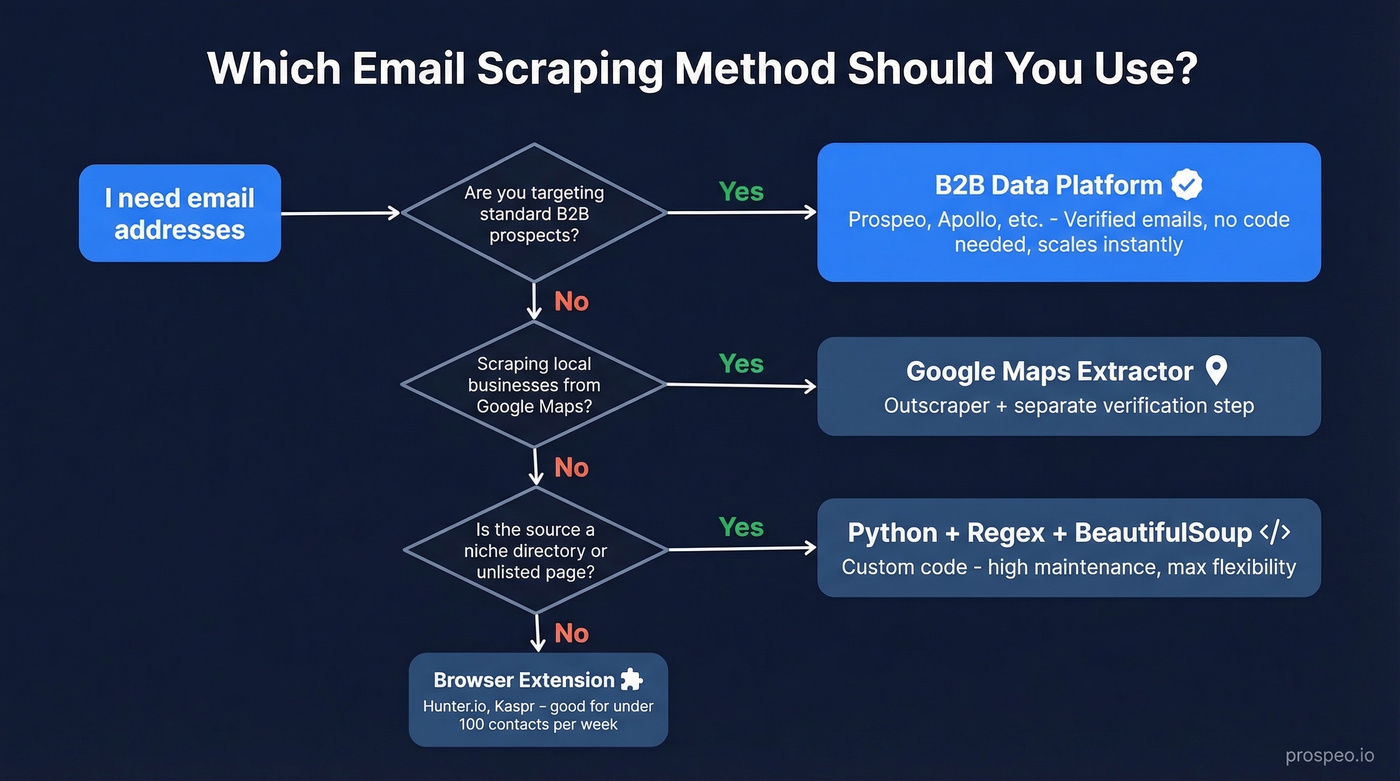
- Scraping local businesses from Google Maps? Use Outscraper for extraction, then verify everything before you send a single message. (If you're doing this at scale, it helps to map it into a repeatable lead generation workflow.)
- Targeting a niche source no platform covers? Python + regex + BeautifulSoup. But only if you genuinely need to extract email addresses from something that doesn't exist in any database.
Three Methods That Actually Work
No-Code Browser Extensions
Use this if you're prospecting one-by-one from company websites and want emails without writing code.
Skip this if you need more than 100 contacts per week. Extensions don't scale, and they only pull from visible page data.
Tools like Kaspr (paid plans start at $49/mo; free plan available) and Hunter.io ($34/mo billed yearly; 50 free credits/month) let you grab emails from web pages in a click. The tradeoff: you're limited to what's rendered on the page, and you still need to verify what you get. Extensions are a starting point, not a system. (For more options, compare email scraper Chrome extensions.)
B2B Data Platforms
Here's the thing: if you're doing standard B2B prospecting in 2026, the email extraction workflow is a solved problem. The scrape-clean-verify-enrich pipeline that took hours in 2020 now collapses into a single search.
Prospeo covers 300M+ professional profiles with 98% email accuracy, all refreshed on a 7-day cycle. Contact data decays 2-3% per month, so that refresh speed matters more than raw database size. At roughly $0.01 per email with 75 free emails plus 100 Chrome extension credits each month, the cost is negligible compared to the engineering time a custom scraper demands. (If you're evaluating vendors, start with a shortlist of sales prospecting databases.)
Apollo is the other obvious option. Its database is massive, but data freshness can lag - and a common outbound failure mode is strong open rates with zero replies, a classic signal of stale or mis-targeted contact data. We've seen teams running high-volume outbound through Apollo hit this wall repeatedly, where the freshness gap compounds into wasted sequences and burned sending domains over the course of a quarter. (If you're troubleshooting that, look at email bounce rate benchmarks and root causes.)

Python + Regex (DIY Scraping)
The standard stack is httpx + BeautifulSoup for fetching and parsing, with regex to extract email patterns from HTML. Parse mailto: links first, then sweep page text with an RFC 5322-style regex pattern. Flexible, yes. But maintenance-heavy. (If you're doing this for pipeline, it’s worth understanding the broader web scraping lead generation tradeoffs.)
The gotcha most tutorials skip: check whether the emails you're looking for are in the static HTML or the rendered DOM. Open DevTools, compare "View page source" with "Inspect Element." If emails only appear in the rendered version, the page uses JavaScript to load them - your basic httpx request won't see them. For JS-heavy sites, ScrapingBee's render_js parameter handles this without you managing headless browsers. Their free trial includes 1,000 API credits.
Let's be honest: if you're writing a Python scraper in 2026 for standard B2B prospecting, you're overengineering a solved problem. Save the custom code for niche sources that no platform indexes - industry directories, local government pages, conference speaker lists. For everything else, the engineering hours you'd spend building and maintaining a scraper cost more than a year of any data platform on this list. (If you still want to compare approaches, see email crawlers vs. finders.)
Google Maps Email Scraping
Local business prospecting - plumbers, therapists, landscapers - lives on Google Maps. But Maps caps results at roughly 120 businesses per query, and manually hunting emails takes 1-2 minutes per listing.

Outscraper automates the extraction, pulling names, phone numbers, addresses, and websites from Maps listings at scale. Expect around 30-60% of listings to have a website, and around 10-30% of those yield a usable email without deeper enrichment. After extraction, run every address through a verification tool before you touch a sequence. Sending unverified scraped emails to local businesses is the fastest way to torch a domain. (If you need more options, start with free lead generation tools and build from there.)

You're reading this article because you want emails that actually connect. Prospeo's 300M+ database delivers 98% verified emails on a 7-day refresh cycle - no scraping, no separate verification step, no bounced-email cleanup. Teams using Prospeo book 35% more meetings than Apollo users because the data is accurate on day one.
Skip the scrape-clean-verify pipeline. Search once, send with confidence.
Why Verification Isn't Optional
Permission-based email lists average a 0.21% hard bounce rate. Unverified scraped lists? Expect 5-15% bounces. The industry target is under 2% total bounces - cross that line and ESPs start throttling your deliverability. (If you're scaling outbound, you also need to manage email velocity to avoid compounding deliverability issues.)
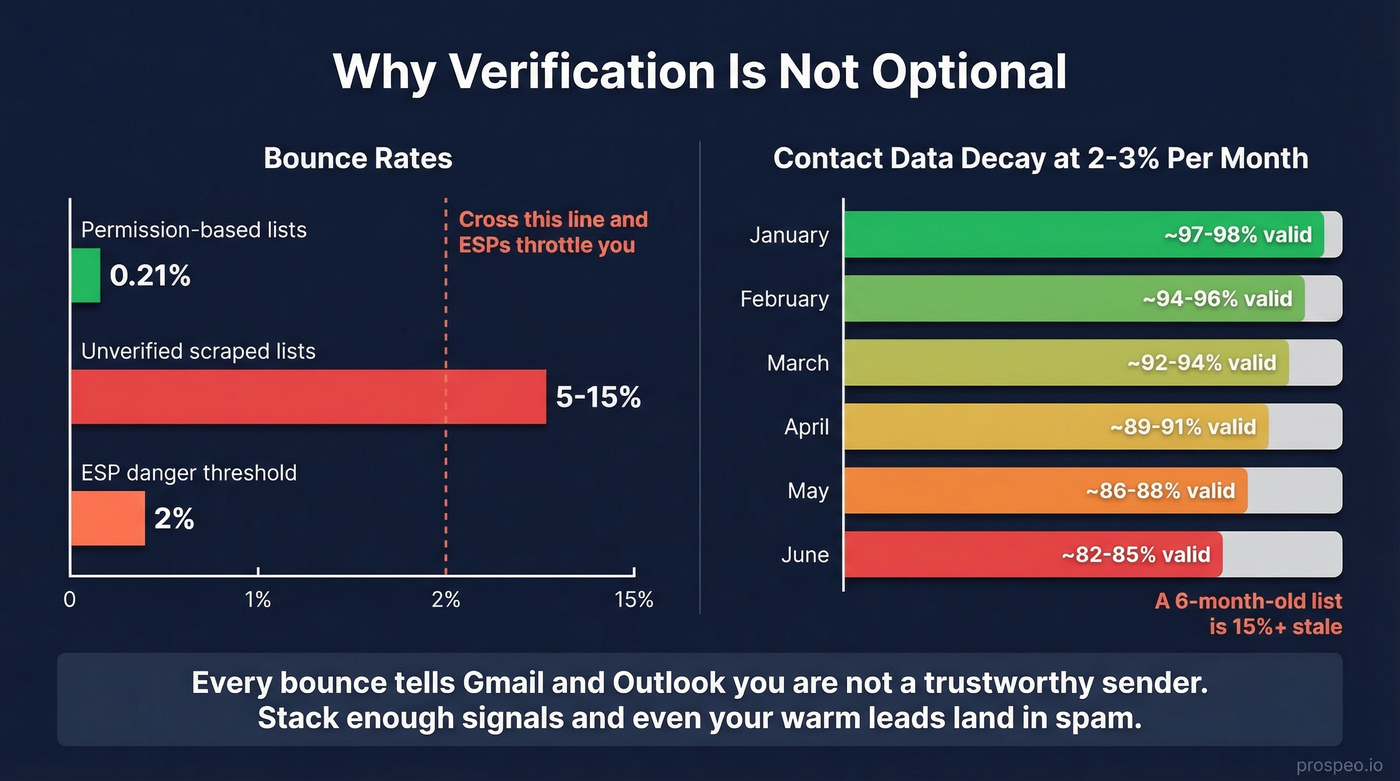
We've watched teams lose weeks of pipeline work to a single unverified list. Contact data decays 2-3% per month, so a list you scraped in January is 12-18% degraded by summer. Every bounce signals Gmail and Outlook that you're not a trustworthy sender. Stack enough of those signals and your domain ends up in spam folders even for legitimate recipients - including the warm leads who actually want to hear from you.
The standard to look for: any tool you use should handle catch-all domains, spam traps, and honeypots before you ever see the contact. If your workflow involves a separate "scrape" step and a separate "verify" step, you've introduced a gap where bad data leaks through. (If you’re cleaning up after the fact, start with spam trap removal.)
Every unverified scraped email is a bet against your domain reputation. Prospeo's 5-step verification - with catch-all handling, spam-trap removal, and honeypot filtering - keeps bounce rates under 2% so your sequences actually reach real inboxes. At roughly $0.01 per email, it costs less than the engineering hours you'd burn maintaining a Python scraper for a single quarter.
Protect your domain. Get verified emails from 300M+ profiles for free.
Mistakes That Kill Your Results
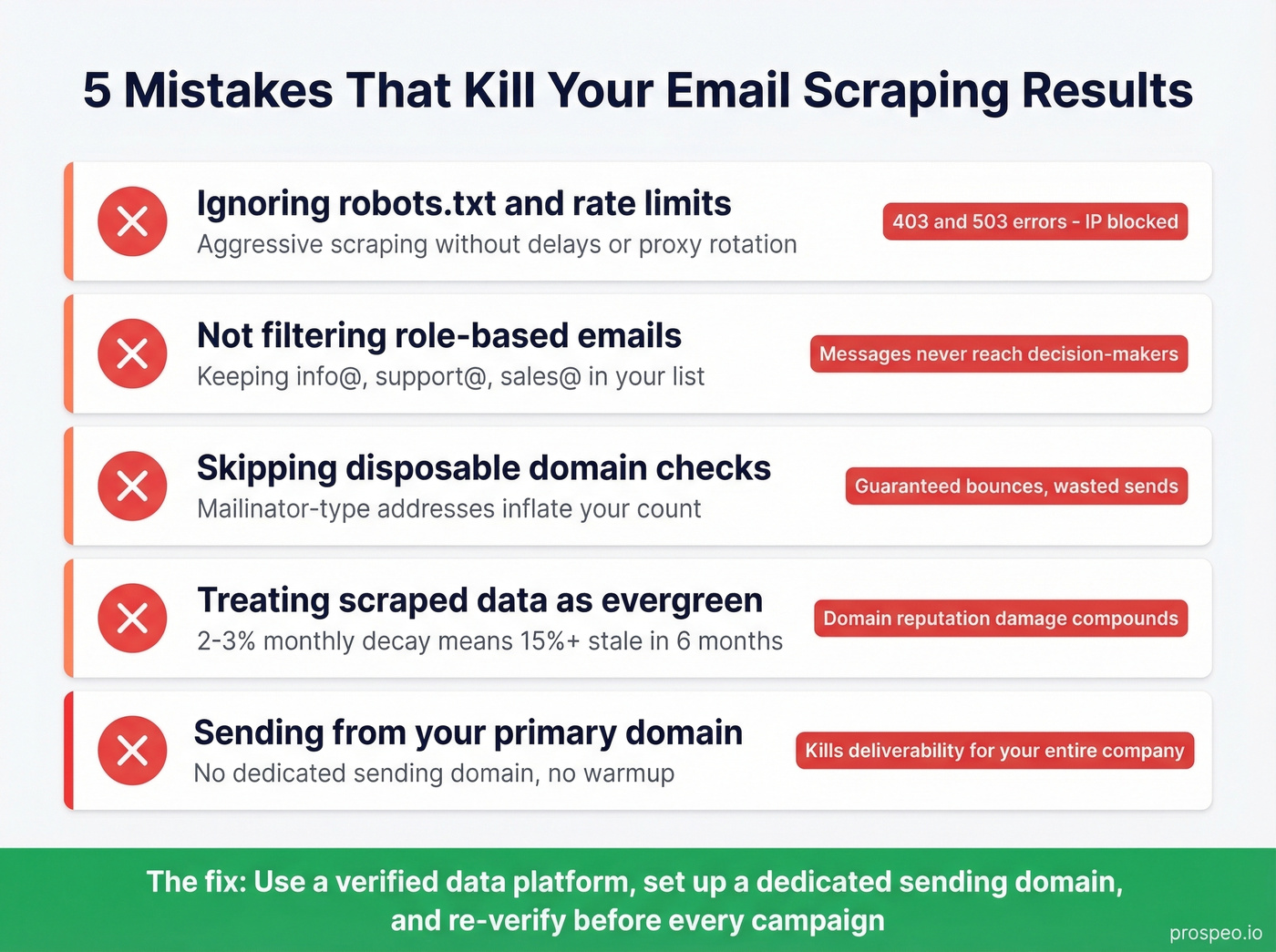
- Ignoring robots.txt and rate limits. Aggressive scraping leads to 403 and 503 errors that block your IP. Respect crawl delays or use proxy rotation.
- Not filtering role-based emails. Addresses like info@, support@, and sales@ rarely reach a decision-maker. Filter them out before they enter your sequence.
- Skipping disposable domain checks. Mailinator-type addresses inflate your list count and guarantee bounces.
- Treating scraped data as evergreen. At 2-3% monthly decay, a six-month-old list is 15%+ stale. Re-verify before every campaign.
- Sending from your primary domain. This is the fastest way to kill deliverability for your entire company. Set up a dedicated sending domain and warm it first. (For a deeper fix, see how to improve sender reputation.)
Legal Guardrails
Scraping a public email doesn't give you the right to email it. Under GDPR, a name-based email address is personal data - processing it requires a lawful basis like legitimate interest, and you must honor opt-out requests. Penalties run up to EUR 20M or 4% of global annual revenue. CNIL took action against Kaspr over data-scraping practices, closing the enforcement order in early 2026 after compliance measures were implemented.
CAN-SPAM requires a functioning unsubscribe mechanism in every message. Build opt-out handling into your workflow from day one - not as an afterthought after your first complaint.
Tool Comparison
Standalone scrapers are a 2020 workflow. In 2026, the tools worth using bundle extraction, verification, and CRM sync. (If you're building a stack, start with a ranked list of SDR tools.)
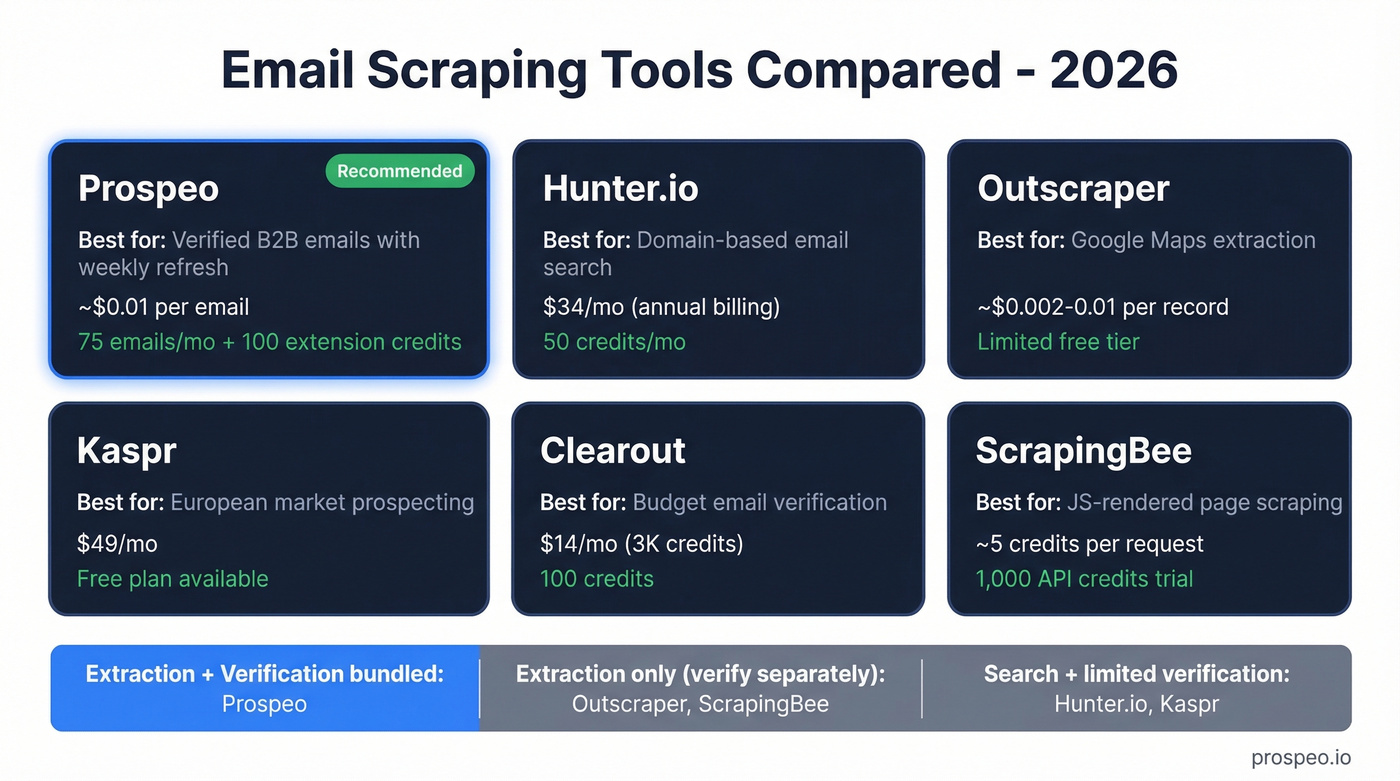
| Tool | Best For | Starting Price | Free Tier |
|---|---|---|---|
| Prospeo | Verified B2B emails with weekly refresh | ~$0.01/email | 75 emails/mo + 100 extension credits/mo |
| Hunter.io | Domain-based email search | $34/mo (annual) | 50 credits/mo |
| Outscraper | Google Maps extraction | ~$0.002-0.01/record | Limited free |
| Kaspr | European market prospecting | $49/mo | Free plan |
| Clearout | Budget email verification | $14/mo (3K credits) | 100 credits |
| ScrapingBee | JS-rendered page scraping | ~5 credits/request | 1,000 API credits |
FAQ
Is it legal to scrape email addresses from websites?
Scraping public emails isn't inherently illegal, but using them for outreach triggers GDPR, CAN-SPAM, and CASL obligations. You need a lawful basis like legitimate interest and must honor opt-outs immediately. GDPR penalties reach EUR 20M or 4% of global revenue.
How do I verify scraped emails before sending?
Run every list through a tool that checks MX records, SMTP responses, catch-all domains, and spam traps. Target under 2% total bounces. Prospeo's 5-step verification handles catch-all detection, spam-trap removal, and honeypot filtering automatically - no separate verify step needed.
Can I scrape emails from Google Maps?
Yes, but Maps caps results at roughly 120 per query. Use Outscraper to extract business data at scale, then verify emails separately before any outreach. Expect only around 10-30% of listings to yield a usable email directly.
When should I use a scraper instead of a data platform?
Custom scraping is worth the effort only when you're targeting a niche source - industry directories, local government pages, or conference speaker lists - that no B2B data platform indexes. For standard prospecting, a verified platform saves engineering time and delivers cleaner results. The consensus on r/sales tends to agree: unless you're scraping something truly obscure, the DIY route costs more in maintenance than it saves.