

How to Send a Cold Email: The 2026 Playbook for Inbox, Replies, and Compliance
A RevOps lead we know rebuilt their entire outbound stack last quarter. Same copy, same offer, same ICP. The only changes were infrastructure - more domains, verified lists, proper warm-up. Reply rate went from 3% to 6%.
The emails didn't get better. The plumbing did.
That's the dirty secret of learning how to send a cold email in 2026: success is 80% infrastructure, 20% copy. Before you write a single word, you need secondary domains, SPF/DKIM/DMARC configured, a 2-4 week warm-up behind you, and every email address on your list verified. Then you write short, plain-text emails with a single ask. Follow up 2-3 times. That's the whole playbook - and the rest of this article breaks down exactly how to execute each piece.
What "Good" Looks Like in 2026
Let's set expectations with real numbers. Instantly's 2026 benchmark report analyzed billions of cold email interactions across thousands of workspaces:
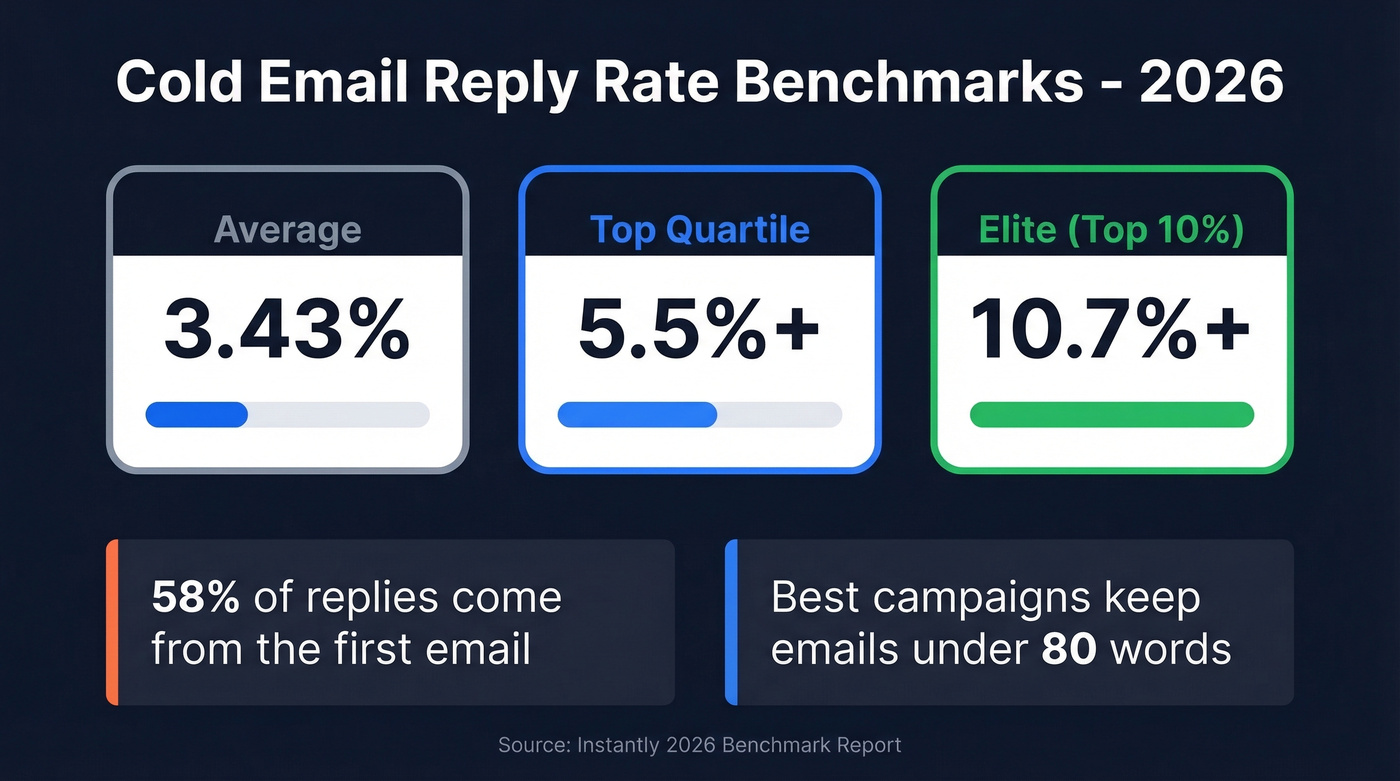
| Tier | Reply Rate |
|---|---|
| Average | 3.43% |
| Top quartile | 5.5%+ |
| Elite (top 10%) | 10.7%+ |
If you're hitting 3.5%, you're average. Above 5%, you're outperforming most teams. Double digits usually means small, hyper-targeted volume - not something you can sustain at scale.
Two other benchmarks worth internalizing: 58% of all replies come from the first email, with follow-ups generating the remaining 42%. And the best-performing campaigns keep emails under 80 words. Longer isn't better. Shorter forces clarity.
Set Up Your Sending Infrastructure
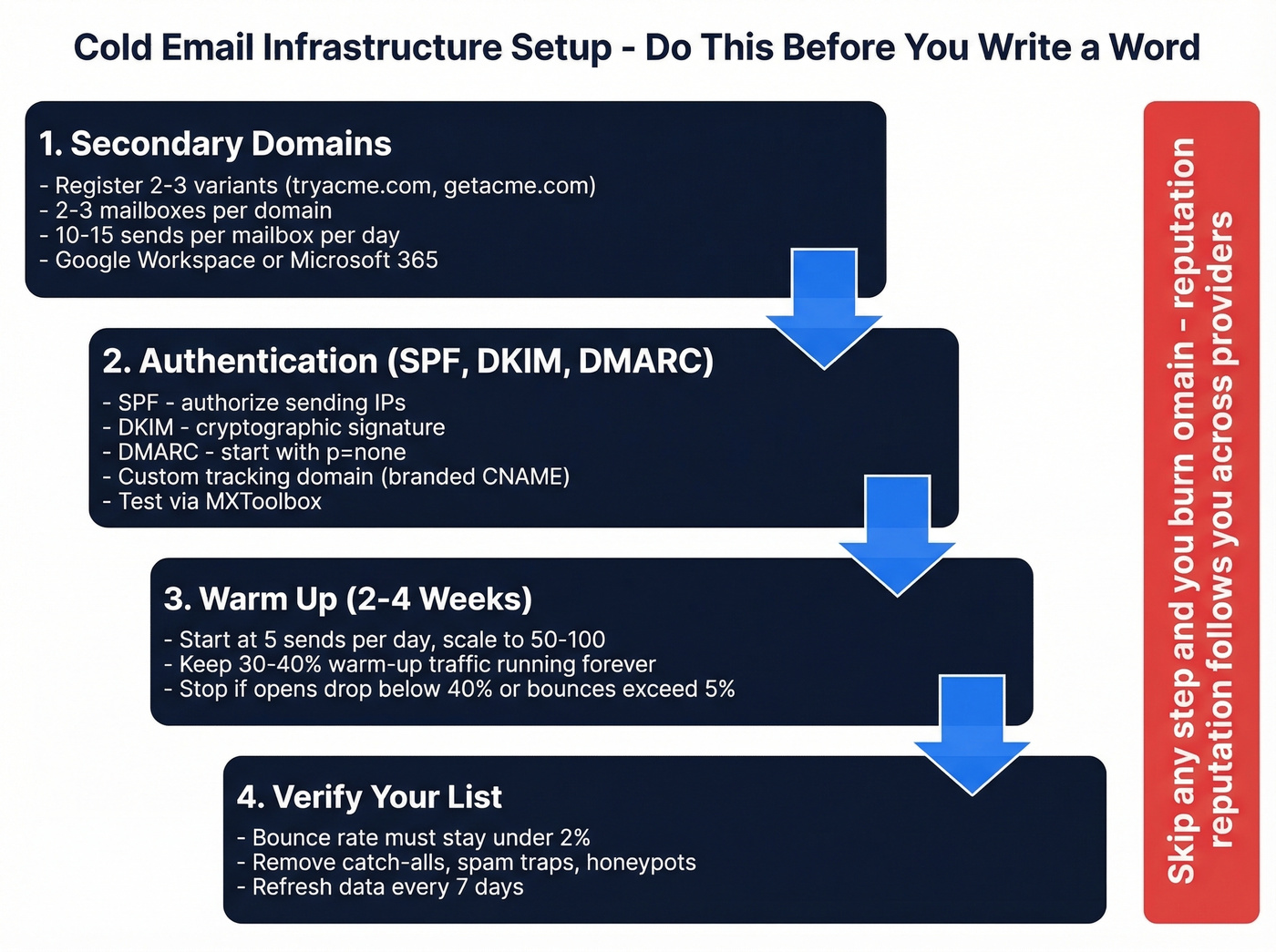
This is where most beginners skip ahead and pay for it later. Infrastructure isn't glamorous, but it's the foundation everything else sits on. If you want to send cold outreach effectively, start here - not with your subject line.
Secondary Domains and Mailboxes
Never send from your primary business domain. If your company is acme.com, register tryacme.com, getacme.com, or acmehq.com and send from those. If a secondary domain gets flagged, your main domain - the one your customers email you on - stays clean.
The scaling math: run 2-3 email accounts per domain, each sending 10-15 emails per day, giving you roughly 30-45 sends per domain. Need 400 emails a day? You're looking at 10-12 domains. Set up each account on Google Workspace ($7/user/mo) or Microsoft 365 ($6-$12/user/mo depending on plan).
SPF, DKIM, and DMARC
All three authentication protocols are required by Google, Yahoo, and Microsoft under the bulk-sender enforcement that kicked in May 2025. Without them, your emails land in spam - or don't land at all.
SPF tells receiving servers which IPs can send on your domain's behalf. DKIM adds a cryptographic signature proving the email wasn't tampered with. DMARC ties them together and tells servers what to do when authentication fails. Start with a DMARC policy of p=none and tighten it once you're confident in your setup. If your sending tool uses link tracking, set up a custom tracking domain (a branded CNAME) so tracking URLs match your sending domain. Test everything via MXToolbox before sending a single outbound message.
You also need one-click unsubscribe headers - List-Unsubscribe and List-Unsubscribe-Post (RFC 8058). Yahoo requires unsubscribe requests honored within 2 days. Keep spam complaints under 0.3% and bounces under 2%. Exceed those thresholds and providers throttle you fast.
Warm Up Your Domain
Brand-new domains have zero reputation. Mailbox providers don't trust them. Warm-up means gradually increasing send volume so providers learn your domain sends legitimate email.
| Week | Daily Volume | Key Metrics | Notes |
|---|---|---|---|
| 1 | 5 to 25/day | 90%+ opens, 50%+ replies | Space sends 2-3 min apart |
| 2 | 25 to 50/day | Pause if opens <40% | Cut volume 50-70% weekends |
| 3 | 75 to 100/day | Introduce cold prospects | Never exceed 2x day-over-day |
| 4 | Maintain 50-100/day | Keep 30-40% warm-up traffic | Some domains need 4-6 weeks |
Stop signals: if opens drop below 40%, you get any spam complaint, or bounce rate exceeds 5% - pause immediately and diagnose. A bounce rate above 3% in week 1 is already a warning sign. Keep warm-up traffic running even after you launch campaigns. Cutting it off cold tanks your sender reputation.
Here's the thing: if you burn a domain, switching ESPs won't save it. Domain reputation follows you across providers. We've seen agencies burn through five or more domains in a month before learning this lesson the expensive way.
Build and Verify Your List
Your list quality determines everything downstream. A practitioner on r/Entrepreneur shared their results after switching from purchased lists to manually verified data - bounce rate dropped from 11% to under 2%, and reply rate doubled. The copy didn't change. The data did.
With 81% of emails opened on mobile, every element of your email needs to work on a small screen. But none of that matters if the email bounces. Exceed 2% bounce rate and you should pause sending until you clean your list.
Prospeo handles both finding and verifying emails in a single step. Search by role, industry, company size, or any of 30+ filters, and every email that comes back has already gone through a 5-step verification process - catch-all handling, spam-trap removal, honeypot filtering included. Data refreshes on a 7-day cycle, so you're not emailing someone who changed jobs six weeks ago. The result is 98% email accuracy. Agencies like Stack Optimize maintain 94%+ deliverability and under 3% bounce across all their clients using this workflow. The free tier gives you 75 verified emails per month to test before committing a dollar.


This article proves it: cold email success is 80% infrastructure. The fastest infrastructure fix is your list. Prospeo's 5-step verification delivers 98% email accuracy with catch-all handling and spam-trap removal - so you stay under the 2% bounce threshold that keeps your domains alive.
Stop burning domains on bad data. Verify before you send.
Writing Copy That Converts
Now - and only now - do you write the actual email. Most guides start here. That's why most guides produce campaigns that bounce.
From Line and Subject Line
Your from line sets the first impression. First name only works for casual, peer-to-peer outreach. Add your last name for a professional tone. Include your title to signal authority, or your company name for brand recognition. Pick one that matches your audience and stay consistent.
Subject lines should land between 25-45 characters to avoid mobile truncation. Aim for 6-10 words - that range consistently produces the highest open rates. "Quick question about [company]" still works because it's short, specific, and doesn't trigger spam filters.
When you A/B test subject lines, use 250+ contacts per variant and measure positive reply rate, not opens. Open rates are increasingly unreliable due to privacy proxies and bot opens. A subject line that gets opens but no replies is worse than useless - it trains you toward clickbait.
If you want more options, pull from a swipe file of subject lines and test them against your segment.
Body and CTA
Keep the body under 80 words. Plain text only - no HTML templates, no images, no logos, no tracking links or promotional URLs in email one. Your unsubscribe link is the exception; it's required. Anything that looks like marketing triggers spam filters and gets deleted.
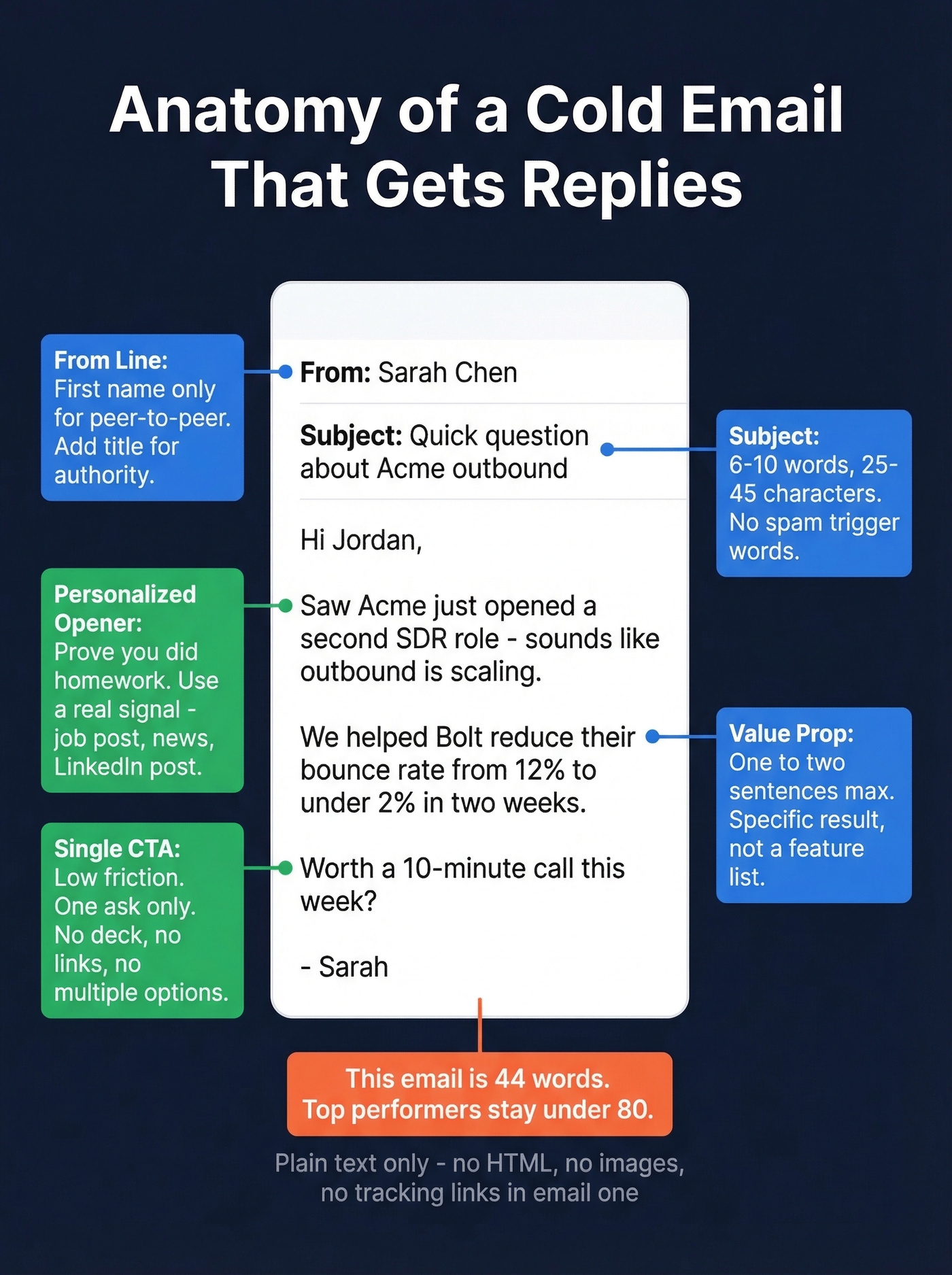
The structure is simple: personalized opener proving you did homework, value prop in one to two sentences, single CTA. Don't pitch. Don't attach a deck. Don't include three different asks. One clear next step.
If you need help tightening the ask, use a proven email call to action framework.
Here's what that looks like:
Subject: Quick question about [Company]'s outbound
Hi [First Name],
Saw [Company] just opened a second SDR role - sounds like outbound is scaling. We helped [similar company] cut their bounce rate from 12% to under 2% in two weeks.
Worth a 10-minute call this week?
-- [Your name]
That's 44 words. No fluff, no pitch deck, no three-paragraph company history. Just a signal that you did your homework, a relevant result, and a low-friction ask.
For personalization at scale, the workflow producing results right now: scrape a recent signal from the prospect - a post, a job listing, a company announcement - run it through an LLM to generate a custom first line, and merge it into your sending tool as a variable. Teams on r/SaaS report roughly 3x response lift versus generic openers. It takes 20 minutes to set up and runs on autopilot after that.
If you want a deeper system, build it around personalized outreach instead of one-off tricks.
Follow-ups generate 42% of cold email replies, but only if your emails land in the inbox. Teams using Prospeo's verified data maintain sub-4% bounce rates and book 26% more meetings than ZoomInfo users - at $0.01 per email instead of $1.
Clean data is the cheapest way to double your reply rate.
Send Smart and Follow Up
Timing and Volume
Tuesday through Wednesday consistently produces the highest reply rates, with Wednesday at the top. Send between 8-11 AM in the recipient's timezone. One practitioner reported a 16% improvement in opens just by shifting sends from random times to this window.
If you want the data and a scheduling playbook, see best time to send.
Safe sending volume once warmed: 20-25 emails per inbox per day. If you need more volume, add inboxes and domains - don't push a single account harder.
To avoid deliverability cliffs, monitor your email velocity as you scale.
Follow-Up Cadence
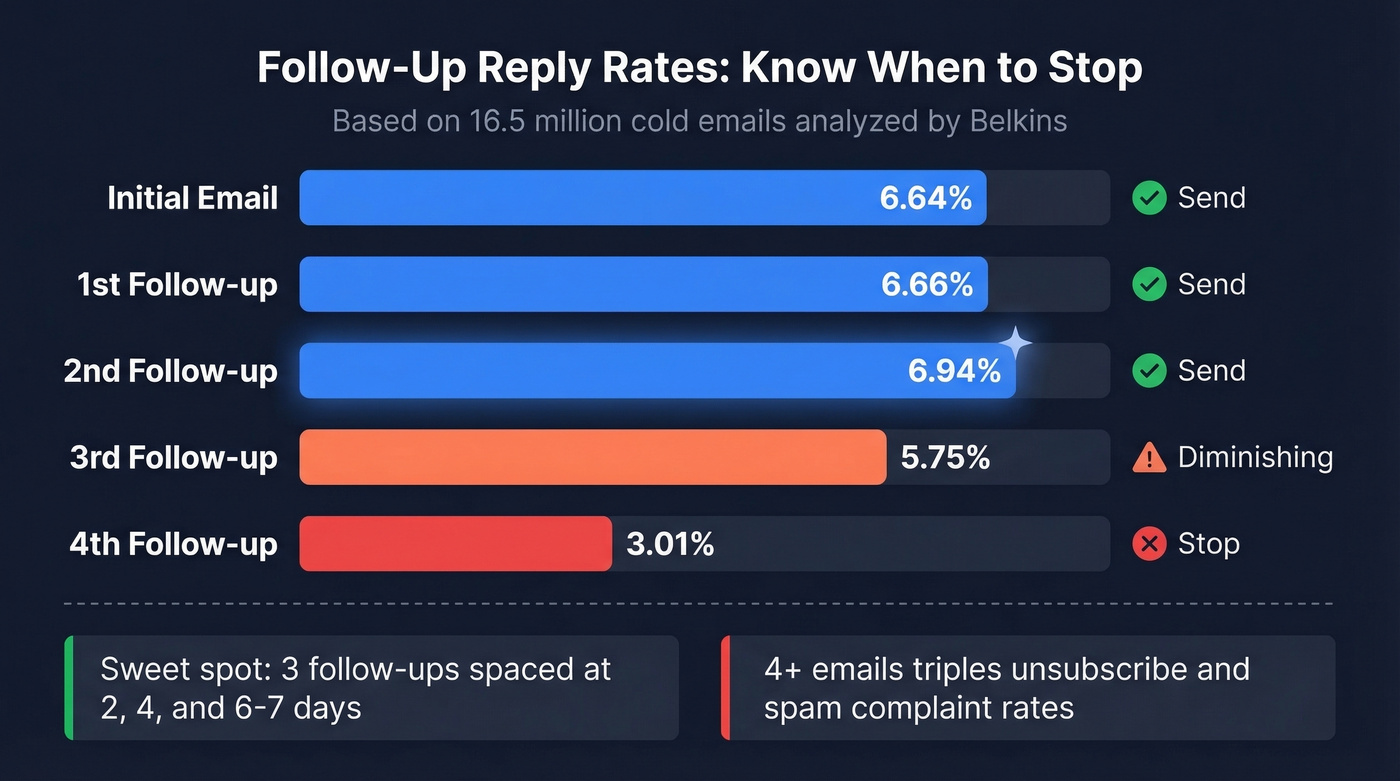
Belkins analyzed 16.5 million cold emails and found something counterintuitive: the highest reply rate (8.4%) came from sequences with just one email. Every additional follow-up showed diminishing returns, and sending 4+ emails more than triples unsubscribe and spam complaint rates.
| Follow-Up # | Founder Reply Rate | Action |
|---|---|---|
| Initial | 6.64% | Send |
| 1st follow-up | 6.66% | Send |
| 2nd follow-up | 6.94% | Send |
| 3rd follow-up | 5.75% | Diminishing |
| 4th follow-up | 3.01% | Stop |
Three follow-ups is the sweet spot for most segments. Space them at 2 days, then 4 days, then 6-7 days. Instantly's benchmark data suggests 4-7 touchpoints as the overall sequence sweet spot, but the difference likely comes down to audience - enterprise prospects need fewer touches, while SMB prospects tolerate more. If a VP at a 1,000+ employee company doesn't reply after two touches, a fifth email won't change their mind. It'll just get you reported.
If you need copy you can plug in fast, use these cold email follow-up templates.
Our hot take: if your average deal size is under $10k, you probably don't need more than two follow-ups. The math doesn't support chasing low-value deals with five-email sequences - the spam complaints cost more than the deal is worth.
When email follow-ups stall entirely, consider adding a profile visit and direct message on professional networks. Belkins' data shows an 11.87% reply rate for that message-plus-visit combo, outperforming email-only follow-ups.
Execution Details That Separate Good From Great
Everything above covers infrastructure and copy, but the difference between campaigns that get ignored and campaigns that generate pipeline often comes down to a handful of execution details working together.
Match your subject line to the body. If the subject promises a question, the body should contain a question - not a pitch. Mismatches train recipients to ignore your future emails. Send from a real person's name, not a team alias or company account. And remove anyone who doesn't open after two touches from future sequences. These small habits compound over time and separate teams running successful outbound from those burning through domains every month.
If you want a full diagnostic checklist, use an email deliverability guide to spot issues before they tank performance.
Mistakes That Kill Cold Emails
In our experience, the list-quality fix produces faster results than any copy change. None of these top mistakes are about your writing:
- Sending from your main domain. One spam flag and your customer-facing email is compromised.
- Skipping warm-up. Two weeks minimum, three to four weeks recommended. There's no shortcut.
- Using unverified lists. That 11% bounce rate from purchased data will destroy your sender reputation in days. Run every list through verification before sending.
- HTML and images in email one. Plain text only. No logos, no social icons, no tracking pixels.
- Emails over 80 words. The data is clear. Shorter wins.
- Pushing one inbox past 25 emails/day. Scale horizontally with more inboxes, not vertically with more volume.
- No SPF/DKIM/DMARC. In 2026, this is table stakes. Without all three, you're invisible.
If bounces are your main issue, start with email bounce rate benchmarks and fixes.
Is Cold Email Legal?
Yes - cold outreach is legal in most jurisdictions, but the rules vary and the penalties are steep enough to take seriously.
| Jurisdiction | Key Requirements | Penalty |
|---|---|---|
| US (CAN-SPAM) | Physical address, opt-out in 10 days, no deceptive subjects | Up to $50,120/email |
| EU (GDPR) | Legitimate interest or consent, opt-out, data records | Up to EUR 20M or 4% revenue |
| Canada (CASL) | Express/implied consent, unsubscribe works 60 days | Up to $10M/violation |
CAN-SPAM is the most permissive - you don't need prior consent for B2B email in the US, but you must include a physical address, honor opt-outs within 10 business days, and avoid deceptive sender info or subject lines. No fake "Re:" subjects to trick opens.
GDPR is stricter. You need either explicit consent or a documented legitimate interest basis. If you're emailing EU prospects, keep records of why you believe each contact is relevant. The EUR 20M penalty isn't theoretical - regulators are enforcing it.
CASL sits in between. Express or implied consent is required, and your unsubscribe mechanism must remain functional for 60 days after sending. The compliance requirements aren't complicated, but ignoring them is expensive.
If you're unsure about list sourcing, read Is It Illegal to Buy Email Lists? before you scale.
Beginner Cold Email Stack
You don't need ten tools. Here's a stack that covers everything for under $500/month:
| Tool | Purpose | Price |
|---|---|---|
| Prospeo | Find + verify emails | Free tier or ~$0.01/email |
| Instantly | Send sequences | $47/mo (Growth) |
| Google Workspace | Mailboxes | $7/user/mo |
Total cost depends mostly on how many inboxes you run. A common solo setup with 10-15 inboxes across multiple domains typically lands around $150-250/month for mailboxes plus sending, plus domains. A small team running more inboxes often lands around $300-420/month.
Alternatives for the sending layer: Smartlead (~$39-59/mo), Lemlist (~$59/mo), or Woodpecker (~$40-60/mo depending on plan). All run follow-up sequences and inbox rotation, and all three integrate natively with Prospeo so your verified data flows directly into your sending tool. Pick based on UI preference - the feature sets are converging.
If you're comparing platforms, start with a shortlist of SDR tools that fit your workflow.
FAQ
How many cold emails can I send per day?
20-25 per inbox once fully warmed up. Scale by adding inboxes and domains - 2-3 accounts per domain, each sending 10-15 emails per day. To send 400 per day, you need roughly 10-12 domains. Never push a single inbox harder to increase volume.
What's a good cold email reply rate?
The 2026 average across billions of emails is 3.43%. Top quartile campaigns hit 5.5%+, and elite campaigns reach 10.7%+. If you're consistently above 3%, you're outperforming most outbound teams.
Do I need a separate domain for cold outreach?
Always. Sending from your primary business domain risks blacklisting it, which means your regular business communication - customer emails, support, invoices - could land in spam. Use secondary domains like tryacme.com with proper SPF/DKIM/DMARC authentication.
How do I verify email addresses before sending?
Use a verification tool that checks for invalid addresses, catch-all domains, spam traps, and honeypots in a single pass. Prospeo's free tier includes 75 verified emails per month - enough to test your first campaign. Keep your bounce rate under 2% at all times; pause and clean your list if it creeps higher.
What's the best approach for beginners?
Start with a small, verified list of 50-100 contacts, a single warmed-up domain, and one sending tool. Focus on nailing your infrastructure and writing short, personalized emails before scaling volume. Most beginners fail because they try to scale before their domains have any reputation.