

How to Send an Introduction Email That Gets a Reply
You met someone at a conference last week. Their card's sitting on your desk. You open a blank compose window, type "Hi," and then - nothing. Twenty minutes later you're still staring at the cursor, overthinking every word.
The average cold introduction email pulls a 7-10% response rate. Not great. But fixable. Knowing how to send an introduction email that actually gets a reply comes down to structure, timing, and one step most people skip entirely: making sure the email arrives in the first place.
The Short Version
Before the templates and timing data, here's what matters:
- Keep it 50-125 words with one clear ask. Two scrolls or fewer on mobile.
- Verify the email address before sending - bounces kill your domain reputation.
- Follow up after 4-7 days - 60% of replies come after the first follow-up.
Now let's break each of those down, with templates you can steal.
Anatomy of an Effective Introduction Email
Every introduction email that works has these structural elements:
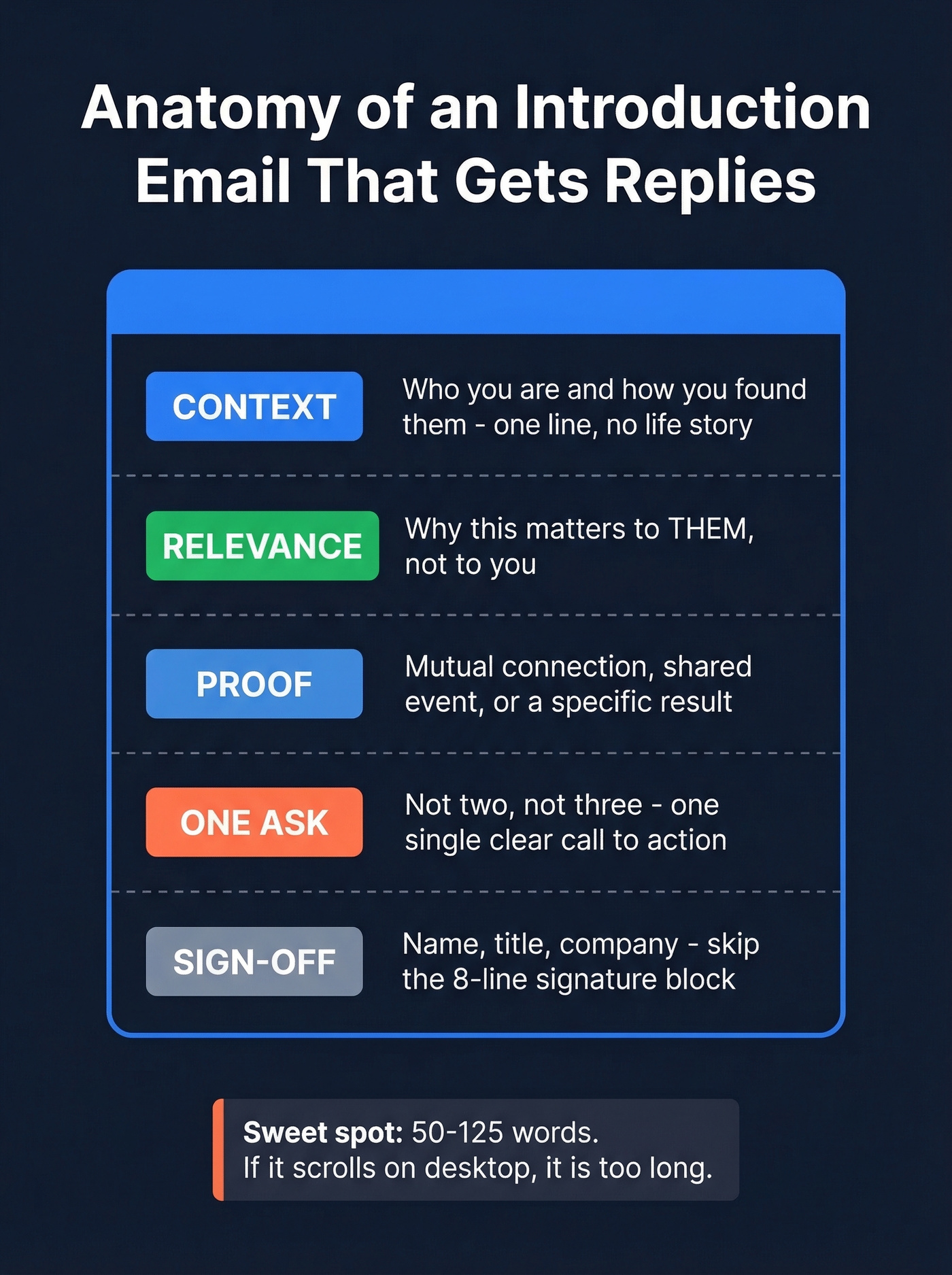
- One-line context. Who you are and how you found them. No life story.
- A reason this matters to them. Not to you - to them.
- Social proof or shared connection. Mutual contact, shared event, relevant result.
- One clear ask. Not two. Not three. One.
- A short sign-off. Name, title, company. Skip the 8-line signature block.
The optimal length is 50-125 words. If your intro email requires scrolling on desktop, it's too long.
Here's the thing: the biggest mistake people make is cramming their entire value proposition into the first email. Your introduction email isn't a pitch deck. It's a door knock.
Templates by Scenario
Self-Introduction Templates
1. Cold prospect introduction
You've identified a potential buyer and have no mutual connection.
Subject: Quick question about [their company's specific initiative]
Hi [First Name],
I'm [Your Name] - I lead [function] at [Company]. I noticed [specific observation about their company]. We helped [similar company] [specific result], and I think there's a fit. Worth a 15-minute call this week?
Best, [Your Name]
2. Job opportunity introduction
Reaching out to a hiring manager or recruiter about a role.
Subject: [Role title] - [Your Name]
Hi [First Name],
I'm [Your Name], a [title/background] with [X years] in [relevant area]. I saw the [role] posting and wanted to reach out directly - my work at [Company] on [specific project] maps closely to what you're building. I'd love to chat. When works best?
3. New team member introduction
You've just joined a company and need to introduce yourself to colleagues or stakeholders.
Subject: New [title] on the team - quick hello
Hi [First Name],
I'm [Your Name], just started as [title] on [team]. I'll be working on [area] and wanted to introduce myself early. I'd love to grab 15 minutes to learn about your priorities and where we'll overlap. How's [day]?
4. Networking introduction
You want to build a relationship with someone in your industry - no immediate ask.
Subject: Fellow [industry/role] - would love to connect
Hi [First Name],
I'm [Your Name] - I run [function] at [Company]. I've been following your work on [specific thing] and it resonates with what we're seeing in [area]. No agenda here - just wanted to connect. Open to a quick chat sometime?
For higher-touch outreach, a 30-second video intro via Loom or similar can lift open rates. But only if the recipient's industry expects that level of informality. B2B SaaS? Go for it. Law firms? Stick to text.
5. Post-event introduction
You met someone briefly at a conference, webinar, or meetup.
Subject: Good meeting you at [Event]
Hi [First Name],
Great connecting at [Event] - your point about [specific thing they said] stuck with me. I'm [Your Name] from [Company], and I think there's overlap between what you're doing with [their initiative] and our work in [area]. Want to continue the conversation over coffee or a call?
Third-Party Introduction Templates
Sending an unsolicited introduction puts the recipient in an awkward position - they didn't ask to be connected and now feel obligated to respond. Always get permission from both sides first. This is called a double opt-in, and it's the only professional way to introduce two people.
6. Double opt-in request
You want to introduce two people but need permission first.
Subject: Quick intro - [Person B's name]?
Hi [Person A],
I know someone who'd be a great fit for what you're working on - [Person B, title at Company]. They're focused on [relevant area]. Mind if I make an intro? I'll keep it brief.
7. The actual introduction
Both parties have agreed to connect.
Subject: Intro - [Person A] and [Person B]
Hi both,
[Person A], meet [Person B] - [one-line context about Person B]. [Person B], [Person A] is [one-line context]. You're both working on [shared interest] and I think a conversation would be valuable. I'll let you two take it from here.
After making the introduction, step back. Ask to be removed from the thread or simply stop replying - hovering makes both parties uncomfortable.
Business Introduction Templates
8. Partnership introduction
Exploring a strategic partnership or co-marketing opportunity.
Subject: [Your Company] + [Their Company] - potential fit
Hi [First Name],
I'm [Your Name], [title] at [Company]. We serve [audience] and I've noticed significant overlap with your customer base. [One specific observation]. I think there's a partnership angle worth exploring - 20 minutes to discuss?
9. Cold sales introduction
Classic outbound sales email to a decision-maker.
Subject: [Specific result] for [their company type]
Hi [First Name],
[Similar company] was dealing with [problem]. We helped them [specific result with number]. I think [their company] has the same opportunity. Worth a quick call to see if there's a fit?
[Your Name], [Company]
10. Investor outreach introduction
Founder reaching out to a potential investor.
Subject: [Company] - [one-line traction metric]
Hi [First Name],
I'm [Your Name], founder of [Company]. We [what you do] for [who], and we've hit [traction metric - revenue, users, growth rate]. I've followed your investments in [relevant portfolio company] and think there's alignment. Would you be open to a 20-minute intro call?
Follow-Up Templates
11. Gentle nudge follow-up
4-7 days after your initial email with no response.
Subject: Re: [original subject line]
Hi [First Name],
Just floating this back up. I know inboxes get buried. Still happy to chat about [original topic] if the timing works. If not, no worries at all.
12. Value-add follow-up
You want to follow up with something useful instead of just bumping the thread.
Subject: Re: [original subject line]
Hi [First Name],
Came across [relevant article/data/insight] and thought of our earlier thread. [One sentence about why it's relevant to them.] Still interested in connecting if you are.
Subject Lines That Get Opens
Your subject line determines whether anything else matters. Personalization lifts open rates 22-36%, and keeping subject lines to 6-8 words ensures they don't get truncated on mobile.
If you want more options to test, pull from these subject line examples and keep a swipe file of winners.
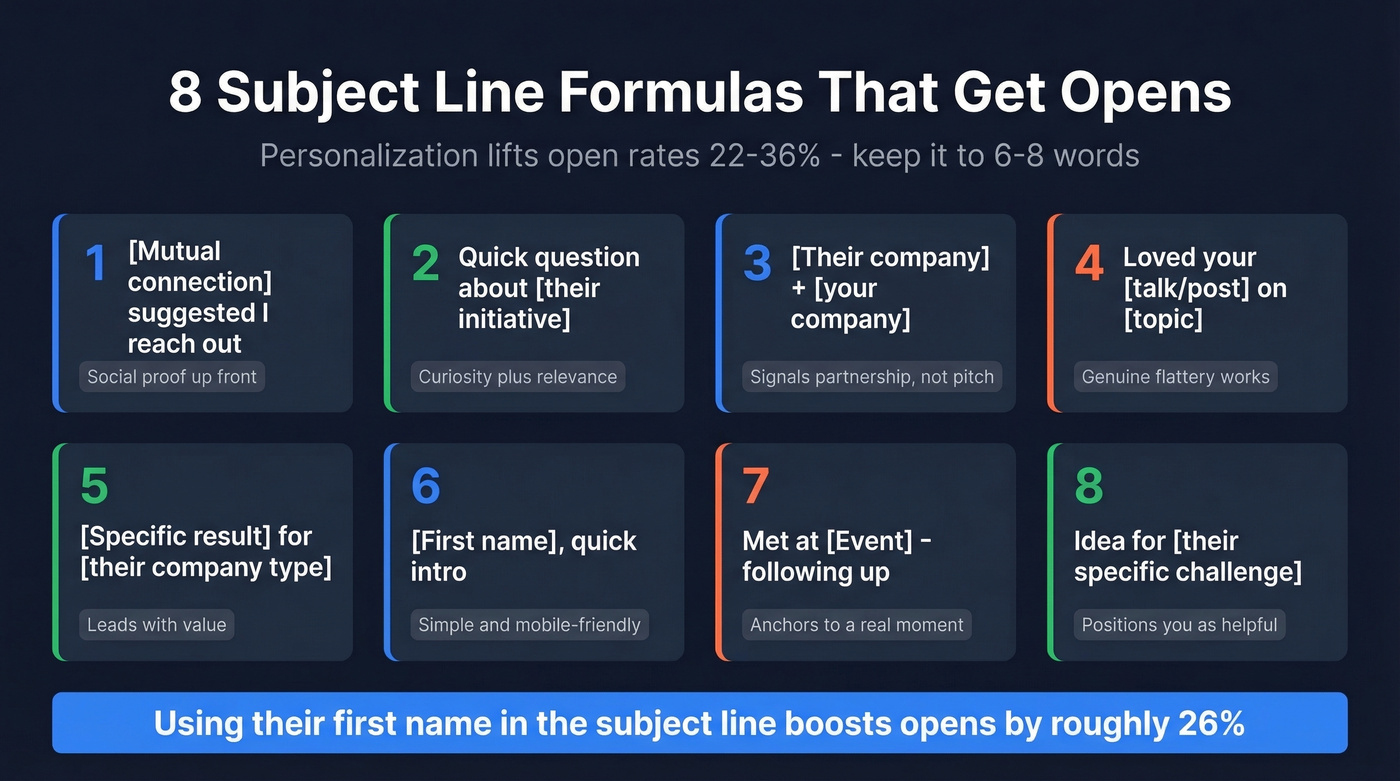
Eight formulas that consistently perform:
- [Mutual connection] suggested I reach out - social proof up front
- Quick question about [their initiative] - curiosity plus relevance
- [Their company] + [your company] - signals partnership, not pitch
- Loved your [talk/post/article] on [topic] - genuine flattery works
- [Specific result] for [their company type] - leads with value
- [First name], quick intro - simple, personal, mobile-friendly
- Met at [Event] - following up - anchors to a real moment
- Idea for [their specific challenge] - positions you as helpful
Using the recipient's first name in the subject line can boost open rates by roughly 26%. Test 5-10 subject lines per quarter and keep the winners in rotation.

You just wrote the perfect introduction email - 80 words, one clear ask, killer subject line. Then it bounces. Now your domain reputation takes the hit and every future email lands closer to spam. Prospeo verifies emails at 98% accuracy with a 5-step process that catches bad addresses, spam traps, and catch-all domains before you send.
Don't let a bad email address waste a great introduction.
Best Time to Send
Timing won't save a bad email, but it can sink a good one.
If you want a deeper breakdown, see our data-backed guide on the best time to send cold emails.
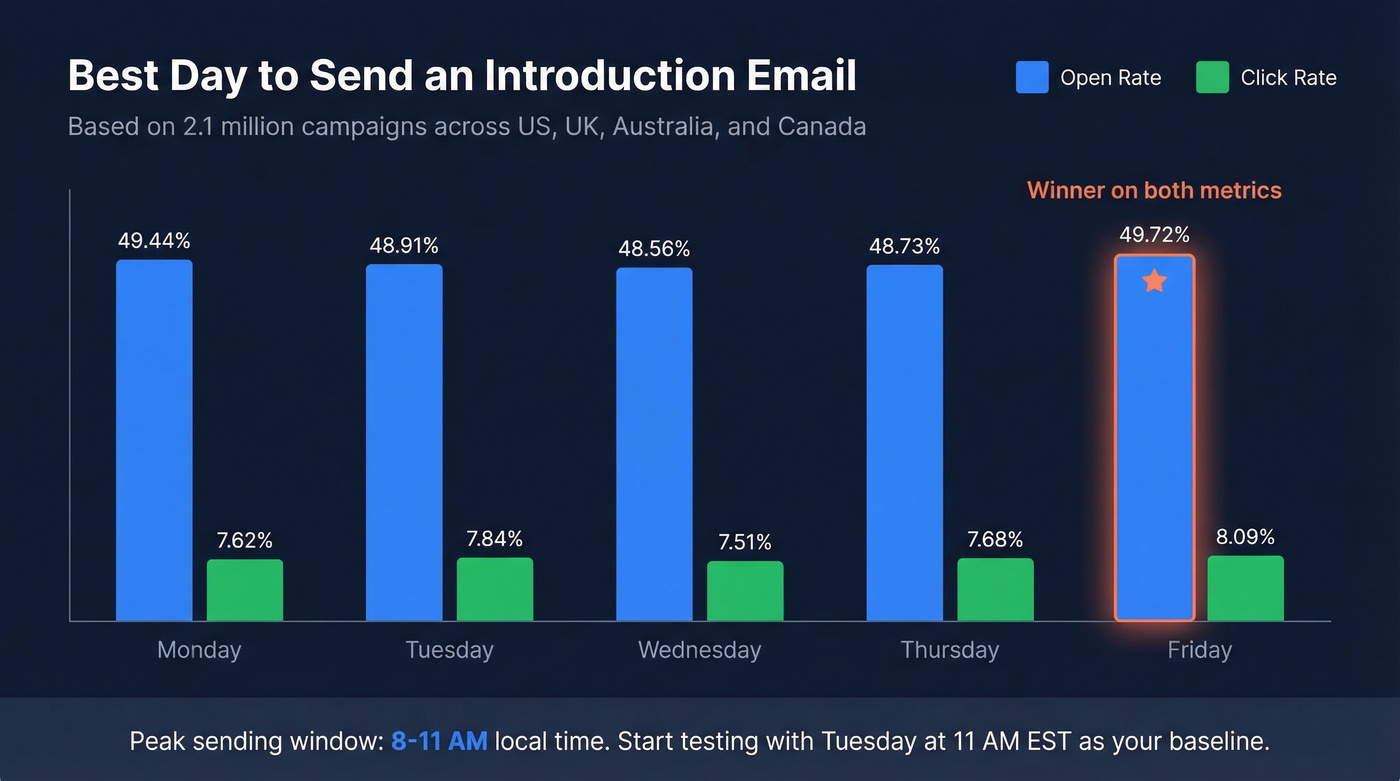
A MailerLite analysis of 2.1 million campaigns across the US, UK, Australia, and Canada found clear patterns:
| Day | Open Rate | Click Rate |
|---|---|---|
| Monday | 49.44% | 7.62% |
| Tuesday | 48.91% | 7.84% |
| Wednesday | 48.56% | 7.51% |
| Thursday | 48.73% | 7.68% |
| Friday | 49.72% | 8.09% |
Friday wins on both opens and clicks - which surprises most people. Monday is a close second for opens. The peak window across all days is 8-11 AM local time.
Twilio recommends starting with Tuesday at 11 AM EST as a testing baseline. But your audience's behavior matters more than any benchmark - use these numbers as a starting point, then adjust based on your own reply data.
Make Sure Your Email Actually Arrives
Look, you can write the perfect introduction email. Doesn't matter if it bounces or lands in spam. The #1 reason introduction emails fail isn't bad writing - it's bad data and broken infrastructure.
If you want the full technical breakdown, start with this email deliverability guide.
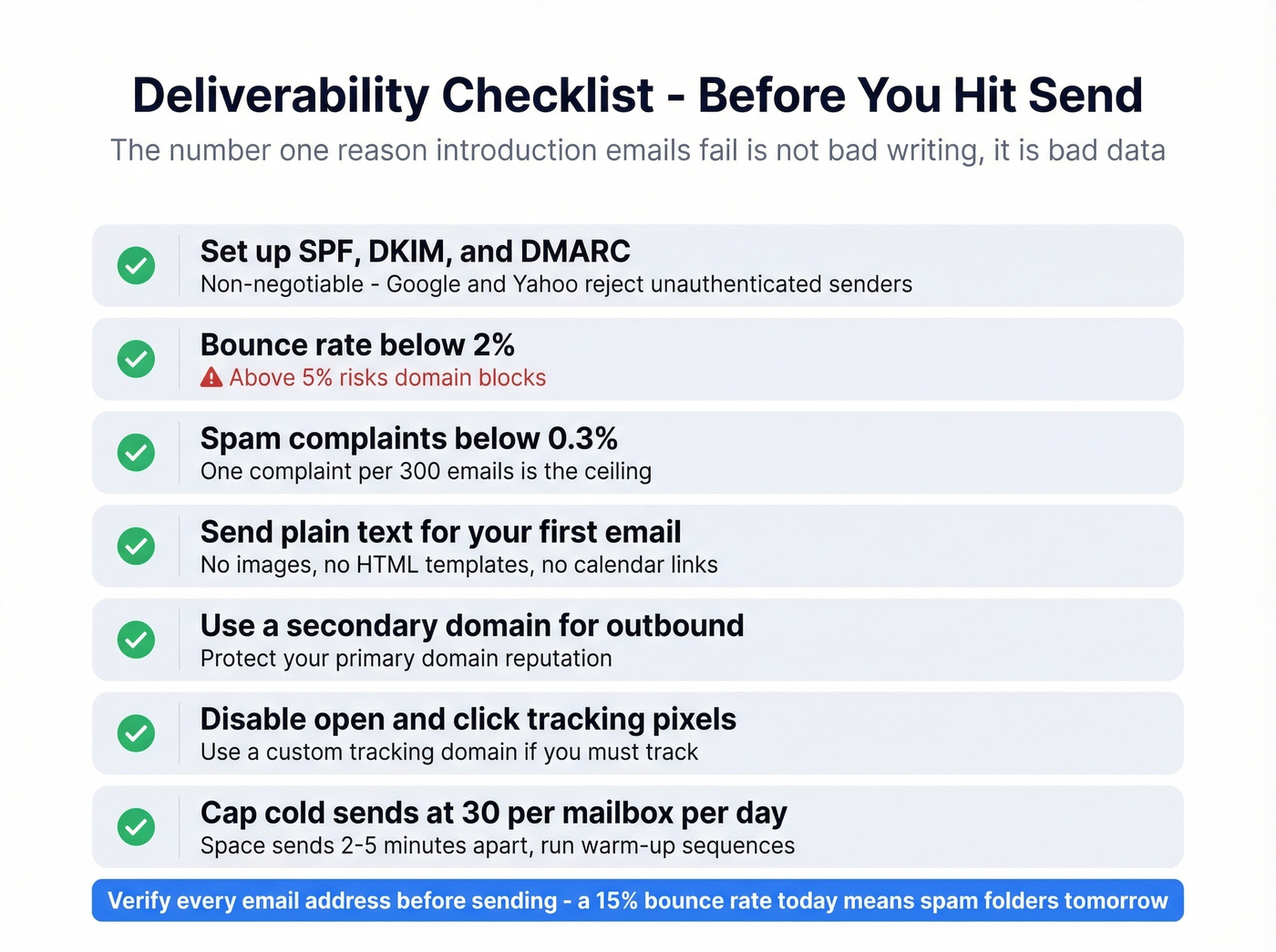
Here's the deliverability checklist:
- Set up SPF, DKIM, and DMARC on your sending domain. Non-negotiable - Google and Yahoo reject unauthenticated senders.
- Keep your bounce rate below 2%. Above 5% and you're risking domain blocks. (More benchmarks: email bounce rate.)
- Keep spam complaints below 0.3%. One complaint per 300 emails is the ceiling.
- Send plain text for your first email. No images, no HTML templates, no calendar links. Fancy formatting triggers spam filters.
- Use a secondary domain for outbound at scale. Protect your primary domain's reputation.
- Disable open and click tracking pixels. They often hurt deliverability. If you must track, use a custom tracking domain so you don't inherit other senders' bad reputation on shared domains. (Related: email tracking pixels.)
- Cap cold sends at 30 per mailbox per day. Use 2-3 mailboxes per domain, space sends 2-5 minutes apart, and run separate warm-up sequences on each. (Related: email velocity.)
And verify the recipient's email before sending. A bounced introduction email wastes your time and damages your sender reputation. Prospeo checks addresses in real time with 98% accuracy - the free tier gives you 75 verifications a month, no credit card required.
We've seen teams send 50 introduction emails, bounce 15% of them, and wonder why their next campaign lands in spam. That's not a copywriting problem. That's a list hygiene problem, and it compounds fast - every bounce makes the next batch of emails less likely to reach an inbox.
Follow Up or Lose the Reply
Following up isn't pushy. It's professional. 60% of replies come after the first follow-up, which means if you're sending one email and moving on, you're leaving more than half your potential replies on the table.
I'll go further: the follow-up is more important than the first email. Your initial message competes with 100+ other emails that morning. Your follow-up lands when the inbox is calmer and the recipient has already seen your name once. I'd rather send a mediocre first email with a great follow-up than a perfect first email with no follow-up at all.
Wait 4-7 days before your first follow-up - anything sooner feels aggressive. Send 2-3 follow-ups max; after that, you're not persistent, you're annoying. Keep each one shorter than the last. If your first email was 100 words, the follow-up should be about half that. And add value every time - share a relevant article, reference a recent event at their company, or reframe your ask. Skip "just circling back" if you want to be taken seriously; that's the laziest move in outbound and everyone recognizes it.
If you want more plug-and-play options, use these sales follow-up templates and adapt them to your intro context.
Mistakes That Kill Introduction Emails
Sending to unverified addresses. This is the most expensive mistake because it compounds. Every bounce hurts your sender score, which hurts deliverability on every future email. Verify addresses before hitting send.
Sounding like a sales pitch. The consensus on r/coldemail is clear: people disengage the instant an email triggers their "this is a pitch" reflex. Lead with curiosity or relevance, not features.
Including multiple CTAs. "Book a call, check out our site, and download our whitepaper" gives the reader three things to do, so they do none. One ask. That's it. (More on this: email call to action.)
Writing a novel. If your email requires scrolling on desktop, it's too long. 50-125 words. Cut everything that doesn't earn the reply.
Using a generic subject line. "Introduction" or "Quick question" without context is invisible in a crowded inbox. Personalize it or don't bother. (More ideas: subject lines that get opened.)
CC'ing everyone on a group introduction. Reddit's take is unanimous: putting a large list in the To or CC field exposes everyone's email and looks unprofessional. Use BCC when recipients shouldn't see each other's addresses.
Using gendered titles you haven't confirmed. Skip Mr./Ms./Mrs. unless you're certain. Getting it wrong is worse than using a first name.

How to Measure Success
Open rates are a vanity metric for introduction emails. Reply rate is the only number that matters.
HubSpot reports a 42.35% average open rate across industries, but that number is inflated. Apple Mail Privacy Protection - which covers 46% of email clients - artificially boosted open rates by 18 points across 80,000+ accounts studied. Your "42% open rate" might really be 24%.
For cold introduction emails, here's what good looks like:
- Response rate: 7-10% is average. 20%+ is achievable with strong targeting and personalization.
- Bounce rate: Under 2%. Above this, your list hygiene needs work.
- Reply quality: Are people engaging with your ask, or just saying "not interested"? Track positive reply rate separately.
In our experience, teams that separate positive replies from total replies make better targeting decisions. They stop optimizing for volume and start optimizing for conversations that actually convert. That shift alone - from "how many replied" to "how many replied with interest" - changes everything about how you build prospect lists and write your emails.
Stop chasing open rates. Track replies.
Finding the right person to introduce yourself to is half the battle. Prospeo's database of 300M+ professional profiles with 30+ filters - job title, department, company size, buyer intent - lets you pinpoint the exact decision-maker worth emailing. Then get their verified email for roughly $0.01.
Stop guessing who to email. Start with the right contact.
FAQ
How long should an introduction email be?
50-125 words - two scrolls or fewer on mobile. State who you are, why you're reaching out, and one clear ask. Anything longer and you're asking the recipient to invest time before they've decided you're worth it.
When should I follow up?
Wait 4-7 days before your first follow-up. 60% of replies come after that first nudge. Send 2-3 follow-ups maximum, each shorter than the last. After three with no response, move on.
Should I use To, CC, or BCC for group introductions?
Put both parties in the To field when introducing two people directly. For larger group sends, BCC everyone and put yourself in To - this protects recipients' addresses and avoids looking unprofessional.
What's a good response rate for cold introductions?
7-10% is average. With strong targeting, personalization, and verified contact data, teams consistently hit 20%+. Below 5% usually signals a list quality or relevance problem, not a copywriting one.
How do I make sure my introduction email doesn't bounce?
Verify the recipient's address before sending. Keep your overall bounce rate below 2% to protect your domain reputation - anything above 5% risks inbox-provider flags. The free tier on most verification tools is enough to get started.