

How to Send Bulk Emails Without Spamming (2026 Guide)
You built a list of 2,000 contacts, loaded them into your sending tool, and hit go. Three days later, open rates sit at 3%, replies don't exist, and your domain reputation is cratered. The problem isn't your copy - it's your infrastructure, and probably your data.
Here's the thing most guides won't say plainly: the majority of teams don't have a "sending" problem. They have a data quality problem wearing a deliverability costume. Fix the list and half your spam issues vanish overnight.
Preflight Checklist
Before you send anything, confirm these five things:
- SPF, DKIM, and DMARC are configured and passing
- Your domain has been warmed up for at least 2-4 weeks
- Your email list is verified with a hard bounce target under 2%
- Spam complaint rate is under 0.1%
- One-click unsubscribe is enabled and functional
If any of those are missing, you'll land in spam. Full stop.
Why Emails Land in the Spam Folder
There are really only three root causes. Everything else is a symptom.
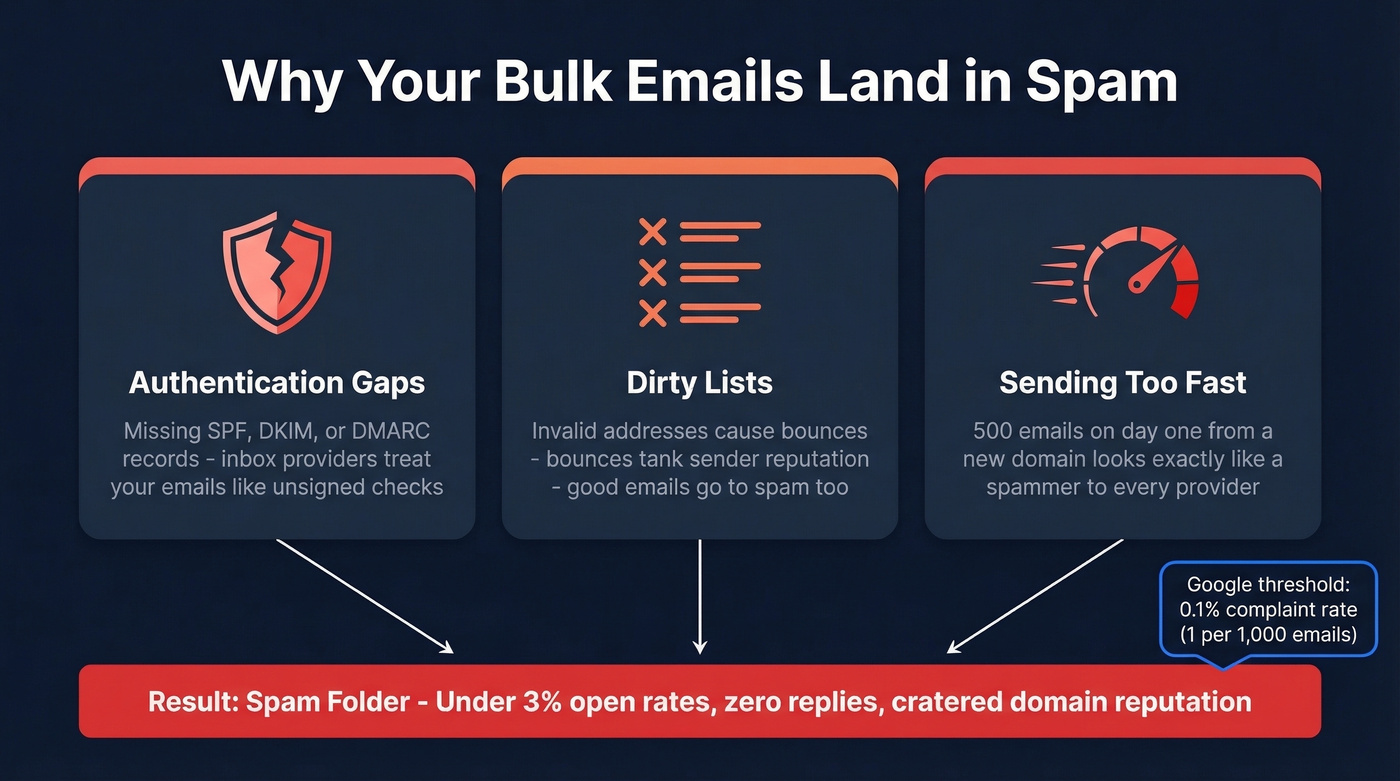
Authentication gaps. If your domain doesn't have SPF, DKIM, and DMARC records properly configured, inbox providers treat your emails like unsigned checks. They might get through. They probably won't.
Dirty lists. Sending to invalid addresses triggers bounces. Bounces tank your sender reputation. A tanked reputation means even your good emails go to spam - it's a vicious loop, and it starts with a single bad list. Spam traps (pristine, typo, and recycled) make dirty lists even more dangerous, because you can't spot them by looking at your CSV.
Sending too fast. A brand-new domain blasting 500 emails on day one looks exactly like a spammer to every inbox provider on the planet. They expect a gradual ramp. Skip the warm-up and you'll spend weeks digging out of a reputation hole.
Google and Yahoo enforce a 0.3% spam complaint threshold and strongly recommend staying below 0.1%. That's 1 complaint per 1,000 emails. Exceed it and you're in the danger zone.
The Sender Rules That Changed Everything
Google and Yahoo rolled out bulk sender requirements in 2024 that rewrote the deliverability playbook - and they remain the standard heading into 2026. If you're sending to Gmail or Yahoo addresses, and you are, these aren't optional.
Every bulk sender must implement SPF, DKIM, and DMARC with a minimum policy of p=none. One-click unsubscribe aligned with RFC 8058 is required, unsubscribe requests must be processed within two days, and the spam complaint threshold is hard-capped at 0.3%. These requirements drove a 65% reduction in unauthenticated messages hitting inboxes. DMARC adoption jumped to 53.8% in 2024, up from 42.6% the year before. And while 63% of senders were at least somewhat familiar with the new requirements, only 49.5% of those actually made changes.
That's good news for you. Compliance isn't just a checkbox - it's a competitive advantage. Authenticated senders get preferential inbox placement while their competitors rot in spam folders. A recurring thread on r/Emailmarketing is newsletters shifting from Primary to Promotions after Gmail enforcement changes; proper authentication is the best baseline defense.
Set Up Email Authentication
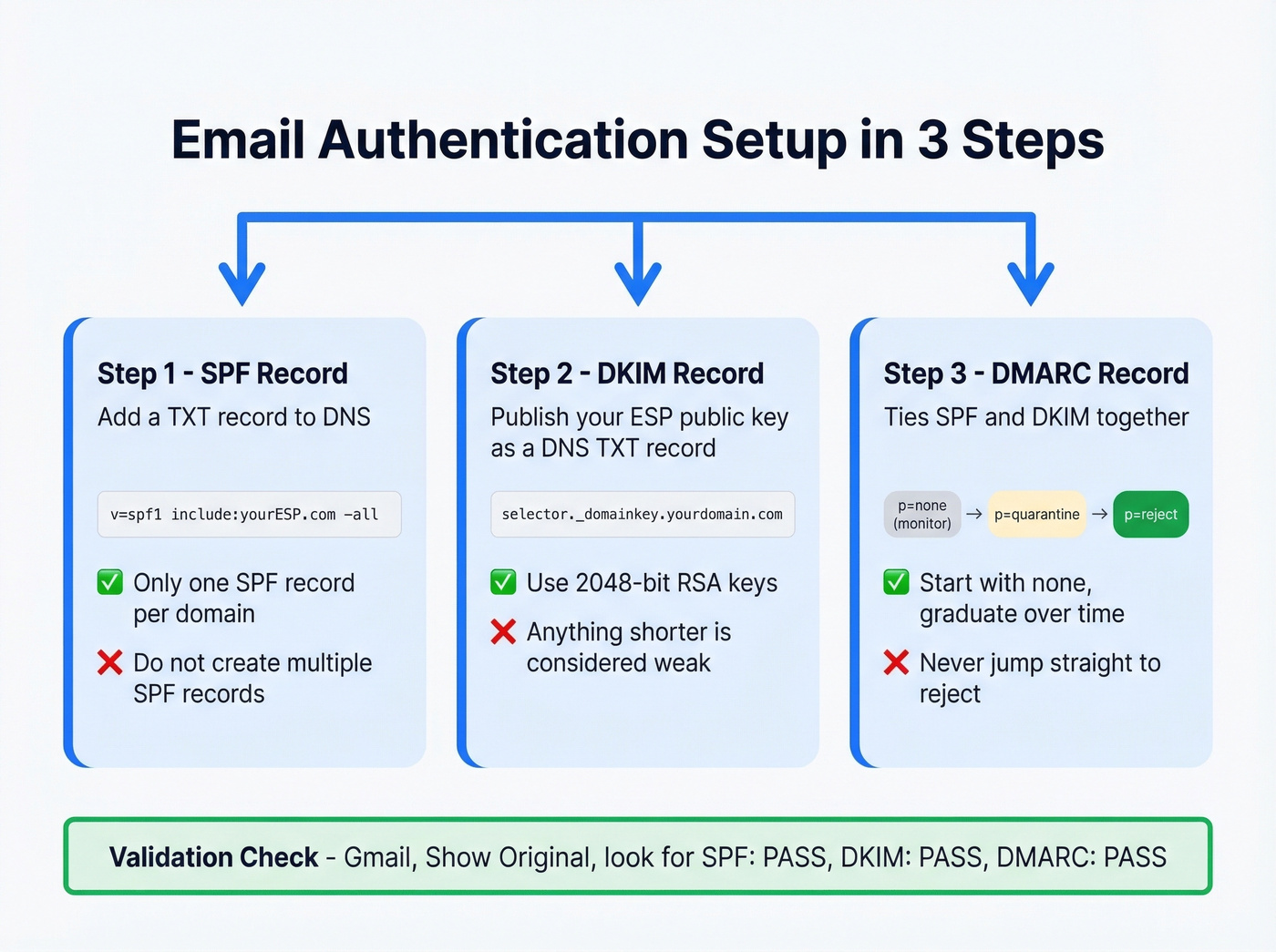
This takes 15-30 minutes. DNS propagation can take up to 24 hours, so do this first and let it cook while you handle everything else.
SPF Record
Add a TXT record to your domain's DNS. This tells inbox providers which servers are allowed to send email on your behalf.
v=spf1 include:mailgun.org include:_spf.google.com -all
Replace the include: values with your actual sending services. The -all at the end is a hard fail - it tells providers to reject anything not on the list. Common mistake: creating multiple SPF records. You can only have one. If you use multiple sending services, combine them into a single record with multiple include: statements.
If you want more syntax patterns, see SPF record examples.
DKIM Record
DKIM adds a cryptographic signature to your emails. Your ESP generates the key pair; you publish the public key as a DNS TXT record.
default._domainkey.yourdomain.com TXT "v=DKIM1; k=rsa; p=MIIBIjANBgkqh..."
Use 2048-bit RSA keys. Anything shorter is considered weak. The default part is your selector - it varies by ESP, so check their docs.
If you’re troubleshooting, use this guide on how to verify DKIM is working.
DMARC Record
DMARC ties SPF and DKIM together and tells providers what to do when authentication fails.
_dmarc.yourdomain.com TXT "v=DMARC1; p=quarantine; rua=mailto:reports@yourdomain.com; ruf=mailto:forensics@yourdomain.com; sp=quarantine; aspf=r; adkim=r"
Don't jump straight to p=reject. Start with p=none to monitor, move to p=quarantine once you've confirmed legitimate mail is passing, then graduate to p=reject. Jumping to reject on day one will break legitimate email flows you forgot about - marketing tools, transactional senders, calendar invites from third-party apps.
For the technical nuance, read more about DMARC alignment.
Validation check: Send a test email to a Gmail account, open it, click the three dots, then "Show original." You should see SPF: PASS, DKIM: PASS, and DMARC: PASS. If any show FAIL, fix it before sending a single campaign.
We've seen teams migrate from one ESP to another and wonder why deliverability cratered - they left the old SPF includes and never added the new ones. Always audit your DNS records after any platform change.
If you’re trying to recover after a bad send, here’s how to improve sender reputation.

Authentication gets you to the door. Clean data gets you through it. Prospeo's 5-step verification with catch-all handling, spam-trap removal, and honeypot filtering keeps bounce rates under 2% - the exact threshold you need to stay out of spam folders.
Stop sending bulk emails to addresses that don't exist.
The Warm-Up Schedule
A new domain or mailbox needs a gradual ramp. There's no shortcut here.
Standard 30-Day Ramp
For teams sending under 100 emails per day from a single inbox:
| Week | Emails/Day | Notes |
|---|---|---|
| 1 | 10-20 | Warm-up only |
| 2 | 20-40 | Mix in 5-10 real sends |
| 3 | 40-60 | 20-30 real sends |
| 4 | 60-100 | Mostly real sends |
Scaling to 1,000+ Per Day
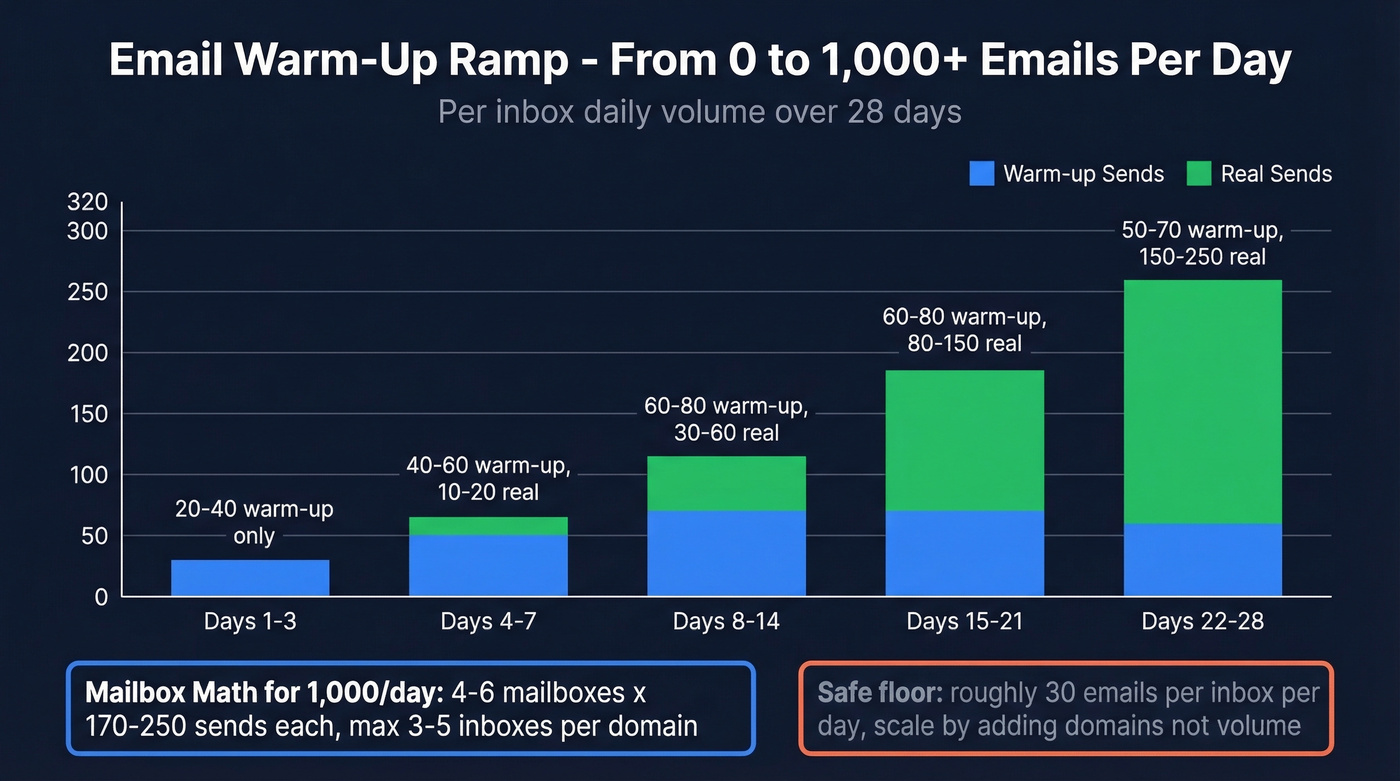
A single inbox won't cut it at high volume. Here's the day-by-day ramp for each inbox, blending warm-up and real sends:
| Days | Warm-up/Day | Real Sends/Day |
|---|---|---|
| 1-3 | 20-40 | 0 |
| 4-7 | 40-60 | 10-20 |
| 8-14 | 60-80 | 30-60 |
| 15-21 | 60-80 | 80-150 |
| 22-28 | 50-70 | 150-250 |
Mailbox math for 1,000 emails/day: Conservative approach is 4 mailboxes x 250/day. Risk-averse teams run 5-6 mailboxes x 170-200/day. Cap it at 3-5 inboxes per domain.
To stay safe as you scale, track your email velocity and ramp gradually.
In our experience, teams that push past 250/day per inbox in the first month regret it. The practitioner consensus backs this up - one sender on r/b2bmarketing doing 3,700+ cold emails per day recommends roughly 30 emails per day per inbox, with 3 inboxes per domain, which works out to about 90 emails per domain per day. That's the safe floor. Scale by adding domains and mailboxes, not by pushing volume through fewer accounts.
Clean Your List Before Sending
List hygiene is the highest-ROI deliverability action you can take. Authentication and warm-up are table stakes. Clean data is what separates teams that consistently reach the inbox from teams that keep getting flagged.
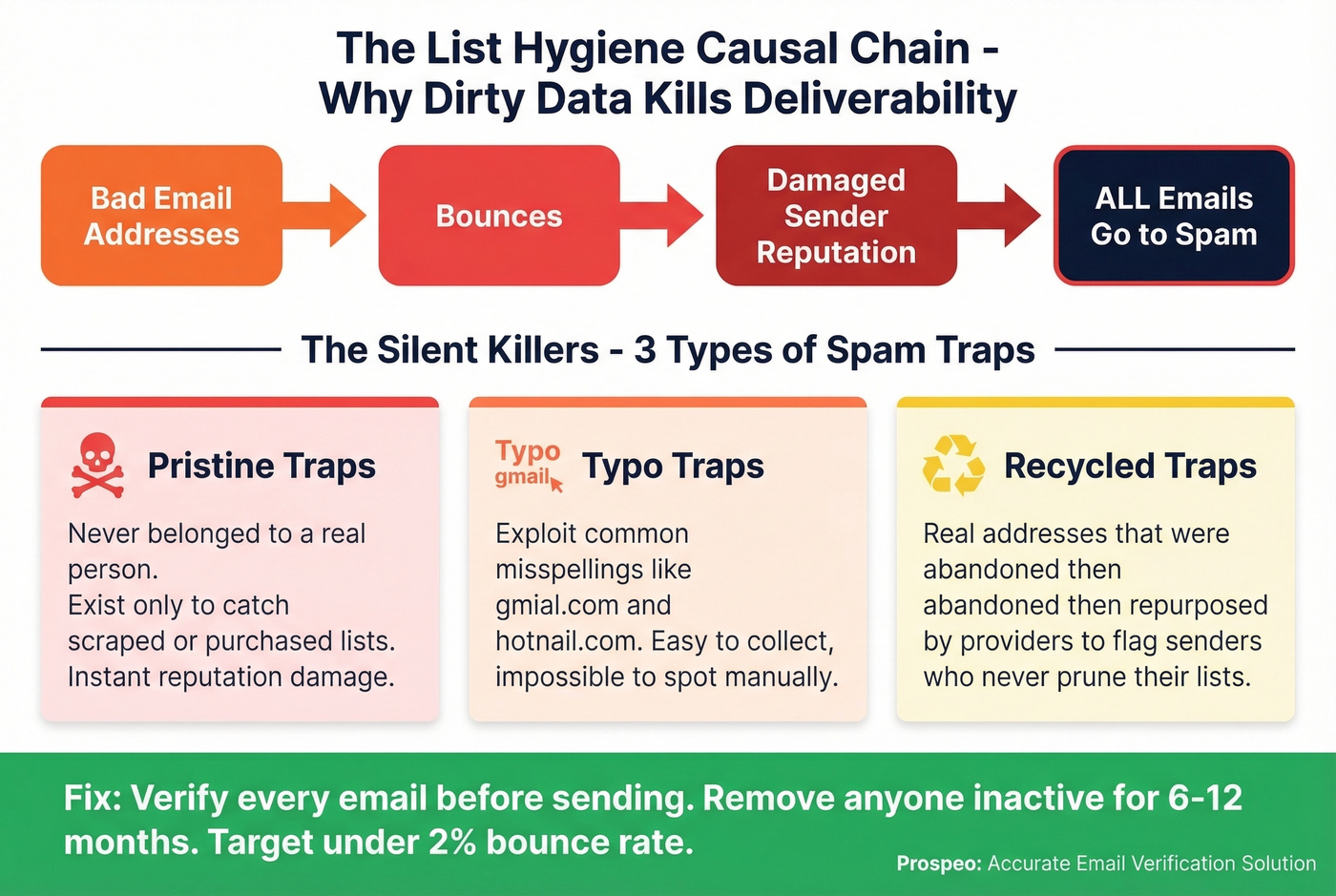
The causal chain is simple: bad email addresses cause bounces, bounces damage your sender reputation, and damaged reputation means spam placement for every email you send, not just the bad ones. I've watched clients go from 3% open rates to 40%+ just by running verification before their first send.
If you want the benchmarks and bounce codes, see email bounce rate.
Spam traps are the silent killers. Pristine traps are addresses that never belonged to a real person - they exist solely to catch senders using scraped or purchased lists. Typo traps exploit common misspellings like "gmial.com" and "hotnail.com." Recycled traps are real addresses that were abandoned and then repurposed by inbox providers to flag senders who never prune their lists. You can't identify these by looking at them. You need verification.
If you suspect traps are already in your list, start with a spam trap removal workflow.
Engagement-based pruning matters too. Anyone who hasn't opened or clicked in 6-12 months should be removed. They're dragging down your engagement metrics, which inbox providers use as a ranking signal.
Most deliverability problems are data problems in disguise. Prospeo refreshes every record on a 7-day cycle - not the 6-week industry average - so your list never goes stale between campaigns. At $0.01 per verified email, cleaning your list costs less than a single spam complaint.
Fix your list before your next send. It takes five minutes.
Write Emails That Pass Filters
Your infrastructure can be perfect and your emails can still get flagged if the content triggers spam filters. What you write matters just as much as how you send it.
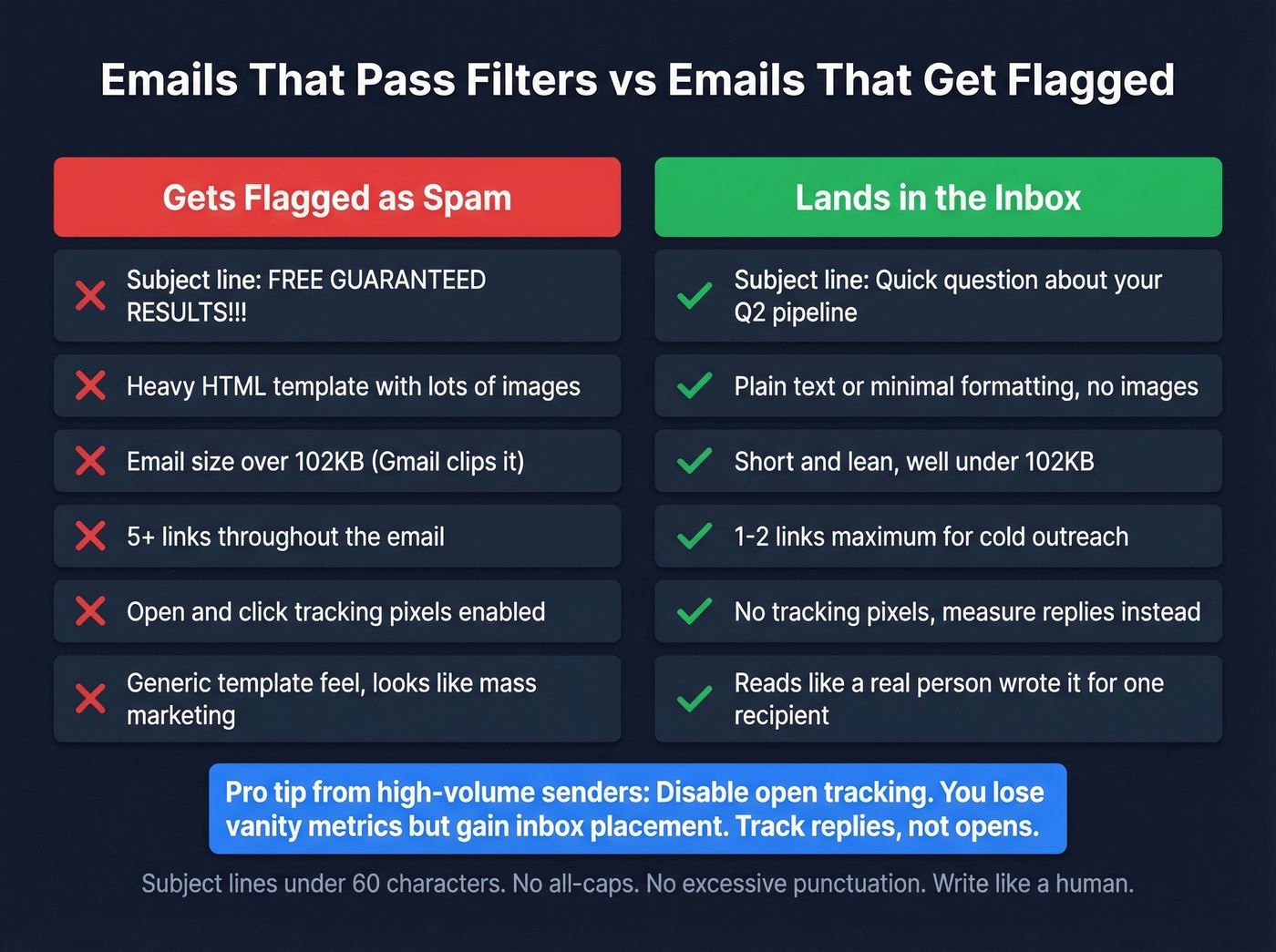
Subject lines should stay under 60 characters. Avoid all-caps, excessive punctuation, and classic spam trigger words like "free," "guaranteed," and "act now." Write like a human, not a marketer.
If you need ideas, use these email subject line examples.
Text-to-image ratio is a real signal. Heavy images with minimal text get flagged. For cold email, skip images entirely.
Email size matters more than people realize. Gmail clips emails over 102KB, hiding the rest behind a "View entire message" link - which kills engagement metrics and can trigger spam filters. Keep it lean.
Minimal links. Every link is a potential spam signal. One or two max for cold outreach.
Now for the contrarian take that experienced cold emailers swear by: disable open and click tracking. Tracking pixels and redirect links are spam filter magnets. The practitioners sending thousands of cold emails per day don't track opens - they track replies. Plain text emails with no tracking consistently outperform HTML templates with full analytics. You lose vanity metrics but gain inbox placement. If your goal is reaching the primary inbox, ditch the tracking. Mailgun's deliverability guide covers this tradeoff in detail.
If you want the technical breakdown, see email tracking pixels.
Legal Compliance
$53,088 per email. That's the CAN-SPAM penalty ceiling - and it's per violation, not per campaign. GDPR maxes out at EUR20M or 4% of global annual turnover. PECR in the UK caps at GBP500,000.
| Regulation | Max Penalty | Applies To |
|---|---|---|
| CAN-SPAM | $53,088/email | US, both B2B and B2C |
| GDPR | EUR20M or 4% revenue | EU/EEA |
| PECR | GBP500,000 | UK |
CAN-SPAM's seven key requirements: no misleading headers, no deceptive subject lines, identify the message as an ad, include your physical postal address, provide a clear opt-out mechanism, honor opt-outs within 10 business days, and take responsibility for third parties sending on your behalf.
Bulk email isn't automatically illegal. In the US, CAN-SPAM allows commercial email as long as you follow the rules above. In the EU/UK, GDPR and PECR compliance depends on your lawful basis and consent requirements. Skip this section if you're only sending to US-based B2B contacts with proper opt-out mechanisms - but don't skip it if you have any EU contacts on your list.
If you’re unsure about list sourcing, read Is it illegal to buy email lists?.
Compliant senders get better inbox placement. ISPs track complaint rates and compliance signals. This isn't just legal protection - it's a deliverability strategy.
Tools and Pricing
Your ESP matters less than your domain setup and data quality. Pick based on volume and budget, and separate transactional email streams from marketing sends.
| Tool | Free Plan | Starting Price | Best For |
|---|---|---|---|
| Prospeo | 75 verifications/month | ~$0.01/email | Email verification |
| Brevo | 100 emails/month | $15/mo | SMB marketing |
| Sender | 15K emails/month | $7/mo | Budget marketing |
| Amazon SES | - | $0.10/1K emails | High-volume transactional |
| Mailjet | 200 emails/day | $17/mo | Mid-volume marketing |
| Postmark | 300 emails/day | $9/mo | Transactional email |
| Mailtrap | 4K emails/month | $15/mo | Dev/testing + sending |
| Constant Contact | - | $30/mo | Traditional marketing |
| GMass | 50 emails/day trial | $25/mo | Gmail-based outreach |
| Apollo | 100 credits/month | $59/mo/user | Outreach + warm-up |
If you’re comparing platforms, start with these AI bulk email senders.
For cold outreach, remember that the sending tool doesn't actually "send" your emails - it orchestrates sending through your connected Gmail or Outlook accounts. Deliverability depends on your domains, authentication, and content, not the platform. Run your list through verification before loading it into any sending tool. At ~$0.01 per email, it's the cheapest insurance against bounces and domain damage.
FAQ
How many emails can I send per day without getting flagged?
A single warmed inbox handles 150-400 emails per day for marketing sends. For cold email, cap at 30 per day per inbox and scale by adding mailboxes and domains. The formula: (target daily volume) / 30 = number of inboxes needed. Want to send 900/day? You need 30 inboxes across 10 domains.
Is sending bulk email illegal?
Bulk email is legal in the US under CAN-SPAM if you include an unsubscribe mechanism, honor opt-outs within 10 business days, and include your physical address. In the EU/UK, GDPR and PECR compliance depends on your lawful basis and consent requirements.
What's the best free tool for verifying email lists before bulk sends?
Prospeo offers 75 free email verifications per month with its 5-step verification process, including catch-all handling and spam-trap removal - enough to test a small campaign. For larger lists, paid plans run ~$0.01 per email with no contracts.
How do I avoid the spam folder with mass email?
Authenticate your domain (SPF, DKIM, DMARC), verify your list to keep bounces under 2%, warm up gradually over 30 days, and keep complaint rates under 0.1%. Let's be honest - there's no single magic fix. Teams that follow this full checklist consistently land in the primary inbox because they've addressed every signal providers look at, not just one.
How long does email warm-up take?
Expect 30 days to reach 100 emails/day from a single inbox and 45-60 days to scale to 500-1,000/day across multiple inboxes. Warm-up emails should continue alongside real sends indefinitely to maintain sender reputation.