

How to Send Bulk Marketing Emails Without Destroying Your Domain
You just hit send on a 2,000-person campaign from your work Gmail. Within an hour, your inbox is flooded with bounce notifications, your IT team is asking why the domain got flagged, and half your list never saw the email. Roughly 1 in 6 marketing emails never reach the inbox, and most of that failure is preventable.
This guide walks you through how to send bulk marketing emails the right way - from platform selection to deliverability monitoring - so you don't torch your domain learning the hard way.
What You Need Before You Send Anything
Three things separate campaigns that land from campaigns that wreck your domain: a dedicated sending platform (not Gmail), a verified list, and proper domain authentication. Skip any one of those and you're gambling with your sender reputation.
If you're starting from scratch, Brevo or Sender offer usable free tiers. Run your list through an email verification tool before every campaign - bad addresses are the fastest way to crater deliverability. We'll cover the full workflow below.
Why Gmail and Outlook Won't Work
Gmail caps you at 500 recipients per day on personal accounts. Workspace accounts have higher limits, but Gmail still isn't built for mass marketing sends. There's no unsubscribe management, no reputation monitoring, no real analytics.
Outlook and Exchange Online are worse. Bulk sending can throttle or block your messages, and it risks your entire tenant's mail flow getting restricted. Yahoo's own documentation puts it bluntly: "if you are sending one email to many recipients, you are a bulk sender." Gmail's built-in mail merge exists, but it gives you nothing you actually need. Use a real sending platform.
2026 Bulk Sender Requirements
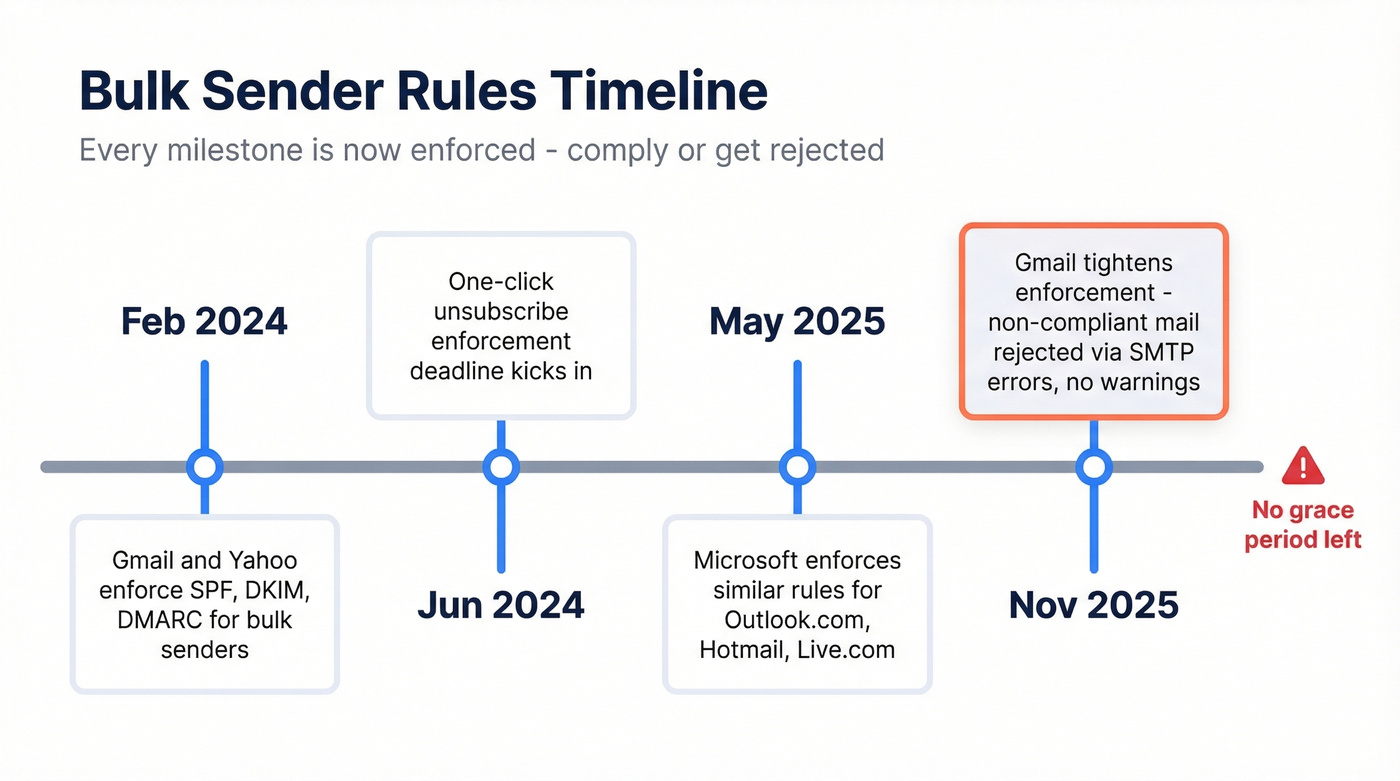
Gmail and Yahoo started enforcing bulk sender requirements in February 2024. The rules have only gotten stricter since. If you're sending 5,000+ emails per day to consumer inboxes, every one of these is mandatory:
- SPF, DKIM, and DMARC authentication on your sending domain
- One-click unsubscribe via RFC 8058 headers
- Spam complaint rate below 0.3% - target under 0.1%
As of late 2025, Gmail rejects non-compliant messages outright with SMTP errors. No warnings, no grace period.
| Date | What Changed |
|---|---|
| Feb 2024 | Gmail/Yahoo enforce SPF, DKIM, DMARC |
| Jun 2024 | One-click unsubscribe enforcement deadline |
| May 2025 | Microsoft enforces similar rules for Outlook.com/Hotmail/Live.com |
| Nov 2025 | Gmail tightened enforcement; non-compliant mail rejected via SMTP 4xx/5xx |
The penalties go beyond bounced emails. CAN-SPAM fines run up to $53,088 per email. GDPR violations can hit EUR 20M or 4% of global annual turnover. These aren't theoretical risks - they're enforced.

Sending bulk emails to unverified addresses is the fastest way to torch your domain. Prospeo's 5-step verification catches spam traps, honeypots, and catch-all domains at 98% accuracy - so your bounce rate stays under 2% where it belongs.
Clean your list before every campaign. Start with 75 free verifications.
Step-by-Step Bulk Email Workflow
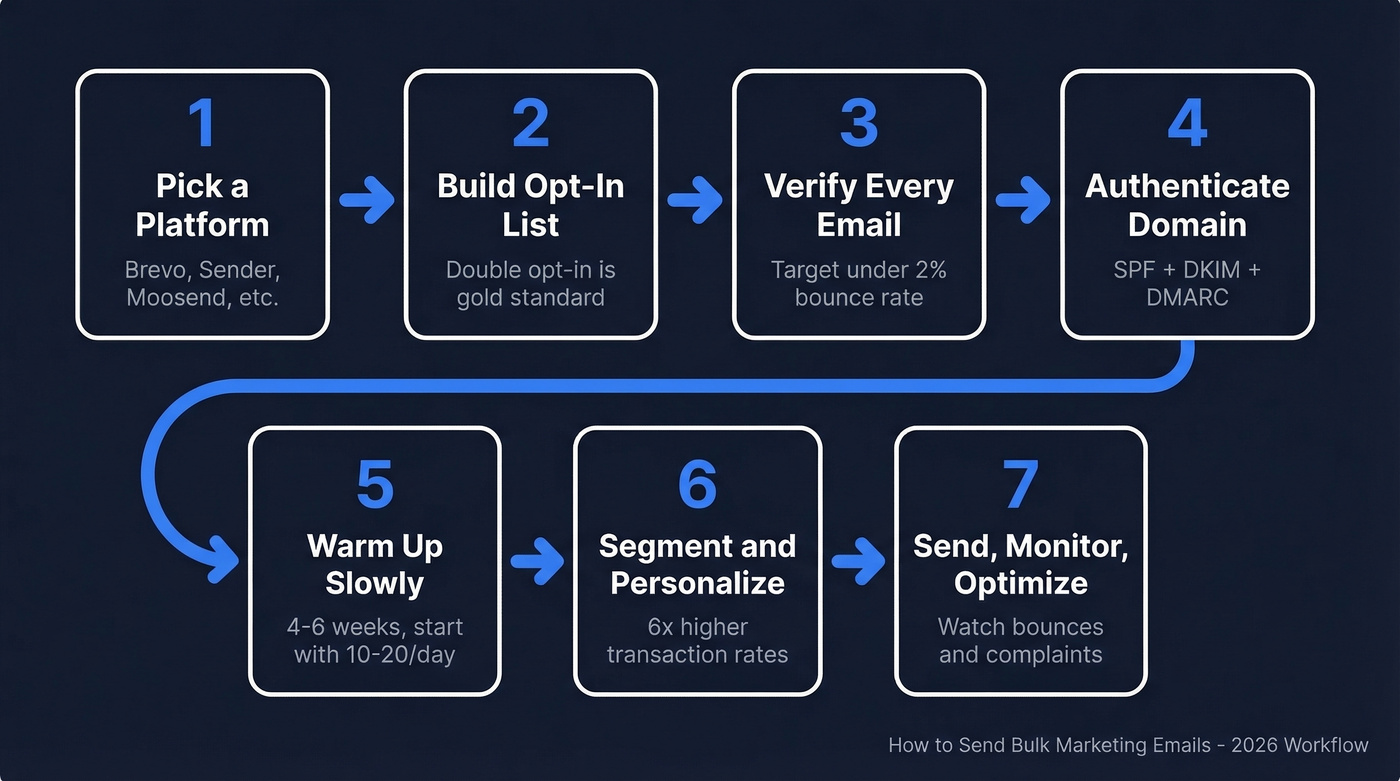
1. Pick a Sending Platform
You need a dedicated email marketing platform with deliverability infrastructure, unsubscribe handling, and analytics built in. The comparison table further down covers the best options by budget. Don't overthink this step - pick one and move.
If you're evaluating options, see our breakdown of AI bulk email senders for 2026.
2. Build an Opt-In List
Every contact on your list should have explicitly opted in. Double opt-in is the gold standard because it confirms the address is real and the person actually wants your emails.
Never buy a list. Purchased lists are full of spam traps, dead addresses, and people who'll mark you as spam on sight. If you're unsure about the legal side, read Is It Illegal to Buy Email Lists?. The consensus on r/emailmarketing is unanimous on this: bought lists are career-ending for your domain reputation.
3. Verify Your List
Here's the thing - this is the step most teams skip, and it's the one that causes the most damage. Clean, verified lists can achieve over 95% deliverability versus roughly 70% for unchecked data. Run your list through a verification tool before every send to catch invalid addresses, spam traps, and honeypots before they tank your sender reputation. Your target: total bounces under 2%.
If you want to go deeper on bounce mechanics, see our email bounce rate guide.
Prospeo's 5-step verification process handles catch-all domains, spam traps, and honeypots at 98% accuracy - and you can verify in bulk before every campaign.
4. Authenticate Your Domain
Set up all three protocols. SPF must stay under 10 DNS lookups - that's a hard limit baked into the spec. Use 2048-bit RSA keys for DKIM. For DMARC, start with p=none to collect reports, move to quarantine once you're confident, then reject.
If you need help validating your setup, follow our guide on how to verify DKIM is working and use these SPF record examples to avoid common syntax mistakes.
5. Warm Up Your Domain
A brand-new domain blasting 5,000 emails on day one will get suspended. In our experience, the warm-up phase is where most teams get impatient and blow it. Ramp slowly over 4-6 weeks:
| Week | Daily Volume |
|---|---|
| 1 | 10-20 |
| 2 | 20-40 |
| 3-4 | 40-50 |
| 5-6 | Scale gradually |
Set up a custom tracking domain using a CNAME record to isolate your reputation from shared tracking infrastructure. DNS propagation can take up to 72 hours, so do this early. The bigger the list you're targeting, the more methodical the ramp needs to be - resist the urge to skip ahead.
For a deeper technical walkthrough, see: What Is a Tracking Domain? and email velocity.
6. Build, Personalize, and Test
Segment your list by behavior, demographics, or purchase history. Segmented campaigns drive 6x higher transaction rates than batch-and-blast. Use merge tags for personalization. Before sending to your full list, fire a test to your internal team and run a spam-score check.
If you want faster iteration, use these email subject line examples and a dedicated email spam checker before you scale volume.
7. Send, Monitor, Optimize
Track opens, clicks, bounces, and complaints after every send. If your bounce rate creeps above 2% or complaints pass 0.3%, stop sending and clean your list immediately.
One thing we always recommend: separate your transactional emails (receipts, password resets) from marketing emails on different subdomains. A marketing reputation hit shouldn't take down your transactional delivery.
For a full diagnostic checklist, see our email deliverability guide.
Best Tools for Bulk Marketing Emails
| Tool | Free Plan | Starting Price | Best For |
|---|---|---|---|
| Brevo | 300 emails/day | $9/mo (5K emails) | Best all-around free tier |
| Sender | 15K emails/mo, 2,500 subs | $7/mo (12K emails) | Most generous free plan |
| Moosend | 30-day trial | $9/mo (500 contacts, unlimited sends) | Unlimited sends on budget |
| Mailjet | 200 emails/day | $17/mo (15K emails) | Transactional + marketing |
| Amazon SES | - | $0.10/1K emails | Developer infrastructure |
| Constant Contact | - | $30/mo (1K contacts) | Small teams, guided setup |
| Prospeo | 75 verifications/mo | ~$0.01/email | List verification before send |
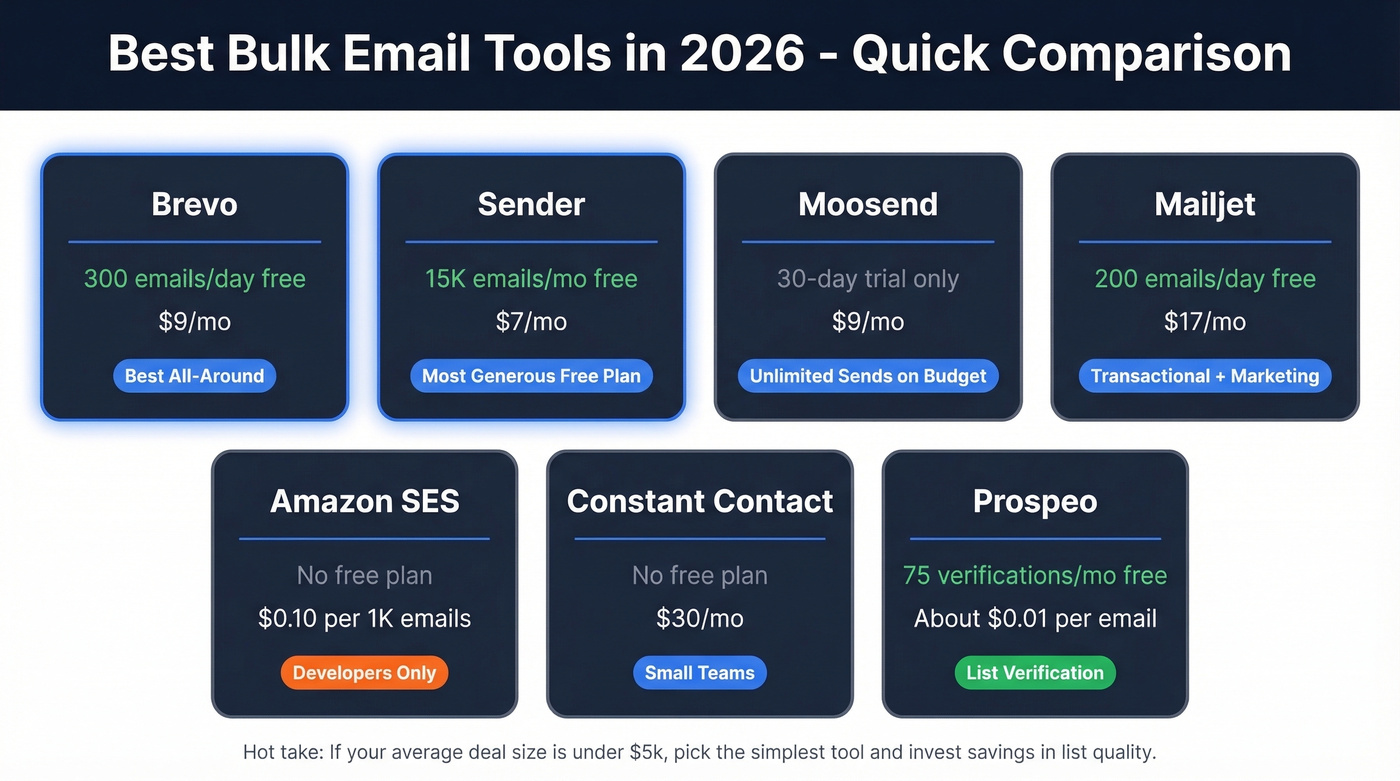
We've tested most of these platforms. Brevo's free tier is genuinely usable, not a bait-and-switch. Start there if you want the best all-around experience, or go with Sender if free volume matters most. Moosend is the pick if unlimited sends from $9/mo beats a free plan for your math.
Amazon SES is the cheapest option at scale but requires developer resources - it's plumbing, not a marketing platform. HubSpot's email marketing is excellent, but it's tied to paid Marketing Hub tiers. ActiveCampaign is powerful but has a brutal learning curve. Skip it unless you need complex automation workflows and have someone on the team who'll actually build them.
Hot take: If your average deal size is under $5k, you don't need a $500/mo email platform. Pick the simplest tool that handles your volume, then invest the savings in list quality. That's where ROI actually lives.
What Good Performance Looks Like
Here's what Mailchimp's benchmark data shows across campaigns sent to 1,000+ subscribers:
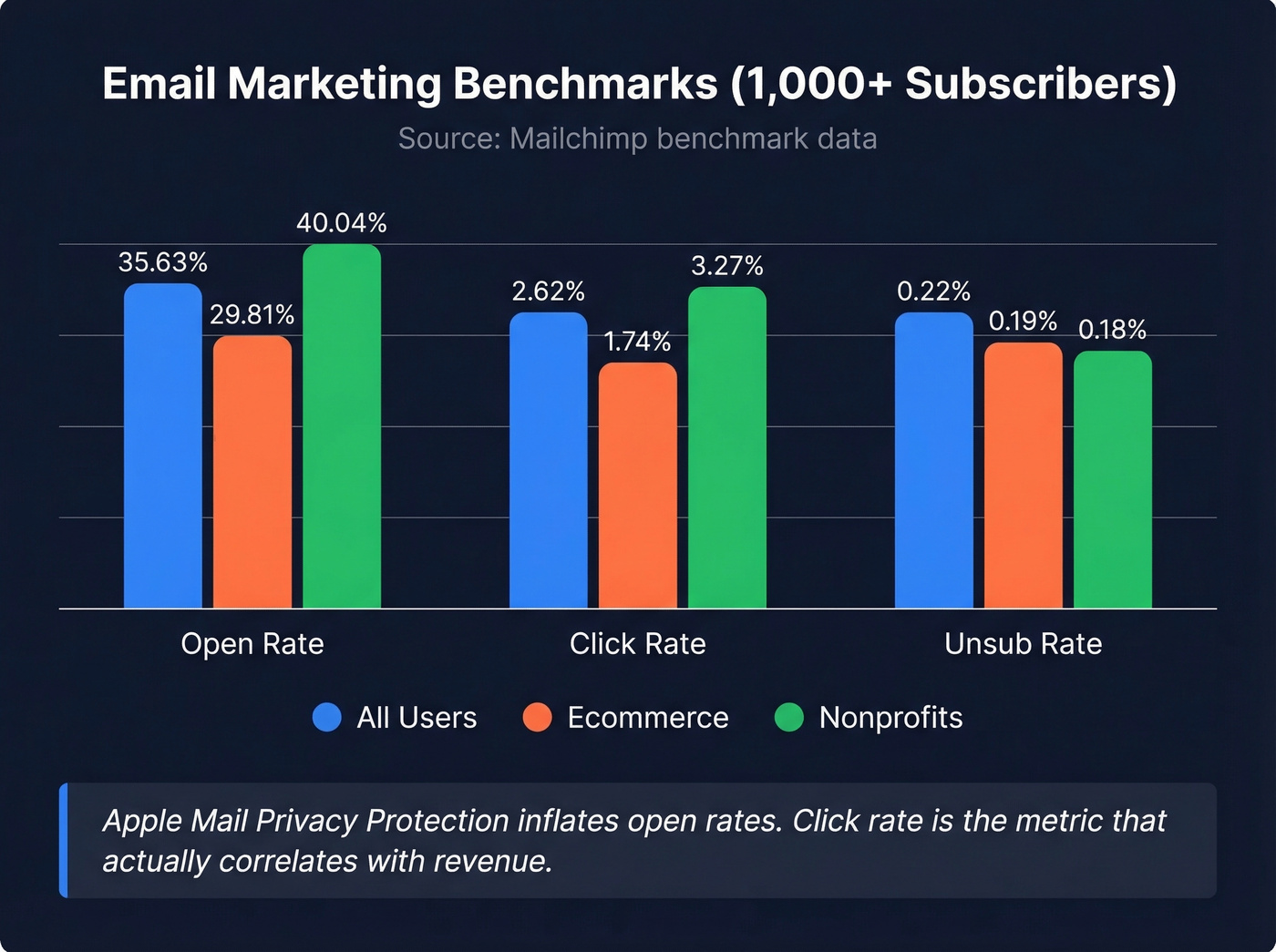
| Metric | All Users | Ecommerce | Nonprofits |
|---|---|---|---|
| Open rate | 35.63% | 29.81% | 40.04% |
| Click rate | 2.62% | 1.74% | 3.27% |
| Unsub rate | 0.22% | 0.19% | 0.18% |
Apple Mail Privacy Protection inflates open rates. Don't obsess over opens - click rate is the metric that actually correlates with revenue.
For ecommerce teams, Klaviyo's data shows automated flows generate roughly 41% of email revenue from just 5.3% of total sends. That stat alone should tell you where to invest your time. Build triggered automations, not just blasts.
Mistakes That Kill Deliverability
Let's walk through a real scenario. Your first campaign went out to 5,000 contacts. Open rate: 8%. Bounce rate: 12%. Your ESP suspended your account the next morning. Here's what went wrong:
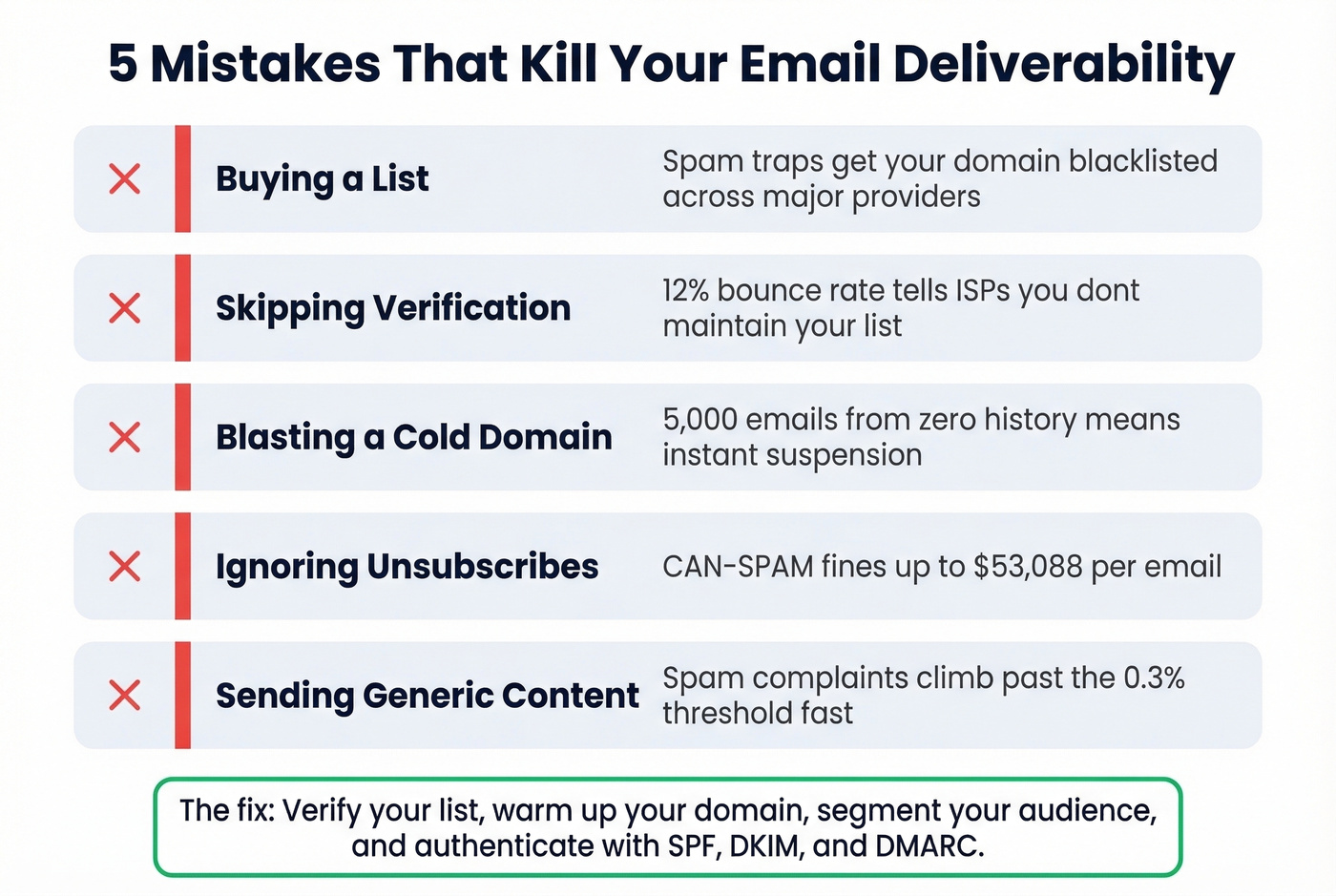
- Buying a list. Purchased lists are loaded with spam traps. One campaign on a bought list can get your domain blacklisted across major providers.
- Skipping verification. Every hard bounce damages your sender reputation. At 12% bounces, you're telling inbox providers you don't maintain your list.
- Blasting a cold domain. Sending 5,000 emails from a domain with zero sending history is the fastest way to get suspended. No exceptions. (If you need a safer ramp, use an unlimited email warmup tool.)
- Ignoring unsubscribe requests. Beyond being a CAN-SPAM violation, every ignored unsubscribe becomes a spam complaint.
- Sending generic content to everyone. When the same email goes to every contact regardless of relevance, spam complaints climb past that 0.3% threshold fast.
We've seen teams recover from deliverability disasters, but it takes weeks of careful warm-up and list cleaning. Far easier to get it right the first time.
FAQ
How many emails can I send for free?
Sender offers 15,000 emails per month free with up to 2,500 subscribers - the most generous free tier available right now. Brevo gives 300 emails per day. Both are solid starting points before you commit to paid tools.
Do I need SPF, DKIM, and DMARC?
Yes, all three. Since November 2025, Gmail rejects non-compliant messages with SMTP errors. Microsoft enforces similar requirements for Outlook.com, Hotmail, and Live.com consumer inboxes. There's no grace period left - authenticate or don't send.
What's a safe bounce rate for mass campaigns?
Keep total bounces under 2% and spam complaints below 0.3%. Hard bounces are worse than soft bounces - verify your list before every campaign to keep bounce rates near zero.
Is dedicated sending infrastructure worth it?
If you're regularly sending to lists above 10,000 contacts, dedicated infrastructure pays for itself through better deliverability and lower per-email costs. Amazon SES becomes cost-effective at that volume, though you'll need developer resources to set it up properly. For teams under that threshold, a managed platform like Brevo or Sender handles everything without the overhead.
Every bounced email chips away at your sender reputation. Teams using Prospeo's bulk verification dropped bounce rates from 35% to under 4% - at roughly $0.01 per email verified. That's cheaper than a single spam complaint.
Stop gambling with your domain. Verify your entire list in minutes.