

How to Send Hundreds (or Thousands) of Emails at Once Without Getting Blocked
You just tried to BCC 400 people from your work Gmail. You had to split it into multiple sends, and after pushing past Gmail's limits your account got locked - and the proposal that needed to go out by 5 PM is sitting in your drafts. Over 361 billion emails move through inboxes every day. Do it wrong and you get flagged, blocked, or blacklisted.
Here's how to send many emails at once the right way, whether you're reaching 50 people or 50,000.
Pick the Right Method
Before choosing a tool, match your list size to the right approach. Regardless of which tier you fall into, step zero is always the same: verify your list. Invalid addresses destroy your sender reputation faster than anything else.
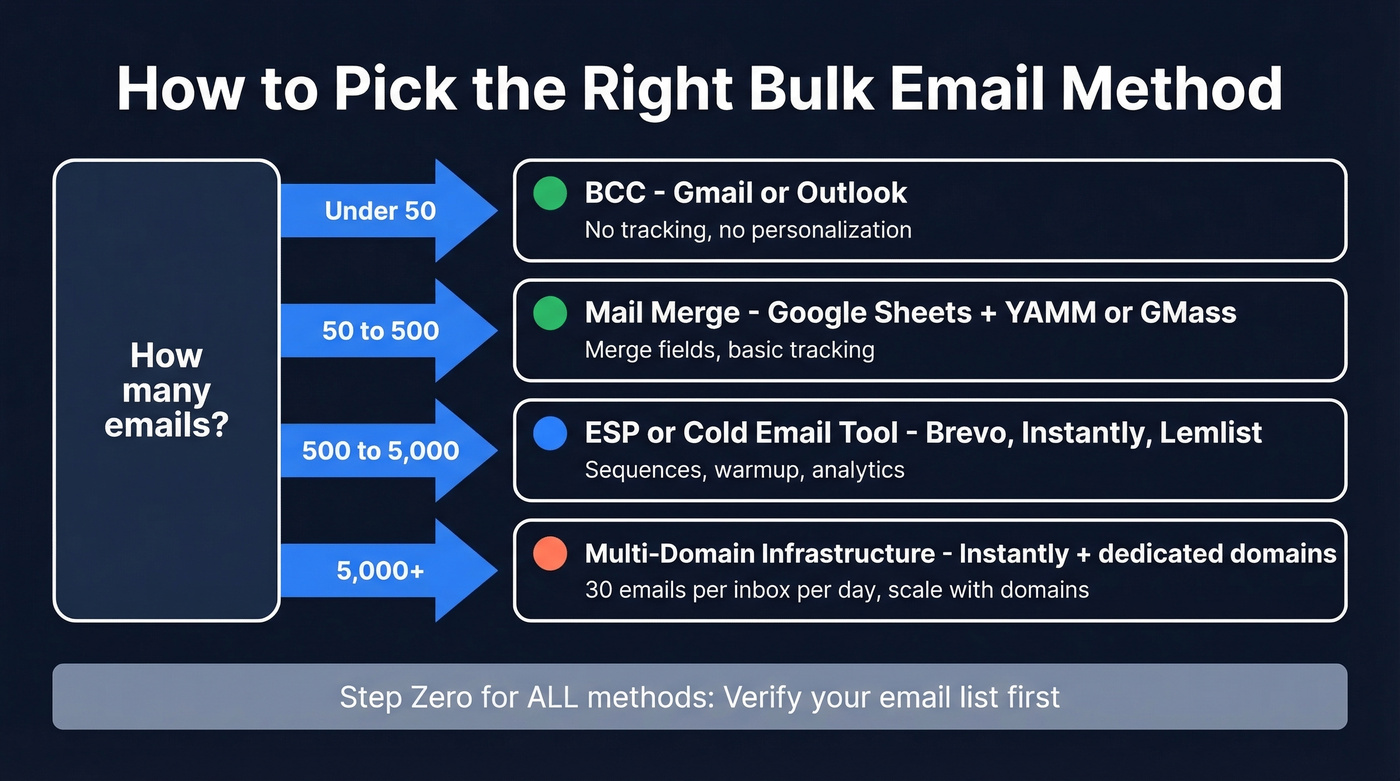
| List Size | Method | Tool Suggestion |
|---|---|---|
| Under 50 | BCC | Gmail / Outlook |
| 50-500 | Mail merge | Sheets + YAMM or GMass |
| 500-5,000 | ESP or cold email tool | Brevo, Instantly, Lemlist |
| 5,000+ | Multi-domain infrastructure | Instantly + dedicated domains |

Sending Limits by Provider
Every email provider caps how many messages you can send per day. Exceed the limit and you lose the ability to send anything - including that urgent reply to your boss.
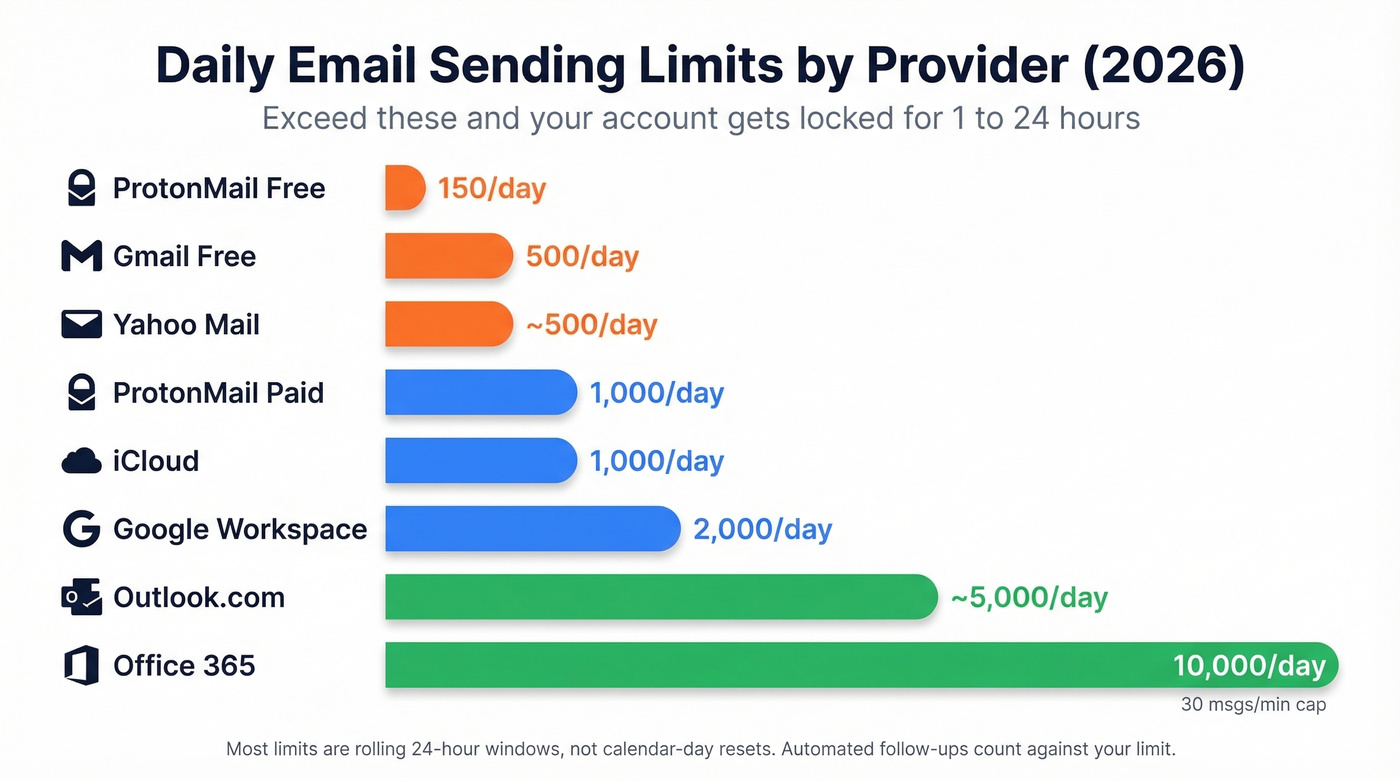
| Provider | Daily Limit | Notes |
|---|---|---|
| Gmail (free) | 500/day | 500/day | 100/day via SMTP |
| Google Workspace | 2,000/day | 2,000/day | 500/day on trial |
| Outlook.com | ~5,000 recipients/day | ~5,000 recipients/day | Varies by account |
| Office 365 | 10,000 recipients/day | 10,000 recipients/day | 30 msgs/minute cap |
| Yahoo Mail | ~500/day | ~500/day | ~100/hour estimated |
| iCloud | 1,000/day | Hard cap |
| ProtonMail (free) | 150/day | 150/day | 50/hour |
| ProtonMail (paid) | 1,000/day | Higher hourly cap |
Most of these limits are rolling 24-hour windows, not calendar-day resets. If you're running automated follow-up sequences, those count against your limit too - one overlapping campaign can push you over without warning, and the lockout blocks all outgoing email for 1-24 hours. Business-critical messages included.
Five Ways to Send Bulk Emails
BCC (Under 50 Recipients)
Use this if you're sending a quick internal announcement or personal update to a small group where tracking doesn't matter.
Skip this if you need open/click tracking, personalization, or you're emailing more than about 50 people. BCC offers zero analytics, no merge fields, and higher spam risk because every recipient gets an identical message. It's the duct tape of bulk email - fine in a pinch, terrible as a system.
Mail Merge (50-500 Recipients)
Gmail's built-in mail merge requires Google Workspace - free accounts can't use it natively. The workflow: build your contact list in Google Sheets with columns for each merge field (first name, company, etc.), compose your email in Gmail using merge tags like @firstname, preview a few merged messages, then send.
For Outlook users, the equivalent is Word + Outlook mail merge. It works, but it feels like it was designed in 2008. If you're on free Gmail, you'll need an add-on like YAMM or GMass to get merge functionality.
Gmail Add-Ons: GMass, YAMM, Mailmeteor
These plug directly into Gmail and turn it into a lightweight bulk sender.
| Tool | Free Tier | Paid Price | Best For |
|---|---|---|---|
| YAMM | 50 emails/send | ~$25/mo | Free tier generosity |
| Mailmeteor | 50 emails/day | ~$10/mo per user | Budget teams |
| GMass | 50/day (7-day trial) | $20/mo annual | Power users |

We've tested all three. YAMM wins on the free tier, Mailmeteor is the cheapest paid option, and GMass has the deepest feature set if you're willing to pay. GMass Standard at $20/mo (annual) gets you unlimited emails, mail merge, and basic tracking. For most small teams sending a few hundred emails a week, YAMM's free plan is honestly enough to start.
If you're doing this regularly, it's worth understanding email velocity so you don't accidentally spike volume and get throttled.
Email Marketing Platforms
Built for newsletters, product updates, and opted-in marketing lists - not cold outreach. Platforms like Brevo and Mailchimp enforce anti-spam policies and will shut you down for cold emailing purchased lists.
| Platform | Free Tier | Paid From | Best For |
|---|---|---|---|
| Brevo | 300 emails/day | ~$9/mo | Best value overall |
| Sender | 15,000/mo | $7/mo | Highest free volume |
| Moosend | - | $9/mo | Clean UI, simple |
| Mailchimp | - | ~$13-20/mo | Brand recognition only |
Brevo is the best value for small teams - 300 free emails per day is generous, and paid plans start around $9/mo with higher tiers around $15/mo for 10,000 emails. Mailchimp is overpriced for what you get and has been steadily gutting its free tier. If you're sending marketing emails to an opted-in list, Sender's free plan at 15,000/mo is hard to beat.
Cold Email Platforms
Here's the thing: if you're doing outbound prospecting, this is the only category that matters. These tools handle warmup, inbox rotation, and multi-step sequences - the infrastructure that keeps you out of spam. Practitioners on r/coldemail describe mass emailing as "walking through a minefield," and they're not wrong. The right platform defuses most of those mines.
| Platform | Starting Price | Key Strength |
|---|---|---|
| Instantly | ~$30/mo | Warmup + inbox rotation |
| Lemlist | ~$55-79/mo | Multichannel sequences |
| Smartreach | ~$29/mo | Domain buying built in |
| Apollo | Free tier, ~$59/mo paid | Database + sending combo |
Instantly and Lemlist are the two to trial first - they're the most battle-tested in the cold email community, and Reddit threads on r/coldemail consistently recommend them. Reply.io and Saleshandy also come up frequently, typically in the $25-50/mo range.
Let's be honest about something: deliverability depends on your domains, your setup, and your content - not the platform. A $30/mo tool with proper infrastructure will outperform a $79/mo tool on a burned domain every time. If your average deal size is modest, you probably don't need a premium-tier cold email platform.
How to Send Thousands of Emails at Once
The math is straightforward. With one domain, you can safely create 3 email inboxes. Each inbox should send about 30 emails per day to stay under spam thresholds. That's roughly 90 emails per day per domain.
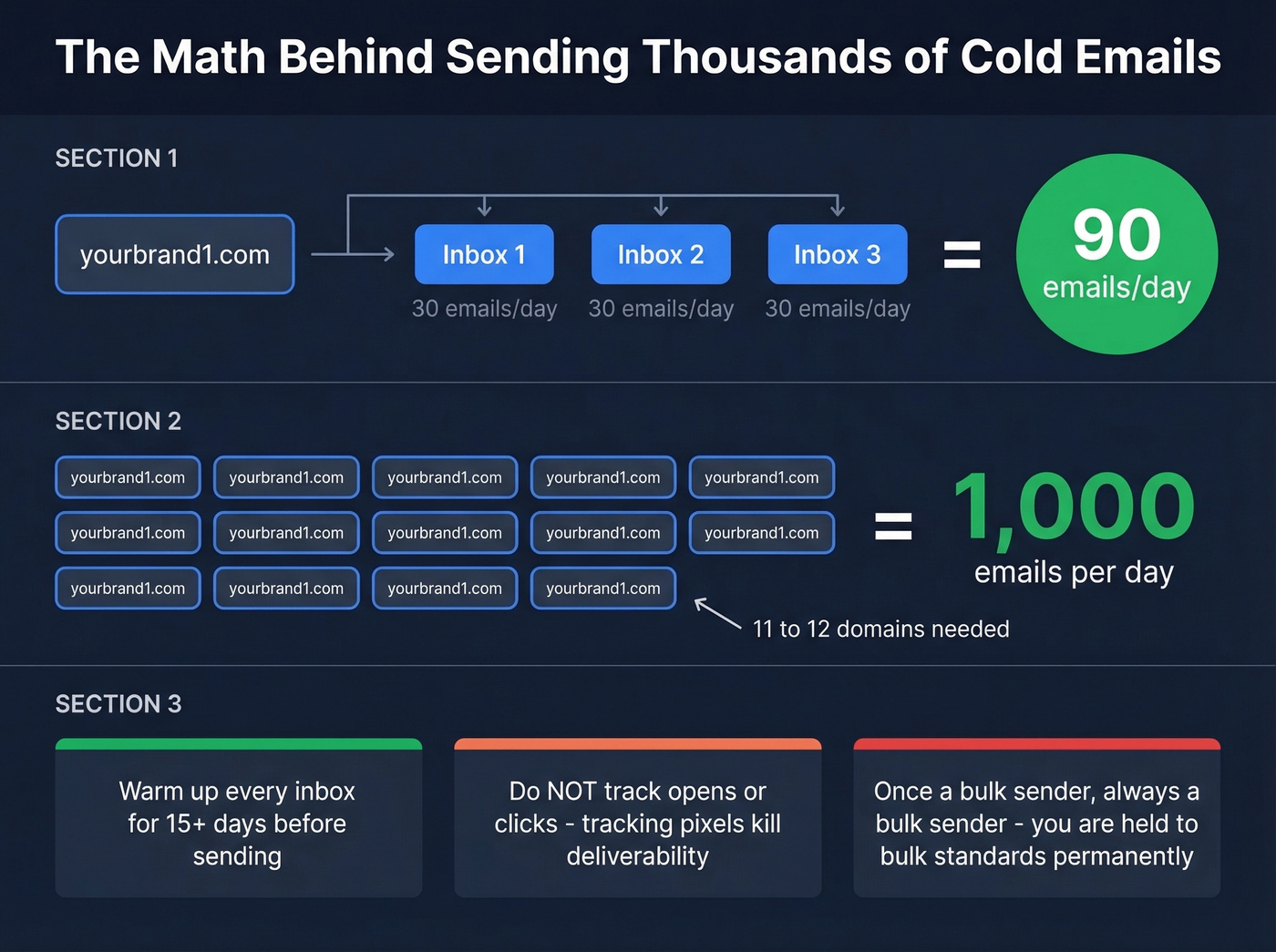
Want to send 1,000/day? You need 11-12 domains. Want 100,000 per month? One practitioner on r/b2bmarketing described managing 170 inboxes across dozens of domains to hit that volume. Not glamorous, but it's how real outbound operations scale.
Three rules for scaling:
- Warm up every inbox for at least 15 days before sending a single cold email. Skip this and your open rates will be awful.
- Don't track opens or clicks. Tracking pixels kill deliverability. Send text-only emails. This is controversial advice, but practitioners who send at volume are nearly unanimous on it. (If you want the technical why, see email tracking pixels.)
- Once a bulk sender, always a bulk sender. Per Mailgun's deliverability guide, once you operate at bulk scale, you're held to bulk-sender standards permanently.
A single spam trap can burn an entire domain. Run your list through Prospeo's 5-step verification before any campaign - it catches invalid addresses, spam traps, and catch-all domains before they tank your reputation. (If you suspect you've already hit one, start with spam trap removal.)

You just read it: invalid addresses destroy sender reputation faster than anything else. Prospeo's 5-step email verification catches spam traps, honeypots, and catch-all domains before they torch your deliverability. 98% accuracy at $0.01 per email.
Verify your entire list before you hit send - starting free.
Email Authentication Setup
If your DNS records aren't configured correctly, nothing else matters. Your emails will land in spam regardless of how good your content is.
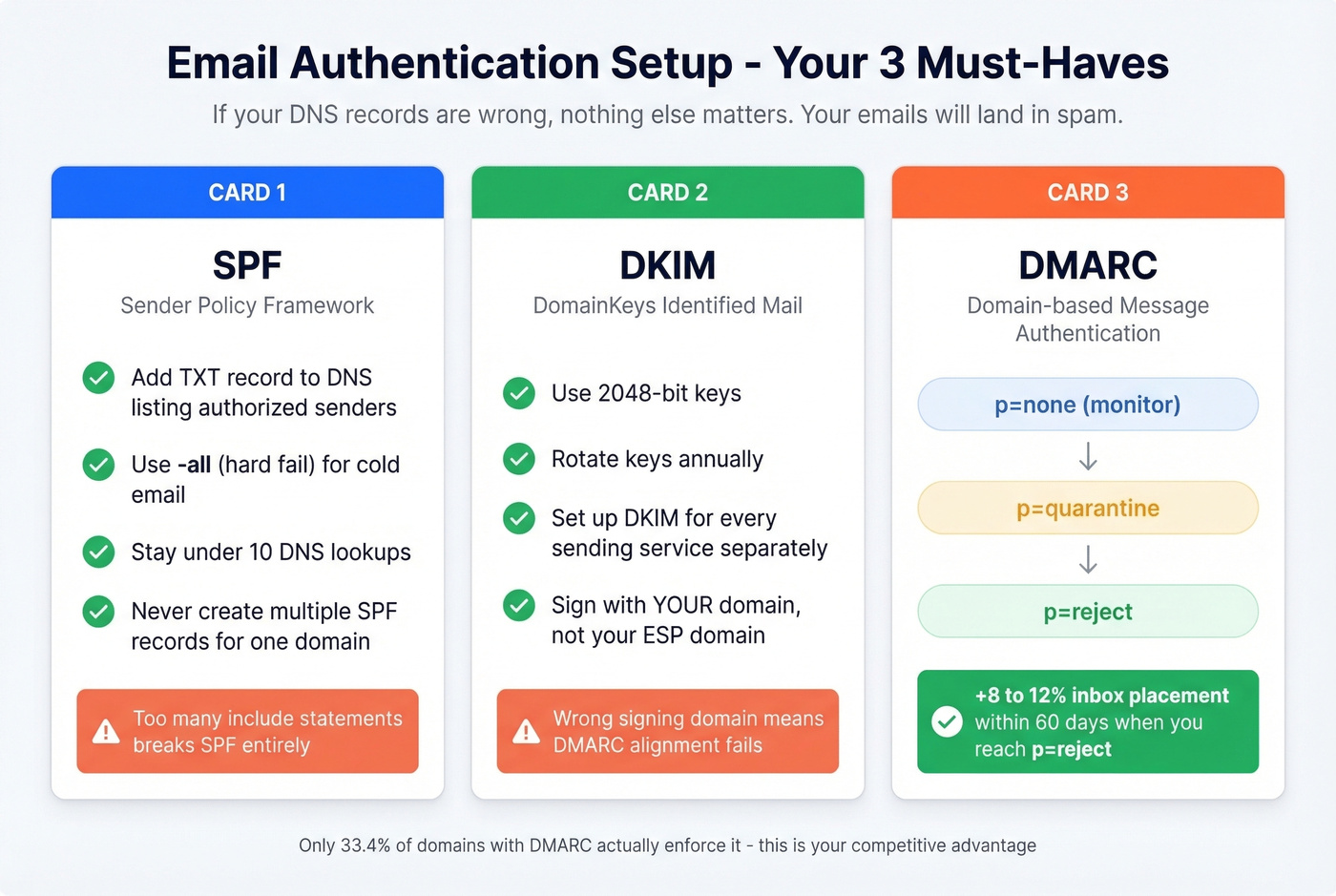
SPF (Sender Policy Framework)
Add a TXT record to your DNS that lists every service authorized to send email from your domain. Use -all (hard fail) for cold email - it tells receiving servers to reject anything not on the list.
Watch the 10 DNS lookup limit; too many include: statements breaks SPF entirely. Never create multiple SPF records for the same domain - that causes a permerror and invalidates everything. Use MXToolbox to check your lookup count. If you want examples you can copy, see SPF record formats.
DKIM (DomainKeys Identified Mail)
Use 2048-bit keys and rotate them annually. You need to set up DKIM for every sending service individually - your ESP, your cold email tool, and your transactional email service each need their own DKIM configuration. If you're signing with your ESP's domain instead of your own, alignment fails and DMARC won't pass. (Quick sanity check: verify DKIM is working.)
DMARC
Start with p=none to monitor, then move to p=quarantine, then p=reject. Don't jump straight to reject - you'll block legitimate email you forgot about.
Moving from p=none to p=reject with proper alignment yields +8-12% inbox placement within 60 days. Yet only 33.4% of domains with DMARC records actually enforce them. That's a massive competitive advantage if you get it right. (More detail on DMARC alignment.)
Google & Yahoo Bulk Sender Rules (2026)
These aren't optional anymore. As of late 2025, Google ramped up enforcement - non-compliant messages now face temporary deferrals and permanent rejections. Not the spam folder. Rejection. Your email never arrives.
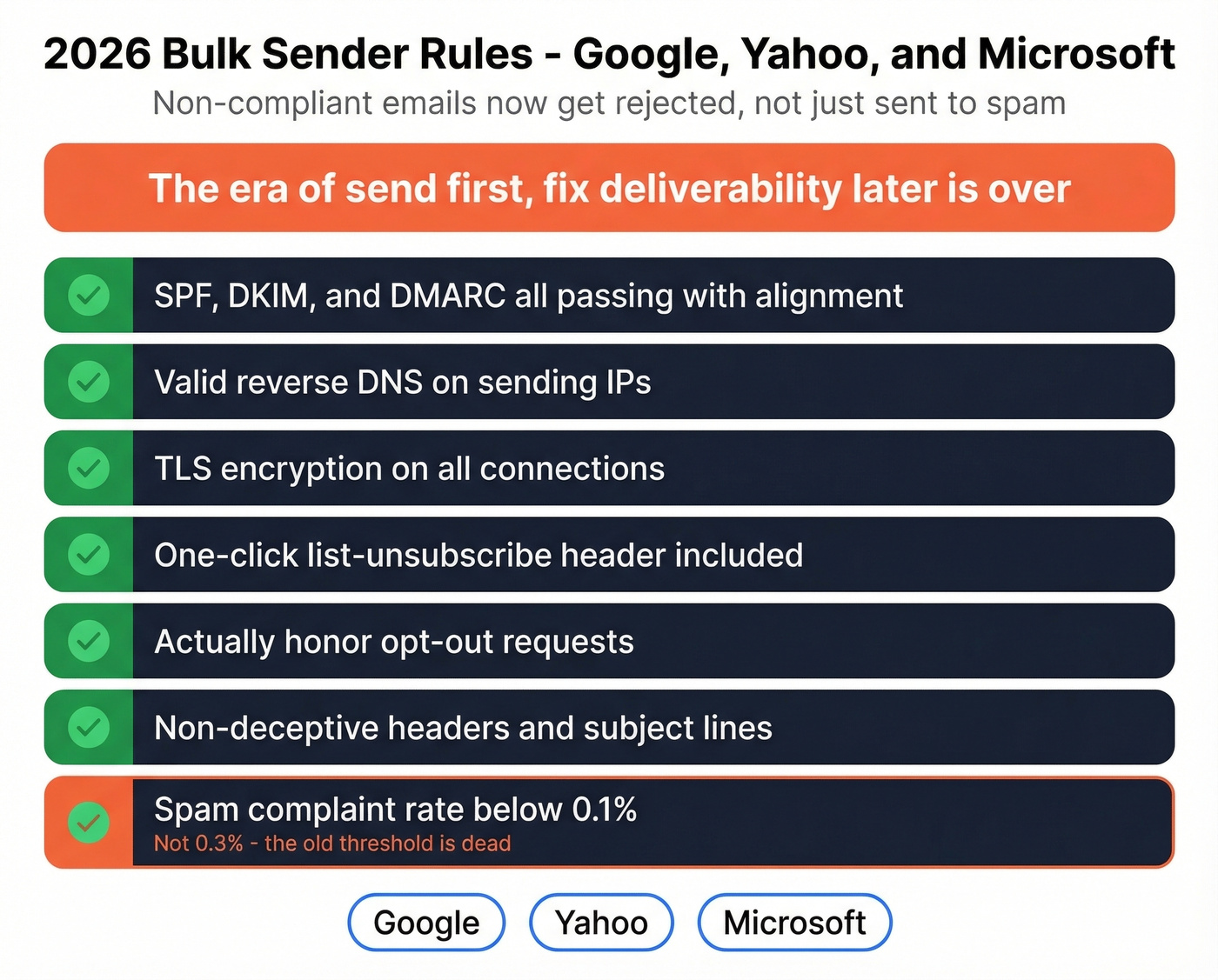
The requirements: SPF, DKIM, and DMARC passing with alignment. Valid reverse DNS. TLS encryption. One-click list-unsubscribe header and actually honoring opt-outs. Spam complaint rate below 0.1% - not 0.3%, which was the old informal threshold. Non-deceptive headers and subject lines.
Microsoft followed suit in May 2025 with similar requirements. The era of "send first, fix deliverability later" is over.
Verify Your List Before You Send
We've seen this play out dozens of times: a team digs up a 3-year-old conference list, loads 5,000 contacts into their email tool, and hits send. Bounce rate comes back at 12%. Their sender reputation tanks. Within a week, even their transactional emails start landing in spam.
The damage from a dirty list isn't just bounces. Spam traps are recycled addresses that ISPs use to catch bulk senders. Catch-all domains accept everything but silently discard most of it, inflating your "delivered" numbers while tanking engagement. Both destroy your reputation without you realizing it.
Prospeo's 5-step verification catches all of this before you send - syntax, domain health, mailbox existence, spam-trap databases, and catch-all domain handling. The result is 98% email accuracy on verified addresses. The free tier gives you 75 verifications per month, and bulk verification handles CSVs of any size. If you're troubleshooting issues, start with email bounce rate benchmarks and fixes.
Compliance Checklist
Before you hit send on any bulk email, run through this:
- Physical mailing address in every email - CAN-SPAM requires it, even for cold emails
- Working unsubscribe link that's easy to find, one-click, now required by Gmail/Yahoo for bulk senders
- Honor opt-outs within 2 days - 10 days is the legal max under CAN-SPAM, but Google and Yahoo expect faster
- GDPR compliance for EU recipients - legitimate interest works for B2B cold email in most cases, but document your reasoning
- No misleading subject lines or sender names - "Re: Our conversation" when you've never spoken is a fast track to spam complaints
- Suppression list management - maintain a master list of everyone who's opted out, across all campaigns and domains
Every spam complaint counts against your 0.1% threshold. One misleading subject line that generates complaints can undo months of domain warming.
Scaling to thousands of cold emails a day means nothing if half your contacts bounce. Prospeo gives you 143M+ verified emails refreshed every 7 days - not the stale data that gets your domains blacklisted. Teams using Prospeo cut bounce rates from 35% to under 4%.
Stop scaling on bad data. Get contacts that actually land.
FAQ
Can I send 10,000 emails from Gmail?
No. Gmail caps at 500/day (free) and 2,000/day (Workspace). To send thousands of emails at once, you need a cold email platform like Instantly or Lemlist with multiple domains and inboxes - each sending under 30-50 messages per day.
What happens if I exceed my sending limit?
Your provider blocks all outgoing email - including client proposals and invoices - for 1-24 hours. Repeated violations can lead to permanent account suspension. Always check your rolling 24-hour count before launching a campaign.
How many emails can I send without getting blacklisted?
Keep each inbox under 30-50 cold emails per day with proper warmup and authentication. Scale volume by adding more inboxes and domains, not by pushing a single account past its limits. List quality matters as much as volume - one spam trap can burn an entire domain.
Do I need a dedicated IP for bulk email?
Dedicated IPs make sense above roughly 50,000 emails per month. Below that, shared IPs from reputable ESPs perform well. Focus on SPF/DKIM/DMARC authentication and list hygiene first - those have a bigger impact on deliverability than IP type.
How do I verify my email list before sending?
Use a verification service that checks syntax, domain health, mailbox existence, spam traps, and catch-all domains. Prospeo's bulk verification handles CSVs of any size at 98% accuracy, with a free tier of 75 verifications per month. Tools like NeverBounce and ZeroBounce also offer bulk verification, though pricing and accuracy vary.