

How to Warm Up a Cold Email List Without Burning Your Domain
45.6% of all emails sent worldwide get flagged as spam. You just set up five fresh inboxes, loaded 2,000 prospects, and you're ready to launch. Don't. Hit send on day one and you'll torch your domain reputation before a single prospect reads your pitch.
Learning how to warm up a cold email list is the boring, unglamorous work that separates teams who book meetings from teams who land in spam. We've watched dozens of outbound teams skip this step and spend months recovering - and a few who never recovered at all.
Two Problems, One Search Query
People landing on this topic actually face one of two very different situations. The first is cold outreach warmup - a brand-new domain or inbox that needs sender reputation built from zero. The second is dormant list re-engagement - an existing list that's gone stale and needs cleaning before you trigger spam filters.
Both require authentication and gradual volume ramps, but the starting point differs. Cold outreach is an infrastructure problem. Dormant re-engagement is a data quality problem. Your email list decays by at least 23% every year, and that decay is accelerating - ZeroBounce recorded 3.6% decay in a single month (November 2024), nearly double the traditional 1.5-2% monthly rate. A list you haven't touched in 12 months has roughly a quarter of its addresses gone bad.
The Quick-Start Version
Three steps, no fluff:
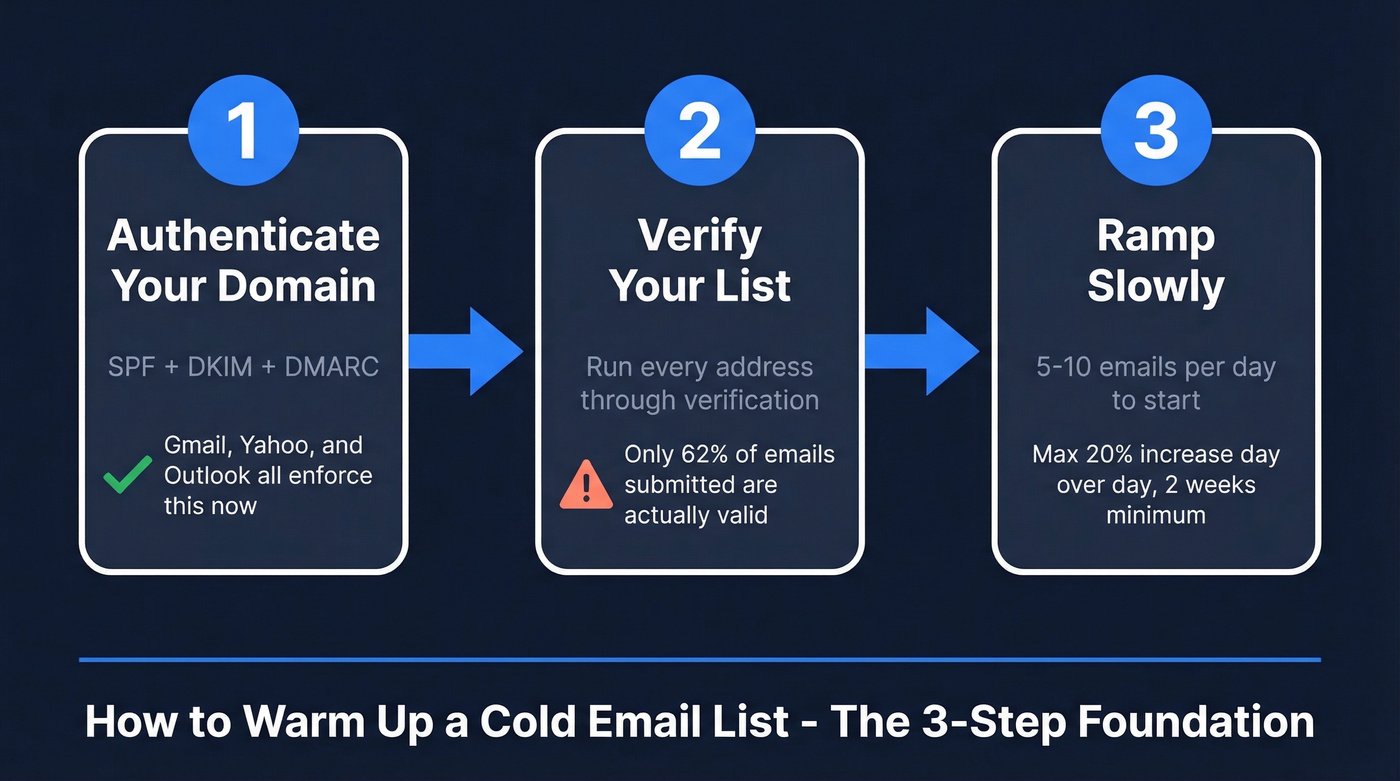
- Authenticate your domain. SPF, DKIM, and DMARC are non-negotiable. Gmail and Yahoo enforce them, and Outlook does too. (If you need a deeper technical checklist, use our email deliverability guide.)
- Verify your list. Run every address through an AI email checker or email verification tool before sending a single warmup email. Only 62% of emails submitted for verification are actually valid - the rest spike bounces and spam risk.
- Ramp slowly. Start at 5-10 emails per day. Never increase volume by more than 20% day-over-day. Two weeks minimum before any campaign sends. (More on safe sending limits in our email velocity guide.)
Everything below is the detail behind those three steps.
Before You Start Warming Up
Authenticate Your Domain
SPF, DKIM, and DMARC aren't optional anymore. Gmail and Yahoo began enforcing authentication in February 2024. Google escalated to actively rejecting emails from non-compliant senders in late 2025, and Outlook enforcement kicked in mid-2025 - non-compliant domains sending 5,000+ emails per day get routed to junk, then outright rejected. CAN-SPAM violations carry penalties up to $51,744 per email, and missing authentication makes you a target.
Set up all three in one sitting. It takes 30-60 minutes. Use 2048-bit DKIM keys per Google's recommendation. Start DMARC at p=none to monitor, then move to p=quarantine once you're confident. Give SPF and DKIM 48 hours to propagate before enabling DMARC. (If you want to validate the setup, follow our steps on how to verify DKIM is working.)
Two things people consistently miss: never publish two SPF TXT records at the same hostname (combine them into one), and avoid .xyz or .site domain extensions - they carry spam associations that hurt you before you've sent a single email. Stick to .com, .co, or .io. If you want examples and syntax, see these SPF record examples.
Verify Your List
Bad data kills warmup before it starts. ZeroBounce processed 11 billion+ emails in 2024 and found that only 62% of addresses submitted for verification were valid. Catch-all addresses made up 9%+ of all checked emails. Sending to these during warmup is like pouring sand into your engine.
Prospeo's 5-step verification process catches invalid addresses, spam traps, catch-all domains, and honeypot addresses before they touch your inbox reputation - 98% email accuracy on proprietary infrastructure. The free tier gives you 75 verifications per month to test before committing. Stack Optimize built their agency to $1M ARR using Prospeo for client list verification, maintaining 94%+ deliverability, under 3% bounce rates, and zero domain flags across all clients. (If you're comparing tools, start with our roundup of Bouncer alternatives.)

Set Up Your Infrastructure
Google Workspace or Microsoft 365. Those are the two standard options for cold email accounts. Free Gmail and Yahoo accounts get flagged immediately for outbound. And those cheap $3/inbox resellers from forums? The accounts die within two weeks - the consensus among experienced senders on r/coldemail is unanimous on this.
Set up 2-3 email accounts per domain for rotation flexibility. Domains aged 2+ years see 40% better inbox placement than fresh ones, so buy an aged domain with clean history if you can. Serious outbound teams operate 3-5 domains rotating daily, each with 4-6 inboxes, capped at 40-50 emails per inbox per day. (If you're planning higher volume, read our guide on the best way to send bulk email without getting blacklisted.)

Your warmup schedule means nothing if 38% of your list is invalid. Prospeo's 5-step verification catches spam traps, honeypots, and catch-all domains - delivering 98% email accuracy on proprietary infrastructure. Stack Optimize kept bounce rates under 3% across every client campaign.
Clean your list before you warm a single inbox.
ISP Differences That Matter
Not all inboxes are created equal. Validity's 2024 benchmark data shows significant gaps: Gmail lands 87.2% of emails in the inbox, Yahoo hits 86%, Apple Mail sits at 76.3%, and Outlook brings up the rear at just 75.6% - with 14.6% going straight to spam.
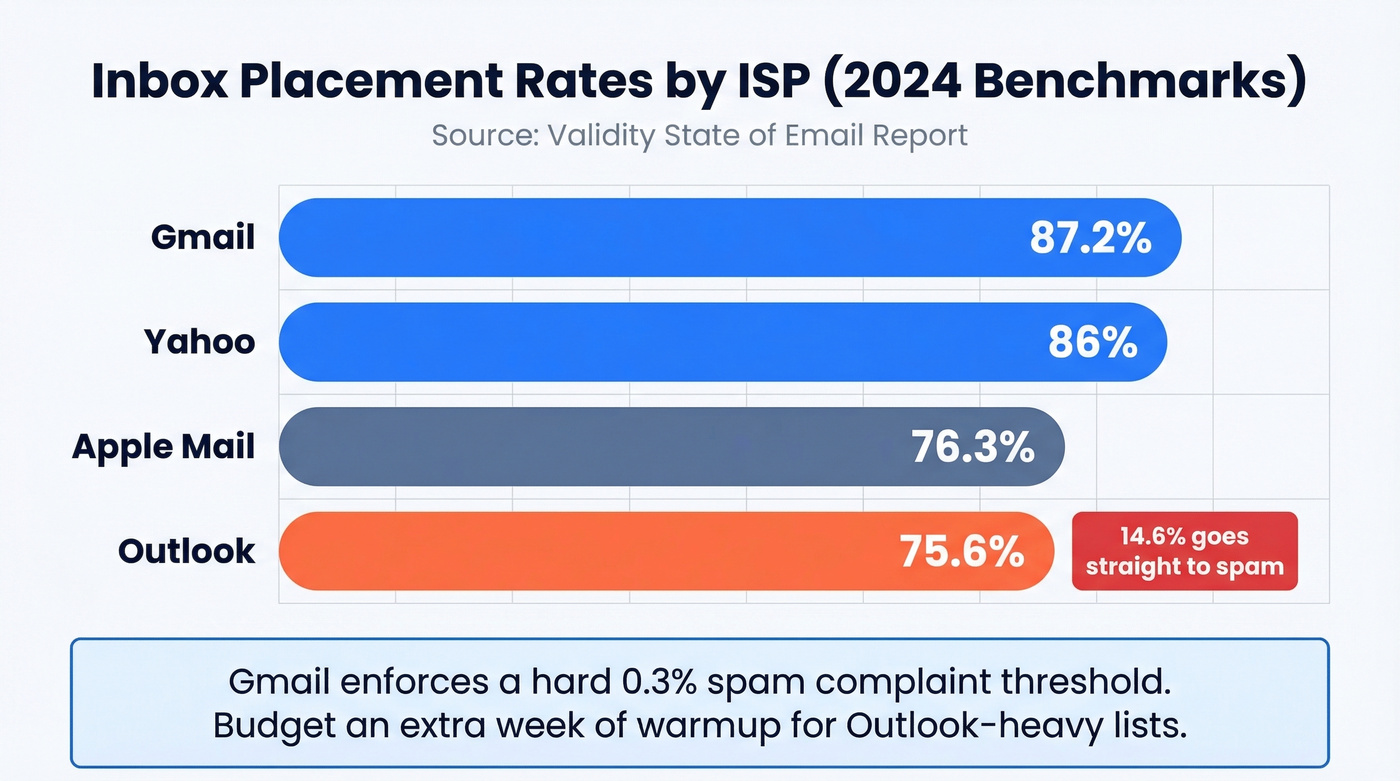
Gmail enforces a hard 0.3% spam complaint threshold. Exceed it and your inbox placement drops fast. Outlook is trickier - its Sweep and Focused Inbox features auto-redirect low-engagement senders to secondary folders, so even if you avoid spam, you might never reach the primary inbox. Budget an extra week of warmup for Outlook-heavy lists. (To keep tabs on your health signals, use these email reputation tools.)
Let's be honest: if your average deal size is under $10k, you probably don't need perfect Outlook deliverability. Most SMB buyers live in Gmail. Focus your warmup energy where your prospects actually are.
Best Warmup Tools Compared
An independent bake-off by Skylead tested the major warmup tools head-to-head. Here's what shook out:
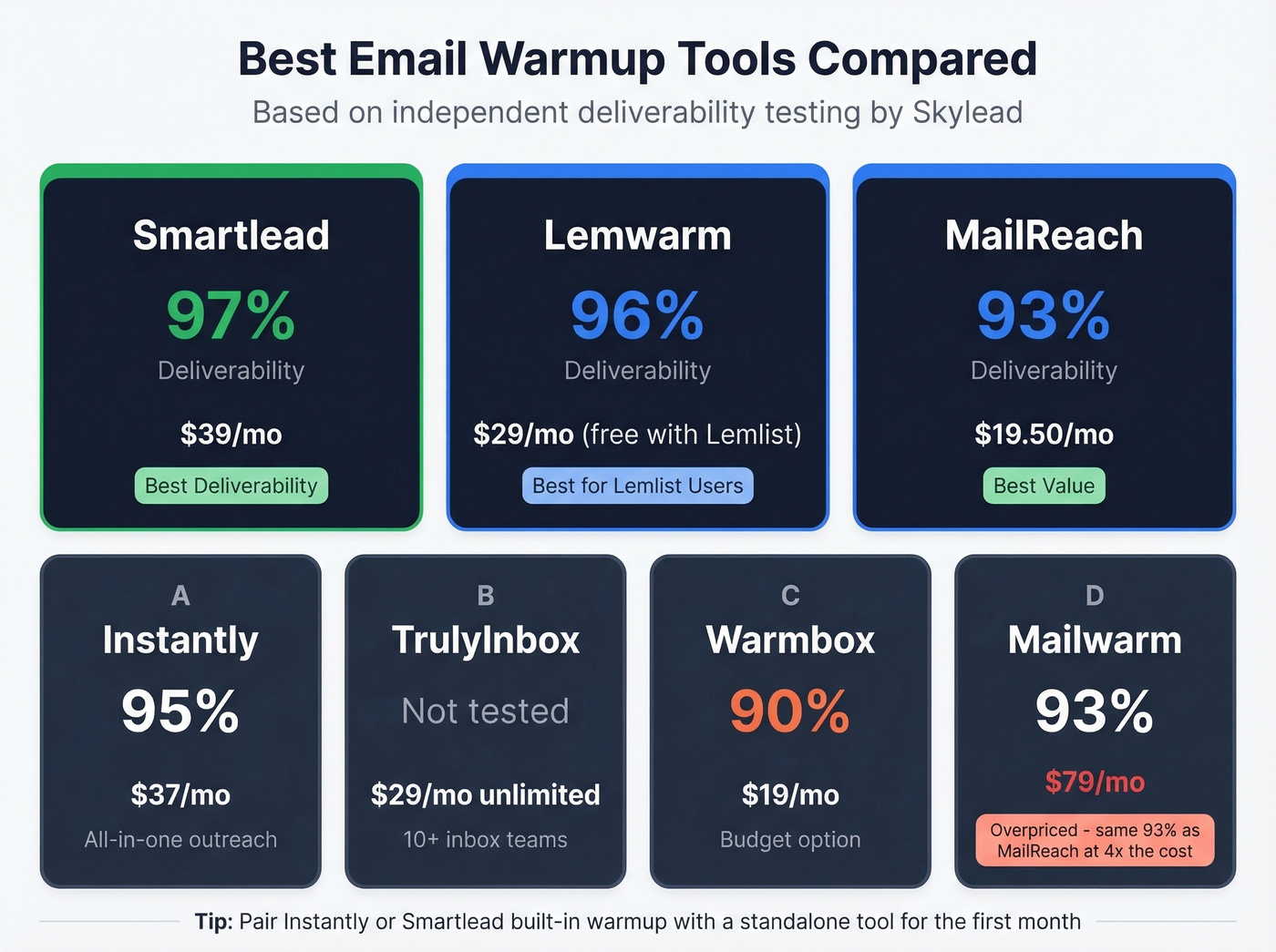
| Tool | Deliverability | Price | Best For |
|---|---|---|---|
| Smartlead | 97% | $39/mo | Best raw deliverability |
| Lemwarm | 96% | $29/mo (free w/ Lemlist) | Lemlist users |
| Instantly | 95% | $37/mo | All-in-one outreach |
| MailReach | 93% | $19.50/mo | Best value |
| Mailwarm | 93% | $79/mo | Skip this one |
| TrulyInbox | Not independently tested | $29/mo unlimited | Teams with 10+ inboxes |
| Warmbox | 90% | $19/mo | Budget option |
Look at Mailwarm vs. MailReach: identical 93% deliverability, but Mailwarm charges 4x the price. That's $79/mo vs. $19.50/mo for the same result. Frustrating if you've been paying for Mailwarm.
Pick Smartlead if deliverability is everything, Lemwarm if you're already on Lemlist (it's free with your subscription), and MailReach for best value per dollar. One caveat - practitioners consistently flag that Instantly and Smartlead's built-in warmup tools are "quite rudimentary" compared to standalone options. If you're on either platform, consider pairing with a dedicated warmup tool for the first month.
Mistakes That Kill Your Warmup
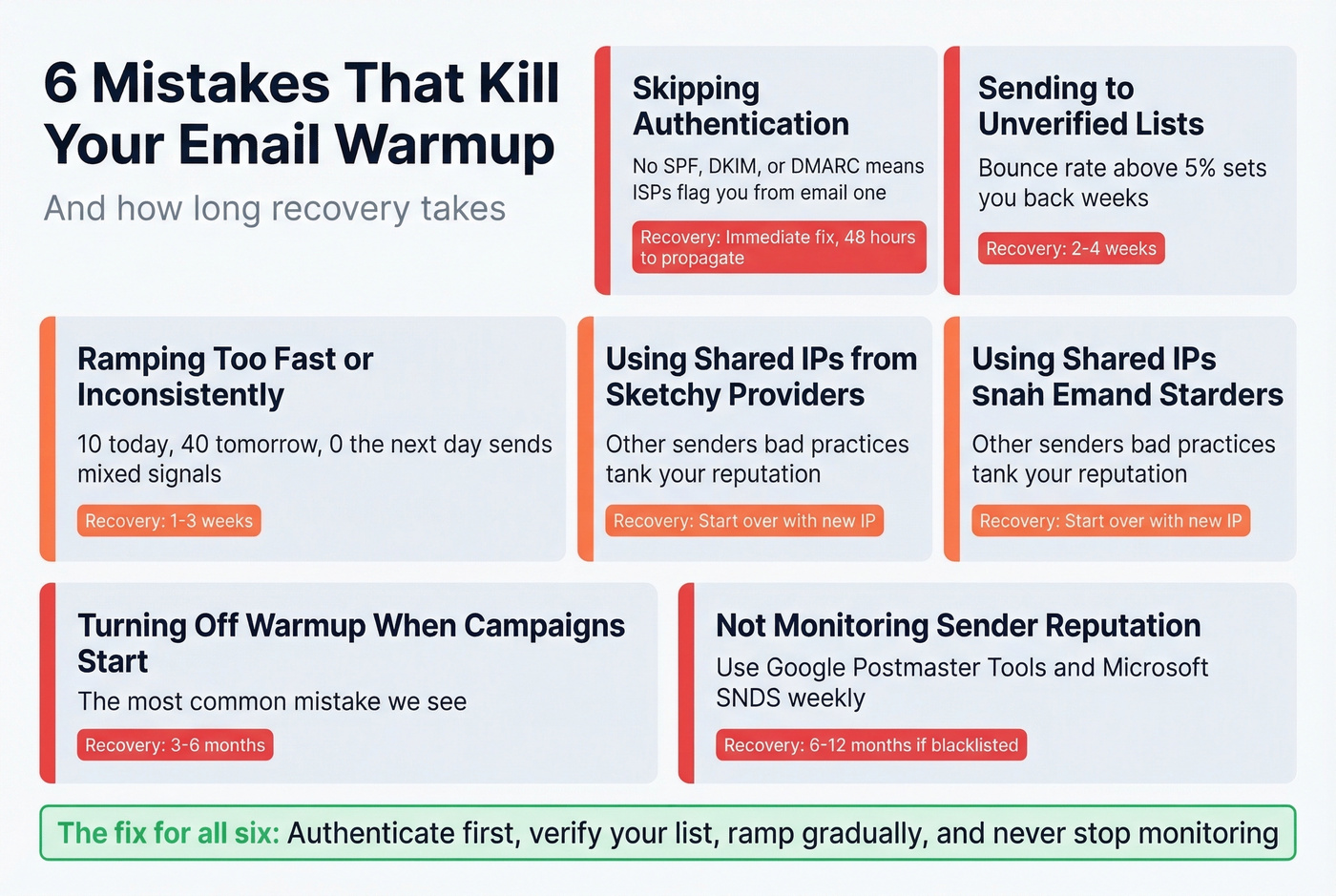
- Skipping authentication. No SPF/DKIM/DMARC means ISPs treat you as suspicious from email one. Easiest fix, most common oversight.
- Sending to unverified lists. A bounce rate above 5% during warmup sets you back weeks. Verify first, always. (If you want bounce codes and benchmarks, see our email bounce rate guide.)
- Ramping too fast or inconsistently. Sending 10 today, 40 tomorrow, and 0 the next day sends mixed signals. Consistency matters more than volume.
- Using shared IPs from sketchy providers. Other senders' bad practices on a shared IP tank your reputation even if you do everything right.
- Turning off warmup when campaigns start. This is the mistake we see most often. Domain recovery from flagging takes 3-6 months. From blacklisting? Six to twelve months. (If you're already in trouble, start with how to improve sender reputation.)
- Not monitoring sender reputation. Use Google Postmaster Tools and Microsoft SNDS - both free - to track your domain health. If you aren't watching these dashboards weekly, you won't catch problems until it's too late.
Post-Warmup Benchmarks
Once your domain is warmed and campaigns are live, aim for these numbers: 27-35% open rates, 5-6% reply rates, 1-2% meeting booking rates, and under 5% bounce. The industry average bounce rate sits at 7-8%, so beating 5% signals healthy infrastructure.
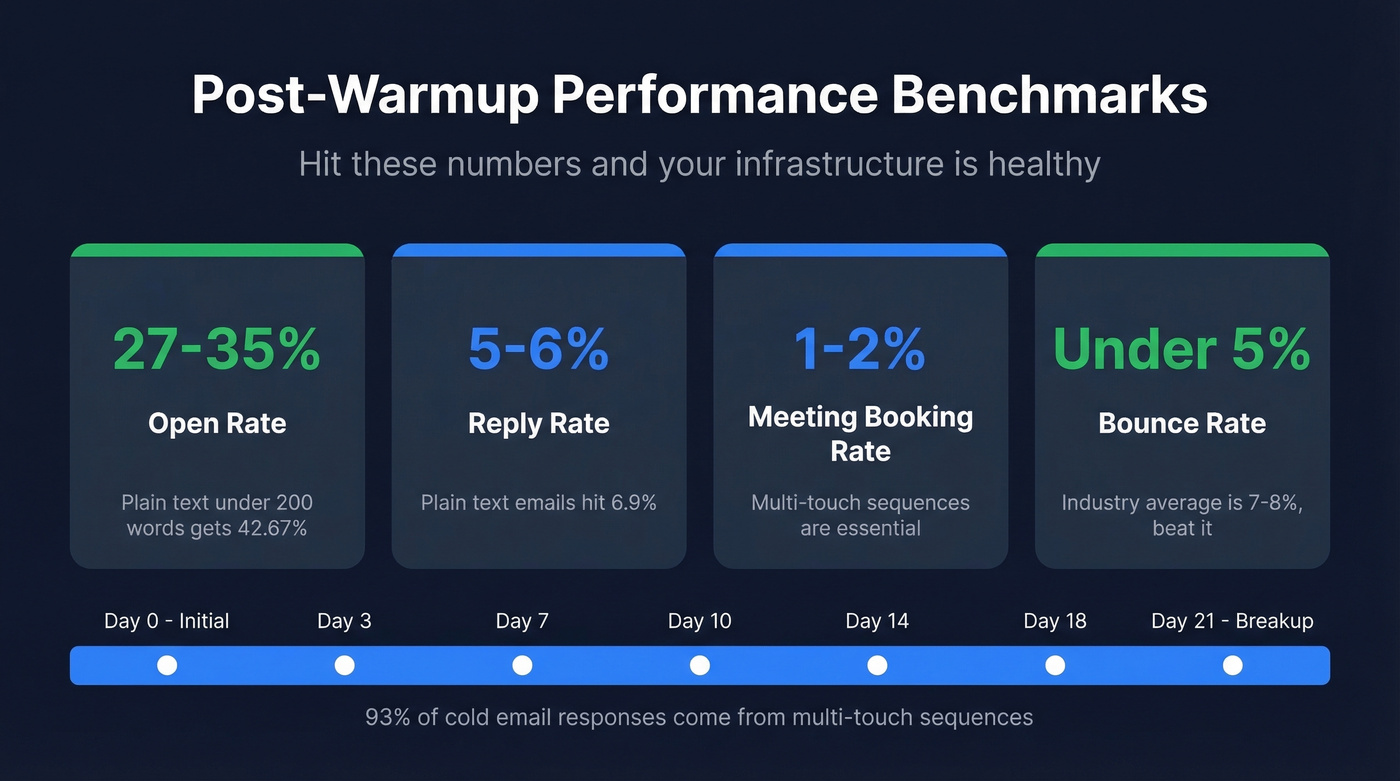
Don't stop at one email. 93% of cold email responses come from multi-touch sequences. A solid follow-up cadence looks like this: Day 0 (initial), Day 3, Day 7, Day 10, Day 14, Day 18, and Day 21 (breakup email). Keep emails short - plain-text emails under 200 words perform best at roughly 42.67% opens and 6.9% replies. Plain text works because there are no tracking pixels, no HTML rendering issues, and it looks like a real person wrote it, which is exactly what ISPs want to see during and after warmup. (For sequence structure, use our B2B cold email sequence guide.)
FAQ
How long does it take to warm up a cold email list?
Two to three weeks is the standard for fresh inboxes, with 12+ weeks needed for full domain maturity and maximum deliverability. Established domains that've gone dormant can often ramp in 10-14 days because they have existing reputation signals ISPs can reference. Never rush below two weeks on a new domain.
Can I warm up a free Gmail or Yahoo account?
No. Free email accounts get flagged immediately for outbound and lack the authentication controls you need. Use Google Workspace (~$6/user/month) or Microsoft 365 exclusively. Cheap reseller inboxes at $3/account are equally useless - they consistently die within two weeks.
How do I know if my list is clean enough to start?
Run your entire list through a verification tool before sending anything. If more than 5% of addresses bounce during verification, the list needs more cleaning. Prospeo's verification catches invalid addresses, spam traps, and catch-all domains in one pass - upload a CSV and get results in minutes. Starting warmup on a dirty list is the fastest way to undo weeks of reputation building.
What's the best free way to verify emails before warmup?
Prospeo's free tier includes 75 email verifications per month with full 5-step verification - enough to test a small batch before committing. Hunter offers 25 free searches monthly but caps enrichment features. For lists over 500 contacts, a paid verification pass at ~$0.01/email is worth every cent compared to the cost of a burned domain.