

How to Warm Up an Email Domain in 2026 (Step-by-Step)
You just registered a fresh domain, set up Google Workspace, pointed your DNS records, and you're ready to send. Tomorrow, ideally. Here's the problem: if you don't warm up that domain properly, you'll hit a wall before your first campaign even launches. Gmail now issues SMTP-level rejections for non-compliant bulk senders, Microsoft 365 has retired Basic Auth for most email client scenarios, and SPF/DKIM/DMARC aren't optional anymore. Most warm-up guides are stuck in 2023, back when you could blast 50 emails on day one and get away with it.
That doesn't work anymore.
The prerequisites matter more than the schedule itself. A perfect ramp-up on a misconfigured domain is just organized failure. So let's start there.
Domain Warm-Up vs. IP Warm-Up
If you're sending cold outreach through Google Workspace or Microsoft 365, you're on a shared IP. Your IP reputation is largely out of your hands. What you control is domain reputation - and it's what mailbox providers weight most heavily for shared-IP senders.
AWS breaks it into three scenarios: a warmed IP paired with a new domain still needs domain warm-up; a new IP paired with an established domain needs IP warm-up, but domain reputation carries you through; both new means you warm both together. The critical thing to understand is that domain reputation travels across ESP changes. Switching from Google Workspace to Outlook won't reset a damaged domain. You carry that baggage with you.
Pre-Warm-Up Checklist
The schedule is the easy part. This checklist determines whether your warm-up actually works.
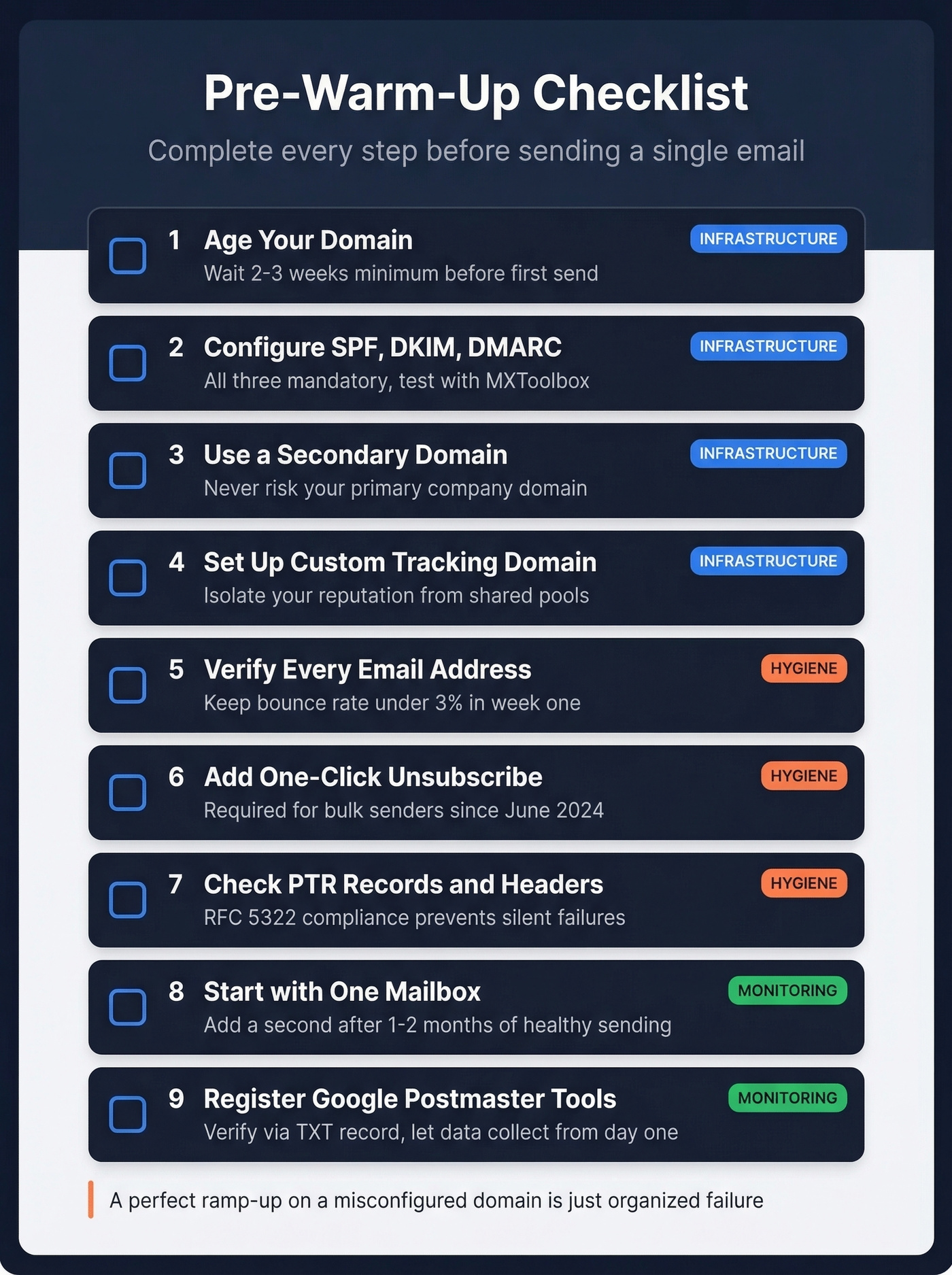
Age your domain at least 2-3 weeks before sending. Domains younger than a month draw extra scrutiny from mailbox providers. Register it, set up a basic website, and wait.
Configure SPF, DKIM, and DMARC. All three are mandatory. For SPF, watch the 10 DNS lookup limit - exceed it and SPF fails silently. For DKIM, use 2048-bit RSA keys and RSA-SHA256 (avoid SHA1). Set DMARC to
p=noneinitially, then tighten top=quarantineonce you're confident. 84% of B2B domains still lack DMARC. Test your records with MXToolbox before sending a single email. If you want to go deeper, review DMARC alignment and a practical SPF record example.Use a secondary domain. Never warm up your primary company domain for cold outreach. Use a professional variant like
yourcompanyhq.comorgetyourcompany.com. Protect the primary at all costs.Set up a custom tracking domain. Shared tracking domains pool your reputation with every other sender on that domain. A custom tracking domain like
track.yourcompanyhq.comisolates your reputation entirely. (More detail: tracking domain.)Verify every address before day one. A bounce rate above 3% in your first week is a warning. Above 5%? Stop sending immediately. Prospeo's 5-step email verification catches invalid, catch-all, and spam-trap addresses at 98% accuracy - the free tier covers 75 emails/month, enough to validate your warm-up list. One bad batch can undo weeks of careful ramping. If you need benchmarks and fixes, see email bounce rate and spam trap removal.

Include one-click unsubscribe. For bulk senders, this has been a non-negotiable requirement since June 2024. Missing it is an instant red flag.
Ensure valid PTR records and RFC 5322-compliant headers. Easy to overlook, and they cause silent delivery failures.
Start with one mailbox per domain. Add a second only after 1-2 months of healthy sending history.
Register for Google Postmaster Tools. Add your domain, verify via TXT record, and let it start collecting data. You won't see anything useful for the first week or two, but you need it running from day one.
The 4-Week Domain Warm-Up Schedule
| Week | Daily Volume | Recipients | Metric Gates | If Failing |
|---|---|---|---|---|
| 1 (Days 1-7) | 5 to 25 | Known contacts, guaranteed engagers | 90%+ opens, 50%+ replies, 0 complaints | Hold volume flat |
| 2 (Days 8-14) | 25 to 50 | Warm contacts, opted-in lists | Opens >40%, 0 complaints, bounces <3% | Pause 48 hrs, drop to Week 1 |
| 3 (Days 15-21) | 50 to 100 | Introduce cold prospects in small batches | Opens >30%, complaints <0.1%, bounces <3% | Cut cold volume, keep warm sends |
| 4 (Days 22-28) | Hold 50-100 | 60-70% campaigns, 30-40% warm-up | Complaints <0.1%, bounces <2% | Reduce campaign ratio |
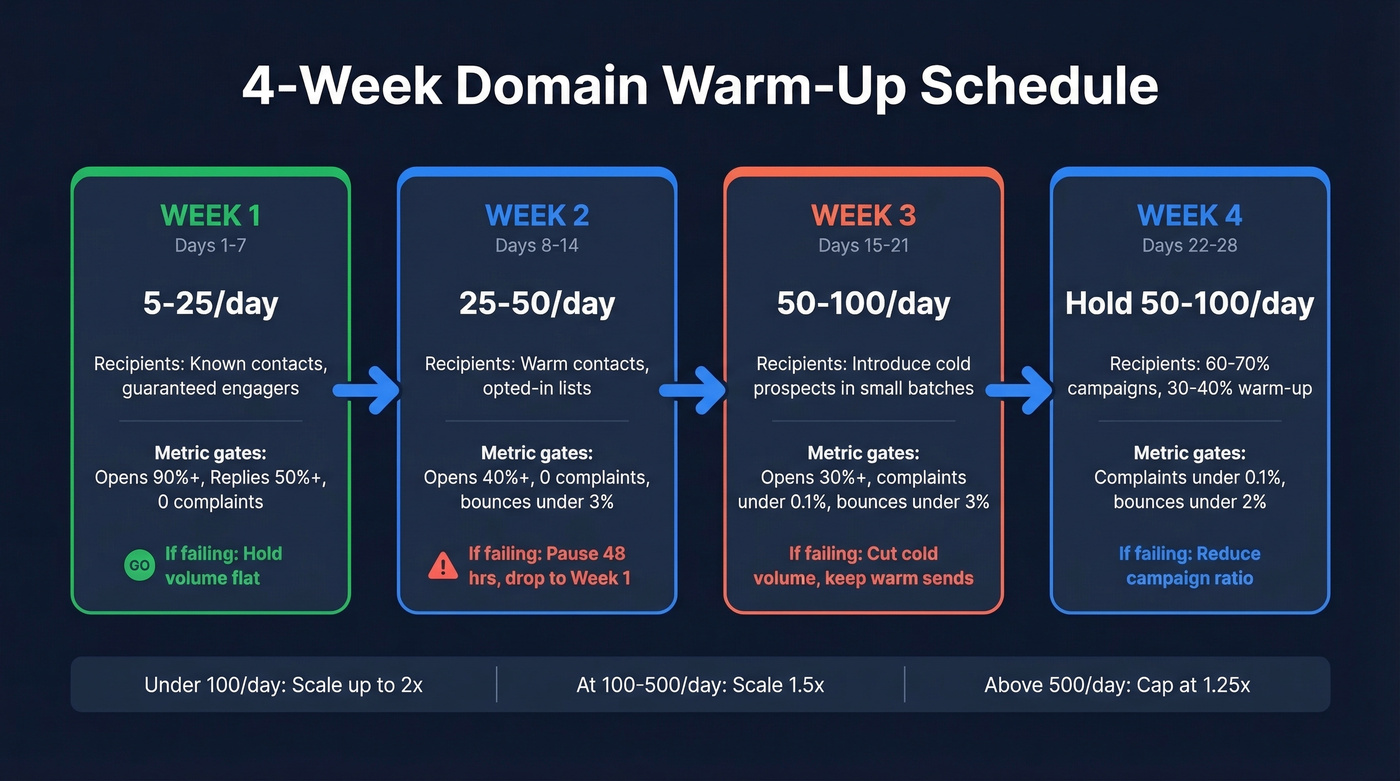
Scaling math: Under 100 emails/day, you can increase up to 2x day-over-day. At 100-500/day, slow to 1.5x. Above 500/day, cap increases at 1.25x. For a deeper breakdown of safe ramp rates, see email velocity.
Space sends 2-3 minutes apart and reduce weekend volume by 50-70%. Never stop entirely - consistency matters more than volume. If bounces spike, cut volume 40-50%. For general engagement drops, reduce 25-30%. Don't guess. Let the metrics tell you how far to pull back.
Here's the thing most guides skip: domain warm-up isn't a task you finish. It's a discipline you maintain. Even after week 4, keep 30-40% of your daily volume as warm-up sends alongside real campaigns. The consensus on r/smallbusiness echoes this - practitioners report that Gmail weights engagement quality like time-to-read, reply depth, and conversation length, not just open rates. Continuous warm-up keeps those signals flowing.
In our experience, conservative teams that take 3+ months before scaling cold outreach aggressively see the best long-term deliverability. Patience isn't exciting, but it works. If you're building a full outbound motion, pair this with a solid B2B cold email sequence and proven sales follow-up templates.

Step 5 of your warm-up checklist says it all: a bounce rate above 3% in week one is a red flag. Prospeo's 5-step verification catches invalid, catch-all, and spam-trap addresses at 98% accuracy - so your carefully ramped domain never gets torpedoed by bad data. The free tier covers 75 emails/month.
Don't let dirty data undo four weeks of careful warm-up.
Monitor with Google Postmaster Tools
Google retired Postmaster Tools V1 on September 30, 2025. You need the current V2 interface. Setup takes five minutes: add your domain, copy the TXT verification record into your DNS, and verify.
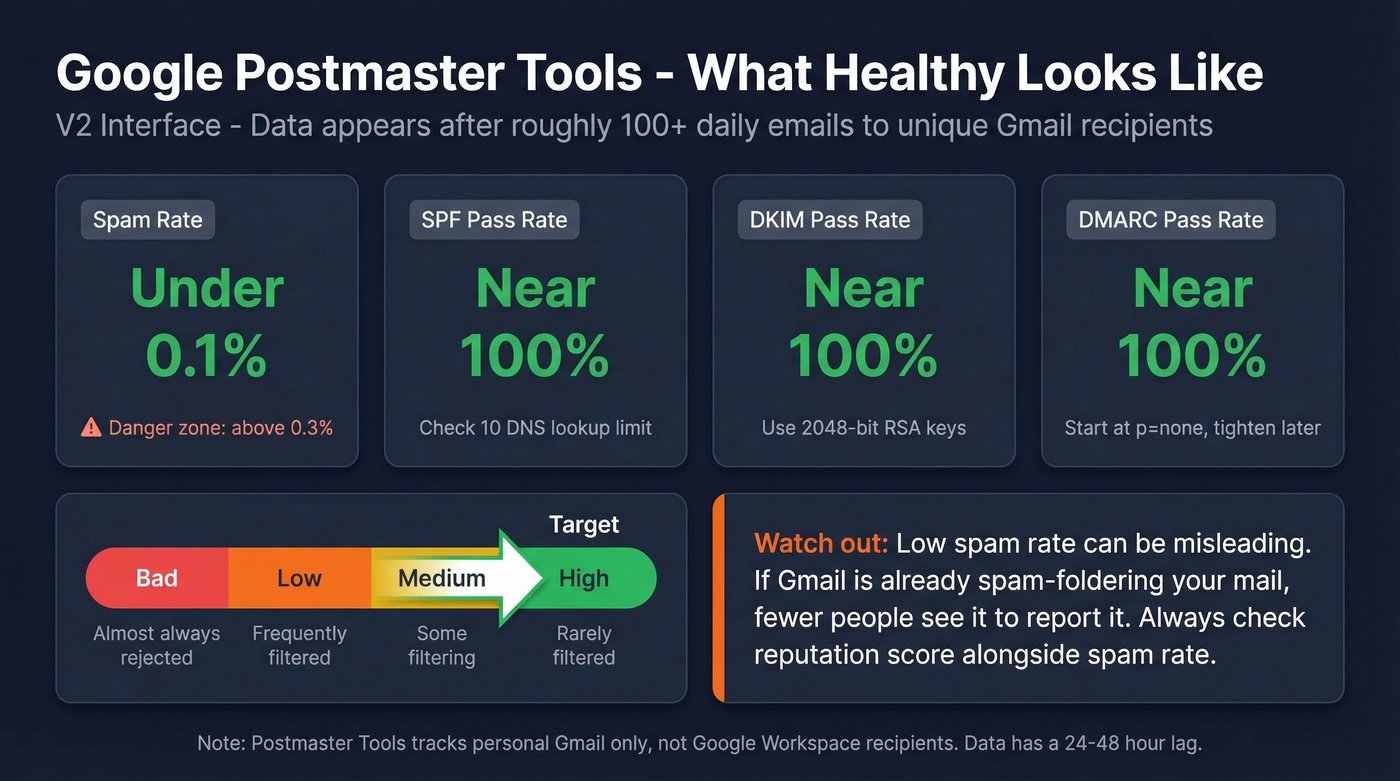
Don't panic when you see no data for the first week or two. Postmaster Tools requires roughly 100+ daily emails to unique Gmail recipients before data populates, and there's a 24-48 hour lag on everything. During early warm-up at 10-30 emails/day, "no data" is completely normal. We've found data takes about 10 days to become useful.
One caveat worth knowing: Postmaster Tools tracks personal Gmail accounts only. Google Workspace recipients aren't included.
Once data appears, healthy looks like this: spam rate below 0.1% (never exceed 0.3%), authentication pass rates near 100% for SPF, DKIM, and DMARC, and TLS encryption near 100%. The reputation scale runs High / Medium / Low / Bad. High means you're rarely filtered. Bad means you're almost always rejected. For more diagnostics, keep a shortlist of email reputation tools and a broader email deliverability guide.
A low spam rate in Postmaster Tools can be misleading, and this trips up a lot of people. If Gmail is already spam-foldering most of your mail, fewer recipients see it in their inbox, which means fewer people can hit the spam button. Low complaint rate plus low inbox placement equals false comfort. Watch reputation score alongside spam rate to get the full picture.
Email Warm-Up Tools
| Tool | Price | Best For |
|---|---|---|
| Instantly | ~$37/mo | Best UX, provider-targeted controls |
| Smartlead | ~$39/mo | Agencies managing multiple client domains |
| Mailreach | ~$19.50-$25/mo per mailbox | Monitoring and diagnostics |
| Lemwarm | ~$29/mo | Teams already using Lemlist |
We've found the best approach is manual warm-up for weeks 1-2 with real emails to real contacts who actually reply, then layering in a tool for ongoing maintenance. No warm-up tool can fix a domain with no DMARC, a list full of catch-all addresses, and a shared tracking domain. Get the fundamentals right first - then automate the maintenance.
Skip warm-up tools entirely if you're only running one mailbox and can commit to sending 15-20 genuine emails per day to people who'll respond. The tool is a convenience, not a requirement.
Mistakes That Kill Domain Reputation
Sending from your primary company domain. If your primary domain's reputation tanks, every employee's email suffers - marketing, support, executive comms, everything. Use a secondary. Always.
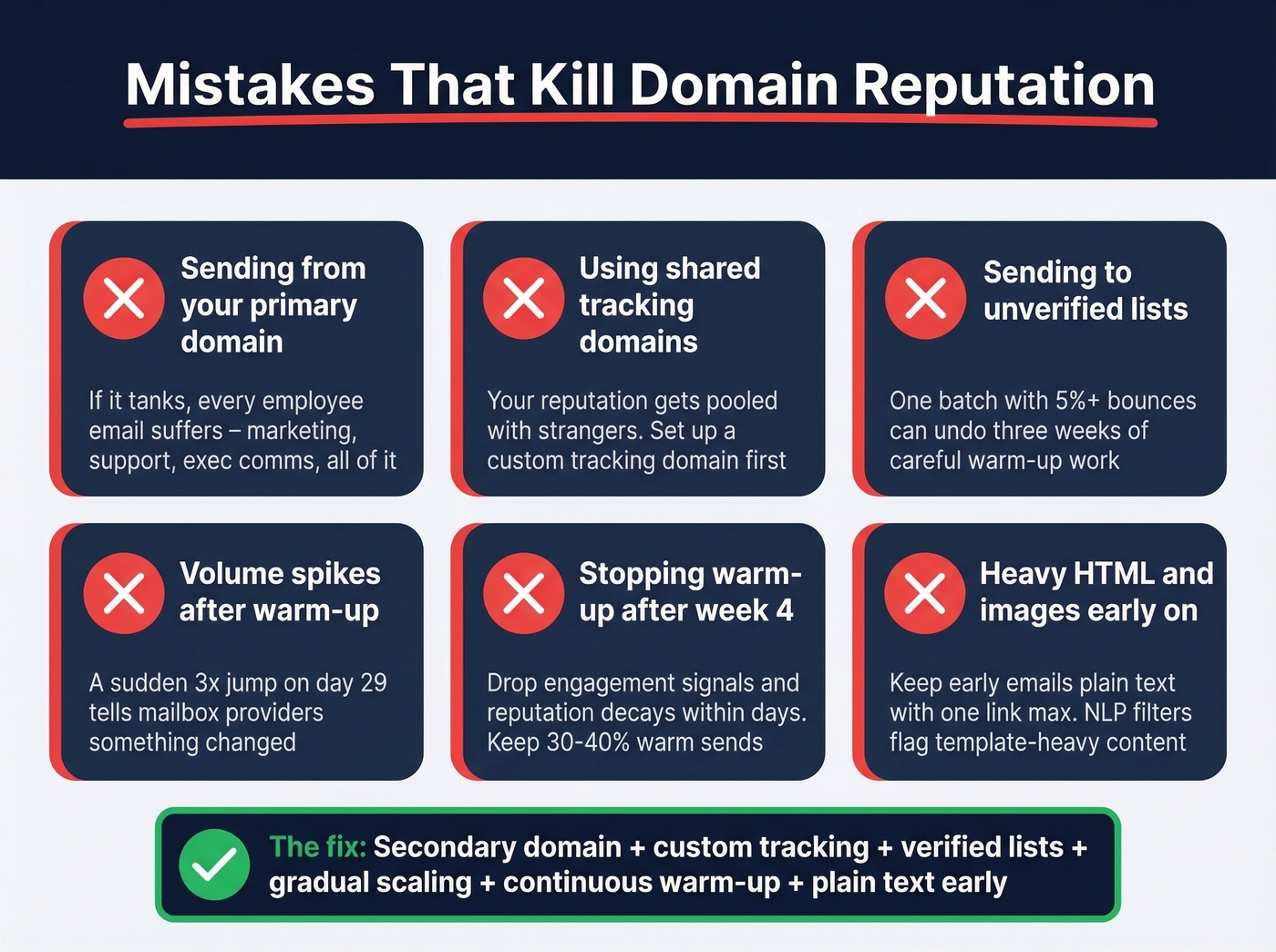
Using shared tracking domains. Your reputation gets pooled with strangers. Set up a custom tracking domain before you send anything.
Sending to unverified lists. A single batch with a 5%+ bounce rate can undo weeks of progress. I've seen teams lose three weeks of warm-up work because someone uploaded an old CSV without running verification first. Verify everything before it touches your warm-up domain.
Volume spikes after warm-up. A sudden 3x jump on day 29 tells mailbox providers something changed. Scale gradually, always.
Stopping warm-up after week 4. Drop your engagement signals and reputation decays within days.
Heavy HTML and images in early sends. Keep early emails plain text with one link maximum. NLP filters flag template-heavy content, and spam complaint rates above 0.3% trigger enforcement actions from Google's bulk sender guidelines. If you're tightening copy and structure, use these emails that get responses principles.
After week 4, you're finally ready to send cold outreach at scale. That's exactly when data quality matters most. Prospeo delivers 98% email accuracy with spam-trap removal and catch-all handling built in - refreshed every 7 days, not 6 weeks. Keep your bounce rate under 2% without guessing.
You spent a month building domain reputation. Protect it with verified data.
FAQ
How long does it take to warm up a new email domain?
Four to six weeks minimum for basic sending. Brand-new domains with no history often need 8-12 weeks before scaling cold outreach aggressively. Rushing the warm-up phase is the single most common reason cold email campaigns fail on launch - and it's the hardest mistake to recover from because you're starting with a damaged reputation instead of a blank slate.
Do I need a warm-up tool?
Not for the first two weeks. Manual warm-up to known contacts builds the strongest engagement signals because replies are genuine. Layer in a tool afterward for automated maintenance - most work by exchanging messages with a network of real inboxes to simulate organic engagement. Budget $15-$50/mo per mailbox.
What if my domain reputation is already damaged?
Check Google Postmaster Tools. If reputation shows "Bad," you've got two options: warm it back from scratch over 6+ weeks, or register a new secondary domain and start fresh. Switching ESPs won't help - reputation follows the domain. Fix the underlying issues (list hygiene, authentication, content) before repeating the process.
Can bad contact data ruin a warm-up?
Absolutely. A single batch with a 5%+ bounce rate can tank a new domain's reputation overnight. Always verify your list before sending. We've seen teams at Stack Optimize maintain 94%+ deliverability and under 3% bounce rates across all their clients by making verification non-negotiable before any send touches a warm-up domain.