

How to Write a Reminder Email That Gets Replies - Not Ignored
You sent the proposal three days ago. The prospect opened it - you saw the notification - and then nothing. You draft three versions, delete them all, and stare at the blinking cursor wondering if "just checking in" makes you sound desperate.
Here's the thing: 42% of all replies come from follow-ups, not the first email. The people who know how to write a reminder email that actually works don't write better prose. They follow a system.
Three Rules Before Any Template
Add new value with every follow-up. A 12-person agency tested this across 340k emails over three months. Reply rates jumped from 0.4% to 3.8% when they stopped "checking in" and started adding fresh information with each touch.
Keep it under 80 words. The best-performing campaigns consistently stay below this threshold. Shorter emails respect the reader's time and make the ask impossible to miss.
Fix your contact data before rewriting your copy. No subject line trick overcomes a 5% bounce rate. We've seen teams obsess over word choice while half their emails land in spam - that's the wrong problem to solve first.
If you're building a full outbound system, start with a B2B cold email sequence that bakes in timing and value-add from day one.
Reply Rates and Timing Benchmarks
A 2026 benchmark analysis of billions of cold email interactions found an overall average reply rate of 3.43%. Top performers break 10%, but most teams hover well below that.
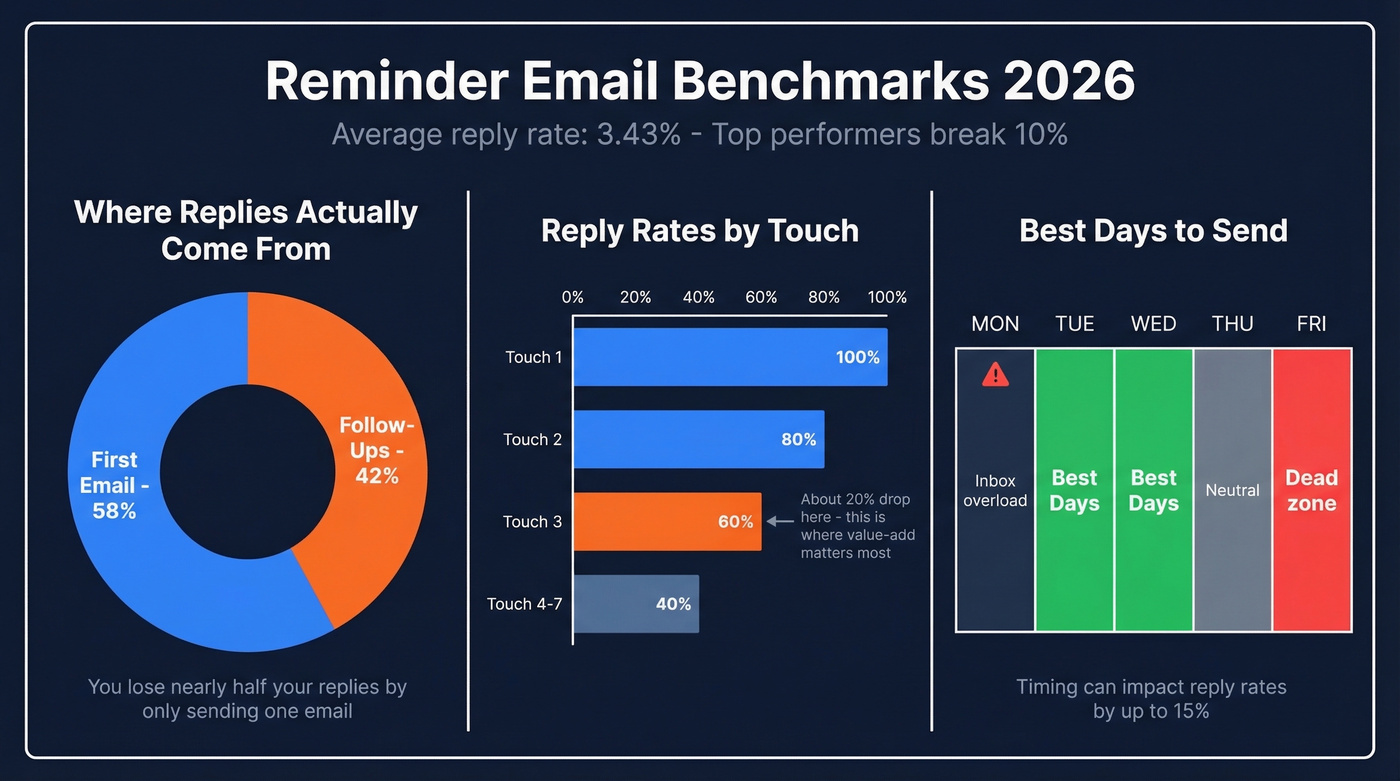
The split between first-touch and follow-up replies is closer than you'd think - 58% come from the initial email, 42% from subsequent touches. If you're only sending one email, you're leaving nearly half your potential replies on the table.
The sweet spot for sequence length is 4-7 touchpoints. Under four and you're quitting too early. Beyond seven and you hit diminishing returns unless each touch introduces something new. Response rates drop roughly 20% by the third email, which is exactly why the value-add framework we cover below matters so much.
Best days to send? Tuesday and Wednesday, with Wednesday edging ahead slightly. Monday mornings are inbox-overload territory. Friday afternoons are a dead zone. (For a deeper breakdown, see our guide on the best time to send cold emails.)
Anatomy of an Effective Reminder
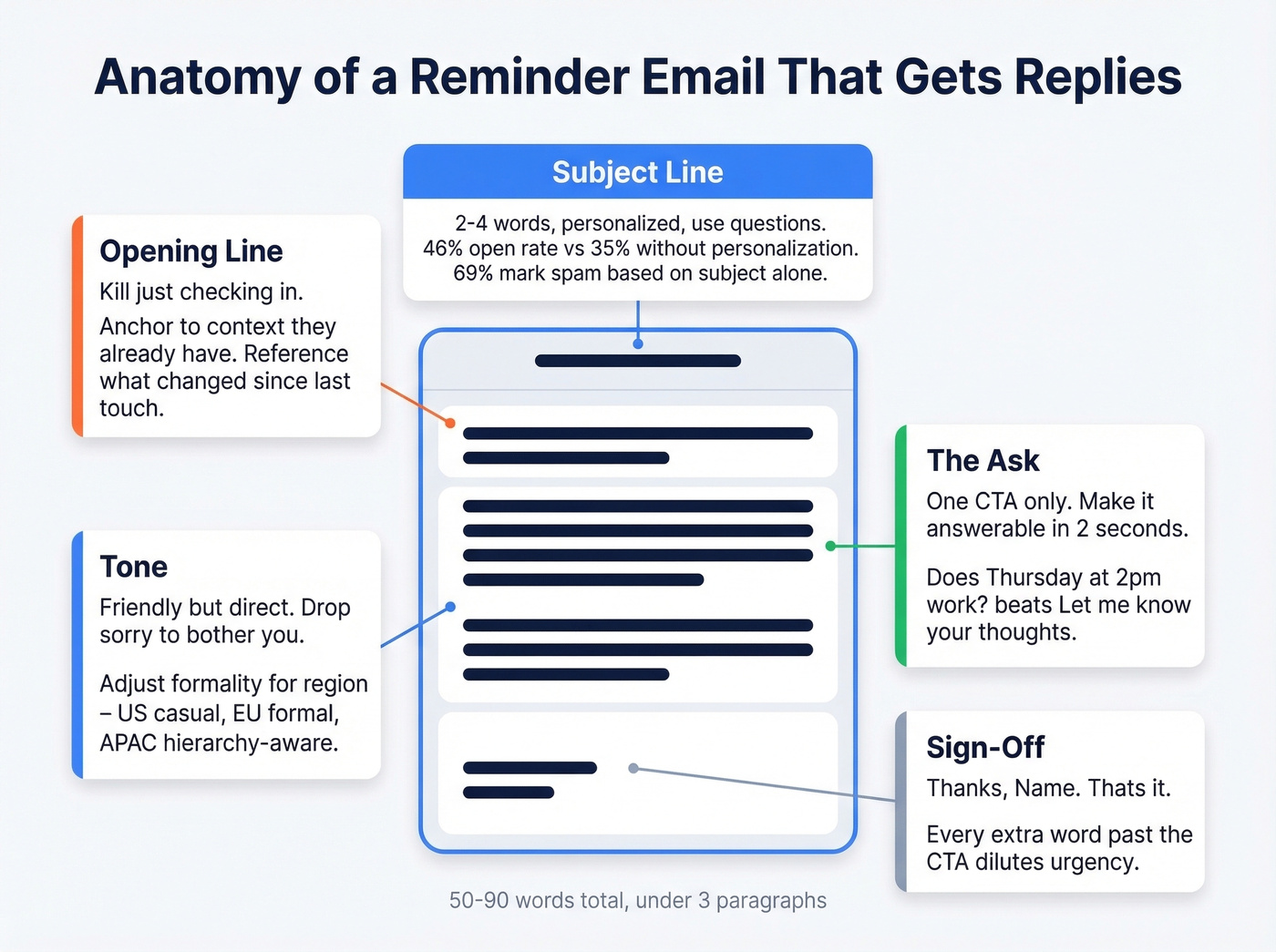
Most effective reminder emails share five components, and the whole thing should land between 50 and 90 words in under three paragraphs. Get any one of these wrong and the whole thing underperforms.
Subject Line
This is where most follow-ups die. 64% of recipients decide whether to open based on the subject line alone, and 69% will mark you as spam based on nothing but those few words.
Three rules hold up across every dataset we've reviewed: personalize it (personalized subject lines hit 46% open rates versus 35% without), keep it short (two to four words consistently outperform longer alternatives), and use questions (which match that same 46% benchmark). "Quick question about [project name]" beats "Following Up on My Previous Email Regarding Our Proposal" every single time. If you want more options, pull from these email subject line examples.
Opening Line
Kill "just checking in." It adds zero value and signals you have nothing new to say. Anchor to context the recipient already has - the specific thing you're waiting on, when you last connected, or what's changed since then. If you need alternatives, here are better ways on how to say just checking in professionally.
Good: "The proposal I sent Thursday has a pricing lock that expires Friday." Bad: "Just wanted to circle back on my previous email."
The Ask
One CTA. Not two. Not a paragraph of options. "Does Thursday at 2pm work?" is answerable in two seconds. "Let me know your thoughts on the proposal and whether you'd like to schedule a call to discuss next steps" requires actual effort - and effort kills reply rates. For more CTA patterns, see email call to action.
Tone
The anxiety about sounding pushy is real. A thread on r/socialskills captured it perfectly: "I don't want them to feel guilty or pressured." Here's the reframe - following up is professional, not rude. The people who never follow up aren't polite. They're invisible.
Aim for friendly but direct. Drop "Sorry to bother you" and "I know you're busy." State your purpose, make the next step easy, and stop.
Formality expectations vary by region, too. US business culture tolerates casual follow-ups; European contacts often expect more formal phrasing and longer gaps between touches. In APAC markets, hierarchy matters - following up with someone senior to you requires softer framing and often a different channel entirely. And if you're using AI to draft follow-ups, read them aloud before sending. AI-generated emails have a flatness that recipients increasingly recognize and ignore. If you're experimenting here, compare approaches in our guide to AI sales follow-up.
Sign-Off
"Thanks, [Name]" works. "Looking forward to hearing from you at your earliest convenience" doesn't. Every extra word past the CTA dilutes urgency.
The Value-Add Framework
An agency managing roughly 200k emails per month across 15 clients found that touches three through five were dead weight - generic "checking in" messages that nobody responded to.
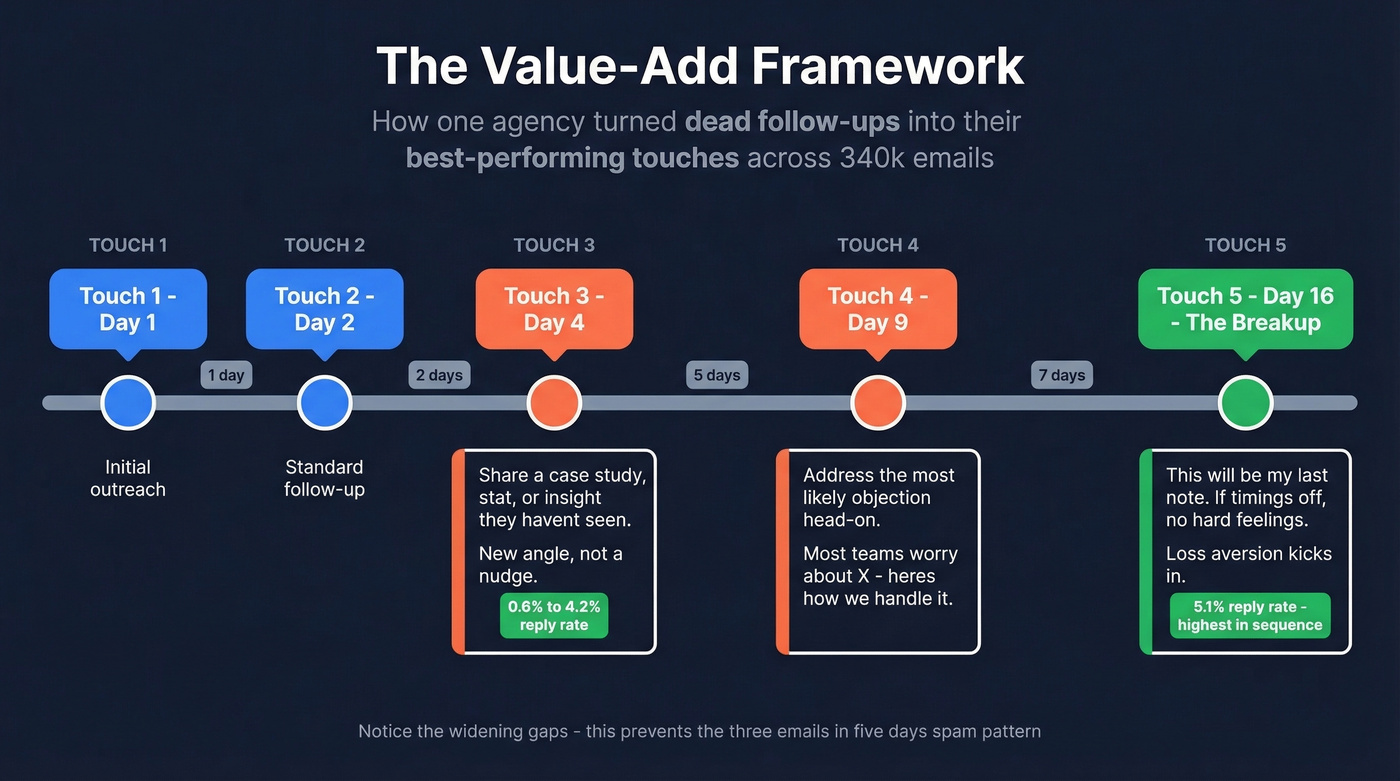
They rewrote every follow-up to add new information instead of re-asking. Over three months and eight campaigns covering 340k follow-up emails, touch three went from 0.6% to 4.2% reply rate. The breakup email at touch five pulled 5.1% - the highest in the sequence.
Their framework:
- Touch 3, Day 4: Share a relevant case study, stat, or insight the prospect hasn't seen. New angle, not a nudge.
- Touch 4, Day 9: Address the most likely objection head-on. "Most teams worry about [X] - here's how we handle it."
- Touch 5, Day 16: The breakup. "This'll be my last note on this. If timing's off, no hard feelings." Loss aversion kicks in and people respond.
Notice the widening gaps between touches. This prevents the "three emails in five days" pattern that makes people hit the spam button.
If you want more plug-and-play options, use these sales follow-up templates alongside the value-add framework.

You just read that 42% of replies come from follow-ups. But here's what kills that number: bad data. If your emails bounce, no subject line or value-add framework saves you. Prospeo delivers 98% email accuracy with a 7-day refresh cycle - so every reminder you send actually lands in a real inbox.
Fix your contact data first. The copy tricks work after that.
Reminder Email Templates
Each template below stays under 90 words. Copy, customize, send.
No-Response Follow-Up (Warm)
Subject: Quick follow-up on [topic]
Hi [Name],
I sent over [the proposal / document / request] on [day]. Wanted to make sure it didn't get buried - I know [time of year / quarter-end] gets hectic.
Is this still on your radar, or has the priority shifted? A one-line reply helps me plan next steps.
Thanks, [Your name]
No-Response Follow-Up (Cold)
Subject: [First name], one more thing
Hi [Name],
Since my last note, [share a relevant stat, case study, or insight]. Thought it was worth flagging given [their company's situation / industry trend].
Worth a 15-minute call this week, or is this not a priority right now?
[Your name]
Meeting Reminder
Most meeting no-shows aren't rude - they just forgot. Here's what a good reminder looks like versus a bad one:
Before: "Hi! Just wanted to remind you about our meeting tomorrow. Please let me know if you can still make it. Looking forward to it!"
After:
Subject: Confirming [day] at [time]
Hi [Name],
Here's the [Zoom link / agenda / deck] for our call [tomorrow / Wednesday] at [time] so we can jump straight in.
If something's come up, no problem - just let me know.
See you then, [Your name]
The difference? The good version leads with the useful thing instead of the anxiety.
Payment / Invoice Reminder
This one often needs a two-step escalation:
Touch 1 (due date):
Subject: Invoice #[number] - due [date]
Hi [Name],
Friendly heads-up that invoice #[number] for [amount] is due on [date]. Reattached for easy reference.
If payment's already in process, ignore this. Otherwise, let me know if you need anything from my end.
Thanks, [Your name]
Touch 2 (7 days overdue):
Subject: Invoice #[number] - now overdue
Hi [Name],
Following up on invoice #[number], now 7 days past due. Can you confirm when payment will be processed?
[Your name]
Deadline Reminder
Subject: [Deliverable] due [date]
Hi [Name],
Quick reminder that [deliverable] is due by [date/time]. We need it by then to keep [project / launch] on track.
If there's a blocker, let me know today so we can adjust.
Thanks, [Your name]
Document / Approval Request
Subject: Need your sign-off on [document]
Hi [Name],
The [contract / brief / spec] I sent on [date] still needs your approval before we can move forward. The team's ready on our end - just waiting on your green light.
Can you review by [date]? If there are changes needed, happy to jump on a quick call.
[Your name]
Job Application Follow-Up
Subject: Following up - [role title] application
Hi [Name],
I applied for the [role] on [date] and wanted to follow up. I'm excited about [specific thing about the company] and think my [relevant skill] experience would be a strong fit.
Is there any additional information I can provide?
Best, [Your name]
The Breakup Email
This format pulled a 5.1% reply rate in the agency study - the highest in the entire sequence.
Subject: Should I close this out?
Hi [Name],
I've reached out a few times and haven't heard back, so I'll assume the timing isn't right.
I'll close out my follow-ups on this. If things change down the road, I'm easy to find.
All the best, [Your name]
Phrases That Kill Replies
"Did you get my message?" sounds judgmental, like you're questioning whether they can manage their inbox. Reply to your original email and add something new instead.
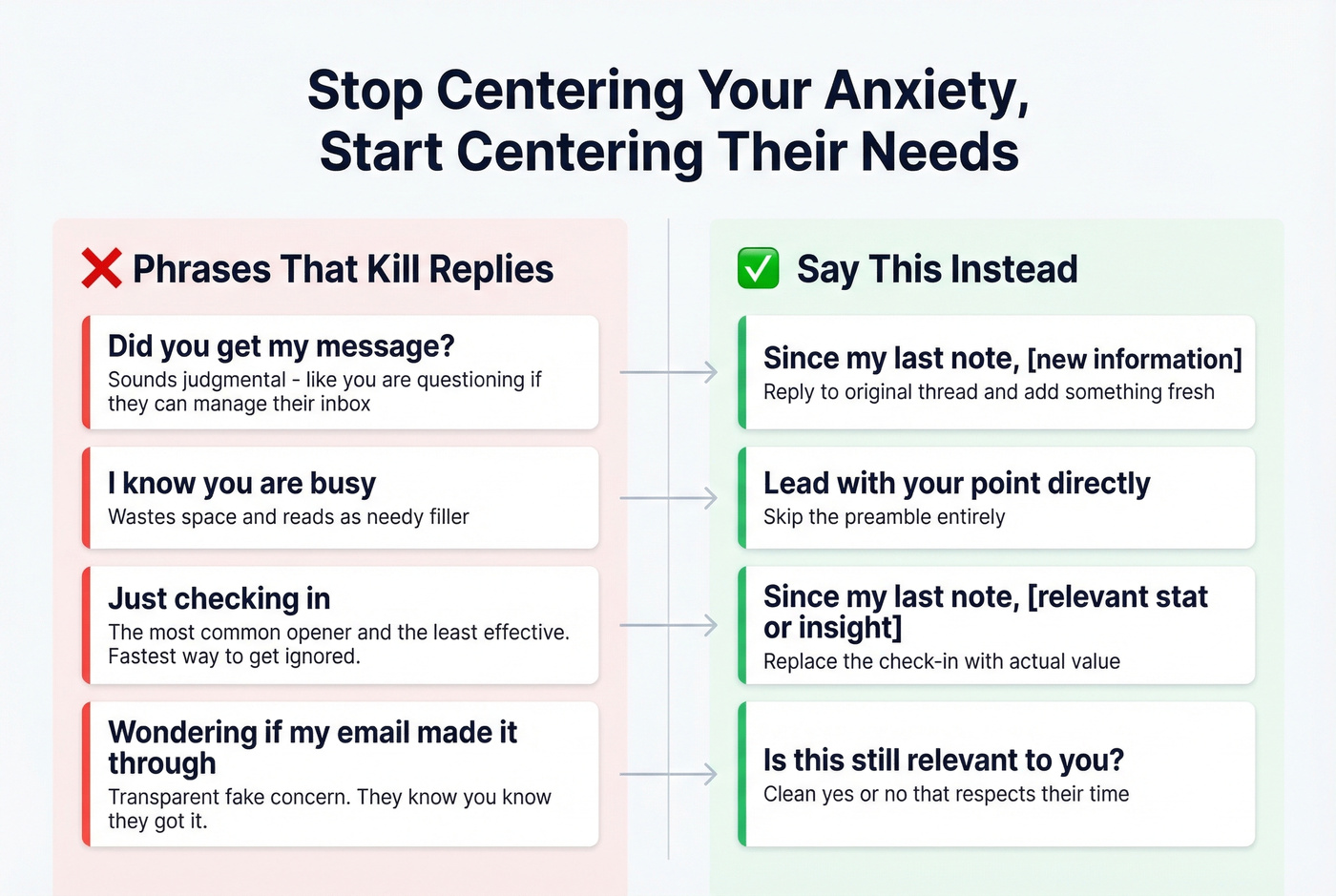
"I know you're busy" wastes space and reads as needy filler. Skip the preamble and lead with your point.
"Just checking in" is the most common follow-up opener and the least effective. In our experience, it's the single fastest way to get ignored. Replace it with "Since my last note, [new information]."
"Wondering if my email made it through" is transparent fake concern. The recipient knows you know they got it. Try "Is this still relevant to you?" - a clean yes/no that respects their time.
Every failed phrase centers your anxiety instead of the recipient's needs.
When Polite Nudges Stop Working
A post on r/work captured the breaking point perfectly: someone on their seventh reminder email, now copying the employee plus two managers plus a VP. We've all been there.
Let's be honest: if you've sent more than three reminder emails for the same request, the problem was never your writing. It's your escalation process - or the fact that the person genuinely doesn't care about the thing you're asking for, and no email will change that.
Here's the three-step framework for when polite nudges fail:
Switch channels. If email isn't working, try Slack, a phone call, or walking over to their desk. Different channels carry different urgency signals.
Involve stakeholders. Don't CC the VP on reminder seven. Loop in a shared manager at reminder three with neutral framing: "Want to make sure [project] stays on track - can you help me connect with [Name] on this?"
Set explicit deadlines with consequences. "I need [deliverable] by Thursday at noon. If I don't have it, I'll need to flag it in the status meeting." That isn't aggressive. It's clear.
The goal is never to punish. It's to make the cost of not responding higher than the cost of responding.
The Deliverability Problem Nobody Talks About
Before you rewrite your follow-up for the fourth time, consider this: half of outbound emails never reach inboxes. Not bounced - delivered to the server but routed straight to spam.
Delivery means the recipient's server accepted your email. Deliverability means it actually landed in the inbox. You can have 98% delivery and 50% deliverability, and your reminder emails will feel like shouting into a void.
The thresholds that matter according to Skrapp's deliverability guide:
- Bounce rate above 2% triggers throttling from major email providers
- Above 5% risks getting your domain blacklisted
- More than two images per email raises spam risk by 40%
- Missing SPF, DKIM, or DMARC authentication remains the top reason legitimate emails get flagged
If your bounce rate is above 2%, fix your contact data before sending more follow-ups. No template in the world helps if your messages land in spam. (If you want a full checklist, start with our email deliverability guide and then tighten your sender reputation.)
Prospeo's 5-step verification catches spam traps, honeypots, and catch-all domains before they damage your sender reputation. At 98% email accuracy across 143M+ verified addresses, it handles the data hygiene so you can focus on the message. The free tier covers 75 verifications per month - enough to run a quick deliverability sanity check on a small sample.
The value-add framework above turned 0.6% reply rates into 4.2%. But that agency was sending to verified contacts. Prospeo gives you 300M+ profiles with 30+ filters - buyer intent, job changes, technographics - so your follow-ups reach decision-makers who are actually in-market. At $0.01 per email, bad data is a choice.
Stop writing perfect reminders to dead email addresses.
FAQ
How many reminder emails should I send?
Two to three for workplace requests like approvals or document sign-offs. For outbound sales, 4-7 touchpoints work if each adds new value. After three internal reminders with no response, switch to a different channel - Slack, phone, or an in-person ask.
What's the best day to send a reminder email?
Wednesday consistently produces the highest reply rates, with Tuesday a close second. Avoid Monday mornings and Friday afternoons. Mid-morning sends between 9-11 AM in the recipient's time zone perform best.
Should I apologize for following up?
No. Phrases like "Sorry to bother you" undermine your message and signal low confidence. Following up is a normal part of professional communication. State your purpose directly, make the next step easy, and keep it under 80 words.
How do I verify my email list before sending reminders?
Use a bulk verification tool to check addresses before any campaign. Prospeo's free tier lets you verify 75 emails per month with 98% accuracy, catching invalid addresses, spam traps, and catch-all domains. For larger lists, upload a CSV and filter out risky contacts in minutes.