

How to Write an Introduction Email That Actually Gets a Reply
The average cold introduction email pulls a 5.8% reply rate. That's across 16.5 million emails and 93 business domains - and it's down 15% from the year before. Open rates hit 46% in early 2024 before dropping to roughly 31-32% by mid-year. So a huge chunk of carefully written messages still die unread.
Here's the thing: the problem usually isn't your writing. It's that the email never reached the right inbox, the subject line got ignored, or the message asked for too much too soon. Knowing how to write an introduction email that gets replies starts with understanding why most fail - and fixing the fundamentals before you touch the copy.
Why Most Email Introductions Fail
Three things determine whether your intro email gets a reply, in this order:
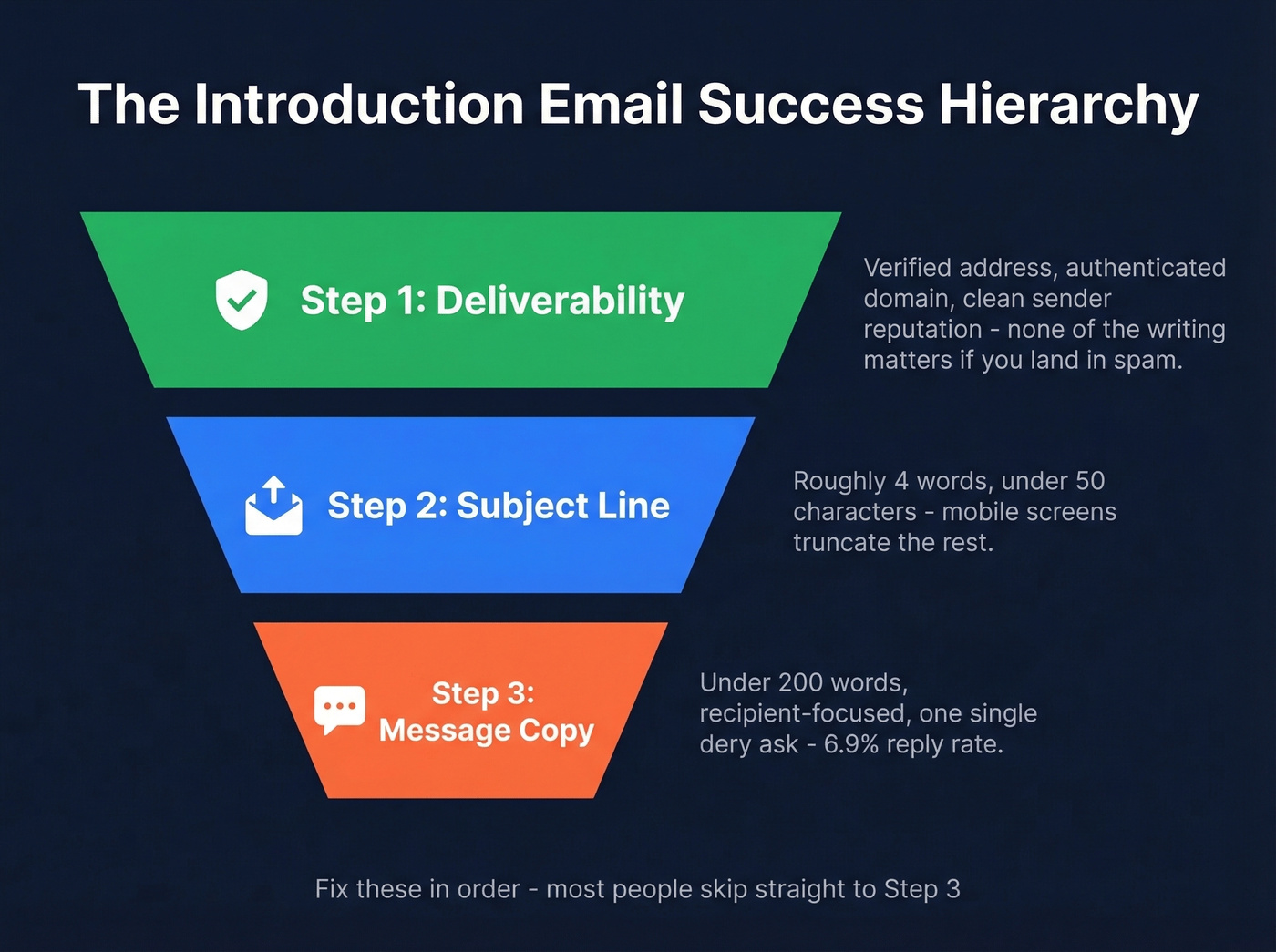
- It reaches the right inbox. Verified address, authenticated domain, clean sender reputation. None of the writing advice matters if your email lands in spam or bounces.
- The subject line earns an open. Aim for roughly four words, often under 50 characters. Mobile screens truncate longer subject lines.
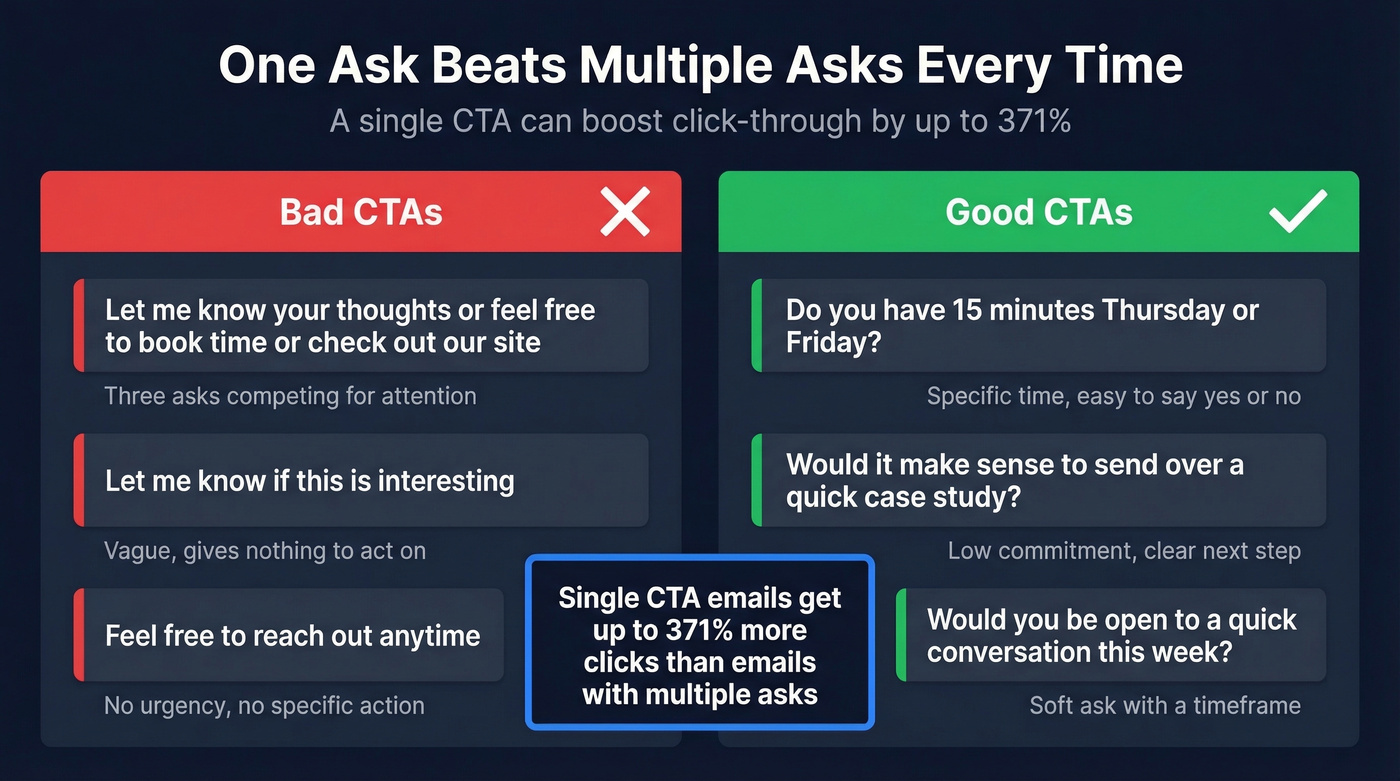
- The message is short, recipient-focused, and ends with one ask. Emails under 200 words hit a 6.9% reply rate in that same dataset. A single CTA can boost click-through by up to 371% compared to emails with multiple asks.
Internalize this hierarchy - deliverability, then subject line, then message - before you write a word.
Anatomy of an Introduction Email
A strong intro email has these core parts, and most people overthink at least three of them:
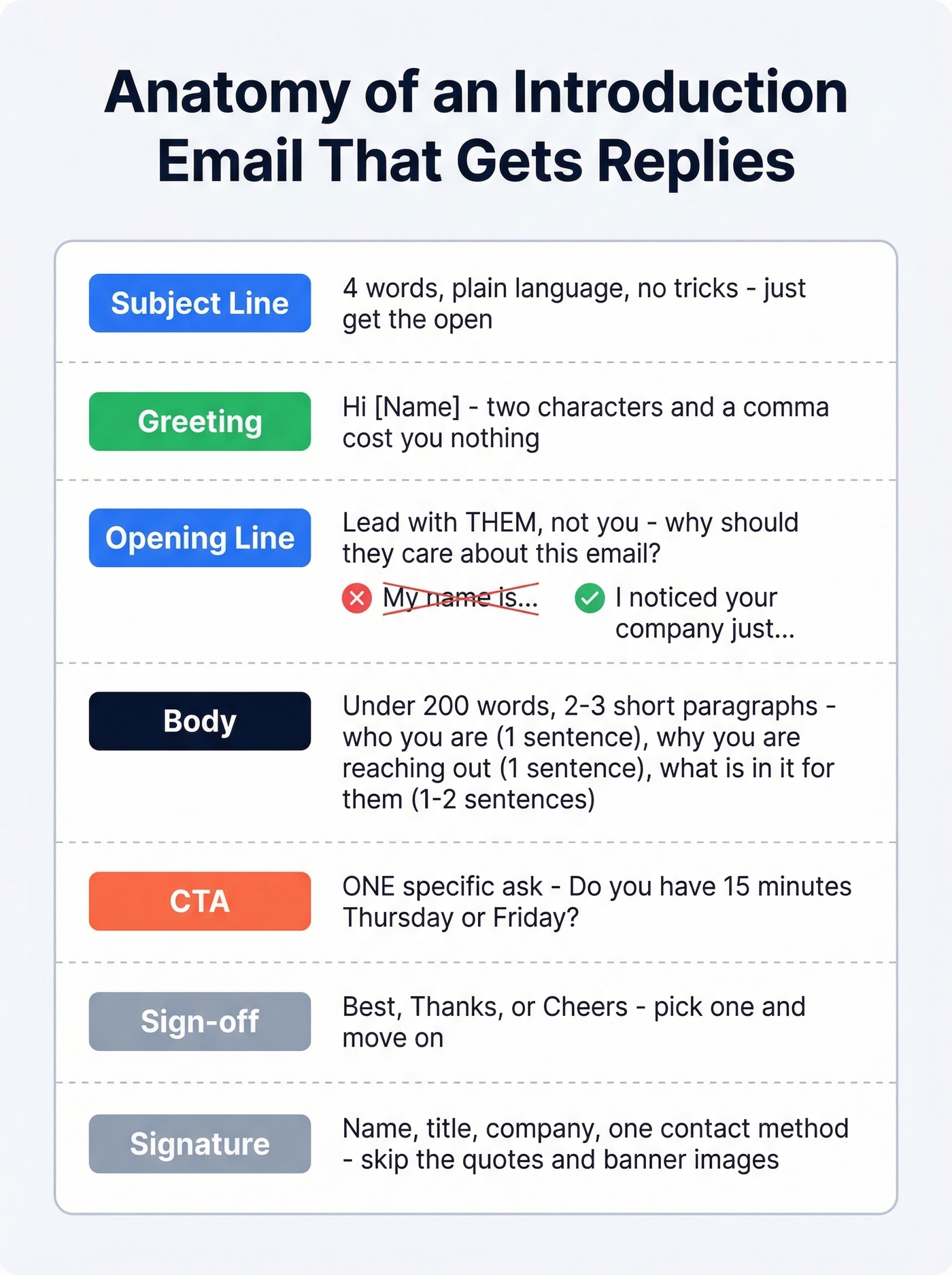
Subject line > Greeting > Opening line > Body > CTA > Sign-off > Signature
The subject line does one job: get the email opened. It's not a summary, a pitch, or a clever hook. Four words, plain language, relevant to the recipient.
The greeting sets tone instantly. "Hi [Name]" works. Starting with just the recipient's bare name - no "Hi," no "Good morning" - can rub people the wrong way. It costs you nothing to add two characters and a comma. Default to gender-neutral greetings ("Hi [First Name]" rather than "Dear Sir/Madam") and consider adding pronouns to your own signature. It signals professionalism and removes guesswork for the recipient.
The opening line is where most intro emails die. If your first sentence starts with "My name is..." you've already made it about you. Lead with the recipient - why you're reaching out to them, not who you are. Your body paragraph delivers the value or context in two to three short sentences. The CTA is a single, low-friction ask. The sign-off is "Best" or "Thanks." And the signature is your name, title, company, and one contact method. That's it.
How to Write Each Part (Step-by-Step)
Subject Line: Keep It to Four Words
Mobile screens truncate subject lines around 50 characters, and shorter subjects consistently outperform longer ones. No ALL CAPS, no exclamation marks, no "RE:" tricks.
Formulas that work: "Question about [X]," "Introduction from [Name]," "[Mutual contact] suggested I reach out," or simply "[Their company] + [topic]." Plain beats clever every time.
Opening Line: Lead With Them
Your first sentence should reference something specific to the recipient - a recent company milestone, a piece of content they published, a shared connection. Not a mail-merge token. "{First_Name}, I noticed your company just..." is personalization. "Hi {First_Name}" followed by a generic pitch isn't.
The goal is to answer the recipient's first question: "Why should I care about this email?" A proper email introduction earns that attention in the first line, not the third paragraph.
Body: Say Less Than You Think
The 16.5M-email study is clear: six to eight sentences, typically under 200 words, produced the highest reply rates at 6.9%. Over 60% of emails are opened on mobile devices, so walls of text are a death sentence. Two to three short paragraphs with white space between them. Every sentence earns its spot or gets cut.
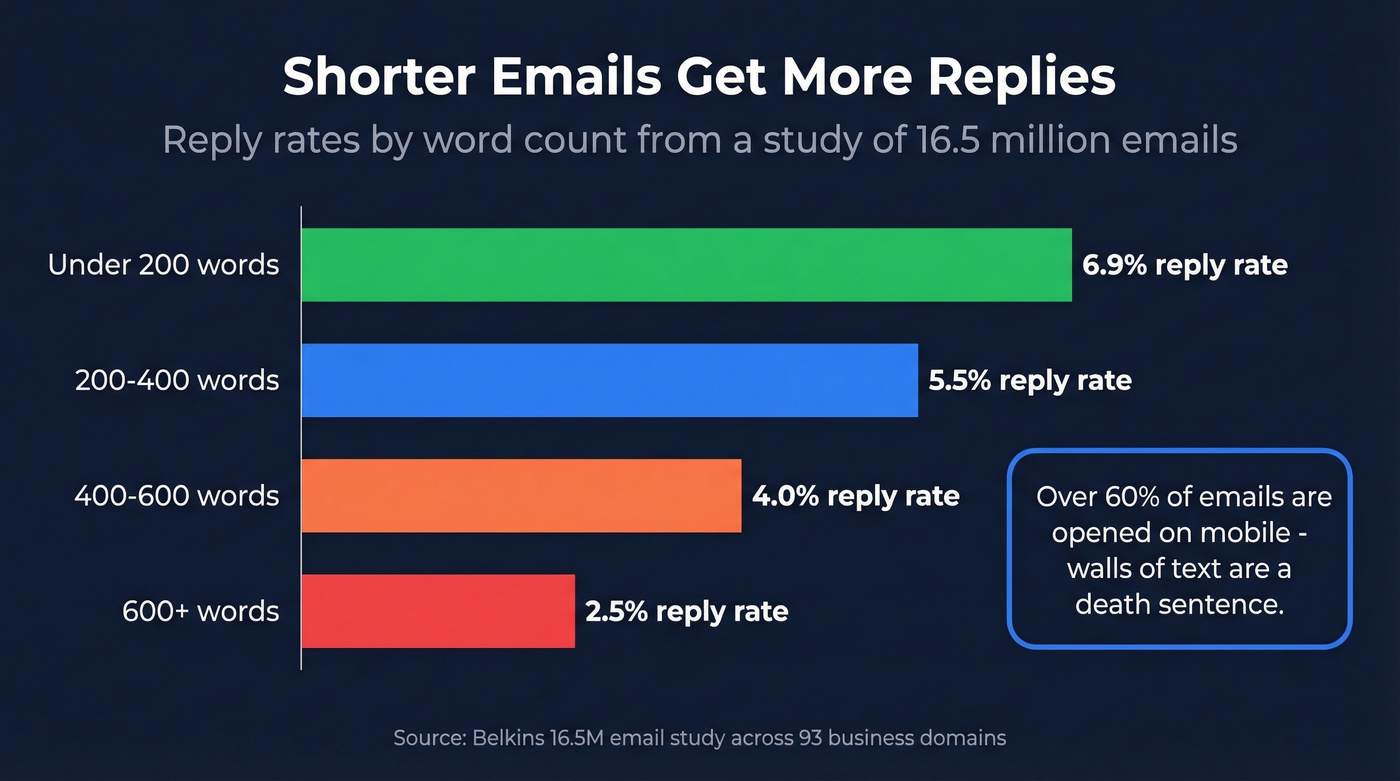
State who you are in one sentence, why you're reaching out in one sentence, and what's in it for them in one to two sentences. That's the whole body. Whether you're writing a business email to introduce yourself or sending an introductory message to another company, this structure holds.
CTA: One Ask, Low Friction
Not two. Not "let me know your thoughts or feel free to book time or check out our site." A single, specific ask: "Do you have 15 minutes Thursday or Friday?" or "Would it make sense to send over a quick case study?" Vague CTAs like "let me know" give the recipient nothing to act on. If you want more examples, borrow proven email call to action patterns.
Sign-Off and Signature
"Best," "Thanks," or "Cheers" - pick one and move on. Your signature: name, title, company, one contact method. Skip the inspirational quotes, banner images, and social media icons. Clean signatures help deliverability and look professional.
Introduction Email Templates
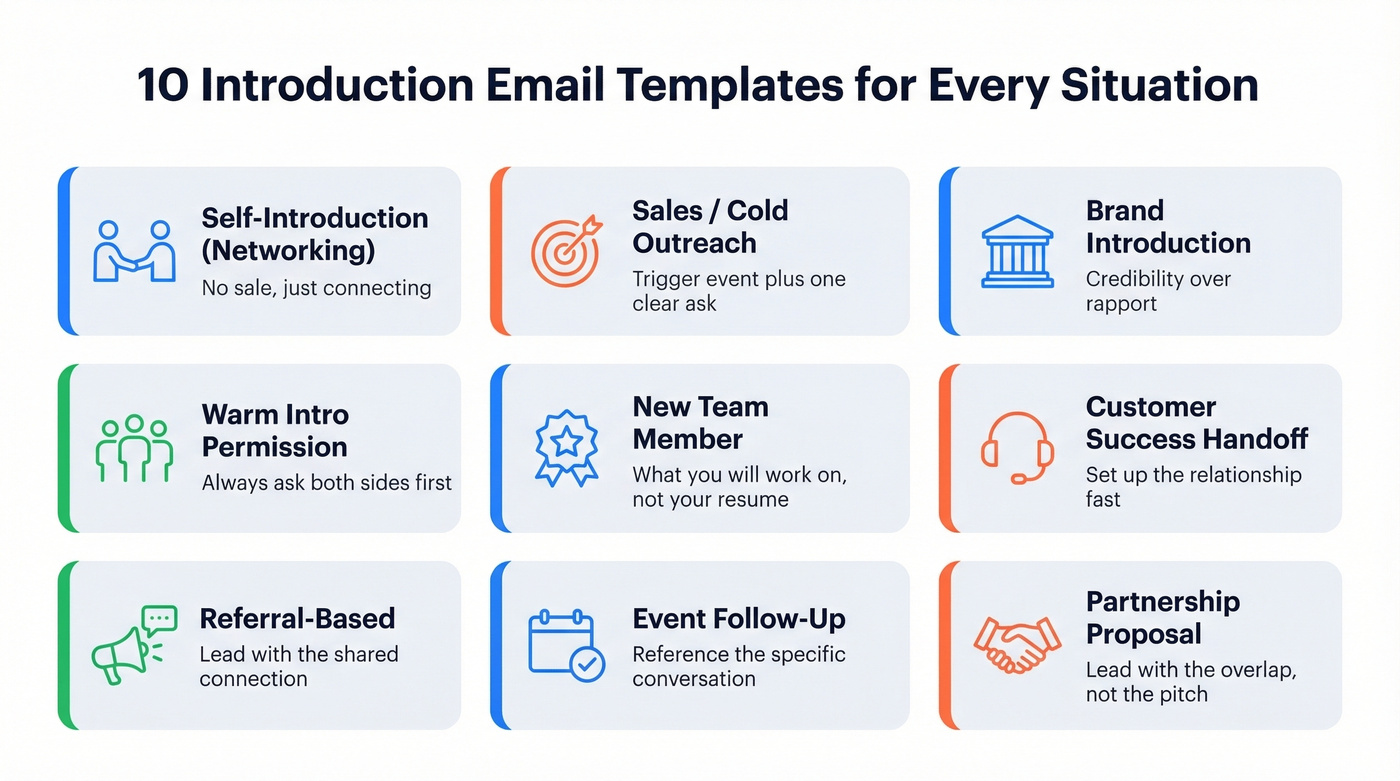
Self-Introduction (Networking)
Use when you're reaching out to someone you'd like to know professionally - no sale, no ask beyond connecting.
Subject: Quick intro - [your shared interest]
Hi [Name],
I've been following your work on [specific topic] and really appreciated your take on [specific piece]. I'm [Your Name], [title] at [Company], working on similar problems in [area].
Would you be open to a 15-minute call sometime this month? I'd love to hear more about your approach to [topic].
Best, [Your Name]
Sales / Cold Outreach
The three-to-five sentence framework works here: personalized opener, one sentence on who you are, one on the value, one clear ask. If you need more options, keep a swipe file of cold email subject line examples.
Subject: [Their pain point] at [Company]
Hi [Name],
Noticed [Company] just [trigger event - hiring, funding round, product launch]. When that happens, teams usually run into [specific problem your product solves].
We help [similar companies] [specific outcome - e.g., "cut list-building time by 80%"]. Would a 10-minute call next week make sense?
Best, [Your Name]
Why this works: The trigger event proves you did your homework. The outcome sentence makes it about their results, not your features. And the time-bound ask is specific enough to act on but loose enough to feel low-pressure.
Don't have their email? Prospeo's Chrome extension finds verified professional emails from any website in one click - so you're not guessing at formats or bouncing off bad addresses.
Brand Introduction Email
When you're introducing your company to a potential client or partner for the first time, the recipient doesn't know you or your brand, so credibility matters more than rapport. For more variations, see these company introduction email examples.
Subject: [Your Company] + [Their Company]
Hi [Name],
I'm [Your Name] at [Company] - we help [type of company] [specific outcome with a proof point]. I noticed [Their Company] is [relevant trigger or context].
Would it make sense to explore whether we can help with [specific challenge]? Happy to send a quick overview first if that's easier.
Best, [Your Name]
Asking Permission Before a Warm Intro
Before you connect two people, ask both sides first. This is the email you send to the person you want to introduce:
Subject: Mind if I intro you to [Name]?
Hi [Name],
I know [Person B] at [Company] - they're working on [relevant topic] and I think you two would have a great conversation. Would you be open to an email intro?
No pressure either way.
Best, [Your Name]
Introducing Two People Over Email
Only send this after both parties say yes. The double opt-in approach respects everyone's time and prevents awkward "who is this?" replies.
Subject: Intro - [Person A] and [Person B]
Hi [Person A] and [Person B],
Connecting you two - [Person A] is [one-line context], and [Person B] is [one-line context]. I think you'd have a great conversation about [specific topic].
I'll let you take it from here!
Best, [Your Name]
New Team Member (Internal)
Most new-hire intro emails read like a LinkedIn summary. Nobody cares about your career arc. They care about what you'll be working on and whether you're approachable.
Before (too formal):
"Dear Team, I am writing to introduce myself as the newest member of the Marketing department. I bring over 8 years of experience in..."
After (human):
Subject: New on the team - [Your Name]
Hi [Name/Team],
I'm [Your Name], just joined as [title] on the [department] team. Previously I was at [Company] doing [one-line context]. I'm excited to dig into [specific project or area].
Looking forward to working together - happy to grab coffee or a quick call anytime this week.
Best, [Your Name]
Customer Success Handoff
Subject: Your new point of contact at [Company]
Hi [Name],
I'm [Your Name], your new [CSM/Account Manager] at [Company]. [Previous CSM] brought me up to speed, and I'd love to set up a quick intro call to cover:
- What success looks like for your team right now
- Any open items or concerns
- Goals for the next quarter
Do you have 15 minutes this week?
Best, [Your Name]
Referral-Based Introduction
Subject: [Referrer's Name] suggested I reach out
Hi [Name],
[Referrer] mentioned you'd be the right person to talk to about [topic]. I'm [Your Name] at [Company] - we help [type of company] with [specific outcome].
Would you have 10 minutes this week for a quick call?
Best, [Your Name]
Event Follow-Up
Subject: Good meeting you at [Event]
Hi [Name],
Great connecting at [Event] - enjoyed our conversation about [specific topic]. I wanted to follow up on [specific thing discussed].
Would it make sense to continue the conversation over a call this week?
Best, [Your Name]
Recruiter to Candidate
Subject: [Role title] at [Company]
Hi [Name],
Your background in [specific skill/experience] caught my attention. We're hiring a [Role] at [Company] - it's a [one-line on why the role is interesting: team size, mission, growth stage].
Would you be open to a quick conversation, even if you're not actively looking?
Best, [Your Name]
Partnership Proposal
Lead with the overlap, not the pitch.
Subject: Partnership idea - [Your Company] + [Their Company]
Hi [Name],
I'm [Your Name] at [Company]. We work with [audience overlap] and I think there's a natural fit between what you're doing at [Their Company] and our [specific capability].
Would you have 15 minutes to explore whether a partnership makes sense?
Best, [Your Name]

The article says it plainly: deliverability comes before copywriting. If your introduction email bounces or lands in spam, your subject line and opening line never get a chance. Prospeo gives you 98% verified emails from 300M+ professional profiles - so every intro you craft actually reaches the inbox it was written for.
Stop perfecting emails that bounce. Start with verified addresses.
Timing, Length, and Follow-Up Data
Here's what the 16.5M-email study found about the mechanics:
| Factor | Best Performing | Data Point |
|---|---|---|
| Length | Under 200 words | 6.9% reply rate |
| Day | Thursday | 6.87% reply rate |
| Time | 8-11 PM | 6.52% reply rate |
| Contacts per company | 1-2 | 7.8% reply rate |
| Sequence length | 1 email | 8.4% reply rate |
| Executive touches | 9 avg | Engagement threshold |
The single-email finding surprises most people. One well-crafted intro email actually outperforms multi-email sequences - adding a third email can drop reply rates by up to 20%. If you do follow up, wait two to five days and keep it shorter than the original. Reaching executives takes around nine touches on average, but for a standard introduction, one strong email often does the job. For ready-to-send options, use these sales follow-up templates.
Spam complaints escalate fast - from 0.5% on the first email to 1.6% by the fourth. Unsubscribes hit 2% by round four. And 69% of people unsubscribe because they get too many emails in the first place. Don't be the sender who follows up five times on an intro email nobody asked for.
We've tested this ourselves across client campaigns: industry averages for cold email reply rates range from 1-2% up to roughly 5.8% in large datasets, depending on who's measuring. If your deal size is under five figures, you probably don't need a five-touch sequence with A/B-tested subject lines. One honest, well-targeted email will outperform a sophisticated campaign sent to the wrong people.
Deliverability Best Practices
None of the advice above matters if your email hits spam. We've seen teams craft the best introduction message they've ever written and wonder why reply rates sit at zero - turns out half their list was bouncing.
Authenticate your domain. SPF, DKIM, and DMARC aren't optional. If you don't know what these are, ask your IT team or check your DNS records. Skip this and everything else is wasted effort. (If you want a deeper checklist, start with this email deliverability guide.)
Use a secondary domain for cold outreach. Never risk your primary brand domain. Set up something like "team-[company].com" with a reputable TLD and warm it up for two-plus weeks, starting at five to ten emails per day and scaling gradually. Cap cold sends at 30 per mailbox per day. To stay safe as you scale, follow email velocity limits.
Go plain text for first emails. No images, no tracking pixels, no calendar links, no HTML formatting. Turning off open tracking alone produced roughly 3% higher response rates. If you must track, use a custom tracking domain - shared or public tracking pixels get blacklisted fast. (More on setup: tracking domain.)
Keep bounce rate under 1%. If it spikes above 3%, pause immediately and clean your list. The consensus on r/coldemail is clear: pause at 0.1% spam complaints too. Clean your lists every three to six months because email addresses decay fast - people change jobs, companies shut down, domains expire. If you need benchmarks and fixes, use this email bounce rate guide.
Sending intro emails to unverified addresses tanks your domain reputation. Prospeo's 5-step email verification catches spam traps, honeypots, and catch-all domains before you hit send, with 98% accuracy across 143M+ verified emails and a 7-day data refresh cycle so addresses don't go stale.
You just spent time crafting the perfect introduction email - personalized opener, single CTA, under 200 words. Now you need the right email address. Prospeo's Chrome extension lets 40,000+ users find verified professional emails from any website or LinkedIn profile in one click, at $0.01 per email. No more guessing at formats or torching your sender reputation on bad data.
Find any prospect's verified email in one click and send with confidence.
Mistakes That Kill Introduction Emails
Do this: Write a four-word subject line. Not that: "Exciting Opportunity to Connect and Discuss Potential Synergies!!!"
Do this: Open with something specific to the recipient. Not that: "My name is John and I work at..."
Do this: End with one clear ask. Not that: "Let me know your thoughts, or book a call, or check out our site, or reply with your availability."
Do this: Send plain text, under 200 words. Not that: 350 words with a banner image, three links, and a tracking pixel.
Do this: Verify the email address before sending. Not that: Guess the format and hope for the best. If you're troubleshooting list quality, start with how to check if an email exists.
Real talk: the most common "personalization" we see is "{First_Name}" with a generic pitch underneath. That's not personalization. That's a mail merge. Recipients can tell the difference in about two seconds.
Quick Tips
- A nice email introduction doesn't mean a long one. Brevity signals confidence and respect for the reader's time.
- For a first-time company introduction, include one proof point - a client name, a metric, a recognizable logo - to establish credibility fast.
- Every intro email should read like a note from a real person, not a marketing brochure. If you wouldn't say it out loud to someone at a coffee shop, cut it.
- Open with context about the recipient, not a self-introduction. "I saw your team just launched [X]" beats "I'm reaching out because we offer [Y]" every time.
FAQ
How long should an introduction email be?
Under 200 words. The 16.5 million cold email study found that six-to-eight sentence emails hit the highest reply rate at 6.9%. Two or three tight paragraphs maximum - anything longer gets skimmed or ignored, especially on mobile.
When's the best time to send one?
Thursday performs best at a 6.87% reply rate, and 8-11 PM is the top-performing time window at 6.52%. Monday is the worst day at 5.29%. Schedule sends accordingly if your email tool supports it.
Should I follow up if I don't hear back?
Once is usually enough. Single-email sequences produce the highest reply rates at 8.4%, and a third email can drop response rates by up to 20%. If you do follow up, wait two to five days and keep it shorter than the original.
How do I introduce two people over email?
Use a double opt-in approach - ask both parties for permission before connecting them. Then send one email with both recipients, briefly explaining who each person is and why they should connect. Never blind-intro someone.
What if I don't have the recipient's email address?
Use a verified email finder before you write. Sending to a guessed address risks bounces that damage your sender reputation. Prospeo's Chrome extension locates professional emails from any website with 98% accuracy, and the free tier includes 75 verifications and 100 extension credits per month - enough to validate your list before you hit send.