

How to Improve Domain Reputation: The 2026 Recovery Playbook
Your SDR team just burned through a new domain in three weeks - 10,000 contacts from a cheap data provider, 500 emails a day with no warmup, and now Gmail routes everything to spam. Sound familiar?
Here's how to improve domain reputation with concrete timelines and a day-by-day schedule you can start today.
The Quick Fix (Three Steps)
Check your reputation using Google Postmaster Tools and Sender Score. Fix authentication - SPF, DKIM, DMARC - then follow the warmup schedule below. Expect 6-12 weeks to fully rebuild your sending reputation back to healthy levels.
Why Recovery Is Harder in 2026
Inbox placement is declining across the board. Validity's benchmarks show average inbox rates at 83.5%, down from just below 87% in early 2024. Instantly cites a big provider gap too, with Gmail placing 87.2% versus Outlook's 75.6%. One in six legitimate marketing emails now misses the inbox entirely.
ISPs have shifted to AI-driven behavioral filtering. Complaint rates, engagement patterns, and sending velocity are weighted in real time, and when thresholds get exceeded, restrictions kick in automatically - no human review, no appeal window, just silence. If complaints drop over a 7-30 day observation period, restrictions lift gradually. It's no longer about whether your SPF record is clean. It's about whether recipients actually want your emails.
The consensus on r/coldemail is blunt: new domains get crushed, templates get flagged fast, and the old playbook of blasting sequences from a fresh domain is dead.
Here's the thing: bad data causes more reputation damage than aggressive volume ever will. We've watched teams send 50 emails a day to a garbage list and torch a domain faster than teams sending 500 a day to verified contacts. Fix the data first, always.
How to Check Your Reputation
Google retired Postmaster Tools V1 in October 2025, and the legacy reputation dashboards with the familiar Bad/Low/Medium/High labels were removed. The current Postmaster Tools experience focuses on compliance checks and spam rate monitoring, so adjust your expectations if you're following an older guide.
Microsoft's SNDS tooling also changed. As of November 2025, SNDS network access requires authentication, and JMRP reports now use standardized ARF format with links that expire after 30 days. SNDS is IP-based and won't show data under ~100 messages/day, so it's primarily useful for teams with dedicated sending IPs.
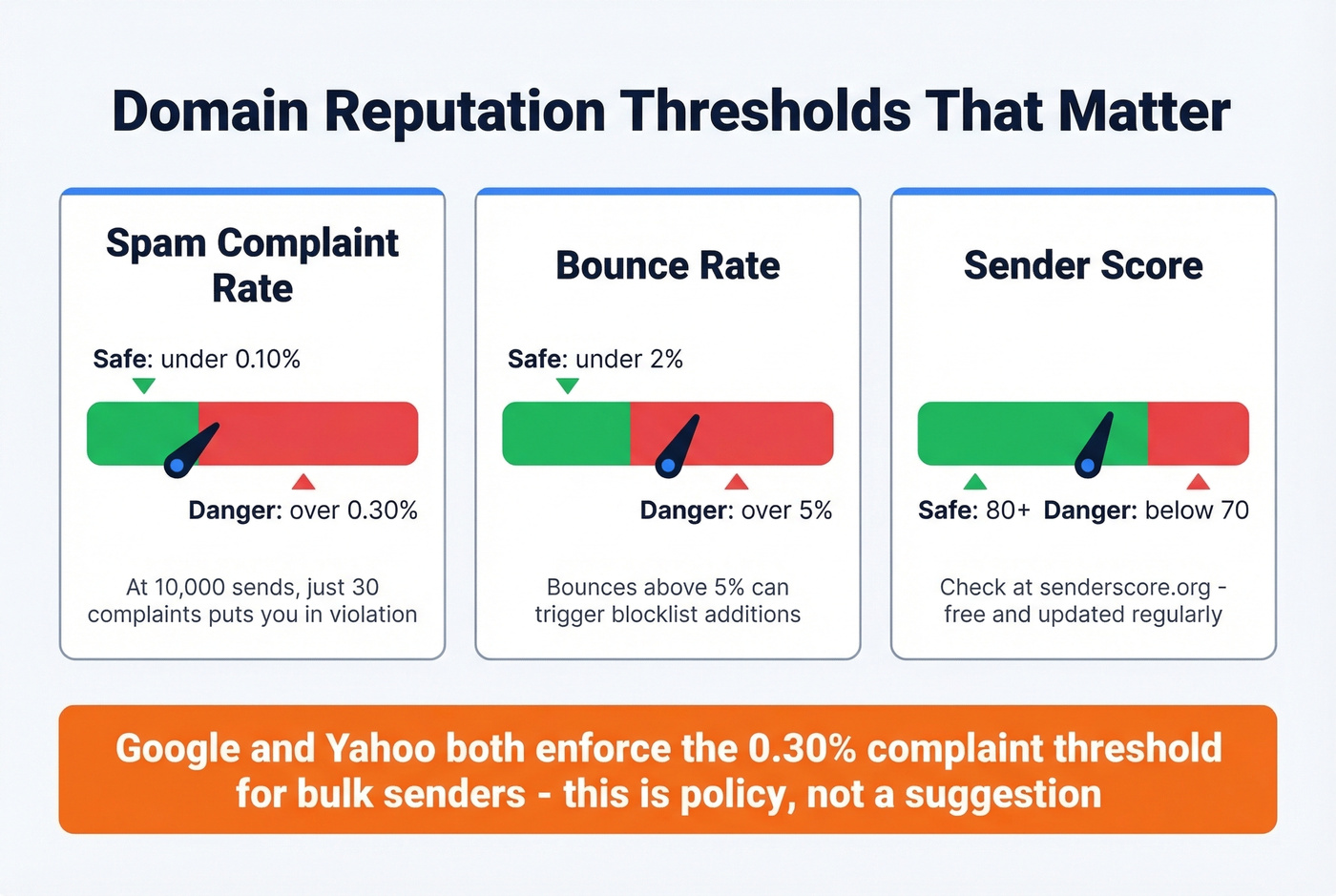
You don't need 10 monitoring tools. You need Google Postmaster Tools, Sender Score, and one blocklist checker like MXToolbox or Talos Intelligence. Here are the thresholds that matter:
| Metric | Safe | Danger Zone |
|---|---|---|
| Spam complaint rate | <0.10% | >0.30% |
| Bounce rate | <2% | >5% |
| Sender Score | 80+ | <70 |
That 0.30% complaint threshold isn't arbitrary. Google and Yahoo both enforce it for bulk senders. At 10,000 sends, that's just 30 complaints before you're in policy violation territory.

That 0.30% complaint threshold leaves zero room for bad data. Prospeo's 5-step verification - with catch-all handling, spam-trap removal, and honeypot filtering - delivers 98% email accuracy so bounces stay under 2% and your domain reputation climbs instead of crashes.
Stop warming up domains on dirty lists. Verify first.
Fix Authentication First
Before you touch volume, lock down your authentication stack. No amount of warmup will help you improve domain reputation if your emails fail basic validation checks.
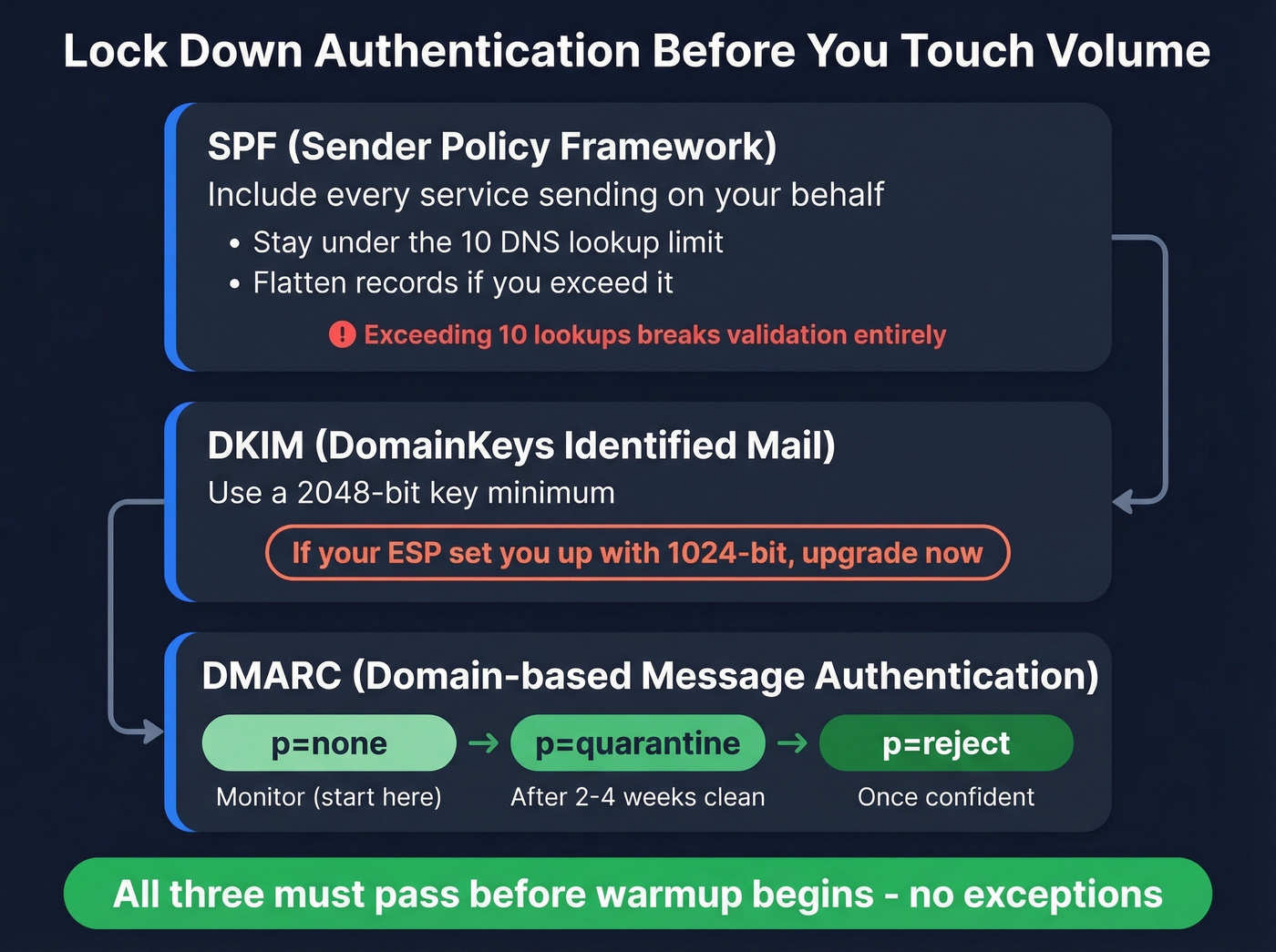
SPF: Publish a record that includes every service sending on your behalf. Stay under the 10 DNS lookup limit - flatten if needed. Exceeding it breaks validation entirely. (If you need a reference point, start with an SPF record example.)
DKIM: Use a 2048-bit key. If your ESP set you up with 1024-bit, upgrade now. If you're unsure, follow a quick checklist to verify DKIM is working.
DMARC: Start at p=none to monitor, move to p=quarantine after 2-4 weeks of clean data, then p=reject once you're confident. EasyDMARC's guide walks through the progression well. (If you want the deeper technical nuance, see DMARC alignment.)
The Day-by-Day Warmup Schedule
This is the section most guides skip entirely. We've synthesized warmup data from Mailwarm, Instantly, and Allegrow into a single schedule that balances warmup emails with real sends. ISPs treat early sending behavior as a trust signal that shapes your sender reputation for months - get this wrong and you're starting over.
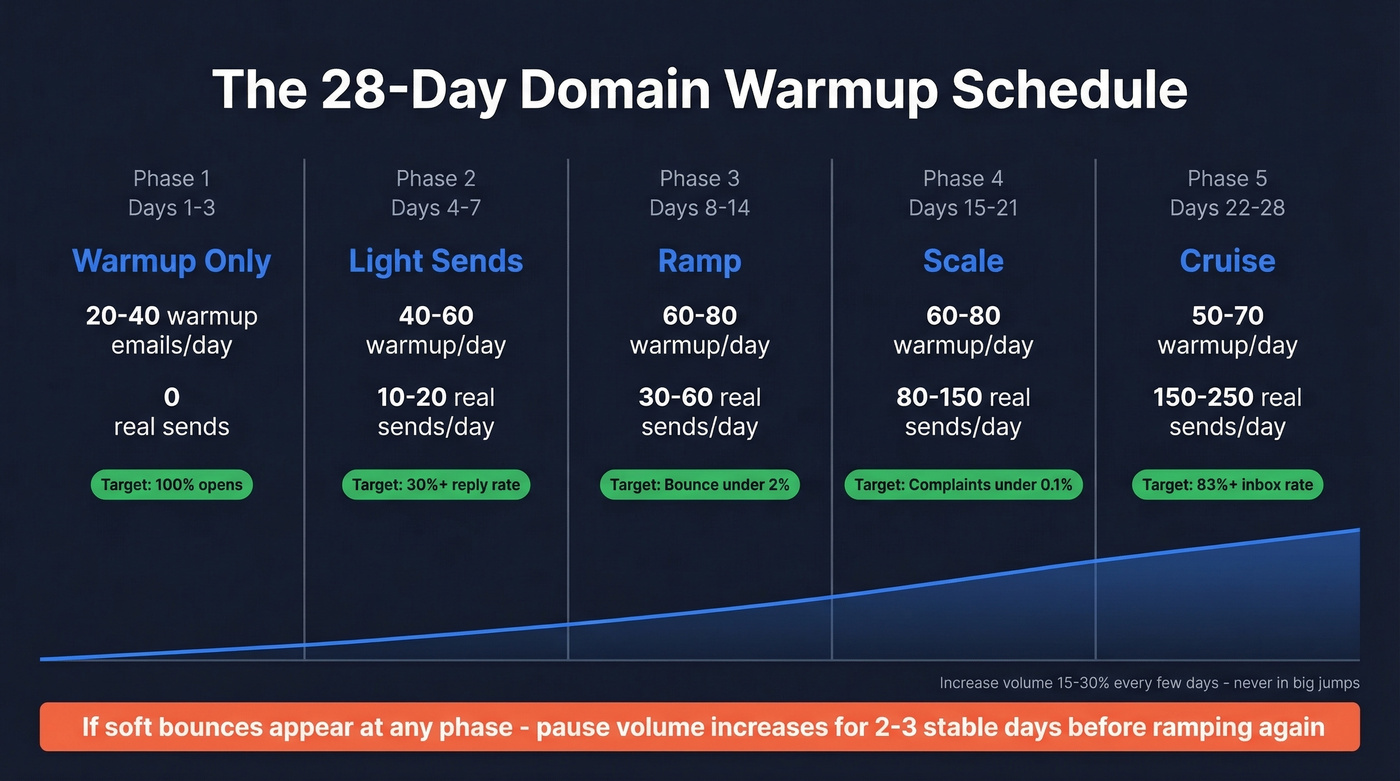
| Phase | Days | Warmup/Day | Real Sends/Day | Key Metric |
|---|---|---|---|---|
| Warmup only | 1-3 | 20-40 | 0 | Opens near 100% |
| Light sends | 4-7 | 40-60 | 10-20 | Reply rate 30%+ |
| Ramp | 8-14 | 60-80 | 30-60 | Bounce <2% |
| Scale | 15-21 | 60-80 | 80-150 | Complaints <0.1% |
| Cruise | 22-28 | 50-70 | 150-250 | Inbox 83%+ |
The warmup-to-real ratio matters as you scale:
| Real Sends/Day | Warmup Ratio |
|---|---|
| 0-50 | 1:1 |
| 50-200 | 1:2 |
| 200-400 | 1:3-4 |
What to Watch During Warmup
Week 1 reply rates need to hit 30%+ - that's the engagement signal ISPs use to decide if you're legitimate. If soft bounces appear, pause volume increases for 2-3 consecutive stable days before ramping again. Increase volume ~15-30% every few days, never in big jumps.
Send fewer, better emails. One personalized message outperforms five templated ones for both engagement and reputation signals. (If you need a starting point, use proven cold email follow-up templates and tighten your email copywriting.)
Recovery timelines differ for IP vs. domain. IP reputation typically rebounds in 2-4 weeks with clean sending. Domain reputation takes 6-12 weeks of consistent, low-complaint volume. We've seen teams recover in as little as 4 weeks when they fix data quality first and follow the schedule above without shortcuts.
Let's be honest about the single biggest mistake we see: teams start warmup on a dirty list. Bad data during warmup defeats the entire purpose. Prospeo's 5-step email verification - with catch-all handling, spam-trap removal, and honeypot filtering - catches invalid addresses before they ever hit your sending infrastructure, and their 98% email accuracy rate means you aren't burning reputation on dead contacts.
How to Get Off Blocklists
If you're already listed, here's what to expect:
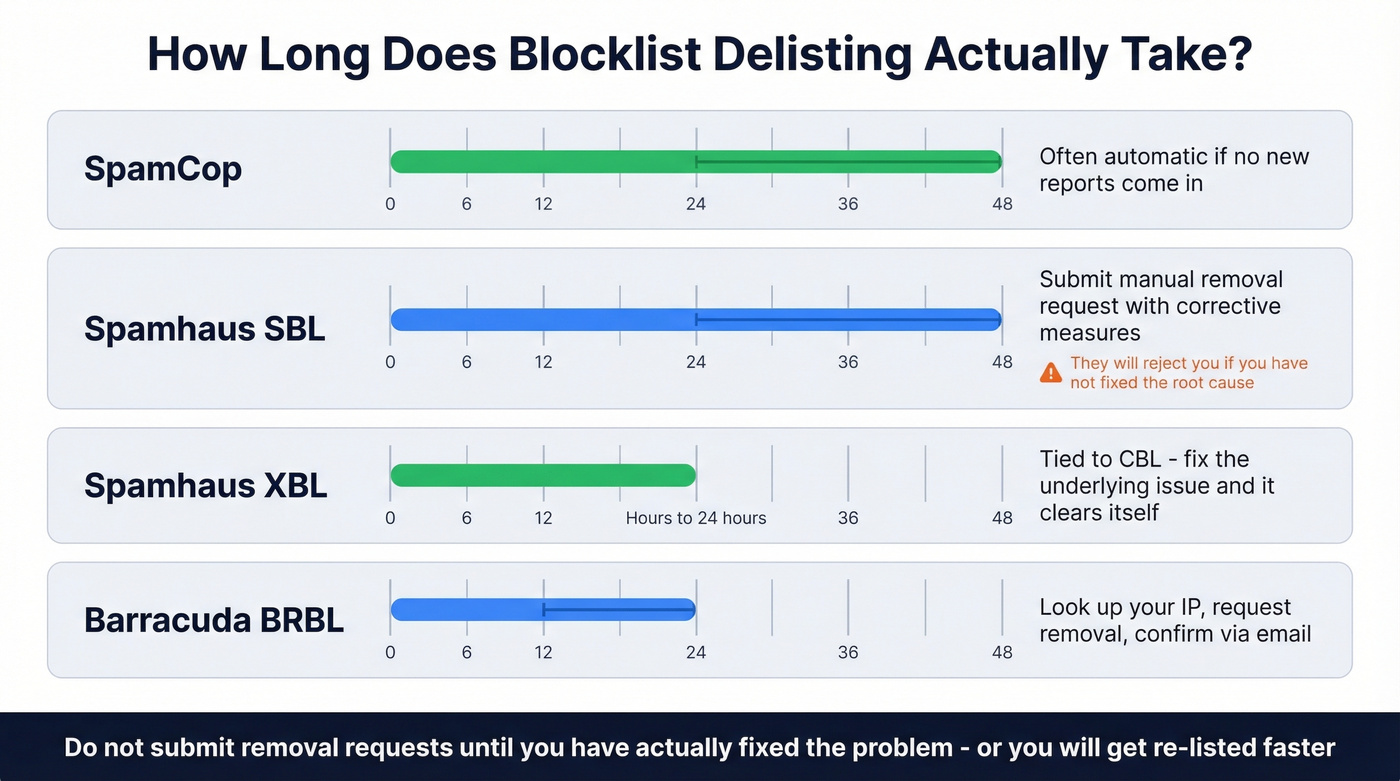
| Blocklist | Delisting Time | Process |
|---|---|---|
| SpamCop | 24-48 hours | Often automatic if no new reports |
| Spamhaus SBL | 24-48 hours | Submit removal + corrective measures |
| Spamhaus XBL | Hours-24 hours | Fix root cause (tied to CBL) |
| Barracuda BRBL | 12-24 hours | Lookup IP, request removal, confirm via email |
Spamhaus SBL requires a manual request with an explanation of what you've fixed. Don't submit until you've actually addressed the root cause - they'll reject you if you haven't. XBL is tied to the CBL and usually clears itself once the underlying issue is resolved. (If you need the full process, follow a dedicated Spamhaus blacklist removal guide.)
Prevent Future Damage
If you're cold emailing from your primary domain, stop reading and go buy a separate domain right now. Isolated sending domains are table stakes for anyone serious about protecting deliverability long-term.
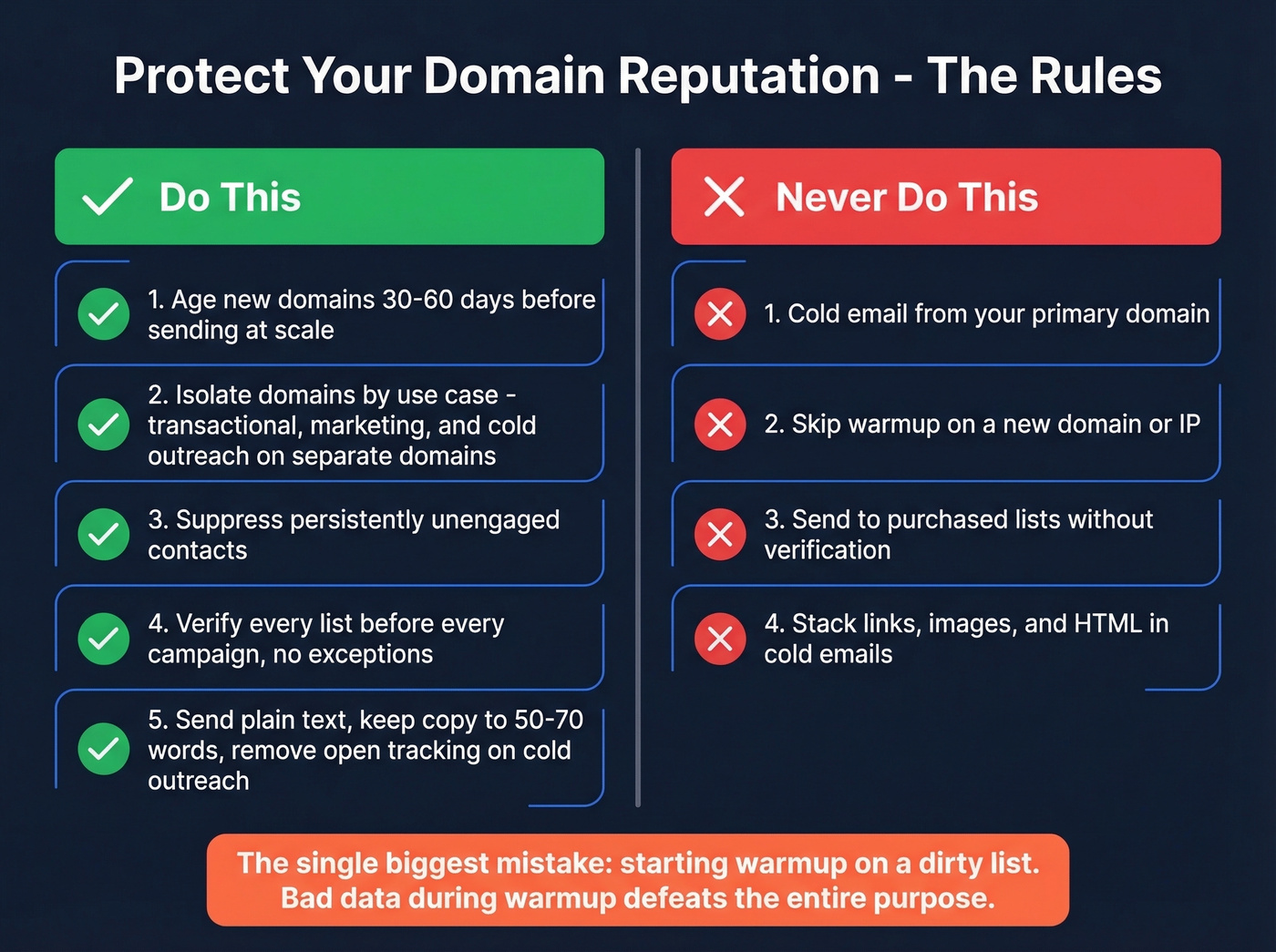
Do this:
- Age new domains 30-60 days before sending at scale
- Isolate sending domains by use case - transactional, marketing, and cold outreach never share a domain
- Suppress persistently unengaged contacts
- Verify every list before every campaign, no exceptions
- Send plain text, keep copy to 50-70 words, remove open tracking on cold outreach (see email tracking pixels if you’re unsure what’s being disabled)
Never do this:
- Cold email from your primary domain
- Skip warmup on a new domain or IP
- Send to purchased lists without verification (if you're tempted, read Is It Illegal to Buy Email Lists?)
- Stack links, images, and HTML in cold emails
Warmup without clean data is like putting premium gas in a car with a cracked engine block. We've seen bounce rates above 5% trigger blocklist additions - and once you're listed, you're looking at weeks of recovery instead of hours of prevention. Stack Optimize scaled to $1M ARR running client campaigns through Prospeo with 94%+ deliverability, bounce rates under 3%, and zero domain flags across every client.
Teams using Prospeo cut bounce rates from 35%+ to under 4% - exactly the kind of clean sending behavior ISPs reward during warmup. At $0.01 per verified email, protecting your domain reputation costs less than one blocklist recovery cycle.
Fix the data before you fix the domain. Every time.
FAQ
How long does it take to recover domain reputation?
IP reputation typically rebounds in 2-4 weeks with clean sending. Domain reputation takes 6-12 weeks of consistent, low-complaint volume. ISPs use 7-30 day observation windows, and if complaints stay below 0.10% during that period, restrictions lift gradually. Don't expect overnight fixes.
Can I just buy a new domain instead of fixing the old one?
You can, but new domains need 30-60 days of aging and a full warmup before sending at scale. You'll repeat the damage if the root cause was bad data - verify contacts before loading them into any outreach tool.
What's the difference between domain and IP reputation?
IP reputation is tied to the mail server's IP address and can be shared across senders on the same infrastructure. Domain reputation is tied to your specific sending domain. Google and Microsoft now weight domain signals more heavily than IP for filtering decisions, which is why domain recovery takes longer and matters more for outbound teams.
How do I rebuild trust after a spam folder penalty?
Pause all outreach, fix authentication (SPF, DKIM, DMARC), and clean your contact lists. Then follow the warmup schedule above - begin with 20-40 warmup emails per day and zero real sends, ramping gradually over four weeks. Consistent low-volume, high-engagement sending over 6-12 weeks rebuilds ISP trust faster than any shortcut.