

Invalid Email Format: What It Means & How to Fix It
You type your email carefully into a signup form. Red text appears: "Invalid email format." You check it, retype it, try again. Same error.
You're not wrong. The form probably is.
That error message usually means one of two things: either the address you entered doesn't follow the local-part@domain structure that email requires, or - more often than people realize - the website's validator is rejecting a perfectly valid address. The first case is a typo. The second is a bug. Below: the five fixes that actually work, the real RFC rules most developers get wrong, and why your form is probably the problem.
What This Error Actually Means
If you're an end user, most format errors are the website's fault, not yours. Try retyping manually instead of pasting - hidden whitespace is a common silent culprit. If nothing works after the five fixes below, contact support. The form is broken.
If you're a developer or marketer, format validation only catches a slice of bad addresses. Many undeliverable emails look syntactically fine but don't exist. Validation and verification aren't the same thing. You need both.
The Actual RFC Rules
Email addresses follow a deceptively simple structure: local-part@domain. But the RFC specs (5321 and 5322) allow far more than most people - and most validators - expect.
Allowed Characters and Limits
| Rule | Example |
|------|---------|
| Letters, digits, and common symbols in local part | jane.doe+work@company.com |
| Unquoted local-part can include !#$%&'*+-/=?^_{|}~|user!data@example.com| | Dots can't be first, last, or consecutive (unquoted) |..bad@example.com✗ | | [Quoted strings allow otherwise-illegal patterns](https://datatracker.ietf.org/doc/html/rfc5322) |"john..doe"@example.com✓ | | Local part ≤ 64 characters |aaaa...x 64@example.com| | Domain ≤ 255 characters |user@sub.sub.sub...example.com` |
| Total address ≤ 254 characters | Rarely hit in practice |
The quoted-string rule trips up most validators. Wrap the local part in double quotes and you can use spaces and consecutive dots inside it. Almost no web form on earth handles this correctly.
Invalid Email Examples vs. Valid Ones
| Status | Why | |
|---|---|---|
user+tag@example.org |
✓ Valid | Plus-addressing is valid per RFC |
postmaster@[192.168.1.1] |
✓ Valid | IP-literal domains are valid |
user@muller.de |
✓ Valid | IDN via Punycode |
"john..doe"@example.com |
✓ Valid | Quoted string allows double dots |
j.o.h.n@gmail.com |
✓ Valid | Gmail ignores dots entirely |
user@gmial.com |
✗ Invalid | Domain typo - mailbox doesn't exist |
user@@domain.com |
✗ Invalid | Double @ breaks structure |
user@.com |
✗ Invalid | Domain can't start with a dot |
The pattern is clear: forms are too strict on valid syntax and too lenient on addresses that simply don't exist.
Common Causes of Format Errors
- Missing
@or typo in the domain -user@gmial.cominstead ofgmail.com. A dataset of 500,000+ form-collected emails found 22% were invalid, with 15% caused by typos alone. (If you're cleaning lists, see email list hygiene best practices.)
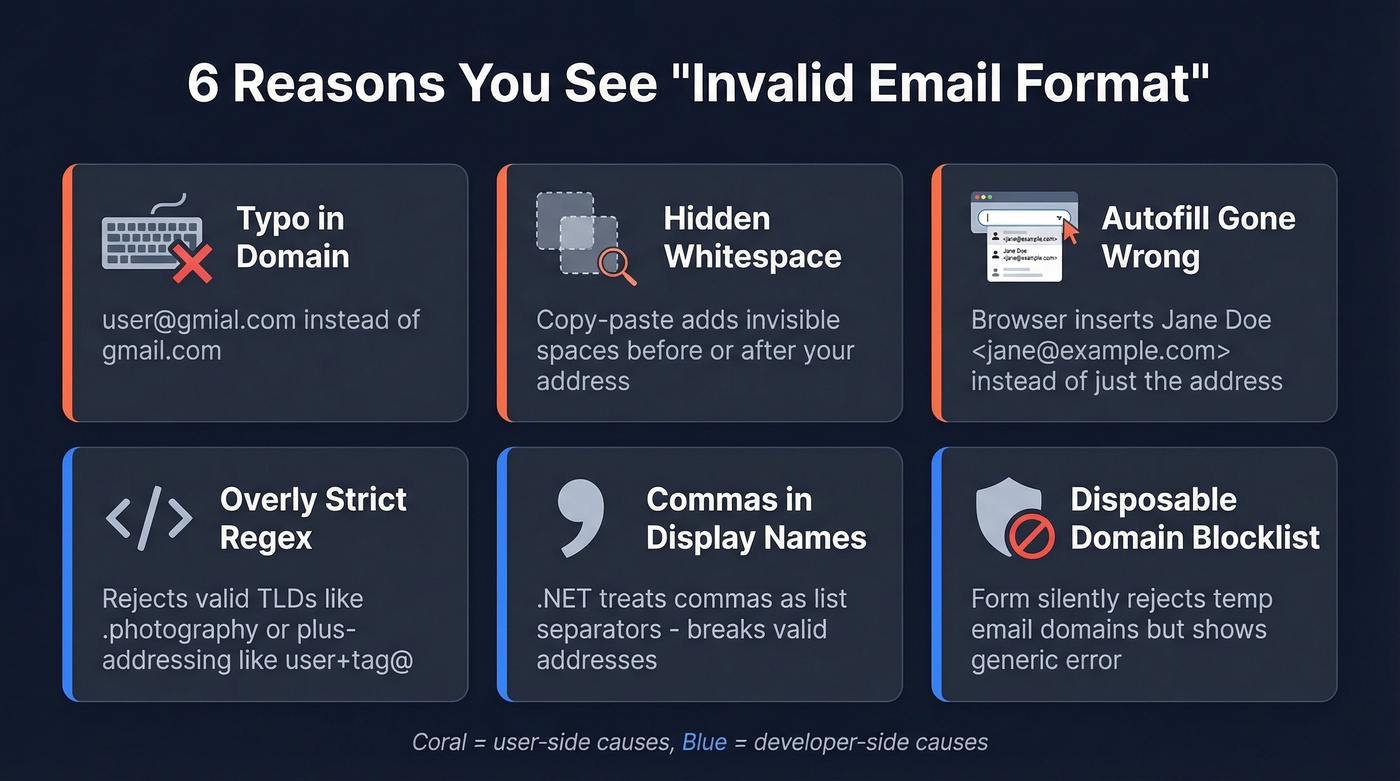
Hidden whitespace from copy-paste - You paste your email from a document or spreadsheet and invisible spaces tag along at the beginning or end. The form sees
" user@domain.com"and rejects it.Autofill inserting your display name - Some browser autofill implementations inject
"Jane Doe <jane@example.com>"instead of just the address. The form's regex chokes on the angle brackets.Overly strict regex rejecting valid TLDs or plus-addressing - Validators written in 2010 often hardcode
.com,.net,.organd reject.photography,.consulting, or anything with a+in the local part. Developers run into this constantly because the error message gives no clue that the TLD is the problem. (More on this in our guide to email syntax check.)Commas in display names breaking parsers - In .NET's
System.Net.Mail, a comma in a display name is treated as a list separator."Smith, John <john@example.com>"throws a format error even though the email itself is fine.Banned or disposable domain lists - Some forms silently reject addresses from domains they've flagged as temporary or high-risk, but show a generic "invalid format" message instead of explaining why. (If this is your issue, implement disposable email detection instead of lying with a format error.)
How to Fix It
The first thing to try is the simplest: retype your address manually instead of pasting. This single step eliminates hidden whitespace, invisible Unicode characters, and display-name artifacts all at once. We've watched people spend ten minutes debugging an error that vanished the moment they stopped copy-pasting from a spreadsheet.
If retyping doesn't work, place your cursor before the first character and after the last character in the field, then delete anything invisible. Some forms render trailing spaces, others don't - you can't trust what you see.
Still failing? Strip any plus-addressing or special characters. If you're using user+newsletter@gmail.com, switch to user@gmail.com. The form may not support plus-addressing even though it's perfectly valid. (If you're building the form, use a proper email validation API plus verification.)
You can also try a different browser or disable autofill entirely - switch from Chrome to Firefox, or manually type instead of letting autofill populate the field. If none of that works, the website is broken. This isn't a hypothetical - it's a diagnosis. Screenshot the error and contact their support team from a working address.

Format validation catches typos. It doesn't catch dead mailboxes, spam traps, or catch-all domains. Prospeo's 5-step verification pipeline handles all of it - delivering 98% email accuracy across 143M+ verified addresses. No bounces, no domain damage.
Stop fixing bad emails. Start with ones that already work.
When the Website Is Wrong
A user on r/swtor tried creating an account with Gmail, Yahoo, and Hotmail addresses across Firefox, Chrome, and Edge - even with a VPN. Every single attempt returned "Unrecognized email format." The problem wasn't the email. The problem was the platform's validator.
Here's the thing: the fact that major platforms still use regex patterns from 2005 that reject newer TLDs and plus-addressing is embarrassing. It's 2026. If you've exhausted the troubleshooting steps above and the error persists, you're not the problem.
Every format error should be required to show which part of the address the validator rejected. The generic red text with zero explanation is a UX failure that has persisted for two decades, and there's no excuse for it.
Validation vs. Verification
These terms get used interchangeably, and they shouldn't. They solve different problems.
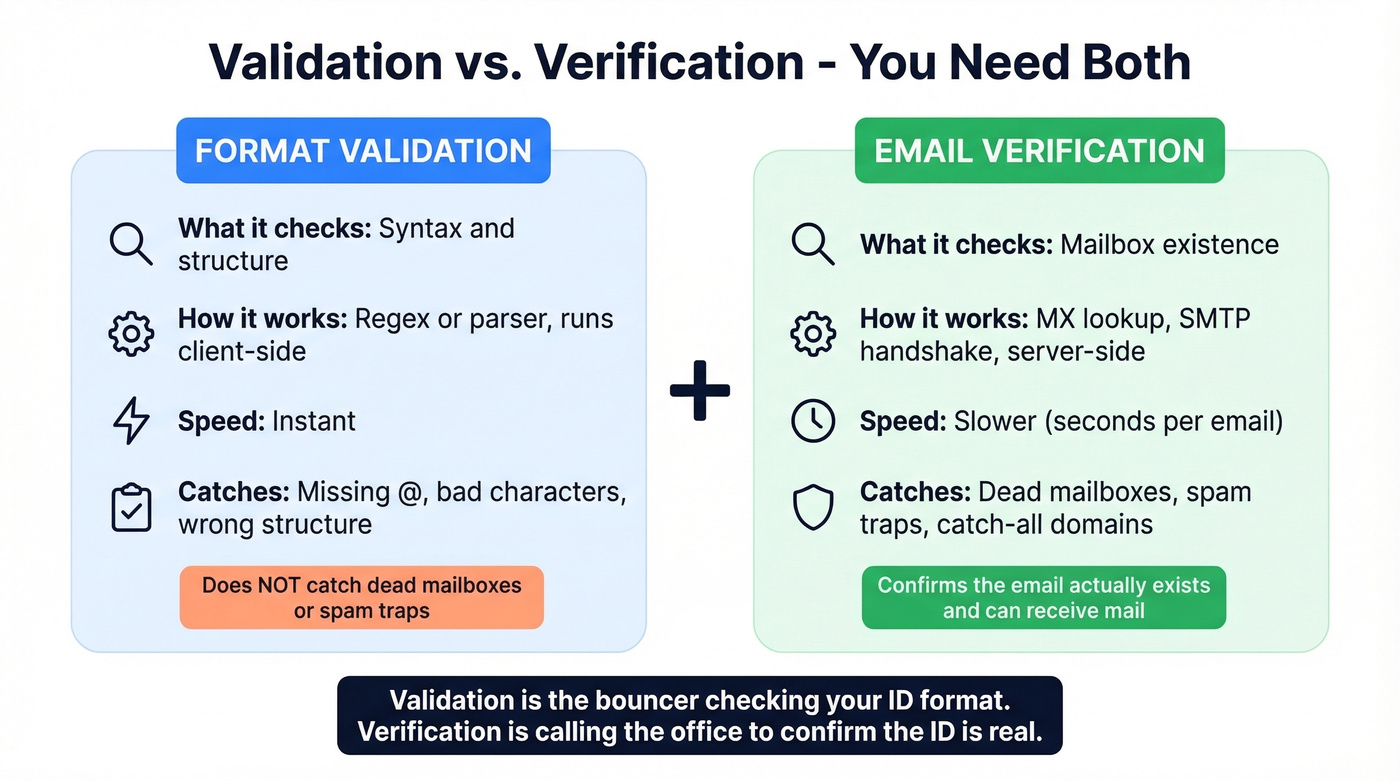
| Validation | Verification | |
|---|---|---|
| What it checks | Syntax and format | Mailbox existence |
| How it works | Regex or parser, client-side | MX lookup, SMTP handshake |
| Speed | Instant | Slower |
| What it catches | Missing @, bad characters |
Dead mailboxes, spam traps |
Validation is the bouncer checking your ID format. Verification is calling the issuing office to confirm the ID is real. You need both - validation confirms an email could exist, verification confirms it does. (If you need a tool stack, start with an email verification tool comparison.)
The Business Impact of Bad Data
Let's say your team sends 50,000 emails. 12,000 bounce. Your ESP flags your account. Your domain reputation tanks. That's what happens when you skip verification and keep mailing bad data. (Related: how to protect email sender reputation.)
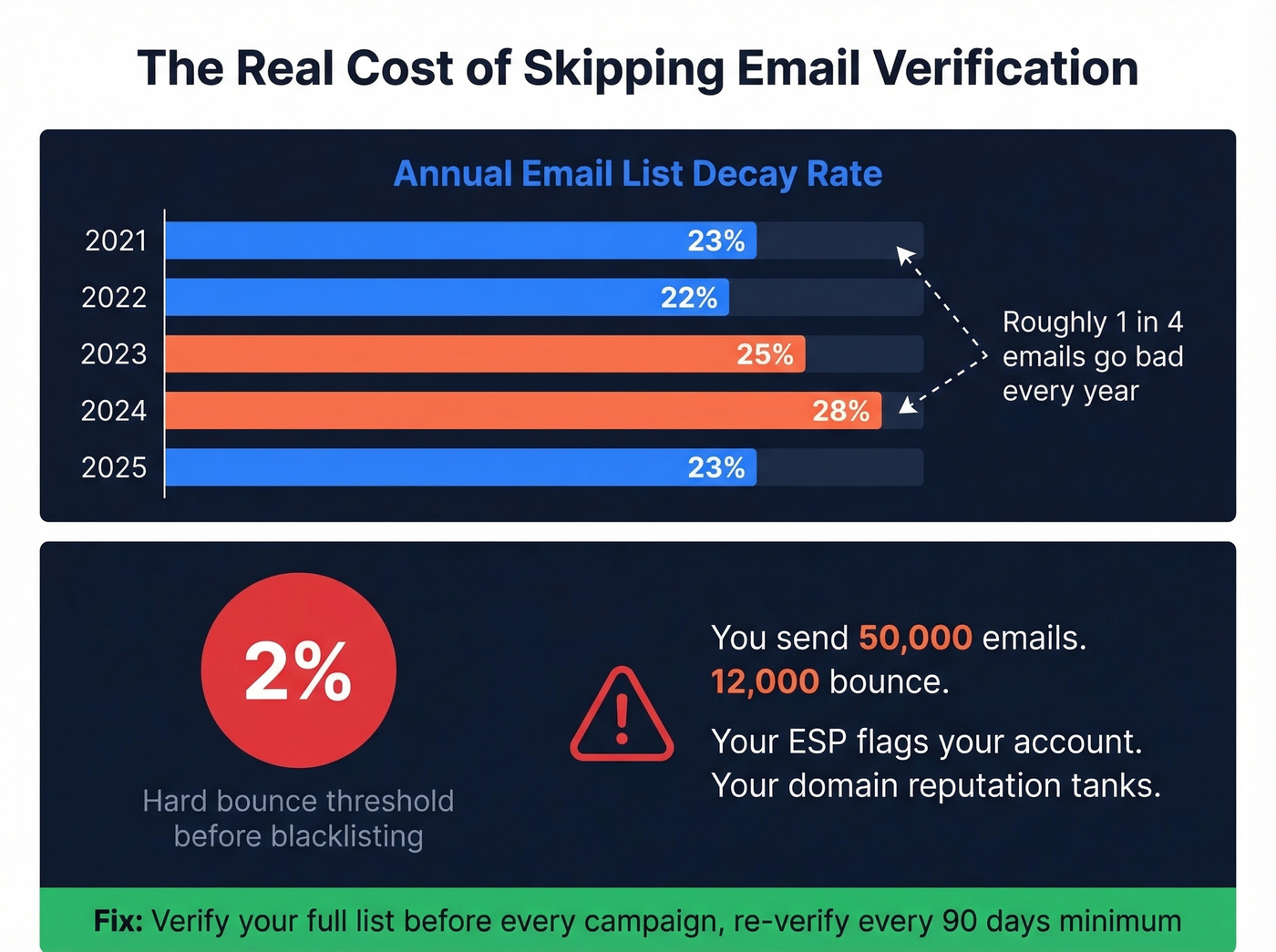
ZeroBounce's 2026 Email Statistics Report found that at least 23% of an email list degrades every year. The trend has been remarkably consistent: 23% in 2021, 22% in 2022, 25% in 2023, 28% in 2024, back to 23% in 2025. And with 9%+ of all checked emails hitting catch-all domains, that 23% is a conservative floor.
The threshold that matters: hard bounces above 2% put you at risk of blacklisting. That's not a lot of room. A list that was clean six months ago can easily cross that line today.
Preventing Bad Emails at Scale
Double opt-in for form submissions is the single best defense against typos, fake addresses, and bot signups. Yes, it reduces volume. The addresses you keep are worth more.
Real-time verification at point of capture means you don't wait until campaign day to discover 15% of your list is dead. Verify as addresses come in. Then verify your full list before every campaign - even if you verified at capture, because addresses die between campaigns. And re-verify on a regular schedule, every 90 days at minimum. With 23% annual decay, quarterly verification isn't paranoia. It's maintenance.
For all of this, you need a verification layer that goes beyond format checks. Prospeo runs 5-step verification - MX lookup, SMTP check, catch-all detection, spam-trap removal, honeypot filtering - on proprietary infrastructure with a 7-day data refresh cycle, delivering 98% email accuracy. The free tier gives you 75 verifications per month, and paid plans run about $0.01 per email, which is trivial compared to the cost of a blacklisted domain. (If you're evaluating vendors, see our best email validation and email list cleaning service roundups.)
Bad data tanks your domain reputation and wastes your team's time. Prospeo refreshes every record on a 7-day cycle and runs every email through catch-all detection, spam-trap removal, and honeypot filtering before you ever see it. At $0.01 per email, clean data costs less than one bounce.
Skip the invalid format headaches - get emails that are verified before they hit your list.
Stop Validating With Regex Alone
Three Regex Patterns Compared
The common oversimplified pattern:
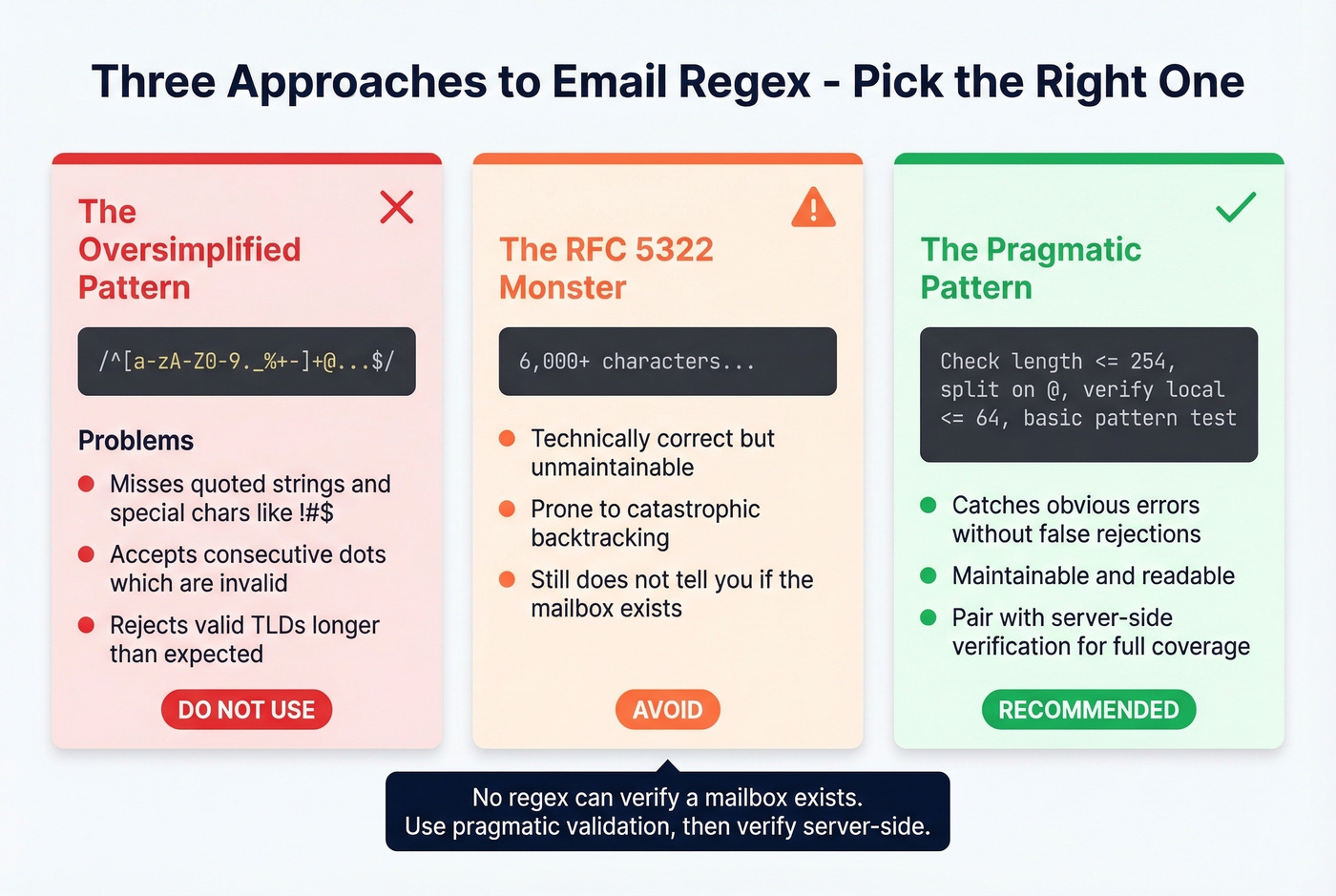
// Misses: quoted strings, !#$ chars, IP-literal domains
const simple = /^[a-zA-Z0-9._%+-]+@[a-zA-Z0-9.-]+\.[a-zA-Z]{2,}$/;
This rejects valid addresses like user!data@example.com and accepts invalid ones with consecutive dots. It's the regex equivalent of checking if someone's name "looks right." (If you want a deeper breakdown, see email validation tools.)
The RFC 5322 monster:
Look, the fully compliant regex runs 6,000+ characters. It's unmaintainable, prone to catastrophic backtracking in some engines, and still doesn't tell you if the mailbox exists. Don't use it.
The pragmatic pattern (recommended):
function isValidEmail(email) {
  if (email.length > 254) return false;
  const [local, domain] = email.split('@');
  if (!local || !domain) return false;
  if (local.length > 64) return false;
  return /^[^\s@]+@[^\s@]+\.[^\s@]+$/.test(email);
}
// PHP has this built in   -   use it
$valid = filter_var($email, FILTER_VALIDATE_EMAIL) !== false
         && strlen($email) <= 254;
Use the pragmatic pattern. Enforce length limits. Then verify server-side. That's it. (For the full workflow, see how does email verification work.)
Display Names Break Everything
We've seen teams waste weeks debugging regex when the real problem was display-name parsing. In .NET's System.Net.Mail, a comma in a display name is treated as a recipient separator. This code throws a format error:
// BREAKS: comma parsed as list separator
mail.To.Add("Smith, John <john@example.com>");

// FIX: quote the display name
mail.To.Add("\"Smith, John\" <john@example.com>");
Always quote display names containing commas, periods, or other special characters. The email address itself is fine - it's the parser's interpretation of the surrounding text that fails.
FAQ
Is a plus sign (+) valid in an email address?
Yes. Plus-addressing like user+tag@domain.com is fully valid per RFC 5322 and widely used for filtering. Gmail, Outlook, and most major providers support it. If a form rejects it, the form's validator is too strict - not your address.
What's the maximum length of an email address?
254 characters total. The local part (before @) maxes out at 64 characters, and the domain can be up to 255 characters. In practice, almost no real address exceeds 50 characters, but validators should enforce RFC limits, not arbitrary shorter ones.
Does Gmail ignore dots in email addresses?
For personal Gmail accounts, yes - john.doe@gmail.com and johndoe@gmail.com deliver to the same inbox. Google Workspace domains may treat dots differently depending on admin configuration, so don't assume this applies to corporate Gmail addresses.
How can I verify emails aren't just formatted correctly but actually exist?
Use a verification service that performs MX lookups and SMTP handshakes - format checks alone miss dead mailboxes, spam traps, and catch-all domains. Prospeo's 5-step verification covers all of these with 98% accuracy, starting free at 75 verifications per month. Alternatives like ZeroBounce and NeverBounce also offer bulk verification.
How often should I verify my email list?
Every 90 days at minimum, and always before a major campaign. Lists decay roughly 23% per year, so addresses that worked three months ago can already be dead. Quarterly verification keeps hard bounces under the 2% blacklist threshold.