

Lead Management System: What It Is, How to Build One, and Which Tools Work
Two reps call the same prospect on the same Tuesday morning. Neither knows the other dialed. The prospect - who filled out a form 47 hours ago - tells the second rep she already bought from a competitor yesterday. That's not a CRM problem. That's a lead management system problem, and it's costing your team deals every week.
What You Need (Quick Version)
A lead management system converts prospects into customers through capture, scoring, routing, and nurturing. Most SMB teams don't need Salesforce - start with HubSpot (free) or Pipedrive ($14/user/month on annual billing). And before you build any workflow, clean your data: Prospeo enriches CRM and CSV records with 50+ data points per contact so your scoring and routing actually work on real inputs instead of half-empty fields.
What Is a Lead Management System?
A lead management system is the process and toolset that moves a prospect from "just showed up" to "closed-won." It's not a single piece of software. It's a workflow spanning six stages: capture, qualify, score, route, nurture, and handoff.
Most articles treat these stages like a nice theory. They're not - each one is a failure point. Skip qualification and reps waste hours chasing students who downloaded your ebook. Skip routing and two reps call the same VP. Skip scoring and every lead looks equally urgent, which means none of them are.
Here's the reality: 65% of marketers say generating traffic and leads is their biggest challenge. But generating leads isn't the hard part. Managing them after they arrive is where pipelines die. A reliable system for managing leads matters more than a bigger ad budget.
LMS vs CRM vs Lead Tracking
These three terms get used interchangeably. They shouldn't.
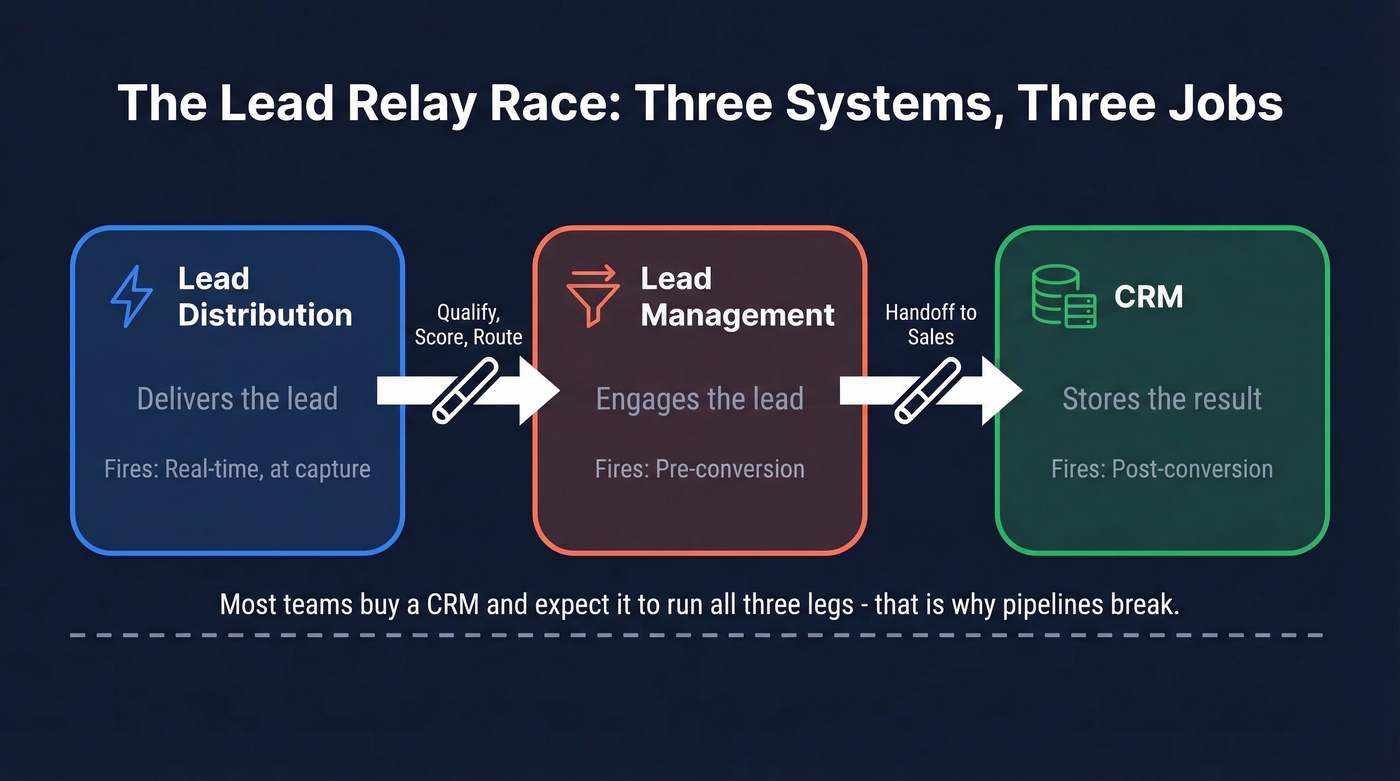
| System | Core Job | When It Fires | Example |
|---|---|---|---|
| Lead Distribution | Delivers the lead | Real-time, at capture | Ping-post routing |
| Lead Management | Engages the lead | Pre-conversion | Scoring, nurturing |
| CRM | Stores the result | Post-conversion | Account management |
Think of it as a relay race. Distribution hands the baton to management, which hands it to CRM. The problem? Most teams buy a CRM and expect it to run all three legs.
A CRM stores contact records and tracks deals. It doesn't do real-time logic-based routing, it doesn't score behavior, and it doesn't nurture. CRMs are built for relationship management after someone becomes a customer - not for converting strangers into pipeline. A lead tracking tool, by contrast, monitors where each prospect stands in the funnel and flags when action is needed.
The "pre-CRM" concept is useful here. For growing teams, a dedicated lead manager handles the messy middle: the prospect who's interested but not ready, the inbound form fill that needs qualification, the demo request that needs to reach the right rep in under five minutes. That five-minute window matters - responding within it makes you 100x more likely to connect. And 78% of buyers choose the first vendor that responds.
Conflating CRM and lead management is why sales teams hate their tools.
What the Stack Includes
Lead management is a suite, not a single tool. Zapier's breakdown makes this clear - if you want one tool to do everything, you'll get mediocre results at every stage.
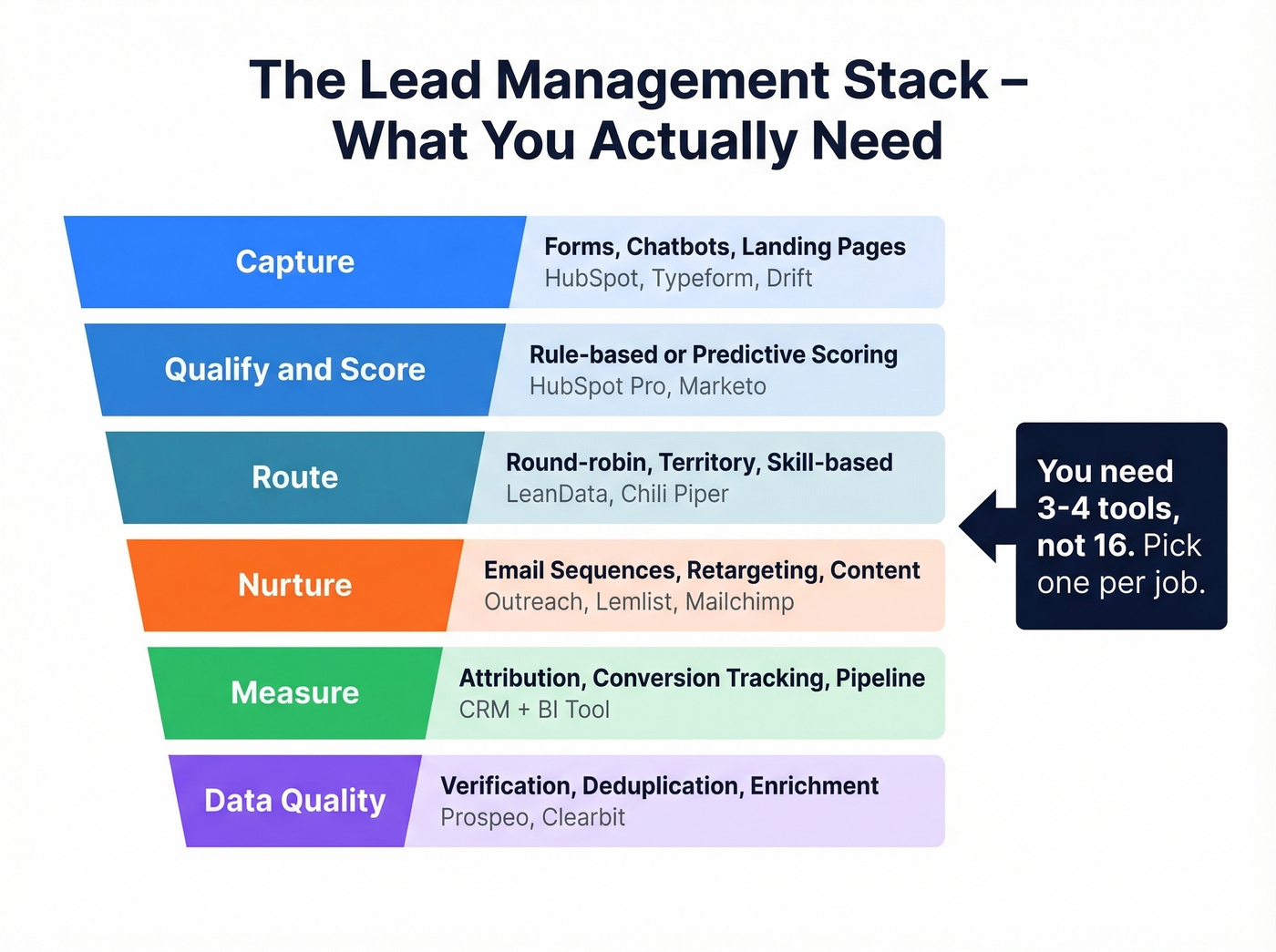
Here's what the stack actually looks like, mapped to each stage:
- Capture: Forms, chatbots, landing pages (HubSpot, Typeform, Drift)
- Qualification & Scoring: Rule-based or predictive scoring (HubSpot Professional, Marketo)
- Routing: Round-robin, territory-based, or skill-based assignment (LeanData, Chili Piper)
- Nurturing: Email sequences, retargeting, content delivery (Outreach, Lemlist, Mailchimp)
- Measurement: Attribution, conversion tracking, pipeline reporting (your CRM + BI tool)
- Data Quality & Enrichment: Verification, deduplication, field completion (Prospeo, Clearbit)
Look, you need 3-4 tools, not 16. Pick one for capture, one for scoring/routing, one for nurturing, and one for data quality. That's your sales lead stack.

Your lead management system is only as strong as the data feeding it. Half-empty CRM fields mean broken scoring models, misrouted leads, and reps chasing ghosts. Prospeo enriches CRM and CSV records with 50+ data points per contact at a 92% match rate - so your fit scores, routing rules, and nurture triggers fire on real, verified inputs instead of guesswork.
Fix your data before you fix your workflow. Start enriching for free.
How to Build a Lead Scoring Model
Most lead scoring advice tells you to "assign points based on behavior and fit." That's useless without actual numbers. Let's build a real model.
Fit + Behavior Inputs
Every lead gets two scores that combine into one number. Fit scoring measures who they are. Behavior scoring measures what they've done.
Behavior signals and point values:
| Action | Points |
|---|---|
| Visited pricing page | +15 |
| Submitted contact form | +20 |
| Clicked email link | +10 |
| Opened 3+ emails | +8 |
| Attended webinar | +30 |
| Downloaded ebook | +10 |
| Requested demo | +50 |
Fit signals and point values:
| Attribute | Points |
|---|---|
| C-level title | +20 |
| Manager/Director | +10 |
| Target industry | +15 |
| Company size match | +5 |
| Target geography | +15 |
| Uses relevant tech stack | +10 |
ICP attributes like tech stack, revenue range, and growth trajectory - recent funding, hiring velocity - should carry real weight. A Series B company hiring 5 SDRs is a completely different lead than a bootstrapped 3-person shop, even if both downloaded your whitepaper.
Thresholds That Matter
The point values above are meaningless without thresholds. Here's how the math plays out in practice, using benchmarks from Databox and LeadsBridge:
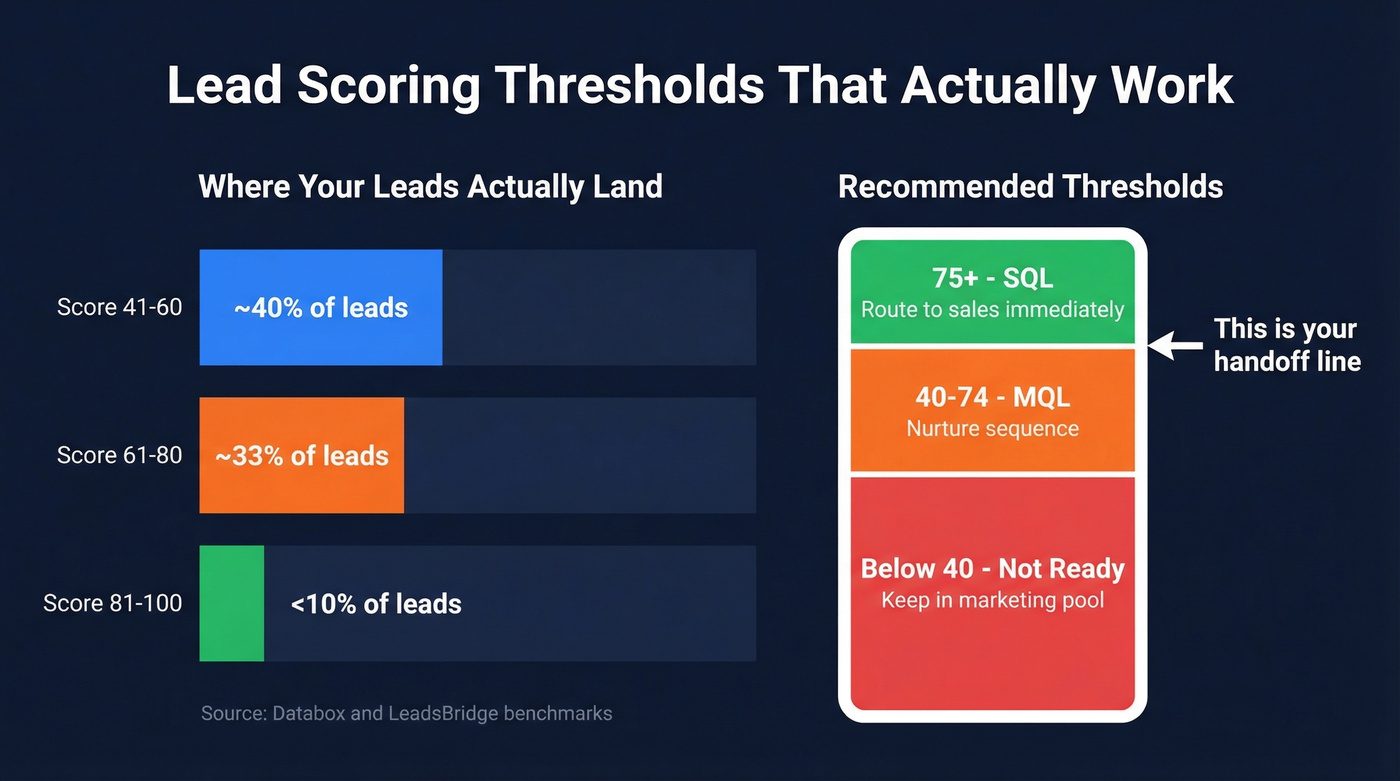
- ~40% of leads score 41-60
- ~33% score 61-80
- Less than 10% score 81-100
In HubSpot, a score above 50 typically triggers MQL status. In Marketo, a score above 70 fires a sales alert. The exact number matters less than having one at all - and sticking to it.
Negative Scoring Rules
This is where most teams drop the ball. Positive scoring inflates your pipeline with noise unless you subtract points for disqualifying signals.
- Personal email domain (gmail.com, yahoo.com): -10
- Visited careers page (job seeker, not buyer): -15
- Out of target region: -10
- No engagement in 3+ months: -20
- Student or intern title: -10
- Unsubscribed from emails: -15
The threshold framework we recommend: 75+ = SQL (route to sales immediately), 40-74 = MQL (nurture sequence), below 40 = not ready (keep in marketing pool). Adjust based on your sales cycle length and deal size, but start here.
Best Lead Management Software in 2026
Choosing the right software depends on your team size, budget, and whether you lean inbound or outbound. Here's how the top options stack up:
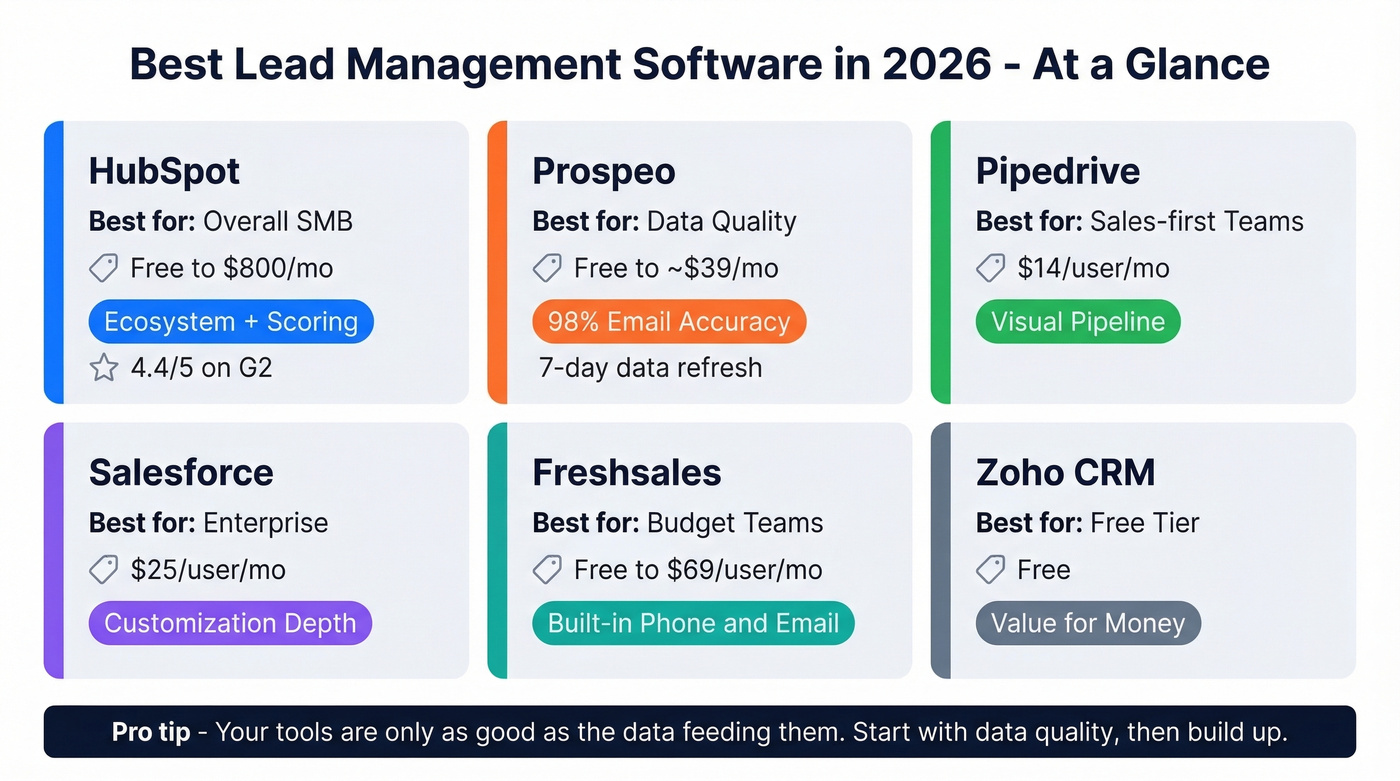
| Tool | Best For | Starting Price | Key Strength |
|---|---|---|---|
| HubSpot | Overall SMB | Free-$800/mo | Ecosystem + scoring |
| Prospeo | Data quality | Free-~$39/mo | 98% email accuracy |
| Pipedrive | Sales-first teams | $14/user/mo | Visual pipeline |
| Salesforce | Enterprise | $25/user/mo | Customization depth |
| Freshsales | Budget teams | Free-$69/user/mo | Built-in phone/email |
| Zoho CRM | Free tier | Free | Value for money |
HubSpot
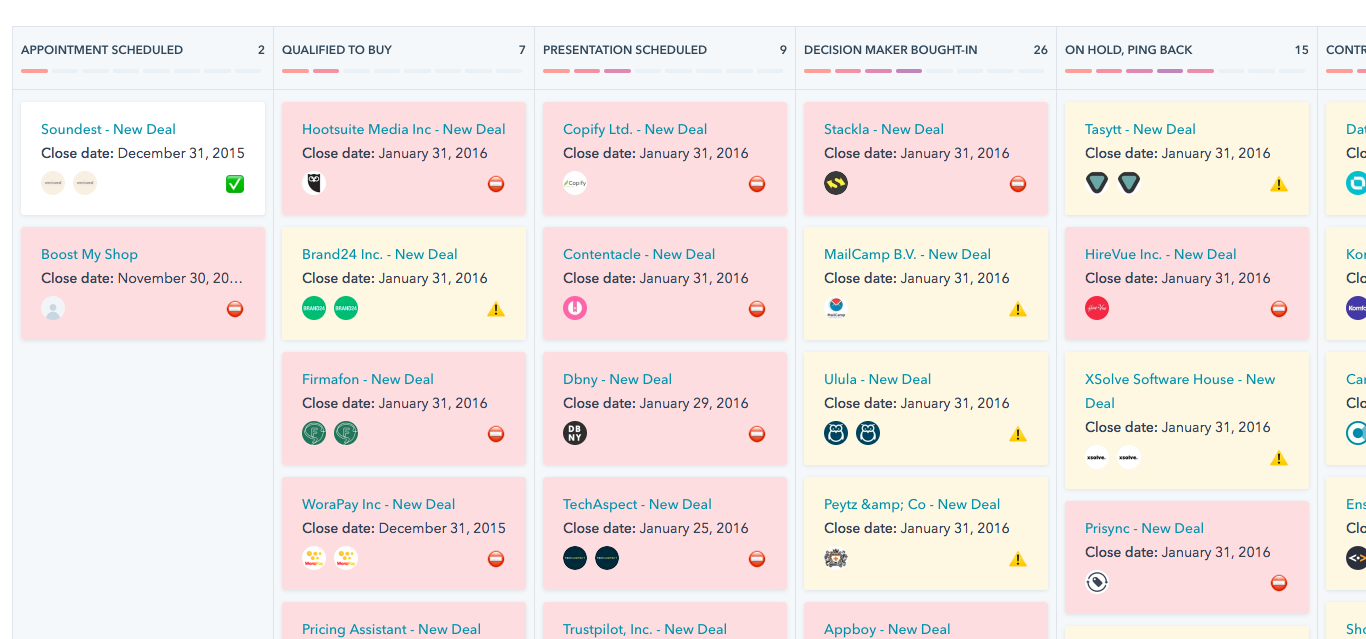
HubSpot is the obvious starting point for most SMB teams, and the free tier is genuinely useful - not a bait-and-switch. You get contact management, deal tracking, and basic reporting without paying a dollar.
The catch? Lead scoring requires the Professional plan at $800/month for 5 users. That's a steep jump from free. But if you're running inbound at any real volume, the scoring, workflows, and 1,400+ integrations justify it. G2 rates it 4.4/5 across 11,000+ reviews, which is hard to argue with at that scale. For teams that want a web-based platform with deep marketing automation baked in, HubSpot is the benchmark.
Use this if you're an inbound-heavy SMB or mid-market team that wants one platform for marketing and sales. Skip this if your team is purely outbound or you can't stomach the Professional pricing jump.
Prospeo
Your lead management system is only as good as your data. We've seen this firsthand - teams build elaborate scoring models and routing rules, then wonder why nothing works. The answer is almost always the same: garbage inputs.
Prospeo's database covers 300M+ professional profiles with 98% email accuracy and 125M+ verified mobile numbers. The 7-day data refresh cycle is the real differentiator - the industry average is six weeks, which means most tools feed your scoring model stale data. Weekly refreshes mean the contact info your reps act on is actually current.
CRM and CSV enrichment returns 50+ data points per contact at a 92% API match rate. That means your scoring model has real inputs - job title, company size, tech stack, funding stage - instead of half-empty fields. At roughly $0.01 per lead compared to ~$1/lead at ZoomInfo, the economics aren't close.
Real results: Meritt's bounce rate dropped from 35% to under 4% after switching, and their pipeline tripled from $100K to $300K per week. The free tier gives you 75 emails and 100 Chrome extension credits per month to test it. Native integrations with Salesforce, HubSpot, Lemlist, Instantly, Clay, Zapier, and Make mean it slots into whatever stack you're already running.

That scoring model you just built? It's worthless if your email field has a 35% bounce rate and your title field says 'Unknown.' Prospeo delivers 98% email accuracy on a 7-day refresh cycle - not the 6-week-old stale records other providers ship. When every lead record is complete and current, your MQL thresholds actually mean something.
Accurate scores start with accurate data. Get 75 free verified emails today.
Pipedrive
Pipedrive is built for reps who hate data entry - which is most reps. The visual pipeline is best in class for teams that think in deals, not dashboards. At $14/user/month on the Essential plan (annual billing), it's the cheapest serious option for sales-first teams.
The tradeoff is marketing features. Pipedrive doesn't try to be a marketing automation platform. If you need lead scoring, nurturing sequences, and attribution reporting in one tool, look at HubSpot. If you need a fast, clean sales pipeline that reps actually use, Pipedrive wins.

Salesforce
Salesforce can do everything. That's both its strength and its problem. Pricing runs $25-$500/user/month depending on the edition.
For teams with complex routing rules, territory management, and multi-product lines, Salesforce is the right answer. For everyone else, it's overkill. We've seen too many 15-person teams buy Salesforce because it felt "enterprise" and then abandon half the features within a year. If you need that level of customization, you're essentially building a custom system on top of Salesforce's platform - budget for a dedicated admin.
Freshsales
Freshsales is the budget play that doesn't feel cheap. The free tier includes contact management, built-in phone, and email - no integrations required. Paid plans run up to $69/user/month for the Enterprise tier with AI-powered scoring and forecasting. For a small team that wants phone and email baked into the CRM without bolting on three other tools, it's worth a trial.
Zoho CRM
Zoho has a free tier for basic lead and contact management, with paid plans scaling to $52/user/month. The Zoho ecosystem (Campaigns, Desk, Analytics) is the real value - if you're already in that world, the CRM integrates seamlessly. Outside the ecosystem, it's less compelling than HubSpot or Pipedrive.
Other Options Worth Knowing
Monday Sales CRM ($12-$28/seat/month) works well if your team already lives in Monday.com for project management - the CRM is essentially a board with sales-specific automations. Salesflare ($49/user/month annual) auto-enriches contacts and minimizes data entry, solid for small B2B teams that want a low-maintenance CRM. noCRM offers a 14-day free trial and is built specifically for reps who hate traditional CRMs, focusing on next actions rather than record-keeping. Apollo ($49-$119/user/month) combines prospecting with a CRM-lite - useful if you want database and pipeline in one tool, though the CRM functionality is thinner than dedicated options.
Mistakes That Kill Your Pipeline
No segmentation. Treating every lead the same means your messaging resonates with nobody. Segment by role, industry, and behavior at minimum.
Slow follow-up. Companies average 47 hours to respond to inbound leads. The data says you need to respond in five minutes. Set SLAs and enforce them with CRM alerts - real-time notifications eliminate this gap entirely. If you need scripts that keep momentum, use these sales follow-up templates.
No qualification process. Without defined MQL/SQL criteria, reps chase every lead equally. Use the scoring model from the section above. It takes an afternoon to build and saves hundreds of hours per quarter. If you want a deeper framework, see our lead scoring guide.
Not recording interactions. If a rep has a 20-minute discovery call and doesn't log it, the next rep starts from zero. Centralize interaction history or accept duplicate work as a permanent tax on your team.
Excessive automation without human touch. A 12-email nurture sequence with zero personalization trains prospects to ignore you. We've tested this ourselves - the sequences that actually convert mix automated touches with genuine human outreach at key moments. One personalized line referencing a prospect's recent company news outperforms five templated follow-ups. For more on this, use a B2B cold email sequence that balances automation and relevance.
Sales and marketing misalignment. If marketing defines MQL differently than sales defines "ready to talk," leads fall into a gap between teams. Align on definitions, meet weekly, and review handoff quality. The consensus on r/sales is that this single issue causes more pipeline leakage than bad tools ever will.
Bad data quality. Scoring models built on stale job titles and invalid emails produce garbage outputs. This is the frustrating one because it's invisible - everything looks like it's working until you check your bounce rates and realize half your "hot leads" have moved companies. Track and fix this with email bounce rate benchmarks and remediation steps.
How to Set Up Your System
Here's the six-step implementation checklist, in order:
1. Define MQL/SQL criteria with actual thresholds. Use the scoring framework above: 75+ = SQL, 40-74 = MQL, below 40 = not ready. Write it down. Get sales and marketing to sign off in the same room. If you need a rubric, start with an Ideal Customer Profile Template.
2. Set response SLAs. Inbound leads get a response within 5 minutes during business hours, 30 minutes outside. Measure it weekly and hold reps accountable. This is one of the highest-leverage sales activities you can standardize.
3. Choose your 3-4 tools. One for capture (HubSpot forms or Typeform), one for scoring and routing (HubSpot Professional or LeanData), one for nurturing (Lemlist or Outreach), and one for data quality. Together, these form your complete software stack. If you're still comparing options, here are examples of a CRM by use case and price.
4. Build your scoring model. Use the point values and thresholds from the scoring section. Start simple - you can add complexity after you've validated the basics over 30 days.
5. Clean your existing data. Run your current database through an enrichment tool before building workflows on top of it. Stale records poison every downstream process, from scoring accuracy to email deliverability. If you're evaluating vendors, see our list of data enrichment services.
6. Establish the sales/marketing handoff SLA. Define what happens when a lead crosses the MQL threshold: who gets notified, how fast they act, and what happens if they don't. Review handoff quality weekly for the first 90 days. To operationalize this, set clear lead status definitions in your CRM.
FAQ
What's the difference between a lead management system and a CRM?
A lead management system handles the pre-conversion journey - capturing, scoring, routing, and nurturing prospects until they're sales-ready. A CRM manages the post-conversion relationship: storing customer records, tracking deals, and supporting account management. Most teams need both, but they solve different problems at different funnel stages.
What is lead scoring and how does it work?
Lead scoring assigns numerical values to prospects based on who they are (job title, company size, industry) and what they've done (visited pricing page, opened emails, requested a demo). When a lead's score crosses a predefined threshold - typically 50-75 points - it's flagged as sales-ready and routed to a rep.
How much does lead management software cost?
Free tiers exist at HubSpot, Freshsales, and Zoho. Paid plans for SMB tools like Pipedrive start at $14/user/month. Mid-market platforms like HubSpot Professional run $800/month. Enterprise tools like Salesforce range from $25-$500/user/month. Budget $50-200/month total for a lean 3-4 tool stack.
How do I keep lead data accurate over time?
Data decays fast - people change jobs, companies rebrand, emails go stale. Use an enrichment tool with a short refresh cycle. Run quarterly audits on top of automated refreshes to catch edge cases, and make sure your team flags bounced emails and returned mail in real time rather than letting bad records sit.