

How to Mail Merge in Gmail Without Wrecking Your Sender Reputation
You send 400 event invitations via Gmail's mail merge. At email 200, your account locks. You spend the next 24 hours explaining to your boss why half the guest list didn't get their invite - and why your Gmail is in timeout. This happens more often than Google would like you to think.
The other classic disaster: "Hi @firstname" lands in 300 inboxes because you pasted the merge tag instead of inserting it properly. Your recipients now think you're a bot. You might as well be.
Both problems are preventable. Here's how to do mail merge in Gmail correctly - the native method, the best add-ons, the sending limits that actually matter, and the one step most guides skip that'll save your sender reputation.
What You Need
Three paths:
Simple, one-time sends: Gmail's native mail merge with Google Sheets. Free, built-in, no add-on required. Workspace accounts only.
Need tracking or follow-ups: Mailmeteor for the best value, GMass if you want maximum features and don't mind paying for them.
Before any merge: Verify your email list. Bounces from a mail merge damage your Gmail sender reputation, and Gmail can restrict sending when you trip its limits. Prospeo catches invalid addresses, spam traps, and honeypots before you hit send - the free tier covers 75 verifications per month. (If you want a deeper playbook, see our email deliverability guide.)
What Is Gmail Mail Merge?
Mail merge lets you send personalized bulk emails from your Gmail account, pulling recipient-specific details like name, company, and custom fields from a Google Sheets spreadsheet. Instead of sending one email to 200 people, you send 200 individual emails that each feel like they were written for one person.
This is different from email marketing platforms like Mailchimp or SendGrid. With Gmail's merge feature, you're sending from your own account and personalizing each message from a spreadsheet - ideal for internal updates, event invites, school communications, and small-scale outreach.
Google introduced native mail merge in Gmail in 2023 and improved it in 2024 to work with a Google Sheet. The native version handles basics well, but it still lacks features that most serious users need.
Gmail Sending Limits
The #1 source of confusion on Reddit about mail merge? Sending limits. One YouTube video says 100 per day. Another blog says 500. A Workspace admin says 2,000. Here's what actually matters:
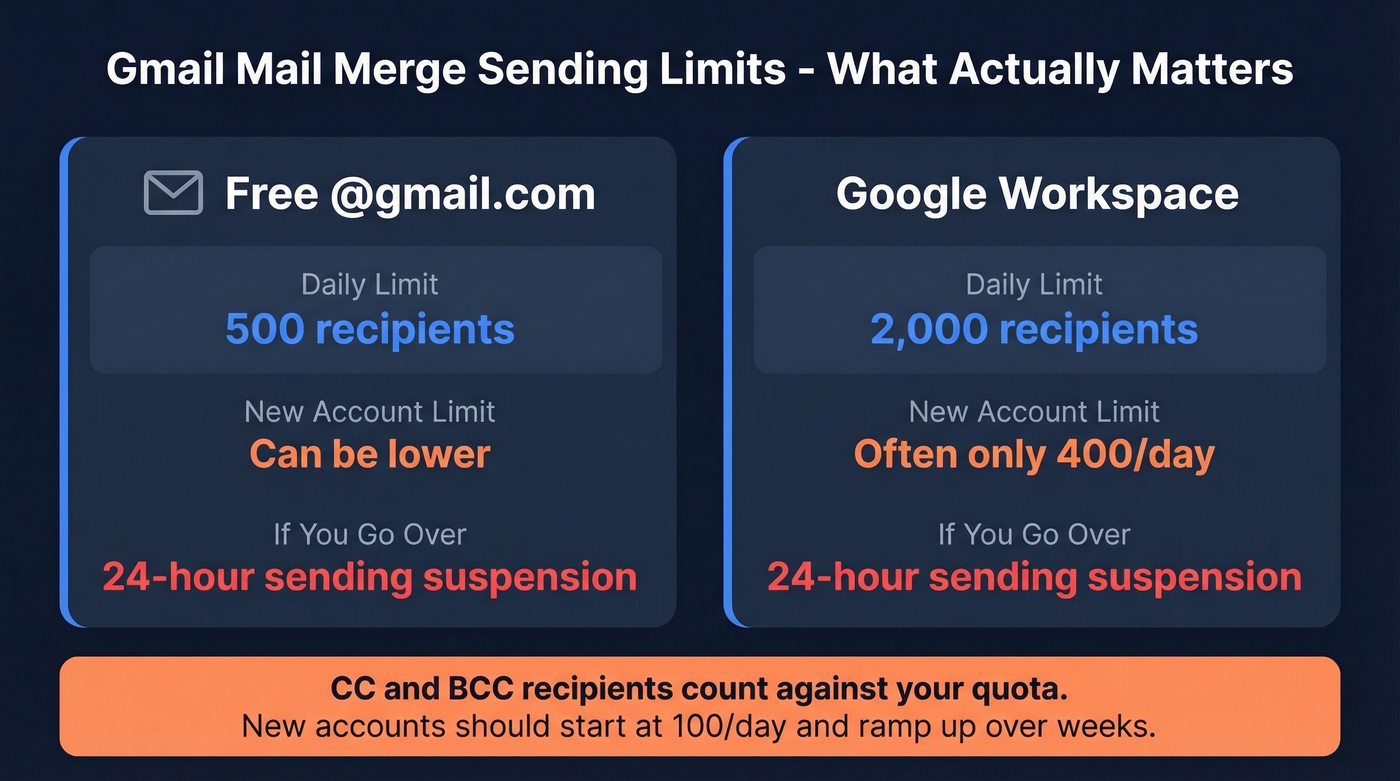
| Account Type | Daily Limit | New Account Limit | Overage Consequence |
|---|---|---|---|
| Free @gmail.com | 500 recipients | Can be lower | Temporary sending suspension (~24 hours) |
| Google Workspace | 2,000 recipients | Often ~400/day on new accounts | Temporary sending suspension (~24 hours) |
CC and BCC recipients count against your quota - a detail that catches people off guard when they're BCCing their manager on every merge email.
New accounts get throttled harder. Even YAMM's own documentation warns new Workspace accounts to start with no more than 100 emails per day. If you set up a Workspace account last week, don't try to blast 2,000 emails on day one. Google will cap you well below the published limit until your account builds trust. Ramp up over a few weeks. (Related: email velocity.)
How to Set Up Mail Merge in Gmail (Native Method)
The built-in method works for Google Workspace accounts. Free @gmail.com users need an add-on (covered below).
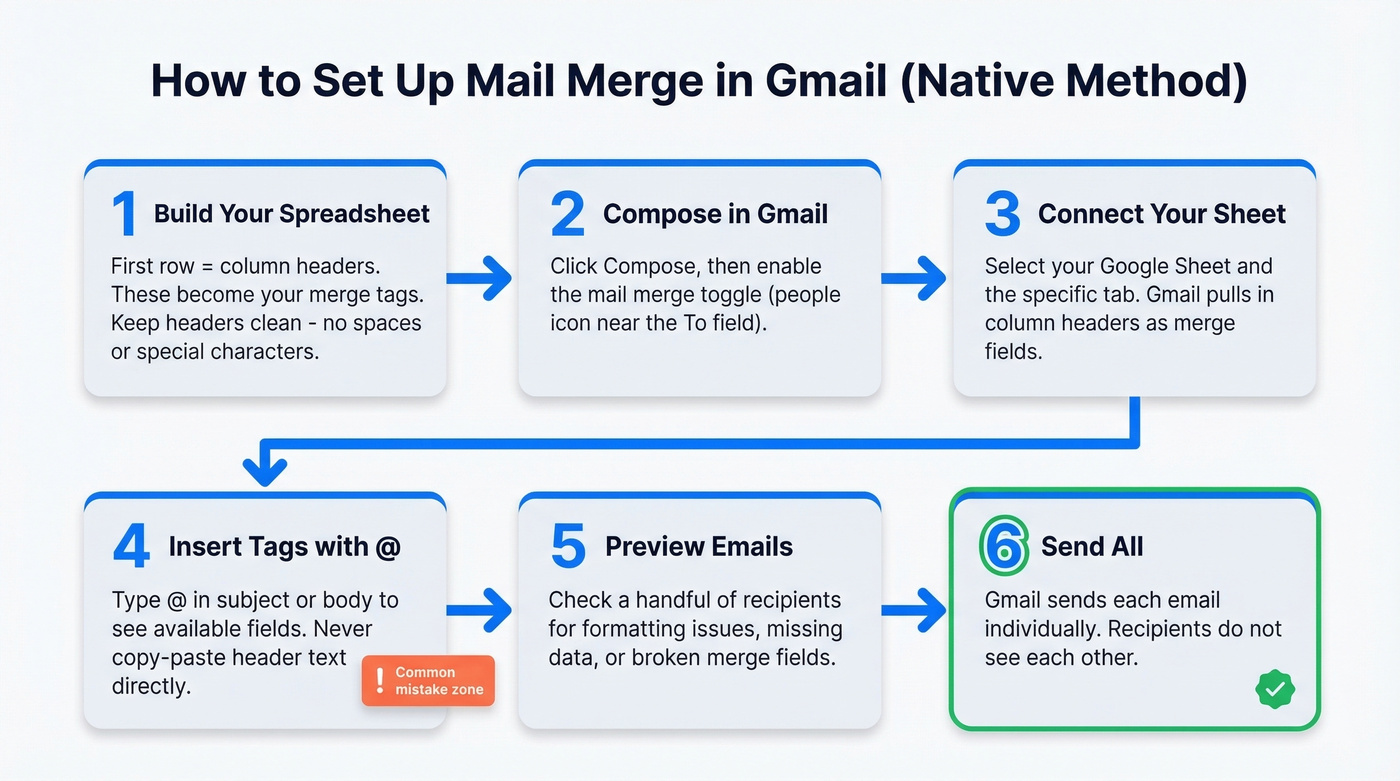
1. Build your spreadsheet in Google Sheets. First row = column headers. These become your merge tags. Common columns: First Name, Last Name, Email, Company, Custom Field. Keep headers clean - no spaces before or after, no special characters.
2. Open Gmail and compose a new email. Click Compose, then look for the mail merge toggle (the people icon near the To field). Enable it, and Gmail will prompt you to connect a Google Sheet.
3. Select your spreadsheet and sheet tab. Gmail pulls in the column headers as available merge tags.
4. Insert merge tags using the @ dropdown. Type @ in the subject line or body, and Gmail shows your available merge fields. Select the one you want. This is where most people mess up - they copy-paste the column header text directly into the body instead of using the @ insertion method.
Warning: Use the @ dropdown to insert merge tags in the body. Pasting column headers directly can fail - your recipients see raw placeholders instead of their actual name. This is exactly the kind of thing that produces "Hi @firstname" disasters.
5. Preview your merged emails. Preview a handful of recipients before sending to catch formatting issues, missing data, or broken merge fields.
6. Hit "Send all." Gmail sends each email individually - recipients don't see each other's addresses.
What Native Mail Merge Can't Do
Here's what you get with Gmail's built-in merge: personalized subject lines, personalized body text, and a straightforward way to send personalized emails from a Google Sheet (Workspace only).
Here's what you don't get: open tracking, click tracking, automated follow-up sequences, email scheduling, per-recipient attachments, A/B testing, or bounce reporting. It's also unavailable on free Gmail accounts. If you need to know whether your emails were opened, you need a third-party tool. (If tracking is a core requirement, see email tracking pixels.)

A mail merge with bad data doesn't just waste sends - it wrecks your Gmail sender reputation. Prospeo's 5-step email verification catches invalid addresses, spam traps, and honeypots before you hit send. 98% accuracy, 7-day data refresh, and 75 free verifications per month.
Clean your list before Gmail cleans it for you.
Three Ways to Send Mass Email
Ninety percent of readers should use either the native method or an add-on. Apps Script is for developers with specific automation needs.
Gmail's Built-In Merge
Best for simple, one-time sends. Free with Workspace. No install required. If you don't need tracking or follow-ups, start here.
Chrome Extensions and Sheets Add-Ons
Best for anyone who needs open/click tracking, automated follow-ups, scheduling, or per-recipient attachments. On r/googleworkspace, users consistently ask for the same stack: merge templates, Sheets-based recipient lists, tracking for sent/bounced/clicked, and personalized links. Tools like GMass, Mailmeteor, YAMM, and merge.email deliver exactly that. Costs range from free tiers up to $59.95/mo depending on features and volume. (If you’re building sequences, start with these sales follow-up templates.)
Google Apps Script
Best for developers who need custom automation logic - conditional sending rules, API integrations, or workflows no off-the-shelf tool supports. Free but requires JavaScript knowledge. Google provides a mail merge Apps Script template to get started. Skip this unless you're comfortable writing code.
Best Add-Ons for Mail Merge in Gmail
Here's how the tools stack up in 2026.
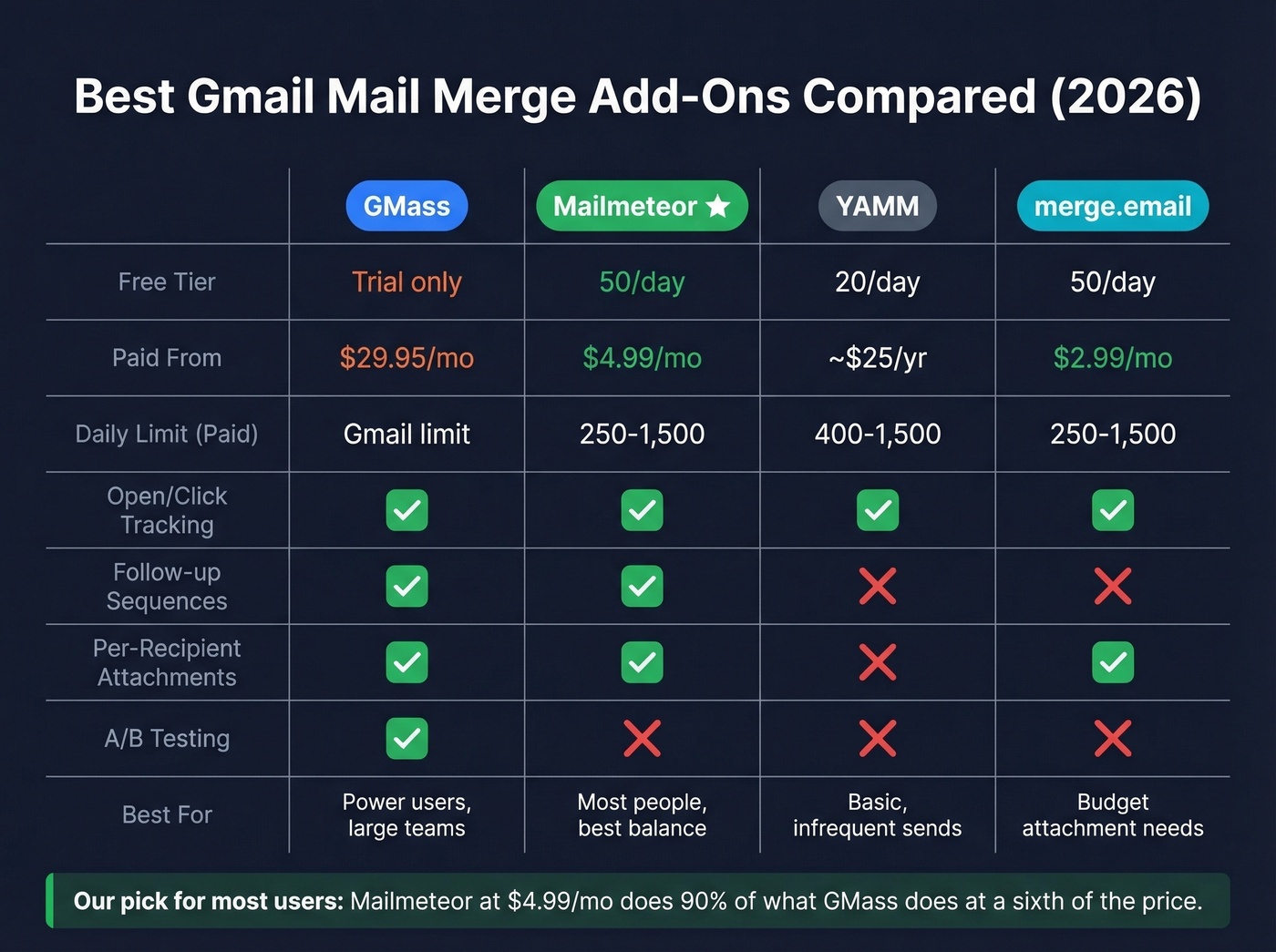
| Tool | Free Tier | Paid From | Daily Limit (Paid) | Tracking |
|---|---|---|---|---|
| GMass | Free trial only | $29.95/mo | Gmail limit | Yes |
| Mailmeteor | 50/day | $4.99/mo | 250-1,500 | Yes |
| YAMM | 20/day | ~$25-50/yr | 400-1,500 | Yes |
| merge.email | 50/day | $2.99/mo | 250-1,500 | Yes |
Per-recipient attachments are supported by GMass, Mailmeteor, and merge.email. Automated follow-up sequences are supported by GMass and Mailmeteor only.

GMass - Most Features, Highest Price
GMass is a Chrome extension that lives inside Gmail and gives you the most complete feature set of any merge tool: A/B testing, auto follow-up sequences, campaign analytics, and bounce management. We've tested it extensively, and the feature depth is genuinely impressive - it feels more like a lightweight outreach platform than a simple merge tool. (If deliverability is your concern, see GMass email deliverability.)
The catch is price. GMass raised prices effective Jan 1, 2026: Standard is $29.95/mo, Premium is $39.95/mo, and Professional is $59.95/mo. Team pricing drops to $22/user at 100 seats. It's the most powerful option, but if you're sending fewer than 1,000 emails per month, you're overpaying.
Mailmeteor - Best Value for Most People
Mailmeteor is a Google Sheets add-on with a 4.9/5 rating from 11,741+ reviews. The free tier gives you 50 emails per day and 500 per month - generous enough for occasional use. Starter at $4.99/mo unlocks 250/day and 5,000/mo. Premium at $12.99/mo gets you 500/day and 15,000/mo.
What makes Mailmeteor stand out is transparency. It publishes both daily and monthly caps clearly on its pricing page. It supports per-recipient attachments via Google Drive links, open and click tracking, and follow-up sequences on higher tiers. For teachers, event organizers, and small sales teams, this is the one to get.
YAMM - Simple and Affordable
Google Sheets add-on with a free tier limited to 20 recipients per day. Pro unlocks 400/day on gmail.com or 1,500/day on Workspace. Paid plans run ~$25-50/year. No per-recipient attachments or follow-up sequences - just tracking on top of native. Good for basic, infrequent merges.
merge.email - Budget Per-Recipient Attachments
Cheapest paid option at $2.99/mo on annual billing. Supports per-recipient attachments, scheduling, and tracking. 250/day on the Personal plan, 1,500/day on Professional ($5.99/mo). No follow-up sequences. If attachments are your primary need and budget matters, this is your tool.
Other tools worth knowing about: Streak, Yesware, and MergeMail all offer some merge functionality, but they're CRM-first tools where mail merge is a secondary feature. For dedicated merge workflows, the four options above are stronger.
Let's be honest: if your average deal value is under $5,000 and you're sending fewer than 500 emails per month, you don't need GMass. Mailmeteor at $4.99/mo does 90% of what GMass does at a sixth of the price. Save the budget for better data. (For more ideas, browse these AI bulk email senders.)
Sending Attachments with Mail Merge
Gmail's native merge can include attachments, but the same file goes to every recipient. You can't send unique files to each person without an add-on.
For per-recipient attachments - sending each person their own invoice, contract, or report - use Mailmeteor or merge.email. Upload each file to Google Drive, grab the share link, and paste it into a dedicated column in your spreadsheet. The add-on pulls the correct file for each recipient at send time. Keep individual attachments under 5MB; anything larger should go as a Drive link instead.
Protect Your Sender Reputation
This is the section most guides skip, and it's the one that matters most. A single bad merge can damage your sender reputation for weeks.
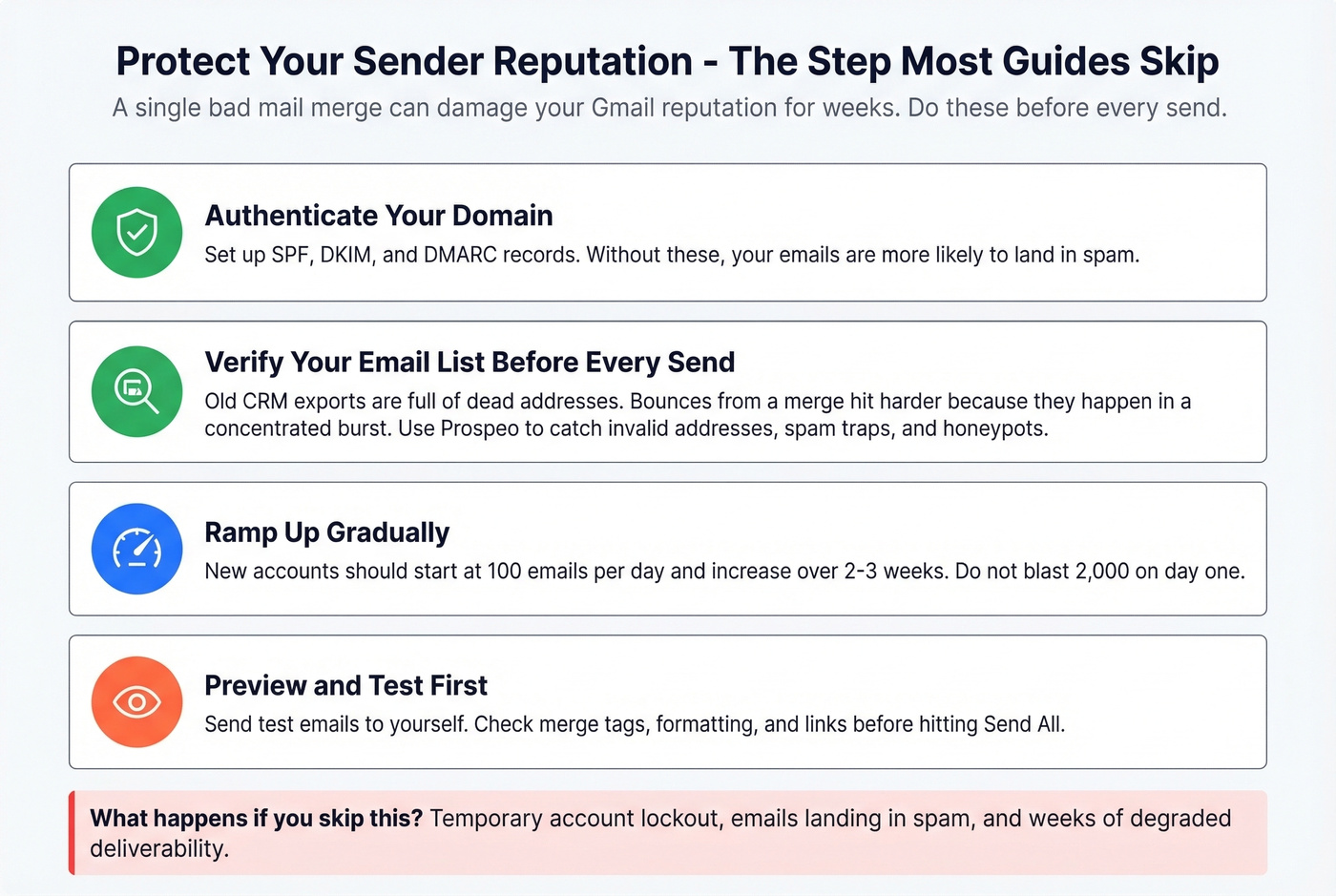
Authenticate your domain. Set up SPF, DKIM, and DMARC records. Google's own email authentication guide walks you through it. (More detail: SPF record examples and DMARC alignment.)
Verify your email list before every send. Here's the thing - old CRM exports are full of dead addresses, and bounces from a mail merge hit your reputation harder than bounces from regular email because they happen in a concentrated burst. Run your list through Prospeo before hitting send. With 98% email accuracy and a 5-step verification process that includes catch-all handling and spam-trap removal, it's built for exactly this use case. The free tier gives you 75 verifications per month, and paid credits run about $0.01 per email. (If you’re troubleshooting bounces, see email bounce rate and spam trap removal.)

Clean your spreadsheet data. ALL CAPS names, scraped company strings with extra characters, and inconsistent formatting all make your emails look automated to spam filters. Normalize everything before merging.
Set fallback values for merge fields. "Hi there" beats "Hi ," when a first name is missing. Every add-on supports fallback values - use them.
Vary your templates. If you're sending hundreds of emails with identical body text and only the name changes, spam filters notice. Mix up subject lines, CTA placement, and sentence structure across batches. Using multiple merge templates rather than a single template helps you avoid pattern-based spam filtering. (Need ideas? Use these email subject line examples.)
Don't over-personalize. Including someone's company name, title, recent funding round, and last blog post in a cold email doesn't feel personal - it feels like surveillance. Stick to 1-2 relevant details.
Gmail's native merge can't tell you if your recipients' emails are still valid. Prospeo verifies every address against catch-all domains, spam traps, and honeypots - so your 400-person mail merge doesn't end with a 24-hour account lockout. Starts at $0.01 per email.
Stop gambling your sender reputation on unverified contacts.
Common Mistakes to Avoid
Pasting merge tags instead of using the @ dropdown. The body field in Gmail's native merge can fail to accept pasted placeholders. Use the @ insertion method or your recipients see raw tags.
Hitting Gmail's Send instead of the tool's merge-send. If you're using GMass or Mailmeteor, there's a separate send button for merged emails. Hit the regular Send button and your recipients get a message full of {FirstName} placeholders. We've seen this happen to experienced marketers under time pressure - it's a brutal mistake that takes about two seconds to make and hours to clean up.
Sending to an unverified list. If your list hasn't been cleaned in 6+ months, dead addresses become bounces, and bounces become reputation damage. One team we worked with had a 12% bounce rate on a 1,500-person merge - their Workspace account was restricted for three days.
Dirty data in your spreadsheet. "JOHN SMITH" in the name field, "acme corp. (acquired)" in the company field, trailing spaces everywhere. Clean your data before merging.
Exceeding daily limits mid-campaign. If you're sending 1,800 emails on a Workspace account, any regular emails you send afterward count against the same 2,000-recipient quota. Stay at 80% of your limit to be safe.
FAQ
Is Gmail mail merge free?
Gmail's native mail merge is free for Google Workspace users. Free @gmail.com accounts can't use the built-in feature but can use free tiers of add-ons like Mailmeteor (50 emails/day) or YAMM (20 recipients/day).
How many emails can I send with a merge?
Free Gmail accounts cap at 500 recipients per 24 hours; Google Workspace accounts cap at 2,000. New accounts get lower limits initially - new Workspace accounts are often restricted to around 400 recipients/day. CC and BCC recipients count against your quota.
Can I track opens and clicks?
Not with Gmail's native merge. You need an add-on like GMass, Mailmeteor, YAMM, or merge.email for open and click tracking. Capabilities vary by plan.
Can I send different attachments to each recipient?
Not natively - Gmail's built-in merge sends the same attachment to everyone. For per-recipient attachments, use Mailmeteor or merge.email with Google Drive links in your spreadsheet. Upload each file to Drive, grab the share link, and paste it into a dedicated column.
How do I avoid landing in spam?
Authenticate your domain with SPF, DKIM, and DMARC. Verify your email list before sending. Clean your spreadsheet data, use fallback values for empty merge fields, and stay under 80% of your daily sending limit.