

The Complete Guide to Master Inbox for Cold Email in 2026
A prospect replied "let's talk" to inbox #47 on Thursday afternoon. Nobody saw it. The rep who owned that account was on PTO, and the reply sat buried under 200 warmup emails, a dozen OOO autoreplies, and a bounce notification from a contact who left the company six months ago. By Tuesday, when someone finally spotted it, the prospect had already signed with a competitor. That deal was worth $28,000 in ARR. A master inbox - the tool that would've surfaced that reply instantly - starts at $30/month.
This isn't a rare story. It's the inevitable outcome of scaling cold email without centralizing your replies.
Quick Decision Tree
Before you read another word:
- Already on Smartlead? Use its built-in unified inbox. Don't add another tool.
- Running multiple sequencers or managing clients? Master Inbox (standalone) or EmailBison.
- Budget-conscious and starting out? Salesforge Primebox at $48/mo gets you a unified inbox plus a full sequencer.
- Fewer than 5 mailboxes, solo SDR? You don't need one yet. Just check your inboxes.
All of this assumes clean data. A centralized reply dashboard fed by bad email addresses is just a bigger junk drawer. Verify contacts before sequences fire - Prospeo's 5-step verification and 98% email accuracy means fewer bounces clogging your queue from day one. (If you’re still building your stack, start with these outreach tools.)
What Is a Master Inbox?
A master inbox aggregates replies from dozens or hundreds of sending accounts into a single dashboard. It's not a shared inbox like a Collaborative Inbox in Google Groups, where multiple people access one email account. It's a cold email reply management layer that pulls responses from every mailbox you're sending from - across tools, domains, and team members - while preserving each sender's identity so threaded replies go out from the right address.
The core concept is the "Master Thread": one thread per lead that consolidates the entire conversation history regardless of which mailbox or sequencer initiated the outreach. If a prospect got touched by three different mailboxes over two months, you see one clean thread instead of three disconnected fragments.
This matters because cold email at scale means dozens of sending identities. Without consolidation, replies scatter across inboxes that nobody's actively monitoring.
The Math Behind Centralizing Replies
You're running 75 mailboxes at ~20 sends/day each. That's 1,500 outbound emails daily. At a 3% average reply rate - the midpoint of the 2-4% benchmark for a solid campaign in 2026 - that's ~45 replies per day scattered across 75 inboxes.
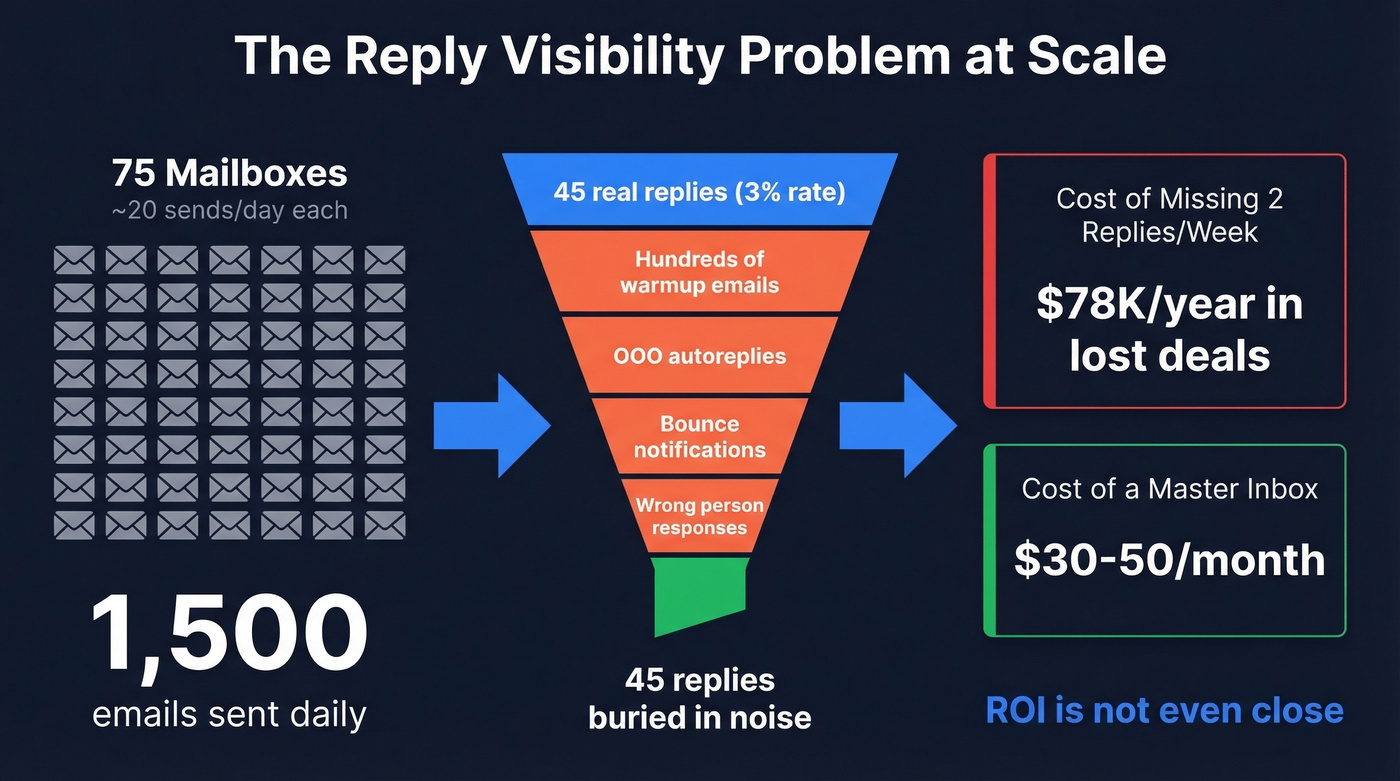
Now factor in warmup noise. Each mailbox runs warmup emails to maintain sender reputation, and warmup traffic can easily outnumber real prospect replies. Across those 75 inboxes, you might have hundreds of warmup emails mixed in with your 45 real replies. Add OOO autoreplies, bounces, and "wrong person" responses, and you're doing archaeology every morning - digging through piles of junk to find the VP who said "send me a proposal."
Here's the cost nobody talks about: at $2.50-$3.50 per mailbox through workspace resellers, 75 mailboxes run you $190-$260/month in infrastructure alone - before you add a sequencer or reply management tool. That's real money, and it's wasted if replies fall through the cracks. If 1 in 20 replies converts to a $15K deal, missing just 2 replies per week costs you $78K/year. Every hour spent hunting for replies is an hour not spent closing them.
Fix Your Infrastructure First
A unified reply dashboard solves the visibility problem. It doesn't solve the data quality problem. Here's what needs to be in place before you centralize anything:
- Separate outreach domains. Never send cold email from your primary domain. One spam complaint can tank your main domain's reputation. (If you’re unsure where to start, run a quick domain reputation test.)
- SPF, DKIM, and DMARC on every domain. Non-negotiable. Without them, your emails land in spam - Gmail alone blocks over 99.9% of spam, phishing, and malware.
- Stick with .com TLDs. Cheap alternatives like .info or .biz hurt credibility and deliverability.
- Redirect cold domains to your main site. Adds legitimacy if a prospect checks the domain.
- 14-21 day warmup minimum, then ramp +1 email/day. Keep warmup running even after you start sending.
- 3-5 mailboxes per domain, 15-25 sends/day per mailbox. Push past these limits and you're burning infrastructure. (For safe volume planning, see How Many Cold Emails Per Day in 2026? Safe Limits.)
The most overlooked prerequisite is data quality. Bad email addresses don't just bounce - they flood your centralized inbox with delivery failure notifications and trigger spam filters that degrade your entire sending reputation. We've seen agencies clean up their contact data and watch their master inbox go from 60% noise to under 10% overnight. Stack Optimize built their agency to $1M ARR using verified data and maintained 94%+ deliverability with sub-3% bounce rates across all clients. That's the kind of upstream hygiene that makes reply centralization actually useful instead of just a bigger pile of noise. (If you want a framework for this, use CRM data hygiene best practices and a dedicated email bounce back checker.)

A master inbox surfaces replies faster. But if 30% of those replies are bounces and delivery failures, you've just centralized your noise. Prospeo's 5-step verification and 7-day data refresh keep bounce rates under 4% - so your unified inbox shows real prospect replies, not junk.
Stop sorting through bounce notifications. Start with verified contacts.
Three Ways to Build a Master Inbox
Path A: Built-in sender inbox. Tools like Smartlead and Instantly include a unified inbox as part of their sequencer. This is the fastest path - zero additional cost, zero additional setup. The tradeoff is lock-in. Your consolidated view only sees replies from that one tool. (If you’re comparing options, start with Best Email Sequencing Tools in 2026 (Tested).)
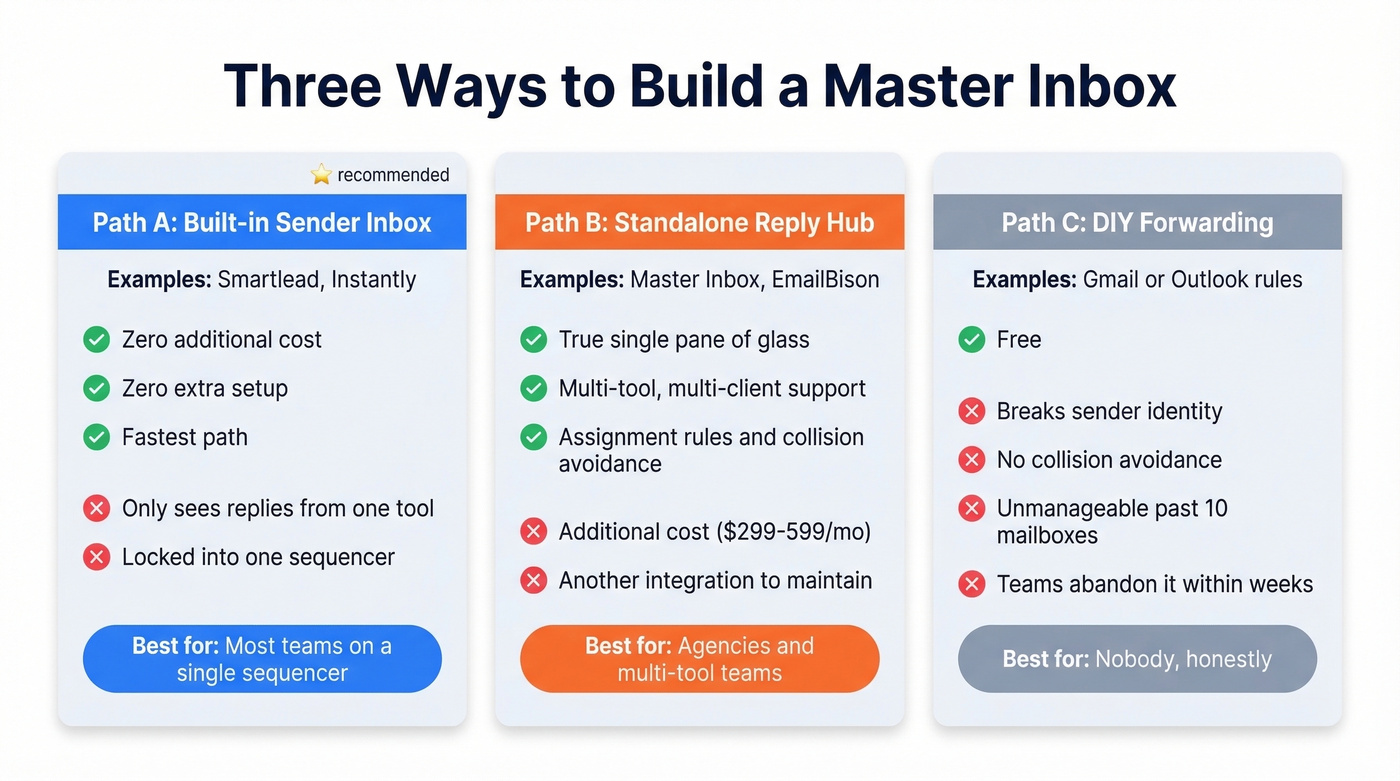
Path B: Standalone reply hub. Dedicated tools like Master Inbox or EmailBison sit on top of your sequencers and pull replies from multiple sources. This is the right call for agencies managing multiple clients across multiple tools, or teams where 2+ reps need assignment rules and collision avoidance. It costs more, but it's the only path that gives you a true single pane of glass across your entire outbound operation. (This is also where a broader sales tech stack starts to matter.)
Path C: DIY forwarding. Set up Gmail or Outlook forwarding rules to route everything to one account. It's free. It also breaks sender identity (replies go out from the forwarding address, not the original sender), offers zero collision avoidance, and becomes completely unmanageable past ~10 mailboxes. We've seen teams try this and abandon it within weeks.
Let's be honest about the solo-vs-team decision. One person with fewer than five mailboxes can get by with Path A or even just checking inboxes manually. The moment you have two or more reps - or you're an agency - you need assignment rules and collision prevention, which means Path A or B.
Features That Actually Matter
Not all unified inboxes are equal. Here's what separates a useful tool from a glorified forwarding rule:
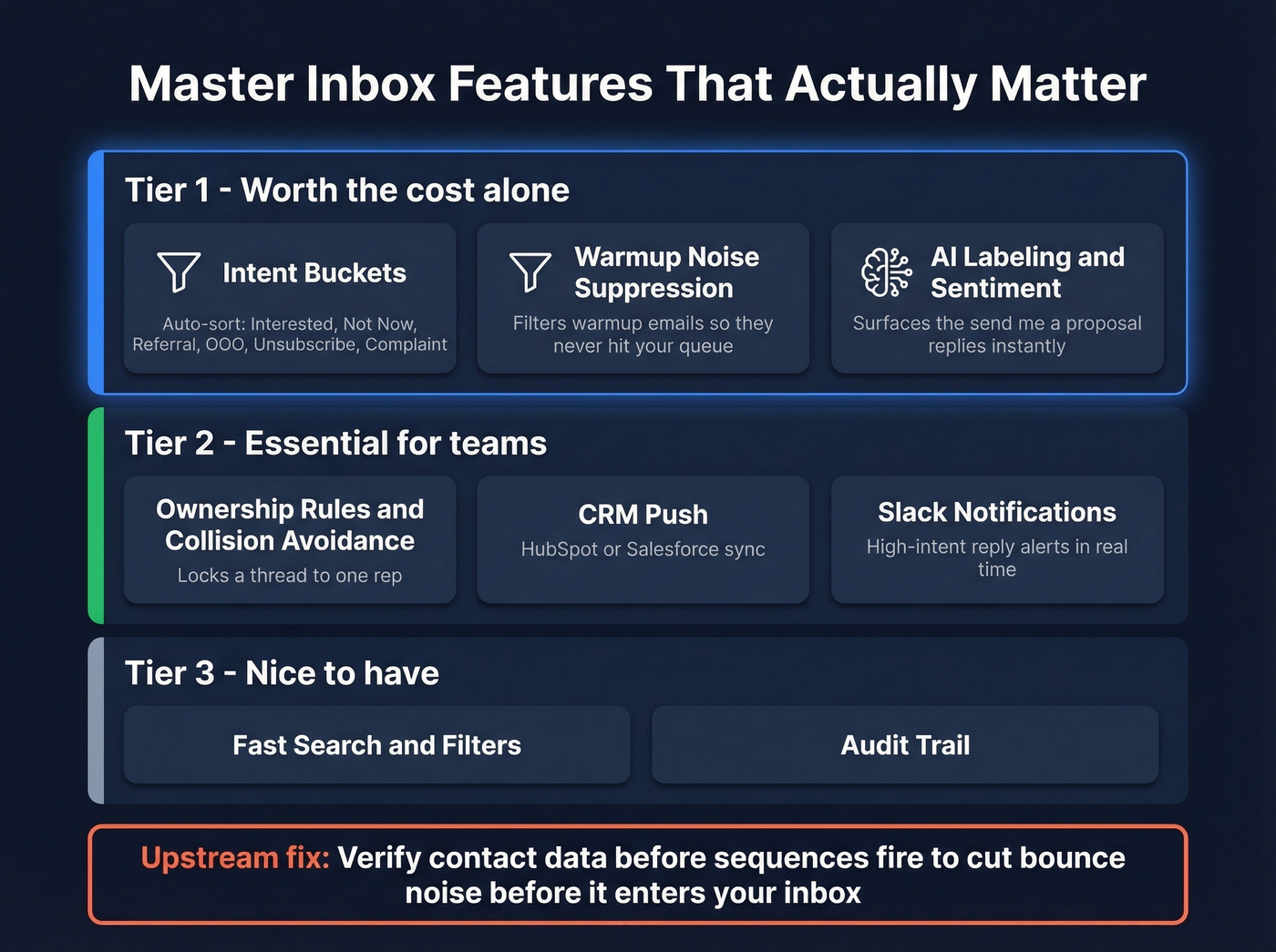
Intent buckets auto-categorize replies as Interested, Not Now, Referral, OOO, Unsubscribe, or Complaint. Warmup noise suppression filters out warmup emails so they never hit your queue. AI labeling and sentiment detection surfaces the "send me a proposal" replies instantly. These three features alone justify the cost for most teams.
On the operational side, look for ownership rules and collision avoidance that lock a thread to one rep, CRM push to HubSpot or Salesforce, and Slack notifications for high-intent replies so your reps don't need to live inside the dashboard. Fast search, filters, and an audit trail round out the must-haves. (If you’re building reporting around this, borrow from these sales dashboard examples.)
Reduce noise upstream too. Verifying contact data before sequences fire cuts bounces before they ever enter your reply queue. (More on verification workflows: Email Identity Verification: 3 Types Explained (2026).)
Best Tools Compared (2026)
| Tool | Starting Price | Mailboxes/Inboxes | Best For |
|---|---|---|---|
| Smartlead ⭐ | ~$32.50/mo | Unlimited inboxes | Most teams (best deliverability) |
| Master Inbox | $299/mo | 1,500 mailboxes (Growth plan) | Multi-tool agencies |
| Salesforge | $48/mo | Unlimited mailboxes | Budget teams starting from scratch |
| Instantly | ~$30/mo | Unlimited inboxes | Beginners who prioritize UI |
| EmailBison | $599/mo | Unlimited (500K emails/mo included) | High-volume agencies |
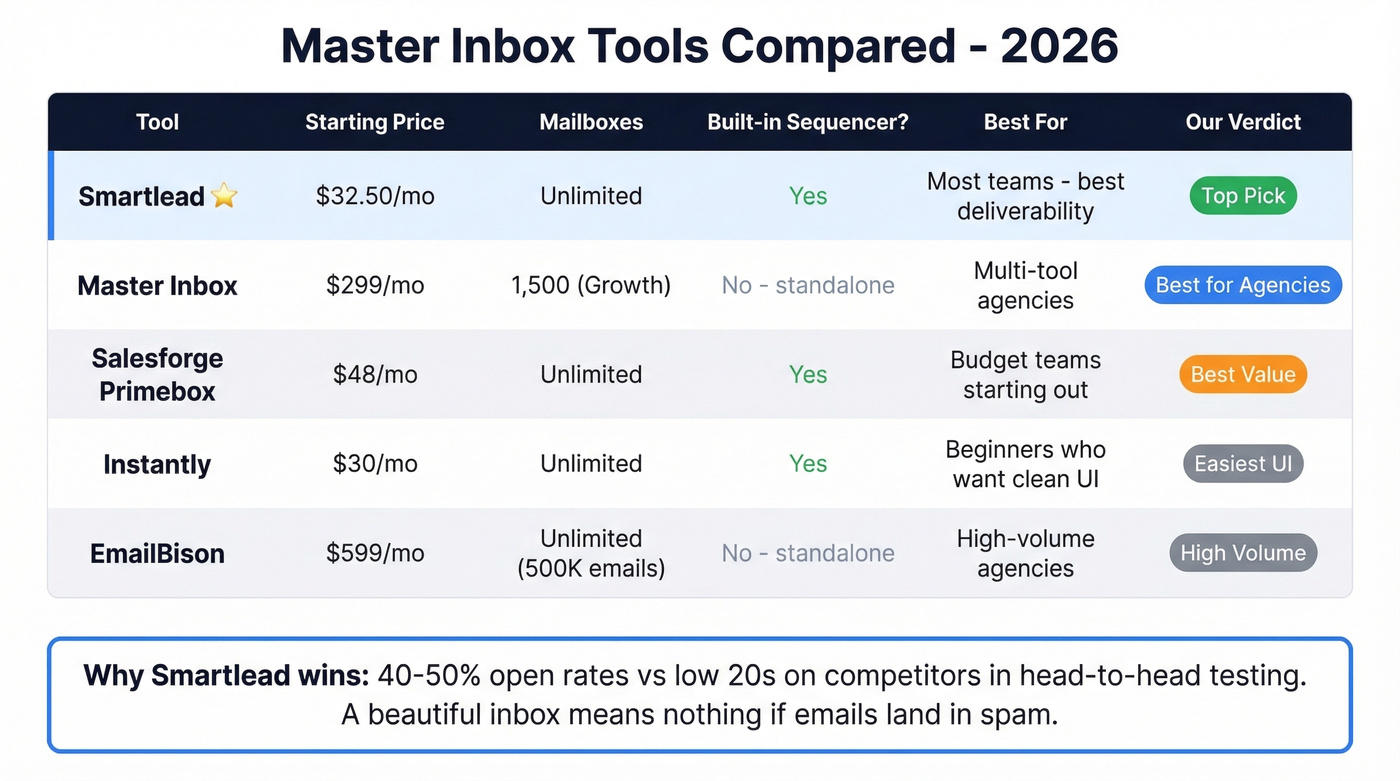
Our take: Smartlead is the best option for most teams - not because it has the best inbox features, but because it has the best deliverability. A beautiful unified inbox is worthless if your emails aren't landing in the primary tab to generate replies in the first place. (If you want a broader shortlist, see Best Outbound Email Tools in 2026 (Tested).)
Smartlead - Best Overall
Smartlead is the path of least resistance if you're already using it as your sequencer, and the best starting point even if you're not. The master inbox is built in, starting at ~$32.50/mo with unlimited inboxes. No additional tool, no additional cost, no additional integration to maintain.
What makes Smartlead's implementation stand out is deliverability. One operator ran a 4-month head-to-head test against Instantly and reported 40-50% open rates on Smartlead versus low-20s on Instantly. The inbox rotation "actually works," per that same test. The interface is uglier - nobody disputes that - but sustained deliverability matters more than a clean UI when your reply rates depend on actually landing in the primary tab.

The limitation is lock-in. Smartlead's unified inbox only sees Smartlead replies. If you're running other tools alongside it, you'll still have blind spots.
Master Inbox (Standalone)
Use this if: You're an agency running Smartlead, Instantly, and other outreach tools simultaneously and need one place to see every reply.
Skip this if: You're on a single sequencer with fewer than 20 mailboxes. The built-in inbox is enough.
The Growth plan at $299/mo gets you 1,500 mailboxes and 10 workspaces, with warmup auto-sync and AI labeling. The Agency plan at $499/mo bumps that to 3,000 mailboxes and 30 workspaces, adding integrations with HeyReach, Expandi, and Aimfox. The Unlimited 30k plan runs $1,297/mo with API access, unlimited webhooks, and HubSpot integration. Agency and Unlimited plans include AI Reply Agents - still in beta, but promising for auto-drafting responses to common reply types like OOOs and referrals.
The Master Thread concept is the real differentiator - one thread per lead regardless of which tool or mailbox initiated contact. Slack notifications for high-intent replies mean your reps don't need to live inside the dashboard. $299-$1,297/mo is a real line item. But if you're running 50+ mailboxes across multiple tools, it pays for itself the first week you catch a deal that would've slipped.
Salesforge (Primebox)
Salesforge's Primebox is the budget play at $48/mo for the Pro plan - 1,000 active contacts, 5,000 emails/month, unlimited mailboxes and warmup included. The Growth tier at $96/mo scales to 10,000 contacts and 50,000 emails. There's a 14-day free trial.
Primebox pulls email and professional profile replies into one view with AI sentiment detection. You're buying an entire outbound suite to get the inbox feature, which is either a bargain or bloat depending on whether you already have a sequencer. For teams starting from scratch, it's hard to beat at that price point. Salesforge also offers Agent Frank, an AI SDR add-on at $499/mo billed quarterly, if you want to automate beyond inbox management.
Instantly
Instantly starts at ~$30/mo with a unified inbox included and unlimited inboxes. The UI is the cleanest in the category, setup is fast, and it's the easiest onboarding experience you'll find. For someone sending their first cold email campaign, it's a solid starting point.
Here's the thing: in our testing, Instantly's interface wins on first impression, but the r/coldemail consensus flags deliverability degrading after month two, and support responsiveness is a recurring complaint. Monitor your open rates monthly. If they start sliding into the low 20s, it's not your copy - it's infrastructure. The "Instantly hype is mostly from affiliates" take shows up repeatedly on Reddit, and while that's harsh, it's worth keeping in mind before you commit long-term.
EmailBison
EmailBison is overkill for most teams and exactly right for high-volume agencies. The single plan runs $599/mo for 500,000 emails/month with unlimited leads, workspaces, and teammates - no per-seat fees. You get isolated infrastructure with dedicated IPs, API access, email warmup, and a private Slack channel with dedicated support.
If you're sending 500K+ emails monthly across multiple clients, the flat rate without per-seat pricing is hard to beat. Below that volume, you're overpaying for infrastructure you don't need. Skip it unless you're genuinely at that scale.
When You Don't Need One
Not every team needs a centralized reply system. Adding one too early just adds complexity.
A solo SDR with three to five mailboxes can check inboxes in five minutes each morning. A single sequencer at low volume handles reply management fine with its built-in inbox. The operational maturity milestone is roughly 20 mailboxes - below that, manual management is annoying but survivable, and above it, a master inbox shifts from nice-to-have to non-optional. The question isn't whether you'll need one. It's when your volume forces the issue.
FAQ
What is a master inbox for cold email?
It aggregates replies from dozens or hundreds of separate sending accounts into one dashboard, preserving each sender's identity for threaded replies. It filters warmup noise, auto-categorizes intent (interested, OOO, unsubscribe), and prevents two reps from replying to the same prospect. Most tools start at $30-$299/mo depending on mailbox count.
Can I use Gmail forwarding instead of a dedicated tool?
Gmail forwarding breaks sender identity - replies go out from the forwarding address, not the original sender. There's no collision avoidance, no AI labeling, and it collapses past ~10 mailboxes. Purpose-built tools like Smartlead ($32.50/mo) or Salesforge ($48/mo) solve all three problems for less than the cost of one lost deal.
How do I reduce bounce noise in my unified inbox?
Verify contact data before sequences fire - bounces are the single biggest source of junk in any centralized reply queue. Prospeo's 5-step verification catches spam traps, honeypots, and catch-all domains, delivering 98% email accuracy. Stack Optimize maintained sub-3% bounce rates across all agency clients using this approach. Downstream, enable warmup filtering and AI labeling to auto-sort OOOs and autoreplies.