

The Best Email Sequencing Tools in 2026 - And the Stack That Makes Them Work
You launched your first cold email campaign last month. Open rates looked decent - 35%. But reply rate? 1.2%. You're wondering if it's your copy, your subject lines, or your email sequencing tool. Here's the thing: it's probably none of those. It's your list.
A Belkins study across 16.5M cold emails puts the average reply rate at 5.8%. If you're below that, the problem is almost certainly upstream of your sequencer - bad data, unverified emails, burned domains. The vendors selling email sequence software won't tell you this. We will: start with the stack that makes sequencing work, then pick the right tool for your situation.
Our Picks (TL;DR)
You need one data platform and one sequencer. Not ten tools.
- Best data + verification layer (start here): Prospeo - 98% email accuracy, native integrations with every sequencer on this list, ~$0.01/email. Free tier available.
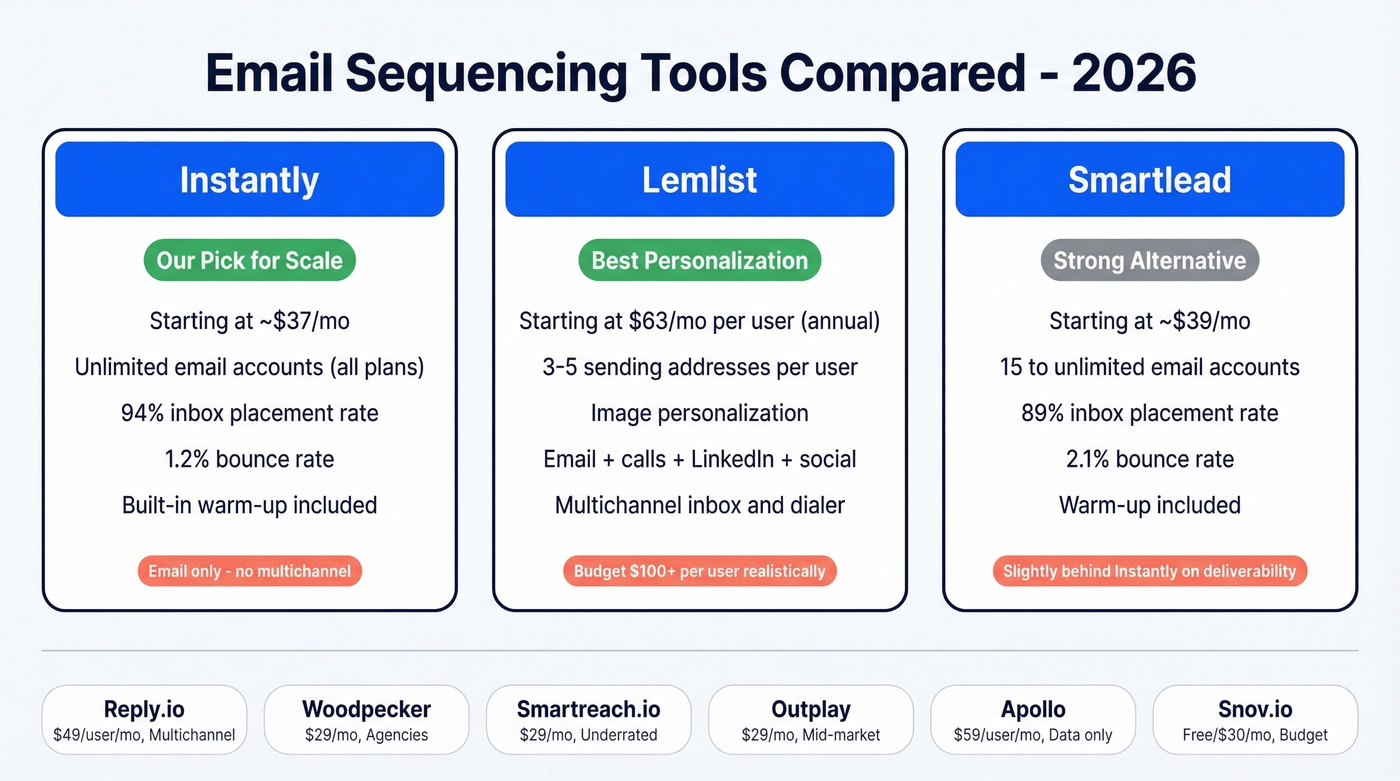
- Best sequencer for scale: Instantly - unlimited email accounts on all plans, from ~$37/mo.
- Best for multichannel personalization: Lemlist - email + calls + multichannel steps, standout image personalization, from $63/mo/user (annual). Budget $100+/user realistically.
The Cold Email Stack Nobody Explains
Most teams treat their email sequence platform like it's the whole system. It's not. Cold email runs on four layers, and your sequencer is only the last one.
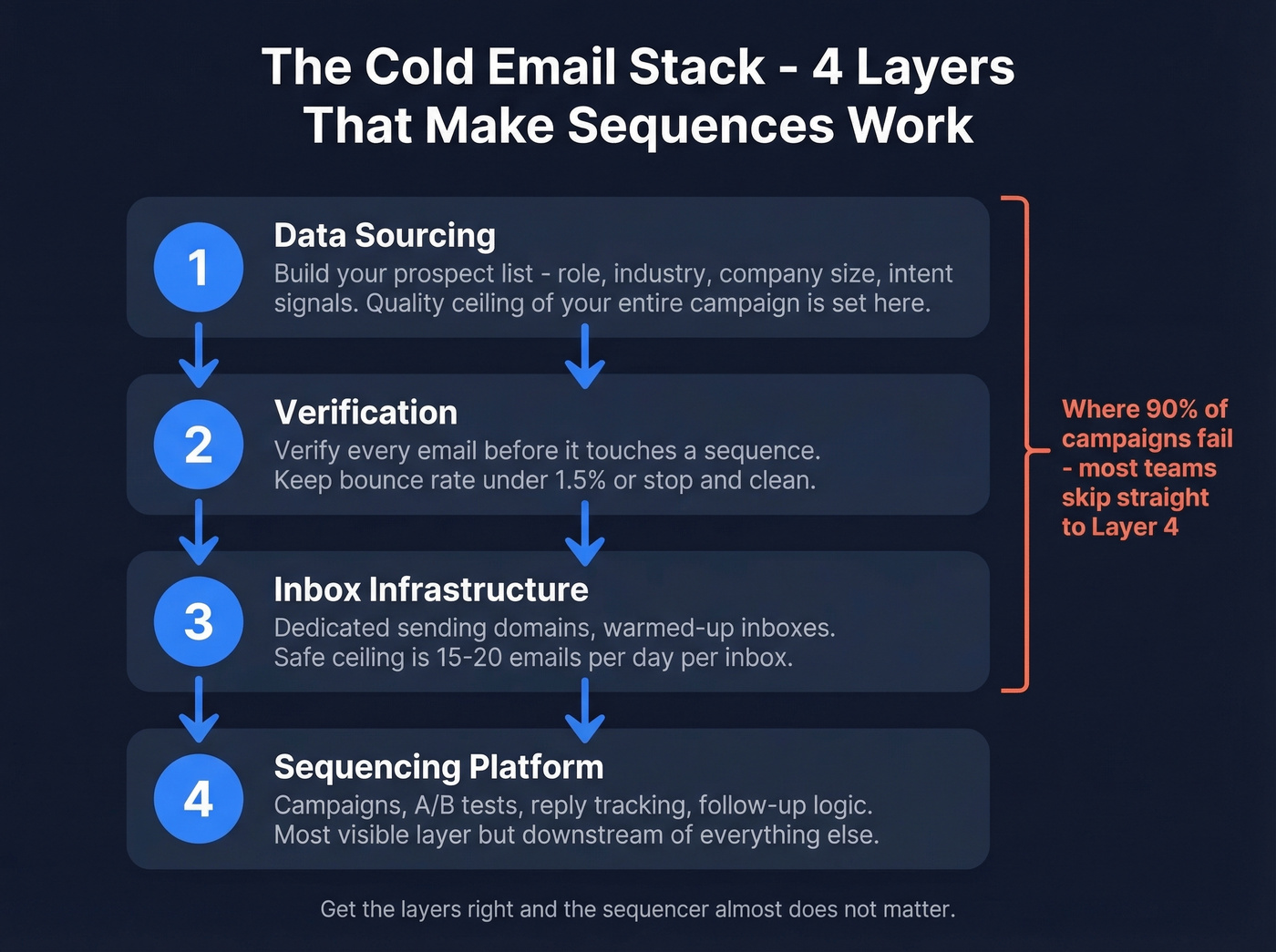
Layer 1: Data sourcing. This is where you build your prospect list - filtered by role, industry, company size, intent signals. The quality ceiling of your entire campaign is set here. Garbage in, garbage out. (If you want to go deeper on list quality, start with data sourcing and work forward.)
Layer 2: Verification. Every email on your list needs to be verified before it touches a sequence. A 2% bounce rate on 10,000 contacts means 200 hard bounces, and that's enough to tank your sender reputation in a week. Keep bounce rate under 1.5%, or stop and clean before scaling. If you’re troubleshooting bounces, use these bounce rate benchmarks and fixes.
Layer 3: Inbox infrastructure. You need dedicated sending domains and warmed-up inboxes. The safe ceiling is 15-20 emails per day per inbox. Want to send 200 emails a day? You need 10-15 inboxes, not one inbox sending 200. Tools like Zapmail or Maildoso handle provisioning; your sequencer handles rotation. (For sending limits, see email velocity.)
Layer 4: Sequencing platform. This is where campaigns live - sequences, A/B tests, reply tracking, follow-up logic. It's the most visible layer, but it's downstream of everything else.
The r/coldemail consensus backs this up: beginners assume one tool does everything, and experienced operators know outbound is layered. Get the layers right and the sequencer almost doesn't matter.
How to Choose Email Sequence Software
Once your data and infrastructure are solid, here's what actually separates the good sequencers from the mediocre ones.
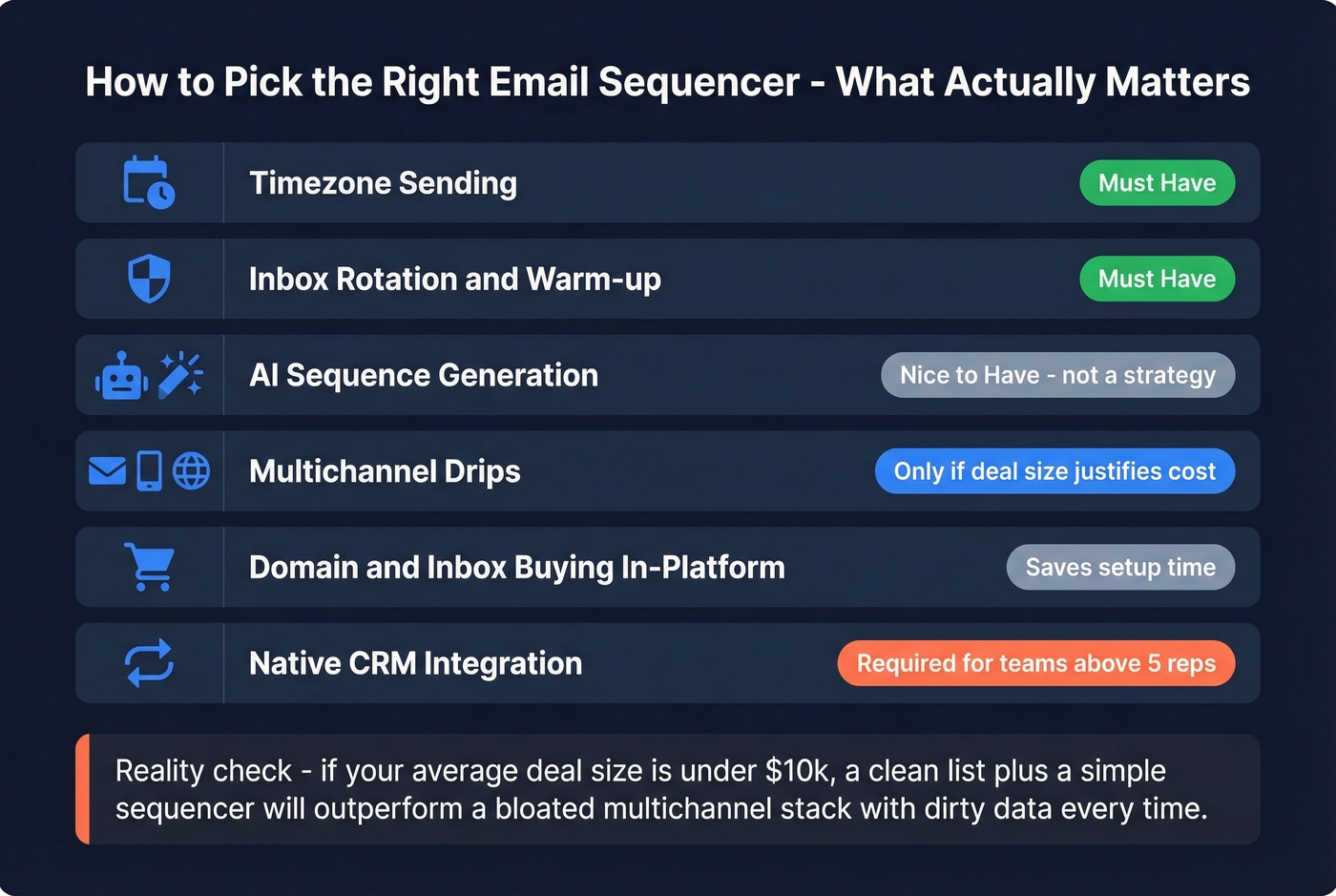
Timezone sending. Your emails should land during the prospect's business hours, not yours. Surprisingly few sequence platforms handle this well out of the box.
Inbox rotation and warm-up. Built-in warm-up saves you from managing a separate tool. Rotation across multiple sending addresses protects deliverability at scale. (If you’re comparing options, here are the best unlimited email warmup tools.)
AI sequence generation. Every major sequencer now offers AI-assisted copy generation - Lemlist, Reply.io, Outplay, and Instantly all have some version of it. They save time on first drafts but don't replace knowing your ICP. Treat them as a starting point, not a strategy. If you want a practical framework, use this AI cold email outreach playbook.
Multichannel drips. If you need email + calls + social touches in one sequence, you need a tool that supports it natively - not three tools duct-taped together.
Domain and inbox buying inside the ecosystem. Some tools let you buy domains and mailboxes inside the platform. This cuts setup time dramatically and removes the infrastructure friction that slows down launches.
CRM integrations. Salesforce and HubSpot syncs aren't optional for teams above 5 reps. Check whether the integration is native or requires Zapier. If you’re doing this at scale, follow a proper connect outreach tool to CRM setup.
Transparent pricing. If you can't figure out what a tool costs from its pricing page, that's a red flag.
Let's be honest: if your average deal size is under $10k, you probably don't need a $150/user/month sales engagement platform. A clean list and a simple sequencer will outperform a bloated multichannel stack with dirty data every single time.
Best Email Sequencing Tools in 2026
| Tool | Best For | Starting Price | Unlimited Accounts? | Multichannel? |
|---|---|---|---|---|
| Instantly | Our pick: high-volume email | ~$37/mo | Yes (all plans) | No |
| Lemlist | Multichannel personalization | $63/mo/user (annual) | No (3-5/user) | Yes |
| Smartlead | Instantly alternative | ~$39/mo | No (15-unlimited) | No |
| Reply.io | AI-powered multichannel | $49/user/mo | Varies | Yes |
| Woodpecker | Agencies | ~$29/mo | Yes | Add-on |
| Smartreach.io | Underrated all-rounder | ~$29/mo | Varies | Yes |
| Outplay | Mid-market sales teams | $29/mo | No (5 mailboxes) | Growth tier+ |
| Apollo | Data sourcing (not sequencing) | $59/user/mo | No (1-15) | Limited |
| Snov.io | Solo founders on a budget | Free / ~$30/mo | Limited | Limited |
Our pick for most teams: Prospeo for data and verification, Instantly or Smartlead for sequencing. Add Lemlist only if multichannel is central to your motion.
Instantly - Best for Scale
Instantly is the default choice for teams that need volume. Unlimited email accounts on every plan means you can scale sending addresses without worrying about per-inbox charges - and that single feature is why it dominates the cold email space right now.
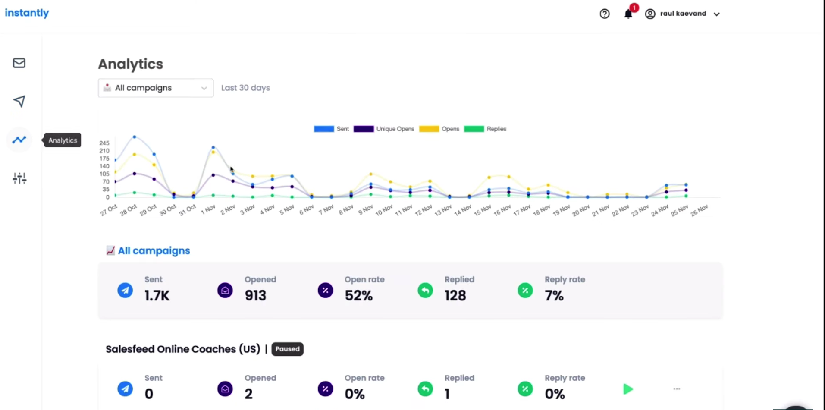
The deliverability numbers are strong. Across a dataset of 8M+ emails, Instantly hit 94% inbox placement with a 1.2% bounce rate. Unlimited warm-up is included on every plan. Pricing starts around $37/mo, with higher tiers at roughly $78/mo and $286/mo on annual billing.
The tradeoff: Instantly is email-only. No native multichannel. And CRM integrations cost extra on lower tiers - a detail that catches teams off guard.
Use this if: You're running high-volume email-only campaigns across many sending accounts.
Skip this if: You need multichannel sequences or tight CRM integration out of the box.
Lemlist - Best for Personalization
Lemlist is the most feature-rich sequencer on this list - and the most expensive once you add everything up. The image personalization is genuinely impressive, and the multichannel sequences (email + calls + social touches) work well in practice. There's a 14-day free trial with no credit card required, which is worth using before you commit.
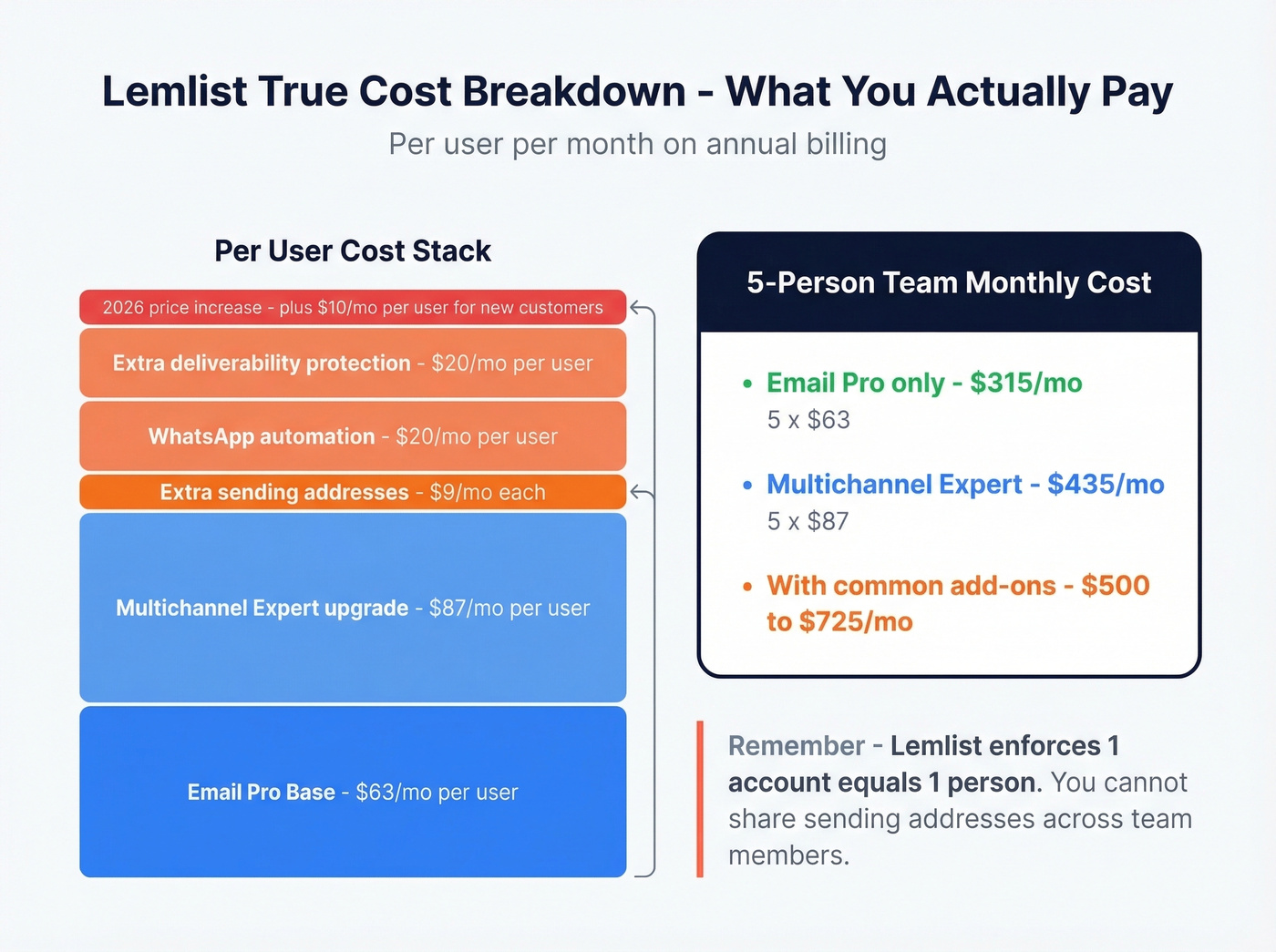
Email Pro starts at $63/mo/user on annual billing with 3 sending addresses. Multichannel Expert runs $87/mo/user with 5 sending addresses plus LinkedIn automation, a unified multichannel inbox, and dialer/VoIP.
Here's where it gets expensive, though. Extra sending addresses are $9/mo each, WhatsApp automation is $20/mo/user, and extra deliverability protection is another $20/mo/user. Lemlist also enforces a strict "1 account = 1 person" policy - you can't share sending addresses across team members. On top of all that, they increased pricing by $10/user/month for new customers starting in early 2026.
Budget $100+/user/month for Lemlist if you want multichannel with reasonable sending capacity. For a 5-person team, you're looking at $500-725/month depending on add-ons.
Use this if: Personalization and multichannel are central to your outbound strategy.
Skip this if: You're price-sensitive or running high-volume email-only campaigns.
Smartlead - Instantly's Main Rival
Smartlead and Instantly are interchangeable for most teams. It starts around $39/mo (Basic, 15 email accounts), ~$94/mo (Pro, 50 accounts), and ~$174/mo (unlimited) on annual billing. Deliverability data from the same 8M+ email dataset shows 89% inbox placement and a 2.1% bounce rate - solid, but Instantly edges it out on both metrics. Warm-up is included. If you're already on Smartlead and happy, there's no reason to switch.
Reply.io - Powerful but Confusing
Reply.io has two completely different pricing tracks on the same page, which confuses everyone. Track one: per-user email volume plans starting at $49/user/mo. Track two: flat-rate plans starting at $159/mo for unlimited users at higher volumes. Multichannel starts at $89/user/mo on annual billing.
Then the add-ons hit: LinkedIn automation is $69/mo per account, calls and SMS are $29/mo per account, and their Jason AI SDR agent starts at $500/mo. Reply is a capable platform buried under a pricing page that needs a decoder ring.
Woodpecker - Best for Agencies
Woodpecker charges by contacted prospects per month - not seats, not emails sent. Contact the same person five times in a campaign and it counts once. That model is unusual and genuinely agency-friendly.
Base plans start around $29/mo for small prospect volumes and scale from there. Unlimited team members and unlimited email accounts are included on all plans. The agency panel runs $27/mo per active client, white label is $5/mo per client, and LinkedIn automation is $29/mo per account. If you're managing outbound for multiple clients, Woodpecker's pricing model makes more sense than per-seat tools that multiply costs across client teams.
Smartreach.io - The Practitioner Favorite
Smartreach.io is the tool that never shows up in top-10 listicles but keeps getting recommended on r/coldemail. Starting around $29/mo, it offers timezone sending, multichannel drips, and the killer feature: domain and inbox buying directly inside the platform. The deliverability stack includes warm-up, blacklist monitoring, and inbox rotation.
We haven't tested Smartreach as deeply as Instantly or Lemlist, but the community signal is strong enough that it belongs on any serious shortlist. It's the most underrated email automation tool in this category.
Outplay
Multichannel sales engagement starting at $29/mo month-to-month for email outreach. Multichannel kicks in at the Growth tier ($59/mo month-to-month), and the AI SDR add-on runs $71/mo monthly or $119/mo billed annually. Solid mid-market option if you want dialer + email + social in one seat.
Apollo
Apollo's database is strong. Deliverability is the weak spot. Free and Basic plans limit you to 1 sending inbox, and Professional ($59/user/mo) only gets you 15. If you're using Apollo, use it for data sourcing and run your sequences through a dedicated sequencer like Instantly or Smartlead. (For more on list building, see how to generate an email list.)
Snov.io
Budget-friendly and credit-based. Free tier gives you 50 credits, Starter runs ~$30/mo. Good for small-volume senders or solo founders who need a simple drip without enterprise complexity. Don't expect the deliverability infrastructure of Instantly or Smartlead at this price point.

Layer 1 and Layer 2 of your cold email stack - data sourcing and verification - determine whether your sequences land or bounce. Prospeo handles both with 98% email accuracy, 30+ search filters, and a 7-day data refresh cycle. At ~$0.01/email, one clean list costs less than a single bounced domain repair.
Stop feeding bad data into good sequences. Start with verified contacts.
Hidden Costs Nobody Mentions
A $30/mo tool becomes $200+/mo once you add multichannel, extra inboxes, and credits. Here's the math.
| Tool | LinkedIn Add-On | Extra Senders | Credits/Verification | Agency Features |
|---|---|---|---|---|
| Lemlist | Included (Expert) | $9/mo each | ~$0.01/credit | None |
| Reply.io | $69/mo/acct | Varies by plan | Included in plan | None |
| Woodpecker | $29/mo/acct | Included | Included | $27/mo/client |
| Outplay | Growth tier+ | By plan | Included | None |
| Instantly | Not available | Included | Included | Enterprise tier |
Lemlist is the biggest offender. Start with Multichannel Expert at $87/mo/user, add two extra sending addresses ($18/mo), WhatsApp ($20/mo), and extra deliverability protection ($20/mo). That's $145/user/month before credits. For a 5-person team, you're at $725/month on annual billing.
Reply.io's add-ons are equally aggressive. A multichannel seat at $89/mo plus LinkedIn ($69/mo) plus calls ($29/mo) puts you at $187/user/month. The Jason AI SDR at $500/mo is a separate line item entirely.
Sequence Best Practices (With Data)
The Belkins dataset of 16.5M cold emails gives us the clearest picture of what actually works in 2026.
Keep it short. Emails with 6-8 sentences hit 6.9% reply rates - the sweet spot. Under 200 words outperforms longer copy consistently. If you need examples, steal from these sales follow-up templates.
Stop after 2-3 follow-ups. By the 4th follow-up, response rates drop 55% compared to earlier emails. Spam complaints jump from 0.5% on the first email to 1.6% by the fourth. If you're sending more than 3 follow-ups, you're not persistent - you're annoying.
Send on Thursday evenings. Thursday pulls the highest reply rate at 6.87%, with Monday at the bottom (5.29%). The 8-11 PM window peaks at 6.52% - emails that land in the evening get read first thing the next morning. (More benchmarks: best time to send cold emails.)
One-touch sequences actually win. Single-email sequences had the highest reply rate at 8.4%. That doesn't mean you should only send one email, but it does mean your first email needs to carry the weight. Every follow-up after that has diminishing returns. Good sequence management tools make it easy to test shorter cadences against longer ones - let the data decide.
Deliverability Checklist
None of this matters if your emails don't reach the inbox. Global average inbox placement sits at 83.5% - roughly 1 in 6 legitimate emails never gets seen. Gmail performs better at 87.2%; Microsoft lags at 75.6%. For a deeper fix list, use this email deliverability guide.
The non-negotiable checklist for 2026:
- SPF, DKIM, and DMARC configured on every sending domain. Gmail tightened enforcement in late 2025 - non-compliant messages now get rejected outright. (If you’re auditing, start with DMARC alignment.)
- One-click unsubscribe (RFC 8058) required for bulk senders. This isn't optional anymore.
- Spam complaint rate under 0.1%. The hard ceiling is 0.3%, but target well below that.
- SPF record under 10 DNS lookups. Exceeding this causes SPF failure, which tanks deliverability silently. (Use these SPF record examples to validate your setup.)
- Warm-up every new inbox for 2-4 weeks before sending cold campaigns. No shortcuts here.
Mistakes That Kill Campaigns
We've seen the same failures repeat across dozens of teams. These are the ones that hurt the most.
Cold emailing your own customers. It sounds absurd, but CRM exclusion failures are shockingly common. One team on r/coldemail admitted they sent a cold sequence to an existing customer - complete with a case study the customer had already participated in. Always sync your suppression lists before launching.
Burning 145 inboxes in one week. Another practitioner warmed up inboxes for three weeks, launched an aggressive campaign, and torched every single one within days. Warm-up isn't a one-time event. You need to maintain sending patterns that look human - 15-20 emails per inbox per day, with warm-up running alongside cold sends indefinitely.
Missing merge tags. Nothing says "I don't actually know you" like "Hi {{first_name}}." Test every sequence with a preview send before it goes live.
Skipping verification entirely. This is a data problem, not a sequencer problem. Verify before you send. A 5-step verification process that catches bad addresses before they hit your sequence prevents the bounces that burn inboxes in the first place - and it's the cheapest insurance you'll buy in your entire outbound stack.
Every sequencer on this list - Instantly, Lemlist, Smartlead - integrates natively with Prospeo. That means verified emails flow straight into your campaigns with zero CSV exports, zero manual cleanup, and bounce rates under 2%. Teams using Prospeo book 35% more meetings than Apollo users.
Plug 98% accurate data directly into your sequencer tonight.
FAQ
How many follow-ups should a cold email sequence have?
Two to three follow-ups maximum. Belkins' data across 16.5M emails shows response rates drop 55% by the fourth follow-up, while spam complaints jump from 0.5% to 1.6%. Focus on making your first two emails strong rather than adding more touches.
What's the difference between a sequencer and a CRM?
Sequencers automate outbound cadences - timed sends, follow-up logic, A/B testing, and reply detection. CRMs track relationships, deals, and pipeline. Most sequencers integrate with Salesforce and HubSpot but don't replace them. You need both: the sequencer starts conversations, the CRM manages what happens after.
Do I need a separate verification tool?
Yes, unless your sequencer includes built-in verification with 95%+ accuracy - most don't. Skipping verification leads to 5%+ bounce rates and burned domains. A dedicated verification layer at ~$0.01/email is the most cost-effective upstream investment you can make.
How many emails per day can I safely send per inbox?
Fifteen to twenty per inbox per day is the safe ceiling in 2026. Scale by adding inboxes, not by increasing volume per inbox. A team sending 300 emails daily needs 15-20 warmed inboxes rotating through their sequencer.
Is email warm-up still necessary in 2026?
Yes - Gmail and Microsoft both tightened enforcement in late 2025. New inboxes need 2-4 weeks of gradual sending with positive engagement signals before you run cold campaigns. Every major sequencer now includes warm-up, and skipping it is the most common reason new domains get flagged.
The Stack, One More Time
Three tools. That's the whole outbound stack for most teams. A strong data and verification layer, a sequencer like Instantly or Smartlead, and Lemlist only if multichannel is genuinely central to your motion. Everything else is optimization. Get the layers right, and the email sequencing tool you pick almost doesn't matter.