

Meeting Request Email Examples That Actually Get Replies
The average cold email reply rate is 3.43%. For every 100 meeting request emails you send, about 97 go unanswered. The top 10% of senders hit 10.7%+ - three times the average - and they're not using magic. They're using shorter emails, better timing, and fewer mistakes.
Stop copying templates blindly. Here are 10 meeting request email examples that actually work, with the data to prove it.
The Formula (Quick Version)
50-80 words. One clear ask. Sent midweek mornings between 6-9am PST (Tuesday-Wednesday is the peak in Instantly's 2026 dataset). Below you'll find 10 copy-paste templates, the benchmarks behind what works, and five operational mistakes silently killing your reply rates.
If your emails run longer than 125 words, you're fighting the data.
What the Data Says
Most guides skip the numbers. Here's what the benchmarks actually show.
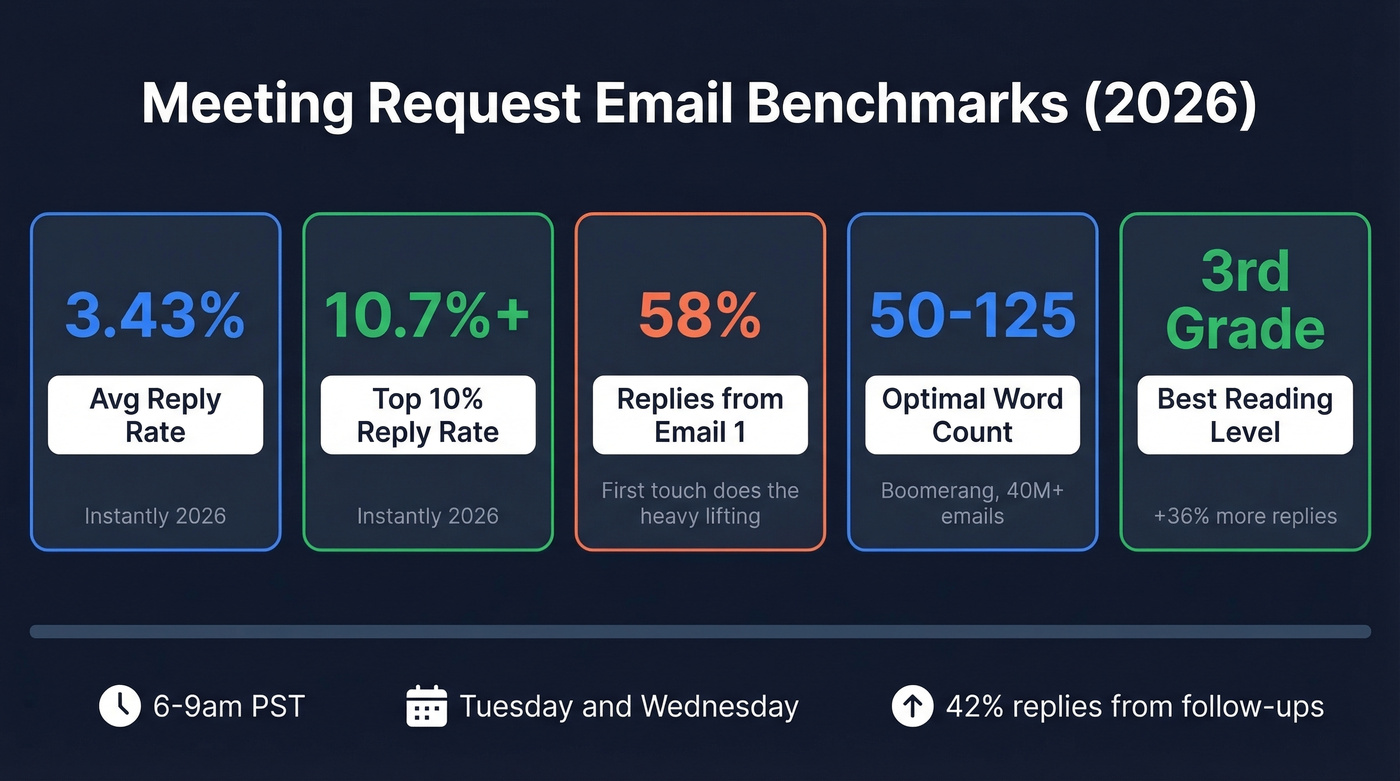
| Metric | Number | Source |
|---|---|---|
| Avg reply rate | 3.43% | Instantly 2026 |
| Top 10% reply rate | 10.7%+ | Instantly 2026 |
| Replies from step 1 | 58% | Instantly 2026 |
| Optimal length | 50-125 words | Boomerang |
| Best reading level | 3rd grade (+36%) | Boomerang |
| Best send window | 6-9am PST; Tue-Wed | Instantly / Siege Media |
| Replies from follow-ups | 42% | Instantly 2026 |
That 58% number is worth sitting with. More than half your replies come from the first email in a sequence, which means your opener is doing most of the heavy lifting. Get that right and everything downstream improves.
The length data is the most actionable piece. Boomerang's analysis of 40 million+ emails found that emails between 50-125 words get response rates above 50%. Cross 500 words and you're down to roughly 44%. The reading level finding is wild - writing at a 3rd-grade level (short sentences, simple words) lifts response rates 36% over college-level writing.
Here's one most people miss: neutral emails underperform. Boomerang found that emails with slight positive or negative sentiment get 10-15% more responses than flat, emotionless tone. Have an opinion. Show some energy. The robotic "I hope this email finds you well" opener isn't just boring - it's measurably worse.
On timing, a Siege Media study of 85,000+ personalized emails found the best-performing window is 6-9am PST, with Monday as the top day in their dataset and Wednesday also strong for replies. Instantly's 2026 data points to Tuesday and Wednesday as peak days. The consistent thread: midweek mornings win. Schedule sends for 7-8am PST so you land in inboxes right as people start their day.
Anatomy of a High-Performing Request
Every high-performing meeting request email shares six elements. Miss one and your reply rate drops.
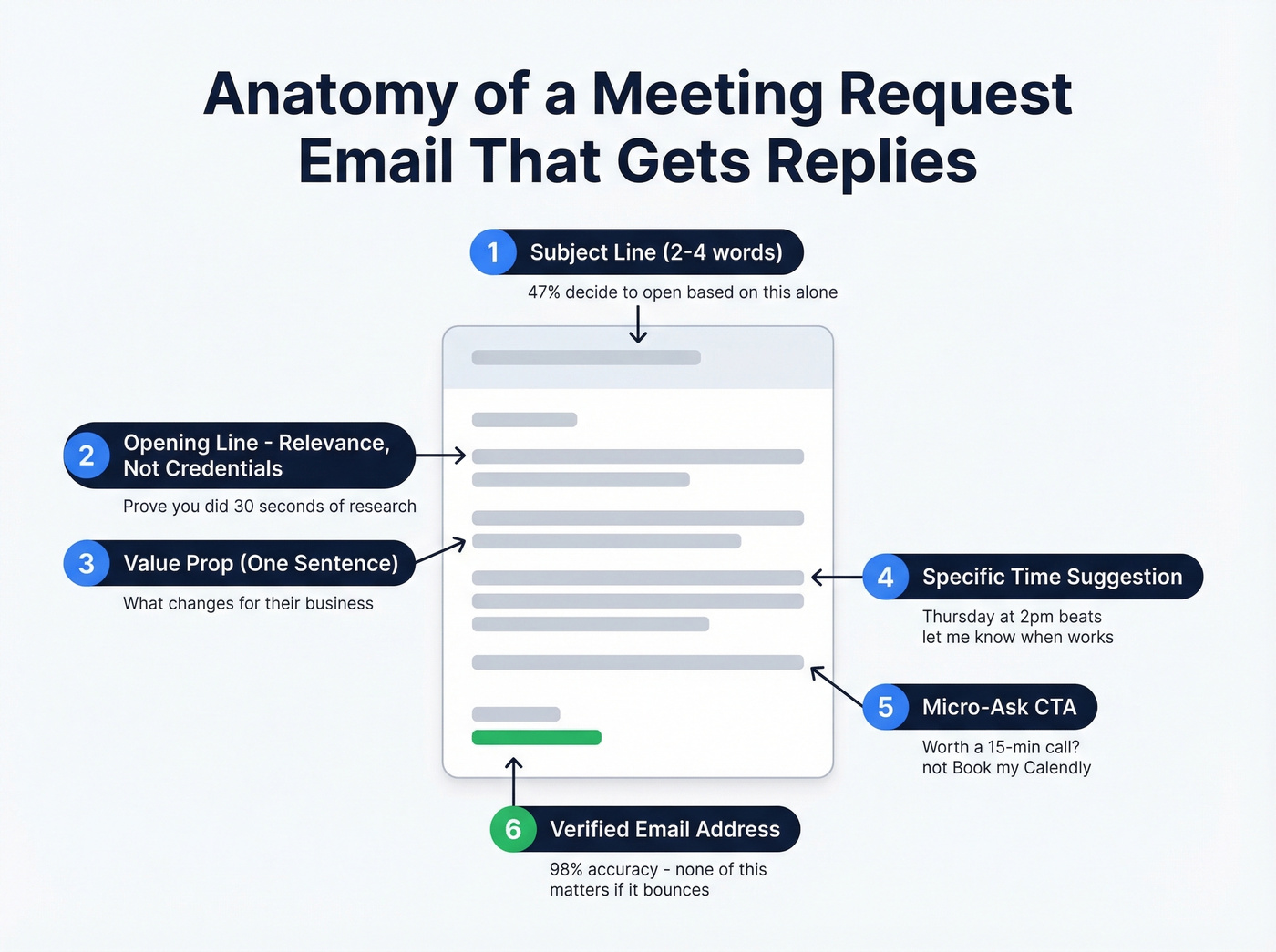
- Subject line (2-4 words): 47% of recipients decide whether to open based on the subject line alone. Keep it short and specific. "Quick question" works. "Exploring Synergistic Partnership Opportunities" doesn't. (If you want more options, see these professional email subject lines.)
- Opening line - relevance, not credentials: Don't lead with who you are. Lead with why you're emailing them specifically. A sentence that proves you did 30 seconds of research beats any introduction. (More ideas: good email openers.)
- Value prop (one sentence): What's in it for them? Not what your product does - what changes for their business. One sentence. That's it.
- Time suggestion (specific slots): "Are you free Thursday at 2pm or Friday at 10am?" beats "Let me know when works." Specificity reduces friction. (More phrasing options: email wording to schedule a meeting.)
- CTA (micro-ask, not calendar link): "Worth a 15-min call this week?" outperforms "Book time on my Calendly." Calendar links feel presumptuous to someone who's never met you. (More examples: email asking for a meeting.)
- Verified email address: None of this matters if your email bounces. Verify every address before you send - Prospeo's Chrome extension pulls verified emails from any company website in one click with 98% accuracy. (If you need a workflow, start with how to verify email addresses in bulk.)
10 Copy-Paste Email Templates
These templates follow the data: under 80 words, single CTA, value-first. Customize the brackets, but don't bloat the word count.
Here's the thing: these templates are starting points, not scripts. The moment 10,000 people send the same email, it stops working. Change the structure, swap the CTA, rewrite the opening - make it yours. (For more variations, use these outreach email templates.)
1. Cold Outreach (Never Met)
Subject: [Their company] + [your company]
Hi [First name],
I noticed [specific observation about their business]. We help [similar companies] [achieve specific outcome] - [proof point or number].
Would a 15-minute call Thursday or Friday make sense to see if there's a fit?
[Your name]
Opens with relevance, delivers value in one line, closes with a micro-ask and specific times. This is the most versatile template for a reason - it works across industries and seniority levels because it respects the reader's time while proving you've done your homework.
2. Warm Introduction (Mutual Connection)
Subject: [Mutual contact] suggested we connect
Hi [First name],
[Mutual contact] mentioned you're working on [specific initiative]. We recently helped [similar company] with [related outcome].
Would 15 minutes next week be worth it to compare notes?
[Your name]
The mutual connection does the credibility work for you. No need to sell - just bridge. (More: warm introduction email.)
3. Internal Team Sync
Subject: Sync on [project/topic]
Hi [First name],
I want to align on [specific deliverable or decision] before [deadline/milestone]. I have a few questions about [their area of ownership].
Can we grab 20 minutes Wednesday or Thursday afternoon?
[Your name]
Internal emails still need a clear ask. Naming the deliverable and deadline creates urgency without being pushy.
4. Cross-Functional Collaboration
Most people write these too formally. What works better is making their input feel essential, not optional:
Subject: Input needed - [project name]
Hi [First name],
We're finalizing [project/initiative] and need [their team's] perspective on [specific area]. Your input would shape [specific decision].
Do you have 30 minutes this week? Happy to work around your schedule.
[Your name]
5. Post-Event Follow-Up
Subject: Good meeting you at [event]
Hi [First name],
Great chatting at [event] about [specific topic you discussed]. I'd love to continue the conversation around [specific angle].
Free for a quick call next Tuesday or Wednesday?
[Your name]
The specificity proves you're not mass-emailing every attendee. (More: post event follow up email.)
6. Product Demo - Bad vs. Good
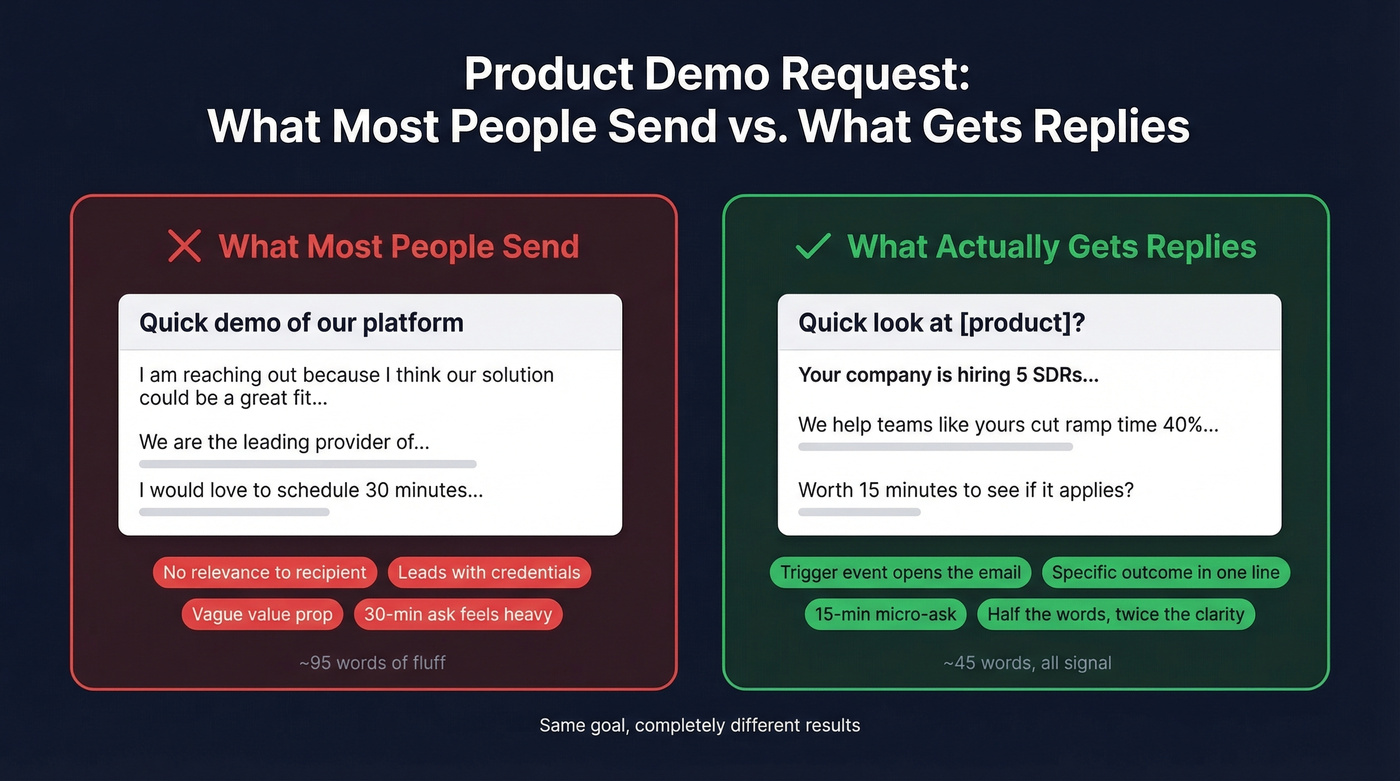
What most people send:
Subject: Quick demo of our platform
Hi [First name], I'm reaching out because I think our solution could be a great fit for your team. We're the leading provider of [category] and work with companies like [list of logos]. I'd love to schedule 30 minutes to walk you through our platform and show you how we can help. Let me know when works!
What actually gets replies:
Subject: Quick look at [product/solution]?
Hi [First name],
[Their company] is [doing something that signals fit - hiring, expanding, using competitor tool]. We help teams like yours [specific outcome] in [timeframe].
Worth 15 minutes to see if it applies? I can walk you through a quick demo.
[Your name]
The good version ties the ask to a trigger event and positions the demo as low-commitment. Half the words, twice the clarity.
7. Partnership or Vendor Meeting
Subject: Partnership idea - [their company] + [your company]
Hi [First name],
I've been following [their company's] work in [specific area]. We're exploring partnerships with companies that [shared goal or audience].
Would a 20-minute call make sense to explore whether there's a fit?
[Your name]
Partnerships require mutual interest, so the tone should be collaborative, not salesy. (More: business partnership email.)
8. Investor Meeting Request
Investors scan hundreds of emails daily. Lead with traction, not vision.
Subject: [Your company] - [stage] raising [amount]
Hi [First name],
We're building [one-line description]. [Key traction metric - revenue, users, growth rate]. [Your fund] invests in [their thesis area], and I think there's strong alignment.
Would 20 minutes work to share what we're building?
[Your name]
Skip this template if you don't have a concrete traction metric. Investors delete "we're pre-revenue but passionate" emails on sight.
9. Rescheduling a Meeting
Subject: Need to reschedule - [original topic]
Hi [First name],
I need to move our [day/time] meeting. Apologies for the shift. Would [two alternative times] work instead?
Still looking forward to discussing [topic].
[Your name]
Direct, respectful, offers alternatives immediately. No over-apologizing. (More: meeting reschedule email templates.)
10. Follow-Up After No Response
Subject: Re: [original subject line]
Hi [First name],
Circling back on this. I know [their role] keeps you buried - totally get it.
If [original value prop] isn't a priority right now, no worries. But if it is, I can keep this to 15 minutes. Worth it?
[Your name]
Acknowledges the silence without guilt-tripping. Giving them an easy out paradoxically increases replies - we've tested this pattern across dozens of campaigns and it consistently outperforms the "just bumping this to the top of your inbox" approach. (More: follow-up email after no response.)

A perfect meeting request email means nothing if it bounces. Prospeo verifies every email through a 5-step process - 98% accuracy, refreshed every 7 days. That's why teams using Prospeo keep bounce rates under 4%.
Stop crafting the perfect email for an inbox that doesn't exist.
Subject Lines That Get Opened
69% of recipients mark emails as spam based on the subject line alone. Get this wrong and nothing else matters.
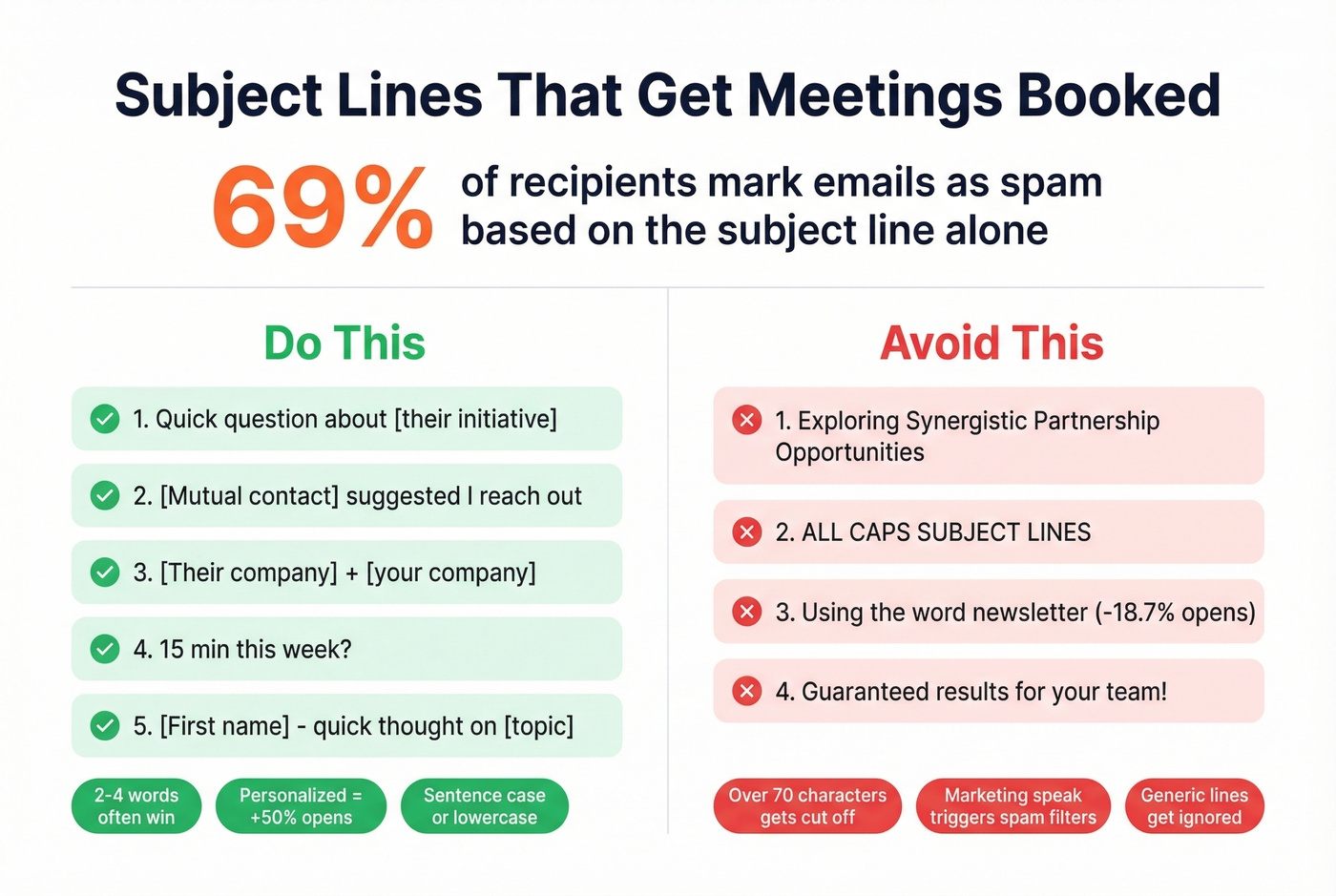
Subject lines that work:
- "Quick question about [their initiative]"
- "[Mutual contact] suggested I reach out"
- "[Their company] + [your company]"
- "Idea for [specific problem they have]"
- "15 min this week?"
- "[First name] - quick thought on [topic]"
- "Following up from [event/conversation]"
- "Can I send you [specific resource]?"
Keep them short - 2-4 words often outperform longer options, and aim for under 60-70 characters so the full line displays cleanly across devices. Personalized subject lines drive 50% higher open rates, so use the recipient's company name or a specific reference point. Write in lowercase or sentence case. ALL CAPS screams spam.
Avoid "newsletter" (drops open rates 18.7%) and "guaranteed."
5 Mistakes Killing Your Reply Rate
Templates are the easy part. These operational mistakes are what actually tank your numbers - and they apply whether you're emailing a prospect or a cross-functional partner.
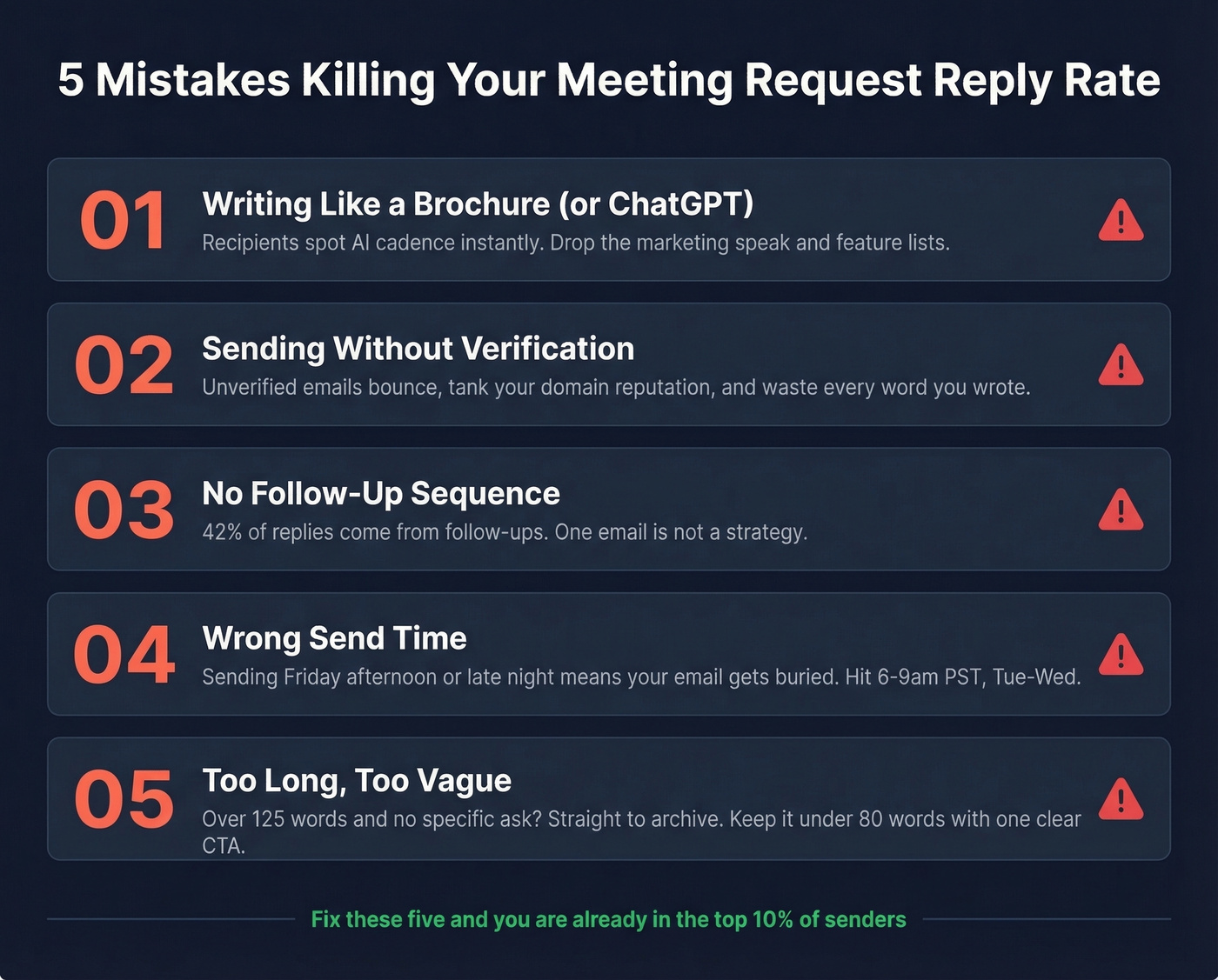
1. Writing Like a Brochure (or ChatGPT)
Your email isn't a landing page. Drop the marketing speak, the feature lists, the "we're the leading provider of..." Nobody cares about your company's origin story in a cold email.
AI-written outreach is already dead. Recipients spot the ChatGPT cadence instantly - the overly polished tone, the generic compliment, the formulaic structure. If you're using AI to draft, rewrite every line in your own voice before sending. We've seen teams get better results from a rough, human-sounding email than a perfectly structured AI one.
2. Skipping Follow-Up
42% of replies come from follow-ups. If you're sending one email and giving up, you're leaving almost half your replies on the table. One operator on r/SaaS mentioned that 80% of their replies came after the third touchpoint. One-and-done isn't a strategy.
3. Over-Formatting (and Over-Tracking)
Turn off open tracking. Snov.io's analysis of 44M emails found reply rates more than doubled - 2.36% vs 1.08% - when open tracking was disabled. That single change is worth more than rewriting your entire email.
HTML templates with banners, logos, and styled fonts look like marketing emails and get treated like them. Plain text wins for meeting requests. One link max. No images. No signature banners the size of a billboard.
4. Weak CTAs
"Let me know if you'd like to chat sometime" isn't a CTA. Neither is dropping a Calendly link with no context. Micro-asks outperform calendar links for cold outreach because they reduce commitment anxiety. "Worth a 15-min call Thursday?" gives them something concrete to say yes or no to.
5. Sending to Unverified Lists
None of these templates matter if your emails bounce. One Reddit thread on r/coldemail described burning 145 email accounts in a single week after sending to an unverified list. High bounce rates destroy your sender reputation, and once your domain is flagged, even your emails to warm prospects land in spam.
Look, in our experience the biggest reply-rate killer isn't bad copy - it's bad data. Verify your list before you send. One of our customers, Meritt, dropped their bounce rate from 35% to under 4% after switching their verification workflow to Prospeo, which checks emails in real time with 98% accuracy and flags catch-all domains, spam traps, and honeypots through a 5-step verification process. The free tier covers 75 emails per month - enough to audit whether bad data is the bottleneck.
Follow-Up Cadence That Works
Nailing the follow-up timing matters as much as the first touch.
| Cadence | Day 1 | Day 2 | Day 3 | Day 4 | Best For |
|---|---|---|---|---|---|
| Standard | 0 | +3 | +7 | +14 | Most outreach |
| Moderate | 0 | +4 | +9 | +16 | Warm leads |
| Compressed | 0 | +2 | +5 | +10 | Time-sensitive |
The standard 0-3-7-14 cadence works for most meeting requests. Four to seven touchpoints is the sweet spot - fewer than four means you're quitting early, more than seven and you're annoying people with diminishing returns.
One tactic that consistently lifts performance: make your step 2 email feel like a reply, not a formal follow-up. Drop the "Just following up on my previous email" opener. Instead, add a new piece of value - a relevant article, a quick insight, a different angle on the original ask. We've seen this approach outperform formal follow-ups by roughly 30%. (More: cold email follow up templates.)
Sending Requests Internationally
If you're requesting meetings across time zones and cultures, three adjustments matter.
First, always include explicit time zone notation. "Tuesday at 2pm" means nothing when you're emailing someone in Singapore from Denver. Write "Tuesday 2:00pm ET (UTC-5)" or "Tuesday 19:00 UTC" and eliminate the guessing.
Second, simplify your language. 68% of global virtual teams cite cultural differences as their biggest productivity hurdle, and 18% of companies have missed opportunities due to misunderstandings. Drop idioms, slang, and humor that doesn't translate. "Let's hop on a call" confuses non-native speakers. "Can we schedule a 15-minute call?" is universal.
Third, offer flexibility on timing. Rotating meeting times across time zones signals respect - and makes people more likely to say yes.
FAQ
How long should a meeting request email be?
50-125 words. Boomerang's data shows this range gets 50%+ response rates. For cold outreach, aim for under 80 words - every template in this guide stays within that range.
How many follow-ups should I send?
Four to seven touchpoints total. 42% of replies come from follow-ups, but beyond seven messages the returns diminish sharply and you risk damaging the relationship.
What's a good reply rate for these emails?
The average is 3.43%. Top performers exceed 10.7%. If you're below 3%, fix your targeting and data quality before rewriting copy - bad contact data is usually the real bottleneck.
Should I suggest specific times or use a scheduling link?
For cold outreach, suggest two specific times. "Worth a 15-min call Thursday at 2pm?" outperforms calendar links, which feel presumptuous to strangers. Save the scheduling link for warm contacts who've already agreed to meet.
How do I find verified email addresses for prospects?
Use a dedicated verification tool before sending. Prospeo's free tier gives you 75 verified emails per month at 98% accuracy, plus a Chrome extension that pulls contact data from any company website in one click.
You just spent 10 minutes personalizing a meeting request. Don't waste it on a dead address. Prospeo's Chrome extension pulls verified emails from any company website in one click - 143M+ verified emails at $0.01 each.
Send every meeting request to a real, verified inbox.