

How to Follow Up on an Unanswered Meeting Request (Without Sounding Desperate)
You sent the meeting request on Monday. It's Thursday. Your inbox is empty, and you're stuck between "should I follow up?" and "am I being annoying?" You're not annoying - you're normal. Every meeting request follow up email guide out there covers what to send after a meeting. This one covers what to send when the meeting never happened.
This isn't about post-meeting recaps. It's about what to do when someone ignores your meeting request entirely, and how to write a follow-up that actually gets read.
What 16.5 Million Emails Tell Us
The internet loves repeating that "80% of sales require 5 follow-ups." A Belkins study of 16.5 million cold emails - the closest large-scale proxy we have for meeting request outreach - tells a different story. The highest reply rate, 8.4%, came from a single email. Performance declined with every additional follow-up, and sending 4+ emails in a sequence tripled unsubscribe rates and more than tripled spam complaint risk.
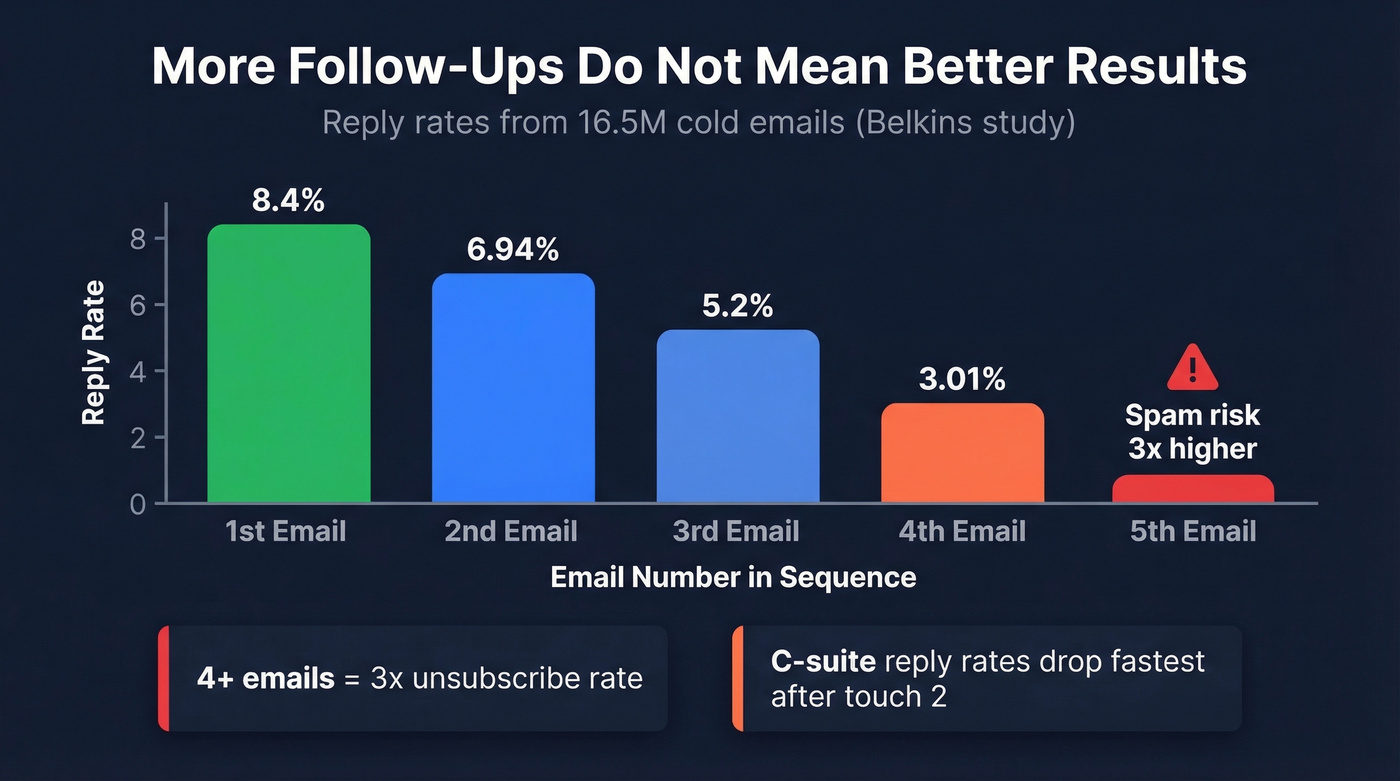
The founder/C-suite segment is even more telling. Reply rates peaked at follow-up #2 at 6.94%, then dropped steadily to 3.01% by the fourth email. That's not persistence paying off. That's diminishing returns accelerating into damage.
More follow-ups don't equal better results. The goal isn't to send the most emails - it's to send the right ones at the right time, then stop. (If you want more options beyond meeting requests, keep a swipe file of sales follow-up templates that fit different contexts.)
The 4-Touch Follow-Up Cadence
Three follow-ups plus one breakup email. That's your ceiling.
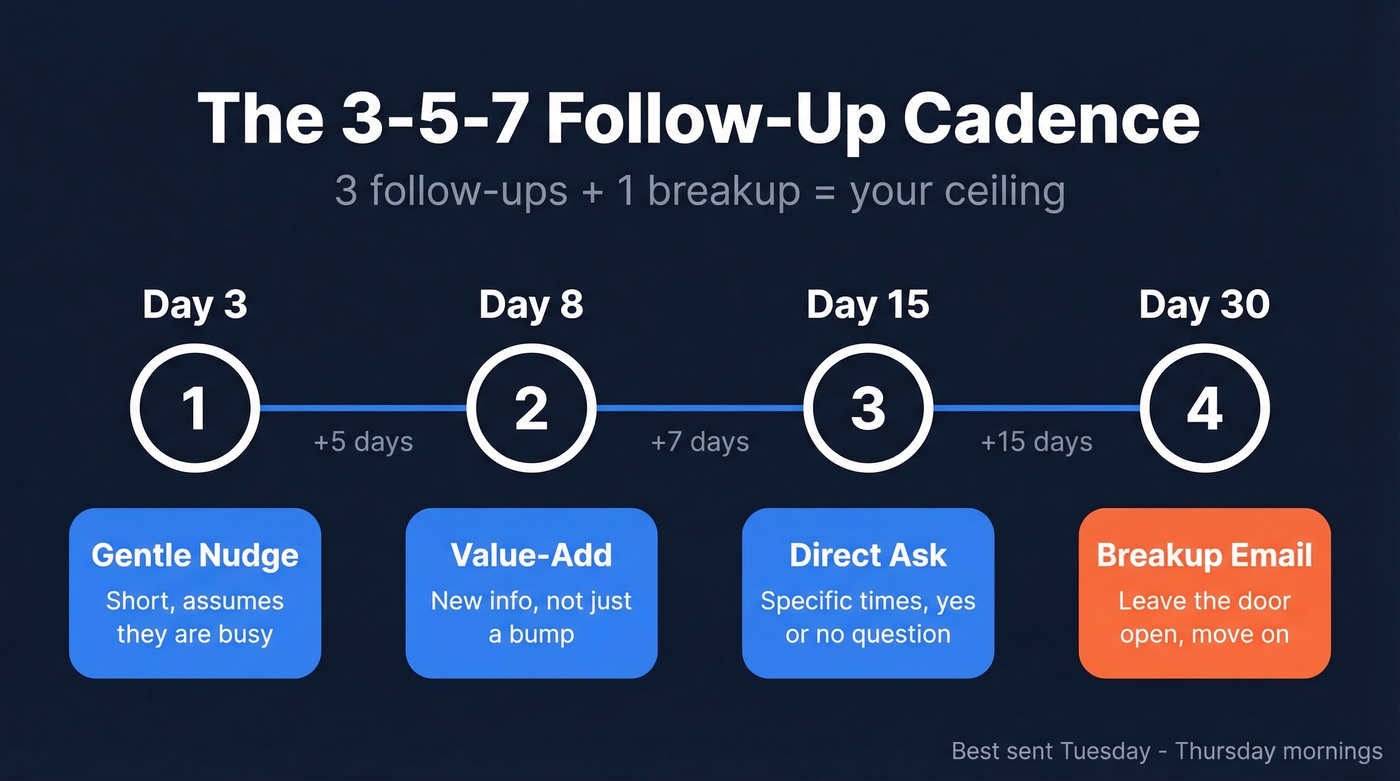
The spacing follows a 3-5-7 pattern, where each gap gets longer as urgency fades:
- Day 3 - Gentle nudge. Short, assumes they're busy.
- Day 8 - Value-add. New information, not a bump.
- Day 15 - Direct ask. Specific times, yes/no question.
- Day 30 - Breakup email. Leave the door open, move on.
As a practical rule, send follow-ups Tuesday through Thursday mornings when inboxes are typically less chaotic than Monday catch-up or late Friday. And if you're targeting enterprise contacts, shorten the chain - they've got low tolerance for long sequences. If you haven't gotten a reply by touch three, send the breakup and move on. (For a deeper timing breakdown, see our guide on the best time to send cold emails.)
Subject Lines That Get Opened
Personalized subject lines hit 46% open rates and 7% reply rates - that's +31% opens and +133% replies versus generic lines. The sweet spot is 2-4 words, and question formats consistently outperform statements. If you need more ideas, pull from these email subject line examples.
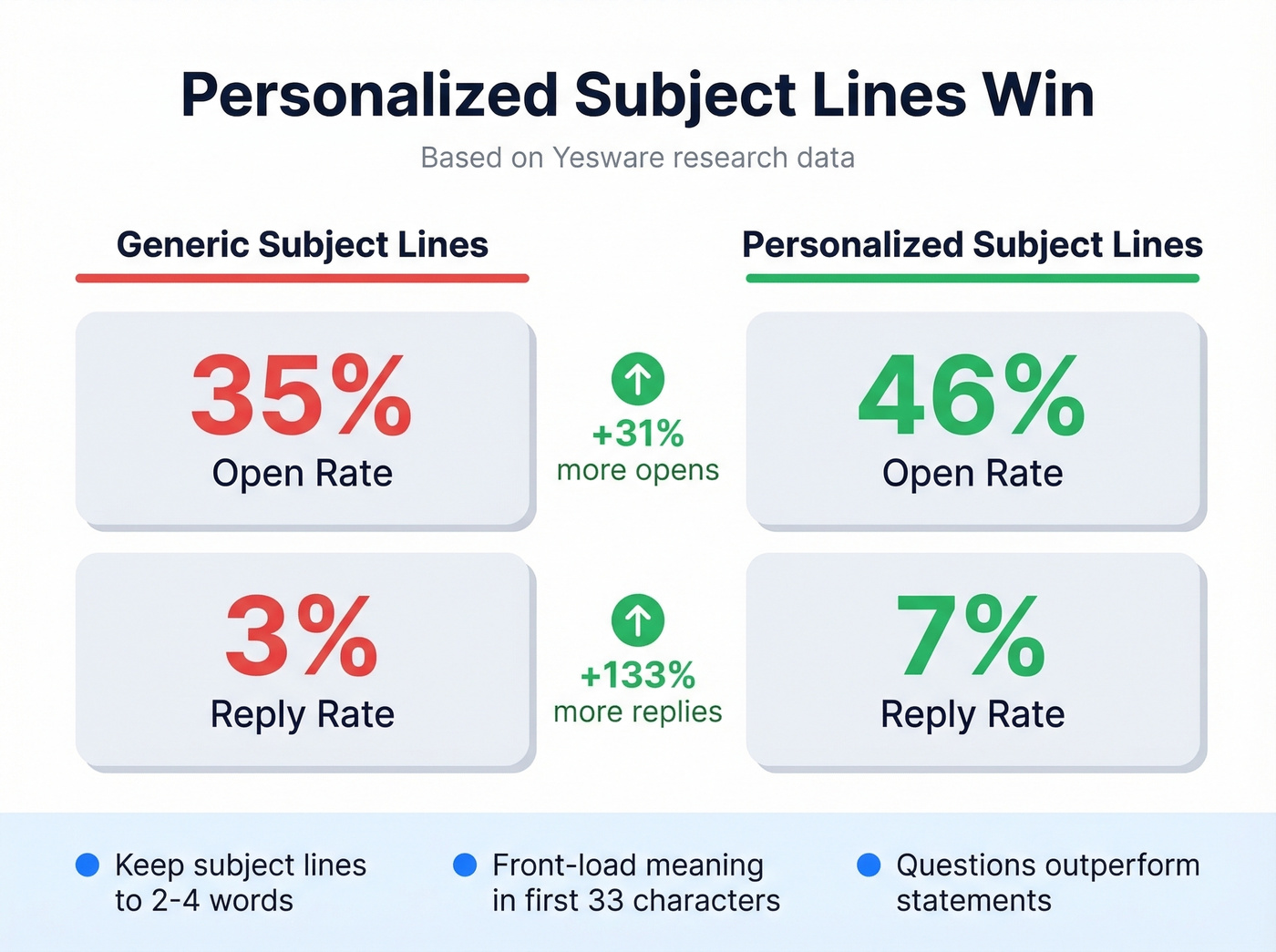
Front-load meaning into the first 33 characters, which is all most mobile clients display. "Following up" alone tells them nothing. (You can also sanity-check against our roundup of subject lines that get opened.)
Examples that work:
- "Quick question, [Name]"
- "Still interested in [topic]?"
- "Time for a 15-min call?"
- "[Name] - [topic] follow-up"
- "Did this slip through?"
- "Worth revisiting?"

Personalized subject lines mean nothing if your email bounces. Prospeo verifies emails at 98% accuracy across 300M+ profiles, so every follow-up in your cadence actually reaches the inbox. Start with 75 free verified emails per month.
Fix the data before you fix the copy.
5 Templates for Every Stage
Here's every template you need - one for each stage of the cadence. We've tested variations of these across our own outreach, and the pattern holds: keep each meeting request follow up email between 50 and 125 words. Long enough to add value, short enough to respect their time. (If you're building a full sequence, this B2B cold email sequence guide pairs well with the cadence.)
Gentle First Nudge (Day 3)
Subject: Quick question, [Name]
Hi [Name],
I sent over a meeting request on [day] about [topic] - wanted to make sure it didn't get buried. Would either [Tuesday at 2pm] or [Thursday at 10am] work for a quick 15-minute call? Happy to adjust if neither works.
Value-Add Second Touch (Day 8)
Subject: [Relevant insight] + [topic]
Hi [Name],
Came across [specific article/data point/trend] that's relevant to [their challenge]. Thought it might be useful regardless - [link or one-sentence summary]. If it sparks questions, I'd love to chat. Still open to 15 minutes whenever timing works.
Direct Ask with Times (Day 15)
Subject: Still open to connecting?
Hi [Name],
Can we do 15 minutes this week? I'm free [specific day/time] or [specific day/time]. A quick yes or no works - I'll handle the calendar invite.
The key here is a binary question with specific times. It removes decision fatigue and makes replying take five seconds.
The Breakup Email (Day 30)
Subject: Closing the loop on [topic]
Hi [Name],
I've reached out a few times about [topic] and haven't heard back - no hard feelings. I'll assume the timing isn't right and won't follow up again. If things change, I'm easy to find: [your calendar link].
Internal Stakeholder Follow-Up
Subject: Need your input by [date] - [topic]
Hi [Name],
I need your input on [specific item] by [deadline] so we can [outcome/next step]. If email isn't the best channel, happy to jump on a quick call - [propose a time]. Let me know either way.
Skip this template for external prospects. It's built for colleagues and cross-functional stakeholders where you have standing to set a deadline.
Mistakes That Kill Your Reply Rate
Bumping with no new info. "Just checking in" adds nothing. Every follow-up needs to give the recipient a new reason to reply. If you keep defaulting to "checking in," use these alternatives for how to say just checking in professionally.
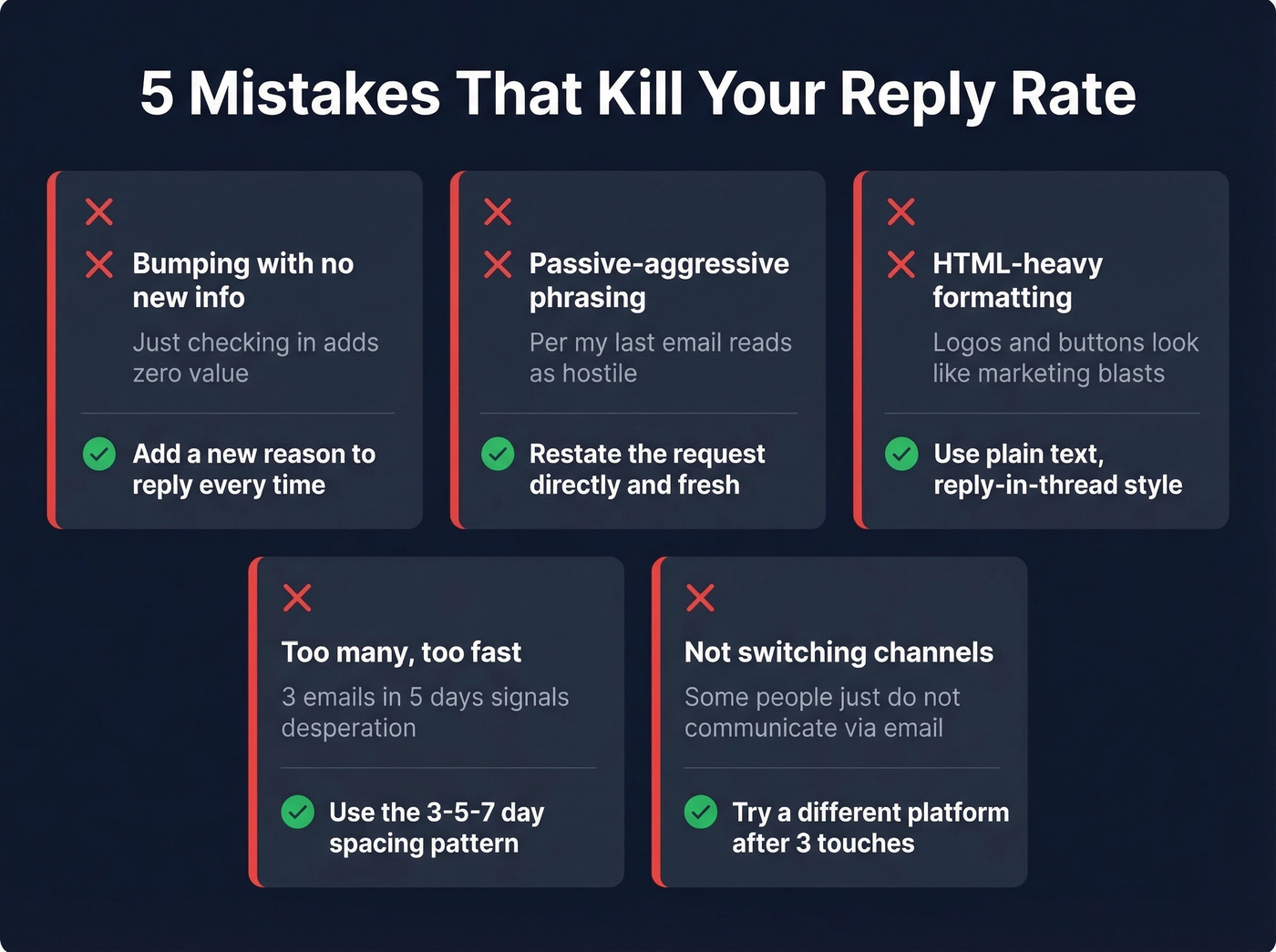
Passive-aggressive phrasing. "Per my last email" is widely interpreted as hostile. Restate the request directly instead of referencing the fact that they ignored you.
HTML-heavy formatting. Plain text, reply-in-thread emails look like real messages. Templates with logos and buttons look like marketing blasts. We've seen this tank reply rates firsthand - strip the formatting.
Too many, too fast. Three emails in five days signals desperation. Space them out using the 3-5-7 pattern above.
Not switching channels. If email isn't working after three touches, move to a different medium. Belkins found that professional platform outreach - a message paired with a profile visit - hit 11.87% reply rates, higher than any email sequence in their 16.5M dataset. Sometimes email just isn't how that person communicates. (If you're running this as part of a broader motion, align it with your sales prospecting techniques.)
Most Follow-Up Problems Are Data Problems
Let's be honest about something nobody talks about: if your meeting request bounced or landed in spam, no follow-up cadence will save you. I've watched teams agonize over copy when the real issue was a dead email address. A perfectly crafted follow-up means nothing if the original never reached the inbox. If you want the full checklist, start with an email deliverability guide and then work backward.
Boomerang handles send-later scheduling with a free plan, with paid plans starting around ~$5/month. Calendly removes the back-and-forth on times with a free plan, with paid tiers starting around ~$10/month. But neither solves the upstream problem - bad contact data. Prospeo finds and verifies professional emails with 98% accuracy across 300M+ profiles, so your outreach actually lands. The free tier gives you 75 verified emails per month, enough to confirm your highest-priority contacts before you hit send. (If you're comparing options, see our list of data enrichment services and email reputation tools.)
The consensus on r/sales is pretty clear on this: deliverability problems masquerade as messaging problems all the time. Fix the data first, then worry about the words.
FAQ
How long should I wait before following up on a meeting request?
Wait 3 business days, then follow the 3-5-7 spacing: second touch at day 8, third at day 15, breakup at day 30. Shorter gaps feel pushy; longer gaps lose momentum.
How many follow-ups is too many?
Three plus one breakup - four total. The Belkins study found 4+ emails triples unsubscribe rates and more than triples spam complaint risk. After four touches with silence, stop.
What if they never respond to any follow-up?
Send the breakup email, then switch channels. Verify you had the right email in the first place - Prospeo's free tier lets you confirm 75 addresses per month, which is enough to audit your highest-value contacts before writing them off.
Most follow-up failures aren't messaging problems - they're deliverability problems. Prospeo's 7-day data refresh cycle means the emails you're sending to are current, not stale records from six weeks ago. At $0.01 per email, verifying your entire prospect list costs less than one bounced opportunity.
Stop following up with dead inboxes. Verify first.